rear view mirror MITSUBISHI OUTLANDER PHEV 2017 Owner's Manual (in English)
[x] Cancel search | Manufacturer: MITSUBISHI, Model Year: 2017, Model line: OUTLANDER PHEV, Model: MITSUBISHI OUTLANDER PHEV 2017Pages: 548, PDF Size: 25.5 MB
Page 11 of 548
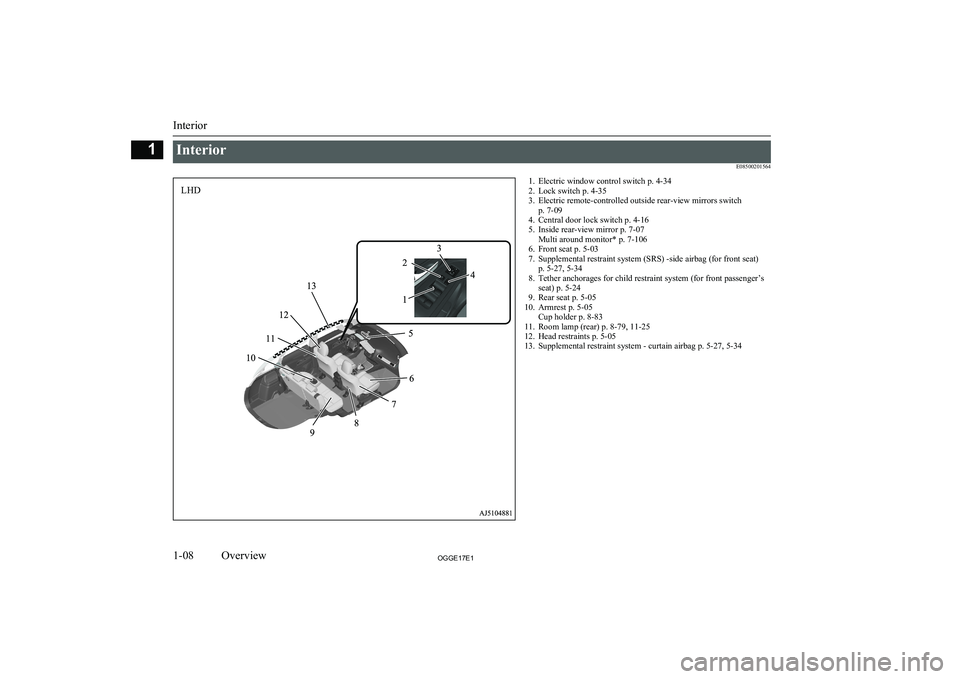
InteriorE085002015641. Electric window control switch p. 4-34
2. Lock switch p. 4-35
3. Electric remote-controlled outside rear-view mirrors switch p. 7-09
4. Central door lock switch p. 4-16
5. Inside rear-view mirror p. 7-07 Multi around monitor* p. 7-106
6. Front seat p. 5-03
7. Supplemental restraint system (SRS) -side airbag (for front seat) p. 5-27, 5-34
8. Tether anchorages for child restraint system (for front passenger’s seat) p. 5-24
9. Rear seat p. 5-05
10. Armrest p. 5-05 Cup holder p. 8-83
11. Room lamp (rear) p. 8-79, 11-25
12. Head restraints p. 5-05
13. Supplemental restraint system - curtain airbag p. 5-27, 5-34
Interior
1-08OGGE17E1Overview1LHD
Page 12 of 548
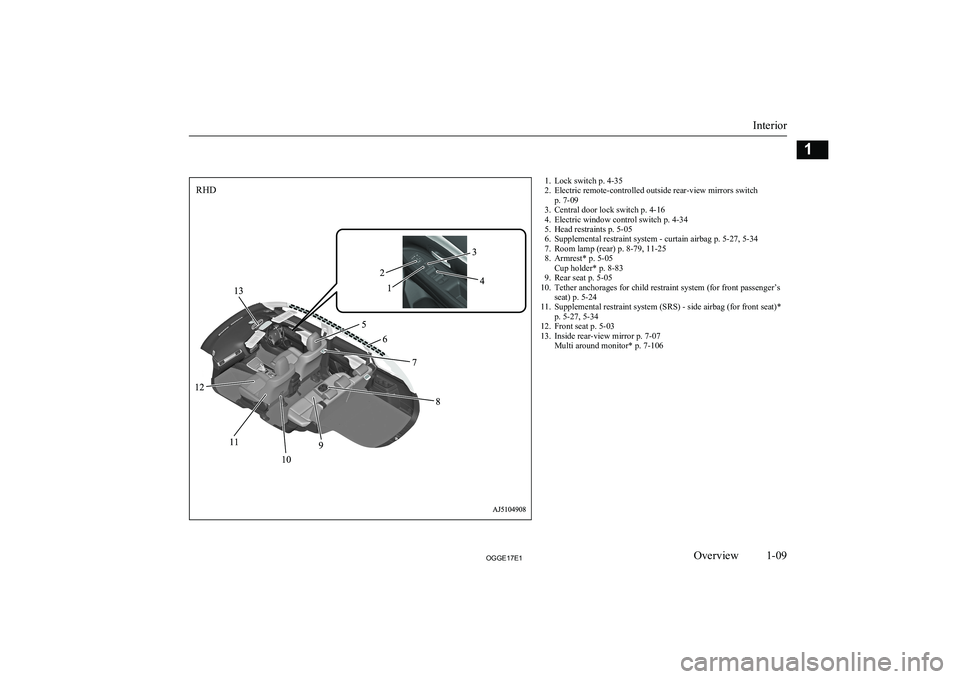
1. Lock switch p. 4-35
2. Electric remote-controlled outside rear-view mirrors switch p. 7-09
3. Central door lock switch p. 4-16
4. Electric window control switch p. 4-34
5. Head restraints p. 5-05
6. Supplemental restraint system - curtain airbag p. 5-27, 5-34
7. Room lamp (rear) p. 8-79, 11-25
8. Armrest* p. 5-05 Cup holder* p. 8-83
9. Rear seat p. 5-05
10. Tether anchorages for child restraint system (for front passenger’s seat) p. 5-24
11. Supplemental restraint system (SRS) - side airbag (for front seat)* p. 5-27, 5-34
12. Front seat p. 5-03
13. Inside rear-view mirror p. 7-07 Multi around monitor* p. 7-106
Interior
1-09OGGE17E1Overview1RHD
Page 21 of 548
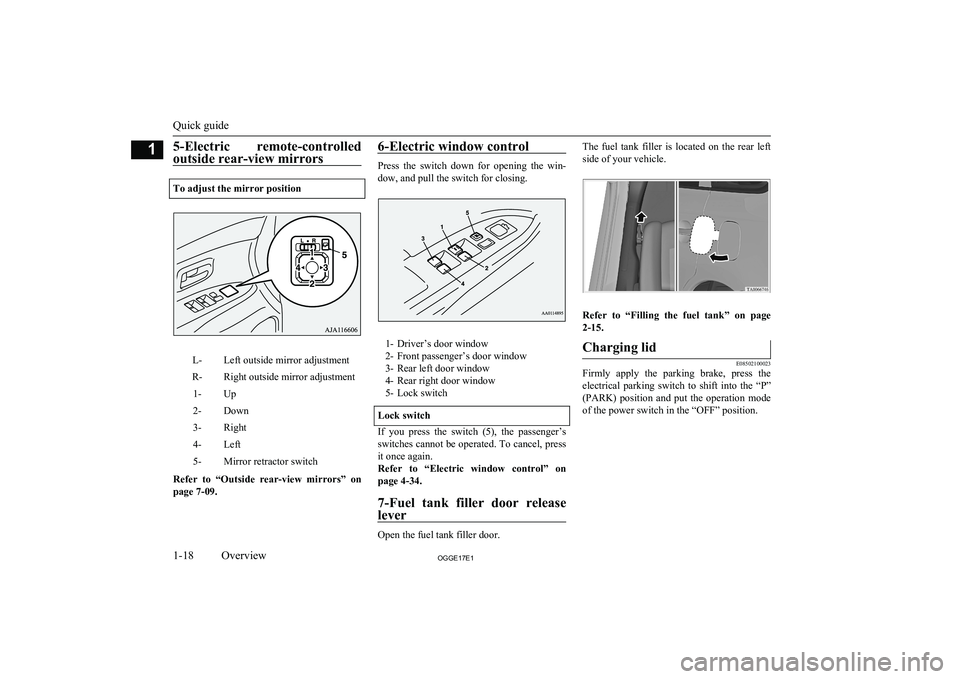
5-Electric remote-controlledoutside rear-view mirrors
To adjust the mirror position
L-Left outside mirror adjustmentR-Right outside mirror adjustment1-Up2-Down3-Right4-Left5-Mirror retractor switch
Refer to “Outside rear-view mirrors” on
page 7-09.
6-Electric window control
Press the switch down for opening the win-
dow, and pull the switch for closing.
1- Driver’s door window
2- Front passenger’s door window
3- Rear left door window
4- Rear right door window
5- Lock switch
Lock switch
If you press the switch (5), the passenger’s switches cannot be operated. To cancel, press
it once again.
Refer to “Electric window control” on
page 4-34.
7-Fuel tank filler door release
lever
Open the fuel tank filler door.
The fuel tank filler is located on the rear left
side of your vehicle.
Refer to “Filling the fuel tank” on page 2-15.
Charging lid
E08502100023
Firmly apply the parking brake, press the electrical parking switch to shift into the “P”
(PARK) position and put the operation mode of the power switch in the “OFF” position.
Quick guide
1-18OGGE17E1Overview1
Page 68 of 548
lCharging timer
If you specify the charge start and/or stop time with the normal charge cable
connected, charging is started and/or
stopped at that time.
l Remote Climate Control
By setting the remote climate control to
operate at a predetermined time, cabin comfort can be improved or visibilitycan be ensured (defrosting/demisting)
before getting in the vehicle.
l Customize (function setting change)
The function setting of the keyless oper-
ation system, outside rear-view mirror,
operation mode of the power switch, air conditioning, lamps and windscreen
wipers can be changed by MITSUBISHI
Remote Control.NOTEl The electric heater is required to activate the
reservation functions of heater, defroster and
demister.
l In a vehicle equipped with the MITSUBISHI
Multi-Communication System (MMCS), it
is possible to change the setting by means of screen operations.
Refer to the separate owner’s manual for de-
tails.NOTEl If you want to cancel the charging timer in
cases of battery exhaustion or loss of a wire-
less LAN device, you can temporarily cancel the charging timer by pressing the switch
(A) of the keyless operation key twice with-
in 2 seconds. When the charging timer is cancelled, the hazard warning lamps will
blink 4 times.
l When using the charging timer, use the EV
charging cable. When using a home or pub- lic charging device (EVSE: Electric Vehi-
cles Supply Equipment), the charging timer
may not be started.
Devices that support wireless LAN are re-
quired to communicate with the vehicle using
the MITSUBISHI Remote Control. Also, an
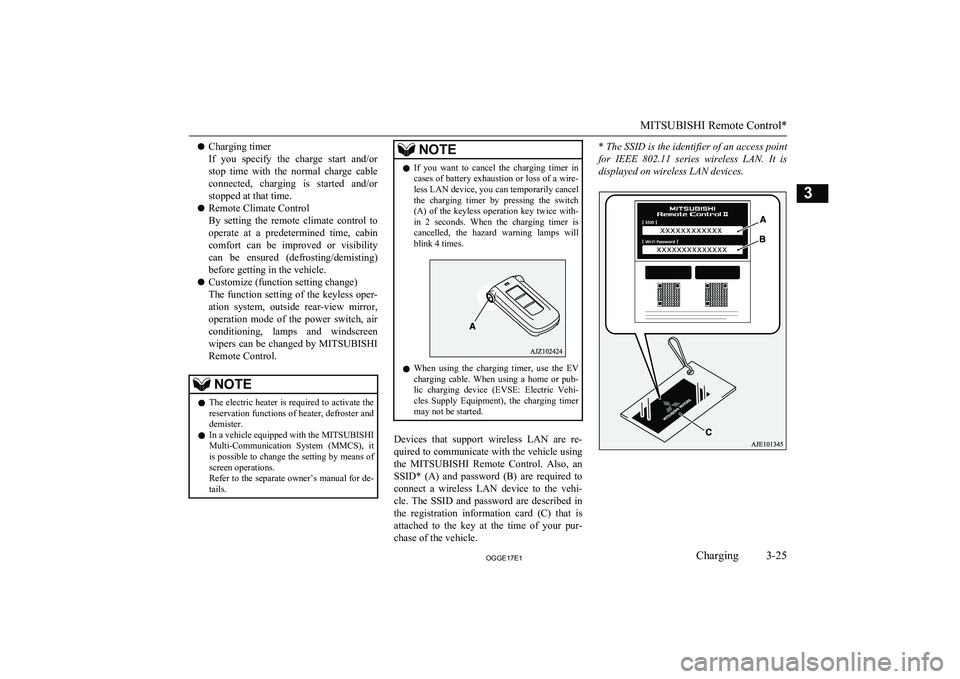
SSID* (A) and password (B) are required to
connect a wireless LAN device to the vehi-
cle. The SSID and password are described in the registration information card (C) that is
attached to the key at the time of your pur- chase of the vehicle.
* The SSID is the identifier of an access point
for IEEE 802.11 series wireless LAN. It is
displayed on wireless LAN devices.
MITSUBISHI Remote Control*
3-25OGGE17E1Charging3
Page 74 of 548
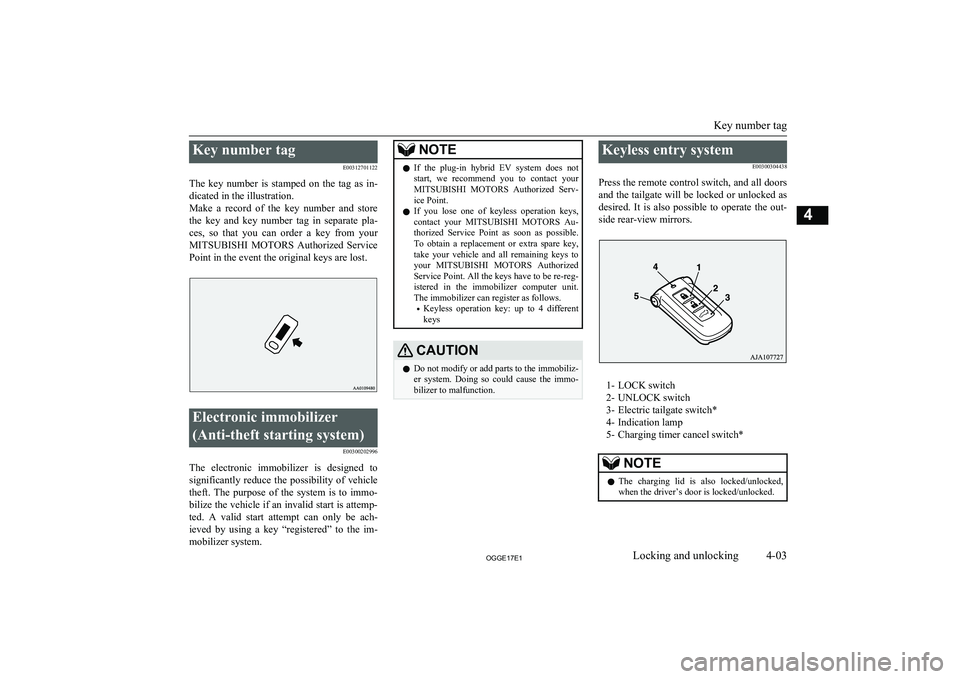
Key number tagE00312701122
The key number is stamped on the tag as in-
dicated in the illustration.
Make a record of the key number and store the key and key number tag in separate pla-ces, so that you can order a key from yourMITSUBISHI MOTORS Authorized Service
Point in the event the original keys are lost.Electronic immobilizer
(Anti-theft starting system) E00300202996
The electronic immobilizer is designed tosignificantly reduce the possibility of vehicle
theft. The purpose of the system is to immo-
bilize the vehicle if an invalid start is attemp-
ted. A valid start attempt can only be ach- ieved by using a key “registered” to the im-mobilizer system.
NOTEl If the plug-in hybrid EV system does not
start, we recommend you to contact yourMITSUBISHI MOTORS Authorized Serv-
ice Point.
l If you lose one of keyless operation keys,
contact your MITSUBISHI MOTORS Au-
thorized Service Point as soon as possible. To obtain a replacement or extra spare key,
take your vehicle and all remaining keys to
your MITSUBISHI MOTORS Authorized
Service Point. All the keys have to be re-reg- istered in the immobilizer computer unit.
The immobilizer can register as follows.
• Keyless operation key: up to 4 different
keysCAUTIONl Do not modify or add parts to the immobiliz-
er system. Doing so could cause the immo- bilizer to malfunction.Keyless entry system
E00300304438
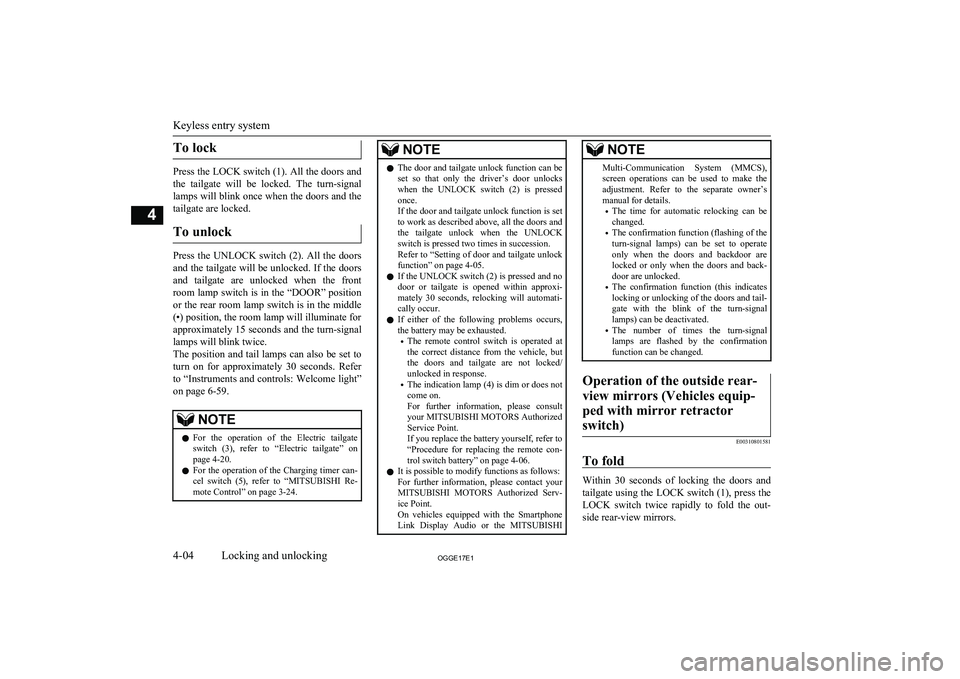
Press the remote control switch, and all doors and the tailgate will be locked or unlocked as
desired. It is also possible to operate the out-
side rear-view mirrors.
1- LOCK switch
2- UNLOCK switch
3- Electric tailgate switch*
4- Indication lamp
5- Charging timer cancel switch*
NOTEl The charging lid is also locked/unlocked,
when the driver’s door is locked/unlocked.
Key number tag
4-03OGGE17E1Locking and unlocking4
Page 75 of 548
To lock
Press the LOCK switch (1). All the doors andthe tailgate will be locked. The turn-signal
lamps will blink once when the doors and the
tailgate are locked.
To unlock
Press the UNLOCK switch (2). All the doors
and the tailgate will be unlocked. If the doors and tailgate are unlocked when the frontroom lamp switch is in the “DOOR” positionor the rear room lamp switch is in the middle
(•) position, the room lamp will illuminate for
approximately 15 seconds and the turn-signal lamps will blink twice.
The position and tail lamps can also be set to
turn on for approximately 30 seconds. Refer to “Instruments and controls: Welcome light”
on page 6-59.
NOTEl For the operation of the Electric tailgate
switch (3), refer to “Electric tailgate” onpage 4-20.
l For the operation of the Charging timer can-
cel switch (5), refer to “MITSUBISHI Re-
mote Control” on page 3-24.NOTEl The door and tailgate unlock function can be
set so that only the driver’s door unlocks
when the UNLOCK switch (2) is pressed once.
If the door and tailgate unlock function is set
to work as described above, all the doors and
the tailgate unlock when the UNLOCK switch is pressed two times in succession.
Refer to “Setting of door and tailgate unlock
function” on page 4-05.
l If the UNLOCK switch (2) is pressed and no
door or tailgate is opened within approxi-mately 30 seconds, relocking will automati-
cally occur.
l If either of the following problems occurs,
the battery may be exhausted.
• The remote control switch is operated at
the correct distance from the vehicle, but
the doors and tailgate are not locked/
unlocked in response.
• The indication lamp (4) is dim or does not
come on.
For further information, please consult your MITSUBISHI MOTORS Authorized
Service Point.
If you replace the battery yourself, refer to
“Procedure for replacing the remote con-
trol switch battery” on page 4-06.
l It is possible to modify functions as follows:
For further information, please contact your MITSUBISHI MOTORS Authorized Serv-
ice Point.
On vehicles equipped with the Smartphone Link Display Audio or the MITSUBISHINOTEMulti-Communication System (MMCS),
screen operations can be used to make theadjustment. Refer to the separate owner’s
manual for details.
• The time for automatic relocking can be
changed.
• The confirmation function (flashing of the
turn-signal lamps) can be set to operateonly when the doors and backdoor arelocked or only when the doors and back-
door are unlocked.
• The confirmation function (this indicates
locking or unlocking of the doors and tail-
gate with the blink of the turn-signal lamps) can be deactivated.
• The number of times the turn-signal
lamps are flashed by the confirmation function can be changed.Operation of the outside rear-
view mirrors (Vehicles equip- ped with mirror retractorswitch)
E00310801581
To fold
Within 30 seconds of locking the doors and tailgate using the LOCK switch (1), press the LOCK switch twice rapidly to fold the out-
side rear-view mirrors.
Keyless entry system
4-04OGGE17E1Locking and unlocking4
Page 76 of 548
To extend
Within 30 seconds of unlocking the doors
and tailgate using the UNLOCK switch (2),
press the UNLOCK switch twice rapidly to return the outside rear-view mirrors to their
extended positions.
The outside rear-view mirrors are not initially
set to work as described above. If you want them to work as described above, you need to
set them so that they do not retract/extend when the doors and tailgate are locked/
unlocked using the keyless entry system or
keyless operation function.
Refer to “Starting and driving: Outside rear-
view mirrors” on page 7-09.
For details, please consult a MITSUBISHI
MOTORS Authorized Service Point.
In a vehicle equipped with the Smartphone Link Display Audio or the MITSUBISHI
Multi-Communication System (MMCS), it is possible to change the setting by means of
screen operations.
Refer to the separate owner’s manual for de- tails.
NOTEl The outside rear-view mirrors automatically
retract when all the doors and tailgate are
locked using the keyless operation function.
Refer to “Starting and driving: Outside rear- view mirrors” on page 7-09.
l The keyless entry system does not operate
when the door or tailgate is open.
l The remote control switch will operate with-
in approximately 4 m from the vehicle.
However, the operating range of the remote control switch may change if the vehicle is
located near a power station, or radio/TV broadcasting station.
l If your remote control switch is lost or dam-
aged, please contact your MITSUBISHI
MOTORS Authorized Service Point for a re-
placement remote control switch.
l If you wish to add a remote control switch,
we recommend you to contact your
MITSUBISHI MOTORS Authorized Serv-
ice Point.
The below remote control switches are avail-
able for your vehicle.
• Keyless operation key: up to 4 remote
control switchesSetting of door and tailgate un-
lock function
E00310301368
The door and tailgate unlock function can be set to the following two conditions.
Each time the door and tailgate unlock func-
tion is set, a chime will sound to tell you the condition of the door and tailgate unlock
function.Number of chimesConditionOne chimeAll doors and the
tailgate unlockTwo chimesDriver’s door unlock only
1. Put the operation mode in OFF.
2. Place the combination headlamps and
dipper switch in the “OFF” position, and leave the driver’s door open.
3. Press the LOCK switch (1) for 4 to 10
seconds and press the UNLOCK switch
(2) during this time.
4. Release in sequence the LOCK and UN-
LOCK switches within 10 seconds of pressing the LOCK switch in step 3.
NOTEl The charging lid is also unlocked, when the
driver’s door is unlocked.
l On vehicles equipped with the Smartphone
Link Display Audio or the MITSUBISHI
Multi-Communication System (MMCS), screen operations can be used to make theadjustment. Refer to the separate owner’s
manual for details.
Keyless entry system
4-05OGGE17E1Locking and unlocking4
Page 81 of 548
NOTElFor vehicles equipped with the mirror retrac-
tor switch, the outside rear-view mirrors au-
tomatically retract when all the doors and
tailgate are locked using the keyless opera- tion function.
Refer to “Starting and driving: Outside rear- view mirrors” on page 7-09.
l The keyless operation function does not op-
erate under the following conditions:
• The keyless operation key is inside the
vehicle.
• A door or the tailgate is open or ajar.
l The tailgate open switch (C) can be used to
check that the vehicle is locked properly.Press the tailgate open switch within approx-
imately 3 seconds of locking the vehicle. If
you wait longer than 3 seconds and press the tailgate open switch, the doors and tailgate
will be unlocked.
l The time allowed for checking that the vehi-
cle is locked can be adjusted. For further in- formation, please contact your
MITSUBISHI MOTORS Authorized Serv-
ice Point.
On vehicles equipped with the Smartphone
Link Display Audio or the MITSUBISHI
Multi-Communication System (MMCS), screen operations can be used to make the
adjustment. Refer to the separate owner’s
manual for details.Unlocking the doors and tail-
gate
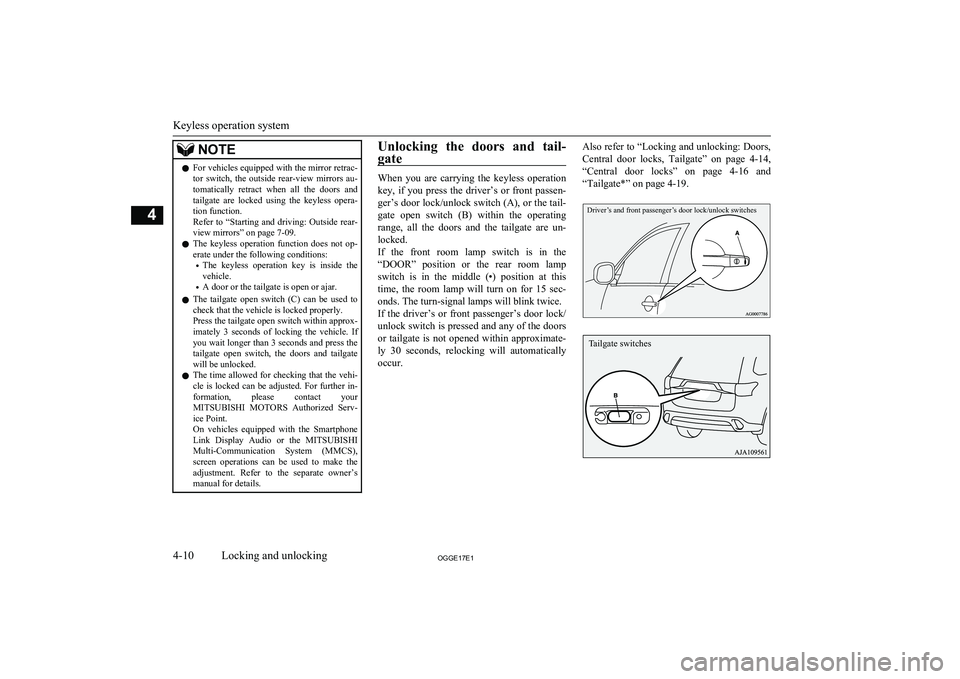
When you are carrying the keyless operation
key, if you press the driver’s or front passen- ger’s door lock/unlock switch (A), or the tail-gate open switch (B) within the operating
range, all the doors and the tailgate are un-
locked.
If the front room lamp switch is in the “DOOR” position or the rear room lampswitch is in the middle (•) position at this
time, the room lamp will turn on for 15 sec-
onds. The turn-signal lamps will blink twice. If the driver’s or front passenger’s door lock/
unlock switch is pressed and any of the doors or tailgate is not opened within approximate-
ly 30 seconds, relocking will automatically occur.
Also refer to “Locking and unlocking: Doors,
Central door locks, Tailgate” on page 4-14,
“Central door locks” on page 4-16 and
“Tailgate*” on page 4-19.Driver’s and front passenger’s door lock/unlock switches
Keyless operation system
4-10OGGE17E1Locking and unlocking4 Tailgate switches
Page 82 of 548
NOTElFor vehicles equipped with the mirror retrac-
tor switch, the outside rear-view mirrors au-
tomatically extend when all the doors and tailgate are unlocked using the keyless oper-
ation function.
Refer to “Starting and driving: Outside rear- view mirrors” on page 7-09.
l The keyless operation function can be set so
that only the driver’s door unlocks when the driver’s door lock/unlock switch is pressed.
If the keyless operation function is set to
work as described above, all the doors and the tailgate unlock when the driver’s door
lock/unlock switch is pressed two times in succession.
Refer to “Setting of door and tailgate unlock
function” on page 4-05.
l The keyless operation function does not op-
erate under the following conditions:
• A door or the tailgate is open or ajar.
l In order to make it possible to check that the
doors and tailgate are locked, you cannot un- lock them by using the tailgate open switch
for 3 seconds after locking them.
l The time allowed for checking that the vehi-
cle is locked can be adjusted. For further in- formation, please contact your
MITSUBISHI MOTORS Authorized Serv-
ice Point.
On vehicles equipped with the Smartphone
Link Display Audio or the MITSUBISHI
Multi-Communication System (MMCS), screen operations can be used to make theadjustment. Refer to the separate owner’s
manual for details.NOTEl The time between unlocking and automatic
locking can be adjusted. Please consult a MITSUBISHI MOTORS Authorized Serv-
ice Point.
On vehicles equipped with the Smartphone
Link Display Audio or the MITSUBISHI
Multi-Communication System (MMCS), screen operations can be used to make theadjustment. Refer to the separate owner’s
manual for details.
Operation confirmation when locking and
unlocking
Operation can be confirmed as shown below. However, the room lamp will only illuminate if the front room lamp switch is in the
“DOOR” position or the rear room lamp switch is in the middle (•) position.
When locking:The turn-signal
lamps will blink
once.When unlocking:The room lamp illu-
minates for approxi-
mately 15 seconds,
the turn-signal lamps
blink twice.NOTEl Functions can be modified as stated below.
For further information, please contact your
MITSUBISHI MOTORS Authorized Serv-
ice Point.
On vehicles equipped with the Smartphone
Link Display Audio or the MITSUBISHI
Multi-Communication System (MMCS), screen operations can be used to make theadjustment. Refer to the separate owner’s
manual for details.
• Set the confirmation function (blinking of
the turn-signal lamps) to operate onlywhen the vehicle is locked or only when
the vehicle is unlocked.
• Disable the operation confirmation func-
tion (blinking of the turn-signal lamps).
• Change the number of blinks for the oper-
ation confirmation function (blinks of the turn-signal lamps).
Keyless operation system
4-11OGGE17E1Locking and unlocking4
Page 216 of 548
lAvoid using the washer continuously for
more than 20 seconds. Do not operate the washer when the fluid reservoir isempty.
Otherwise, the motor may burn out.
l Periodically check the level of washer
fluid in the reservoir and refill if re-quired.
During cold weather, add a recommen-
ded washer solution that will not freeze
in the washer reservoir. Failure to do so could result in loss of washer functionand frost damage to the system compo-
nents.Wiper de-icer switch*
E00507701142
The rear window demister switch can be op-erated when the Plug-in Hybrid EV System is
operating.
When the front wipers have frozen to the
windscreen at the parked positions, turning
on this switch will heat the windscreen to
make the wipers operable. Press the rear win- dow demister switch and the deicer will oper-
ate.
NOTEl The wiper de-icer is activated/deactivated,
depending on the operation of the rear win-
dow demister. Refer to “Rear window de- mister switch” on page 6-69.Rear window demister
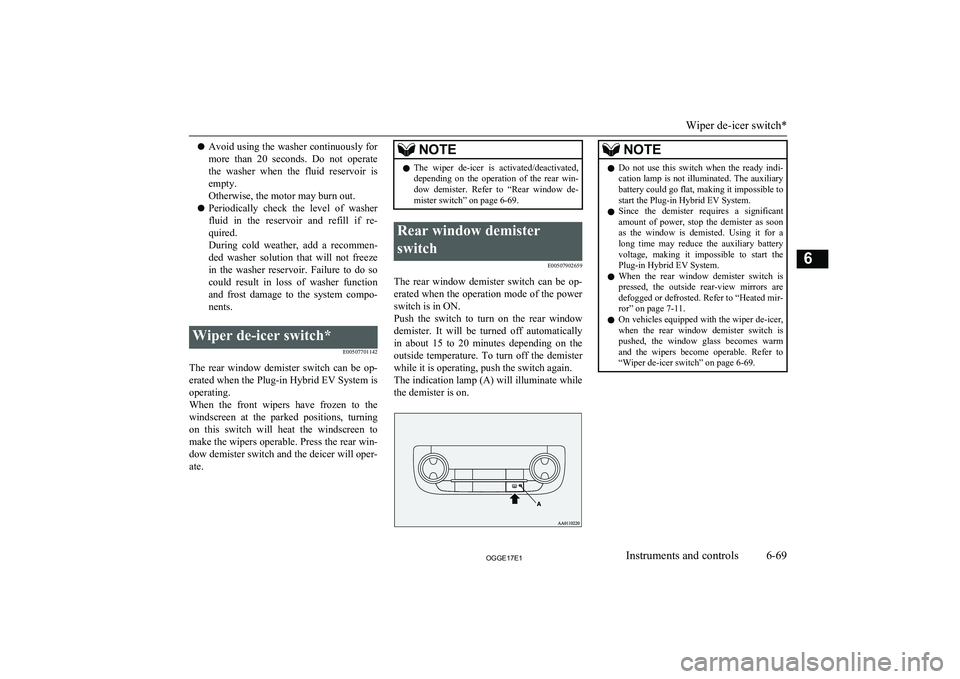
switch E00507902659
The rear window demister switch can be op-erated when the operation mode of the power
switch is in ON.
Push the switch to turn on the rear window
demister. It will be turned off automatically
in about 15 to 20 minutes depending on the outside temperature. To turn off the demister
while it is operating, push the switch again. The indication lamp (A) will illuminate while the demister is on.
NOTEl Do not use this switch when the ready indi-
cation lamp is not illuminated. The auxiliary battery could go flat, making it impossible to
start the Plug-in Hybrid EV System.
l Since the demister requires a significant
amount of power, stop the demister as soonas the window is demisted. Using it for along time may reduce the auxiliary battery
voltage, making it impossible to start the
Plug-in Hybrid EV System.
l When the rear window demister switch is
pressed, the outside rear-view mirrors are
defogged or defrosted. Refer to “Heated mir-
ror” on page 7-11.
l On vehicles equipped with the wiper de-icer,
when the rear window demister switch is pushed, the window glass becomes warm
and the wipers become operable. Refer to “Wiper de-icer switch” on page 6-69.
Wiper de-icer switch*
6-69OGGE17E1Instruments and controls6