battery MITSUBISHI OUTLANDER PHEV 2018 (in English) Owners Manual
[x] Cancel search | Manufacturer: MITSUBISHI, Model Year: 2018, Model line: OUTLANDER PHEV, Model: MITSUBISHI OUTLANDER PHEV 2018Pages: 538, PDF Size: 25.01 MB
Page 345 of 538
Air conditioning system refrig-erant and lubricant recommen- dations
If the air conditioner seems less effective
than usual, the cause might be a refrigerant leak.
We recommend you to have the system in-
spected.
[Except for vehicles for Ukraine]
The air conditioning system in your vehicle
must be charged with the refrigerant
HFO-1234yf and the lubricant POE MA68EV.
[Vehicles for Ukraine]
The air conditioning system in your vehicle must be charged with the refrigerant
HFC-134a and the lubricant POE MA68EV.
Use of any other refrigerant or lubricant will
cause severe damage which will result in the need to replace your vehicle’s entire air con-
ditioning system. The release of refrigerant into the atmosphere is not recommended.
We recommend you to recover and recycle the refrigerant for reuse.
During a long period of disuse
The air conditioner should be operated for at
least five minutes each week, even in cold weather. This is to prevent the compressor from seizing and to maintain the air condi-
tioner in the best operating condition.
Air purifier
E00708400718
An air filter has been incorporated into this air conditioner so that dirt and dust are
cleaned from the air.
Replace the air filter periodically as its ability
to clean the air will be reduced as it collects pollen and dirt. For the maintenance interval,
refer to the “SERVICE BOOKLET”.NOTEl Operation in certain conditions such as driv-
ing on a dusty road and frequent use of the air conditioner can lead to reduction of serv-
ice life of the filter. When you feel that the air flow is lower than normal or when the
windscreen or windows start to fog up easi- ly, replace the air filter.
We recommend you to have it checked.Remote Climate Control*
E00735401087
You can run the air conditioner in advance ofusing the vehicle.
For details, refer to “MITSUBISHI Remote
control: Remote Climate Control” on page 3-24.
Heating
E00733901062
When heating, the engine starts running be-
cause the heating system uses the heat of en-
gine coolant.
On vehicles with electric heater, it can de-
crease the number of times engine starting because electrical power stored in the drive battery is also used when heating.NOTEl If you want to stop the engine running for
heating, select the EV priority mode before operating the air conditioner. Refer to “EV
switch” on page 7-25.LW/MW/FM radio/CD
player* E00708503387
The audio system can only be used when theoperation mode of the power switch is in ON
or ACC.
Air purifier
8-13OGGE18E1For pleasant driving8
Page 382 of 538
NOTElIf the operation mode is left in ACC, the ac-
cessory power will automatically turn off af-ter a certain period of time and you will no
longer be able to use the Bluetooth ®
2.0 in-
terface. The accessory power comes on again if the power switch is operated.
Refer to “ACC power auto-cutout function”
on page 7-13.
l The Bluetooth ®
2.0 interface cannot be used
if the Bluetooth ®
device has a flat battery or
the device power is turned off.
l Hands-free calls will not be possible if your
phone does not have service available.
l If you place the Bluetooth ®
device in the
luggage compartment, you may not be able
to use the Bluetooth ®
2.0 interface.
l Some Bluetooth ®
devices are not compatible
with the Bluetooth ®
2.0 interface.
l You can confirm the Link System software
version by pressing the HANG-UP button 3
times (press and hold 2 times and then press briefly) within 10 seconds.
l For details on the Bluetooth ®
2.0 interface,
you can see them by accessing the MITSUBISHI MOTORS website.
Please read and agree on the “Warning about
Links to the Web Sites of Other Companies”
because it connects to other than MITSUBISHI MOTORS website.
http://www.mitsubishi-motors.com/en/prod-
ucts/index.htmlNOTEl Software updates by cellular phone/digital
audio device manufacturers may change/
alter device connectivity.
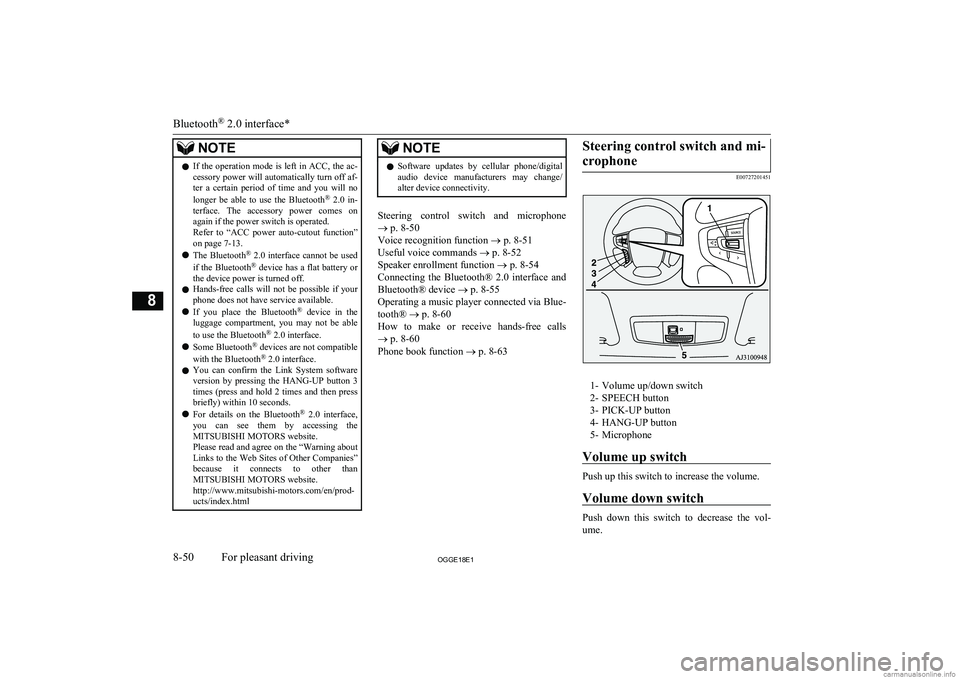
Steering control switch and microphone
® p. 8-50
Voice recognition function ® p. 8-51
Useful voice commands ® p. 8-52
Speaker enrollment function ® p. 8-54
Connecting the Bluetooth® 2.0 interface and Bluetooth® device ® p. 8-55
Operating a music player connected via Blue-
tooth® ® p. 8-60
How to make or receive hands-free calls ® p. 8-60
Phone book function ® p. 8-63
Steering control switch and mi-
crophone
E00727201451
1- Volume up/down switch2- SPEECH button
3- PICK-UP button
4- HANG-UP button
5- Microphone
Volume up switch
Push up this switch to increase the volume.
Volume down switch
Push down this switch to decrease the vol- ume.
Bluetooth ®
2.0 interface*
8-50OGGE18E1For pleasant driving8
Page 383 of 538
SPEECH button
lPress this button to change to voice rec-
ognition mode.
While the system is in voice recognition
mode, “Listening” will appear on the au- dio display.
l If you press the button briefly while in
voice recognition mode, it will interrupt prompting and allow voice command in-
put.
Pressing the button longer will deacti-
vate the voice recognition mode.
l Pressing this button briefly during a call
will enable voice recognition and allow voice command input.
PICK-UP button
l Press this button when an incoming call
is received to answer the telephone.
l When another call is received during a
call, press this button to put the first call-
er on hold and talk to the new caller. • In such circumstances, you can press
the button briefly to switch between
callers. You will switch to the first
caller and the other caller will be put on hold.
• To establish a three-way call in such
situations, press the SPEECH button
to enter voice recognition mode and then say “Join calls”.
HANG-UP button
l Press this button when an incoming call
is received to refuse the call.
l Press this button during a call to end the
current call.
When another call is on hold, you will switch to that call.
l If this button is pressed in the voice rec-
ognition mode, the voice recognition
mode will be deactivated.
NOTEl When you press the SPEECH button to enter
voice recognition mode with a cellular
phone paired to the system, current informa- tion on the cellular phone, such as “remain- ing battery life,” “signal strength” or “roam-
ing,” will be displayed on the audio dis-
play.*
*: Some cellular phones will not send this
information to the Bluetooth ®
2.0 interface.
l Call waiting and three-way calls can be used
by the Bluetooth ®
2.0 interface, only if it is
possible to use those services with your cel- lular phone.
Microphone
Your voice will be recognized by a micro-
phone in the overhead console, allowing you to make hands-free calls with voice com-
mands.
NOTEl If a cellular phone is brought close to the mi-
crophone, it may create noise in the voice on
the phone. In such a case, take the cellular phone at a place as far as possible from the
microphone.Voice recognition function
E00727300514
The Bluetooth ®
2.0 interface is equipped
with a voice recognition function.
Simply say voice commands and you can
perform various operations and make or re- ceive hands-free calls.
With the Bluetooth ®
2.0 interface, voice rec-
ognition is possible for English, French,
Spanish, Italian, German, Dutch, Portuguese and Russian. The factory setting is “English” or “Russian.”
NOTEl If the voice command that you say differs
from the predefined command or cannot be recognised due to ambient noise or some
other reason, the Bluetooth ®
2.0 interface
will ask you for the voice command again up
to 3 times.
Bluetooth ®
2.0 interface*
8-51OGGE18E1For pleasant driving8
Page 395 of 538
Switching between hands-freemode and private mode
E00761400036
The Bluetooth ®
2.0 interface can switch be-
tween Hands-free mode (Hands-free calls) and private mode (calls using cellular phone).
If you press the SPEECH button and say “Transfer call” during a Hands-free call, you
can stop the Hands-free mode and talk in pri- vate mode.
To return to Hands-free mode, press the
SPEECH button again and say “Transfer
call”.
Phone book function
E00763700017
The Bluetooth ®
2.0 interface has 2 types of
unique phone books that are different from
the phone book stored in the cellular phone. They are the vehicle phone book and the mo-
bile phone book.
These phone books are used to register tele- phone numbers and to make calls to desired
numbers via the voice recognition function.
NOTEl Disconnecting the battery cable will not de-
lete information registered in the phone
book.Vehicle phone book
E00763801262
This phone book is used when making calls
with the voice recognition function.
Up to 32 names can be registered in the vehi-
cle phone book per language.
Also, each entry has 4 locations associated with: home, work, mobile and other. You can
register one telephone number for each loca- tion.
You can register a desired name as a name
for any phone book entry registered in the ve- hicle phone book.
Names and telephone numbers can be
changed later on.
The vehicle phone book can be used with all paired cellular phones.
To register a telephone number in the ve- hicle phone book
You can register a telephone number in thevehicle phone book in the following 2 ways:
Reading out a telephone number, and select- ing and transferring 1 phone book entry fromthe phone book of the cellular phone.
To register by reading out a telephone
number
1. Press the SPEECH button.
2. Say “Phone book.”
3. The voice guide will say “Select one of
the following: new entry, edit number,
edit name, list names, delete, erase all, or
import contact.” Say “New entry.”
4. The voice guide will say “Name please.”
Say your preferred name to register it.NOTEl If the maximum number of entries are al-
ready registered, the voice guide will say“The phone book is full. Would you like to
delete a name?” Say “Yes” if you want to
delete a registered name.
Say “No,” to return to the main menu.
5. When the name has been registered, the
voice guide will say “home, work, mo- bile, or other?” Say the location forwhich you want to register a telephone
number.
NOTEl When the confirmation function is on, the
voice guide will say “
If a telephone number has been registered for the selected location, the voice guide will say “The current number is
If you do not want to change the telephone number, say “cancel” or the original number to keep it registered.
Bluetooth ®
2.0 interface*
8-63OGGE18E1For pleasant driving8
Page 404 of 538
NOTElIt is recommended to use an iPod with firm-
ware updated to the latest version.
l You can charge your iPod by connecting it
to the USB input terminal when the opera-tion mode is in ON or ACC.
l Do not keep your USB memory device or
iPod in your vehicle.
l It is recommended that you back up files in
case of data damage.
l Do not connect to the USB input terminal
any device (hard disk, card reader, memory reader, etc.) other than the connectable devi- ces specified in the previous section. The de- vice and/or data may be damaged. If any of
these devices was connected by mistake, re- move it after putting the operation mode inOFF.File specifications
E00762401056
You can play music files of the following
specifications that are saved in a USB memo-ry device or other device supporting mass
storage class. When you connect your iPod, playable file specifications depend on the connected iPod.
ItemConditionFile formatMP3, WMA, AAC,
WAVItemConditionMaximum number of levels
(including the root)
Level 8
Number of folders700Number of files65,535Sun visors
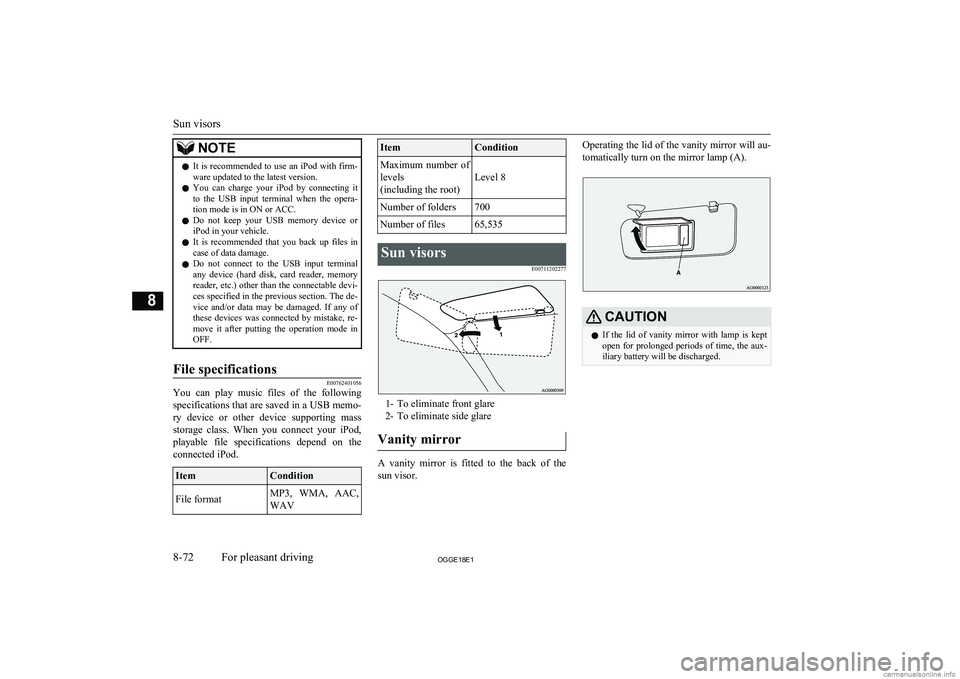
E00711202277
1- To eliminate front glare2- To eliminate side glare
Vanity mirror
A vanity mirror is fitted to the back of the sun visor.
Operating the lid of the vanity mirror will au-
tomatically turn on the mirror lamp (A).CAUTIONl If the lid of vanity mirror with lamp is kept
open for prolonged periods of time, the aux-
iliary battery will be discharged.
Sun visors
8-72OGGE18E1For pleasant driving8
Page 406 of 538
CAUTIONlDo not touch the heating element or the cig-
arette lighter housing, hold the knob only to prevent burns.
l Do not allow children to operate or play with
the cigarette lighter as burns may occur.
l Something is wrong with the cigarette light-
er if it does not pop back out within approxi-
mately 30 seconds of being pushed in.
Pull it out and have the problem corrected at MITSUBISHI MOTORS Authorized Serv-
ice Point.
l Do not use any electric appliance that is not
approved by MITSUBISHI MOTORS . Do-
ing so could damage the socket. If you used
the cigarette lighter after damaging the sock- et, the cigarette lighter might pop out or fail
to come out after being pushed in.
l When the cigarette lighter socket is used as a
power source for an electric appliance, be sure that the electric appliance operates at
12 V and has an electric capacity of 120 W or less. In addition, long use of the electricappliance when the ready indicator is not il-
luminated may run down the auxiliary bat- tery.Accessory socket
E00711602864CAUTIONlBe sure to use a “plug-in” type accessory op-
erating at 12 V and at 120 W or less.
When using more than one socket at the same time, make sure that the electrical ac-
cessories are 12 V accessories and that the total power consumption does not exceed
120 W.
l Long use of the electric appliance when the
ready indicator is not illuminated may run
down the auxiliary battery.
l When the accessory socket is not in use, be
sure to close the lid or install the cap, be-
cause the socket might become clogged by foreign material and be short-circuited.
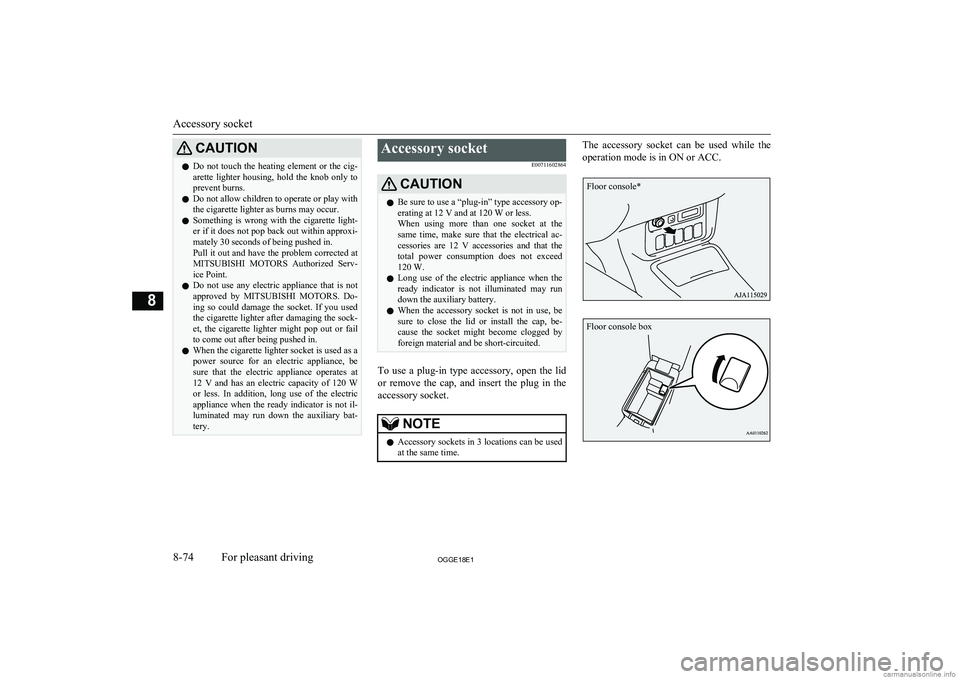
To use a plug-in type accessory, open the lid
or remove the cap, and insert the plug in the accessory socket.
NOTEl Accessory sockets in 3 locations can be used
at the same time.The accessory socket can be used while the
operation mode is in ON or ACC.
Accessory socket
8-74OGGE18E1For pleasant driving8 Floor console* Floor console box
Page 409 of 538
CAUTIONlWhen the 220-240 V AC power supply is
not in use, be sure to cancel power supply by pressing the 220-240 V AC power supply
switch, disconnect the plug and close the lid.
This will prevent the 220-240 V AC power
supply from becoming clogged and short cir-
cuiting.
l Do not stand behind the exhaust pipe as the
engine may automatically start depending on the condition. Heat from the exhaust could
lead to burns.
l Make sure that the plug is inserted all the
way into the 220-240 V AC power supplybefore using an electrical appliance.
l Do not use an electrical appliance in the ve-
hicle which emits heat such as a heater. Heat
damage to interior parts could result.
l Do not connect a malfunctioning electrical
appliance to the 220-240 V AC power sup- ply. Doing so could damage the 220-240 VAC power supply.NOTEl The accessory socket and 220-240 V AC
power supplies can be used simultaneously.
Refer to “Accessory socket” on page 8-74.
l If the plug of the electrical appliance was
loose or wobbled when inserted in the outlet, have the 220-240 V AC power supply re-
placed at a MITSUBISHI MOTORS Au-
thorized Service Point.NOTEl Never leave the vehicle, perform refueling
or washing the vehicle while using the
220-240 V AC power supply.
l You may hear operating sounds such as
sounds from the cooling fan near the lug-
gage area when using the 220-240 V AC power supply. This is normal.
l Never use electrical appliance that is vulner-
able to vibration or heat in the cabin. When
exposed to strong direct sunlight, the cabin will become extremely hot. It could cause
product failure.
l Do not use the 220-240 V AC power supply
with the vehicle covered by a car cover.
l When closing the window, door or tailgate,
be careful not to trap the power supply cord.
l 220-240 V AC power supply cannot be used
in the following cases.
• When the Plug-in Hybrid EV System
warning lamp is illuminated.
• When the drive battery level display indi-
cates 0.
• When the “PROPULSION POWER IS
REDUCED” warning display appears.
l Electrical appliance may not operate normal-
ly or electricity supply stops under the fol- lowing conditions. You may hear an opera- tion noise. This is normal.
• When the power consumption of the elec-
trical appliance exceeds 1500 W.
• When the vehicle interior temperature is
too hot or too cold.
l When the 220-240 V AC power supply can-
not be used or is not returned to operationNOTEautomatically after stopping electricity sup-
ply, follow the procedures below.
1
. Disconnect the plug of electrical ap-
pliance.
2 . Confirm the remaining quantity of
the drive battery. When it is low,
charge the drive battery by using the battery charge mode switch, etc.
Battery charge mode switch ® p. 7-28
Normal charging (charging method
with rated AC 220-240V outlet)
® p. 3-10
Quick charging (charging method with quick charger) ® p. 3-17
3 . Confirm that the ready indicator illu-
minates. If not, start the Plug-in Hy-
brid EV System.
4 . When the vehicle interior tempera-
ture is too hot or too cold, adjust it
appropriately by the using air condi-
tioner.
5 . Press the 220-240 V AC power sup-
ply switch to turn it on.
6 . Confirm that the indication lamp on
the 220-240 V AC power supply
switch comes on and insert the plug in the power outlet.
l The following electrical appliance may not
operate normally even if the power con-
220-240 V AC power supplies*
8-77OGGE18E1For pleasant driving8
Page 410 of 538
NOTEsumption is less than 1500 W. Also be awarethat the electric power that can be used will vary depending on the drive battery condi- tion.
• Electrical appliance to which large
amounts of current flow momentarily
• Electrical appliance that gauges precise
data
• Electrical appliance that does not operate
normally when it is not placed horizontal-
ly
• Electrical appliance that needs extremely
stable operation
• Electrical appliance with a timer function,
that needs the consecutive output
l The AC power output may shut off and the
electrical appliance may be turned off ac- cordingly depending on the drive batterycondition even if the battery level displaydoes not indicate 0.
l The use of electrical appliance could cause
radio or television noise.
l The voltage of the 220-240 V AC power
supply cannot be correctly gauged with a commercially available tester. Consult a MITSUBISHI MOTORS Authorized Serv-
ice Point when you need measurement of the voltage.
l Also refer to the instruction manual and la-
bel accompanying the electrical appliance.NOTEl When the remaining power in the drive bat-
tery is low, the engine starts and charges thedrive battery automatically. Be careful not to
run out of fuel since it will be consumed
when the engine starts.Interior lamps
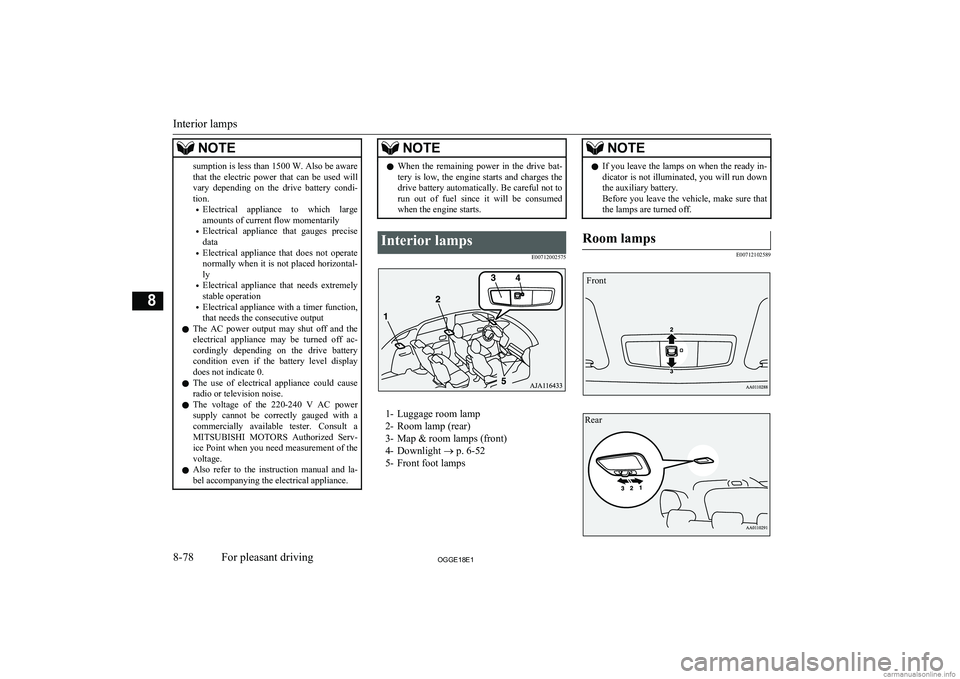
E00712002575
1- Luggage room lamp
2- Room lamp (rear)
3- Map & room lamps (front)
4- Downlight ® p. 6-52
5- Front foot lamps
NOTEl If you leave the lamps on when the ready in-
dicator is not illuminated, you will run down the auxiliary battery.
Before you leave the vehicle, make sure that
the lamps are turned off.Room lamps
E00712102589
Interior lamps
8-78OGGE18E1For pleasant driving8 Front Rear
Page 414 of 538
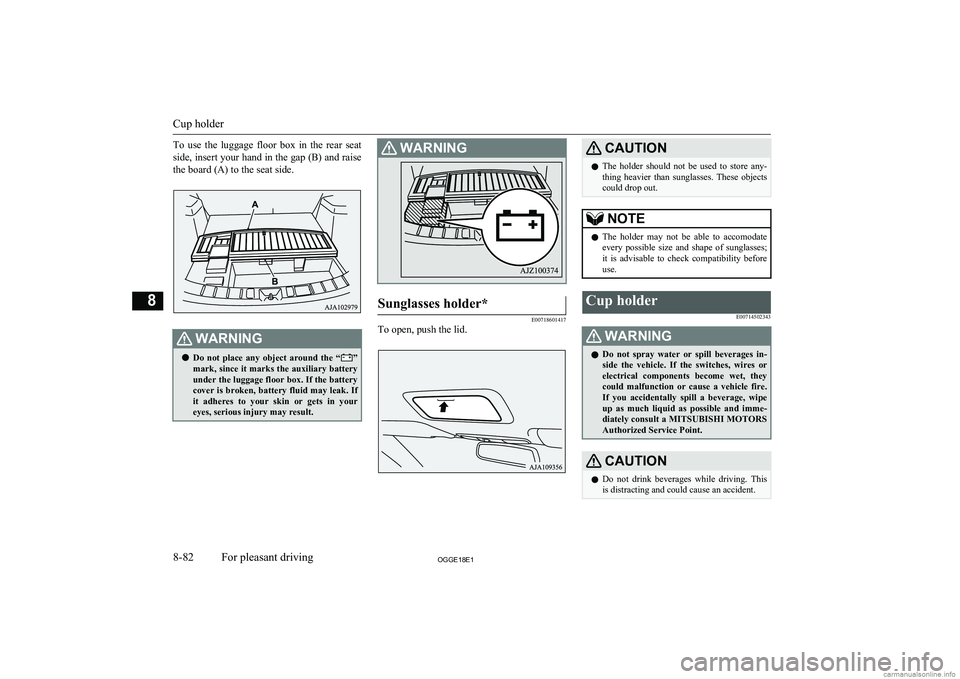
To use the luggage floor box in the rear seat
side, insert your hand in the gap (B) and raise the board (A) to the seat side.WARNINGl Do not place any object around the “”
mark, since it marks the auxiliary battery
under the luggage floor box. If the battery cover is broken, battery fluid may leak. If it adheres to your skin or gets in your
eyes, serious injury may result.WARNINGSunglasses holder*
E00718601417
To open, push the lid.
CAUTIONl The holder should not be used to store any-
thing heavier than sunglasses. These objects
could drop out.NOTEl The holder may not be able to accomodate
every possible size and shape of sunglasses;
it is advisable to check compatibility before use.Cup holder
E00714502343WARNINGlDo not spray water or spill beverages in-
side the vehicle. If the switches, wires or electrical components become wet, they
could malfunction or cause a vehicle fire. If you accidentally spill a beverage, wipe
up as much liquid as possible and imme- diately consult a MITSUBISHI MOTORS
Authorized Service Point.CAUTIONl Do not drink beverages while driving. This
is distracting and could cause an accident.
Cup holder
8-82OGGE18E1For pleasant driving8
Page 420 of 538
If the vehicle breaks downE00800102408
If the vehicle breaks down on the road, move it to the shoulder and use the hazard warning
flashers and/or the warning triangle etc.
Refer to “Hazard warning flasher switch” on page 6-60.
If you need to push your vehicle, put the op-
eration mode of the power switch in ON and put the select position in “N” (NEUTRAL) position.WARNINGl If you are unable to safely assess the vehi-
cle due to vehicle damage, do not touch
the vehicle. Leave the vehicle and contact emergency services. Advise emergency
responders that this is a Plug-in Hybrid Electric vehicle.
If the ready indicator goes out
while driving
Vehicle operation and control are affected if
the ready indicator goes out while driving.
Before moving the vehicle to a safe area, be aware of the following:
l The brake booster may becomes inoper-
ative and the pedal effort will increase.
Press down the brake pedal harder than usual.
l The power steering system may not op-
erate, the steering wheel feels heavy when turning it.Emergency starting
E00800504204
If the Plug-in Hybrid EV system cannot be
started because the auxiliary battery is weak or dead, the battery from another vehicle can
be used with jumper cables to start the Plug-
in Hybrid EV system.
WARNINGl To start the Plug-in Hybrid EV system us-
ing jumper cables from another vehicle
and perform the correct procedures ac-
cording to the instruction below. Incor-
rect procedures could result in a fire, ex- plosion, electric shock or damage to the
vehicles.
l Keep sparks, cigarettes and flames away
from the battery because the battery may
produce an explosion.CAUTIONl The Plug-in Hybrid EV system cannot be
started by pulling or pushing the vehicle.
l Check the other vehicle. It must have a 12-
volt battery. If the other system isn’t 12-volt, shorting can damage both vehicles.
l Use the proper cables suitable for the battery
size to prevent overheating of the cables.CAUTIONl Check the jumper cables for damage and
corrosion before use.
l Always wear protective eye goggles when
working near the battery.
l Keep the battery out of the reach of children.
l Do not attempt jump starting the auxiliary
battery while the drive battery is being charged. Doing so could damage the charg-
ing equipment or the vehicle.NOTEl If the auxiliary battery is disconnected, the
operation mode of the power switch is mem-
orized. When a booster battery is connected
by jumper cables, the operation mode re- turns to the state it had before the auxiliary
battery ran down.
Pay due attention if you do not know the op- eration mode before the auxiliary battery
was fully discharged.
l If the auxiliary battery is fully discharged
with the select position in the “P” (PARK)
position, the select position cannot be changed to other position from the “P”
(PARK) position in some cases. In such a case, the front wheels have been locked.
Therefore, the vehicle cannot be moved.
1. Get the vehicles close enough so the
jumper cables can reach, but be sure the vehicles aren’t touching each other.
If the vehicle breaks down
9-02OGGE18E1For emergencies9