engine MITSUBISHI OUTLANDER PHEV 2018 (in English) User Guide
[x] Cancel search | Manufacturer: MITSUBISHI, Model Year: 2018, Model line: OUTLANDER PHEV, Model: MITSUBISHI OUTLANDER PHEV 2018Pages: 538, PDF Size: 25.01 MB
Page 48 of 538
NOTE•Do not repeat charging near the full
charge level.
l The quick charging gives priority when the
normal charging and the quick charging are performed at the same time. At this time, thenormal charging will be stopped.
l Even if the operation mode of the power
switch is OFF, you may hear the operating sound of the cooling fan for cooling the
drive battery during charging.
This is not a malfunction.
l If your vehicle is not used for a long time,
check the energy level gauge every 3 months. If the gauge shows 0, charge thedrive battery until some indication appears.
Alternatively, start the Plug-in Hybrid EV
System. Then the engine will automatically start to charge the drive battery. Wait until the engine automatically stops, then put theoperation mode of the power switch in OFF.
l In the event of an electrical power outage
while charging, charging restarts automati-
cally with the restoration of electricity.Charge port courtesy lamp
E08304300157
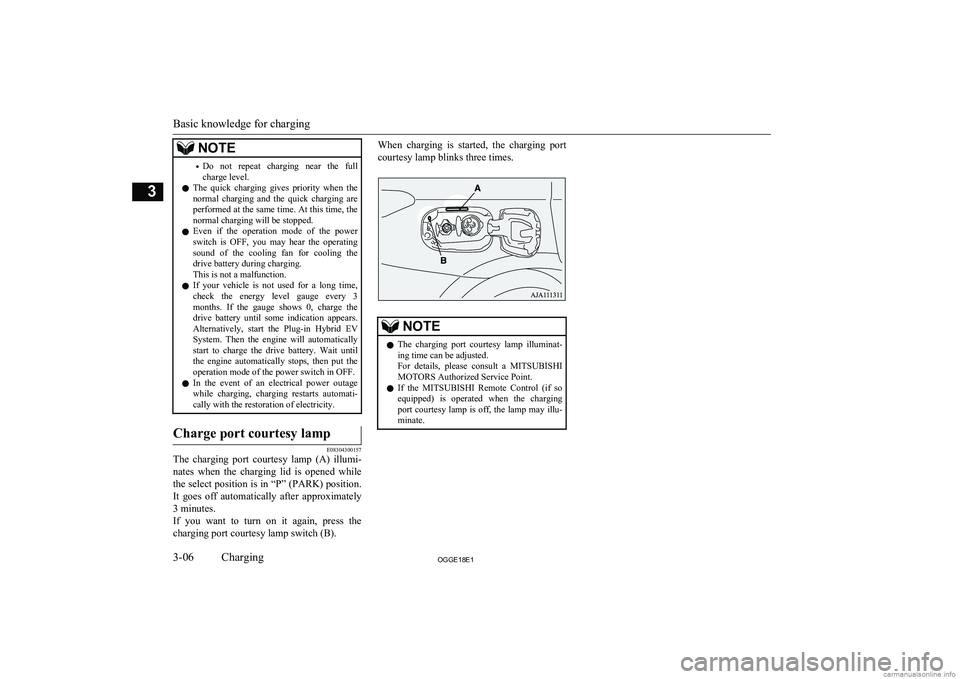
The charging port courtesy lamp (A) illumi-
nates when the charging lid is opened while
the select position is in “P” (PARK) position. It goes off automatically after approximately3 minutes.
If you want to turn on it again, press the charging port courtesy lamp switch (B).
When charging is started, the charging port
courtesy lamp blinks three times.NOTEl The charging port courtesy lamp illuminat-
ing time can be adjusted.
For details, please consult a MITSUBISHI
MOTORS Authorized Service Point.
l If the
MITSUBISHI Remote Control (if so
equipped) is operated when the charging
port courtesy lamp is off, the lamp may illu-
minate.
Basic knowledge for charging
3-06OGGE18E1Charging3
Page 53 of 538
WARNING•Do not open the tailgate, for example to
remove or place an item in the cargo area.
Charging may affect the operation of elec-
tric medical devices and result in serious personal injury or death.
l Do not charge when the EV charging ca-
ble is coiled up.
Doing so the cable may be heated abnor- mally and this might result in fire.
l Before charging, make sure that there is
no foreign matter such as dust at the nor-
mal charge port and the normal charge connector.
At this time, do not touch the normal
charge port.
l When the normal charge connector is
connected to the charge port, prevent for- eign matter such as water or dust from
entering in the connection.
Connection with foreign matter such as
water or dust may cause fire or an electric shock. Do not perform charging if there
might be strong exposure to water at the connection.
l Never pull the cable to remove the plug.
And never submerge the EV charging
connector, control box or plug in water.
l Please observe the following in order to
prevent accidents during charging such as
electrocution.
• Only use the EV charging cable that is
supplied with the vehicle.WARNING• Do not charge another vehicle by the
EV charging cable. The cable may overheat and this may result in a fire.
• When charging outdoors, make sure to
use an outlet that is protected from wa-
ter entering.
• Do not perform charging with the vehi-
cle covered by a car cover, except for
the MITSUBISHI MOTORS GENU-
INE car cover.
• Do not connect or disconnect the plug
and connector with wet hands.
l While it is normal for the connector and
charging cable to become warm during charging, discontinue use immediately if
the connector or charging cable becomes hot to the touch.
l While it is normal for the control box to
become warm during charging, discontin-
ue use immediately if the control box be- comes hot to the touch.
l If abnormal smells are detected or the ve-
hicle produces smoke, quickly stop charg-
ing.
l Do not perform charging in a poorly ven-
tilated area or in an enclosed area. Keep
sparks, cigarettes, and flames away from
the auxiliary battery.
Flammable gas generated from the auxili- ary battery during charging may be trap- ped, resulting in explosion.
If charging is inevitably required, venti-
late the area well.WARNINGl Grasp the normal charge connector when
connecting or disconnecting the EVcharging cable.
Grasping the cable may damage the cable
and could cause an electric shock, short circuit, and/or fire.CAUTIONl During charging, the cooling fans inside the
engine compartment may automatically be operated even if the operation mode of the
power switch is in OFF.
Keep your hands away from the cooling fan during charging.
l Do not perform charging from other power
source like a generator. Doing so could cause a malfunction.NOTEl If the charge connector is not easily connec-
ted to the charge port due to foreign materialentering, never force the connection. Doing so could damage the charging equipment or
the vehicle. Please contact a MITSUBISHI
MOTORS Authorized Service Point.
l The on board charger is only for rated AC
220-240V outlets.
Normal charging (charging method with rated AC 220-240V outlet)
3-11OGGE18E1Charging3
Page 68 of 538
For the operation method of theMITSUBISHI Remote Control, please visit
the MITSUBISHI MOTORS Web site:
http://www.mitsubishi-motors.com/en/prod-
ucts/outlander_phev2/app/remote/
l If you need further information, please
contact a MITSUBISHI MOTORS Au-
thorized Service Point.WARNINGl Do not use the
MITSUBISHI Remote
Control if children, persons in need of care, pets, etc. are in the vehicle. Even if the remote climate control is used, thecabin may become hot or cold due to somereasons such as automatic stop of the sys-
tem. The cabin temperature may quickly
rise in sunshine, which poses a risk of heat
stroke and dehydration. In cold weather, on the other hand, the cabin temperature
may quickly drop. Either of which could lead to death in the worst case.
In addition, children can activate switches and controls, resulting in injury or a fatal
accident.
l The cooling fan in the engine compart-
ment may operate automatically when
charging or when operating air condition- er. Do not bring your hand close to the
cooling fan during charging.CAUTIONl Do not use a car cover except for the
MITSUBISHI MOTORS GENUINE car
cover, when using the charging timer or the remote climate control.NOTEl Keep the following points in mind when us-
ing a wireless LAN device:
• Communication speed and range vary de-
pending on the wireless LAN devices and the surrounding conditions (radio environ-
ment, obstacles, parking area environ- ment, etc.).
• Due to the characteristics of radio waves,
communication speed tends to decrease as the communication distance increases.
Use your wireless LAN device at a short
distance from the vehicle for better re- sponse.
• When a microwave oven or ISM (indus-
trial, scientific and medical) equipment is being used, the communication speed andrange of wireless LAN devices may de-crease. Use your wireless LAN device
away from these appliances and equip-
ment.NOTE• If a wireless LAN device and Bluetooth
(registered trademark of Bluetooth SIG, Inc.) are used simultaneously, the com-
munication speed and range of each de- vice may decrease. Use your wireless
LAN device away from Bluetooth devi- ces.
l Wireless LAN devices may not communi-
cate with the vehicle, or may not operate
normally or stably in the following environ- ment or situations. Check that the device cancommunicate with your vehicle before use.
• There is an obstruction such as a concrete
or metal wall between the vehicle and
wireless LAN device.
• The vehicle is surrounded by tall vehicles
in a parking lot.
• There are facilities nearby that emit strong
radio waves, such as a TV tower, trans-
former substation, broadcasting station or airport.
• There is a communication device such as
a mobile phone or radio, or an electric de- vice such as a personal computer near thewireless LAN device.
• The wireless LAN device is in contact
with or covered by a metal object.
• The battery of the wireless LAN device
has run down.
l The
MITSUBISHI Remote Control cannot
be used under the following conditions:
• The wireless LAN device is turned off.
• The
MITSUBISHI Remote Control appli-
cation software is not installed.
MITSUBISHI Remote Control*
3-26OGGE18E1Charging3
Page 86 of 538
Set the inside lock knob (1) to the locked po-
sition, and close the door (2).Central door locks
E00300803335NOTElRepeated continuous operation between lock
and unlock could activate the central door
locking systems built-in protection circuit
and prevent the system from operating. If
this occurs, wait approximately 1 minute be- fore operating the central door lock switch.
l When the driver’s door is open, the central
door lock switch cannot be used to lock it.
l The charging lid is also locked/unlocked,
when the driver’s door is locked/unlocked using the central door locks.To lock and unlock the doors
and tailgate
Using the central door lock
switch
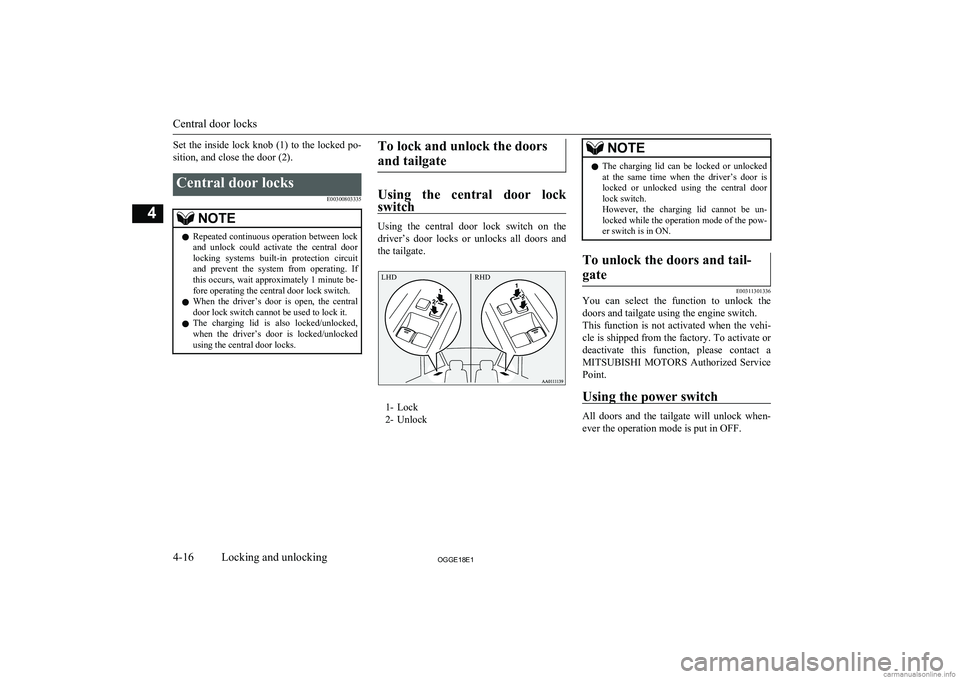
Using the central door lock switch on the
driver’s door locks or unlocks all doors and the tailgate.
1- Lock
2- Unlock
NOTEl The charging lid can be locked or unlocked
at the same time when the driver’s door islocked or unlocked using the central doorlock switch.
However, the charging lid cannot be un-
locked while the operation mode of the pow- er switch is in ON.To unlock the doors and tail-
gate
E00311301336
You can select the function to unlock the doors and tailgate using the engine switch.
This function is not activated when the vehi- cle is shipped from the factory. To activate or
deactivate this function, please contact a MITSUBISHI MOTORS Authorized Service
Point.
Using the power switch
All doors and the tailgate will unlock when-
ever the operation mode is put in OFF.
Central door locks
4-16OGGE18E1Locking and unlocking4 LHD RHD
Page 146 of 538
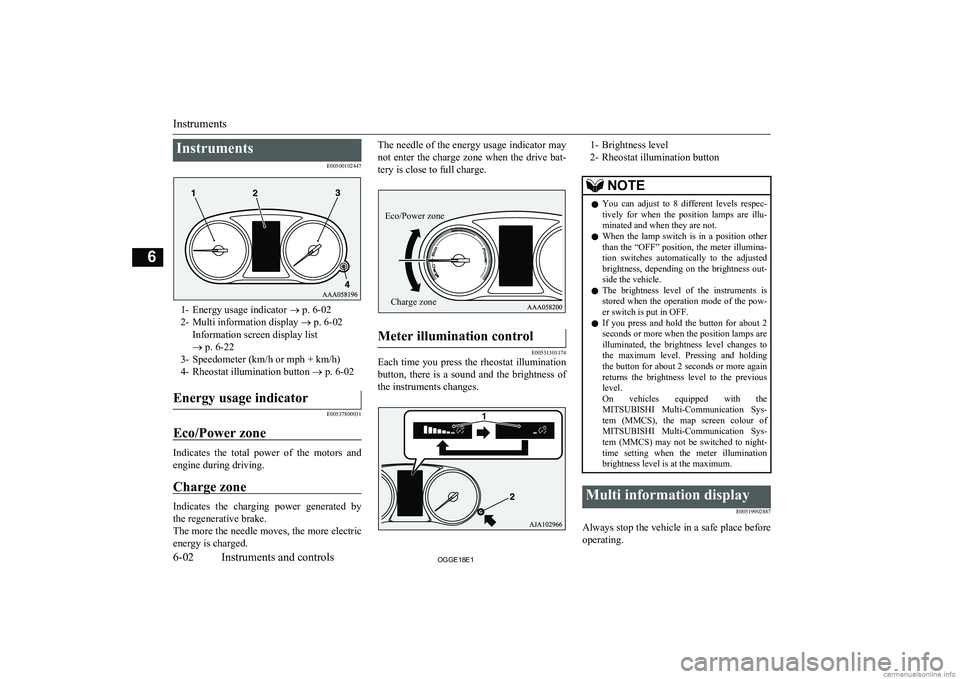
InstrumentsE00500102447
1- Energy usage indicator ® p. 6-02
2- Multi information display ® p. 6-02
Information screen display list
® p. 6-22
3- Speedometer (km/h or mph + km/h)
4- Rheostat illumination button ® p. 6-02
Energy usage indicator
E00537800031
Eco/Power zone
Indicates the total power of the motors and
engine during driving.
Charge zone
Indicates the charging power generated by the regenerative brake.
The more the needle moves, the more electric
energy is charged.
The needle of the energy usage indicator may
not enter the charge zone when the drive bat-tery is close to full charge.Meter illumination control
E00531301174
Each time you press the rheostat illumination
button, there is a sound and the brightness of the instruments changes.
1- Brightness level
2- Rheostat illumination buttonNOTEl You can adjust to 8 different levels respec-
tively for when the position lamps are illu- minated and when they are not.
l When the lamp switch is in a position other
than the “OFF” position, the meter illumina-
tion switches automatically to the adjusted brightness, depending on the brightness out- side the vehicle.
l The brightness level of the instruments is
stored when the operation mode of the pow- er switch is put in OFF.
l If you press and hold the button for about 2
seconds or more when the position lamps are illuminated, the brightness level changes to
the maximum level. Pressing and holding the button for about 2 seconds or more again
returns the brightness level to the previous
level.
On vehicles equipped with the MITSUBISHI Multi-Communication Sys-
tem (MMCS), the map screen colour of MITSUBISHI Multi-Communication Sys-
tem (MMCS) may not be switched to night-
time setting when the meter illumination brightness level is at the maximum.Multi information display
E00519902887
Always stop the vehicle in a safe place beforeoperating.
Instruments
6-02OGGE18E1Instruments and controls6 Eco/Power zoneCharge zone
Page 154 of 538
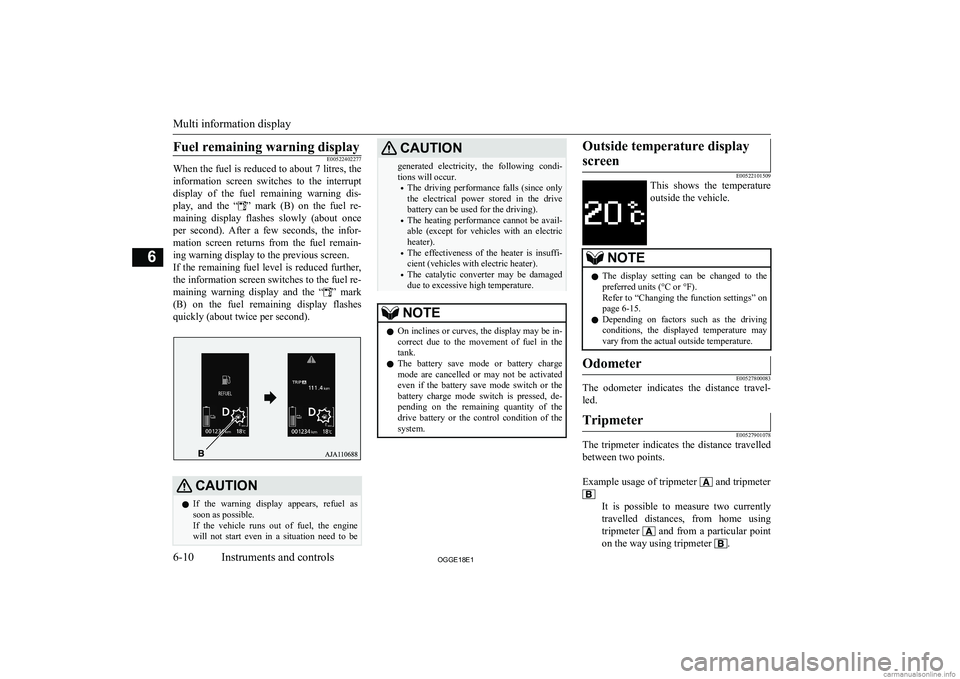
Fuel remaining warning displayE00522402277
When the fuel is reduced to about 7 litres, the
information screen switches to the interruptdisplay of the fuel remaining warning dis-
play, and the “
” mark (B) on the fuel re-
maining display flashes slowly (about once
per second). After a few seconds, the infor- mation screen returns from the fuel remain-
ing warning display to the previous screen.
If the remaining fuel level is reduced further,
the information screen switches to the fuel re-
maining warning display and the “
” mark
(B) on the fuel remaining display flashes
quickly (about twice per second).
CAUTIONl If the warning display appears, refuel as
soon as possible.
If the vehicle runs out of fuel, the engine will not start even in a situation need to beCAUTIONgenerated electricity, the following condi-tions will occur.
• The driving performance falls (since only
the electrical power stored in the drive
battery can be used for the driving).
• The heating performance cannot be avail-
able (except for vehicles with an electric heater).
• The effectiveness of the heater is insuffi-
cient (vehicles with electric heater).
• The catalytic converter may be damaged
due to excessive high temperature.NOTEl On inclines or curves, the display may be in-
correct due to the movement of fuel in the
tank.
l The battery save mode or battery charge
mode are cancelled or may not be activated
even if the battery save mode switch or the battery charge mode switch is pressed, de-
pending on the remaining quantity of the drive battery or the control condition of the
system.Outside temperature display
screen
E00522101509
This shows the temperature
outside the vehicle.
NOTEl The display setting can be changed to the
preferred units (°C or °F).
Refer to “Changing the function settings” on page 6-15.
l Depending on factors such as the driving
conditions, the displayed temperature may vary from the actual outside temperature.Odometer
E00527800083
The odometer indicates the distance travel-
led.
Tripmeter
E00527901078
The tripmeter indicates the distance travelled between two points.
Example usage of tripmeter
and tripmeter
It is possible to measure two currently
travelled distances, from home using
tripmeter
and from a particular point
on the way using tripmeter
.
Multi information display
6-10OGGE18E1Instruments and controls6
Page 158 of 538
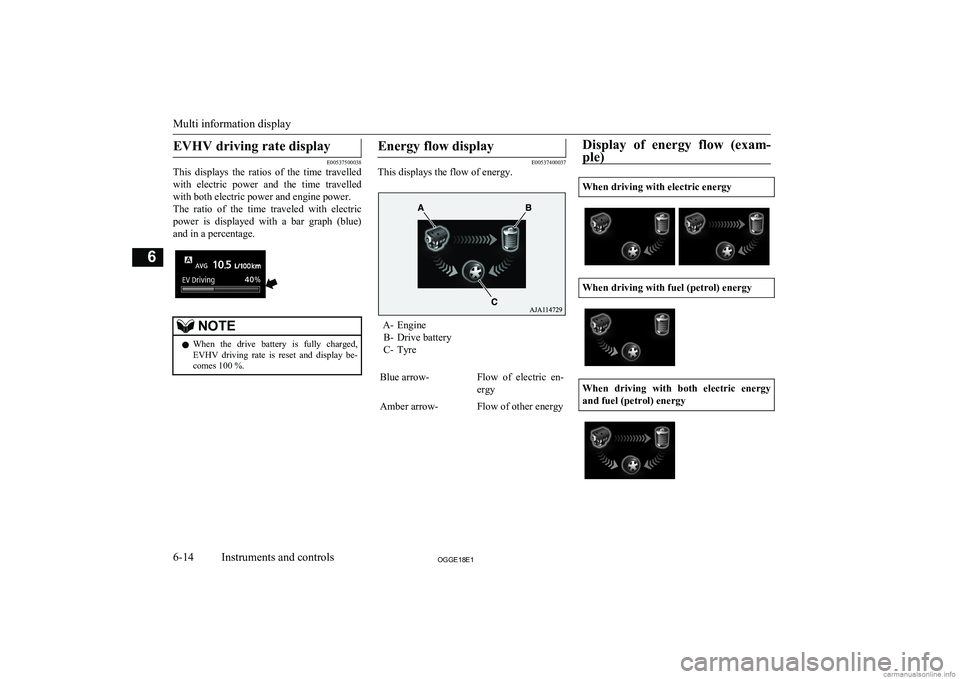
EVHV driving rate display
E00537500038
This displays the ratios of the time travelled
with electric power and the time travelledwith both electric power and engine power.
The ratio of the time traveled with electric
power is displayed with a bar graph (blue) and in a percentage.
NOTEl When the drive battery is fully charged,
EVHV driving rate is reset and display be- comes 100 %.Energy flow display
E00537400037
This displays the flow of energy.
A- Engine
B- Drive battery
C- Tyre
Blue arrow-Flow of electric en-
ergyAmber arrow-Flow of other energyDisplay of energy flow (exam-
ple)
When driving with electric energy
When driving with fuel (petrol) energy
When driving with both electric energy
and fuel (petrol) energy
Multi information display
6-14OGGE18E1Instruments and controls6
Page 166 of 538
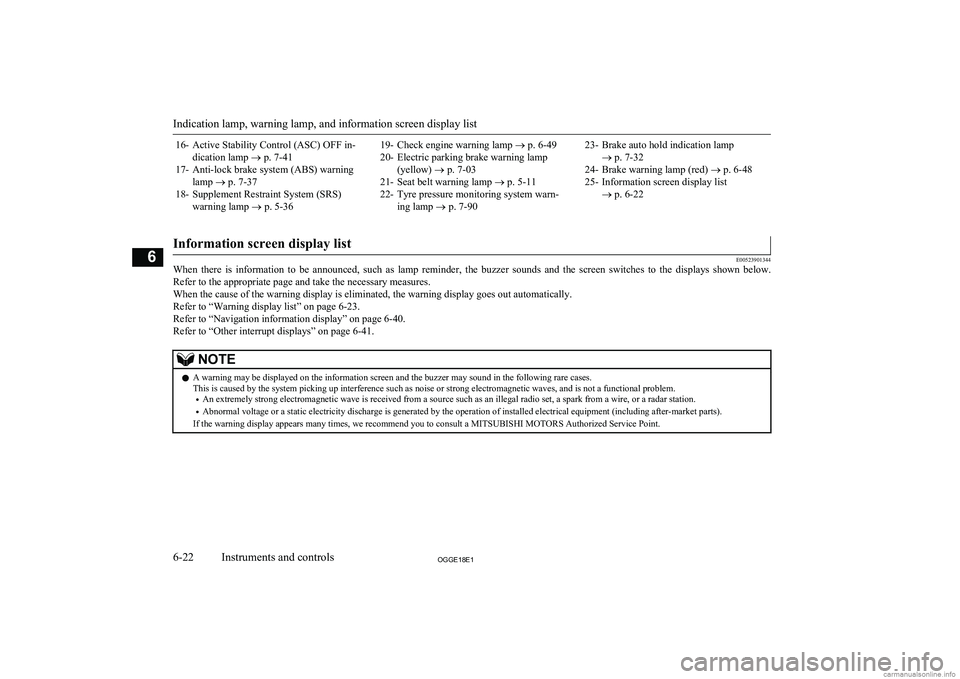
16- Active Stability Control (ASC) OFF in-dication lamp ® p. 7-41
17- Anti-lock brake system (ABS) warning lamp ® p. 7-37
18- Supplement Restraint System (SRS) warning lamp ® p. 5-3619- Check engine warning lamp ® p. 6-49
20- Electric parking brake warning lamp (yellow) ® p. 7-03
21- Seat belt warning lamp ® p. 5-11
22- Tyre pressure monitoring system warn- ing lamp ® p. 7-9023- Brake auto hold indication lamp
® p. 7-32
24- Brake warning lamp (red) ® p. 6-48
25- Information screen display list ® p. 6-22
Information screen display list
E00523901344
When there is information to be announced, such as lamp reminder, the buzzer sounds and the screen switches to the displays shown below.
Refer to the appropriate page and take the necessary measures.
When the cause of the warning display is eliminated, the warning display goes out automatically. Refer to “Warning display list” on page 6-23.
Refer to “Navigation information display” on page 6-40. Refer to “Other interrupt displays” on page 6-41.
NOTEl A warning may be displayed on the information screen and the buzzer may sound in the following rare cases.
This is caused by the system picking up interference such as noise or strong electromagnetic waves, and is not a functional problem.
• An extremely strong electromagnetic wave is received from a source such as an illegal radio set, a spark from a wire, or a radar station.
• Abnormal voltage or a static electricity discharge is generated by the operation of installed electrical equipment (including after-market parts).
If the warning display appears many times, we recommend you to consult a MITSUBISHI MOTORS Authorized Service Point.
Indication lamp, warning lamp, and information screen display list
6-22OGGE18E1Instruments and controls6
Page 173 of 538
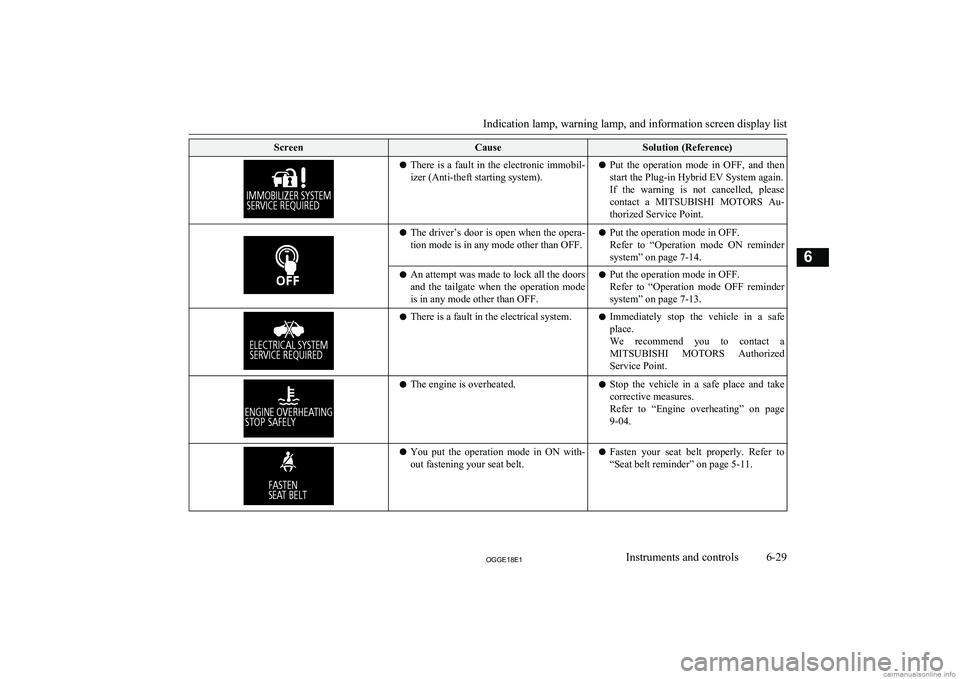
ScreenCauseSolution (Reference)lThere is a fault in the electronic immobil-
izer (Anti-theft starting system).l Put the operation mode in OFF, and then
start the Plug-in Hybrid EV System again.If the warning is not cancelled, please
contact a MITSUBISHI MOTORS Au-
thorized Service Point.l The driver’s door is open when the opera-
tion mode is in any mode other than OFF.l Put the operation mode in OFF.
Refer to “Operation mode ON reminder
system” on page 7-14.l An attempt was made to lock all the doors
and the tailgate when the operation mode
is in any mode other than OFF.l Put the operation mode in OFF.
Refer to “Operation mode OFF reminder system” on page 7-13.l There is a fault in the electrical system.l Immediately stop the vehicle in a safe
place.
We recommend you to contact a MITSUBISHI MOTORS Authorized
Service Point.l The engine is overheated.lStop the vehicle in a safe place and take
corrective measures.
Refer to “Engine overheating” on page 9-04.l You put the operation mode in ON with-
out fastening your seat belt.l Fasten your seat belt properly. Refer to
“Seat belt reminder” on page 5-11.
Indication lamp, warning lamp, and information screen display list
6-29OGGE18E1Instruments and controls6
Page 176 of 538
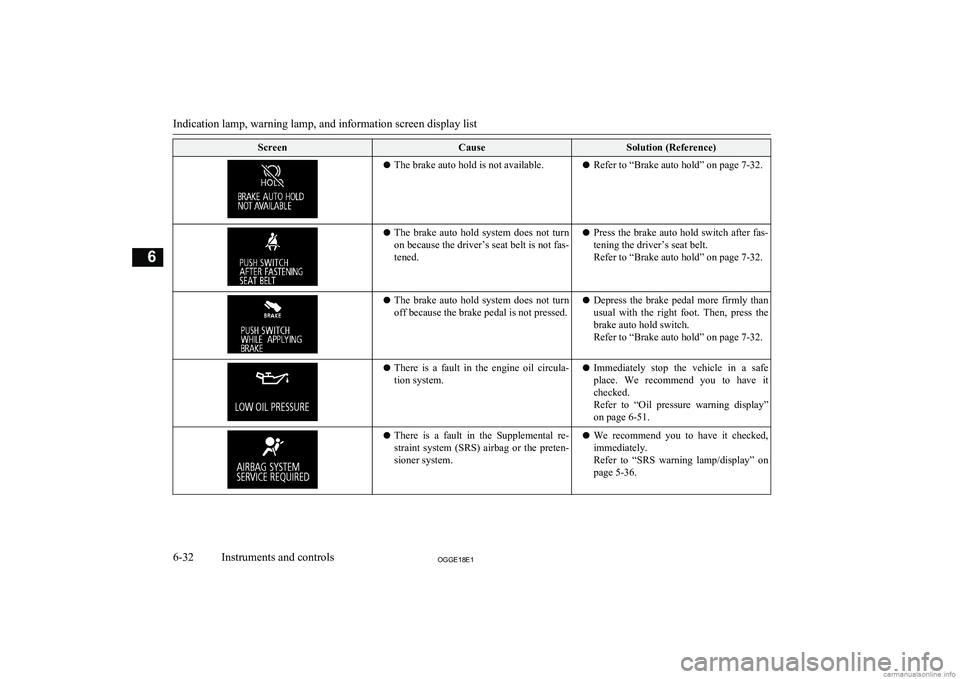
ScreenCauseSolution (Reference)lThe brake auto hold is not available.l Refer to “Brake auto hold” on page 7-32.lThe brake auto hold system does not turn
on because the driver’s seat belt is not fas-
tened.l Press the brake auto hold switch after fas-
tening the driver’s seat belt.
Refer to “Brake auto hold” on page 7-32.l The brake auto hold system does not turn
off because the brake pedal is not pressed.l Depress the brake pedal more firmly than
usual with the right foot. Then, press the
brake auto hold switch.
Refer to “Brake auto hold” on page 7-32.l There is a fault in the engine oil circula-
tion system.l Immediately stop the vehicle in a safe
place. We recommend you to have it checked.
Refer to “Oil pressure warning display” on page 6-51.l There is a fault in the Supplemental re-
straint system (SRS) airbag or the preten-
sioner system.l We recommend you to have it checked,
immediately.
Refer to “SRS warning lamp/display” on
page 5-36.
Indication lamp, warning lamp, and information screen display list
6-32OGGE18E1Instruments and controls6