towing MITSUBISHI OUTLANDER PHEV 2018 (in English) User Guide
[x] Cancel search | Manufacturer: MITSUBISHI, Model Year: 2018, Model line: OUTLANDER PHEV, Model: MITSUBISHI OUTLANDER PHEV 2018Pages: 538, PDF Size: 25.01 MB
Page 296 of 538
NOTElWhen the operation mode is set to OFF, the
selected condition just before setting to OFFis retained.
l The BSW operates when all of the following
conditions are met.
• The operation mode is put in ON.
• The select position is in a position other
than “P” (PARK) and “R” (REVERSE).
• The speed of your vehicle is approximate-
ly 10 km/h (6 mph) or higher.
When the sensor detects an ap-
proaching vehicle
When the BSW indication lamp in the instru-
ment cluster is on, if a vehicle is approaching your vehicle in the detection area, the BlindSpot Warning lamp in the outside rear-view
mirror illuminates.
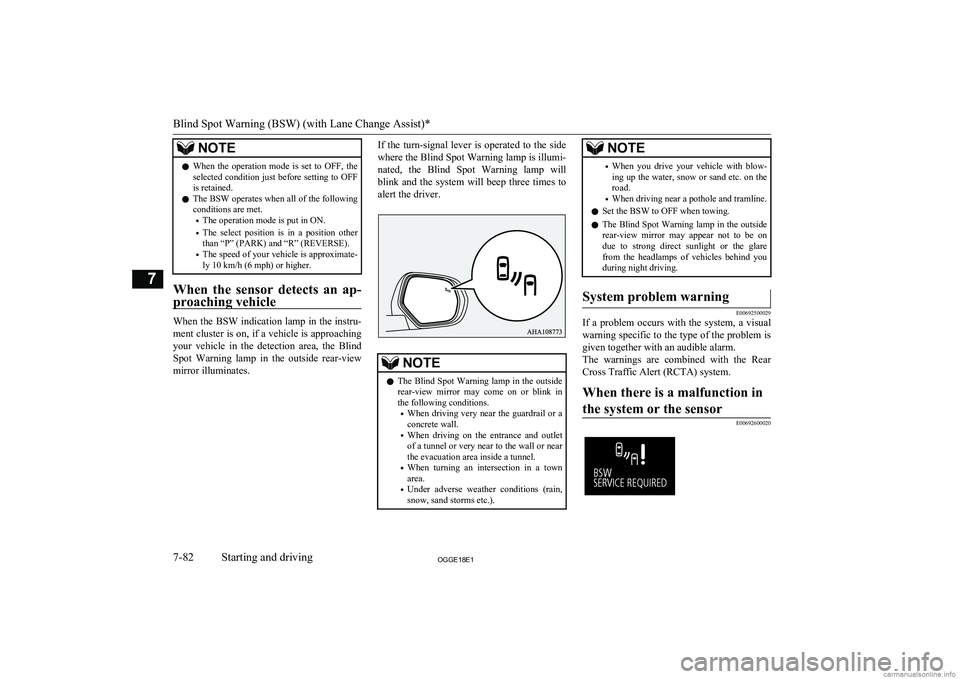
If the turn-signal lever is operated to the side
where the Blind Spot Warning lamp is illumi-
nated, the Blind Spot Warning lamp will
blink and the system will beep three times to alert the driver.NOTEl The Blind Spot Warning lamp in the outside
rear-view mirror may come on or blink inthe following conditions.
• When driving very near the guardrail or a
concrete wall.
• When driving on the entrance and outlet
of a tunnel or very near to the wall or near the evacuation area inside a tunnel.
• When turning an intersection in a town
area.
• Under adverse weather conditions (rain,
snow, sand storms etc.).NOTE• When you drive your vehicle with blow-
ing up the water, snow or sand etc. on the road.
• When driving near a pothole and tramline.
l Set the BSW to OFF when towing.
l The Blind Spot Warning lamp in the outside
rear-view mirror may appear not to be on
due to strong direct sunlight or the glare from the headlamps of vehicles behind youduring night driving.System problem warning
E00692500029
If a problem occurs with the system, a visual
warning specific to the type of the problem isgiven together with an audible alarm.
The warnings are combined with the Rear
Cross Traffic Alert (RCTA) system.
When there is a malfunction in
the system or the sensor
E00692600020Blind Spot Warning (BSW) (with Lane Change Assist)*
7-82OGGE18E1Starting and driving7
Page 299 of 538
CAUTION•When the reversing speed of your vehicle
is approximately 18 km/h (11 mph) or
higher.
• When the speed of an approaching vehicle
is approximately 7 km/h (5 mph) or less.
• If the sensor detection area is blocked by
a nearby object, such as a wall or parked vehicle.
• When a vehicle is approaching from
straight behind your vehicle.
• When your vehicle is exiting from an an-
gled parking spot.
• Immediately after the RCTA has been
turned on.
• Immediately after the operation mode of
the power switch has been put in ON.
• When the bumper surface around the sen-
sor is covered with dirt, snow and ice, etc.
• When the sensor becomes extremely hot
or cold, such as after the vehicle has been parked for a prolonged time under the
blazing sun or in cold weather.
CAUTIONl If the bumper has experienced an impact, the
sensor may have been damaged and the RCTA may not function properly. Have the
vehicle inspected at a MITSUBISHI
MOTORS Authorized Service Point.
To operate
1. Press the BSW switch while the opera-
tion mode is put in ON.
(Refer to “Blind Spot Warning (BSW):
To operate” on page 7-81.)
2. When the select position is put in the
“R” (REVERSE) position, the RCTAwill operate.
NOTEl Set the RCTA to OFF when towing.
l The Blind Spot Warning lamp in the outside
rear-view mirror may appear not to be on
due to strong direct sunlight or the glare from the headlamps of vehicles behind youduring night driving.
When a problem is detected in
the system
If the system detects a problem, a warning is
displayed on the information screen in the multi-information display.
Refer to “Blind Spot Warning (BSW): Sys-
tem problem warning” on page 7-82.
Lane Departure Warning
(LDW)* E00635701119
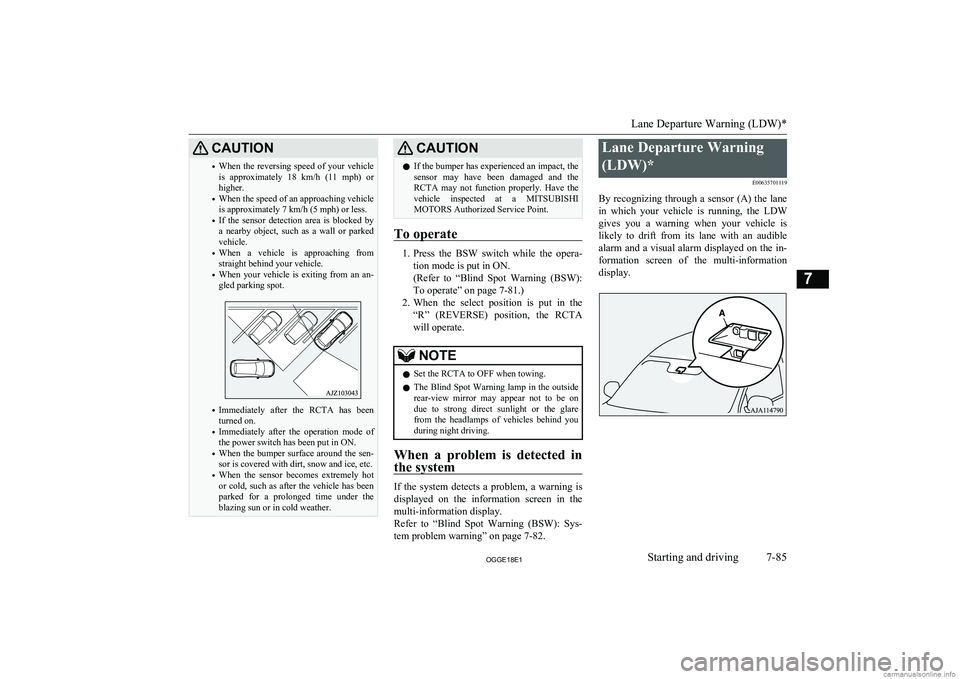
By recognizing through a sensor (A) the lane in which your vehicle is running, the LDW gives you a warning when your vehicle is
likely to drift from its lane with an audible
alarm and a visual alarm displayed on the in- formation screen of the multi-information
display.
Lane Departure Warning (LDW)*
7-85OGGE18E1Starting and driving7
Page 309 of 538
Corner and back sensor loca-tions
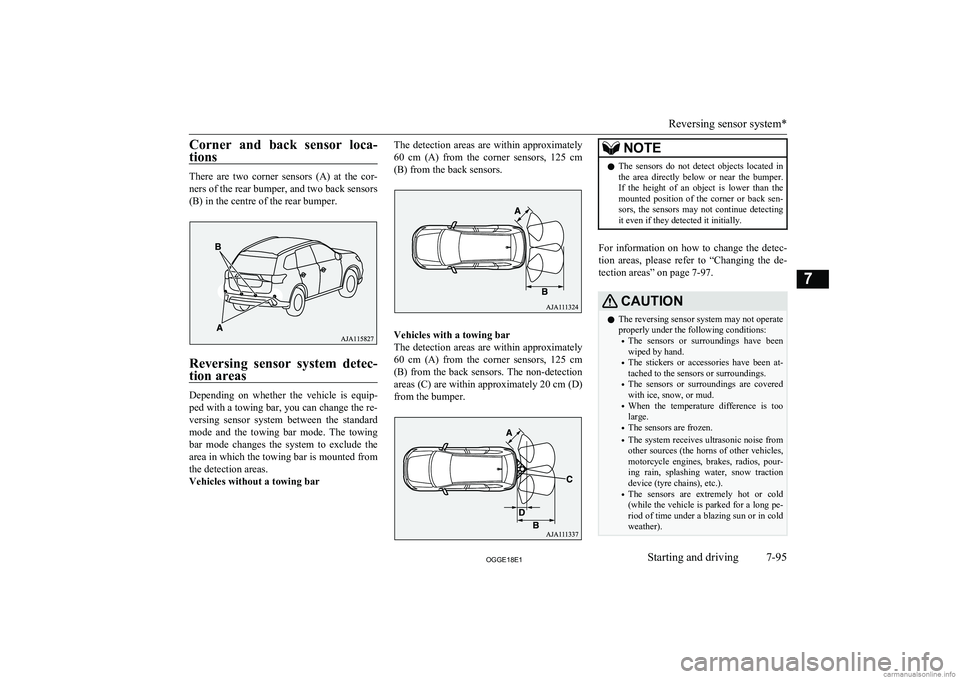
There are two corner sensors (A) at the cor-ners of the rear bumper, and two back sensors
(B) in the centre of the rear bumper.
Reversing sensor system detec-
tion areas
Depending on whether the vehicle is equip-
ped with a towing bar, you can change the re-
versing sensor system between the standard
mode and the towing bar mode. The towing bar mode changes the system to exclude the
area in which the towing bar is mounted from the detection areas.
Vehicles without a towing bar
The detection areas are within approximately
60 cm (A) from the corner sensors, 125 cm
(B) from the back sensors.
Vehicles with a towing bar
The detection areas are within approximately 60 cm (A) from the corner sensors, 125 cm
(B) from the back sensors. The non-detection areas (C) are within approximately 20 cm (D)
from the bumper.
NOTEl The sensors do not detect objects located in
the area directly below or near the bumper. If the height of an object is lower than the
mounted position of the corner or back sen-
sors, the sensors may not continue detecting it even if they detected it initially.
For information on how to change the detec-
tion areas, please refer to “Changing the de- tection areas” on page 7-97.
CAUTIONl The reversing sensor system may not operate
properly under the following conditions:
• The sensors or surroundings have been
wiped by hand.
• The stickers or accessories have been at-
tached to the sensors or surroundings.
• The sensors or surroundings are covered
with ice, snow, or mud.
• When the temperature difference is too
large.
• The sensors are frozen.
• The system receives ultrasonic noise from
other sources (the horns of other vehicles,
motorcycle engines, brakes, radios, pour- ing rain, splashing water, snow tractiondevice (tyre chains), etc.).
• The sensors are extremely hot or cold
(while the vehicle is parked for a long pe- riod of time under a blazing sun or in coldweather).
Reversing sensor system*
7-95OGGE18E1Starting and driving7
Page 311 of 538
Back sensor (vehicles without a towing
bar)Vehicle to obstacle distanceWarning display/sound cycleApprox. 125 to 80 cmIntermittentApprox. 80 to 40 cmFast intermittentWithin approx.40 cmContinuous
Back sensor (vehicles with a towing bar)
Vehicle to obstacle distanceWarning display/sound cycleApprox. 125 to 100 cmIntermittentApprox. 100 to 60 cmFast intermittentWithin approx.60 cmContinuousCAUTIONlThe distances given are to be used for refer-
ence only, as errors may be caused by vari- ous factors, such as temperature, humidity,
or the shape of the obstacles.NOTEl When the sensors are detecting different ob-
stacles at the same time, the information screen in the multi information display indi-
cates the directions of the obstacles each sensors are detecting. However, closer ob-
stacles are given priority over other detected obstacles and the warning buzzer sounds to
inform you of closer obstacles.Changing the detection areas
E00615801257
The detection areas can be changed as fol-
lows:
Vehicles with a towing bar
While the operation of the system is stopped
at the “SONAR” switch, push the “SONAR”
switch approximately 3 seconds or more, and release it. The buzzer sounds twice to indi-
cate that the detection area has been changed.
Vehicles without a towing bar
While the operation of the system is stopped at the “SONAR” switch, push the “SONAR”
switch approximately 3 seconds or more, and
release it. The buzzer sounds once to indicate that the detection area has been changed.
NOTEl The detection area will not change if you
keep the “SONAR” switch pushed for 10
seconds or more.
l After pushing the “SONAR” switch, revers-
ing sensor system operation differs accord- ing to the detection area setting.
• Setting when towing bar is not equipped
When the selector lever is moved to the
“R” position, the reversing sensor system will operate even if the corner sensor op-
eration was stopped by pushing the “SO- NAR” switch.
• Setting when towing bar is equipped
When the reversing sensor system opera-
tion was stopped by pushing the “SO- NAR” switch, the reversing sensor system
will not operate until the Plug-in Hybrid EV System has been stopped even if the selector lever is moved to the “R” posi-tion.
To resume the reversing sensor system operation, push the “SONAR” switch or
stop and restart the Plug-in Hybrid EV System, and then move the selector lever to the “R” position.
Reversing sensor system*
7-97OGGE18E1Starting and driving7
Page 313 of 538
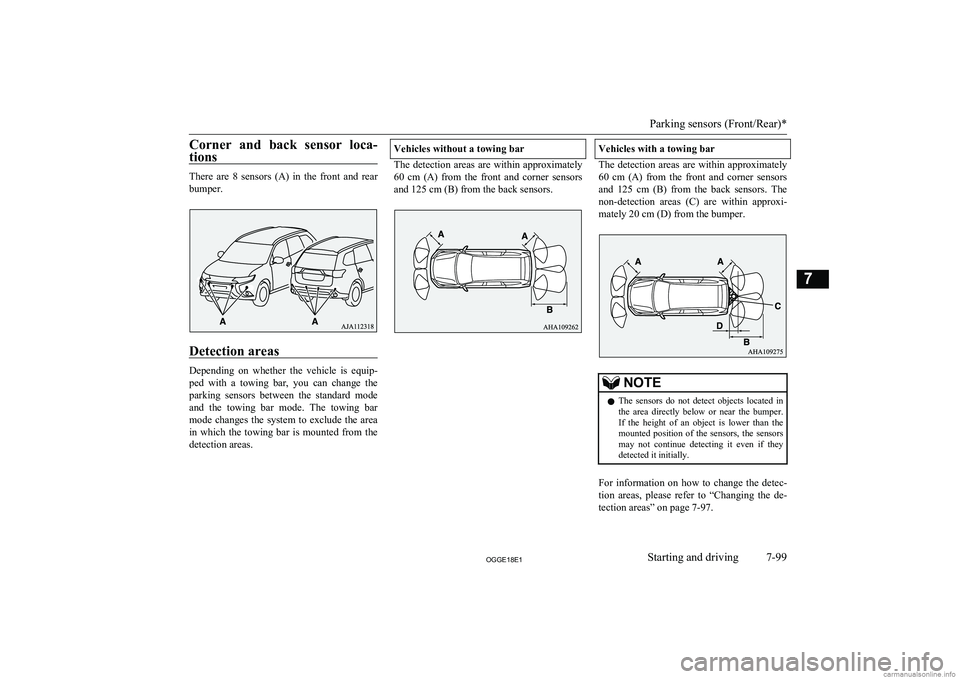
Corner and back sensor loca-tions
There are 8 sensors (A) in the front and rearbumper.
Detection areas
Depending on whether the vehicle is equip-
ped with a towing bar, you can change the parking sensors between the standard modeand the towing bar mode. The towing bar
mode changes the system to exclude the area in which the towing bar is mounted from the
detection areas.
Vehicles without a towing bar
The detection areas are within approximately
60 cm (A) from the front and corner sensors
and 125 cm (B) from the back sensors.
Vehicles with a towing bar
The detection areas are within approximately 60 cm (A) from the front and corner sensors
and 125 cm (B) from the back sensors. The
non-detection areas (C) are within approxi- mately 20 cm (D) from the bumper.
NOTEl The sensors do not detect objects located in
the area directly below or near the bumper. If the height of an object is lower than the
mounted position of the sensors, the sensors
may not continue detecting it even if they detected it initially.
For information on how to change the detec-
tion areas, please refer to “Changing the de- tection areas” on page 7-97.
Parking sensors (Front/Rear)*
7-99OGGE18E1Starting and driving7
Page 315 of 538
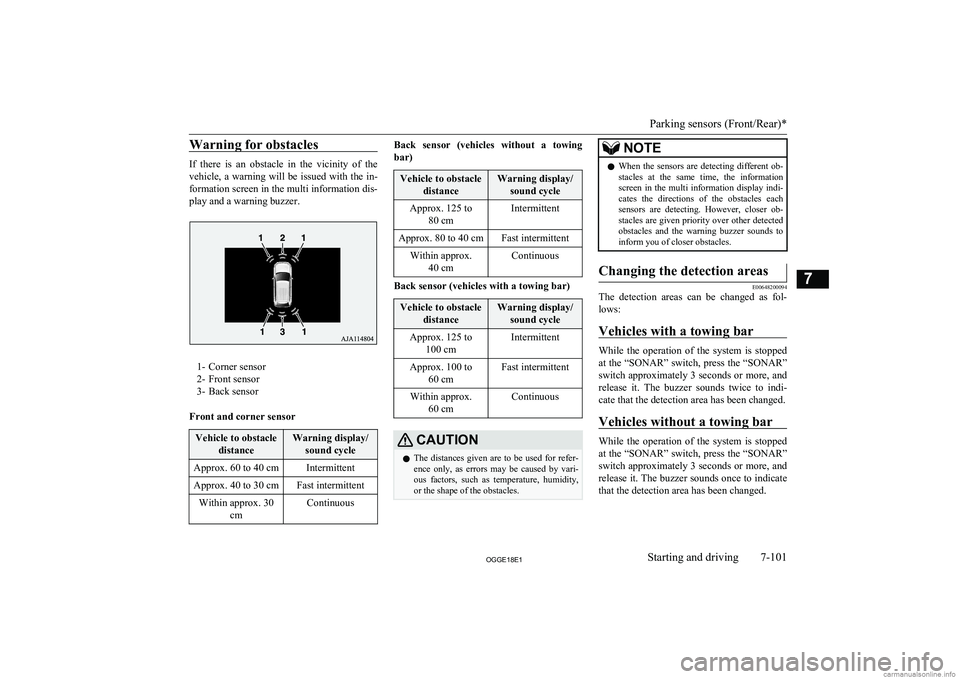
Warning for obstacles
If there is an obstacle in the vicinity of the
vehicle, a warning will be issued with the in-
formation screen in the multi information dis- play and a warning buzzer.
1- Corner sensor
2- Front sensor
3- Back sensor
Front and corner sensor
Vehicle to obstacle distanceWarning display/sound cycleApprox. 60 to 40 cmIntermittentApprox. 40 to 30 cmFast intermittentWithin approx. 30 cmContinuousBack sensor (vehicles without a towing
bar)Vehicle to obstacle distanceWarning display/sound cycleApprox. 125 to 80 cmIntermittentApprox. 80 to 40 cmFast intermittentWithin approx.40 cmContinuous
Back sensor (vehicles with a towing bar)
Vehicle to obstacle distanceWarning display/sound cycleApprox. 125 to 100 cmIntermittentApprox. 100 to 60 cmFast intermittentWithin approx.60 cmContinuousCAUTIONlThe distances given are to be used for refer-
ence only, as errors may be caused by vari- ous factors, such as temperature, humidity,
or the shape of the obstacles.NOTEl When the sensors are detecting different ob-
stacles at the same time, the information screen in the multi information display indi-
cates the directions of the obstacles each sensors are detecting. However, closer ob-
stacles are given priority over other detected obstacles and the warning buzzer sounds to
inform you of closer obstacles.Changing the detection areas
E00648200094
The detection areas can be changed as fol-
lows:
Vehicles with a towing bar
While the operation of the system is stopped
at the “SONAR” switch, press the “SONAR”
switch approximately 3 seconds or more, and release it. The buzzer sounds twice to indi-
cate that the detection area has been changed.
Vehicles without a towing bar
While the operation of the system is stopped
at the “SONAR” switch, press the “SONAR”
switch approximately 3 seconds or more, and
release it. The buzzer sounds once to indicate that the detection area has been changed.
Parking sensors (Front/Rear)*
7-101OGGE18E1Starting and driving7
Page 316 of 538
NOTElThe mode of the detection area can be
switched only when the select position is in
the “R” (REVERSE) position.
l The detection area will not change if you
keep the “SONAR” switch pressed for 10 seconds or more.
l After pressing the “SONAR” switch, the
parking sensors operation differs according
to the detection area setting.
• Setting when towing bar is not equipped
When the selector lever is moved to the “R” (REVERSE) position, the parking
sensors will operate even if the parking sensors operation was stopped by pressing
the “SONAR” switch.
• Setting when towing bar is equipped
When the parking sensors operation was stopped by pressing the “SONAR”
switch, the parking sensors will not oper- ate until the Plug-in Hybrid EV System has been stopped even if the select posi-
tion is put to the “R” (REVERSE) posi-
tion.
To resume the parking sensors operation, press the “SONAR” switch or stop and re-
start the Plug-in Hybrid EV System, and then put the select position to the “R”
(REVERSE) position.Warning display
E00648300125
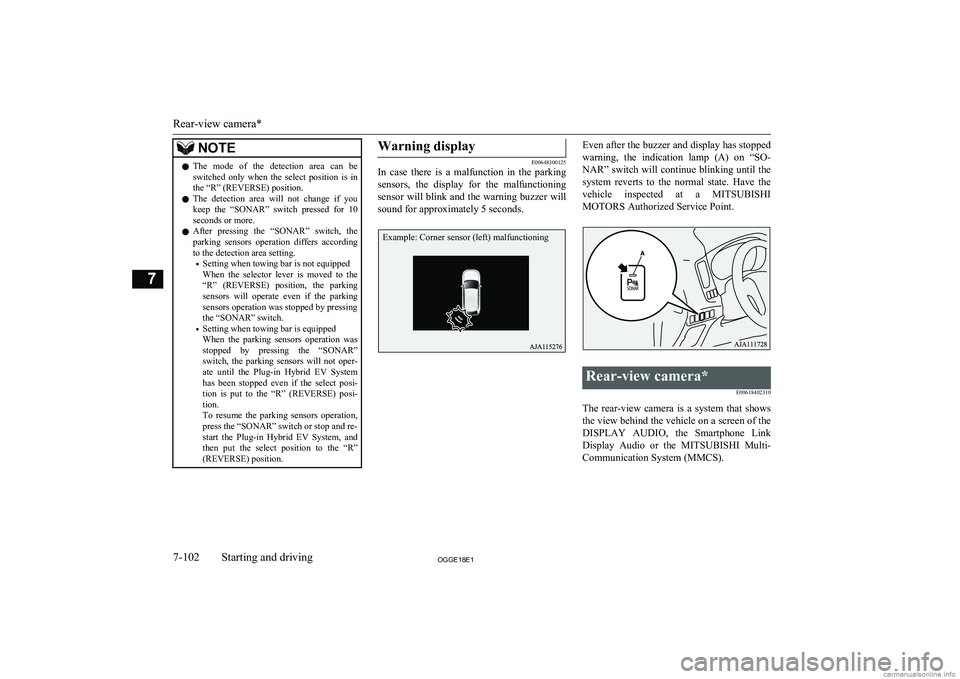
In case there is a malfunction in the parking
sensors, the display for the malfunctioning
sensor will blink and the warning buzzer will sound for approximately 5 seconds.
Even after the buzzer and display has stopped
warning, the indication lamp (A) on “SO- NAR” switch will continue blinking until the
system reverts to the normal state. Have the vehicle inspected at a MITSUBISHI
MOTORS Authorized Service Point.Rear-view camera*
E00618402310
The rear-view camera is a system that showsthe view behind the vehicle on a screen of the
DISPLAY AUDIO, the Smartphone Link Display Audio or the MITSUBISHI Multi-
Communication System (MMCS).
Rear-view camera*
7-102OGGE18E1Starting and driving7 Example: Corner sensor (left) malfunctioning
Page 330 of 538
NOTElBe sure that adequate clearance is main-
tained for raising the tailgate while loading
luggage on the roof carrier.Trailer towing
E00610001906
In order to tow a trailer with your vehicle,
have a trailer towing device mounted that
meets all relevant regulations in your area, consult a MITSUBISHI MOTORS Author-
ized Service Point.
The regulations concerning the towing of a
trailer may differ from country to country. You are advised to obey the regulations in
each area.
CAUTIONl Danger of Accident!
A towing bar should be fitted according to MITSUBISHI MOTORS guidelines.
Maximum towable weight with
brake and maximum trailer- nose weight
Never exceed the maximum towable weight
with brake and the maximum trailer-nose weight as listed in the specifications.
(Refer to page “Vehicle weight” on page
12-05.)
If you tow a trailer at an altitude of more than
1,000 m above sea-level, reduce your weight by 10 % of the gross combination weight for
every increase of 1,000 m above sea-level, as
the engine output is lowered owing to de-
crease in atmospheric pressure.
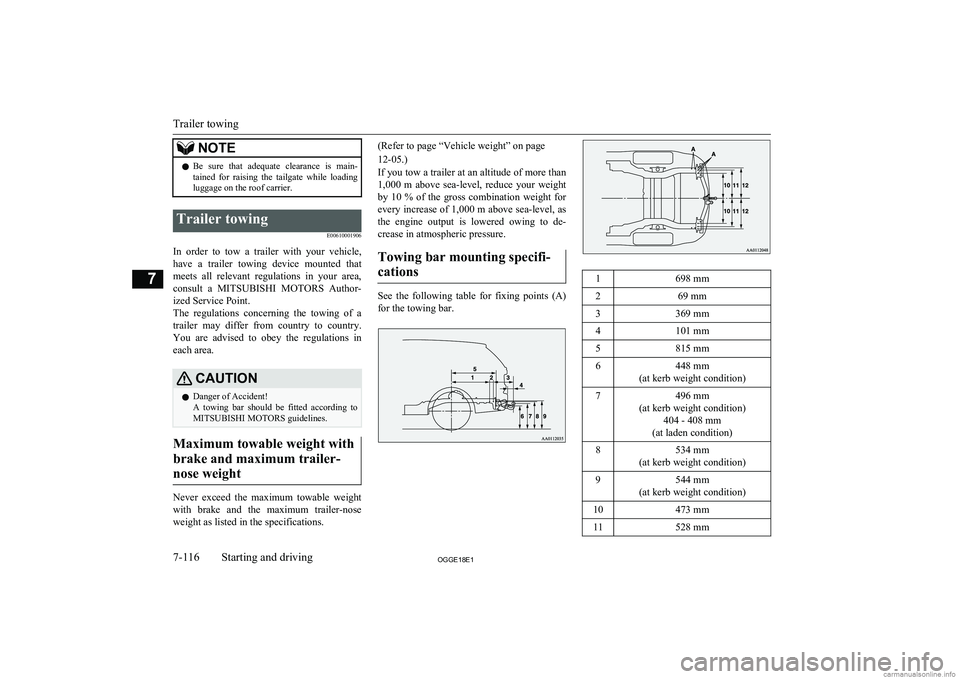
Towing bar mounting specifi-cations
See the following table for fixing points (A) for the towing bar.
1698 mm269 mm3369 mm4101 mm5815 mm6448 mm
(at kerb weight condition)7496 mm
(at kerb weight condition) 404 - 408 mm
(at laden condition)8534 mm
(at kerb weight condition)9544 mm
(at kerb weight condition)10473 mm11528 mm
Trailer towing
7-116OGGE18E1Starting and driving7
Page 331 of 538
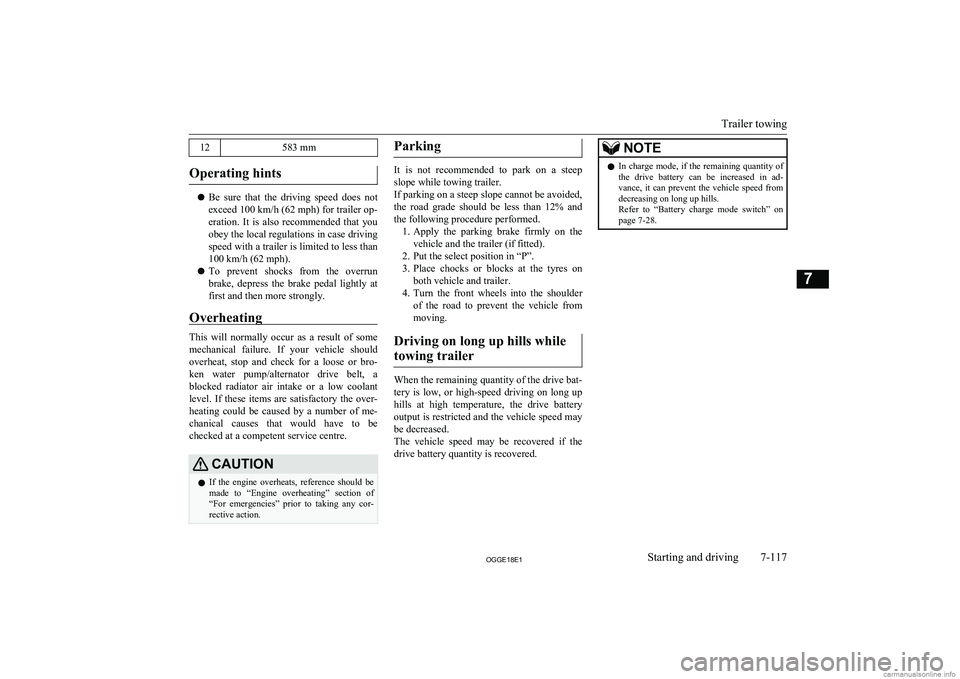
12583 mm
Operating hints
lBe sure that the driving speed does not
exceed 100 km/h (62 mph) for trailer op-
eration. It is also recommended that you obey the local regulations in case driving speed with a trailer is limited to less than
100 km/h (62 mph).
l To prevent shocks from the overrun
brake, depress the brake pedal lightly at first and then more strongly.
Overheating
This will normally occur as a result of some
mechanical failure. If your vehicle should overheat, stop and check for a loose or bro-ken water pump/alternator drive belt, a
blocked radiator air intake or a low coolant level. If these items are satisfactory the over-
heating could be caused by a number of me-
chanical causes that would have to be
checked at a competent service centre.
CAUTIONl If the engine overheats, reference should be
made to “Engine overheating” section of
“For emergencies” prior to taking any cor- rective action.Parking
It is not recommended to park on a steep
slope while towing trailer.
If parking on a steep slope cannot be avoided,
the road grade should be less than 12% and
the following procedure performed. 1. Apply the parking brake firmly on the
vehicle and the trailer (if fitted).
2. Put the select position in “P”.
3. Place chocks or blocks at the tyres on
both vehicle and trailer.
4. Turn the front wheels into the shoulder
of the road to prevent the vehicle from moving.
Driving on long up hills while towing trailer
When the remaining quantity of the drive bat-tery is low, or high-speed driving on long up
hills at high temperature, the drive battery
output is restricted and the vehicle speed may be decreased.
The vehicle speed may be recovered if the
drive battery quantity is recovered.
NOTEl In charge mode, if the remaining quantity of
the drive battery can be increased in ad-
vance, it can prevent the vehicle speed from
decreasing on long up hills.
Refer to “Battery charge mode switch” on page 7-28.
Trailer towing
7-117OGGE18E1Starting and driving7
Page 419 of 538
If the vehicle breaks down.................................................................. 9-02Emergency starting............................................................................. 9-02
Engine overheating............................................................................. 9-04
Tools and jack..................................................................................... 9-06
Tyre repair kit......................................................................................9-07
How to change a tyre.......................................................................... 9-13
Towing................................................................................................ 9-17
Operation under adverse driving conditions....................................... 9-20For emergencies
OGGE18E19