light MITSUBISHI OUTLANDER SPORT 2012 3.G Owners Handbook
[x] Cancel search | Manufacturer: MITSUBISHI, Model Year: 2012, Model line: OUTLANDER SPORT, Model: MITSUBISHI OUTLANDER SPORT 2012 3.GPages: 16, PDF Size: 1.82 MB
Page 4 of 16
2
1
56
3
7
4
22
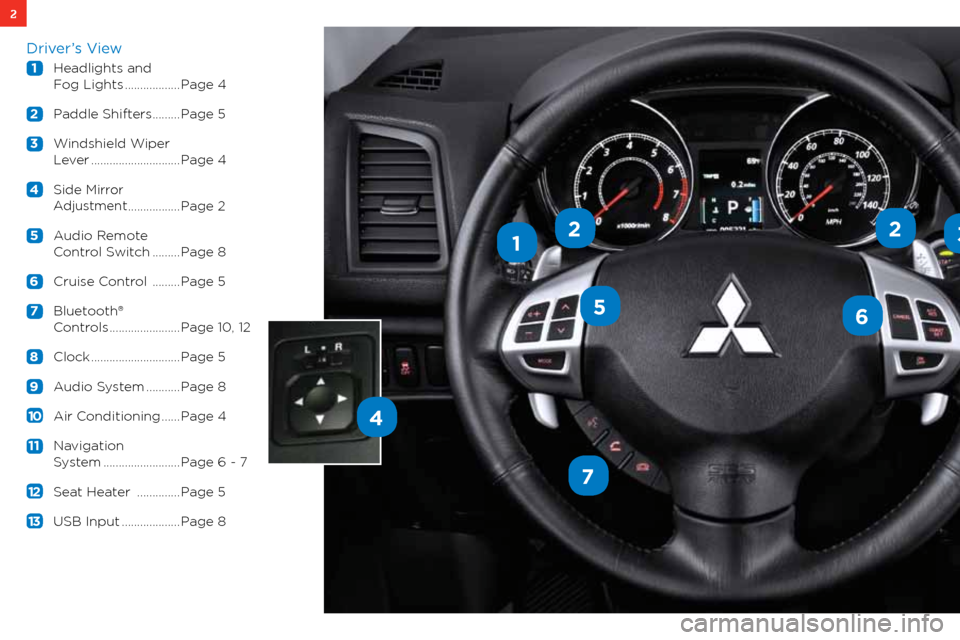
Driver’s View
1 headlights and
f og lights .................. Page 4
2 Paddle shifters ......... Page 5
3 w indshield w iper
l ever ............................. Page 4
4 side
mirror
a djustment
................. Page 2
5 a udio Remote
c ontrol s witch ......... Page 8
6 cruise c ontrol .........Page 5
7 bluetooth®
c ontrols ....................... Page 10, 12
8 clock ............................. Page 5
9 a udio s ystem ........... Page 8
10 air c onditioning ...... Page 4
11 navigation
system ......................... Page 6 - 7
12 seat heater .............. Page 5
1 3 Usb input ................... Page 8
Page 6 of 16
4CONTROLS
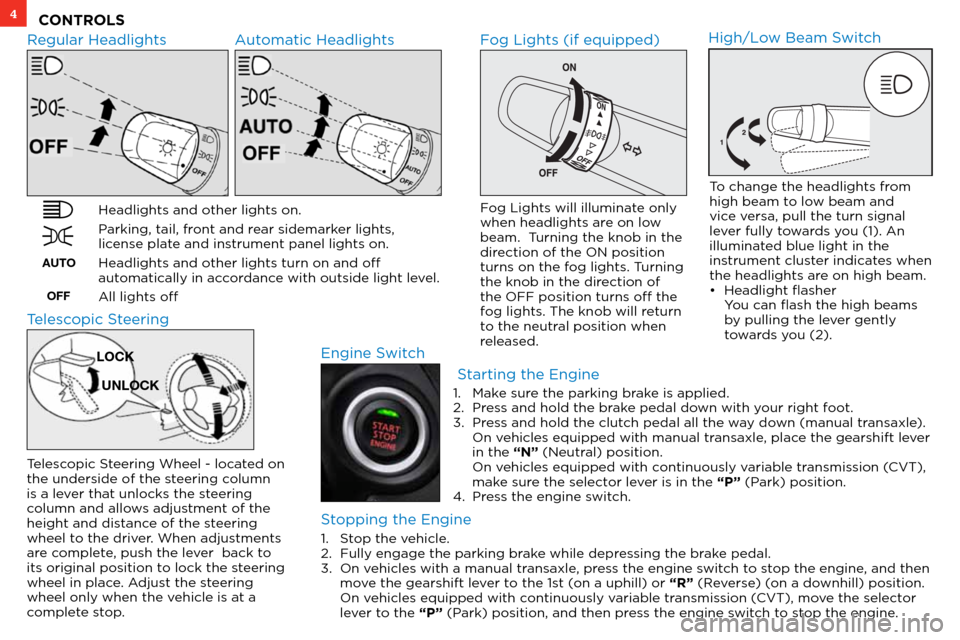
Regular Headlights Automatic Headlights
Headlights and other lights on.
Parking, tail, front and rear sidemarker lights,
license plate and instrument panel lights on.
Headlights and other lights turn on and off
automatically in accordance with outside light level.
All lights off
AUTOOFF
Fog Lights (if equipped)
Engine Switch
Fog Lights will illuminate only
when headlights are on low
beam. Turning the knob in the
direction of the ON position
turns on the fog lights. Turning
the knob in the direction of
the OFF position turns off the
fog lights. The knob will return
to the neutral position when
released.
High/Low Beam Switch
To change the headlights from
high beam to low beam and
vice versa, pull the turn signal
lever fully towards you (1). An
illuminated blue light in the
instrument cluster indicates when
the headlights are on high beam.
• Headlight flasher
You can flash the high beams by pulling the lever gently
towards you (2).
Telescopic Steering
Telescopic Steering Wheel - located on
the underside of the steering column
is a lever that unlocks the steering
column and allows adjustment of the
height and distance of the steering
wheel to the driver. When adjustments
are complete, push the lever back to
its original position to lock the steering
wheel in place. Adjust the steering
wheel only when the vehicle is at a
complete stop.
LOCK
UNLOCK
Starting the Engine
Stopping the Engine
1. Stop the vehicle.
2. Fully engage the parking brake while depressing the brake pedal.
3. On vehicles with a manual transaxle, press the engine switch to stop the engine, and then
move the gearshift lever to the 1st (on a uphill) or “R” (Reverse) (on a downhill) position.
On vehicles equipped with continuously variable transmission (CVT), move the selector
lever to the “P” (Park) position, and then press the engine switch to stop the engine. 1.
Make sure the parking brake is applied.
2. Press and hold the brake pedal down with your right foot.
3. Press and hold the clutch pedal all the way down (manual transaxle).
On vehicles equipped with manual transaxle, place the gearshift lever
in the “N” (Neutral) position.
On vehicles equipped with continuously variable transmission (CVT),
make sure the selector lever is in the “P” (Park) position.
4. Press the engine switch.
Page 7 of 16
5
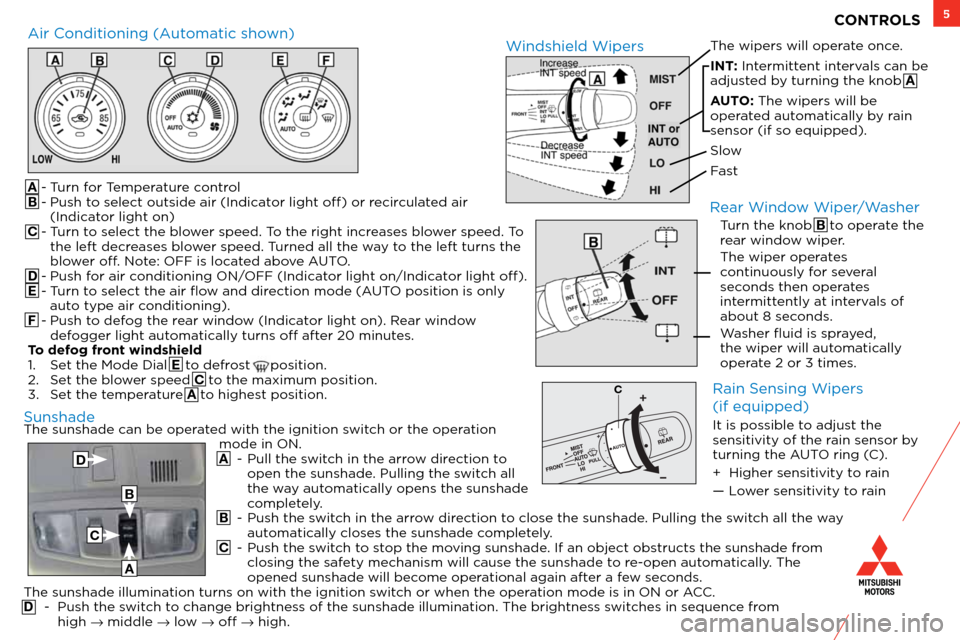
The sunshade can be operated with the ignition switch or the operation mode in ON.
A - Pull the switch in the arrow direction to
open the sunshade. Pulling the switch all
the way automatically opens the sunshade
completely.
B - Push the switch in the arrow direction to close the sunshade. Pulling the switch all the way
automatically closes the sunshade completely.
C - Push the switch to stop the moving sunshade. If an object obstructs the sunshade from
closing the safety mechanism will cause the sunshade to re-open automatically. The
opened sunshade will become operational again after a few seconds.
The sunshade illumination turns on with the ignition switch or when the operation mode is in ON or ACC.
D - Push the switch to change brightness of the sunshade illumination. The brightness switches in sequence from
high → middle → low → off → high.
A
- Turn for Temperature control
B - Push to select outside air (Indicator light off) or recirculated air
(Indicator light on)
C - Turn to select the blower speed. To the right increases blower speed. To
the left decreases blower speed. Turned all the way to the left turns the
blower off. Note: OFF is located above AUTO.
D - Push for air conditioning ON/OFF (Indicator light on/Indicator light off).
E - Turn to select the air flow and direction mode (AUTO position is only auto type air conditioning).
F - Push to defog the rear window (Indicator light on). Rear window
defogger light automatically turns off after 20 minutes.
To defog front windshield
1. Set the Mode Dial E to defrost
position.
2. Set the blower speed C to the maximum position.
3. Set the temperature A to highest position.
Air Conditioning (Automatic shown) The wipers will operate once.
INT: Intermittent intervals can be
adjusted by turning the knob A
AUTO: The wipers will be
operated automatically by rain
sensor (if so equipped).
Slow
FastWindshield Wipers
CONTROLS
Sunshade
Turn the knob B to operate the
rear window wiper.
The wiper operates
continuously for several
seconds then operates
intermittently at intervals of
about 8 seconds.
Washer fluid is sprayed,
the wiper will automatically
operate 2 or 3 times.
Rear Window Wiper/Washer
Rain Sensing Wipers
(if equipped)
It is possible to adjust the
sensitivity of the rain sensor by
turning the AUTO ring (C).
+ Higher sensitivity to rain
— Lower sensitivity to rain
C
A
D
B
C
Page 8 of 16
6OWN THE ROAD
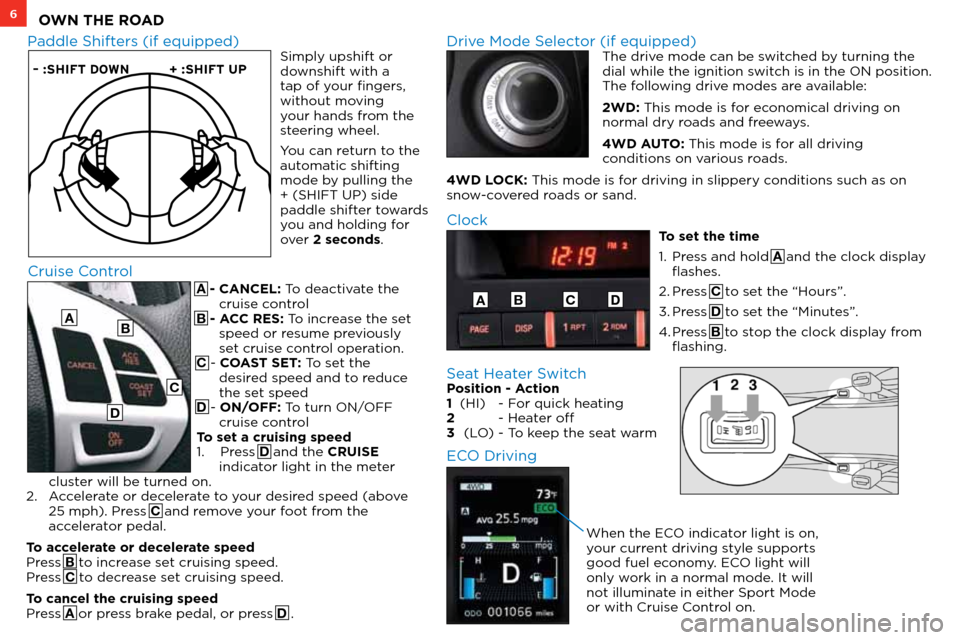
A - CANCEL: To deactivate the cruise control
B - ACC RES: To increase the set speed or resume previously
set cruise control operation.
C - COAST SET: To set the desired speed and to reduce
the set speed
D - ON/OFF: To turn ON/OFF cruise control
To set a cruising speed
1. Press D and the CRUISE
indicator light in the meter
cluster will be turned on.
2. Accelerate or decelerate to your desired speed (above
25 mph). Press C and remove your foot from the
accelerator pedal.
To accelerate or decelerate speed
Press B to increase set cruising speed.
Press C to decrease set cruising speed.
To cancel the cruising speed
Press A or press brake pedal, or press D .
– :SHIFT DO WN+ :SHIFT UP
Paddle Shifters (if equipped) Drive Mode Selector (if equipped) The drive mode can be switched by turning the
dial while the ignition switch is in the ON position.
The following drive modes are available:
2WD: This mode is for economical driving on
normal dry roads and freeways.
4WD AUTO: This mode is for all driving
conditions on various roads.
4WD LOCK: This mode is for driving in slippery conditions such as on
snow-covered roads or sand.
Cruise Control
A
Clock
To set the time
1. Press and hold A and the clock display
flashes.
2. Press C to set the “Hours”.
3. Press D to set the “Minutes”.
4. Press B to stop the clock display from
flashing.
ABCD
B
C
D
Simply upshift or
downshift with a
tap of your fingers,
without moving
your hands from the
steering wheel.
You can return to the
automatic shifting
mode by pulling the
+ (SHIFT UP) side
paddle shifter towards
you and holding for
over 2 seconds.
Seat Heater Switch Position - Action
1 (HI) - For quick heating
2 - Heater off
3 (LO) - To keep the seat warm
ECO Driving
When the ECO indicator light is on,
your current driving style supports
good fuel economy. ECO light will
only work in a normal mode. It will
not illuminate in either Sport Mode
or with Cruise Control on.
Page 12 of 16
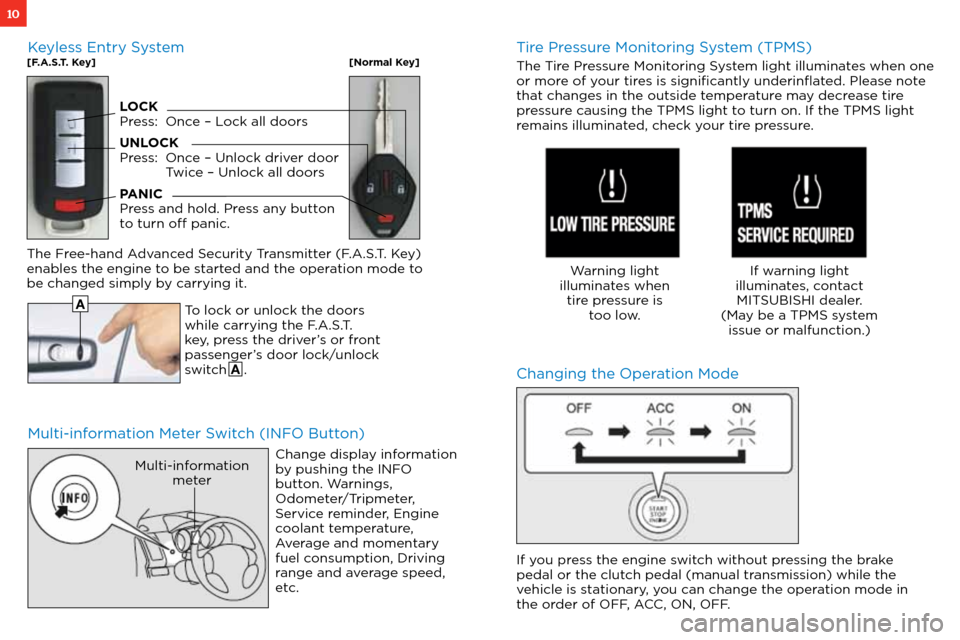
10
Multi-information Meter Switch (INFO Button)Changing the Operation Mode
To lock or unlock the doors
while carrying the F.A.S.T.
key, press the driver’s or front
passenger’s door lock/unlock
switch A .
The Free-hand Advanced Security Transmitter (F.A.S.T. Key)
enables the engine to be started and the operation mode to
be changed simply by carrying it.
Change display information
by pushing the INFO
button. Warnings,
Odometer/Tripmeter,
Service reminder, Engine
coolant temperature,
Average and momentary
fuel consumption, Driving
range and average speed,
etc.
Multi-informationmeter
A
Tire Pressure Monitoring System (TPMS)
The Tire Pressure Monitoring System light illuminates when one
or more of your tires is significantly underinflated. Please note
that changes in the outside temperature may decrease tire
pressure causing the TPMS light to turn on. If the TPMS light
remains illuminated, check your tire pressure.
Warning light
illuminates when tire pressure is too low. If warning light
illuminates, contact MITSUBISHI dealer.
(May be a TPMS system issue or malfunction.)
Keyless Entry System[F.A.S.T. Key][Normal Key]
LOCK
Press: Once – Lock all doors
UNLOCK
Press: Once – Unlock driver door
Twice – Unlock all doors
PANIC
Press and hold. Press any button
to turn off panic.
If you press the engine switch without pressing the brake
pedal or the clutch pedal (manual transmission) while the
vehicle is stationary, you can change the operation mode in
the order of OFF, ACC, ON, OFF.
Page 15 of 16

13
Q: My Outlander Sport has two 12V accessory outlets. What devices can be plugged into these outlets?
A: Both of these outlets are protected with 15 amp fuses. Always check the current draw rating of any device prior to use in the vehicle.
If the device is rated above 12 amps, this could lead to circuit overload and the electrical fuse opening (no current flow).
Q: I only have one remote for the remote start system on my Outlander Sport. Can I get a second one?
A: No. Only one remote can be programmed per vehicle for security reasons.
Q: How can I get the MPG stated on the window sticker?
A: Vehicle driving styles will greatly affect MPG. Avoid sudden abrupt starts from a stop and let the vehicle coast to the traffic light. Both of these styles will increase mileage and reduce brake lining wear.
• Vehicles are designed to achieve the best fuel mileage when they are driven at the speed limits on the freeway. Avoid driving over 65 mph.
• Under inflated tires will increase rolling resistance and will reduce fuel mileage. Check tire pressure frequently to increase miles per gallon. Proper tire pressure also ensures optimum tire performance (including tire wear.)
Q: How does the Navigation System choose a certain route?
A: The system takes into account traffic conditions, road types, distance and road width to recommend the route.
Q: Why does my Anti-Lock Braking System (ABS) make a noise?
A: Each time your vehicle is started and driven a short distance, you will hear the sound of the ABS motor operating from the right front
engine compartment. This is the normal sound the Anti-Lock Braking System makes when performing a self check.
Q: Why do my Rain Sensing Windshield Wipers operate on their own when it’s not raining?
A: • When the lever is in the AUTO position, the rain sensor detects rain or snow and automatically turns on the wipers.
• The wipers may automatically operate when things such as insects or foreign objects are affixed to the windshield on top of the rain sensor or when the windshield is frosted over.
• To stop the wipers, place the lever in the OFF position.
Q: Why does my check engine light come on after I put gas in my car?
A: There are many reasons why your check engine light may illuminate. Before calling your dealership, make sure the
fuel cap is fully engaged and you have heard three clicks when tightening it. After checking and hearing three clicks and
the light is still on, contact your dealership.
Q: How do I use the emergency key when the F.A.S.T. key battery or vehicle battery is run down?
A: Remove the emergency key from the F.A.S.T key fob and manually unlock the door. Once inside the vehicle insert the F.A.S.T.
key fob into the key slot in the glove box. Starting the engine and changing the operation mode should now be possible.
Remove the F.A.S.T. key from the slot after starting the engine or changing the operation mode.
FAQ ’ s