display MITSUBISHI OUTLANDER SPORT 2013 3.G Owners Handbook
[x] Cancel search | Manufacturer: MITSUBISHI, Model Year: 2013, Model line: OUTLANDER SPORT, Model: MITSUBISHI OUTLANDER SPORT 2013 3.GPages: 16, PDF Size: 2.46 MB
Page 8 of 16
6OWN THE ROAD
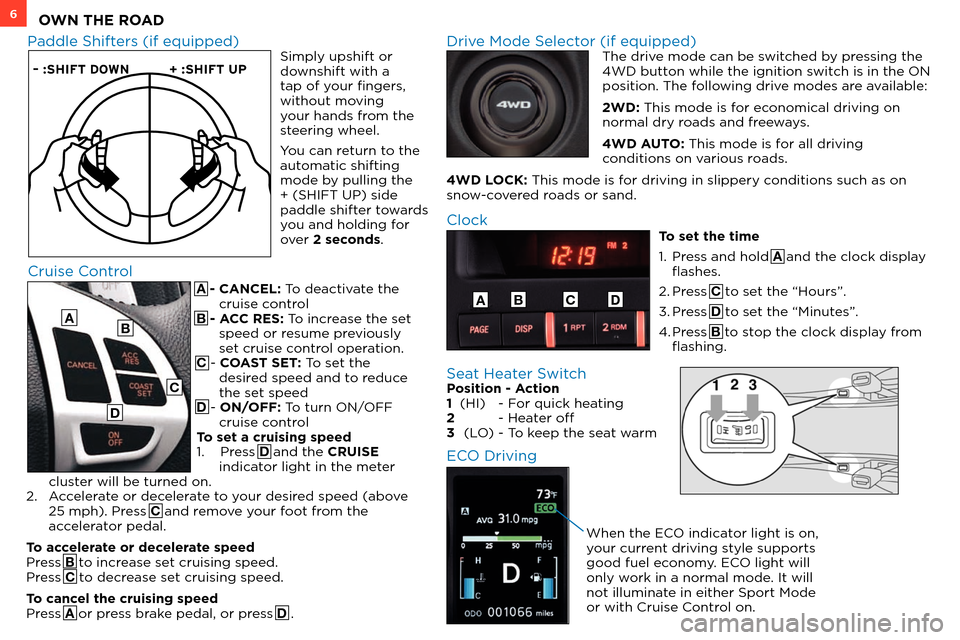
A - CANCEL: To deactivate the cruise control
B - ACC RES: To increase the set speed or resume previously
set cruise control operation.
C - COAST SET: To set the desired speed and to reduce
the set speed
D - ON/OFF: To turn ON/OFF cruise control
To set a cruising speed
1.
Press D and the CRUISE
indicator light in the meter
cluster will be turned on.
2.
A
ccelerate or decelerate to your desired speed (above
25 mph). Press C and remove your foot from the
accelerator pedal.
To accelerate or decelerate speed
Press B to increase set cruising speed.
Press C to decrease set cruising speed.
To cancel the cruising speed
Press A or press brake pedal, or press D .
– :SHIFT DOWN + :SHIFT UP
Paddle Shifters (if equipped) Drive Mode Selector (if equipped) The drive mode can be switched by pressing the
4WD button while the ignition switch is in the ON
position. The following drive modes are available:
2WD: This mode is for economical driving on
normal dry roads and freeways.
4WD AUTO: This mode is for all driving
conditions on various roads.
4WD LOCK: This mode is for driving in slippery conditions such as on
snow-covered roads or sand.
Cruise Control
A
Clock
To set the time
1.
Pr
ess and hold A and the clock display
flashes.
2.
Press C to set the “Hours”.
3.
Press D to set the “Minutes”.
4.
Press B to stop the clock display from
flashing.
ABCD
B
C
D
Simply upshift or
downshift with a
tap of your fingers,
without moving
your hands from the
steering wheel.
You can return to the
automatic shifting
mode by pulling the
+ (SHIFT UP) side
paddle shifter towards
you and holding for
over 2 seconds.
Seat Heater Switch Position - Action
1 (HI) - F or quick heating
2
- Hea
ter off
3
(L
O)
- T
o keep the seat warm
ECO Driving
When the ECO indicator light is on,
your current driving style supports
good fuel economy. ECO light will
only work in a normal mode. It will
not illuminate in either Sport Mode
or with Cruise Control on.
Page 9 of 16
7AUDIO SYSTEM
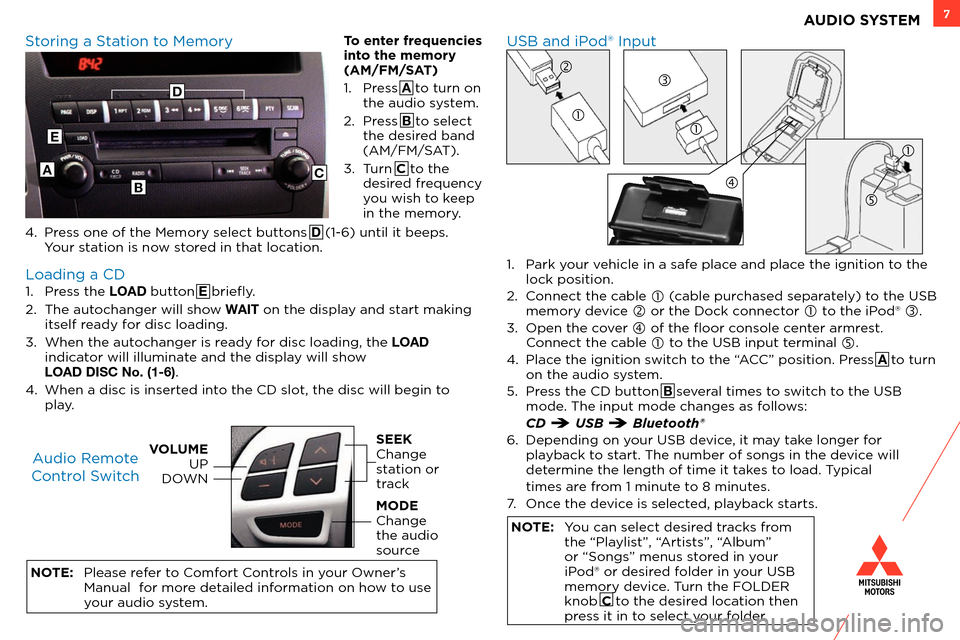
1. Press the LOAD button E briefly.
2.
T
he autochanger will show WAIT on the display and start making
itself ready for disc loading.
3.
W
hen the autochanger is ready for disc loading, the LOAD
indicator will illuminate and the display will show
LOAD DISC No. (1-6)
.
4.
W
hen a disc is inserted into the CD slot, the disc will begin to
play.
NOTE:
Please r
efer to Comfort Controls in your Owner’s
Manual for more detailed information on how to use
your audio system.
USB and iPod® Input
Storing a Station to Memory
Loading a CD Audio Remote
Control Switch
VOLUME UP
DOWNSEEK
Change
station or
track
MODE
Change
the audio
source
1. Park your vehicle in a safe place and place the ignition to the lock position.
2.
C
onnect the cable
(cable purchased separately) to the USB
memory device
or the Dock connector to the iPod® .
3.
Open the c
over
of the floor console center armrest. C
onnect the cable
to the USB input terminal .
4.
Plac
e the ignition switch to the “ACC” position. Press A to turn
on the audio system.
5.
Pr
ess the CD button B several times to switch to the USB
mode. The input mode changes as follows:
CD USB Bluetooth®
6.
Depending on y
our USB device, it may take longer for
playback to start. The number of songs in the device will
determine the length of time it takes to load. Typical
times ar
e from 1 minute to 8 minutes.
7.
Onc
e the device is selected, playback starts.
NOTE: You can select desired tracks from the “Playlist”, “Artists”, “Album”
or “Songs” menus stored in your
iPod® or desired folder in your USB
memory device. Turn the FOLDER
knob C to the desired location then
press it in to select your folder.
A
E
BC
To enter frequencies
into the memory
(AM/FM/SAT)
1.
Pr
ess A to turn on
the audio system.
2.
Pr
ess B to select
the desired band
(AM/FM/SAT).
3.
T
urn C to the
desired frequency
you wish to keep
in the memory.
4.
Pr
ess one of the Memory select buttons D (1-6) until it beeps.
Your station is now stored in that location.
D
Page 10 of 16
![MITSUBISHI OUTLANDER SPORT 2013 3.G Owners Handbook 1 Press the [MENU] key to display.
2 Touch [Point of Interest].
6 Touch [All POIs]
3 Input the “S
tate” and “City”
7 Input the POI name
4 Touch [All Categories]
8 Touch [Set](/img/19/7543/w960_7543-9.png "MITSUBISHI OUTLANDER SPORT 2013 3.G Owners Handbook 1 Press the [MENU] key to display.
2 Touch [Point of Interest].
6 Touch [All POIs]
3 Input the “S
tate” and “City”
7 Input the POI name
4 Touch [All Categories]
8 Touch [Set")
1 Press the [MENU] key to display.
2 Touch [Point of Interest].
6 Touch [All POIs]
3 Input the “S
tate” and “City”
7 Input the POI name
4 Touch [All Categories]
8 Touch [Set]
5 Touch the category of the desired POI
and category type to select.
Point of Interest (POI) Name
8NAVIGATION SYSTEM
6
4
2
Way Points – Once you have set a destination, you can enter additional stops along the
way called Way Points. For details on how to set Way Points refer to your Navigation
Owner’s Manual.
Saving Addresses - To save an address, first enter the address into the system. Then
touch [Address Book] and confirm location to be stored. Touch [Set to Address Book]
to complete.
Page 11 of 16
![MITSUBISHI OUTLANDER SPORT 2013 3.G Owners Handbook 9NAVIGATION SYSTEM
1 Press the [MENU] key to display.
2 Touch [Address/Intersection].
6 Input the street name
3 Touch the “State” and “City” button
7 Touch [List] to select a stre](/img/19/7543/w960_7543-10.png "MITSUBISHI OUTLANDER SPORT 2013 3.G Owners Handbook 9NAVIGATION SYSTEM
1 Press the [MENU] key to display.
2 Touch [Address/Intersection].
6 Input the street name
3 Touch the “State” and “City” button
7 Touch [List] to select a stre")
9NAVIGATION SYSTEM
1 Press the [MENU] key to display.
2 Touch [Address/Intersection].
6 Input the street name
3 Touch the “State” and “City” button
7 Touch [List] to select a street from the list
4 Input the “S
tate” and “City” name
8 Touch House # or intersection 9 Touch [Set]
5 Touch [All Streets]
5
8
8
2 3
3
Searching for a Location by Address / Location
Page 12 of 16
10
Multi-information Meter Switch (INFO Button)Changing the Operation Mode
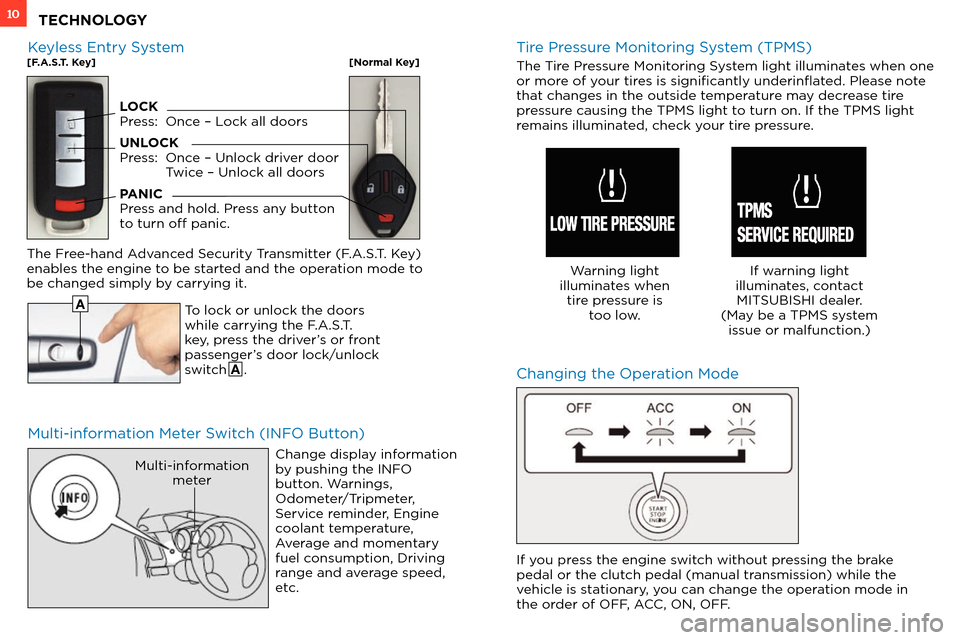
To lock or unlock the doors
while carrying the F.A.S.T.
key, press the driver’s or front
passenger’s door lock/unlock
switch A .
The Free-hand Advanced Security Transmitter (F.A.S.T. Key)
enables the engine to be started and the operation mode to
be changed simply by carrying it.
Change display information
by pushing the INFO
button. Warnings,
Odometer/Tripmeter,
Service reminder, Engine
coolant temperature,
Average and momentary
fuel consumption, Driving
range and average speed,
etc.
Multi-informationmeter
A
Tire Pressure Monitoring System (TPMS)
The Tire Pressure Monitoring System light illuminates when one
or more of your tires is significantly underinflated. Please note
tha
t changes in the outside temperature may decrease tire
pressure causing the TPMS light to turn on. If the TPMS light
remains illuminated, check your tire pressure.
Warning light
illuminates when tire pressure is too low. If warning light
illuminates, contact MITSUBISHI dealer.
(May be a TPMS system issue or malfunction.)
Keyless Entry System[F.A.S.T. Key][Normal Key]
LOCK
Press: Onc e – Lock all doors
UNLOCK
Press:
Onc
e – Unlock driver door
T
wice – Unlock all doors
PANIC
Press and hold. Press any button
to turn off panic.
If you press the engine switch without pressing the brake
pedal or the clutch pedal (manual transmission) while the
vehicle is stationary, you can change the operation mode in
the order of OFF, ACC, ON, OFF.
TECHNOLOGY