tow MITSUBISHI OUTLANDER SPORT 2013 3.G Owners Handbook
[x] Cancel search | Manufacturer: MITSUBISHI, Model Year: 2013, Model line: OUTLANDER SPORT, Model: MITSUBISHI OUTLANDER SPORT 2013 3.GPages: 16, PDF Size: 2.46 MB
Page 6 of 16
4CONTROLS
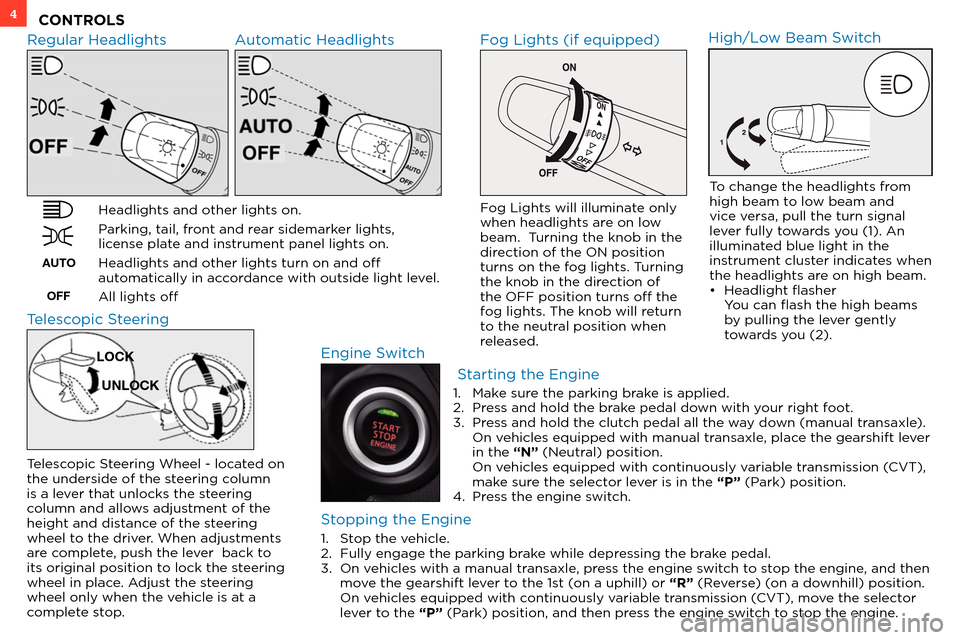
Regular Headlights Automatic Headlights
Headlights and other lights on.
Parking, tail, front and rear sidemarker lights,
license plate and instrument panel lights on.
Headlights and other lights turn on and off
automatically in accordance with outside light level.
All lights off
AUTOOFF
Fog Lights (if equipped)
Engine Switch
Fog Lights will illuminate only
when headlights are on low
beam. Turning the knob in the
direction of the ON position
turns on the fog lights. Turning
the knob in the direction of
the OFF position turns off the
fog lights. The knob will return
to the neutral position when
released.
High/Low Beam Switch
To change the headlights from
high beam to low beam and
vice versa, pull the turn signal
lever fully towards you (1). An
illuminated blue light in the
instrument cluster indicates when
the headlights are on high beam.
• Headlight flasher
You
can flash the high beams
b
y pulling the lever gently
towards you (2).
Telescopic Steering
Telescopic Steering Wheel - located on
the underside of the steering column
is a lever that unlocks the steering
column and allows adjustment of the
height and distance of the steering
wheel to the driver. When adjustments
are complete, push the lever back to
its original position to lock the steering
wheel in place. Adjust the steering
wheel only when the vehicle is at a
complete stop.
LOCK
UNLOCK
Starting the Engine
Stopping the Engine
1. Stop the vehicle.
2. Fully engage the parking br ake while depressing the brake pedal.
3.
On v
ehicles with a manual transaxle, press the engine switch to stop the engine, and then
move the gearshift lever to the 1st (on a uphill) or “R” (Reverse) (on a downhill) position.
On v
ehicles equipped with continuously variable transmission (CVT), move the selector
lever to the “P” (Park) position, and then press the engine switch to stop the engine. 1.
Mak
e sure the parking brake is applied.
2.
Pr
ess and hold the brake pedal down with your right foot.
3.
Pr
ess and hold the clutch pedal all the way down (manual transaxle).
On v
ehicles equipped with manual transaxle, place the gearshift lever
in the “N” (Neutral) position.
On v
ehicles equipped with continuously variable transmission (CVT),
make sure the selector lever is in the “P” (Park) position.
4.
Pr
ess the engine switch.
Page 8 of 16
6OWN THE ROAD
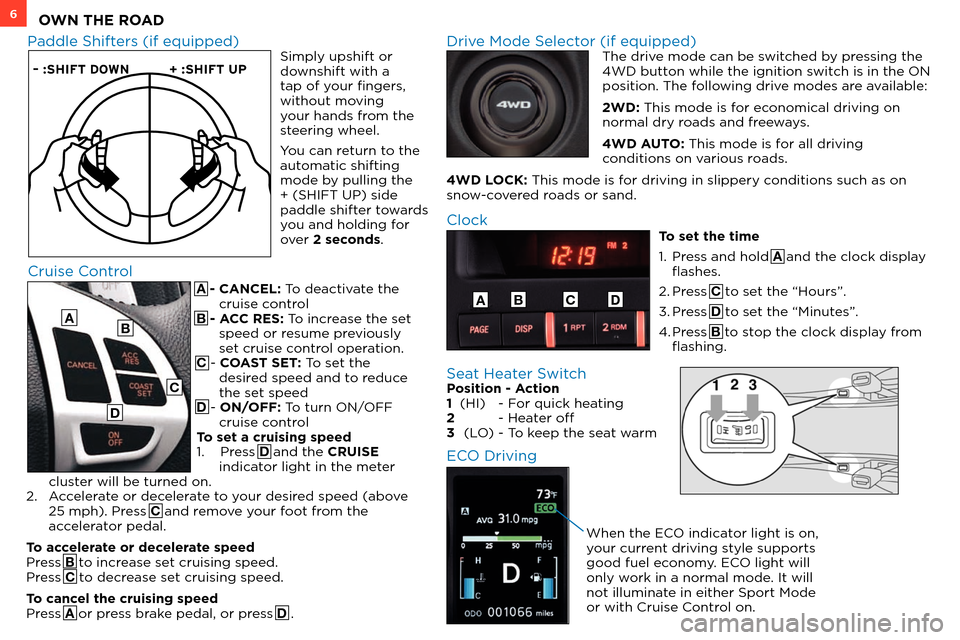
A - CANCEL: To deactivate the cruise control
B - ACC RES: To increase the set speed or resume previously
set cruise control operation.
C - COAST SET: To set the desired speed and to reduce
the set speed
D - ON/OFF: To turn ON/OFF cruise control
To set a cruising speed
1.
Press D and the CRUISE
indicator light in the meter
cluster will be turned on.
2.
A
ccelerate or decelerate to your desired speed (above
25 mph). Press C and remove your foot from the
accelerator pedal.
To accelerate or decelerate speed
Press B to increase set cruising speed.
Press C to decrease set cruising speed.
To cancel the cruising speed
Press A or press brake pedal, or press D .
– :SHIFT DOWN + :SHIFT UP
Paddle Shifters (if equipped) Drive Mode Selector (if equipped) The drive mode can be switched by pressing the
4WD button while the ignition switch is in the ON
position. The following drive modes are available:
2WD: This mode is for economical driving on
normal dry roads and freeways.
4WD AUTO: This mode is for all driving
conditions on various roads.
4WD LOCK: This mode is for driving in slippery conditions such as on
snow-covered roads or sand.
Cruise Control
A
Clock
To set the time
1.
Pr
ess and hold A and the clock display
flashes.
2.
Press C to set the “Hours”.
3.
Press D to set the “Minutes”.
4.
Press B to stop the clock display from
flashing.
ABCD
B
C
D
Simply upshift or
downshift with a
tap of your fingers,
without moving
your hands from the
steering wheel.
You can return to the
automatic shifting
mode by pulling the
+ (SHIFT UP) side
paddle shifter towards
you and holding for
over 2 seconds.
Seat Heater Switch Position - Action
1 (HI) - F or quick heating
2
- Hea
ter off
3
(L
O)
- T
o keep the seat warm
ECO Driving
When the ECO indicator light is on,
your current driving style supports
good fuel economy. ECO light will
only work in a normal mode. It will
not illuminate in either Sport Mode
or with Cruise Control on.