engine MITSUBISHI OUTLANDER SPORT 2015 3.G Manual PDF
[x] Cancel search | Manufacturer: MITSUBISHI, Model Year: 2015, Model line: OUTLANDER SPORT, Model: MITSUBISHI OUTLANDER SPORT 2015 3.GPages: 384, PDF Size: 61.37 MB
Page 148 of 384
Multi-information display
Features and controls 5-85
5
N00555100149
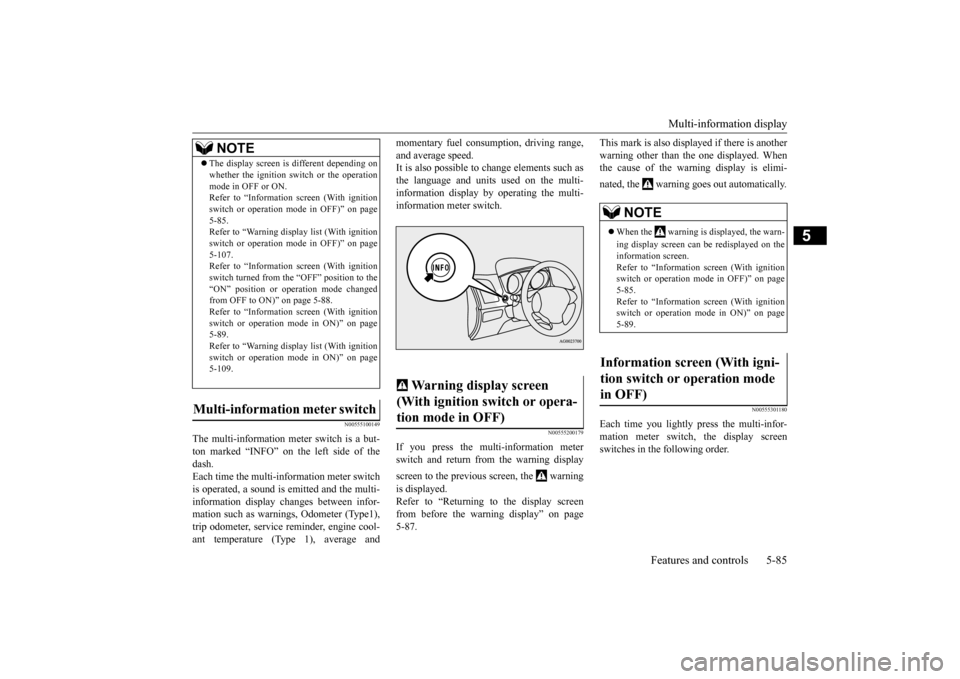
The multi-information meter switch is a but- ton marked “INFO” on the left side of thedash. Each time the multi-information meter switch is operated, a sound is emitted and the multi-information display changes between infor- mation such as warnings, Odometer (Type1), trip odometer, service reminder, engine cool-ant temperature (Type 1), average and
momentary fuel consumption, driving range, and average speed. It is also possible to change elements such as the language and units used on the multi-information display by operating the multi- information meter switch.
N00555200179
If you press the multi-information meter switch and return from the warning display screen to the previous screen, the warning is displayed. Refer to “Returning to the display screenfrom before the warning display” on page5-87.
This mark is also displayed if there is another warning other than the one displayed. When the cause of the warning display is elimi- nated, the warning goes out automatically.
N00555301180
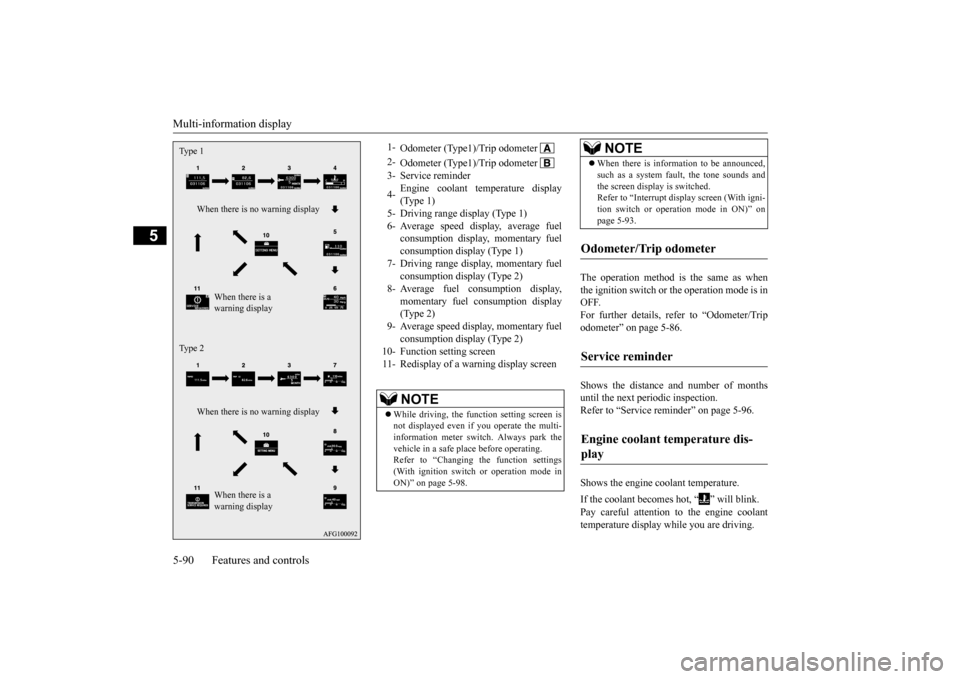
Each time you lightly press the multi-infor- mation meter switch, the display screenswitches in the following order.
The display screen is different depending on whether the ignition switch or the operation mode in OFF or ON. Refer to “Information screen (With ignition switch or operation mode in OFF)” on page5-85. Refer to “Warning displa
y list (With ignition
switch or operation mode in OFF)” on page5-107. Refer to “Information screen (With ignition switch turned from the “OFF” position to the“ON” position or operation mode changed from OFF to ON)” on page 5-88. Refer to “Information screen (With ignitionswitch or operation mode in ON)” on page 5-89. Refer to “Warning displa
y list (With ignition
switch or operation mode in ON)” on page 5-109.
Multi-information meter switch
NOTE
Warning display screen (With ignition switch or opera- tion mode in OFF)
NOTE
When the warning is displayed, the warn- ing display screen can be redisplayed on the information screen.Refer to “Information screen (With ignition switch or operation mode in OFF)” on page 5-85.Refer to “Information screen (With ignition switch or operation mode in ON)” on page 5-89.
Information screen (With igni- tion switch or operation mode in OFF)
BK0206700US.bo
ok 85 ページ 2014年3月25日 火曜日 午後4時42分
Page 153 of 384
Multi-information display 5-90 Features and controls
5
The operation method is the same as when the ignition switch or the operation mode is in OFF.For further details, refer to “Odometer/Trip odometer” on page 5-86. Shows the distance and number of months until the next periodic inspection. Refer to “Service reminder” on page 5-96. Shows the engine coolant temperature. If the coolant becomes hot, “ ” will blink. Pay careful attention to the engine coolant temperature display while you are driving.
Type 1
When there is no warning display
When there is a warning display
Type 2
When there is no warning display
When there is a warning display
1-
Odometer (Type1)/Trip odometer
2-
Odometer (Type1)/Trip odometer
3- Service reminder 4-
Engine coolant temperature display (Type 1)
5- Driving range display (Type 1)6- Average speed display, average fuel
consumption display, momentary fuel consumption display (Type 1)
7- Driving range display, momentary fuel
consumption display (Type 2)
8- Average fuel consumption display,
momentary fuel consumption display(Type 2)
9- Average speed display, momentary fuel
consumption display (Type 2)
10- Function setting screen 11- Redisplay of a warning display screen
NOTE
While driving, the function setting screen is not displayed even if you operate the multi- information meter switch. Always park the vehicle in a safe place before operating. Refer to “Changing the function settings(With ignition switch or operation mode in ON)” on page 5-98.
When there is information to be announced, such as a system fault, the tone sounds and the screen display is switched. Refer to “Interrupt display screen (With igni- tion switch or operation mode in ON)” onpage 5-93.
Odometer/Trip odometer Service reminder Engine coolant temperature dis- play
NOTE
BK0206700US.bo
ok 90 ページ 2014年3月25日 火曜日 午後4時42分
Page 154 of 384
Multi-information display
Features and controls 5-91
5
Shows the approximate driving range (how many more miles or kilometers you candrive). When this driving range falls below 30 miles (50 km), “---” is displayed. Refuel as soon as possible.
This displays the average speed from the last reset to the present.There are 2 types of mode settings as follows. For details on how to change the average speed display setting, refer to “Changing thefunction settings (With ignition switch or operation mode in ON)” on page 5-98. When the average speed is being dis- played, if you hold down the multi-infor-mation meter switch, these calculations will be reset to zero.
When the following operation is per- formed, the mode setting changes auto- matically from manual to auto. [Except for vehicles equipped with the F. A . S . T. - k e y ]Turn the ignition switch to the “ON” posi- tion from the “ACC” or “OFF” position. [For vehicles equipped with the F.A.S.T.- key]Change the operation mode to ON fromACC or OFF. When the average speed is being dis- played, if you hold down the multi-infor- mation meter switch, these calculationswill be reset to zero.
CAUTION If the engine is overheating, “ ” will blink. In this case, the bar graph is on the red zone. Immediately park the vehicle in a safe place and take the required measures. Refer to“Engine overheating” on page 8-4.
Driving range display
NOTE
The driving range is determined based on the fuel consumption data. This may vary depending on the driving conditions and hab-its. Treat the distance displayed as just a rough guideline. When you refuel, the driving range display is updated. However, if you only add a small amount of fuel, the correct value will not be displayed. Fill to a full tank whenever possible. When your vehicle is stopped on an extremely steep hill, the driving range valuemay, change. This is due to the movement of fuel in the tank and does not indicate any breakdown.
The display setting can be changed to the preferred units (miles or km). Refer to “Changing the function settings (With ignition switch or operation mode in ON)” on page 5-98.
Average speed display Manual reset mode
NOTE
Auto reset mode
BK0206700US.bo
ok 91 ページ 2014年3月25日 火曜日 午後4時42分
Page 155 of 384
Multi-information display 5-92 Features and controls
5
When the engine switch or the operation mode is in the following conditions, the average speed display will automatically reset. [Except for vehicles equipped with the F. A . S . T. - k e y ] The ignition switch has been set to the “ACC” or “OFF” position for about 4hours or more. [For vehicles equipped with the F.A.S.T.- key] The operation mode has been set to ACC or OFF for about 4 hours or more.
This displays the average fuel consumption from the last reset to the present. There are 2 types of mode settings as follows. For details on how to change the average fuelconsumption display setting, refer to “Chang- ing the function settings (With ignition switch or operation mode in ON)” on page 5-98. The “ ” mark in the momentary fuel gauge shows the average fuel consumption. (Type 2) When the average fuel consumption is being displayed, if you hold down themulti-information meter switch, these cal- culations will be reset to zero.
When the following operation is per- formed, the mode setting changes auto- matically from manual to auto. [Except for vehicles equipped with the F.A.S.T.-key] Turn the ignition switch to the “ON” posi- tion from the “ACC” or “OFF” position. [For vehicles equipped with the F.A.S.T.- key]Change the operation mode to ON fromACC or OFF. When the average fuel consumption is being displayed, if you hold down the multi-information meter switch, these cal-culations will be reset to zero.
NOTE
The average speed display and the average fuel consumption display can be reset sepa- rately in both auto reset mode and manualreset mode. “---” is displayed when the average speed cannot be measured. The initial (default) setting is “Auto reset mode”. The display setting can be changed to the preferred units (mph or km/h). Refer to “Changing the function settings(With ignition switch or operation mode in ON)” on page 5-98.
Disconnecting the battery cable will erase from memory the manual reset mode or auto reset mode setting for the average speed dis- play.
Average fuel consumption display Manual reset mode
NOTE
Auto reset mode
BK0206700US.bo
ok 92 ページ 2014年3月25日 火曜日 午後4時42分
Page 156 of 384
Multi-information display
Features and controls 5-93
5
When the engine switch or the operation mode is in the following conditions, the average fuel consumption display will automatically reset. [Except for vehicles equipped with the F.A.S.T.-key] The ignition switch has been set to the “ACC” or “OFF” position for about 4hours or more. [For vehicles equipped with the F.A.S.T.- key] The operation mode has been set to ACC or OFF for about 4 hours or more.
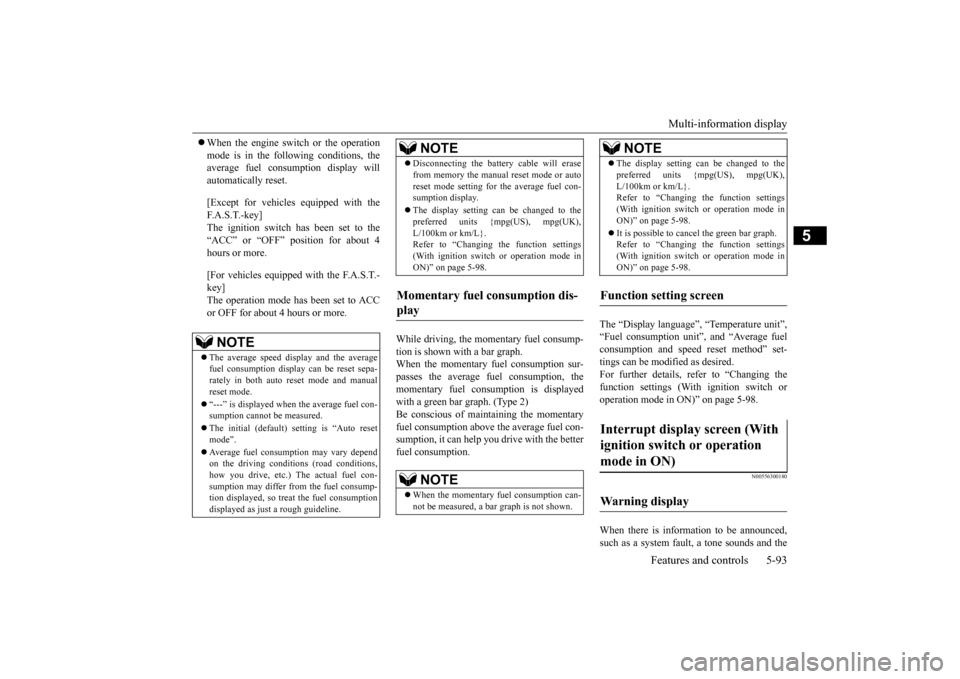
While driving, the momentary fuel consump- tion is shown with a bar graph. When the momentary fuel consumption sur-passes the average fuel consumption, the momentary fuel consumption is displayed with a green bar graph. (Type 2)Be conscious of maintaining the momentary fuel consumption above the average fuel con- sumption, it can help you drive with the betterfuel consumption.
The “Display language”, “Temperature unit”, “Fuel consumption unit”, and “Average fuelconsumption and speed reset method” set- tings can be modified as desired. For further details, refer to “Changing thefunction settings (With ignition switch or operation mode in ON)” on page 5-98.
N00556300180
When there is information to be announced, such as a system fault, a tone sounds and the
NOTE
The average speed display and the average fuel consumption display can be reset sepa- rately in both auto reset mode and manualreset mode. “---” is displayed when the average fuel con- sumption cannot be measured. The initial (default) setting is “Auto reset mode”. Average fuel consumption may vary depend on the driving conditions (road conditions, how you drive, etc.) The actual fuel con-sumption may differ from the fuel consump- tion displayed, so treat the fuel consumption displayed as just a rough guideline.
Disconnecting the battery cable will erase from memory the manual reset mode or auto reset mode setting for the average fuel con- sumption display. The display setting can be changed to the preferred units {mpg(US), mpg(UK), L/100km or km/L}.Refer to “Changing the function settings (With ignition switch or operation mode in ON)” on page 5-98.
Momentary fuel consumption dis- play
NOTE
When the momentary fuel consumption can- not be measured, a ba
r graph is not shown.
NOTE
The display setting can be changed to the preferred units {mpg(US), mpg(UK), L/100km or km/L}. Refer to “Changing the function settings (With ignition switch or operation mode inON)” on page 5-98. It is possible to cancel the green bar graph. Refer to “Changing the function settings (With ignition switch or operation mode in ON)” on page 5-98.
Function setting screen Interrupt display screen (With ignition switch or operation mode in ON) Warning display
NOTE
BK0206700US.bo
ok 93 ページ 2014年3月25日 火曜日 午後4時42分
Page 163 of 384
Multi-information display 5-100 Features and controls
5
When the average fuel consumption and average speed are being displayed, if you hold down the multi-information meter switch, these calculations will be reset tozero. When the engine switch or the operation mode is in the following conditions, theaverage fuel consumption display and the average speed display will automatically reset. [Except for vehicles equipped with the F. A . S . T. - k e y ]The ignition switch has been set to the “ACC” or “OFF” position for about 4 hours or more. [For vehicles equipped with the F.A.S.T.- key] The operation mode has been in ACC or OFF for about 4 hours or more.
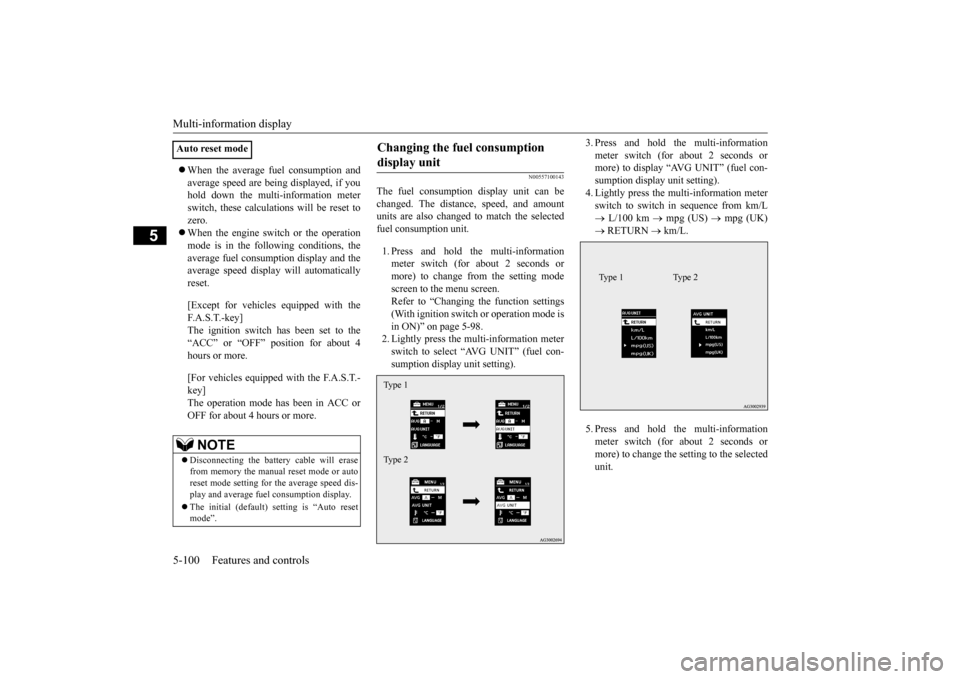
N00557100143
The fuel consumption display unit can be changed. The distance, speed, and amount units are also changed to match the selectedfuel consumption unit. 1. Press and hold the multi-information meter switch (for about 2 seconds or more) to change from the setting modescreen to the menu screen.Refer to “Changing the function settings (With ignition switch or operation mode is in ON)” on page 5-98.2. Lightly press the multi-information meter switch to select “AVG UNIT” (fuel con- sumption display unit setting).
3. Press and hold the multi-information meter switch (for about 2 seconds or more) to display “AVG UNIT” (fuel con- sumption display unit setting).4. Lightly press the multi-information meter switch to switch in sequence from km/L L/100 km
mpg (US)
mpg (UK)
RETURN
km/L.
5. Press and hold the multi-information meter switch (for about 2 seconds or more) to change the setting to the selected unit.
Auto reset mode
NOTE
Disconnecting the battery cable will erase from memory the manual reset mode or autoreset mode setting for the average speed dis- play and average fuel consumption display. The initial (default) setting is “Auto reset mode”.
Changing the fuel consumption display unit Type 1 Type 2
Type 1 Type 2
BK0206700US.book
100 ページ 2014年3月25日 火曜日 午後4時42分
Page 169 of 384
Indicator light, warning light, an
d information screen display list
5-106 Features and controls
5
N00557900082
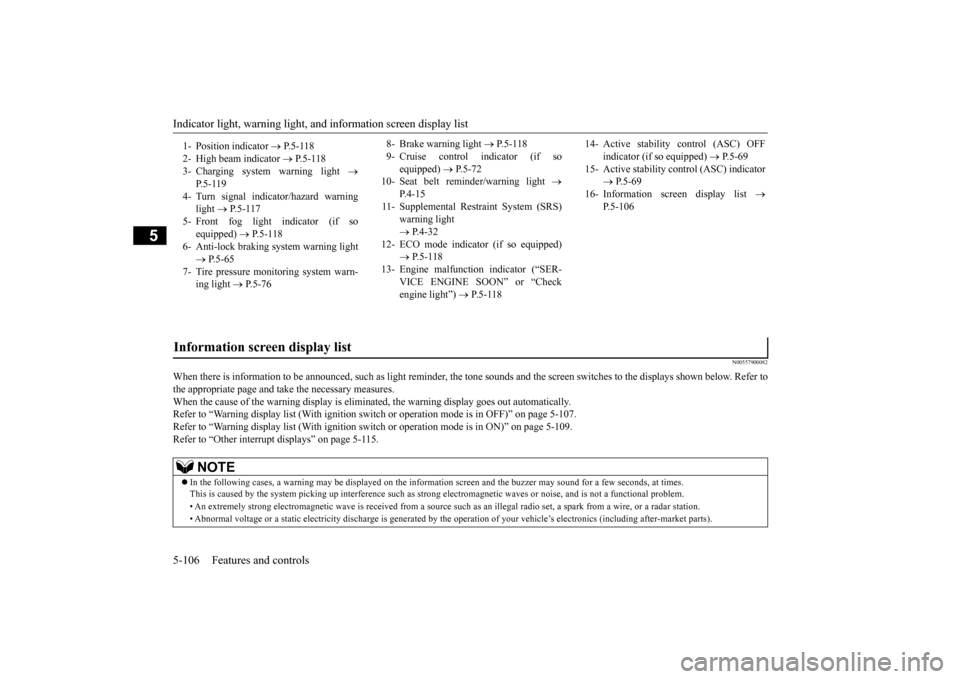
When there is information to be announced,
such as light reminder, the tone sounds an
d the screen switches to the displays show
n below. Refer to
the appropriate page and take the necessary measures. When the cause of the warning display is eliminated, the warning display goes out automatically.Refer to “Warning display list (With ignition switch or operation mode is in OFF)” on page 5-107. Refer to “Warning display list (With ignition switch or operation mode is in ON)” on page 5-109. Refer to “Other interrupt displays” on page 5-115. 1- Position indicator
P.5-118
2- High beam indicator
P.5-118
3- Charging system warning light
P. 5 - 1 1 9
4- Turn signal indicator/hazard warning
light
P.5-117
5- Front fog light indicator (if so
equipped)
P.5-118
6- Anti-lock braking system warning light
P.5-65
7- Tire pressure monitoring system warn-
ing light
P.5-76
8- Brake warning light
P. 5 - 1 1 8
9- Cruise control indicator (if so
equipped)
P.5-72
10- Seat belt reminder/warning light
P. 4 - 1 5
11- Supplemental Restraint System (SRS)
warning light P.4-32
12- ECO mode indicator (if so equipped)
P.5-118
13- Engine malfunction indicator (“SER-
VICE ENGINE SOON” or “Checkengine light”)
P.5-118
14- Active stability control (ASC) OFF
indicator (if so equipped)
P.5-69
15- Active stability control (ASC) indicator
P.5-69
16- Information screen display list
P.5-106
Information screen display list
NOTE
In the following cases, a warning may be displayed on the inform
ation screen and the buzzer may
sound for a few seconds, at tim
es.
This is caused by the system picking up interference such as stro
ng electromagnetic waves or nois
e, and is not a functional pro
blem.
• An extremely strong electromagnetic wave is received from a source
such as an illegal radio set,
a spark from a wire, or a rad
ar station.
• Abnormal voltage or a static electricity discharge is genera
ted by the operation of your vehicle’s electronics (including afte
r-market parts).
BK0206700US.book
106 ページ 2014年3月25日 火曜日 午後4時42分
Page 172 of 384
Indicator light, warning light, an
d information screen display list Features and controls 5-109
5
N00558101310
—
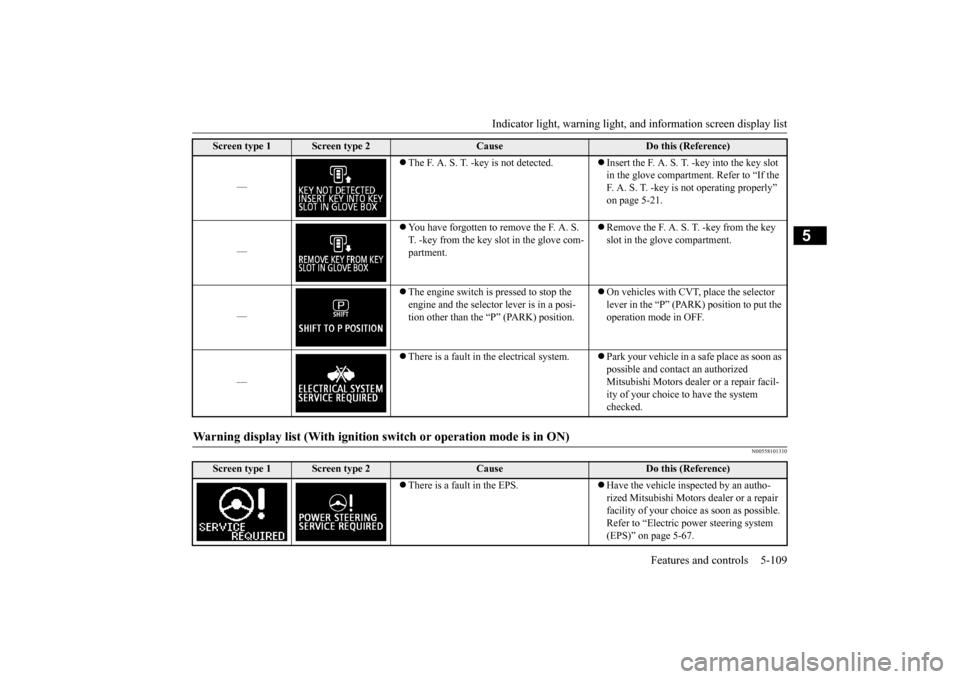
The F. A. S. T. -key is not detected.
Insert the F. A. S. T. -key into the key slot in the glove compartment. Refer to “If the F. A. S. T. -key is not operating properly” on page 5-21.
—
You have forgotten to remove the F. A. S. T. -key from the key slot in the glove com-partment.
Remove the F. A. S. T. -key from the key slot in the glove compartment.
—
The engine switch is pressed to stop the engine and the selector lever is in a posi-tion other than the “P” (PARK) position.
On vehicles with CVT, place the selector lever in the “P” (PARK) position to put the operation mode in OFF.
—
There is a fault in the electrical system.
Park your vehicle in a safe place as soon as possible and contact an authorized Mitsubishi Motors dealer or a repair facil- ity of your choice to have the system checked.
Warning display list (With ignition sw
itch or operation mode is in ON)
Screen type 1
Screen type 2
Cause
Do this (Reference)
There is a fault in the EPS.
Have the vehicle inspected by an autho- rized Mitsubishi Motors dealer or a repair facility of your choice as soon as possible. Refer to “Electric power steering system (EPS)” on page 5-67.
Screen type 1
Screen type 2
Cause
Do this (Reference)
BK0206700US.book
109 ページ 2014年3月25日 火曜日 午後4時42分
Page 175 of 384
Indicator light, warning light, an
d information screen display list
5-112 Features and controls
5
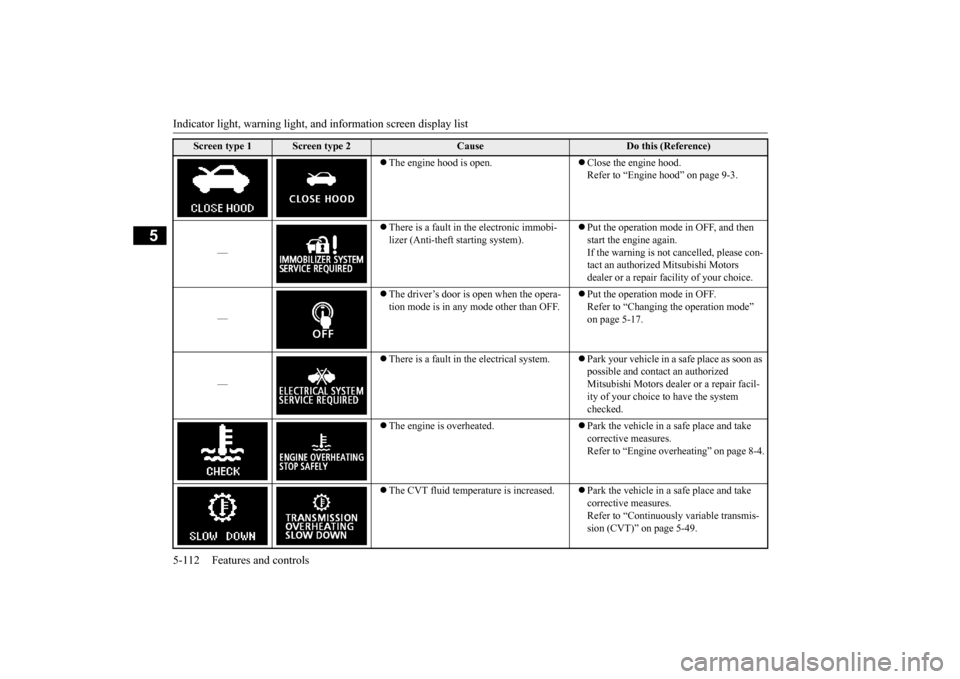
The engine hood is open.
Close the engine hood. Refer to “Engine hood” on page 9-3.
—
There is a fault in the electronic immobi- lizer (Anti-theft starting system).
Put the operation mode in OFF, and then start the engine again.If the warning is not cancelled, please con- tact an authorized Mitsubishi Motors dealer or a repair facility of your choice.
—
The driver’s door is open when the opera- tion mode is in any mode other than OFF.
Put the operation mode in OFF. Refer to “Changing the operation mode” on page 5-17.
—
There is a fault in the electrical system.
Park your vehicle in a safe place as soon as possible and contact an authorized Mitsubishi Motors dealer or a repair facil- ity of your choice to have the system checked.
The engine is overheated.
Park the vehicle in a safe place and take corrective measures. Refer to “Engine overheating” on page 8-4.
The CVT fluid temperature is increased.
Park the vehicle in a safe place and take corrective measures.Refer to “Continuously variable transmis- sion (CVT)” on page 5-49.
Screen type 1
Screen type 2
Cause
Do this (Reference)
BK0206700US.book
112 ページ 2014年3月25日 火曜日 午後4時42分
Page 176 of 384
Indicator light, warning light, an
d information screen display list Features and controls 5-113
5
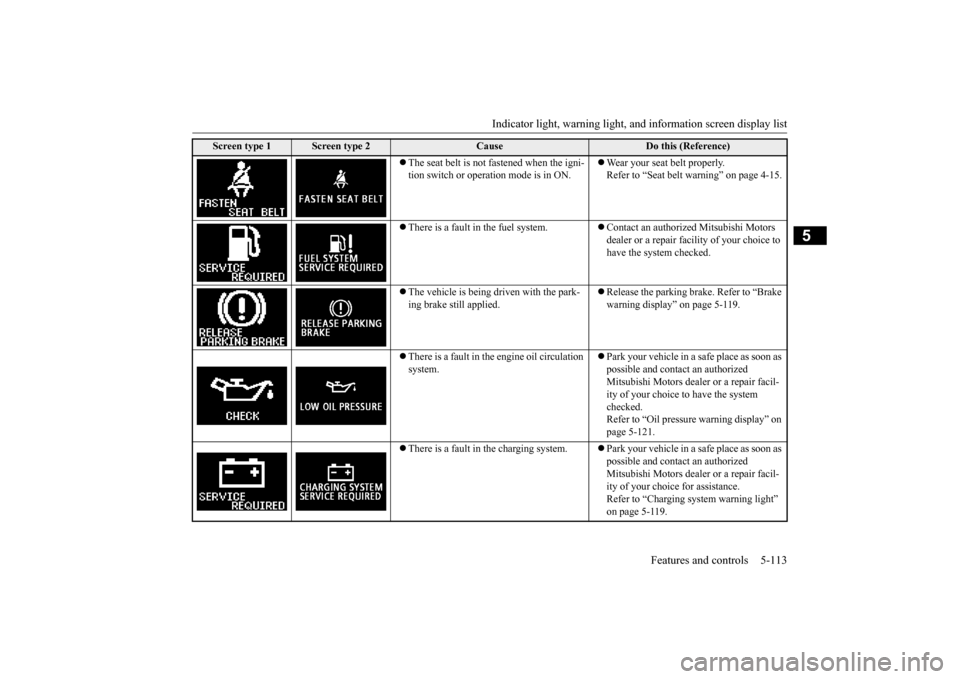
The seat belt is not fastened when the igni- tion switch or operation mode is in ON.
Wear your seat belt properly. Refer to “Seat belt warning” on page 4-15.
There is a fault in the fuel system.
Contact an authorized Mitsubishi Motors dealer or a repair facility of your choice to have the system checked.
The vehicle is being driven with the park- ing brake still applied.
Release the parking brake. Refer to “Brake warning display” on page 5-119.
There is a fault in the engine oil circulation system.
Park your vehicle in a safe place as soon as possible and contact an authorized Mitsubishi Motors dealer or a repair facil- ity of your choice to have the system checked. Refer to “Oil pressure warning display” on page 5-121.
There is a fault in the charging system.
Park your vehicle in a safe place as soon as possible and contact an authorized Mitsubishi Motors dealer or a repair facil- ity of your choice for assistance.Refer to “Charging system warning light” on page 5-119.
Screen type 1
Screen type 2
Cause
Do this (Reference)
BK0206700US.book
113 ページ 2014年3月25日 火曜日 午後4時42分