key MITSUBISHI OUTLANDER SPORT 2016 3.G Manual Online
[x] Cancel search | Manufacturer: MITSUBISHI, Model Year: 2016, Model line: OUTLANDER SPORT, Model: MITSUBISHI OUTLANDER SPORT 2016 3.GPages: 398, PDF Size: 14.63 MB
Page 298 of 398

Listen to CDs 7-42 Comfort controls
7
The CODE required for changing the LOCK settings in the satellite settings is initialized.(The factory setting is “1111”.) key while holding down the /SEL key. “Turn the Power ON/OFF” (P7-35)
N00717100039
This explains how to listen to audio CDs (CD-DA/CD-TEXT). Insert the disc. Insert a disc to automatically start playback. “Insert/Eject Discs” (P.7-36)
If a disc is already within the product, press the MEDIA key to switch to CD as the source. Press the key or key to select the track. This enables selection of the next or previous track. Hold down the 3 key or the 4 key. Fast forward/rewind is possible. Repeat playback, random playback, and scan playback are possible. Press the 1RPT key. Repeat playback of th
e track currently being
played.
Press the 2RDM key. Play the tracks on the disc in a random order. Press the SCAN key. Play the first 10 seconds of each track on the disc in order.
In the channel preliminary setting mode, press the 6 key to return to the category search mode without returning to the previ- ous channel search mode. If there is no operation for 10 seconds, the search mode will be cancelled.
Initialize the CODE (Passcode)
Listen to CDs Play CDs
NOTE
Select the Track Fast Forward or Rewind Switch Playback Mode Repeat Playback (RPT)
NOTE
Pressing again will cancel. Selecting a track, ejecting, fast forwarding, or rewinding will cancel.
Random Playback (RDM)
NOTE
Pressing again will cancel. Ejecting will cancel this.
Scan Playback (SCAN)
NOTE
Press this button again during playback if you wish to hear that track, and that track will play normally.
BK0229600US.bo
ok 42 ページ 2015年10月1日 木曜日 午後2時29分
Page 299 of 398
Listen to MP3s
Comfort controls 7-43
7
N00717200030
This explains how to listen to audio files on a disc. Insert the disc. Insert a disc to automatically start playback. “Insert/Eject Discs” (P.7-36) If a disc is already within the product, press the MEDIA key to switch to CD as thesource. Press the key or key to select the track.
This enables selection of the next or previous track. Hold down the 3 key or the 4 key. Fast forward/rewind is possible. Repeat playback, random playback, and scan playback are possible. Press the 1RPT key. Repeat playback of th
e track currently being
played. Hold down the 1RPT key.
Repeat playback of the tracks within the folder currently being played. Press the 2RDM key. Play the tracks in the folder in a random order. Hold down the 2RDM key. Play all tracks in folders on the disc in a ran- dom order.
Listen to MP3s
CAUTION CD-ROM and CD-R/RW media can only play back MP3 format audio files.
To Listen to MP3s
NOTE
Depending on the file structure, it may take some time to read the contents of the disc.
Select the Track (File)
Fast Forward or Rewind Switch Playback Mode Repeat Playback (RPT)
NOTE
Pressing again will cancel. Selecting a file, ejecting, fast forwarding, or rewinding will cancel.
Folder Repeat Playback
NOTE
Pressing again will cancel. Even if the file is selected, folder repeat playback will not be cancelled.
Random Playback (RDM)
NOTE
Pressing again will cancel.
Folder Random Playback
NOTE
Pressing again will cancel.
BK0229600US.bo
ok 43 ページ 2015年10月1日 木曜日 午後2時29分
Page 300 of 398
Listen to an iPod 7-44 Comfort controls
7
Press the SCAN key. Play the first 10 seconds of each track in the folder currently being played in order. Search folders and files, and select a track. 1. Turn the /SEL key to select the folder. 2. Press the /SEL key. Files within the selected folder are dis- played. 3. Turn the /SEL key to select the file.4. Press the /SEL key. This plays the selected file (track).
N00717300073
By connecting commercially-available iPod/iPhone devices to this product, you canplay back tracks on these through the product.
Scan Playback (SCAN)
NOTE
Press this button again during playback if you wish to hear that track, and that trackwill play normally.
Search Tracks
NOTE
While the folder is selected, press the 6 key to cancel track search mode.
If there is no operation for 10 seconds after selecting the folder, then track search mode will be cancelled. Select the folder, and hold down the /SEL key to start playback from the first track in that folder. While the file is selected, press the 6 key to return to the previous operation. While the file is selected, hold down the 6 key to cancel track search mode. If there is no operation for five seconds after selecting the file, that file is played back. Disc operations such as
selecting a track will
cancel track search mode.
Listen to an iPod
CAUTION Do not leave the iPod/iPhone unattended in the vehicle. Never hold these devices in your hand to operate while driving, as this is dangerous. No indemnification for data loss resulting when the iPod/iPhone is connected to the product will be possible.NOTE
Depending on how the devices are handled, audio files being damaged or lost, therefore it is recommended that data be backed up.NOTE
Depending on the generation, model, or soft- ware version of the iPod/iPhone, playback on this product may not be possible.( P.7-26) Additionally, playback as
explained in this document may not be possi- ble. For vehicles with a Bluetooth
® 2.0 interface,
the types of devices that can be connectedmay vary. [For vehicles sold in U.S.A.] For details, access the Mitsubishi Motors North America website. [For vehicles sold in Canada and Mexico]For details, access the Mitsubishi Motors website. Please read and agree to the “Warn- ing about Links to the Web Sites of OtherCompanies”. The websites mentioned above may connect you to websites other than the Mitsubishi Motors website.http://www.mitsubishi-motors.com/en/prod- ucts/index.html Regarding how to connect the iPod/iPhone, refer to “How to connect an iPod” on page 5-161. When connecting the iPod/iPhone, use a commercially-available iPod connectioncable.CAUTION
BK0229600US.bo
ok 44 ページ 2015年10月1日 木曜日 午後2時29分
Page 301 of 398

Listen to an iPod
Comfort controls 7-45
7
Press the MEDIA key to set the iPod as the source. The selected source is indicated on the dis- play. Press the key or key to select the track. This enables selection of the next or previous track. Hold down the 3 key or the 4 key. Fast forward/rewind is possible.
Repeat playback and shuffle playback are possible. Press the 1RPT key. Repeat playback of th
e track currently being
played. Press the 2RDM key. Play tracks in the category currently being played in a random order. Hold down the 2RDM key.
Set up the device in order that no unsafe actions, such as plugging in the connection cable are taken while driving. When inserting and removing the iPod/iPhone, for safety’s sake first stop the vehicle. Depending on the status of the iPod/iPhone, it may take some time until the device is rec- ognized, or playback starts. Buttons on the product will not operate while the iPod/iPhone is connected. iPod/iPhone specifications and settings may mean that a connection is not possible, orresult in differences in operation or display. Depending on audio data in the iPod/iPhone, track information may not be displayed cor- rectly. Depending on the status of the vehicle and device, the iPod/iPhone may not play back after starting the engine. Data containing copyright information may not play back. It is recommended that the iPod/iPhone equalizer settings be set to flat. Operate the iPod/iPhone while connected to this product. If the iPod/iPhone is connected via Bluetooth as a Bluetooth-capable audio device, then do not connect the iPod/iPhone using an iPod cable. Connection using both methods willresult in erroneous operation.NOTE
If an iPod/iPhone does not operate correctly, then remove the iPod/iPhone from the prod- uct, reset, then reconnect.
Play iPod Select the Track (File) Fast Forward or Rewind
NOTE
Switch Playback Mode Repeat Playback (RPT)
NOTE
Pressing again will cancel.
Shuffle Playback (RDM)
NOTE
Pressing again will cancel.
Album Shuffle Playback
BK0229600US.bo
ok 45 ページ 2015年10月1日 木曜日 午後2時29分
Page 302 of 398
Listen to Audio Files on a USB Device 7-46 Comfort controls
7
Play back the album in a random order (tracks in any order on the album). Search categories or track names, and select a track. 1. Turn the /SEL key to select the cate- gory. 2. Press the /SEL key. Categories or tracks within the selected category aredisplayed. 3. Turn the /SEL key to select the cate- gory or track. 4. Press the /SEL key. Repeat steps 1 to 4, and search for tracks. Select the track, and press the /SEL key to play.
N00717400087
By connecting commercially-available USB devices such as USB memory to this product,you can play back audio files through the product.
NOTE
Pressing again will cancel.
Search Tracks
NOTE
While the category (1st level) is selected, press the 6 key to cancel track search mode.
If there is no operation for 10 seconds after selecting the category, then track search mode will be cancelled. Select the category, and hold down the
/SEL key to start playback from the first
track in that category. While the track is selected, press the 6 key to return to the previous operation. While the track is selected, hold down the 6 key to cancel track search mode. If there is no operation for five seconds after selecting the track, that file is played back. iPod operations such as selecting a track will cancel track search mode.
Listen to Audio Files on a USB Device
CAUTION Do not leave the USB device unattended in the vehicle. Never hold these devices in your hand to operate while driving, as this is dangerous.NOTE
Do not use hard discs, card readers, or mem- ory readers, as damage may occur to these or to the data contained therein. If these are erroneously connected, then turn the ignition switch to the “LOCK” position or put theoperation mode in OFF, then remove. Because of the risk of data loss, it is recom- mended that files be backed up. No guarantee is made as regards damage to the USB device, nor regarding loss or dam- age to data contained therein. Depending on how the devices are handled, audio files being damaged or lost, therefore it is recommended that data be backed up.NOTE
Digital audio players that support the mass storage class specifications can be con- nected. For details regarding the types of USB devices that can be connected and the types of files that can be played back in vehicles with a Bluetooth
® 2.0 interface, refer to
“Types of connectable devices and supportedfile specifications” on page 5-162. Regarding how to connect USB devices, refer to “How to connect a USB memory device” on page 5-160.CAUTION
BK0229600US.bo
ok 46 ページ 2015年10月1日 木曜日 午後2時29分
Page 303 of 398

Listen to Audio Files on a USB Device
Comfort controls 7-47
7
Press the MEDIA key to set USB as the source. The selected source is indicated on the dis- play. Press the key or key to select the track. This enables selection of the next or previous track.
Hold down the 3 key or the 4 key. Fast forward/rewind is possible. Repeat playback, random playback, and scan playback are possible. Press the 1RPT key. Repeat playback of th
e track currently being
played. Hold down the 1RPT key.
When connecting a USB device, use a con- nection cable. Failure to use a connection cable when connecting may place undue load on, or damage the USB connector. Set up the device in order that no unsafe actions, such as plugging in the connection cable are taken while driving. When inserting and removing the USB device, for safety’s sake first stop the vehi-cle. Do not insert non audio devices into the USB port. Damage to the device or equipment may result. Depending on the status of the USB device, it may take some time until the device is rec- ognized, or playback starts. Depending on USB devices, buttons on the product will not operate while the USBdevice is connected. USB device specifications and settings may mean that connection is not possible, or result in differences in operation or display. Depending on the audio data in the USB device, track information may not be dis- played correctly. Depending on the status of the vehicle and device, the iPod/iPhone may not play back after starting the engine. Data containing copyright information may not play back. This product can play back MP3, WMA, and AAC format audio files.NOTE
Depending on the type of USB device, usage may not be possible, or functions that can be used may be restricted. The recommended file system for USB memory is FAT32. The maximum supported capacity for USB memory is 32GB. Operate the USB device containing recorded audio files while connected to this product.
Play Back of Audio Files on a USB Device Select the Track (File)
NOTE
Fast Forward or Rewind Switch Playback Mode Repeat Playback (RPT)
NOTE
Pressing again will cancel. Selecting a file will cancel this. However, it will not be cancelled in vehicles with a Bluetooth
® 2.0 interface.
Folder Repeat Playback
BK0229600US.bo
ok 47 ページ 2015年10月1日 木曜日 午後2時29分
Page 304 of 398

Listen to Audio Files on a USB Device 7-48 Comfort controls
7
Repeat playback of the tracks within the folder currently being played. Press the 2RDM key. Play tracks in the folder currently being played in a random order. Hold down the 2RDM key.
Play the tracks in all folders in a random order. Press the SCAN key. Play the first 10 seconds of each track on the USB device in order. Hold down the SCAN key. Play the first 10 seconds of the first track in each folder on the USB device in order.
Search folders and files, and select a track. 1. Turn the /SEL key to select the folder. 2. Press the /SEL key. Files within the selected folder are dis- played. 3. Turn the /SEL key to select the file.4. Press the /SEL key. This plays the selected file (track).
NOTE
Pressing again will cancel. Selecting a folder will cancel this. Cycling up/down through files will cancel this. Even if the file is selected, folder repeat playback will not be cancelled.
Folder Random Playback (RDM)
NOTE
Pressing again will cancel. Selecting a folder will cancel this. Cycling up/down through files will cancel this. Even if the file is selected, folder random playback will not be cancelled.
All Folder Random Playback
NOTE
Pressing again will cancel. Selecting a folder will cancel this. Cycling up/down through files will cancel this. Even if the file is selected, all folder random playback will not be cancelled.
Scan Playback (SCAN)
NOTE
Press this button again during playback if you wish to hear that track, and that track will play normally.
Folder Scan Playback
NOTE
Press this button again during playback if you wish to hear that track, and that track will play normally.
Search Tracks
NOTE
While the folder is selected, press the 6 key to cancel track search mode. If there is no operation for 10 seconds after selecting the folder, then track search mode will be cancelled. Select the folder, and hold down the /SEL key to start playback from the first track in that folder. While the file is selected, press the 6 key to return to the previous operation.
BK0229600US.bo
ok 48 ページ 2015年10月1日 木曜日 午後2時29分
Page 305 of 398
To play iPod/USB memory device tracks via voice
operation (vehicles with
Bluetooth® 2.0 interface) Comfort controls 7-49
7
N00772001067
When connected to the USB input terminal desired tracks on the iPod/USB memory device can be selected and played via voiceoperation. For information concerning the voice recog- nition function or speaker registration func- tion, refer to “Bluetooth
® 2.0 interface” on
page 5-137. The following explains how to prepare forvoice operation and play the tracks.
N00772101068
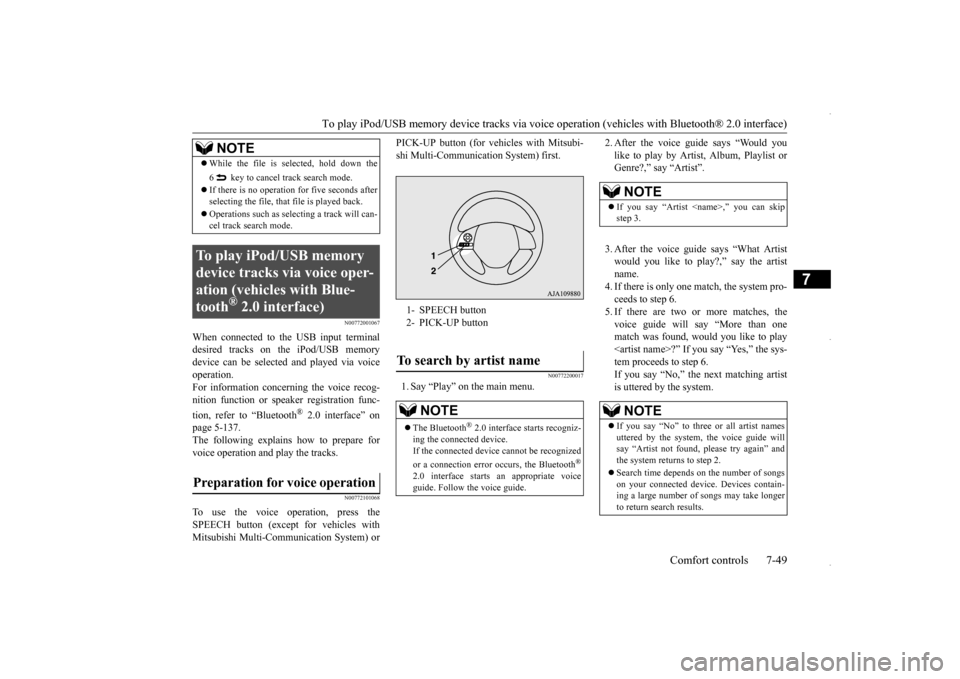
To use the voice operation, press theSPEECH button (except for vehicles withMitsubishi Multi-Communication System) or
PICK-UP button (for vehicles with Mitsubi- shi Multi-Communication System) first.
N00772200017
1. Say “Play” on the main menu.
2. After the voice guide says “Would you like to play by Artist, Album, Playlist or Genre?,” say “Artist”. 3. After the voice guide says “What Artist would you like to play?,” say the artistname. 4. If there is only one match, the system pro- ceeds to step 6.5. If there are two or more matches, the voice guide will say “More than one match was found, would you like to play
While the file is selected, hold down the 6 key to cancel track search mode. If there is no operation for five seconds after selecting the file, that file is played back. Operations such as selecting a track will can- cel track search mode.
To play iPod/USB memory device tracks via voice oper-ation (vehicles with Blue-tooth
® 2.0 interface)
Preparation for voice operation
NOTE
1- SPEECH button 2- PICK-UP buttonTo search by artist name
NOTE
The Bluetooth
® 2.0 interface starts recogniz-
ing the connected device. If the connected device cannot be recognized or a connection error occurs, the Bluetooth
®
2.0 interface starts an appropriate voice guide. Follow the voice guide.
NOTE
If you say “Artist
If you say “No” to three or all artist names uttered by the system, the voice guide will say “Artist not found, please try again” and the system returns to step 2. Search time depends on the number of songs on your connected device. Devices contain- ing a large number of songs may take longerto return search results.
BK0229600US.bo
ok 49 ページ 2015年10月1日 木曜日 午後2時29分
Page 308 of 398
Listen to Bluetooth Audio (if so equipped) 7-52 Comfort controls
7
7. The system exits the voice recognition mode and starts playback.
N00717500033
This product can play back tracks on com-mercially-available Bluetooth-capable audio devices.
Regarding how to connect your Bluetooth device, refer to “Connecting the Bluetooth
®
2.0 interface and Bluetooth device” on page 5-144. Operation methods below describe situations once connection has been completed. 1. Press the MEDIA key to set Bluetooth Audio as the source. The selected source is indicated on the display. 2. Press the 5 key. Bluetooth Audio play- back starts.
NOTE
If the confirmation function is active, the voice guide confirms if the genre is correct. If the genre is correct, say “Yes”. If not, say “No”. After the voice guide says “Genre not found, please try again,” the system returnsto step 2. Refer to “Confirmation function setting” on page 5-141.
Listen to Bluetooth Audio
(if
so equipped)
CAUTION Never hold these devices in your hand to operate while driving, as this is dangerous. Do not leave the Bluetooth audio device unattended in the vehicle. Depending on how the devices are handled, audio files being damaged or lost, therefore it is recommended that data be backed up.
NOTE
Depending on the type of Bluetooth-capable audio devices, usage may not be possible, or functions that can be used may be restricted. Confirm together with the user manuals for the commercially-available Bluetooth-capa- ble audio devices. Depending on the type of Bluetooth-capable audio devices, volume levels may differ. There is the danger of loud volumes, so priorto use, it is recommended that you turn the volume down. “Adjust Volume” (P.7-36)
Depending on the status of the Bluetooth audio device, it may take some time until thedevice is recognized, or playback starts. Bluetooth audio device specifications and settings may mean that connection is not possible, or result in differences in operation or display. Depending on audio data in the Bluetooth audio device, track information may not bedisplayed correctly. Depending on the status of the vehicle and device, the iPod/iPhone may not play back after starting the engine.
Connect a Bluetooth-capable Audio Device
NOTE
If the iPod/iPhone is connected via Bluetooth as a Bluetooth-capable audio device, then donot connect the iPod/iPhone using an iPod cable. Connection using both methods will result in erroneous operation.
Play Bluetooth Audio
NOTE
Hold down the 5 key to pause. Press the 6 key to stop.
BK0229600US.bo
ok 52 ページ 2015年10月1日 木曜日 午後2時29分
Page 309 of 398

Listen to Bluetooth Audio (if so equipped)
Comfort controls 7-53
7
Press the key or key to select the track. This enables selection of the next or previous track. Hold down the 3 key or the 4 key. Fast forward/rewind is possible. Repeat playback, random playback, and scan playback are possible. Press the 1RPT key. Repeat playback of th
e track currently being
played.
Press the 2RDM key. Play the tracks in the Bluetooth Audio device in a random order. Press the SCAN key. Play the first 10 seconds of each track on the Bluetooth Audio device in order.
Select the Track (File)
Fast Forward or Rewind
Switch Playback Mode
Repeat Playback (RPT)
NOTE
Each time the 1RPT key is pressed, this switches in the order Repeat OFF, 1 track repeat, All track repeat, and Repeat OFF.
Random Playback (RDM)
NOTE
Pressing again will cancel.
Scan Playback (SCAN)
NOTE
Press this button again during playback if you wish to hear that track, and that trackwill play normally.
BK0229600US.bo
ok 53 ページ 2015年10月1日 木曜日 午後2時29分