buttons MITSUBISHI PAJERO IV 2011 User Guide
[x] Cancel search | Manufacturer: MITSUBISHI, Model Year: 2011, Model line: PAJERO IV, Model: MITSUBISHI PAJERO IV 2011Pages: 377, PDF Size: 29.43 MB
Page 199 of 377
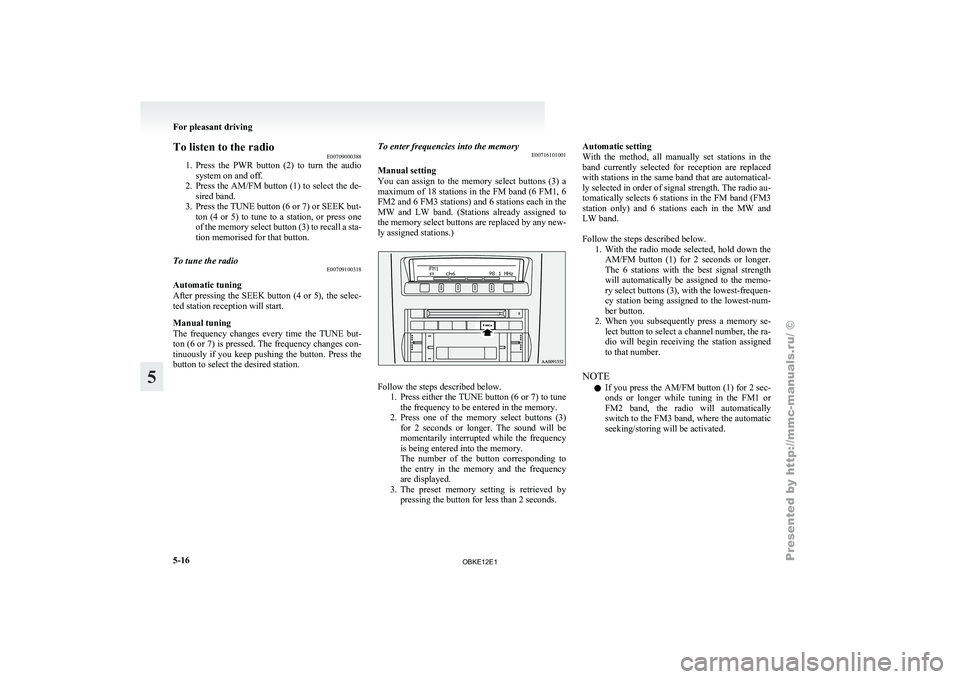
To listen to the radio
E00709000388
1. Press the PWR
button (2) to turn the audio
system on and off.
2. Press the AM/FM button (1) to select the de- sired band.
3. Press the TUNE button (6 or 7) or SEEK but- ton (4 or 5) to tune to a station, or press one
of the memory select button (3) to recall a sta-
tion memorised for that button.
To tune the radio E00709100318
Automatic tuning
After pressing
the
SEEK button (4 or 5), the selec-
ted station reception will start.
Manual tuning
The frequency changes every time the TUNE but-
ton (6 or 7) is pressed. The frequency changes con-
tinuously if you keep pushing the button. Press the
button to select the desired station. To enter frequencies into the memory
E00716101001
Manual setting
You can
assign
to the memory select buttons (3) a
maximum of 18 stations in the FM band (6 FM1, 6
FM2 and 6 FM3 stations) and 6 stations each in the
MW and LW band. (Stations already assigned to
the memory select buttons are replaced by any new-
ly assigned stations.) Follow the steps described below.
1. Press either the
TUNE button (6 or 7) to tune
the frequency to be entered in the memory.
2. Press one of the memory select buttons (3) for 2 seconds or longer. The sound will be
momentarily interrupted while the frequency
is being entered into the memory.
The number of the button corresponding to
the entry in the memory and the frequency
are displayed.
3. The preset memory setting is retrieved by pressing the button for less than 2 seconds. Automatic setting
With the
method,
all manually set stations in the
band currently selected for reception are replaced
with stations in the same band that are automatical-
ly selected in order of signal strength. The radio au-
tomatically selects 6 stations in the FM band (FM3
station only) and 6 stations each in the MW and
LW band.
Follow the steps described below. 1. With the radio mode selected, hold down theAM/FM button (1) for 2 seconds or longer.
The 6 stations with the best signal strength
will automatically be assigned to the memo-
ry select buttons (3), with the lowest-frequen-
cy station being assigned to the lowest-num-
ber button.
2. When you subsequently press a memory se- lect button to select a channel number, the ra-
dio will begin receiving the station assigned
to that number.
NOTE l If you press the AM/FM button (1) for 2 sec-
onds or longer while tuning in the FM1 or
FM2 band, the radio will automatically
switch to the FM3 band, where the automatic
seeking/storing will be activated. For pleasant driving
5-16
5
OBKE12E1
Page 200 of 377
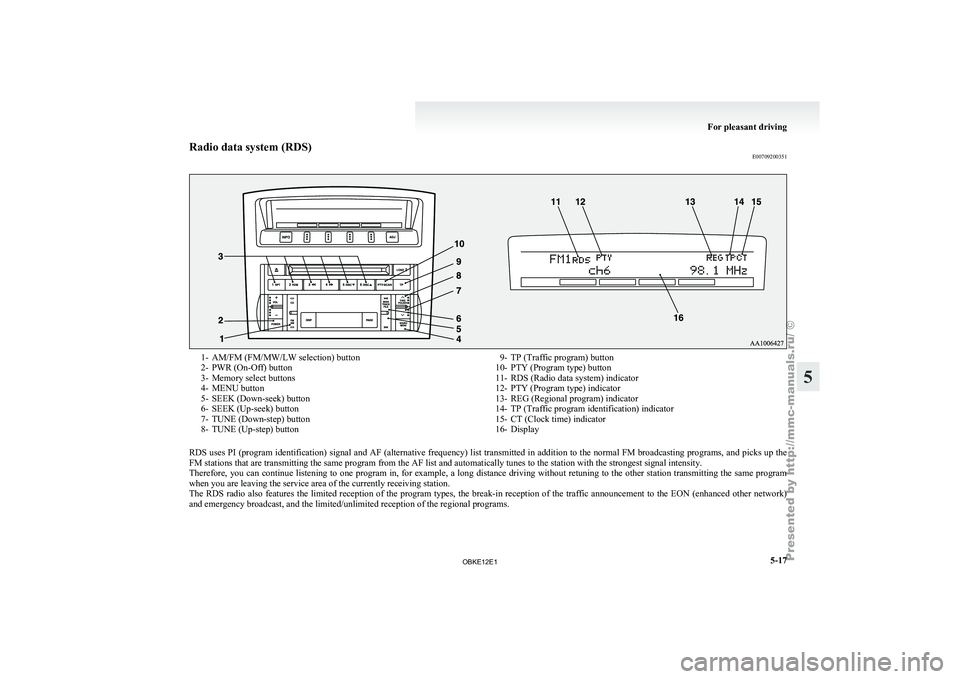
Radio data system (RDS)
E007092003511- AM/FM (FM/MW/LW selection) button
2- PWR (On-Off) button
3-
Memory select buttons
4-
MENU button
5- SEEK (Down-seek) button
6- SEEK (Up-seek) button
7- TUNE (Down-step) button
8- TUNE (Up-step) button 9- TP (Traffic program) button
10- PTY (Program type) button
11- RDS (Radio data system) indicator
12-
PTY (Program type) indicator
13- REG (Regional program) indicator
14- TP (Traffic program identification) indicator
15- CT (Clock time) indicator
16- Display
RDS uses PI (program identification) signal and AF (alternative frequency) list transmitted in addition to the normal FM broadcasting programs, and picks up the
FM stations that are transmitting the same program from the AF list and automatically tunes to the station with the strongest signal intensity.
Therefore, you can
continue listening to one program in, for example, a long distance driving without retuning to the other station transmitting the same program
when you are leaving the service area of the currently receiving station.
The RDS radio also features the limited reception of the program types, the break-in reception of the traffic announcement to the EON (enhanced other network)
and emergency broadcast, and the limited/unlimited reception of the regional programs. For pleasant driving
5-17 5
OBKE12E1
Page 202 of 377
NOTE
l If
the SEEK
button (5 or 6) is pressed for
less than 1 second,the radio will try to find
out another broadcast of the same program
type as currently selected.
l If no station is found with your desired PTY,
the display will show “EMPTY” for about
5 seconds and the radio will return to the pre-
vious station.
How to enter PTYs in the memory E00721400089
As many as 6 PTYs can be entered in the memory.
Follow the steps described below.
1. Press either
the
TUNE button (7 or 8) to tune
the PTY to be entered in the memory.
2. Press one of the memory select buttons (3) for 2 seconds or longer. The sound will be
momentarily interrupted while the PTY is be-
ing entered into the memory. The number of
the button corresponding to the entry into the
memory and the PTY are displayed.
3. The preset memory setting is retrieved by pressing the button and then releasing it with-
in about 2 seconds.
Traffic information E00721600195
The radio will automatically tune in to traffic infor-
mation broadcasts while
receiving FM broadcasts
or playing compact discs.
To select this function: 1. Press the TP button (9). The display willshow TP indicator (14). If the RDS data can
be read, the display will show RDS indicator
(11). If not, the display will show “NO RDS”
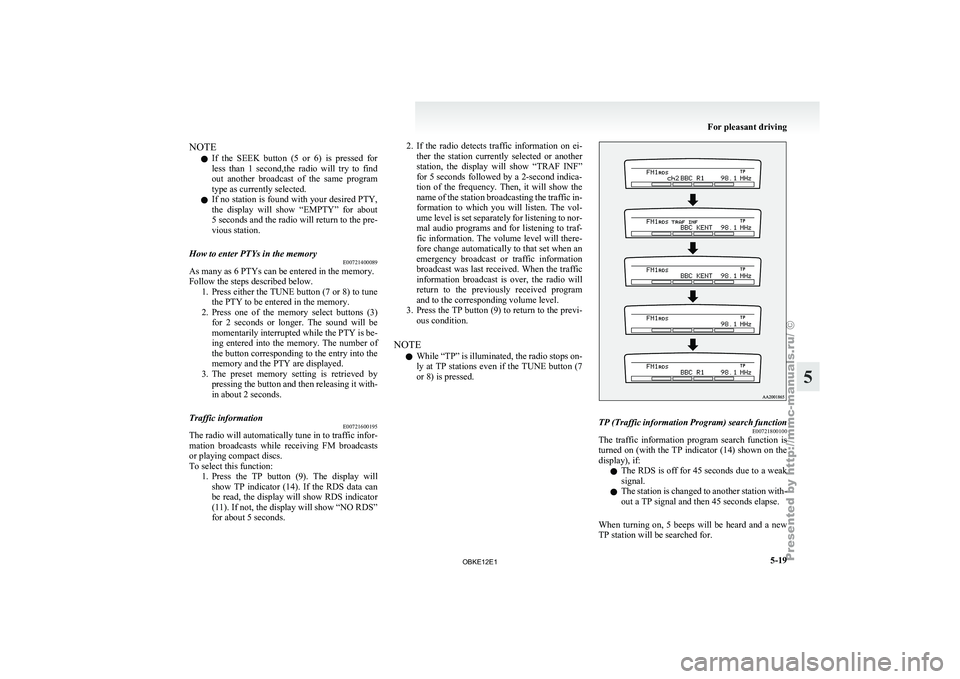
for about 5 seconds. 2. If the radio detects traffic information on ei-
ther the
station currently selected or another
station, the display will show “TRAF INF”
for 5 seconds followed by a 2-second indica-
tion of the frequency. Then, it will show the
name of the station broadcasting the traffic in-
formation to which you will listen. The vol-
ume level is set separately for listening to nor-
mal audio programs and for listening to traf-
fic information. The volume level will there-
fore change automatically to that set when an
emergency broadcast or traffic information
broadcast was last received. When the traffic
information broadcast is over, the radio will
return to the previously received program
and to the corresponding volume level.
3. Press the TP button (9) to return to the previ- ous condition.
NOTE l While “TP” is illuminated, the radio stops on-
ly at TP stations even if the TUNE button (7
or 8) is pressed. TP (Traffic information Program) search function
E00721800100
The traffic information program search function is
turned on (with
the TP indicator (14) shown on the
display), if:
l The RDS is off for 45 seconds due to a weak
signal.
l The station is changed to another station with-
out a TP signal and then 45 seconds elapse.
When turning on, 5 beeps will be heard and a new
TP station will be searched for. For pleasant driving
5-19 5
OBKE12E1
Page 207 of 377
CAUTION
l
Attempting to play a file not in the MP3
format which has a “.mp3” file name may
produce noise from the speakers and
speaker damage, and can damage your
hearing.
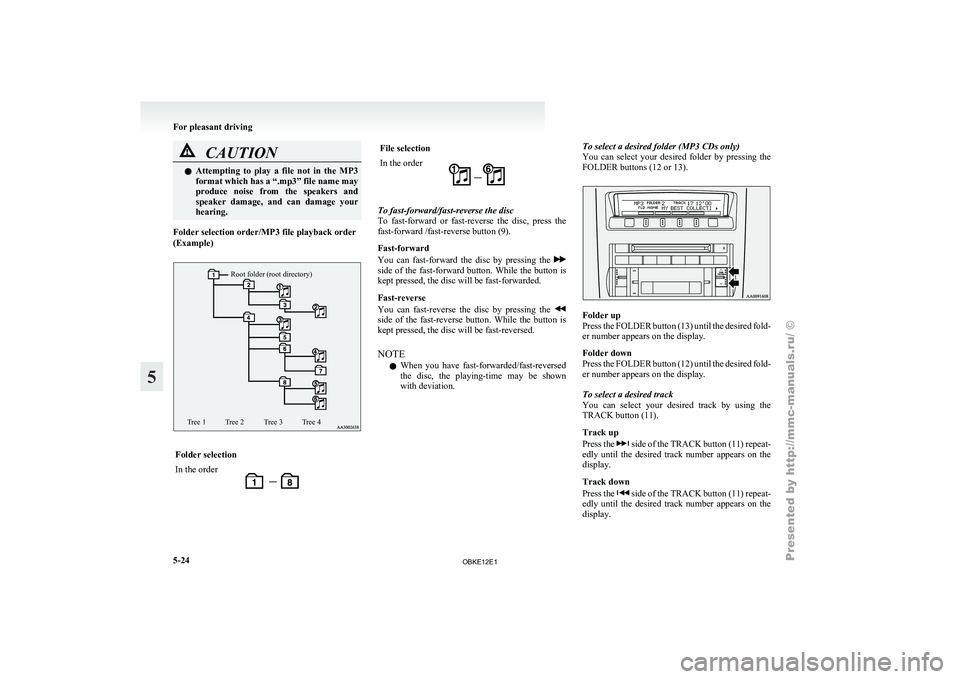
Folder selection order/MP3 file playback order
(Example)
Root folder (root directory)
Tree 1 Tree 2 Tree 3 Tree 4 Folder selection
In the order File selection
In the order
To fast-forward/fast-reverse the disc
To fast-forward
or
fast-reverse the disc, press the
fast-forward /fast-reverse button (9).
Fast-forward
You can fast-forward the disc by pressing the side of the fast-forward button. While the button is
kept pressed, the disc will be fast-forwarded.
Fast-reverse
You can
fast-reverse
the disc by pressing the side of the fast-reverse button. While the button is
kept pressed, the disc will be fast-reversed.
NOTE
l When
you have
fast-forwarded/fast-reversed
the disc, the playing-time may be shown
with deviation. To select a desired folder (MP3 CDs only)
You
can
select
your desired folder by pressing the
FOLDER buttons (12 or 13). Folder up
Press the
FOLDER
button (13) until the desired fold-
er number appears on the display.
Folder down
Press the FOLDER button (12) until the desired fold-
er number appears on the display.
To select a desired track
You can select your desired track by using the
TRACK button (11).
Track up
Press the side of the TRACK button (11) repeat-
edly until the
desired track number appears on the
display.
Track down
Press the side of the TRACK button (11) repeat-
edly until the
desired track number appears on the
display. For pleasant driving
5-24
5
OBKE12E1
Page 210 of 377
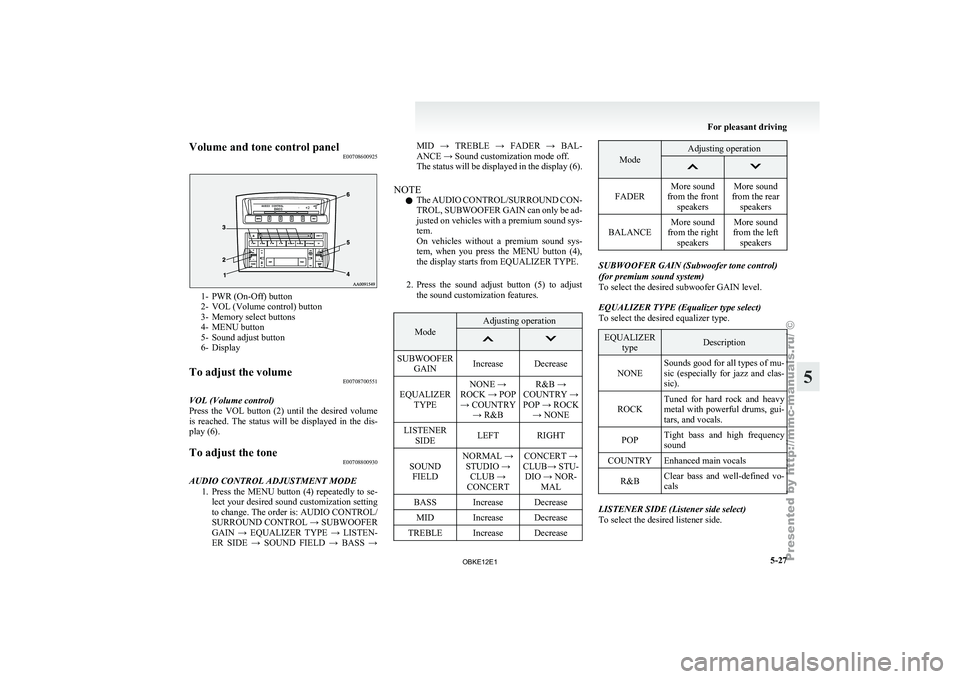
Volume and tone control panel
E007086009251- PWR (On-Off) button
2- VOL (Volume control) button
3-
Memory select buttons
4-
MENU button
5- Sound adjust button
6- Display
To adjust the volume E00708700551
VOL (Volume control)
Press the VOL
button (2) until the desired volume
is reached. The status will be displayed in the dis-
play (6).
To adjust the tone E00708800930
AUDIO CONTROL ADJUSTMENT MODE 1. Press the MENU
button (4) repeatedly to se-
lect your desired sound customization setting
to change. The order is: AUDIO CONTROL/
SURROUND CONTROL → SUBWOOFER
GAIN → EQUALIZER TYPE → LISTEN-
ER SIDE → SOUND FIELD → BASS → MID → TREBLE → FADER → BAL-
ANCE → Sound customization mode off.
The
status
will
be displayed in the display (6).
NOTE l The AUDIO CONTROL/SURROUND CON-
TROL, SUBWOOFER GAIN can only be ad-
justed on vehicles with a premium sound sys-
tem.
On vehicles without a premium sound sys-
tem, when you press the MENU button (4),
the display starts from EQUALIZER TYPE.
2. Press the sound adjust button (5) to adjust the sound customization features. Mode Adjusting operation
SUBWOOFER
GAIN Increase Decrease
EQUALIZER TYPE NONE →
ROCK → POP → COUNTRY → R&B R&B →
COUNTRY →
POP → ROCK → NONE
LISTENER SIDE LEFT RIGHT
SOUND FIELD NORMAL →
STUDIO → CLUB →
CONCERT CONCERT →
CLUB→ STU- DIO → NOR- MAL
BASS Increase Decrease MID Increase Decrease
TREBLE Increase Decrease Mode Adjusting operation
FADER
More sound
from the front speakers More sound
from the rear speakers
BALANCE More sound
from the right speakers More sound
from the left speakers SUBWOOFER GAIN (Subwoofer tone control)
(for premium sound system)
To select the desired subwoofer GAIN level.
EQUALIZER TYPE (Equalizer type select)
To select the desired equalizer type.
EQUALIZER
type Description
NONE Sounds good for all types of mu-
sic (especially
for
jazz and clas-
sic).
ROCK Tuned for hard rock and heavy
metal with powerful
drums, gui-
tars, and vocals.
POP Tight bass and high frequency
sound
COUNTRY Enhanced main vocals
R&B Clear bass and well-defined vo-
cals LISTENER SIDE (Listener side select)
To select the desired listener side. For pleasant driving
5-27 5
OBKE12E1
Page 214 of 377

To listen to the radio
E00709000418
1. Press the PWR
button (2) to turn the audio
system on and off.
Press the AM/FM button (1) to turn on the ra-
dio if a CD is being played.
2. Press the AM/FM button (1) to select the de- sired band.
3. Press the TUNE button (6 or 7) or SEEK but- ton (4 or 5) to tune to a station, or press one
of the memory select buttons (3) to recall a
station memorised for that button.
To tune the radio E00709100350
Automatic tuning
After pressing
the
SEEK button (4 or 5), the selec-
ted station reception will start.
Manual tuning
The frequency changes every time the TUNE but-
ton (6 or 7) is pressed. The frequency changes con-
tinuously if you keep pushing the button. Press the
button to select the desired station. To enter frequencies into the memory
E00716101014
Manual setting
You can
assign
to the memory select buttons (3) a
maximum of 18 stations in the FM band (6 FM1, 6
FM2 and 6 FM3 stations) and 6 stations each in the
MW and LW band. (Stations already assigned to
the memory select buttons are replaced by any new-
ly assigned stations.)
Follow the steps described below.
1. Press either the
TUNE button (6 or 7) to tune
the frequency to be entered in the memory.
2. Press one of the memory select buttons (3) for 2 seconds or longer. The sound will be
momentarily interrupted while the frequency
is being entered into the memory.
The number of the button corresponding to
the entry in the memory and the frequency
are displayed.
3. The preset memory setting is retrieved by pressing the button for less than 2 seconds. Automatic setting
With the
method,
all manually set stations in the
band currently selected for reception are replaced
with stations in the same band that are automatical-
ly selected in order of signal strength. The radio au-
tomatically selects 6 stations in the FM band (FM3
station only) and 6 stations each in the MW and
LW band.
Follow the steps described below. 1. With the radio mode selected, hold down theAM/FM button (1) for 2 seconds or longer.
The 6 stations with the best signal strength
will automatically be assigned to the memo-
ry select buttons (3), with the lowest-frequen-
cy station being assigned to the lowest-num-
ber button.
2. When you subsequently press a memory se- lect button to select a channel number, the ra-
dio will begin receiving the station assigned
to that number.
NOTE l If you press the AM/FM button (1) for
2 seconds or longer while tuning in the FM1
or FM2 band, the radio will automatically
switch to the FM3 band, where the automatic
seeking/storing will be activated. For pleasant driving
5-31 5
OBKE12E1
Page 215 of 377

Radio data system (RDS)
E007092003641- AM/FM (FM/MW/LW selection) button
2- PWR (On-Off) button
3-
Memory select buttons
4-
MENU button
5- SEEK (Down-seek) button
6- SEEK (Up-seek) button
7- TUNE (Down-step) button
8- TUNE (Up-step) button 9- TP (Traffic program) button
10- PTY (Program type) button
11- RDS (Radio data system) indicator
12-
PTY (Program type) indicator
13- REG (Regional program) indicator
14- TP (Traffic program identification) indicator
15- CT (Clock time) indicator
16- Display
RDS uses PI (program identification) signal and AF (alternative frequency) list transmitted in addition to the normal FM broadcasting programs, and picks up the
FM stations that are transmitting the same program from the AF list and automatically tunes to the station with the strongest signal intensity.
Therefore, you can
continue listening to one program in, for example, a long distance driving without retuning to the other station transmitting the same program
when you are leaving the service area of the currently receiving station.
The RDS radio also features the limited reception of the program types, the break-in reception of the traffic announcement to the EON (enhanced other network)
and emergency broadcast, and the limited/unlimited reception of the regional programs. For pleasant driving
5-32
5
OBKE12E1
Page 217 of 377
NOTE
l If
the SEEK
button (5 or 6) is pressed for
less than 1 second, the radio will try to find
out another broadcast of the same program
type as currently selected.
l If no station is found with your desired PTY,
the display will show “EMPTY” for about 5
seconds and the radio will return to the previ-
ous station.
How to enter PTYs in the memory E00721400092
As many as 6 PTYs can be entered in the memory.
Follow the steps described below.
1. Press either
the
TUNE button (7 or 8) to tune
the PTY to be entered in the memory.
2. Press one of the memory select buttons (3) for 2 seconds or longer. The sound will be
momentarily interrupted while the PTY is be-
ing entered into the memory. The number of
the button corresponding to the entry into the
memory and the PTY are displayed.
3. The preset memory setting is retrieved by pressing the button and then releasing it with-
in about 2 seconds.
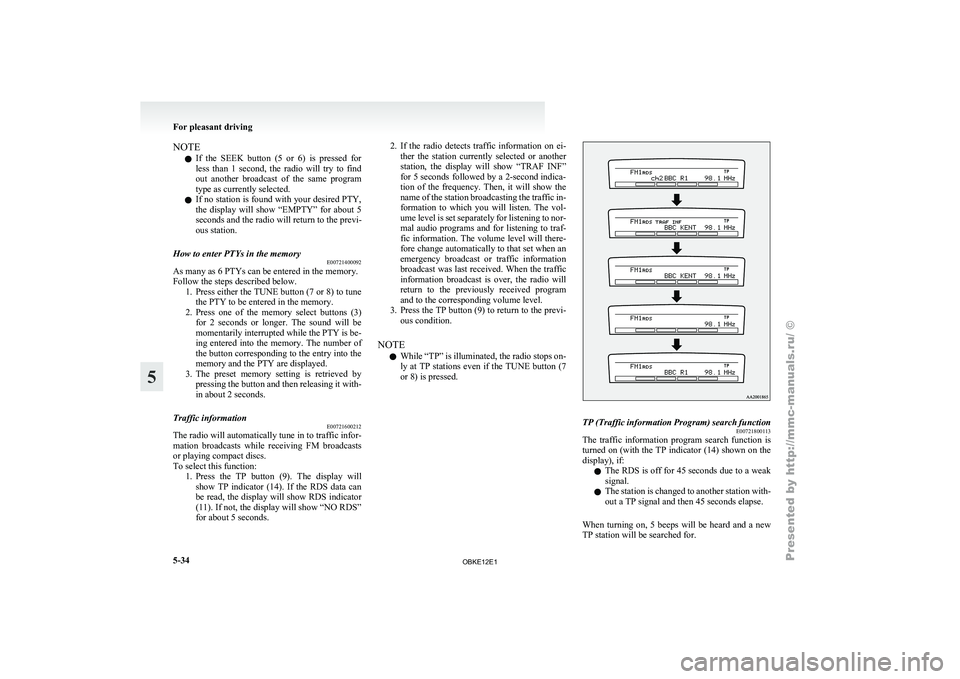
Traffic information E00721600212
The radio will automatically tune in to traffic infor-
mation broadcasts while
receiving FM broadcasts
or playing compact discs.
To select this function: 1. Press the TP button (9). The display willshow TP indicator (14). If the RDS data can
be read, the display will show RDS indicator
(11). If not, the display will show “NO RDS”
for about 5 seconds. 2. If the radio detects traffic information on ei-
ther the
station currently selected or another
station, the display will show “TRAF INF”
for 5 seconds followed by a 2-second indica-
tion of the frequency. Then, it will show the
name of the station broadcasting the traffic in-
formation to which you will listen. The vol-
ume level is set separately for listening to nor-
mal audio programs and for listening to traf-
fic information. The volume level will there-
fore change automatically to that set when an
emergency broadcast or traffic information
broadcast was last received. When the traffic
information broadcast is over, the radio will
return to the previously received program
and to the corresponding volume level.
3. Press the TP button (9) to return to the previ- ous condition.
NOTE l While “TP” is illuminated, the radio stops on-
ly at TP stations even if the TUNE button (7
or 8) is pressed. TP (Traffic information Program) search function
E00721800113
The traffic information program search function is
turned on (with
the TP indicator (14) shown on the
display), if:
l The RDS is off for 45 seconds due to a weak
signal.
l The station is changed to another station with-
out a TP signal and then 45 seconds elapse.
When turning on, 5 beeps will be heard and a new
TP station will be searched for. For pleasant driving
5-34
5
OBKE12E1
Page 221 of 377

To listen to a CD
E00709601961
The CD can
be loaded or ejected by pressing the
LOAD button (15) or the eject button (7) even if
the audio system power is off. 1. Press the PWR button (2) to turn the audiosystem on and off. The system turns on in
the last mode used.
2. Press the CD button (4) to enter CD mode. The autochanger will start playback if the
CD is already in the autochanger.
3. To stop the CD, turn off the power by press- ing the PWR button (2) or change over to ra-
dio mode by pressing the AM/FM button (1),
or eject the disc by pressing the eject button
(7).
NOTE l To adjust the volume and tone, refer to “To
adjust the volume” on page 5-27 and “To ad-
just the tone” on page 5-27.
l As many as 6 CDs can be inserted into the
CD autochanger.
l For information concerning the handling of
the compact discs, refer to “Handling of com-
pact discs” on page 5-65. To set discs To set a single disc
1. Press the LOAD button (15) briefly.
2.The
autochanger will show “WAIT” on the
display and start making itself ready for disc
loading.
3. When the autochanger is ready for disc load- ing, the indicator light (A) will come on and
the display will show “LOAD DISC (1~6)”.
4. Insert a disc into the disc loading slot.
NOTE l If there are multiple empty slots, you can se-
lect your desired slot by pressing the DISC
buttons (16 or 17).
l If you do not insert a disc for about
15 seconds after the autochanger starts stand-
ing by for loading, the loading standby mode
will be cancelled.
To set all the discs 1. Press the LOAD button (15) for 2 seconds orlonger (until you hear a beep).
2. The autochanger will select the lowest-num- bered empty slot and switch to loading stand-
by mode. 3. When
the display shows “LOAD DISC
(1~6)”, insert
a disc. The autochanger will
then automatically select the next empty slot
and enter loading standby mode.
4. Repeat the above-described steps until every slot contains a disc. Playback will then begin
with the disc that you inserted last.
NOTE l If you press the LOAD button (15) again
while the autochanger is in loading standby
mode, the loading standby mode will be can-
celled.
To eject discs To eject a single disc
Press the
eject
button (7) briefly to eject the current-
ly selected disc.
NOTE
l If you press the eject button (7) while the dis-
play is showing “LOAD DISC (1~6)”, the
loading standby mode will be cancelled and
the next disc will be ejected. For pleasant driving
5-38
5
OBKE12E1
Page 224 of 377
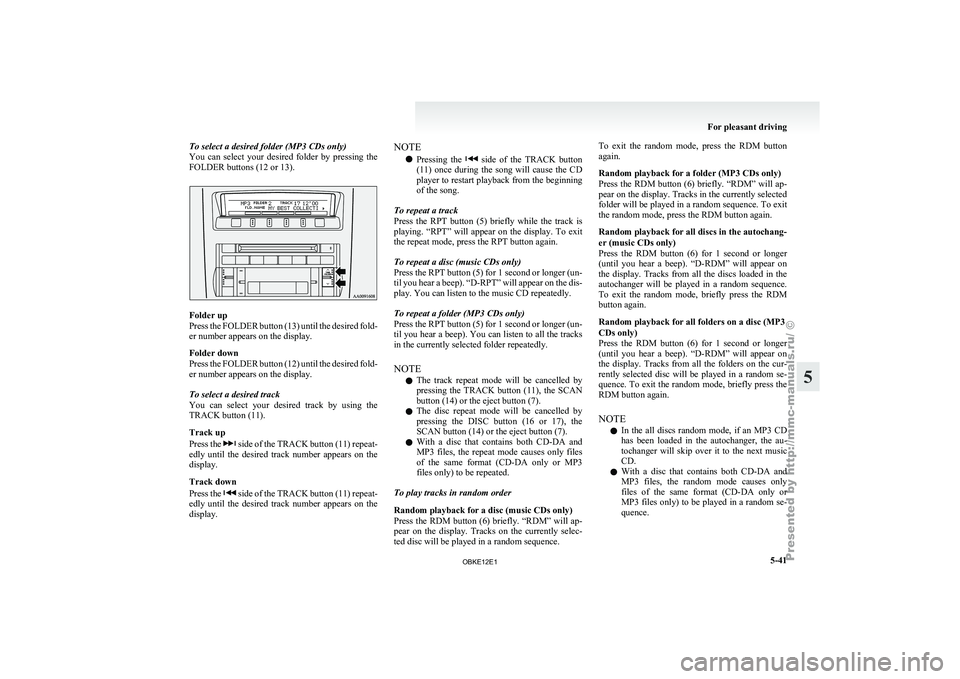
To select a desired folder (MP3 CDs only)
You can select
your desired folder by pressing the
FOLDER buttons (12 or 13). Folder up
Press the
FOLDER
button (13) until the desired fold-
er number appears on the display.
Folder down
Press the FOLDER button (12) until the desired fold-
er number appears on the display.
To select a desired track
You can select your desired track by using the
TRACK button (11).
Track up
Press the side of the TRACK button (11) repeat-
edly until the
desired track number appears on the
display.
Track down
Press the side of the TRACK button (11) repeat-
edly until the
desired track number appears on the
display. NOTE
l Pressing
the side of the TRACK button
(11) once during
the song will cause the CD
player to restart playback from the beginning
of the song.
To repeat a track
Press the RPT button (5) briefly while the track is
playing. “RPT” will appear on the display. To exit
the repeat mode, press the RPT button again.
To repeat a disc (music CDs only)
Press the RPT button (5) for 1 second or longer (un-
til you hear a beep). “D-RPT” will appear on the dis-
play. You can listen to the music CD repeatedly.
To repeat a folder (MP3 CDs only)
Press the RPT button (5) for 1 second or longer (un-
til you hear a beep). You can listen to all the tracks
in the currently selected folder repeatedly.
NOTE l The track repeat mode will be cancelled by
pressing the TRACK button (11), the SCAN
button (14) or the eject button (7).
l The disc repeat mode will be cancelled by
pressing the DISC button (16 or 17), the
SCAN button (14) or the eject button (7).
l With a disc that contains both CD-DA and
MP3 files, the repeat mode causes only files
of the same format (CD-DA only or MP3
files only) to be repeated.
To play tracks in random order
Random playback for a disc (music CDs only)
Press the RDM button (6) briefly. “RDM” will ap-
pear on the display. Tracks on the currently selec-
ted disc will be played in a random sequence. To exit the random mode, press the RDM button
again.
Random playback for a folder (MP3 CDs only)
Press
the RDM
button (6) briefly. “RDM” will ap-
pear on the display. Tracks in the currently selected
folder will be played in a random sequence. To exit
the random mode, press the RDM button again.
Random playback for all discs in the autochang-
er (music CDs only)
Press the RDM button (6) for 1 second or longer
(until you hear a beep). “D-RDM” will appear on
the display. Tracks from all the discs loaded in the
autochanger will be played in a random sequence.
To exit the random mode, briefly press the RDM
button again.
Random playback for all folders on a disc (MP3
CDs only)
Press the RDM button (6) for 1 second or longer
(until you hear a beep). “D-RDM” will appear on
the display. Tracks from all the folders on the cur-
rently selected disc will be played in a random se-
quence. To exit the random mode, briefly press the
RDM button again.
NOTE
l In the all discs random mode, if an MP3 CD
has been loaded in the autochanger, the au-
tochanger will skip over it to the next music
CD.
l With a disc that contains both CD-DA and
MP3 files, the random mode causes only
files of the same format (CD-DA only or
MP3 files only) to be played in a random se-
quence. For pleasant driving
5-41 5
OBKE12E1