child lock MITSUBISHI PAJERO IV 2011 User Guide
[x] Cancel search | Manufacturer: MITSUBISHI, Model Year: 2011, Model line: PAJERO IV, Model: MITSUBISHI PAJERO IV 2011Pages: 377, PDF Size: 29.43 MB
Page 57 of 377
Seat belts
E00404800072
To protect you
and your passengers in the event of
an accident, it is most important that the seat belts
are worn correctly while driving.
The front seat belts have a pretensioner system.
These belts are used the same way as a convention-
al seat belt.
Refer to “Seat belt pretensioner system and force
limiter system” on page 2-23. WARNING
l Always place
the
shoulder belt over your
shoulder and across your chest. Never
put it behind you or under your arm.
l One seat belt should be used by only one
person. Doing otherwise can be dangerous.
l The seat belt will provide its wearer with
maximum protection if the recliner seat-
back is placed in fully upright position.
When the seatback is reclined, there is
greater risk that the passenger will slide
under the belt, especially in a forward im-
pact accident, and may be injured by the
belt or by striking the instrument panel
or seatbacks.
l Seat belts should always be worn by ev-
ery adult who drives or rides in this vehi-
cle, and by all children who are tall
enough to wear seat belts properly.
Other children should always use proper
child restraint systems.
l Remove any twists when using the belt. WARNING
l No modifications or
additions should be
made by the user which will either pre-
vent the seat belt adjusting devices from
operating to remove slack, or prevent the
seat belt assembly from being adjusted to
remove slack.
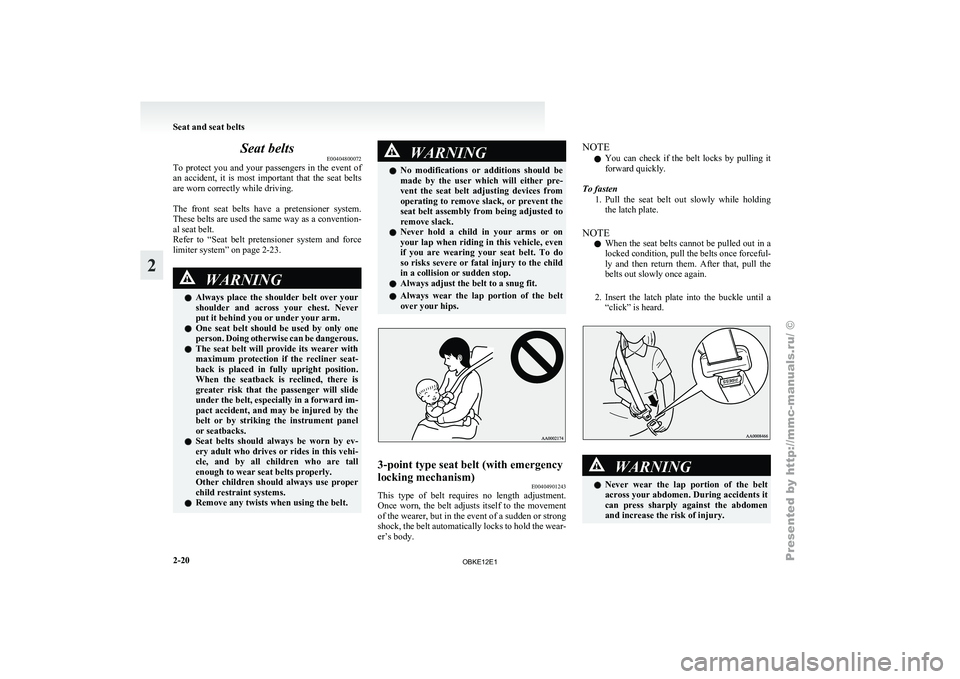
l Never hold a child in your arms or on
your lap when riding in this vehicle, even
if you are wearing your seat belt. To do
so risks severe or fatal injury to the child
in a collision or sudden stop.
l Always adjust the belt to a snug fit.
l Always wear the lap portion of the belt
over your hips. 3-point type seat belt (with emergency
locking mechanism)
E00404901243
This type of belt requires no length adjustment.
Once worn, the
belt adjusts itself to the movement
of the wearer, but in the event of a sudden or strong
shock, the belt automatically locks to hold the wear-
er’s body. NOTE
l You
can check
if the belt locks by pulling it
forward quickly.
To fasten 1. Pull the seat belt out slowly while holdingthe latch plate.
NOTE l When the seat belts cannot be pulled out in a
locked condition, pull the belts once forceful-
ly and then return them. After that, pull the
belts out slowly once again.
2. Insert the latch plate into the buckle until a “click” is heard. WARNING
l Never wear
the
lap portion of the belt
across your abdomen. During accidents it
can press sharply against the abdomen
and increase the risk of injury. Seat and seat belts
2-20
2
OBKE12E1
Page 69 of 377
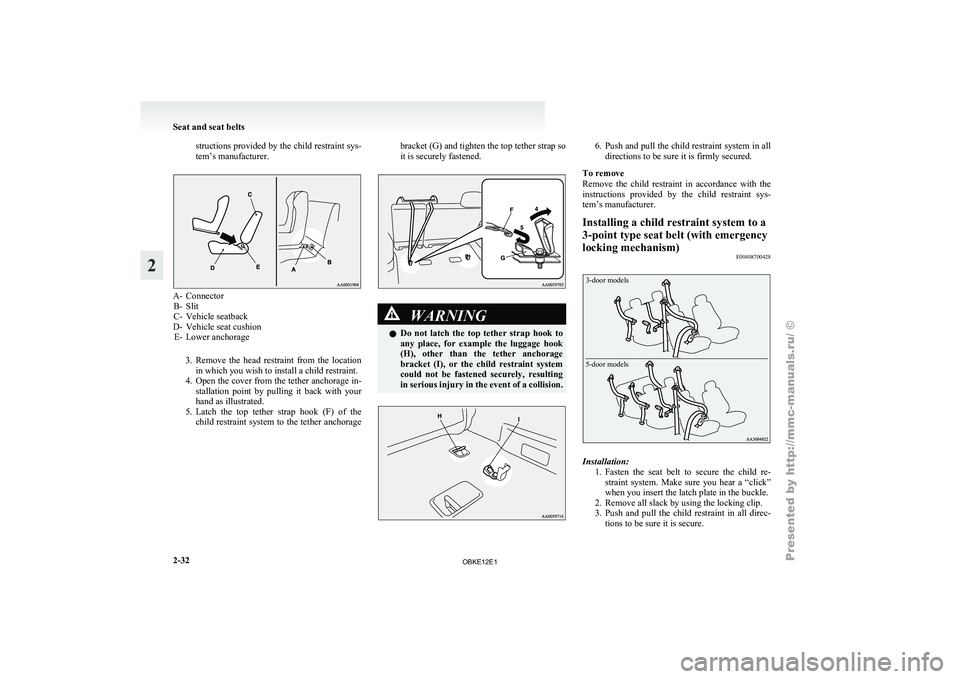
structions provided by the child restraint sys-
tem’s manufacturer.
A- Connector
B- Slit
C- Vehicle seatback
D-
Vehicle seat cushion
E- Lower anchorage
3. Remove the head restraint from the locationin which you wish to install a child restraint.
4. Open the cover from the tether anchorage in- stallation point by pulling it back with your
hand as illustrated.
5. Latch the top tether strap hook (F) of the child restraint system to the tether anchorage bracket (G) and tighten the top tether strap so
it is securely fastened.
WARNING
l Do not
latch
the top tether strap hook to
any place, for example the luggage hook
(H), other than the tether anchorage
bracket (I), or the child restraint system
could not be fastened securely, resulting
in serious injury in the event of a collision. 6. Push and pull the child restraint system in all
directions to be sure it is firmly secured.
To remove
Remove the
child restraint in accordance with the
instructions provided by the child restraint sys-
tem’s manufacturer.
Installing a child restraint system to a
3-point type seat belt (with emergency
locking mechanism) E00408700428
3-door models
5-door models Installation:
1. Fasten the seat
belt to secure the child re-
straint system. Make sure you hear a “click”
when you insert the latch plate in the buckle.
2. Remove all slack by using the locking clip.
3. Push and pull the child restraint in all direc- tions to be sure it is secure. Seat and seat belts
2-32
2
OBKE12E1
Page 70 of 377
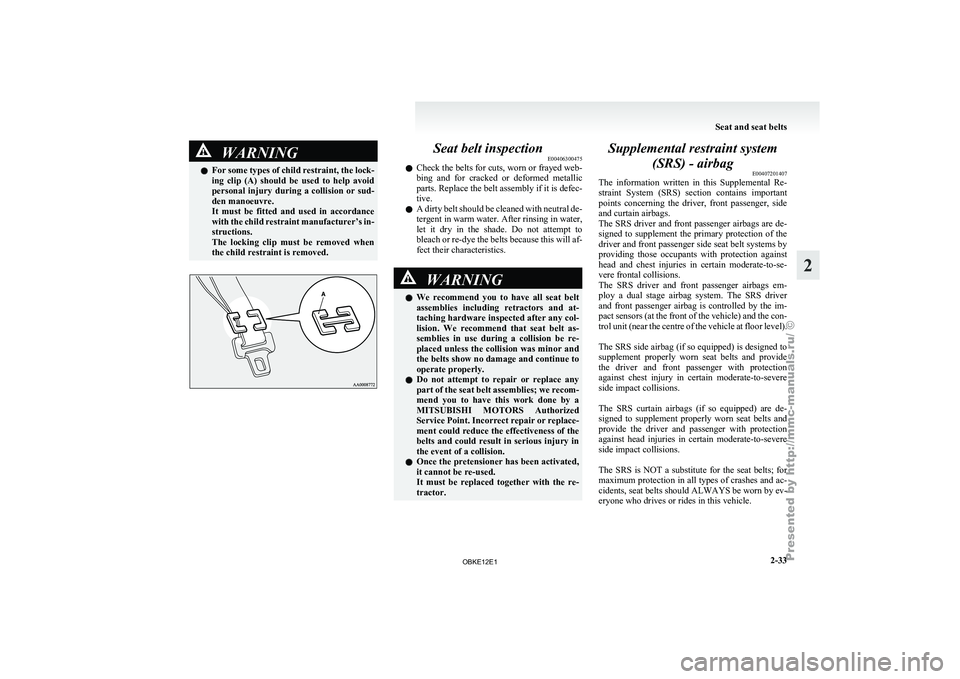
WARNING
l For some types of child restraint, the lock-
ing clip (A) should be used to help avoid
personal injury during a collision or sud-
den manoeuvre.
It must be fitted and used in accordance
with the child restraint manufacturer’s in-
structions.
The locking clip must be removed when
the child restraint is removed. Seat belt inspection
E00406300475
l Check the
belts
for cuts, worn or frayed web-
bing and for cracked or deformed metallic
parts. Replace the belt assembly if it is defec-
tive.
l A dirty belt should be cleaned with neutral de-
tergent in warm water. After rinsing in water,
let it dry in the shade. Do not attempt to
bleach or re-dye the belts because this will af-
fect their characteristics. WARNING
l We recommend
you
to have all seat belt
assemblies including retractors and at-
taching hardware inspected after any col-
lision. We recommend that seat belt as-
semblies in use during a collision be re-
placed unless the collision was minor and
the belts show no damage and continue to
operate properly.
l Do not attempt to repair or replace any
part of the seat belt assemblies; we recom-
mend you to have this work done by a
MITSUBISHI MOTORS Authorized
Service Point. Incorrect repair or replace-
ment could reduce the effectiveness of the
belts and could result in serious injury in
the event of a collision.
l Once the pretensioner has been activated,
it cannot be re-used.
It must be replaced together with the re-
tractor. Supplemental restraint system
(SRS) - airbag E00407201407
The information written
in this Supplemental Re-
straint System (SRS) section contains important
points concerning the driver, front passenger, side
and curtain airbags.
The SRS driver and front passenger airbags are de-
signed to supplement the primary protection of the
driver and front passenger side seat belt systems by
providing those occupants with protection against
head and chest injuries in certain moderate-to-se-
vere frontal collisions.
The SRS driver and front passenger airbags em-
ploy a dual stage airbag system. The SRS driver
and front passenger airbag is controlled by the im-
pact sensors (at the front of the vehicle) and the con-
trol unit (near the centre of the vehicle at floor level).
The SRS side airbag (if so equipped) is designed to
supplement properly worn seat belts and provide
the driver and front passenger with protection
against chest injury in certain moderate-to-severe
side impact collisions.
The SRS curtain airbags (if so equipped) are de-
signed to supplement properly worn seat belts and
provide the driver and passenger with protection
against head injuries in certain moderate-to-severe
side impact collisions.
The SRS is NOT a substitute for the seat belts; for
maximum protection in all types of crashes and ac-
cidents, seat belts should ALWAYS be worn by ev-
eryone who drives or rides in this vehicle. Seat and seat belts
2-33 2
OBKE12E1
Page 73 of 377
Front passenger’s airbag ON-OFF
switch
E00410100070
The front passenger’s
airbag ON-OFF switch can
be used to disable the front passenger’s airbag. If
you have a rearward facing child restraint system
that cannot be fitted to any seat other than the front
passenger seat, be sure to turn OFF the front passen-
ger’s airbag ON-OFF switch before using it. (Refer
to “To turn an airbag off” on page 2-36.)
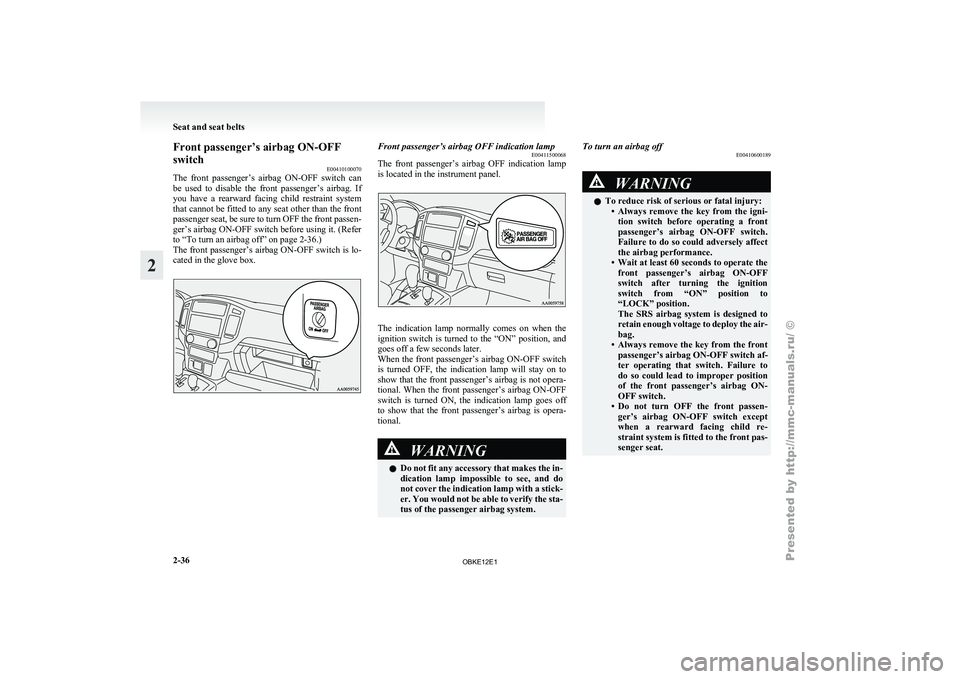
The front passenger’s airbag ON-OFF switch is lo-
cated in the glove box. Front passenger’s airbag OFF indication lamp
E00411500068
The front passenger’s
airbag OFF indication lamp
is located in the instrument panel. The indication lamp normally comes on when the
ignition switch is
turned to the “ON” position, and
goes off a few seconds later.
When the front passenger’s airbag ON-OFF switch
is turned OFF, the indication lamp will stay on to
show that the front passenger’s airbag is not opera-
tional. When the front passenger’s airbag ON-OFF
switch is turned ON, the indication lamp goes off
to show that the front passenger’s airbag is opera-
tional. WARNING
l Do
not
fit
any accessory that makes the in-
dication lamp impossible to see, and do
not cover the indication lamp with a stick-
er. You would not be able to verify the sta-
tus of the passenger airbag system. To turn an airbag off
E00410600189 WARNING
l To reduce risk of serious or fatal injury:
• Always remove the
key from the igni-
tion switch before operating a front
passenger’s airbag ON-OFF switch.
Failure to do so could adversely affect
the airbag performance.
• Wait at least 60 seconds to operate the front passenger’s airbag ON-OFF
switch after turning the ignition
switch from “ON” position to
“LOCK” position.
The SRS airbag system is designed to
retain enough voltage to deploy the air-
bag.
• Always remove the key from the front passenger’s airbag ON-OFF switch af-
ter operating that switch. Failure to
do so could lead to improper position
of the front passenger’s airbag ON-
OFF switch.
• Do not turn OFF the front passen- ger’s airbag ON-OFF switch except
when a rearward facing child re-
straint system is fitted to the front pas-
senger seat. Seat and seat belts
2-36
2
OBKE12E1
Page 201 of 377
AF (Alternative Frequencies) function
E00720900090
The AF function
finds a station broadcasting the
same program and selects the station with the stron-
gest signal of AF lists.
The AF function is turned on at all times unless
you manually switch it off.
The AF function can be turned ON and OFF.
Refer to “Adjusting the time” on page 3-13.
CT (Clock Time) function E00721000085
The clock can be set automatically by using the sig-
nal from the
local RDS stations. Refer to “Adjust-
ing the time” on page 3-13.
REG (Regional) function E00721100028
REG function limits to receive the stations broad-
casting regional programs.
Regional programming and
regional networks are
organized differently depending on the country or
area (they may be changed according to the hour,
state, or broadcast area), so if you don’t want to re-
ceive the regional programs automatically, you can
set up REG ON not to receive regional programs.
The REG function can be turned ON and OFF. Re-
fer to “Function setup mode” on page 5-20.
PI (Program Identification) search function E00721200247
When travelling long distance and the recalled pre-
set station is
weak, the radio searches another fre-
quency broadcasting the same programming with
the same PI code in AF list. If there are no frequencies broadcasting the same
programming, the
radio
searches a frequency broad-
casting the regional programming. The radio suc-
ceeds in searching the regional programming, then
the display shows the REG indicator (13).
If the radio does not succeed in searching the re-
gional programming, the radio returns to the recal-
led preset station.
The PI function can be turned ON and OFF.
Refer to “Function setup mode” on page 5-35.
NOTE
l While searching, the audio system is muted.
The display shows “WAIT” or “SEARCH”.
PTY (Program type) E00721300277
RDS broadcasts are classified according to pro-
gram type (PTY)
as follows. Use the TUNE button
(7 or 8) to select your desired PTY. 1. NEWS
2. AFFAIRS (Current affairs)
3. INFO (Information)
4. SPORT
5. EDUCATE (Education)
6. DRAMA
7. CULTURE
8. SCIENCE
9. VARIED
10. POP M (Pop music)
11. ROCK M (Rock music)
12. EASY M (Easy music)
13. LIGHT M (Light classics)
14. CLASSICS
15. OTHER M (Other music)
16. WEATHER (Weather information)
17. FINANCE
18. CHILDREN 19. SOCIAL
20. RELIGION
21.
PHONE IN
22.
TRAVEL
23. LEISURE
24. JAZZ
25. COUNTRY
26. NATION M (National music)
27. OLDIES
28. FOLK M (Folk music)
29. DOCUMENT
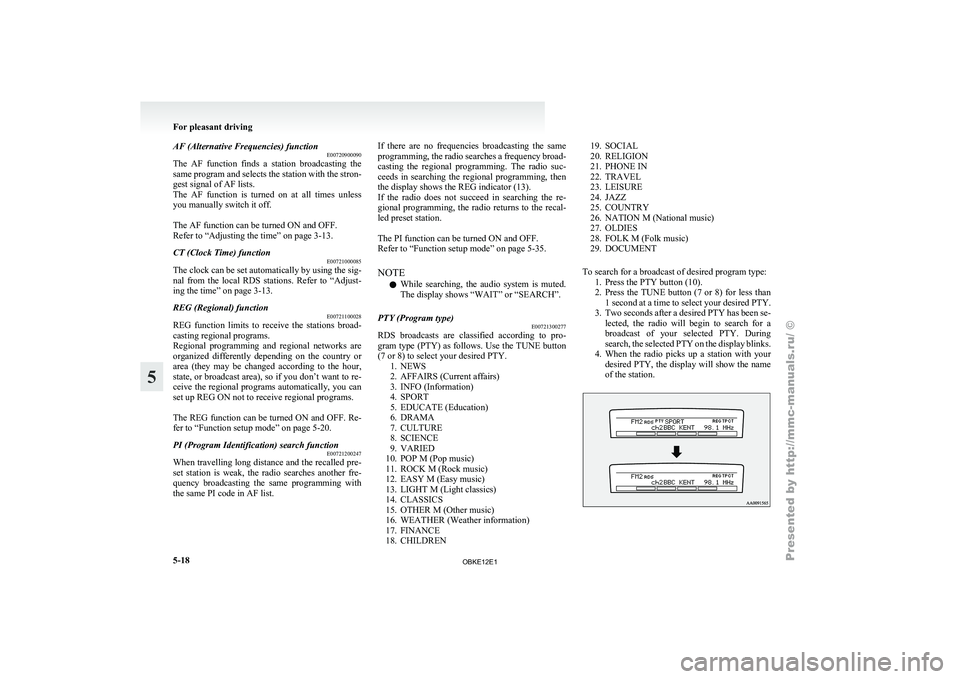
To search for a broadcast of desired program type: 1. Press the PTY button (10).
2. Press the TUNE button (7 or 8) for less than1 second at a time to select your desired PTY.
3. Two seconds after a desired PTY has been se- lected, the radio will begin to search for a
broadcast of your selected PTY. During
search, the selected PTY on the display blinks.
4. When the radio picks up a station with your desired PTY, the display will show the name
of the station. For pleasant driving
5-18
5
OBKE12E1
Page 216 of 377

AF (Alternative Frequencies) function
E00720900104
The AF function
finds a station broadcasting the
same program and selects the station with the stron-
gest signal of AF lists.
The AF function is turned on at all times unless
you manually switch it off.
The AF function can be turned ON and OFF. Refer
to “Function setup mode” on page 5-20.
CT (Clock Time) function E00721000098
The clock can be set automatically by using the sig-
nal from the
local RDS stations. Refer to “Adjust-
ing the time” on page 3-13.
REG (Regional) function E00721100015
REG function limits to receive the stations broad-
casting regional programs.
Regional programming and
regional networks are
organized differently depending on the country or
area (they may be changed according to the hour,
state, or broadcast area), so if you don’t want to re-
ceive the regional programs automatically, you can
set up REG ON not to receive regional programs.
The REG function can be turned ON and OFF. Re-
fer to “Function setup mode” on page 5-20.
PI (Program Identification) search function E00721200234
When travelling long distance and the recalled pre-
set station is
weak, the radio searches another fre-
quency broadcasting the same programming with
the same PI code in AF list. If there are no frequencies broadcasting the same
programming, the
radio
searches a frequency broad-
casting the regional programming. The radio suc-
ceeds in searching the regional programming, then
the display shows the REG indicator (13). If the ra-
dio does not succeed in searching the regional pro-
gramming, the radio returns to the recalled preset
station.
The PI function can be turned ON and OFF.
Refer to “Function setup mode” on page 5-20.
NOTE
l While searching, the audio system is muted.
The display shows “WAIT” or “SEARCH”.
PTY (Program type) E00721300280
RDS broadcasts are classified according to pro-
gram type (PTY)
as follows. Use the TUNE button
(7 or 8) to select your desired PTY. 1. NEWS
2. AFFAIRS (Current affairs)
3. INFO (Information)
4. SPORT
5. EDUCATE (Education)
6. DRAMA
7. CULTURE
8. SCIENCE
9. VARIED
10. POP M (Pop music)
11. ROCK M (Rock music)
12. EASY M (Easy music)
13. LIGHT M (Light classics)
14. CLASSICS
15. OTHER M (Other music)
16. WEATHER (Weather information)
17. FINANCE
18. CHILDREN 19. SOCIAL
20. RELIGION
21. PHONE IN
22.
TRAVEL
23. LEISURE
24. JAZZ
25. COUNTRY
26. NATION M (National music)
27. OLDIES
28. FOLK M (Folk music)
29. DOCUMENT
To search for a broadcast of desired program type: 1. Press the PTY button (10).
2. Press the TUNE button (7 or 8) for less than1 second at a time to select your desired PTY.
3. Two seconds after a desired PTY has been se- lected, the radio will begin to search for a
broadcast of your selected PTY. During
search, the selected PTY on the display blinks.
4. When the radio picks up a station with your desired PTY, the display will show the name
of the station. For pleasant driving
5-33 5
OBKE12E1
Page 358 of 377
A
Accessory (Installation) 04
Accessory socket 5-86
Active stability & traction control (ASTC) 4-41
Additional equipment
8-19
Air conditioning Front automatic air conditioning
5-03
Important operation tips for the air condition-
ing 5-11
Rear air conditioning 5-10
Air purifier (with deodorizing function) 5-12
Airbag 2-33
Antenna 5-66
Anti-lock brake system (ABS) 4-39 Warning lamp 4-40
Approach lamps 1-08
Armrest 2-08,2-10
Ashtray 5-85
Audio Error codes 5-59
Handling of compact discs 5-65
LW/MW/FM electronic tuning radio with CD au-
tochanger 5-26
LW/MW/FM electronic tuning radio with CD
player 5-12
Steering wheel remote control switch 5-57
Auto-cutout function 5-91
Automatic headlamp levelling 3-34
Automatic transmission Fluid 9-15
Selector lever operation 4-19
Selector lever position 4-20
Sports mode 4-21
BBackdoor 1-09 Battery 8-10
Charge warning display 3-10
Discharged battery (Emergency starting) 6-02
Specification 9-11
Bleeding the fuel system
6-06
Bluetooth® 2.0 interface 5-67
Bonnet 8-03
Brake Anti-lock brake 4-39
Brake assist system 4-38
Braking 4-37
Fluid 8-08,9-15
Parking brake 4-06
Power brakes 4-37
Warning lamp 3-09
Bulb capacity 8-24
C Card holder 5-84,5-93
Cargo loads 4-56
Catalytic converter 8-02
Cautions on handling of 4-wheel drive vehi-
cles 4-35
Central door locks 1-07
Centre console box 5-92
Centre information display
3-11
Changing a fuse 8-22
Charge warning display 3-10
Check engine warning lamp
3-10
Child restraint 2-23
Child-protection rear doors 1-08
Cigarette lighter 5-86
Cleaning Aluminium wheels 7-05
Chrome parts 7-05
Exterior of your vehicle 7-03
Genuine leather 7-02
Interior of your vehicle 7-02 Plastic, vinyl leather, etc 7-02
Polishing 7-04
Sunroof 7-05
Washing 7-03
Waxing 7-04
Clutch Fluid 8-09,9-15
Coat hooks 5-97
Combination headlamps and dipper switch 3-31
Convenient hook 5-96
Coolant (engine) 8-06,9-15
Cruise control 4-45
Cup holder 5-94
Curtain airbag system 2-40
D Daytime dipper button 3-06
Daytime running lamp 3-32
Demister (rear window) 3-42
Diesel particulate filter (DPF)
4-15
Diesel preheat indication lamp
3-08
Dimensions 9-04
Dipper (High/Low beam change) 3-32
Door ajar warning lamp 3-11
Door courtesy lamps 5-91,8-24 Replacement 8-30
Doors Central door locks 1-07
Child-protection 1-08
Lock and unlock 1-06
Driving, alcohol and drugs 4-02
E Economical driving 4-02
Electric window control 1-15
Switch 1-15
Timer function 1-16 Alphabetical index
1
OBKE12E1
Page 361 of 377
Seat belt 2-20
Adjustable seat belt anchor 2-21Child restraint 2-23
Force limiter system 2-23
Inspection 2-33
Pregnant women restraint
2-22
Pretensioner system 2-23
Rear/second, third seat belt storage 2-22
Seat belt reminder/warning lamp 2-21
Seats Adjustment 2-05
Armrest 2-08,2-10
Front seats 2-05
Head restraints 2-11
Heated seats 2-08
Lumbar support 2-07
Making a flat seat 2-18
Making a luggage area 2-12
Rear seats 2-09
Seat arrangement 2-03
Second seats 2-09
Third seat 2-11
Security alarm system 1-10
Service precaution 8-02
Service reminder 3-02,3-03
Side airbag system 2-40
Side box 5-93
Snow tyres 8-15
Spark plug 9-11
Specifications 9-02
Starting 4-14
Steering Power steering fluid 8-10,9-15
Power steering system 4-41
Steering wheel height adjustment 4-08
Steering wheel lock 4-13
Steering wheel remote control switch 5-57
Stop lamps Bulb capacity 8-24 Replacement 8-27
Storage spaces 5-91
Sun visors 5-84
Sunglasses holder 5-94
Sunroof 1-17 Lock switch 1-18
Safety mechanism 1-18
Sunshade 1-19
Super select 4WD II 4-24
Supplemental restraint system 2-33 How the Supplemental Restraint System
works 2-34
Servicing 2-43
Warning lamp 2-43
T Tachometer 3-02
Tail lamps
Bulb capacity 8-24
Replacement 8-27
Tank capacity
03
Third seat 2-11
Tools 6-07 Storage 6-07
Towing 6-15
Trailer towing 4-57
Transfer oil 9-15
Transmission Automatic transmission 4-19
Manual transmission 4-16
Tripmeter 3-02
Turn-signal indication lamps 3-08
Turn-signal lever 3-35
Tyres 8-12 How to change a tyre 6-09
Inflation pressures 8-13
Rotation 8-14
Size (tyre and wheel) 9-12 Snow tyres 8-15
Spare wheel information 6-09
Tyre chains 8-15
U USB input terminal 5-82
Used engine
oils
safety instructions and disposal in-
formation 06
V Vanity mirror 5-84
Vanity mirror lamps
Bulb capacity 8-24
Replacement 8-31
Vehicle care precautions
7-02
Vehicle dimensions 9-04
Vehicle identification number 9-02
Vehicle identification number plate 9-02
Vehicle information code plate 9-02
Vehicle labeling 9-02
Vehicle performance 9-06
Vehicle weight 9-07
Ventilators 5-02
W Warning lamps 3-09
Washer
Fluid 8-07,9-15
Switch 3-37,3-41
Washing 7-03
Water temperature gauge 3-05
Waxing 7-04
Weatherstripping 8-19
Weight 9-07
Wheel condition
8-14
Wheel Alphabetical index
4
OBKE12E1