clock MITSUBISHI PAJERO IV 2011 User Guide
[x] Cancel search | Manufacturer: MITSUBISHI, Model Year: 2011, Model line: PAJERO IV, Model: MITSUBISHI PAJERO IV 2011Pages: 377, PDF Size: 29.43 MB
Page 200 of 377
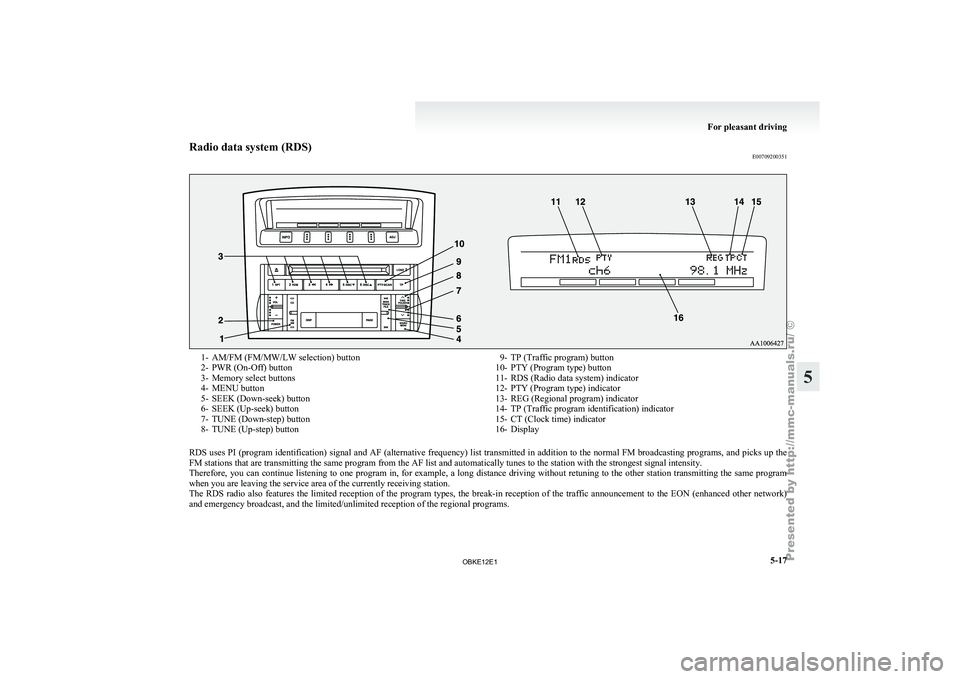
Radio data system (RDS)
E007092003511- AM/FM (FM/MW/LW selection) button
2- PWR (On-Off) button
3-
Memory select buttons
4-
MENU button
5- SEEK (Down-seek) button
6- SEEK (Up-seek) button
7- TUNE (Down-step) button
8- TUNE (Up-step) button 9- TP (Traffic program) button
10- PTY (Program type) button
11- RDS (Radio data system) indicator
12-
PTY (Program type) indicator
13- REG (Regional program) indicator
14- TP (Traffic program identification) indicator
15- CT (Clock time) indicator
16- Display
RDS uses PI (program identification) signal and AF (alternative frequency) list transmitted in addition to the normal FM broadcasting programs, and picks up the
FM stations that are transmitting the same program from the AF list and automatically tunes to the station with the strongest signal intensity.
Therefore, you can
continue listening to one program in, for example, a long distance driving without retuning to the other station transmitting the same program
when you are leaving the service area of the currently receiving station.
The RDS radio also features the limited reception of the program types, the break-in reception of the traffic announcement to the EON (enhanced other network)
and emergency broadcast, and the limited/unlimited reception of the regional programs. For pleasant driving
5-17 5
OBKE12E1
Page 201 of 377
AF (Alternative Frequencies) function
E00720900090
The AF function
finds a station broadcasting the
same program and selects the station with the stron-
gest signal of AF lists.
The AF function is turned on at all times unless
you manually switch it off.
The AF function can be turned ON and OFF.
Refer to “Adjusting the time” on page 3-13.
CT (Clock Time) function E00721000085
The clock can be set automatically by using the sig-
nal from the
local RDS stations. Refer to “Adjust-
ing the time” on page 3-13.
REG (Regional) function E00721100028
REG function limits to receive the stations broad-
casting regional programs.
Regional programming and
regional networks are
organized differently depending on the country or
area (they may be changed according to the hour,
state, or broadcast area), so if you don’t want to re-
ceive the regional programs automatically, you can
set up REG ON not to receive regional programs.
The REG function can be turned ON and OFF. Re-
fer to “Function setup mode” on page 5-20.
PI (Program Identification) search function E00721200247
When travelling long distance and the recalled pre-
set station is
weak, the radio searches another fre-
quency broadcasting the same programming with
the same PI code in AF list. If there are no frequencies broadcasting the same
programming, the
radio
searches a frequency broad-
casting the regional programming. The radio suc-
ceeds in searching the regional programming, then
the display shows the REG indicator (13).
If the radio does not succeed in searching the re-
gional programming, the radio returns to the recal-
led preset station.
The PI function can be turned ON and OFF.
Refer to “Function setup mode” on page 5-35.
NOTE
l While searching, the audio system is muted.
The display shows “WAIT” or “SEARCH”.
PTY (Program type) E00721300277
RDS broadcasts are classified according to pro-
gram type (PTY)
as follows. Use the TUNE button
(7 or 8) to select your desired PTY. 1. NEWS
2. AFFAIRS (Current affairs)
3. INFO (Information)
4. SPORT
5. EDUCATE (Education)
6. DRAMA
7. CULTURE
8. SCIENCE
9. VARIED
10. POP M (Pop music)
11. ROCK M (Rock music)
12. EASY M (Easy music)
13. LIGHT M (Light classics)
14. CLASSICS
15. OTHER M (Other music)
16. WEATHER (Weather information)
17. FINANCE
18. CHILDREN 19. SOCIAL
20. RELIGION
21.
PHONE IN
22.
TRAVEL
23. LEISURE
24. JAZZ
25. COUNTRY
26. NATION M (National music)
27. OLDIES
28. FOLK M (Folk music)
29. DOCUMENT
To search for a broadcast of desired program type: 1. Press the PTY button (10).
2. Press the TUNE button (7 or 8) for less than1 second at a time to select your desired PTY.
3. Two seconds after a desired PTY has been se- lected, the radio will begin to search for a
broadcast of your selected PTY. During
search, the selected PTY on the display blinks.
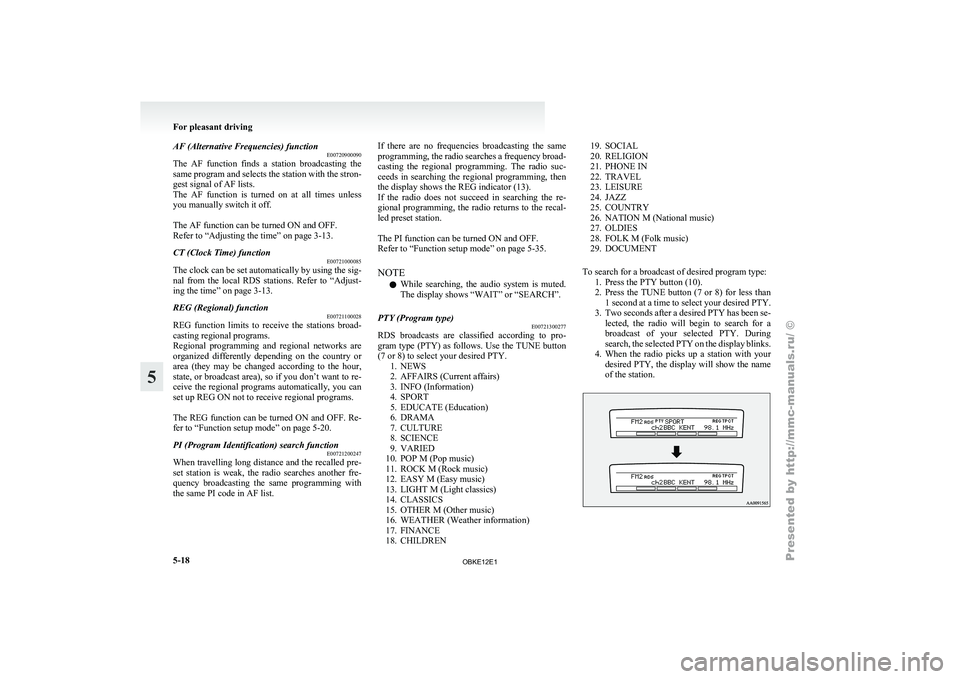
4. When the radio picks up a station with your desired PTY, the display will show the name
of the station. For pleasant driving
5-18
5
OBKE12E1
Page 215 of 377

Radio data system (RDS)
E007092003641- AM/FM (FM/MW/LW selection) button
2- PWR (On-Off) button
3-
Memory select buttons
4-
MENU button
5- SEEK (Down-seek) button
6- SEEK (Up-seek) button
7- TUNE (Down-step) button
8- TUNE (Up-step) button 9- TP (Traffic program) button
10- PTY (Program type) button
11- RDS (Radio data system) indicator
12-
PTY (Program type) indicator
13- REG (Regional program) indicator
14- TP (Traffic program identification) indicator
15- CT (Clock time) indicator
16- Display
RDS uses PI (program identification) signal and AF (alternative frequency) list transmitted in addition to the normal FM broadcasting programs, and picks up the
FM stations that are transmitting the same program from the AF list and automatically tunes to the station with the strongest signal intensity.
Therefore, you can
continue listening to one program in, for example, a long distance driving without retuning to the other station transmitting the same program
when you are leaving the service area of the currently receiving station.
The RDS radio also features the limited reception of the program types, the break-in reception of the traffic announcement to the EON (enhanced other network)
and emergency broadcast, and the limited/unlimited reception of the regional programs. For pleasant driving
5-32
5
OBKE12E1
Page 216 of 377

AF (Alternative Frequencies) function
E00720900104
The AF function
finds a station broadcasting the
same program and selects the station with the stron-
gest signal of AF lists.
The AF function is turned on at all times unless
you manually switch it off.
The AF function can be turned ON and OFF. Refer
to “Function setup mode” on page 5-20.
CT (Clock Time) function E00721000098
The clock can be set automatically by using the sig-
nal from the
local RDS stations. Refer to “Adjust-
ing the time” on page 3-13.
REG (Regional) function E00721100015
REG function limits to receive the stations broad-
casting regional programs.
Regional programming and
regional networks are
organized differently depending on the country or
area (they may be changed according to the hour,
state, or broadcast area), so if you don’t want to re-
ceive the regional programs automatically, you can
set up REG ON not to receive regional programs.
The REG function can be turned ON and OFF. Re-
fer to “Function setup mode” on page 5-20.
PI (Program Identification) search function E00721200234
When travelling long distance and the recalled pre-
set station is
weak, the radio searches another fre-
quency broadcasting the same programming with
the same PI code in AF list. If there are no frequencies broadcasting the same
programming, the
radio
searches a frequency broad-
casting the regional programming. The radio suc-
ceeds in searching the regional programming, then
the display shows the REG indicator (13). If the ra-
dio does not succeed in searching the regional pro-
gramming, the radio returns to the recalled preset
station.
The PI function can be turned ON and OFF.
Refer to “Function setup mode” on page 5-20.
NOTE
l While searching, the audio system is muted.
The display shows “WAIT” or “SEARCH”.
PTY (Program type) E00721300280
RDS broadcasts are classified according to pro-
gram type (PTY)
as follows. Use the TUNE button
(7 or 8) to select your desired PTY. 1. NEWS
2. AFFAIRS (Current affairs)
3. INFO (Information)
4. SPORT
5. EDUCATE (Education)
6. DRAMA
7. CULTURE
8. SCIENCE
9. VARIED
10. POP M (Pop music)
11. ROCK M (Rock music)
12. EASY M (Easy music)
13. LIGHT M (Light classics)
14. CLASSICS
15. OTHER M (Other music)
16. WEATHER (Weather information)
17. FINANCE
18. CHILDREN 19. SOCIAL
20. RELIGION
21. PHONE IN
22.
TRAVEL
23. LEISURE
24. JAZZ
25. COUNTRY
26. NATION M (National music)
27. OLDIES
28. FOLK M (Folk music)
29. DOCUMENT
To search for a broadcast of desired program type: 1. Press the PTY button (10).
2. Press the TUNE button (7 or 8) for less than1 second at a time to select your desired PTY.
3. Two seconds after a desired PTY has been se- lected, the radio will begin to search for a
broadcast of your selected PTY. During
search, the selected PTY on the display blinks.
4. When the radio picks up a station with your desired PTY, the display will show the name
of the station. For pleasant driving
5-33 5
OBKE12E1
Page 281 of 377
Installation position for warning
triangle E00718400102
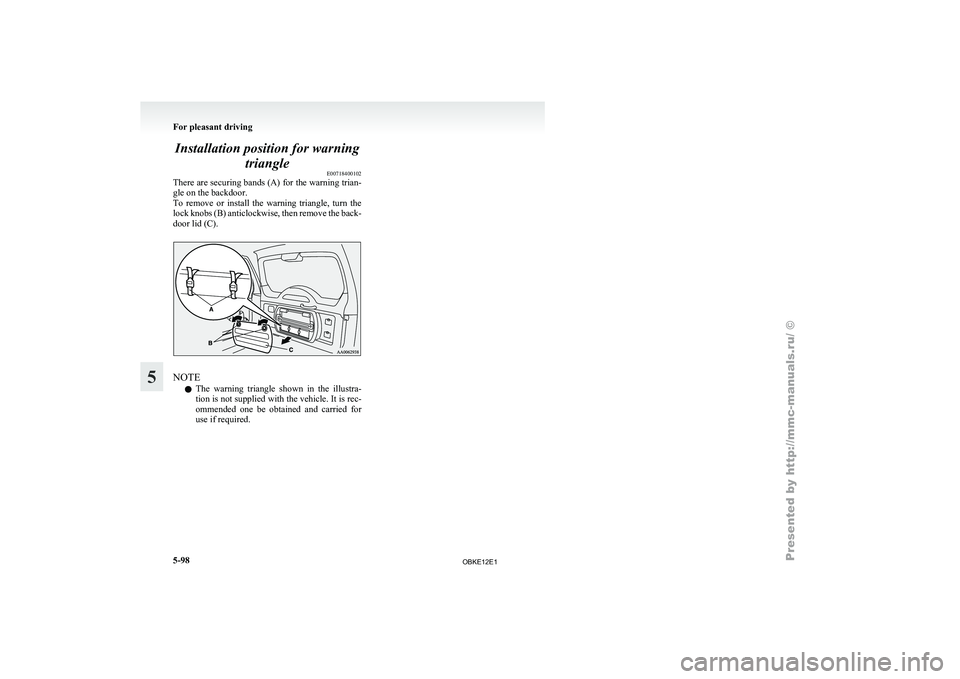
There are securing
bands (A) for the warning trian-
gle on the backdoor.
To remove or install the warning triangle, turn the
lock knobs (B) anticlockwise, then remove the back-
door lid (C). NOTE
l The
warning triangle
shown in the illustra-
tion is not supplied with the vehicle. It is rec-
ommended one be obtained and carried for
use if required. For pleasant driving
5-98
5
OBKE12E1
Page 291 of 377
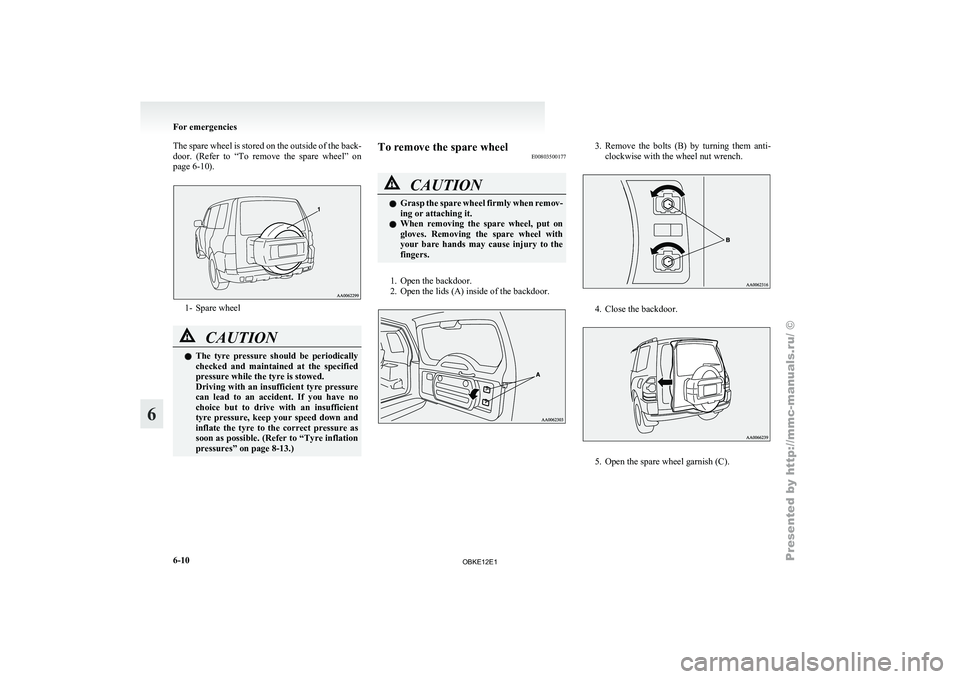
The spare wheel is stored on the outside of the back-
door. (Refer to
“To remove the spare wheel” on
page 6-10). 1- Spare wheel
CAUTION
l
The tyre pressure
should be periodically
checked and maintained at the specified
pressure while the tyre is stowed.
Driving with an insufficient tyre pressure
can lead to an accident. If you have no
choice but to drive with an insufficient
tyre pressure, keep your speed down and
inflate the tyre to the correct pressure as
soon as possible. (Refer to “Tyre inflation
pressures” on page 8-13.) To remove the spare wheel
E00803500177 CAUTION
l
Grasp the
spare
wheel firmly when remov-
ing or attaching it.
l When removing the spare wheel, put on
gloves. Removing the spare wheel with
your bare hands may cause injury to the
fingers.
1. Open the backdoor.
2. Open the lids (A) inside of the backdoor. 3. Remove the bolts (B) by turning them anti-
clockwise with the wheel nut wrench. 4. Close the backdoor.
5. Open the spare wheel garnish (C).For emergencies
6-10
6
OBKE12E1
Page 292 of 377
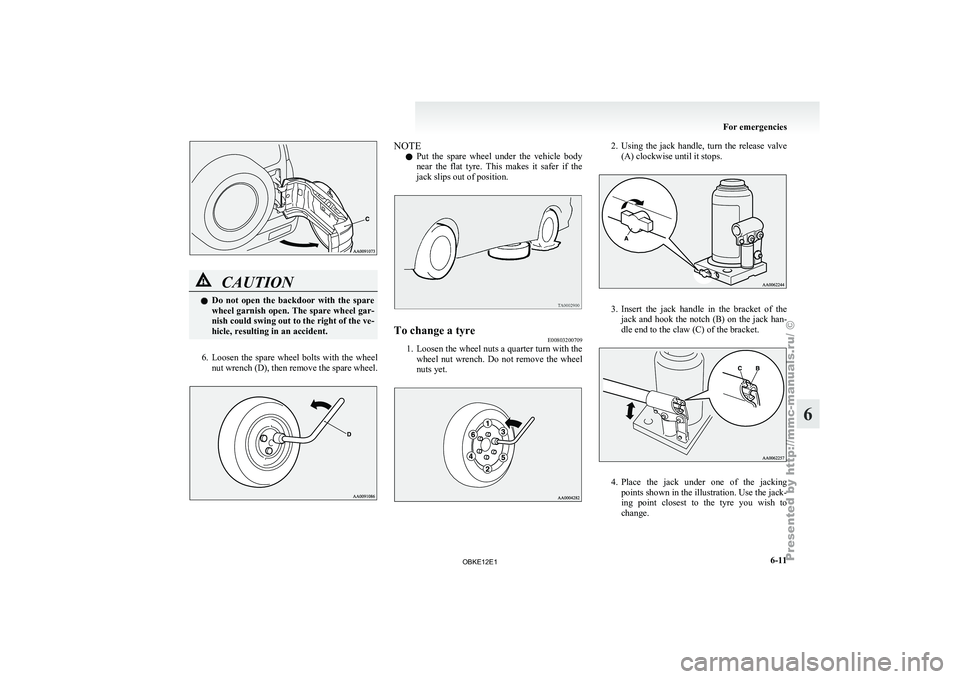
CAUTION
l
Do not
open the backdoor with the spare
wheel garnish open. The spare wheel gar-
nish could swing out to the right of the ve-
hicle, resulting in an accident.
6. Loosen the spare wheel bolts with the wheel
nut wrench
(D), then remove the spare wheel. NOTE
l Put
the spare
wheel under the vehicle body
near the flat tyre. This makes it safer if the
jack slips out of position. To change a tyre
E00803200709
1. Loosen the wheel nuts a quarter turn with the
wheel nut
wrench. Do not remove the wheel
nuts yet. 2. Using the jack handle, turn the release valve
(A) clockwise until it stops. 3. Insert the jack handle in the bracket of the
jack and
hook the notch (B) on the jack han-
dle end to the claw (C) of the bracket. 4. Place
the jack under one of the jacking
points shown in the illustration. Use the jack-
ing point
closest to the tyre you wish to
change. For emergencies
6-11 6
OBKE12E1
Page 294 of 377
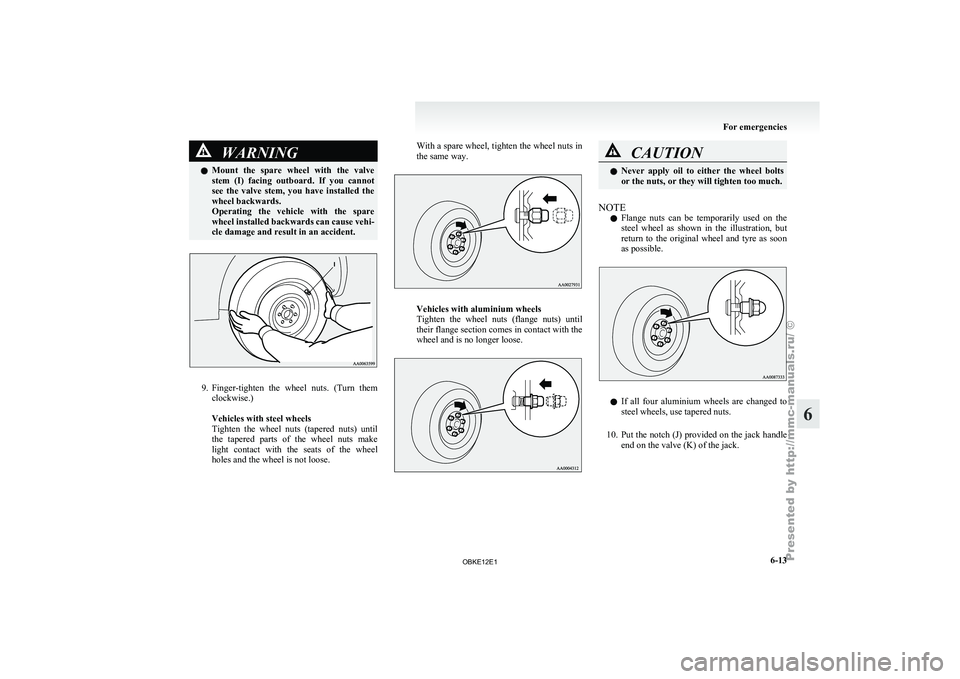
WARNING
l Mount the spare wheel with the valve
stem (I) facing outboard. If you cannot
see the valve stem, you have installed the
wheel backwards.
Operating the vehicle with the spare
wheel installed backwards can cause vehi-
cle damage and result in an accident. 9. Finger-tighten the
wheel
nuts. (Turn them
clockwise.)
Vehicles with steel wheels
Tighten the wheel nuts (tapered nuts) until
the tapered parts of the wheel nuts make
light contact with the seats of the wheel
holes and the wheel is not loose. With a spare wheel, tighten the wheel nuts in
the same way.
Vehicles with aluminium wheels
Tighten the
wheel
nuts (flange nuts) until
their flange section comes in contact with the
wheel and is no longer loose. CAUTION
l
Never apply oil
to either the wheel bolts
or the nuts, or they will tighten too much.
NOTE l Flange
nuts can
be temporarily used on the
steel wheel as shown in the illustration, but
return to the original wheel and tyre as soon
as possible. l
If all
four
aluminium wheels are changed to
steel wheels, use tapered nuts.
10. Put the notch (J) provided on the jack handle end on the valve (K) of the jack. For emergencies
6-13 6
OBKE12E1
Page 295 of 377
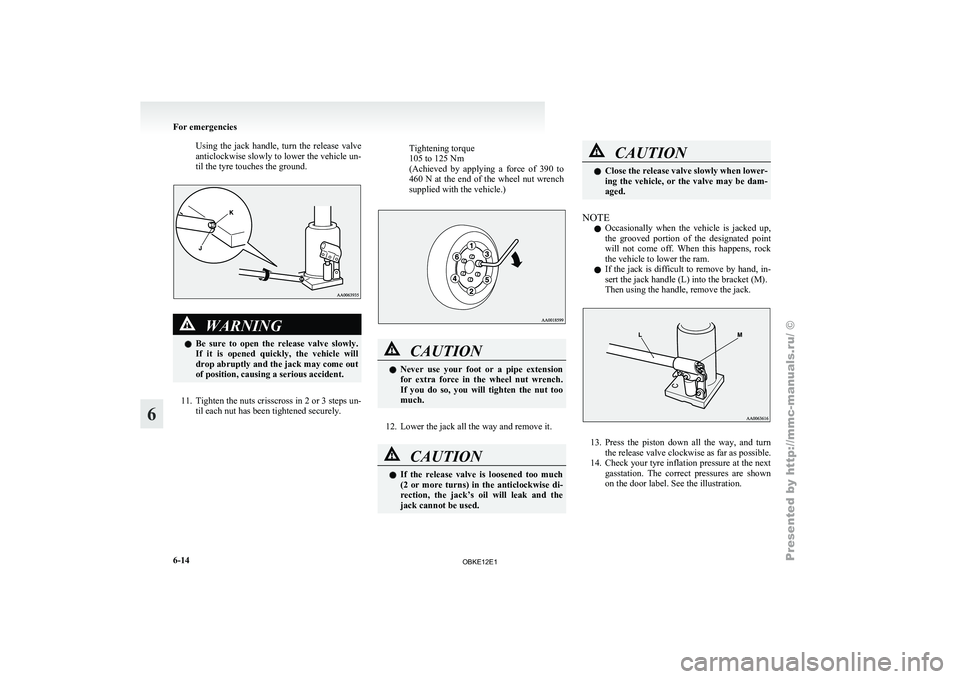
Using the jack handle, turn the release valve
anticlockwise slowly to lower the vehicle un-
til the tyre touches the ground.
WARNING
l Be sure
to open the release valve slowly.
If it is opened quickly, the vehicle will
drop abruptly and the jack may come out
of position, causing a serious accident.
11. Tighten the nuts crisscross in 2 or 3 steps un-
til each nut has been tightened securely.
Tightening torque
105 to 125 Nm
(Achieved by
applying
a force of 390 to
460 N at the end of the wheel nut wrench
supplied with the vehicle.) CAUTION
l
Never use
your
foot or a pipe extension
for extra force in the wheel nut wrench.
If you do so, you will tighten the nut too
much.
12. Lower the jack all the way and remove it. CAUTION
l
If the
release
valve is loosened too much
(2 or more turns) in the anticlockwise di-
rection, the jack’s oil will leak and the
jack cannot be used. CAUTION
l
Close the release
valve slowly when lower-
ing the vehicle, or the valve may be dam-
aged.
NOTE l Occasionally
when the
vehicle is jacked up,
the grooved portion of the designated point
will not come off. When this happens, rock
the vehicle to lower the ram.
l If the jack is difficult to remove by hand, in-
sert the jack handle (L) into the bracket (M).
Then using the handle, remove the jack. 13. Press the piston down all the way, and turn
the release valve clockwise as far as possible.
14. Check
your tyre inflation pressure at the next
gasstation. The correct pressures are shown
on the door label. See the illustration. For emergencies
6-14
6
OBKE12E1
Page 332 of 377
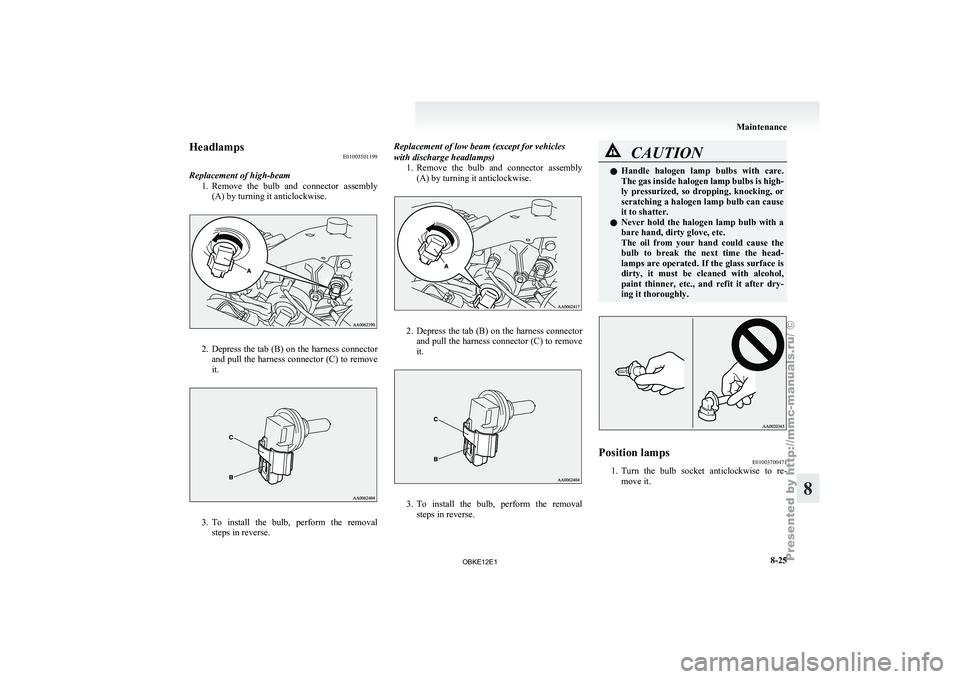
Headlamps
E01003501199
Replacement of high-beam 1. Remove the bulb
and connector assembly
(A) by turning it anticlockwise. 2. Depress the tab (B) on the harness connector
and pull
the harness connector (C) to remove
it. 3. To
install the bulb, perform the removal
steps in reverse. Replacement of low beam (except for vehicles
with discharge headlamps)
1.Remove the bulb
and connector assembly
(A) by turning it anticlockwise. 2. Depress the tab (B) on the harness connector
and pull
the harness connector (C) to remove
it. 3. To install the bulb, perform the removal
steps in reverse. CAUTION
l
Handle halogen lamp
bulbs with care.
The gas inside halogen lamp bulbs is high-
ly pressurized, so dropping, knocking, or
scratching a halogen lamp bulb can cause
it to shatter.
l Never hold the halogen lamp bulb with a
bare hand, dirty glove, etc.
The oil from your hand could cause the
bulb to break the next time the head-
lamps are operated. If the glass surface is
dirty, it must be cleaned with alcohol,
paint thinner, etc., and refit it after dry-
ing it thoroughly. Position lamps
E01003700471
1. Turn the bulb socket anticlockwise to re-
move it. Maintenance
8-25 8
OBKE12E1