lock MITSUBISHI PAJERO IV 2011 Owner's Manual
[x] Cancel search | Manufacturer: MITSUBISHI, Model Year: 2011, Model line: PAJERO IV, Model: MITSUBISHI PAJERO IV 2011Pages: 377, PDF Size: 29.43 MB
Page 29 of 377
(Since the ignition switch is in the “LOCK”
position, washer fluid will not be sprayed.)
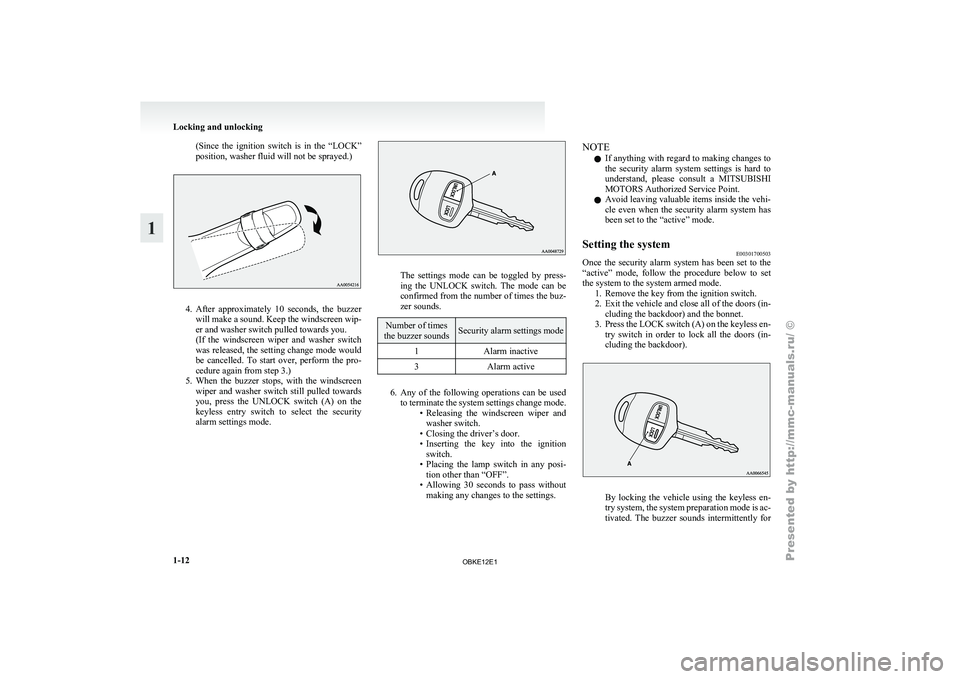
4. After approximately 10 seconds, the buzzer
will make
a sound. Keep the windscreen wip-
er and washer switch pulled towards you.
(If the windscreen wiper and washer switch
was released, the setting change mode would
be cancelled. To start over, perform the pro-
cedure again from step 3.)
5. When the buzzer stops, with the windscreen wiper and washer switch still pulled towards
you, press the UNLOCK switch (A) on the
keyless entry switch to select the security
alarm settings mode. The settings mode can be toggled by press-
ing the
UNLOCK
switch. The mode can be
confirmed from the number of times the buz-
zer sounds. Number of times
the buzzer sounds Security alarm settings mode
1 Alarm inactive
3 Alarm active 6. Any of the following operations can be used
to terminate
the system settings change mode.
• Releasing the windscreen wiper and washer switch.
• Closing the driver’s door.
• Inserting the key into the ignition switch.
• Placing the lamp switch in any posi- tion other than “OFF”.
• Allowing 30 seconds to pass without making any changes to the settings. NOTE
l If
anything with
regard to making changes to
the security alarm system settings is hard to
understand, please consult a MITSUBISHI
MOTORS Authorized Service Point.
l Avoid leaving valuable items inside the vehi-
cle even when the security alarm system has
been set to the “active” mode.
Setting the system E00301700503
Once the security alarm system has been set to the
“active” mode, follow
the procedure below to set
the system to the system armed mode. 1. Remove the key from the ignition switch.
2. Exit the vehicle and close all of the doors (in-cluding the backdoor) and the bonnet.
3. Press the LOCK switch (A) on the keyless en- try switch in order to lock all the doors (in-
cluding the backdoor). By locking the vehicle using the keyless en-
try system,
the
system preparation mode is ac-
tivated. The buzzer sounds intermittently for Locking and unlocking
1-12
1
OBKE12E1
Page 30 of 377
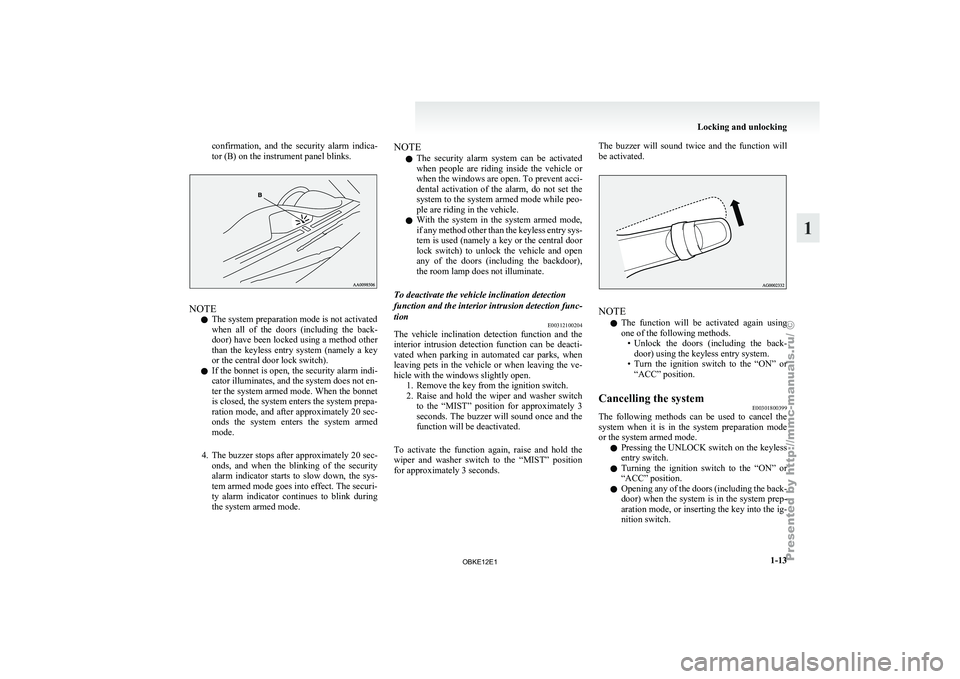
confirmation, and the security alarm indica-
tor (B) on the instrument panel blinks.
NOTE
l The system preparation mode is not activated
when
all of
the doors (including the back-
door) have been locked using a method other
than the keyless entry system (namely a key
or the central door lock switch).
l If the bonnet is open, the security alarm indi-
cator illuminates, and the system does not en-
ter the system armed mode. When the bonnet
is closed, the system enters the system prepa-
ration mode, and after approximately 20 sec-
onds the system enters the system armed
mode.
4. The buzzer stops after approximately 20 sec- onds, and when the blinking of the security
alarm indicator starts to slow down, the sys-
tem armed mode goes into effect. The securi-
ty alarm indicator continues to blink during
the system armed mode. NOTE
l The security
alarm
system can be activated
when people are riding inside the vehicle or
when the windows are open. To prevent acci-
dental activation of the alarm, do not set the
system to the system armed mode while peo-
ple are riding in the vehicle.
l With the system in the system armed mode,
if any method other than the keyless entry sys-
tem is used (namely a key or the central door
lock switch) to unlock the vehicle and open
any of the doors (including the backdoor),
the room lamp does not illuminate.
To deactivate the vehicle inclination detection
function and the interior intrusion detection func-
tion E00312100204
The vehicle inclination detection function and the
interior intrusion
detection
function can be deacti-
vated when parking in automated car parks, when
leaving pets in the vehicle or when leaving the ve-
hicle with the windows slightly open. 1. Remove the key from the ignition switch.
2. Raise and hold the wiper and washer switchto the “MIST” position for approximately 3
seconds. The buzzer will sound once and the
function will be deactivated.
To activate the function again, raise and hold the
wiper and washer switch to the “MIST” position
for approximately 3 seconds. The buzzer will sound twice and the function will
be activated.
NOTE
l The
function will
be activated again using
one of the following methods. • Unlock the doors (including the back-door) using the keyless entry system.
• Turn the ignition switch to the “ON” or “ACC” position.
Cancelling the system E00301800399
The following methods can be used to cancel the
system when it
is in the system preparation mode
or the system armed mode.
l Pressing the UNLOCK switch on the keyless
entry switch.
l Turning the ignition switch to the “ON” or
“ACC” position.
l Opening any of the doors (including the back-
door) when the system is in the system prep-
aration mode, or inserting the key into the ig-
nition switch. Locking and unlocking
1-13 1
OBKE12E1
Page 31 of 377
NOTE
l If
the bonnet
is opened during the system prep-
aration mode, the system preparation mode
is suspended. The system returns to the sys-
tem preparation mode when the bonnet is
closed.
l If the battery terminals are disconnected
while the system is in the system preparation
mode, the memory will be erased.
l It is possible to register up to 4 remote con-
trol switches. As long as they are registered,
any of the 4 remote control switches, other
than the one used to activate the system, can
be used to cancel the system.
If you want to register additional remote con-
trol switches, please contact a MITSUBISHI
MOTORS Authorized Service Point.
l The activation distance for the keyless entry
system is approximately 4 m.
If it is not possible to lock or unlock the vehi-
cle by pressing the switch at the correct dis-
tance or the security alarm system cannot be
set or cancelled using the switch, the battery
may need to be replaced.
For further information, please consult a
MITSUBISHI MOTORS Authorized Service
Point.
If you replace the battery yourself, refer to
“Procedure for replacing the remote control
switch battery” on page 1-05. l
If
the
UNLOCK switch is pressed and no
door is (including the backdoor) opened with-
in 30 seconds, the doors will automatically re-
lock. In this case as well, the system prepara-
tion mode will go into effect.
The time between pressing the UNLOCK
switch and automatic locking can be adjus-
ted. Consult a MITSUBISHI MOTORS Au-
thorized Service Point.
Alarm activation E00301900840
When the system is in the system armed mode, the
alarm will be
activated as follows if the vehicle is
unlocked and any of the doors (including the back-
door) or bonnet is opened using a method other
than pressing the UNLOCK switch on the keyless
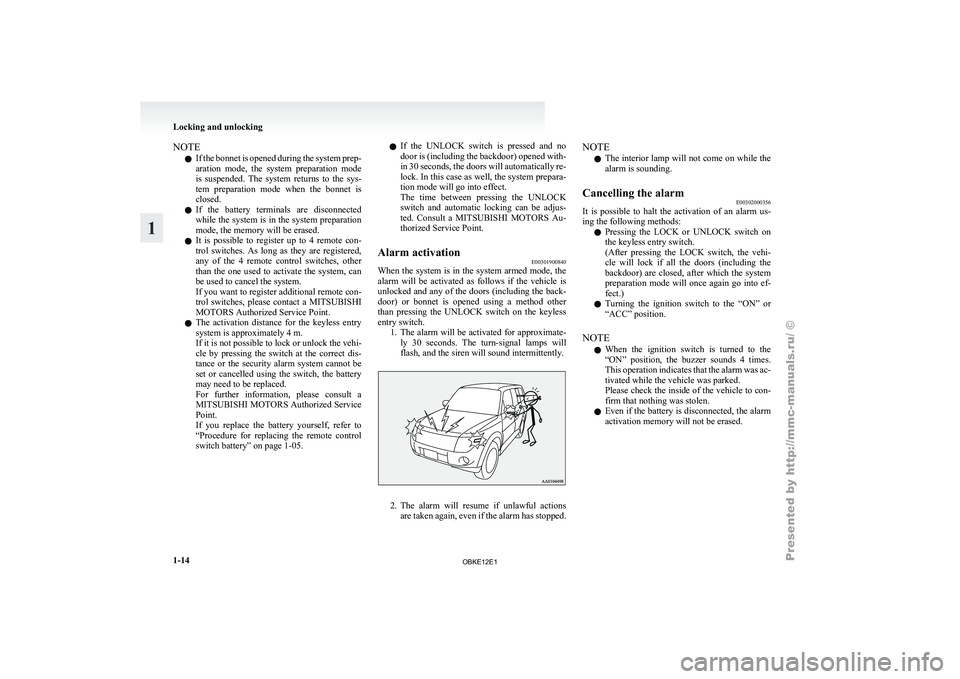
entry switch. 1. The alarm will be activated for approximate-ly 30 seconds. The turn-signal lamps will
flash, and the siren will sound intermittently. 2. The alarm will resume if unlawful actions
are taken
again, even if the alarm has stopped. NOTE
l The
interior lamp
will not come on while the
alarm is sounding.
Cancelling the alarm E00302000356
It is possible to halt the activation of an alarm us-
ing the following methods:
l Pressing the
LOCK
or UNLOCK switch on
the keyless entry switch.
(After pressing the LOCK switch, the vehi-
cle will lock if all the doors (including the
backdoor) are closed, after which the system
preparation mode will once again go into ef-
fect.)
l Turning the ignition switch to the “ON” or
“ACC” position.
NOTE l When the ignition switch is turned to the
“ON” position, the buzzer sounds 4 times.
This operation indicates that the alarm was ac-
tivated while the vehicle was parked.
Please check the inside of the vehicle to con-
firm that nothing was stolen.
l Even if the battery is disconnected, the alarm
activation memory will not be erased. Locking and unlocking
1-14
1
OBKE12E1
Page 32 of 377
Electric window control
E00302200185
The electric windows can only be operated with the
ignition switch in the “ON” position.
Electric window control switch E00302301226
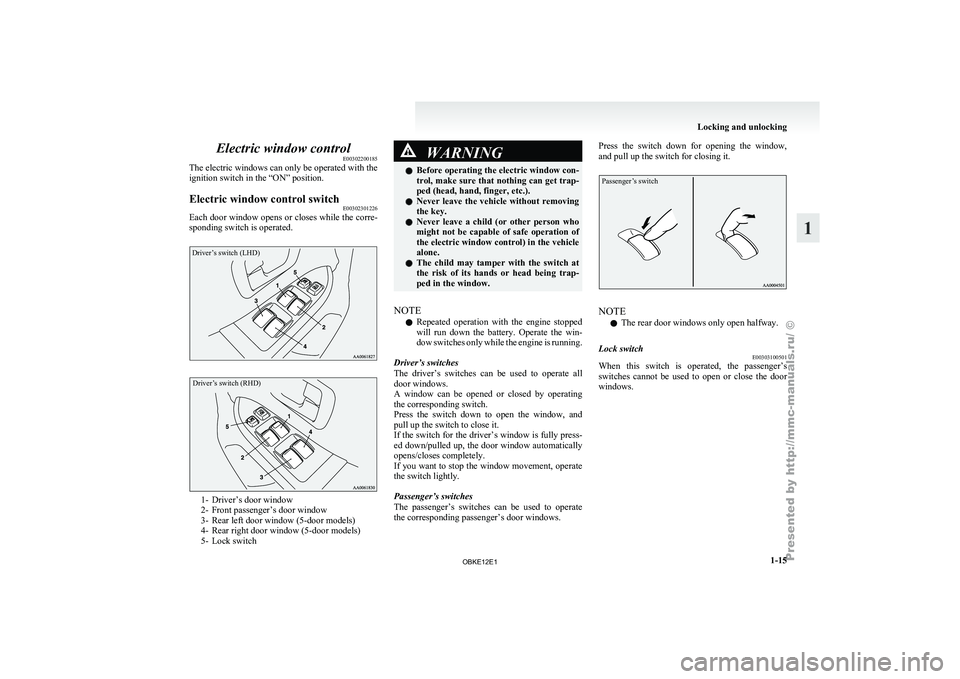
Each door window opens or closes while the corre-
sponding switch is operated.Driver’s switch (LHD)
Driver’s switch (RHD) 1- Driver’s door window
2- Front passenger’s door window
3-
Rear left door window (5-door models)
4-
Rear right door window (5-door models)
5- Lock switch WARNING
l Before operating the
electric window con-
trol, make sure that nothing can get trap-
ped (head, hand, finger, etc.).
l Never leave the vehicle without removing
the key.
l Never leave a child (or other person who
might not be capable of safe operation of
the electric window control) in the vehicle
alone.
l The child may tamper with the switch at
the risk of its hands or head being trap-
ped in the window.
NOTE l Repeated
operation with
the engine stopped
will run down the battery. Operate the win-
dow switches only while the engine is running.
Driver’s switches
The driver’s switches can be used to operate all
door windows.
A window can be opened or closed by operating
the corresponding switch.
Press the switch down to open the window, and
pull up the switch to close it.
If the switch for the driver’s window is fully press-
ed down/pulled up, the door window automatically
opens/closes completely.
If you want to stop the window movement, operate
the switch lightly.
Passenger’s switches
The passenger’s switches can be used to operate
the corresponding passenger’s door windows. Press the switch down for opening the window,
and pull up the switch for closing it.
Passenger’s switch
NOTE
l The rear door windows only open halfway.
Lock switch E00303100501
When this switch is operated, the passenger’s
switches cannot be
used to open or close the door
windows. Locking and unlocking
1-15 1
OBKE12E1
Page 33 of 377
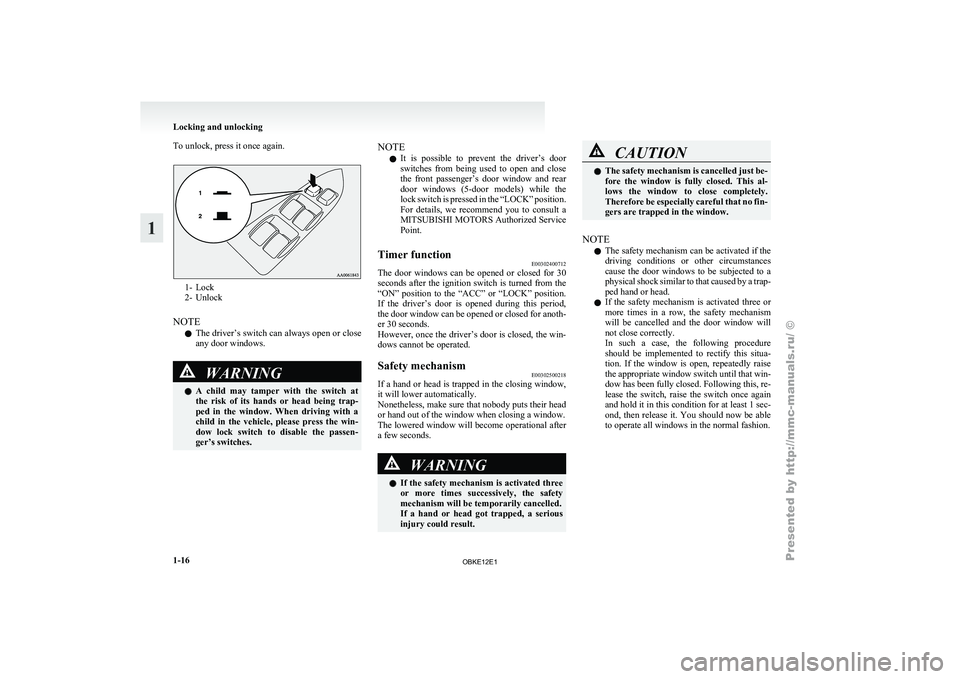
To unlock, press it once again.
1- Lock
2- Unlock
NOTE l The
driver’s
switch can always open or close
any door windows. WARNING
l A
child
may
tamper with the switch at
the risk of its hands or head being trap-
ped in the window. When driving with a
child in the vehicle, please press the win-
dow lock switch to disable the passen-
ger’s switches. NOTE
l It
is possible
to prevent the driver’s door
switches from being used to open and close
the front passenger’s door window and rear
door windows (5-door models) while the
lock switch is pressed in the “LOCK” position.
For details, we recommend you to consult a
MITSUBISHI MOTORS Authorized Service
Point.
Timer function E00302400712
The door windows can be opened or closed for 30
seconds after the
ignition switch is turned from the
“ON” position to the “ACC” or “LOCK” position.
If the driver’s door is opened during this period,
the door window can be opened or closed for anoth-
er 30 seconds.
However, once the driver’s door is closed, the win-
dows cannot be operated.
Safety mechanism E00302500218
If a hand or head is trapped in the closing window,
it will lower automatically.
Nonetheless, make sure
that nobody puts their head
or hand out of the window when closing a window.
The lowered window will become operational after
a few seconds. WARNING
l If the
safety
mechanism is activated three
or more times successively, the safety
mechanism will be temporarily cancelled.
If a hand or head got trapped, a serious
injury could result. CAUTION
l
The safety mechanism
is cancelled just be-
fore the window is fully closed. This al-
lows the window to close completely.
Therefore be especially careful that no fin-
gers are trapped in the window.
NOTE l The
safety mechanism
can be activated if the
driving conditions or other circumstances
cause the door windows to be subjected to a
physical shock similar to that caused by a trap-
ped hand or head.
l If the safety mechanism is activated three or
more times in a row, the safety mechanism
will be cancelled and the door window will
not close correctly.
In such a case, the following procedure
should be implemented to rectify this situa-
tion. If the window is open, repeatedly raise
the appropriate window switch until that win-
dow has been fully closed. Following this, re-
lease the switch, raise the switch once again
and hold it in this condition for at least 1 sec-
ond, then release it. You should now be able
to operate all windows in the normal fashion. Locking and unlocking
1-16
1
OBKE12E1
Page 34 of 377
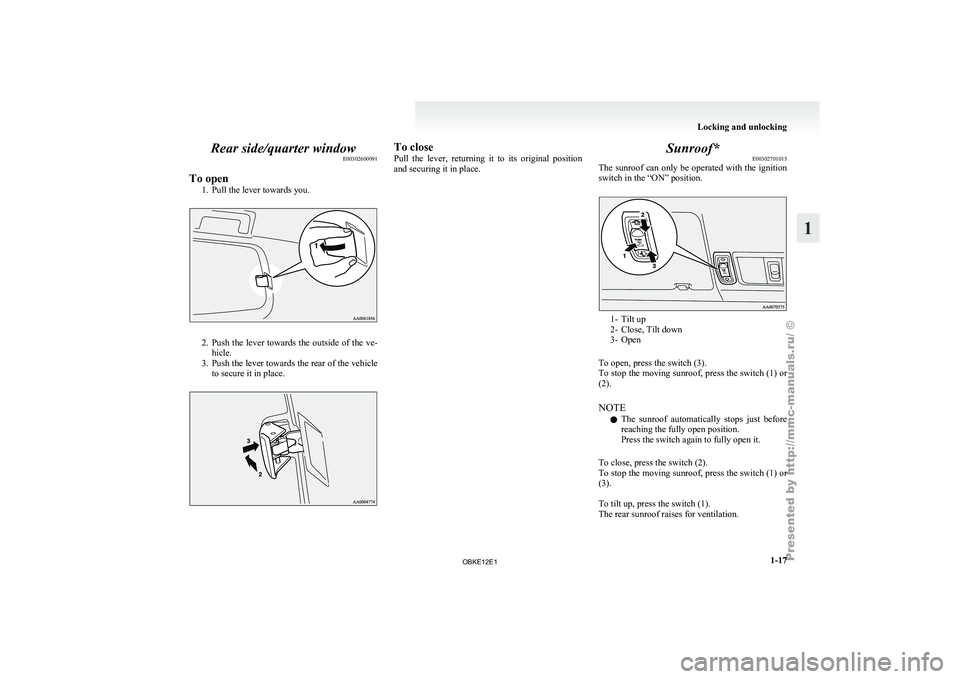
Rear side/quarter window
E00302600091
To open 1. Pull the lever towards you. 2. Push the lever towards the outside of the ve-
hicle.
3. Push
the lever towards the rear of the vehicle
to secure it in place. To close
Pull the
lever,
returning it to its original position
and securing it in place. Sunroof*
E00302701015
The sunroof can
only be operated with the ignition
switch in the “ON” position. 1- Tilt up
2- Close, Tilt down
3-
Open
To open, press the switch (3).
To
stop the moving sunroof, press the switch (1) or
(2).
NOTE
l The sunroof automatically stops just before
reaching the fully open position.
Press the switch again to fully open it.
To close, press the switch (2).
To stop the moving sunroof, press the switch (1) or
(3).
To tilt up, press the switch (1).
The rear sunroof raises for ventilation. Locking and unlocking
1-17 1
OBKE12E1
Page 35 of 377
NOTE
l When
the sunroof
is tilted up, the sunshade
is automatically opened slightly.
To tilt down, press the switch (2). WARNING
l Do not
put
head, hands or anything else
out of the sunroof opening while driving
the vehicle.
l Never leave a child (or other person who
might not be capable of safe operation of
the sunroof switch) in the vehicle alone.
l Before operating the sunroof, make sure
that nothing is capable of being trapped
(head, hand, finger, etc.).
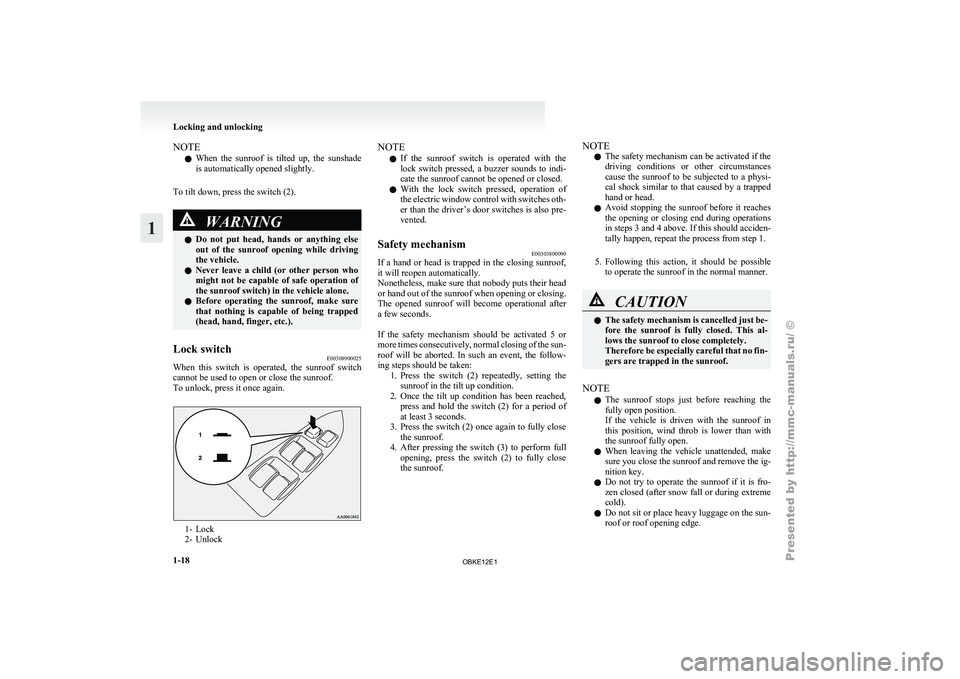
Lock switch E00308900025
When this switch is operated, the sunroof switch
cannot be used to open or close the sunroof.
To unlock, press it once again. 1- Lock
2- Unlock NOTE
l If
the sunroof
switch is operated with the
lock switch pressed, a buzzer sounds to indi-
cate the sunroof cannot be opened or closed.
l With the lock switch pressed, operation of
the electric window control with switches oth-
er than the driver’s door switches is also pre-
vented.
Safety mechanism E00303800090
If a hand or head is trapped in the closing sunroof,
it will reopen automatically.
Nonetheless, make sure
that nobody puts their head
or hand out of the sunroof when opening or closing.
The opened sunroof will become operational after
a few seconds.
If the safety mechanism should be activated 5 or
more times consecutively, normal closing of the sun-
roof will be aborted. In such an event, the follow-
ing steps should be taken: 1. Press the switch (2) repeatedly, setting thesunroof in the tilt up condition.
2. Once the tilt up condition has been reached, press and hold the switch (2) for a period of
at least 3 seconds.
3. Press the switch (2) once again to fully close the sunroof.
4. After pressing the switch (3) to perform full opening, press the switch (2) to fully close
the sunroof. NOTE
l The
safety mechanism
can be activated if the
driving conditions or other circumstances
cause the sunroof to be subjected to a physi-
cal shock similar to that caused by a trapped
hand or head.
l Avoid stopping the sunroof before it reaches
the opening or closing end during operations
in steps 3 and 4 above. If this should acciden-
tally happen, repeat the process from step 1.
5. Following this action, it should be possible to operate the sunroof in the normal manner. CAUTION
l
The safety
mechanism
is cancelled just be-
fore the sunroof is fully closed. This al-
lows the sunroof to close completely.
Therefore be especially careful that no fin-
gers are trapped in the sunroof.
NOTE l The
sunroof stops
just before reaching the
fully open position.
If the vehicle is driven with the sunroof in
this position, wind throb is lower than with
the sunroof fully open.
l When leaving the vehicle unattended, make
sure you close the sunroof and remove the ig-
nition key.
l Do not try to operate the sunroof if it is fro-
zen closed (after snow fall or during extreme
cold).
l Do not sit or place heavy luggage on the sun-
roof or roof opening edge. Locking and unlocking
1-18
1
OBKE12E1
Page 36 of 377
l
Release the
switch as soon as the sunroof rea-
ches the fully open or fully closed position.
l If the sunroof does not operate when the sun-
roof switch is operated, release the switch
and check whether something is trapped by
the sunroof. If nothing is trapped, we recom-
mend you to have the sunroof checked.
l Depending on the model of ski carriers or
roof carriers, the sunroof may make contact
with the carrier when the sunroof is tilted up.
Be careful when tilting up the sunroof if such
a ski carrier or a roof carrier is installed.
l Be sure to close the sunroof completely
when washing the vehicle or when leaving
the vehicle.
l Be careful, not to put any wax on the weath-
erstrip (black rubber) around the sunroof
opening. If stained with wax, the weather-
strip cannot maintain a weatherproof seal
with the sunroof.
l After washing the vehicle or after it has
rained, wipe off any water that is on the sun-
roof before operating it.
l Operating the sunroof repeatedly with the en-
gine stationary will run down the battery. Op-
erate the sunroof while the engine is running. Sunshade
E00307900103
Slide the sunshade manually to open and close it. CAUTION
l
Be careful that
hands are not trapped
when closing the sunshade. To open
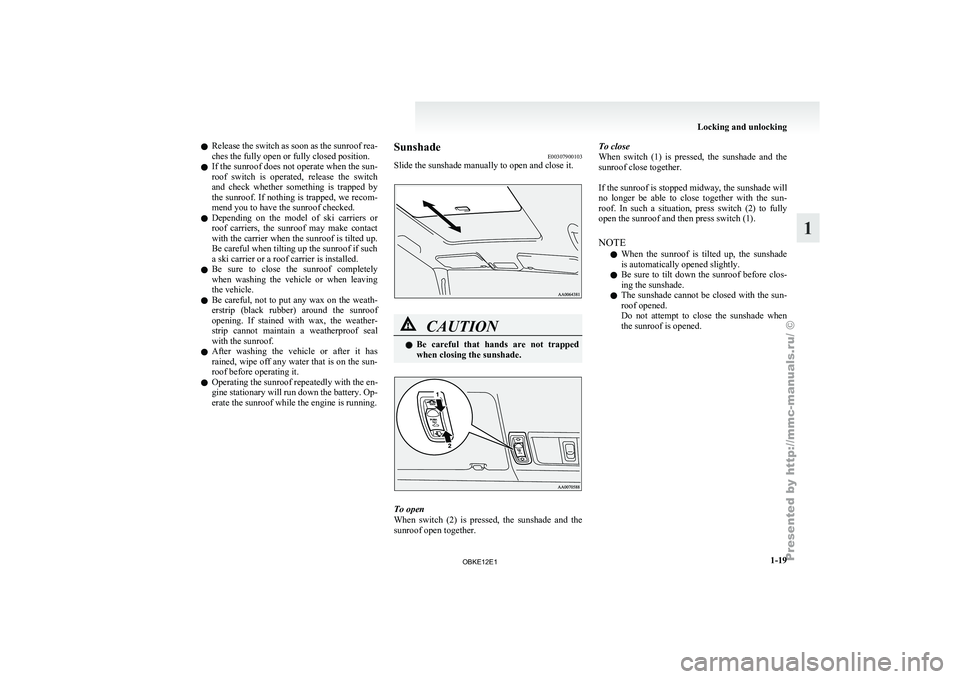
When switch
(2)
is pressed, the sunshade and the
sunroof open together. To close
When switch
(1)
is pressed, the sunshade and the
sunroof close together.
If the sunroof is stopped midway, the sunshade will
no longer be able to close together with the sun-
roof. In such a situation, press switch (2) to fully
open the sunroof and then press switch (1).
NOTE
l When the sunroof is tilted up, the sunshade
is automatically opened slightly.
l Be sure to tilt down the sunroof before clos-
ing the sunshade.
l The sunshade cannot be closed with the sun-
roof opened.
Do not attempt to close the sunshade when
the sunroof is opened. Locking and unlocking
1-19 1
OBKE12E1
Page 42 of 377
Seat adjustment
E00400300314
Adjust the driver’s
seat so that you are comfortable
and that you can reach the pedals, steering wheel,
switches etc. while retaining a clear field of vision. WARNING
l Do not
attempt
to adjust the seat while
driving. This can cause loss of vehicle con-
trol and result in an accident. After ad-
justments are made, ensure the seating is
locked in position by attempting to move
the seat forward and rearward without us-
ing the adjusting mechanism.
l Do not allow people or children to ride in
any area of your vehicle that is not equip-
ped with seats and seat belts, and make
sure that everyone travelling in your vehi-
cle is in a seat and wearing a seat belt, or
in the case of a child is strapped in a child
restraint.
l To minimize the risk of personal injury
in the event of a collision or sudden brak-
ing, the seatbacks should always be in the
almost upright position while the vehicle
is in motion. The protection provided by
the seat belts may be reduced significant-
ly when the seatback is reclined. There is
greater risk that the passenger will slide
under the seat belt, resulting in serious in-
jury, when the seatback is reclined. CAUTION
l
Make sure the
seat is adjusted by an
adult or with adult supervision for cor-
rect and safe operation.
l Do not place a cushion or the like be-
tween your back and the seatback while
driving. The effectiveness of the head re-
straints will be reduced in the event of an
accident.
l When sliding the seats, be careful not to
catch your hand or foot. Front seats
E00400400100
To adjust forward or backward E00400500055
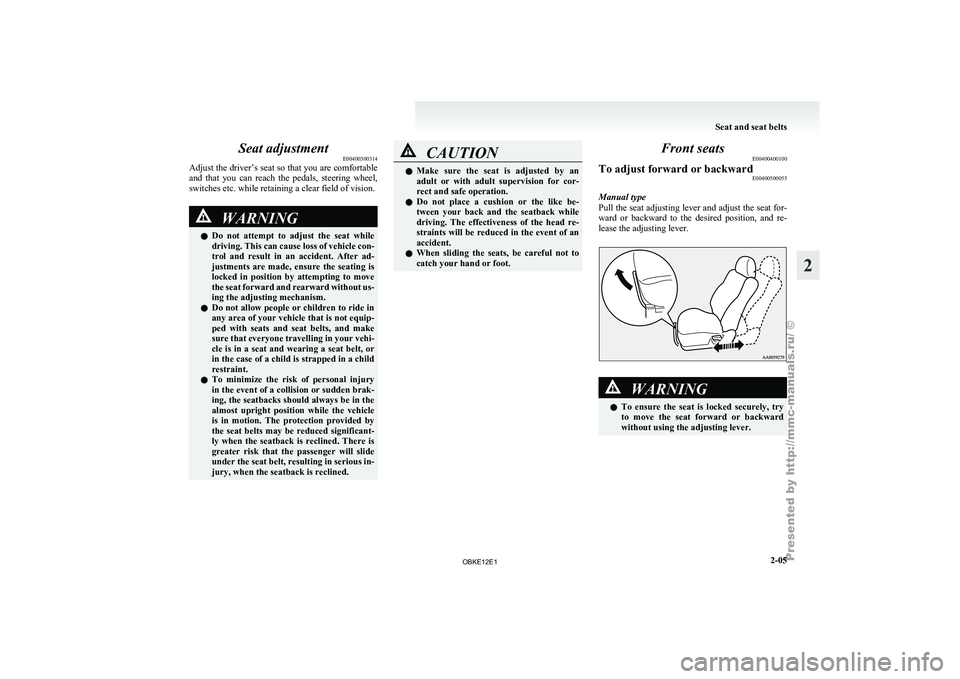
Manual type
Pull the seat
adjusting lever and adjust the seat for-
ward or backward to the desired position, and re-
lease the adjusting lever. WARNING
l To ensure
the
seat is locked securely, try
to move the seat forward or backward
without using the adjusting lever. Seat and seat belts
2-05 2
OBKE12E1
Page 43 of 377
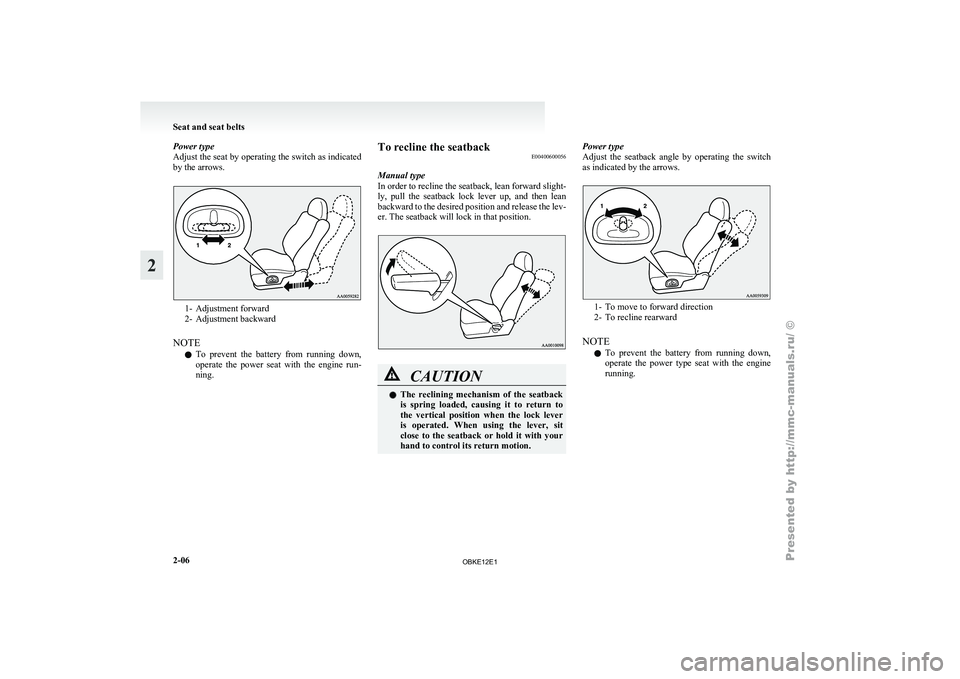
Power type
Adjust the seat
by operating the switch as indicated
by the arrows. 1- Adjustment forward
2- Adjustment backward
NOTE l To prevent
the battery from running down,
operate the power seat with the engine run-
ning. To recline the seatback
E00400600056
Manual type
In order to
recline the seatback, lean forward slight-
ly, pull the seatback lock lever up, and then lean
backward to the desired position and release the lev-
er. The seatback will lock in that position. CAUTION
l
The reclining
mechanism
of the seatback
is spring loaded, causing it to return to
the vertical position when the lock lever
is operated. When using the lever, sit
close to the seatback or hold it with your
hand to control its return motion. Power type
Adjust
the seatback
angle by operating the switch
as indicated by the arrows. 1- To move to forward direction
2- To recline rearward
NOTE l To
prevent
the battery from running down,
operate the power type seat with the engine
running. Seat and seat belts
2-06
2
OBKE12E1