wheel MITSUBISHI PAJERO IV 2011 Owner's Guide
[x] Cancel search | Manufacturer: MITSUBISHI, Model Year: 2011, Model line: PAJERO IV, Model: MITSUBISHI PAJERO IV 2011Pages: 377, PDF Size: 29.43 MB
Page 163 of 377

When driving downhill
It is
important
to take advantage of the engine brak-
ing by shifting to a lower shift position while driv-
ing on steep downhill roads in order to prevent the
brakes from overheating. WARNING
l Do not
leave
any objects near the brake
pedal or let a floor mat slide under it; do-
ing so could prevent the full pedal stroke
that would be necessary in an emergency.
Make sure that the pedal can be operated
freely at all times. Make sure the floor
mat is securely held in place.
Brake pads l Avoid hard braking situations.
New
brakes need
to be broken-in by moder-
ate use for the first 200 km (125 miles).
l The disc brakes are provided with a warning
device which emits a shrieking metallic
sound while braking if the brake pads have
reached their wear limit.
If you hear this sound, have the brake pads re-
placed immediately. WARNING
l Driving with worn
brake pads will make
it harder to stop, and can cause an acci-
dent. Brake assist system
E00627000376
The brake assist system is a device assisting drivers
who cannot depress
the brake pedal firmly when it
is necessary to do so (such as in emergency stop sit-
uations) and provides greater braking force.
If the brake pedal is depressed suddenly, the brakes
will be applied with more force than usual. CAUTION
l
The brake
assist
system is not a device de-
signed to exercise braking force greater
than its capacity. Make sure to always
keep a sufficient distance between vehi-
cles in front of you without relying too
much on the brake assist system.
NOTE l Once
the brake
assist system is operational,
it maintains great braking force even if the
brake pedal is lightly released.
To stop its operation, completely remove
your foot from the brake pedal.
l When the brake assist system is in use while
driving, you may feel the brake pedal at-
tempt to resist, the pedal moves in small mo-
tions in conjunction with the operation noise,
or the vehicle body and the steering wheel vi-
brate. This occurs when the brake assist sys-
tem is operating normally and does not indi-
cate faulty operation. Continue to firmly de-
press the brake pedal. l
When
the
anti-lock
brake system warning
lamp is illuminated, the brake assist system
is not functioning. Starting and driving
4-38
4
OBKE12E1
Page 164 of 377
Anti-lock brake system (ABS)
E00607101248
Environmental conditions can
have an effect on
braking. During sudden braking when there is
snow, ice, oil, water etc. on the road surface, a skid
may occur. In this situation, steering control and
braking effectiveness is reduced and the stopping
distance is increased. The vehicle may also go into
an uncontrolled spin.
The ABS helps prevent the wheels from locking dur-
ing braking, thus maintaining directional stability,
ensuring controllability and providing optimum
braking force.
Driving hints
l Always maintain the same distance from the
vehicle in front of you as you would for a ve-
hicle not equipped with ABS.
Compared with vehicles not fitted with ABS,
your vehicle may require a longer stopping
distance in the following cases:
• Driving on gravel or snow-covered roads.
• Driving with tyre chains installed.
• Driving on roads where the road surfaceis pitted or has other differences in sur-
face height.
• Driving on bumpy roads or other poor driv- ing surfaces.
l In order to ensure that the ABS will operate
correctly in situations where tyre chains have
been fitted, drive in the “4H”, “4HLc”, or
“4LLc” position. l
Operation of
ABS is not restricted to situa-
tions where brakes are applied suddenly.
This system may also operate to prevent
wheel lock when you are driving over man-
holes, steel road-work plates, or the vehicle
is driven over steps or level differences in
the road, road markings, or other surfaces
which are difficult for the wheels to grip.
l When the ABS is activated, you may feel the
brake pedal pulsation and the vibrations of
the vehicle body and steering wheel. You
may also hear a characteristic noise. At this
time, you may feel as if the pedal attempts to
resist being depressed.
This is a normal result of the ABS operation,
and does not indicate a problem.
In this situation, to let the ABS work for
you, just hold the brake pedal down more
firmly. Do not pump the brake. This will
result in reduced braking performance.
l When the engine starts and after starting to
drive, you might hear operation noise from
the engine compartment or feel a shock from
the brake pedal. This is normal. The ABS is
performing self-check.
l The ABS will operate after the vehicle has ac-
celerated to a speed in excess of approximate-
ly 10 km/h (6 mph). It stops operating when
the vehicle decelerates to a speed below
about 5 km/h (3 mph). CAUTION
l
Even the ABS
cannot prevent the natural
laws of physics from acting on the vehi-
cle. It cannot for instance avoid accidents
that may result from excessive speed on
bends or following another vehicle too
closely or aquaplaning. It should remain
the driver’s task to observe safety precau-
tions to judge speeds and brake applica-
tions correctly in such conditions.
l Be sure to use tyres of the same type and
size on 4 wheels.
If tyre types or sizes are mixed, ABS may
not function normally.
l Never install a limited-slip differential,
which is not a MITSUBISHI MOTORS
genuine part, as the ABS may not func-
tion normally.
We recommend you to consult a
MITSUBISHI MOTORS Authorized
Service Point. Starting and driving
4-39 4
OBKE12E1
Page 166 of 377
Inspection following snowy road oper-
ation
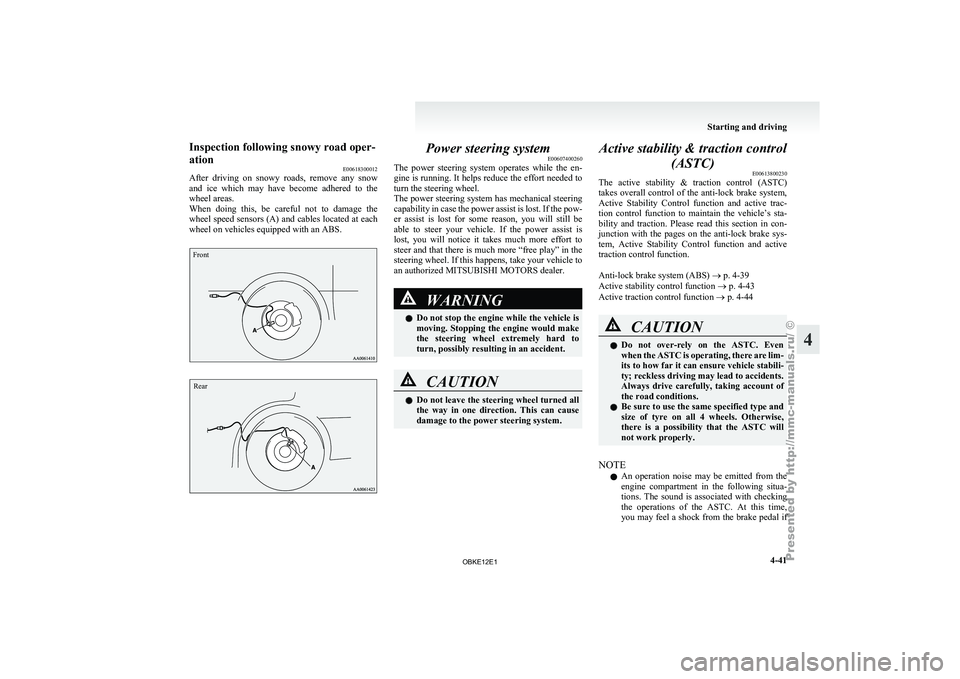
E00618300012
After driving on
snowy roads, remove any snow
and ice which may have become adhered to the
wheel areas.
When doing this, be careful not to damage the
wheel speed sensors (A) and cables located at each
wheel on vehicles equipped with an ABS.
Front
Rear Power steering system
E00607400260
The power steering
system operates while the en-
gine is running. It helps reduce the effort needed to
turn the steering wheel.
The power steering system has mechanical steering
capability in case the power assist is lost. If the pow-
er assist is lost for some reason, you will still be
able to steer your vehicle. If the power assist is
lost, you will notice it takes much more effort to
steer and that there is much more “free play” in the
steering wheel. If this happens, take your vehicle to
an authorized MITSUBISHI MOTORS dealer. WARNING
l Do not
stop
the engine while the vehicle is
moving. Stopping the engine would make
the steering wheel extremely hard to
turn, possibly resulting in an accident. CAUTION
l
Do not leave
the steering wheel turned all
the way in one direction. This can cause
damage to the power steering system. Active stability & traction control
(ASTC) E00613800230
The active stability
& traction control (ASTC)
takes overall control of the anti-lock brake system,
Active Stability Control function and active trac-
tion control function to maintain the vehicle’s sta-
bility and traction. Please read this section in con-
junction with the pages on the anti-lock brake sys-
tem, Active Stability Control function and active
traction control function.
Anti-lock brake system (ABS) ® p. 4-39
Active stability control function ® p. 4-43
Active traction control function ® p. 4-44 CAUTION
l
Do not
over-rely
on the ASTC. Even
when the ASTC is operating, there are lim-
its to how far it can ensure vehicle stabili-
ty; reckless driving may lead to accidents.
Always drive carefully, taking account of
the road conditions.
l Be sure to use the same specified type and
size of tyre on all 4 wheels. Otherwise,
there is a possibility that the ASTC will
not work properly.
NOTE l An
operation noise
may be emitted from the
engine compartment in the following situa-
tions. The sound is associated with checking
the operations of the ASTC. At this time,
you may feel a shock from the brake pedal if Starting and driving
4-41 4
OBKE12E1
Page 168 of 377
Driving hints
E00618100036
When extricating the
vehicle from mud, sand or
fresh snow with the transfer shift lever in the “2H”,
“4H”, or “4HLc” position, you may find that opera-
tion of the ASTC prevents the engine speed from in-
creasing in response to depression of the accelera-
tor pedal. If this happens and the vehicle remains
stuck as a result, place the transfer shift lever in the
“4LLc” position or turn the Active Stability Con-
trol switch OFF. The vehicle will then be easier to
extricate. (Brake control of the active traction con-
trol function is still working to prevent wheel spins
when ASC OFF switch “OFF” or “4LLc” position
selected.)
NOTE
l If the vehicle speed increases to about
120 km/h (75 mph) with the Active Stability
Control function deactivated, the Active Sta-
bility Control function automatically starts op-
erating. To subsequently stop the Active Sta-
bility Control function, stop the vehicle and
press the ASC OFF switch again.
Active stability control function E00613900097
The Active Stability Control function is designed
to help maintain
the vehicle’s control in slippery
conditions, or during rapid steering manoeuvres. It
works by controlling the engine output and brake
on each wheel. NOTE
l The
Active Stability
Control function does
not operate when the transfer shift lever is in
the “4LLc” position.
When the Active Stability Control function
is operating with the transfer shift lever in
the “2H”, “4H” or “4HLc” position, moving
the shift lever to the “4LLc” position makes
the Active Stability Control function deacti-
vate automatically.
l On vehicles with rear differential lock, the Ac-
tive Stability Control function does not oper-
ate when the rear differential lock is activated.
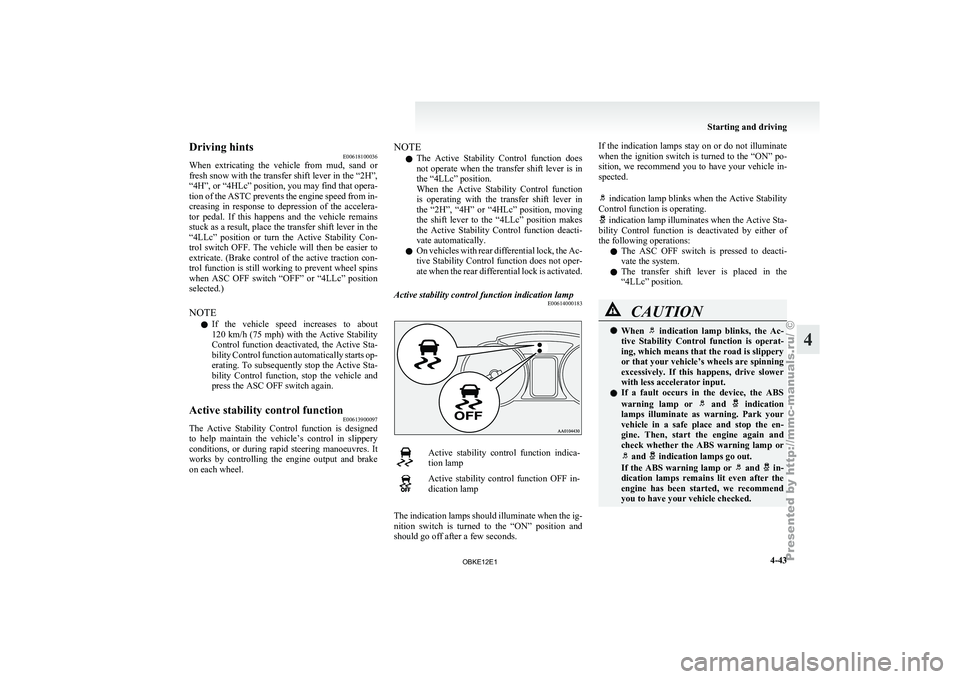
Active stability control function indication lamp E00614000183 Active stability control function indica-
tion lamp
Active stability control function OFF in-
dication lamp
The indication lamps should illuminate when the ig-
nition switch is
turned to the “ON” position and
should go off after a few seconds. If the indication lamps stay on or do not illuminate
when the
ignition
switch is turned to the “ON” po-
sition, we recommend you to have your vehicle in-
spected.
indication lamp blinks when the Active Stability
Control function is operating. indication lamp illuminates when the Active Sta-
bility Control function
is deactivated by either of
the following operations:
l The ASC OFF switch is pressed to deacti-
vate the system.
l The transfer shift lever is placed in the
“4LLc” position. CAUTION
l
When indication lamp blinks, the Ac-
tive Stability Control
function is operat-
ing, which means that the road is slippery
or that your vehicle’s wheels are spinning
excessively. If this happens, drive slower
with less accelerator input.
l If a fault occurs in the device, the ABS
warning lamp or and indication
lamps illuminate as
warning. Park your
vehicle in a safe place and stop the en-
gine. Then, start the engine again and
check whether the ABS warning lamp or and indication lamps go out.
If the ABS
warning lamp or and in-
dication lamps remains
lit even after the
engine has been started, we recommend
you to have your vehicle checked. Starting and driving
4-43 4
OBKE12E1
Page 169 of 377
NOTE
l Immediately
after reconnection
of the battery
cable, the indication lamp will illuminate
and the Active Stability Control function will
stop operating. If
the vehicle is driven and
the indication lamp goes off, the Active
Stability Control function
will again start op-
erating.
If the indication lamp illuminates again or il-
luminates even though the battery has not
been disconnected, an insufficient battery
voltage or other problems may be the reason.
We recommend you to have your vehicle in-
spected.
Active traction control function E00614100041
The active traction control function maintains trac-
tion on slippery
road surfaces by automatically con-
trolling the engine output and applying the brakes
so the driving wheels are prevented from spinning.
The active traction control function automatically
turns ON when the ignition switch is turned to the
“ON” position. CAUTION
l
If the temperature
in the braking system
increases excessively due to continuous
brake control on a slippery road surface,
a warning buzzer will sound intermittent-
ly to warn the driver. If driving continues
in spite of the buzzer and the tempera-
ture in the braking system increases fur-
ther, the indication lamp will illumi-
nate, the warning
buzzer will sound con-
tinuously for approximately 3 seconds,
and active traction control function oper-
ation will be suspended to protect the brak-
ing system. (Normal operation of the vehi-
cle will not be affected.) If the vehicle is
stopped and the indication lamp goes
off, the active
traction control function
will start operating again.
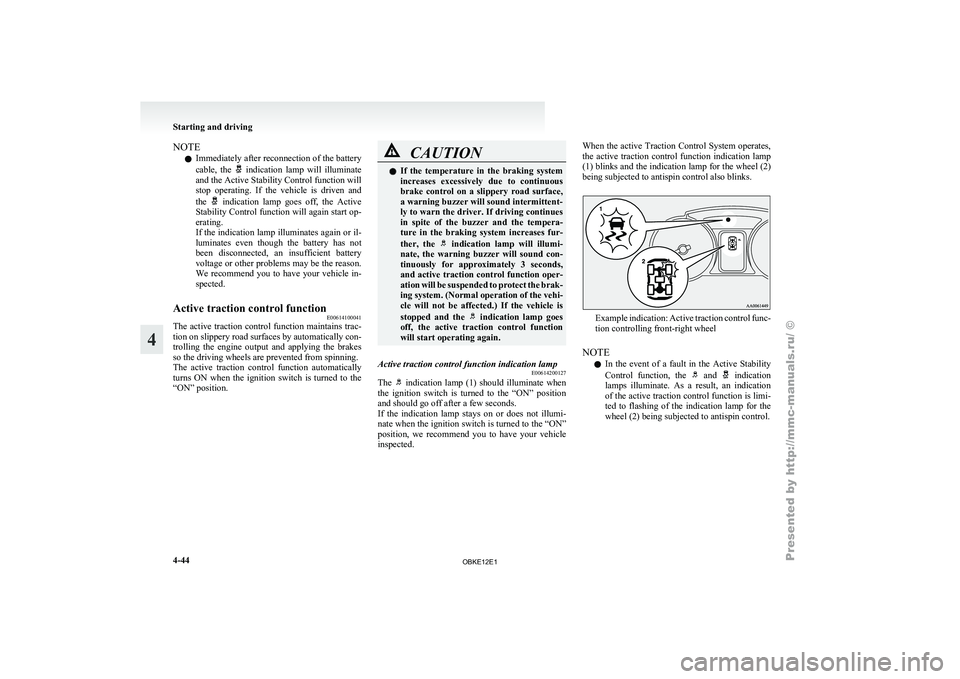
Active traction control function indication lamp E00614200127
The indication lamp (1) should illuminate when
the ignition switch
is turned to the “ON” position
and should go off after a few seconds.
If the indication lamp stays on or does not illumi-
nate when the ignition switch is turned to the “ON”
position, we recommend you to have your vehicle
inspected. When the active Traction Control System operates,
the
active
traction
control function indication lamp
(1) blinks and the indication lamp for the wheel (2)
being subjected to antispin control also blinks. Example indication: Active traction control func-
tion controlling front-right wheel
NOTE l In
the event
of a fault in the Active Stability
Control function, the and indication
lamps illuminate. As
a result, an indication
of the active traction control function is limi-
ted to flashing of the indication lamp for the
wheel (2) being subjected to antispin control. Starting and driving
4-44
4
OBKE12E1
Page 170 of 377

CAUTION
l
If the vehicle is towed with the ignition
switch in the “ON” position and only the
front wheels or only the rear wheels
raised off the ground, the active traction
control function may operate, resulting in
an accident. When towing the vehicle
with the front wheels raised, keep the ig-
nition switch in the “LOCK” or “ACC”
position. When towing the vehicle with
the rear wheels raised, keep the ignition
switch in the “ACC” position.
Refer to “Towing” on page 6-15. Cruise control*
E00609100519
Cruise control is
an automatic speed control system
that keeps a set speed. It can be activated at about
40 km/h (25 mph) or more. CAUTION
l
When you
do
not wish to drive at a set
speed, turn off the cruise control for safety.
l Do not use cruise control when driving
conditions will not allow you to stay at
the same speed, such as in heavy traffic
or on roads that are winding, icy, snow-
covered, wet, slippery, on a steep down-
hill slope.
l On vehicles with M/T, do not move the
gearshift lever to the “N” (Neutral) posi-
tion while driving at a set speed without
depressing the clutch pedal. The engine
will run too fast and might be damaged.
NOTE l Cruise
control may
not be able to keep your
speed on uphills or downhills.
l Your speed may decrease on a steep uphill.
You may use the accelerator pedal if you
want to stay at your set speed.
l Your speed may increase to more than the
set speed on a steep downhill. You must use
the brake to control your speed. As a result,
the set speed driving is deactivated. Cruise control switches
A- “ON OFF” switch
Used to turn on and off the cruise control.
B- “COAST SET” switch
Used to
reduce
the set speed and to set the de-
sired speed.
C- “ACC RES” switch
Used to increase the set speed and to return to
the original set speed.
D- “CANCEL” switch
Used to deactivate the set speed driving.
NOTE l When operating the cruise control switches,
press the cruise control switches correctly.
The set speed driving may be deactivated au-
tomatically if two or more switches of the
cruise control are pressed at the same time.
To activate E00609300553
1. With the ignition switch in the “ON” posi-
tion, press
the “ON OFF” switch (A) to turn Starting and driving
4-45 4
OBKE12E1
Page 174 of 377
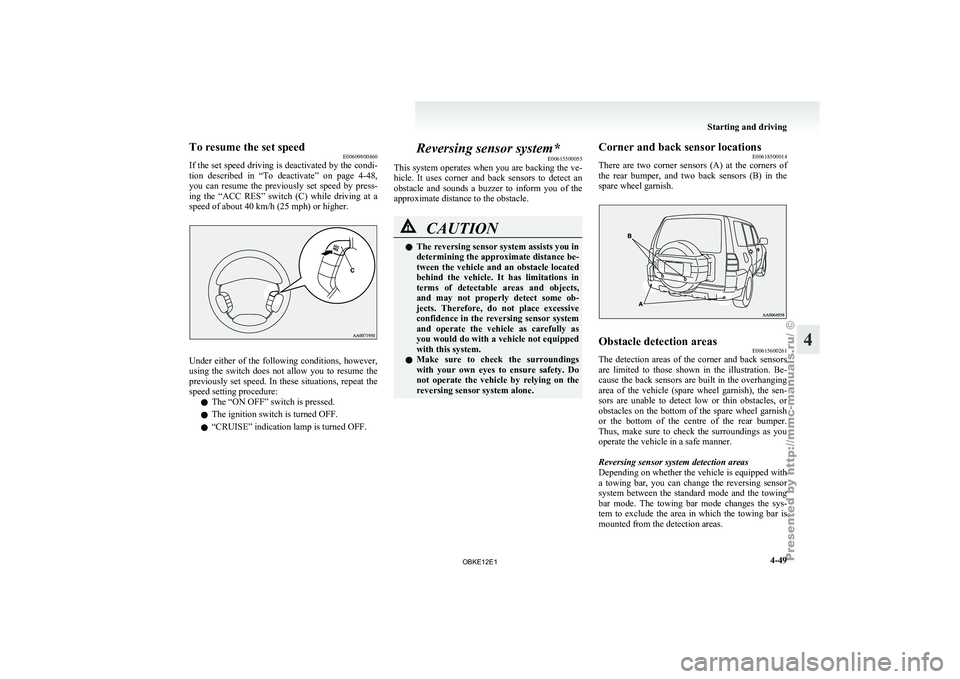
To resume the set speed
E00609800460
If the set
speed driving is deactivated by the condi-
tion described in “To deactivate” on page 4-48,
you can resume the previously set speed by press-
ing the “ACC RES” switch (C) while driving at a
speed of about 40 km/h (25 mph) or higher. Under either of the following conditions, however,
using the
switch
does not allow you to resume the
previously set speed. In these situations, repeat the
speed setting procedure:
l The “ON OFF” switch is pressed.
l The ignition switch is turned OFF.
l “CRUISE” indication lamp is turned OFF. Reversing sensor system*
E00615500055
This system operates
when you are backing the ve-
hicle. It uses corner and back sensors to detect an
obstacle and sounds a buzzer to inform you of the
approximate distance to the obstacle. CAUTION
l
The reversing sensor system assists you in
determining the approximate distance be-
tween the
vehicle
and an obstacle located
behind the vehicle. It has limitations in
terms of detectable areas and objects,
and may not properly detect some ob-
jects. Therefore, do not place excessive
confidence in the reversing sensor system
and operate the vehicle as carefully as
you would do with a vehicle not equipped
with this system.
l Make sure to check the surroundings
with your own eyes to ensure safety. Do
not operate the vehicle by relying on the
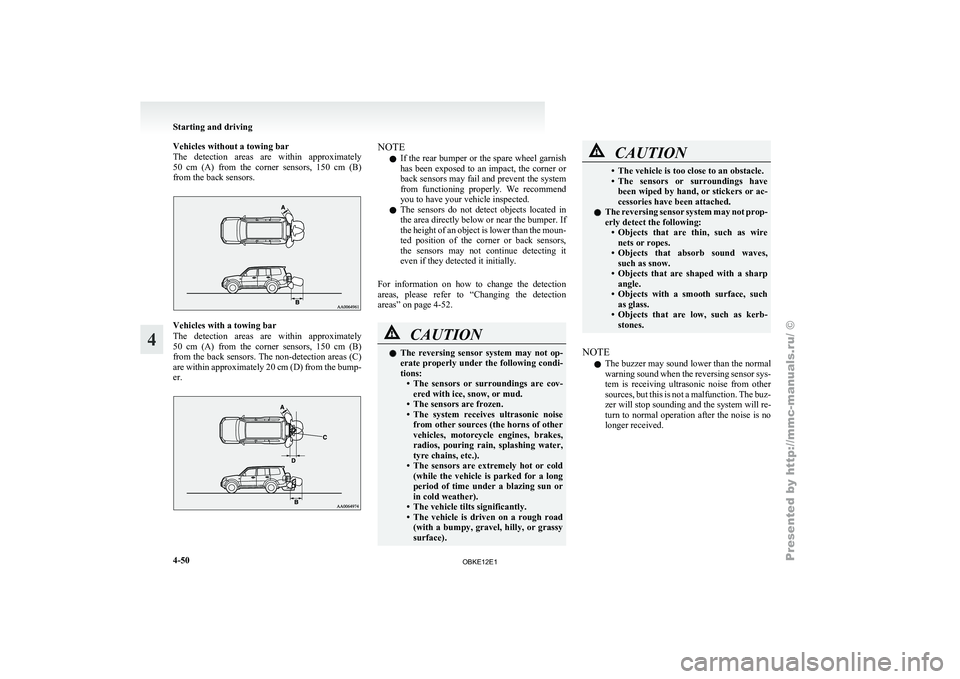
reversing sensor system alone. Corner and back sensor locations
E00618500014
There are two
corner sensors (A) at the corners of
the rear bumper, and two back sensors (B) in the
spare wheel garnish. Obstacle detection areas
E00615600261
The detection areas of the corner and back sensors
are limited to
those shown in the illustration. Be-
cause the back sensors are built in the overhanging
area of the vehicle (spare wheel garnish), the sen-
sors are unable to detect low or thin obstacles, or
obstacles on the bottom of the spare wheel garnish
or the bottom of the centre of the rear bumper.
Thus, make sure to check the surroundings as you
operate the vehicle in a safe manner.
Reversing sensor system detection areas
Depending on whether the vehicle is equipped with
a towing bar, you can change the reversing sensor
system between the standard mode and the towing
bar mode. The towing bar mode changes the sys-
tem to exclude the area in which the towing bar is
mounted from the detection areas. Starting and driving
4-49 4
OBKE12E1
Page 175 of 377
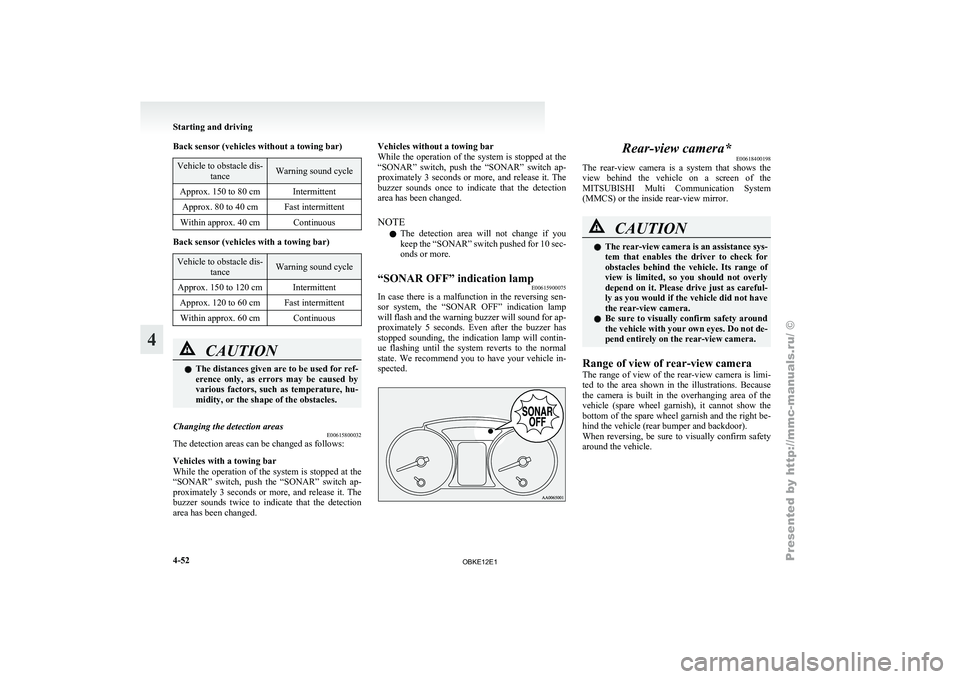
Vehicles without a towing bar
The detection areas
are within approximately
50 cm (A) from the corner sensors, 150 cm (B)
from the back sensors. Vehicles with a towing bar
The detection
areas
are within approximately
50 cm (A) from the corner sensors, 150 cm (B)
from the back sensors. The non-detection areas (C)
are within approximately 20 cm (D) from the bump-
er. NOTE
l If
the rear
bumper or the spare wheel garnish
has been exposed to an impact, the corner or
back sensors may fail and prevent the system
from functioning properly. We recommend
you to have your vehicle inspected.
l The sensors do not detect objects located in
the area directly below or near the bumper. If
the height of an object is lower than the moun-
ted position of the corner or back sensors,
the sensors may not continue detecting it
even if they detected it initially.
For information on how to change the detection
areas, please refer to “Changing the detection
areas” on page 4-52. CAUTION
l
The reversing
sensor
system may not op-
erate properly under the following condi-
tions: • The sensors or surroundings are cov-ered with ice, snow, or mud.
• The sensors are frozen.
• The system receives ultrasonic noise from other sources (the horns of other
vehicles, motorcycle engines, brakes,
radios, pouring rain, splashing water,
tyre chains, etc.).
• The sensors are extremely hot or cold (while the vehicle is parked for a long
period of time under a blazing sun or
in cold weather).
• The vehicle tilts significantly.
• The vehicle is driven on a rough road (with a bumpy, gravel, hilly, or grassy
surface). CAUTION
• The vehicle is too close to an obstacle.
• The sensors
or
surroundings have
been wiped by hand, or stickers or ac-
cessories have been attached.
l The reversing sensor system may not prop-
erly detect the following:
• Objects that are thin, such as wirenets or ropes.
• Objects that absorb sound waves, such as snow.
• Objects that are shaped with a sharp angle.
• Objects with a smooth surface, such as glass.
• Objects that are low, such as kerb- stones.
NOTE l The
buzzer may
sound lower than the normal
warning sound when the reversing sensor sys-
tem is receiving ultrasonic noise from other
sources, but this is not a malfunction. The buz-
zer will stop sounding and the system will re-
turn to normal operation after the noise is no
longer received. Starting and driving
4-50
4
OBKE12E1
Page 177 of 377
Back sensor (vehicles without a towing bar)
Vehicle to obstacle dis-
tance Warning sound cycle
Approx. 150 to 80 cm Intermittent Approx. 80 to 40 cm Fast intermittent
Within approx. 40 cm Continuous Back sensor (vehicles with a towing bar)
Vehicle to obstacle dis-
tance Warning sound cycle
Approx. 150 to 120 cm Intermittent Approx. 120 to 60 cm Fast intermittentWithin approx. 60 cm Continuous CAUTION
l
The distances given are to be used for ref-
erence
only, as
errors may be caused by
various factors, such as temperature, hu-
midity, or the shape of the obstacles.
Changing the detection areas E00615800032
The detection areas can be changed as follows:
Vehicles with a towing bar
While the operation
of the system is stopped at the
“SONAR” switch, push the “SONAR” switch ap-
proximately 3 seconds or more, and release it. The
buzzer sounds twice to indicate that the detection
area has been changed. Vehicles without a towing bar
While the
operation
of the system is stopped at the
“SONAR” switch, push the “SONAR” switch ap-
proximately 3 seconds or more, and release it. The
buzzer sounds once to indicate that the detection
area has been changed.
NOTE
l The detection area will not change if you
keep the “SONAR” switch pushed for 10 sec-
onds or more.
“SONAR OFF” indication lamp E00615900075
In case there is a malfunction in the reversing sen-
sor system, the
“SONAR OFF” indication lamp
will flash and the warning buzzer will sound for ap-
proximately 5 seconds. Even after the buzzer has
stopped sounding, the indication lamp will contin-
ue flashing until the system reverts to the normal
state. We recommend you to have your vehicle in-
spected. Rear-view camera*
E00618400198
The rear-view camera
is a system that shows the
view behind the vehicle on a screen of the
MITSUBISHI Multi Communication System
(MMCS) or the inside rear-view mirror. CAUTION
l
The rear-view
camera
is an assistance sys-
tem that enables the driver to check for
obstacles behind the vehicle. Its range of
view is limited, so you should not overly
depend on it. Please drive just as careful-
ly as you would if the vehicle did not have
the rear-view camera.
l Be sure to visually confirm safety around
the vehicle with your own eyes. Do not de-
pend entirely on the rear-view camera.
Range of view of rear-view camera
The range of
view of the rear-view camera is limi-
ted to the area shown in the illustrations. Because
the camera is built in the overhanging area of the
vehicle (spare wheel garnish), it cannot show the
bottom of the spare wheel garnish and the right be-
hind the vehicle (rear bumper and backdoor).
When reversing, be sure to visually confirm safety
around the vehicle. Starting and driving
4-52
4
OBKE12E1
Page 178 of 377
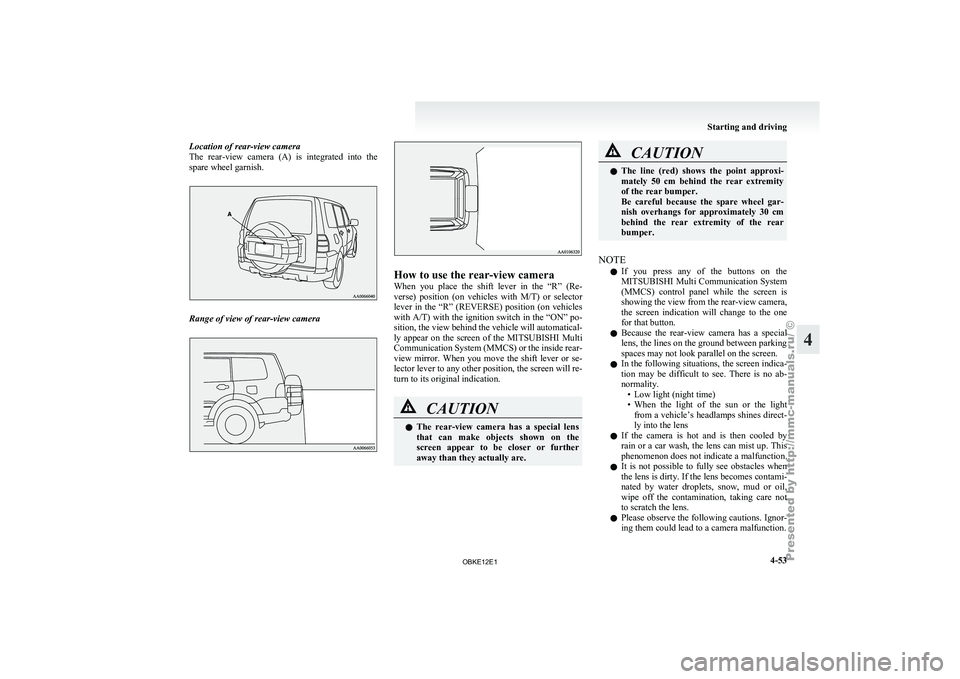
Location of rear-view camera
The rear-view camera
(A) is integrated into the
spare wheel garnish. Range of view of rear-view camera How to use the rear-view camera
When you
place
the shift lever in the “R” (Re-
verse) position (on vehicles with M/T) or selector
lever in the “R” (REVERSE) position (on vehicles
with A/T) with the ignition switch in the “ON” po-
sition, the view behind the vehicle will automatical-
ly appear on the screen of the MITSUBISHI Multi
Communication System (MMCS) or the inside rear-
view mirror. When you move the shift lever or se-
lector lever to any other position, the screen will re-
turn to its original indication. CAUTION
l
The rear-view
camera
has a special lens
that can make objects shown on the
screen appear to be closer or further
away than they actually are. CAUTION
l
The line (red)
shows the point approxi-
mately 50 cm behind the rear extremity
of the rear bumper.
Be careful because the spare wheel gar-
nish overhangs for approximately 30 cm
behind the rear extremity of the rear
bumper.
NOTE l If
you press
any of the buttons on the
MITSUBISHI Multi Communication System
(MMCS) control panel while the screen is
showing the view from the rear-view camera,
the screen indication will change to the one
for that button.
l Because the rear-view camera has a special
lens, the lines on the ground between parking
spaces may not look parallel on the screen.
l In the following situations, the screen indica-
tion may be difficult to see. There is no ab-
normality.
• Low light (night time)
• When the light of the sun or the lightfrom a vehicle’s headlamps shines direct-
ly into the lens
l If the camera is hot and is then cooled by
rain or a car wash, the lens can mist up. This
phenomenon does not indicate a malfunction.
l It is not possible to fully see obstacles when
the lens is dirty. If the lens becomes contami-
nated by water droplets, snow, mud or oil,
wipe off the contamination, taking care not
to scratch the lens.
l Please observe the following cautions. Ignor-
ing them could lead to a camera malfunction. Starting and driving
4-53 4
OBKE12E1