CD changer MITSUBISHI PAJERO IV 2011 Owners Manual
[x] Cancel search | Manufacturer: MITSUBISHI, Model Year: 2011, Model line: PAJERO IV, Model: MITSUBISHI PAJERO IV 2011Pages: 377, PDF Size: 29.43 MB
Page 209 of 377
NOTE
l The
display can
show up to 16 characters. If
a disc name or track name has more than 16
characters, press the PAGE button (10) to
view the next 16 characters.
l When there is no title information to be dis-
played, the display shows “NO TITLE”.
l Characters that the CD player cannot display
are shown as “ ”.
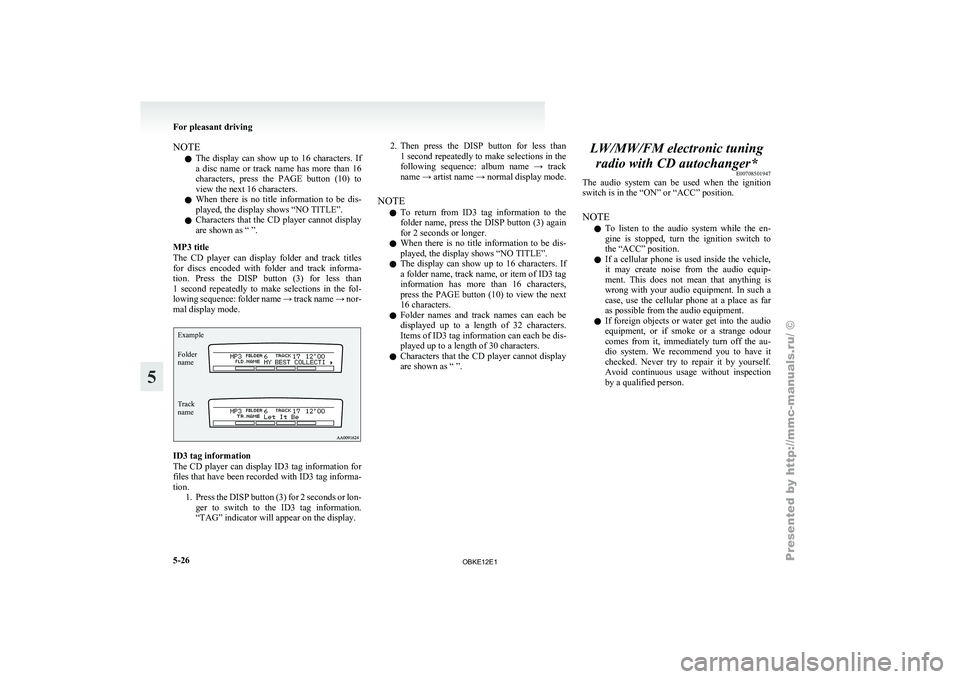
MP3 title
The CD player can display folder and track titles
for discs encoded with folder and track informa-
tion. Press the DISP button (3) for less than
1 second repeatedly to make selections in the fol-
lowing sequence: folder name → track name → nor-
mal display mode.
Track
name Folder
name Example ID3 tag information
The CD
player
can display ID3 tag information for
files that have been recorded with ID3 tag informa-
tion. 1. Press the DISP button (3) for 2 seconds or lon-ger to switch to the ID3 tag information.
“TAG” indicator will appear on the display. 2. Then press the DISP button for less than
1 second
repeatedly to make selections in the
following sequence: album name → track
name → artist name → normal display mode.
NOTE l To return from ID3 tag information to the
folder name, press the DISP button (3) again
for 2 seconds or longer.
l When there is no title information to be dis-
played, the display shows “NO TITLE”.
l The display can show up to 16 characters. If
a folder name, track name, or item of ID3 tag
information has more than 16 characters,
press the PAGE button (10) to view the next
16 characters.
l Folder names and track names can each be
displayed up to a length of 32 characters.
Items of ID3 tag information can each be dis-
played up to a length of 30 characters.
l Characters that the CD player cannot display
are shown as “ ”. LW/MW/FM electronic tuning
radio with CD autochanger* E00708501947
The audio system
can be used when the ignition
switch is in the “ON” or “ACC” position.
NOTE
l To listen to the audio system while the en-
gine is stopped, turn the ignition switch to
the “ACC” position.
l If a cellular phone is used inside the vehicle,
it may create noise from the audio equip-
ment. This does not mean that anything is
wrong with your audio equipment. In such a
case, use the cellular phone at a place as far
as possible from the audio equipment.
l If foreign objects or water get into the audio
equipment, or if smoke or a strange odour
comes from it, immediately turn off the au-
dio system. We recommend you to have it
checked. Never try to repair it by yourself.
Avoid continuous usage without inspection
by a qualified person. For pleasant driving
5-26
5
OBKE12E1
Page 221 of 377

To listen to a CD
E00709601961
The CD can
be loaded or ejected by pressing the
LOAD button (15) or the eject button (7) even if
the audio system power is off. 1. Press the PWR button (2) to turn the audiosystem on and off. The system turns on in
the last mode used.
2. Press the CD button (4) to enter CD mode. The autochanger will start playback if the
CD is already in the autochanger.
3. To stop the CD, turn off the power by press- ing the PWR button (2) or change over to ra-
dio mode by pressing the AM/FM button (1),
or eject the disc by pressing the eject button
(7).
NOTE l To adjust the volume and tone, refer to “To
adjust the volume” on page 5-27 and “To ad-
just the tone” on page 5-27.
l As many as 6 CDs can be inserted into the
CD autochanger.
l For information concerning the handling of
the compact discs, refer to “Handling of com-
pact discs” on page 5-65. To set discs To set a single disc
1. Press the LOAD button (15) briefly.
2.The
autochanger will show “WAIT” on the
display and start making itself ready for disc
loading.
3. When the autochanger is ready for disc load- ing, the indicator light (A) will come on and
the display will show “LOAD DISC (1~6)”.
4. Insert a disc into the disc loading slot.
NOTE l If there are multiple empty slots, you can se-
lect your desired slot by pressing the DISC
buttons (16 or 17).
l If you do not insert a disc for about
15 seconds after the autochanger starts stand-
ing by for loading, the loading standby mode
will be cancelled.
To set all the discs 1. Press the LOAD button (15) for 2 seconds orlonger (until you hear a beep).
2. The autochanger will select the lowest-num- bered empty slot and switch to loading stand-
by mode. 3. When
the display shows “LOAD DISC
(1~6)”, insert
a disc. The autochanger will
then automatically select the next empty slot
and enter loading standby mode.
4. Repeat the above-described steps until every slot contains a disc. Playback will then begin
with the disc that you inserted last.
NOTE l If you press the LOAD button (15) again
while the autochanger is in loading standby
mode, the loading standby mode will be can-
celled.
To eject discs To eject a single disc
Press the
eject
button (7) briefly to eject the current-
ly selected disc.
NOTE
l If you press the eject button (7) while the dis-
play is showing “LOAD DISC (1~6)”, the
loading standby mode will be cancelled and
the next disc will be ejected. For pleasant driving
5-38
5
OBKE12E1
Page 222 of 377

l
If you
do not remove the disc before
15 seconds have elapsed, the autochanger
will automatically reload the disc and stop.
To eject all the discs 1. Press the eject button (7) for 2 seconds or lon-ger (until you hear a beep).
2. The currently selected disc will be ejected. When you remove the ejected disc, the next
disc will automatically be ejected.
3. Repeat the above-described steps until all of the discs have been ejected. The autochanger
will then enter loading standby mode.
NOTE l If you do not remove an ejected disc before
15 seconds have elapsed, the disc will be re-
loaded and the eject mode will be cancelled.
The reloaded disc will not be played.
To select a desired disc
You can select your desired disc by using the DISC
button (16 or 17). The active disc will be indicated
by “ ” on the display.
Disc up
Press the DISC
button (16) repeatedly until the de-
sired disc number appears on the display.
Disc down
Press the DISC button (17) repeatedly until the de-
sired disc number appears on the display. To listen to a music CD
Push the CD button (4) if the discs are already in
the
autochanger. The
autochanger will enter CD
mode and start playback. The disc number, the
track number and the playing-time will appear on
the display. The discs in the unit will be played con-
secutively and continuously. To listen to an MP3 CD
This
autochanger
allows
you to play MP3 (MPEG
Audio Layer-3) files recorded on CD-ROMs, CD-
Rs (recordable CDs), and CD-RWs (rewritable
CDs) in ISO9660 Level 1/Level 2, Joliet, and Ro-
meo formats. Each disc may have a maximum of
16 trees, 100 folders, and 255 files per disc. During
MP3 playback, the unit can display ID3 tag infor-
mation. For information concerning ID3 tag, refer
to “CD text and MP3 title display” on page 5-25. Push the CD button (4) if MP3 CDs are already in
the autochanger.
The
display shows
“READING”, then playback
will begin. The folder number, the track number,
the playing-time and “MP3” indicator will appear
on the display. For pleasant driving
5-39 5
OBKE12E1
Page 224 of 377
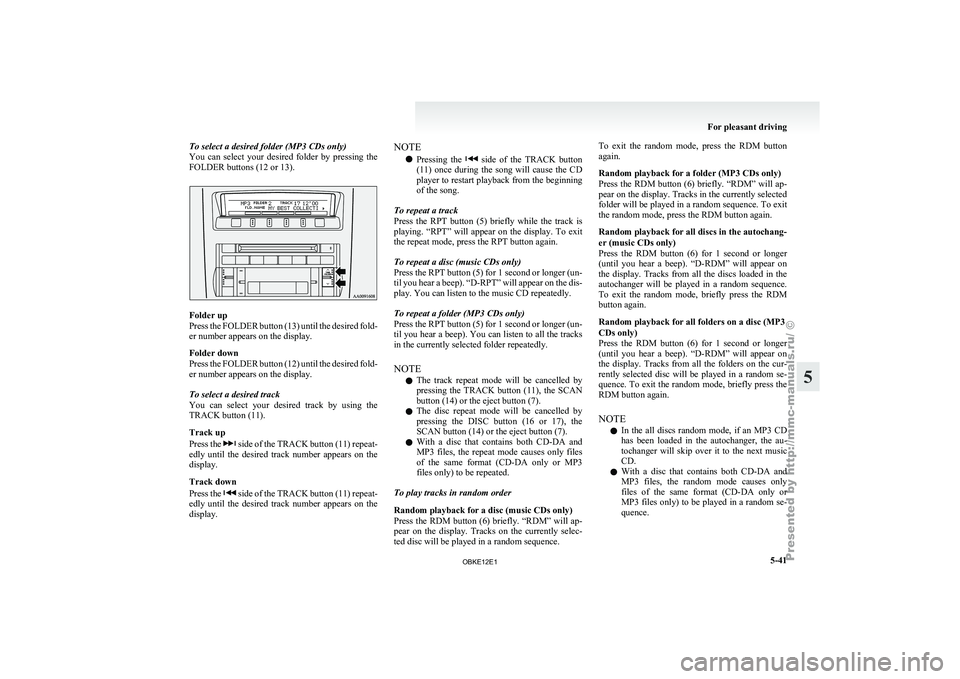
To select a desired folder (MP3 CDs only)
You can select
your desired folder by pressing the
FOLDER buttons (12 or 13). Folder up
Press the
FOLDER
button (13) until the desired fold-
er number appears on the display.
Folder down
Press the FOLDER button (12) until the desired fold-
er number appears on the display.
To select a desired track
You can select your desired track by using the
TRACK button (11).
Track up
Press the side of the TRACK button (11) repeat-
edly until the
desired track number appears on the
display.
Track down
Press the side of the TRACK button (11) repeat-
edly until the
desired track number appears on the
display. NOTE
l Pressing
the side of the TRACK button
(11) once during
the song will cause the CD
player to restart playback from the beginning
of the song.
To repeat a track
Press the RPT button (5) briefly while the track is
playing. “RPT” will appear on the display. To exit
the repeat mode, press the RPT button again.
To repeat a disc (music CDs only)
Press the RPT button (5) for 1 second or longer (un-
til you hear a beep). “D-RPT” will appear on the dis-
play. You can listen to the music CD repeatedly.
To repeat a folder (MP3 CDs only)
Press the RPT button (5) for 1 second or longer (un-
til you hear a beep). You can listen to all the tracks
in the currently selected folder repeatedly.
NOTE l The track repeat mode will be cancelled by
pressing the TRACK button (11), the SCAN
button (14) or the eject button (7).
l The disc repeat mode will be cancelled by
pressing the DISC button (16 or 17), the
SCAN button (14) or the eject button (7).
l With a disc that contains both CD-DA and
MP3 files, the repeat mode causes only files
of the same format (CD-DA only or MP3
files only) to be repeated.
To play tracks in random order
Random playback for a disc (music CDs only)
Press the RDM button (6) briefly. “RDM” will ap-
pear on the display. Tracks on the currently selec-
ted disc will be played in a random sequence. To exit the random mode, press the RDM button
again.
Random playback for a folder (MP3 CDs only)
Press
the RDM
button (6) briefly. “RDM” will ap-
pear on the display. Tracks in the currently selected
folder will be played in a random sequence. To exit
the random mode, press the RDM button again.
Random playback for all discs in the autochang-
er (music CDs only)
Press the RDM button (6) for 1 second or longer
(until you hear a beep). “D-RDM” will appear on
the display. Tracks from all the discs loaded in the
autochanger will be played in a random sequence.
To exit the random mode, briefly press the RDM
button again.
Random playback for all folders on a disc (MP3
CDs only)
Press the RDM button (6) for 1 second or longer
(until you hear a beep). “D-RDM” will appear on
the display. Tracks from all the folders on the cur-
rently selected disc will be played in a random se-
quence. To exit the random mode, briefly press the
RDM button again.
NOTE
l In the all discs random mode, if an MP3 CD
has been loaded in the autochanger, the au-
tochanger will skip over it to the next music
CD.
l With a disc that contains both CD-DA and
MP3 files, the random mode causes only
files of the same format (CD-DA only or
MP3 files only) to be played in a random se-
quence. For pleasant driving
5-41 5
OBKE12E1
Page 225 of 377

To find the start of each track on a disc for playback
Press the SCAN
button (14). “SCAN” will appear
on the display and the autochanger will play back
the first 10 seconds of each track on the selected disc.
The track number will blink while the scan mode is
selected. To exit the scan mode, press the SCAN
button again.
NOTE
l Once all tracks on the disc have been scan-
ned, playback of the disc will restart from the
beginning of the track that was playing when
scanning started.
l The scan mode will be cancelled when radio
or CD operation is selected.
l With a disc that contains both CD-DA and
MP3 files, the scan mode causes only files of
the same format (CD-DA only or MP3 files
only) to be played.
CD text and MP3 title display E00725000520
This autochanger can display CD text and MP3 ti-
tles including ID3 tag information. CD text
The autochanger can
display disc and track titles
for discs with converted disc and track title informa-
tion. Press the DISP button (3) repeatedly to make
selections in the following sequence: disc name →
track name → normal display mode.
Example
Disc
name
Track
name NOTE
l The
display can
show up to 16 characters. If
a disc name or track name has more than 16
characters, press the PAGE button (10) to
view the next 16 characters.
l When there is no title information to be dis-
played, the display shows “NO TITLE”.
l Characters that the autochanger cannot dis-
play are shown as “ ”. MP3 titles
The
autochanger
can
display folder and track titles
for discs with converted folder and track informa-
tion. Press the DISP button (7) repeatedly to make
selections in the following sequence: folder name
→ track name → normal display mode.
Track
name Folder
name Example ID3 tag information
The autochanger can
display ID3 tag information
for files that have been recorded with ID3 tag infor-
mation. 1. Press the DISP button (3) for 2 seconds or lon-ger to switch to the ID3 tag information. The
“TAG” indicator will appear on the display.
2. Then press the DISP button for less than 1 second repeatedly to make selections in the
following sequence: album name → track
name → artist name → normal display mode.
NOTE l To return from ID3 tag information to the
folder name, press the DISP button (3) again
for 2 seconds or longer.
l When there is no title information to be dis-
played, the display shows “NO TITLE”. For pleasant driving
5-42
5
OBKE12E1
Page 226 of 377
l
The display
can show up to 16 characters. If
a folder name, track name, or item of ID3 tag
information has more than 16 characters,
press the PAGE button (10) to view the next
16 characters.
l Folder names and track names can each be
displayed up to a length of 32 characters.
Items of ID3 tag information can each be dis-
played up to a length of 30 characters.
l Characters that the autochanger cannot dis-
play are shown as “ ”. To play tracks from USB device*
E00756100149
You can connect
your iPod or USB memory device
to the USB input terminal and play music files stor-
ed in the iPod or USB memory device.
See the following section for the types of connecta-
ble devices and supported files.
Refer to “Types of connectable devices and suppor-
ted file specifications” on page 5-83.
See the following sections for the connecting meth-
ods, “How to connect an iPod” on page 5-82 and
“How to connect a USB memory device” on page
5-82.
If your vehicle is equipped with a Bluetooth ®
2.0
interface, you can play music files in your iPod or
USB memory device via voice operation.
Refer to “To play iPod tracks via voice operation”
on page 5-46 and “To play USB memory device
tracks via voice operation” on page 5-52.
NOTE
l The protected file by copyright might not be
able to start playback.
l It is recommended to adjust the equalizer of
the connected device is flat. For pleasant driving
5-43 5
OBKE12E1
Page 358 of 377
A
Accessory (Installation) 04
Accessory socket 5-86
Active stability & traction control (ASTC) 4-41
Additional equipment
8-19
Air conditioning Front automatic air conditioning
5-03
Important operation tips for the air condition-
ing 5-11
Rear air conditioning 5-10
Air purifier (with deodorizing function) 5-12
Airbag 2-33
Antenna 5-66
Anti-lock brake system (ABS) 4-39 Warning lamp 4-40
Approach lamps 1-08
Armrest 2-08,2-10
Ashtray 5-85
Audio Error codes 5-59
Handling of compact discs 5-65
LW/MW/FM electronic tuning radio with CD au-
tochanger 5-26
LW/MW/FM electronic tuning radio with CD
player 5-12
Steering wheel remote control switch 5-57
Auto-cutout function 5-91
Automatic headlamp levelling 3-34
Automatic transmission Fluid 9-15
Selector lever operation 4-19
Selector lever position 4-20
Sports mode 4-21
BBackdoor 1-09 Battery 8-10
Charge warning display 3-10
Discharged battery (Emergency starting) 6-02
Specification 9-11
Bleeding the fuel system
6-06
Bluetooth® 2.0 interface 5-67
Bonnet 8-03
Brake Anti-lock brake 4-39
Brake assist system 4-38
Braking 4-37
Fluid 8-08,9-15
Parking brake 4-06
Power brakes 4-37
Warning lamp 3-09
Bulb capacity 8-24
C Card holder 5-84,5-93
Cargo loads 4-56
Catalytic converter 8-02
Cautions on handling of 4-wheel drive vehi-
cles 4-35
Central door locks 1-07
Centre console box 5-92
Centre information display
3-11
Changing a fuse 8-22
Charge warning display 3-10
Check engine warning lamp
3-10
Child restraint 2-23
Child-protection rear doors 1-08
Cigarette lighter 5-86
Cleaning Aluminium wheels 7-05
Chrome parts 7-05
Exterior of your vehicle 7-03
Genuine leather 7-02
Interior of your vehicle 7-02 Plastic, vinyl leather, etc 7-02
Polishing 7-04
Sunroof 7-05
Washing 7-03
Waxing 7-04
Clutch Fluid 8-09,9-15
Coat hooks 5-97
Combination headlamps and dipper switch 3-31
Convenient hook 5-96
Coolant (engine) 8-06,9-15
Cruise control 4-45
Cup holder 5-94
Curtain airbag system 2-40
D Daytime dipper button 3-06
Daytime running lamp 3-32
Demister (rear window) 3-42
Diesel particulate filter (DPF)
4-15
Diesel preheat indication lamp
3-08
Dimensions 9-04
Dipper (High/Low beam change) 3-32
Door ajar warning lamp 3-11
Door courtesy lamps 5-91,8-24 Replacement 8-30
Doors Central door locks 1-07
Child-protection 1-08
Lock and unlock 1-06
Driving, alcohol and drugs 4-02
E Economical driving 4-02
Electric window control 1-15
Switch 1-15
Timer function 1-16 Alphabetical index
1
OBKE12E1
Page 360 of 377
L
Labeling 9-02
Lamp monitor buzzer 3-32
Lamps
(headlamps,
fog lamp, etc.) auto-cutout func-
tion 3-32
Leakage (Fuel, engine coolant, oil and exhaust
gas) 8-18
Licence plate lamps Bulb capacity 8-24
Replacement 8-28
Link System 5-67
Low fuel warning lamp 3-05
Lubricants 9-15
Luggage compartment lamp 5-89 Bulb capacity 8-24
Replacement 8-30
Luggage floor box 5-93
Luggage hooks 5-97
LW/MW/FM electronic tuning radio with CD au-
tochanger 5-26
LW/MW/FM electronic tuning radio with CD play-
er 5-12
MMaking a flat seat 2-18
Making a luggage area 2-12
Manual transmission 4-16
Oil 9-15
Mirror Inside rear-view mirror 4-08
Outside rear-view mirrors 4-10
MIVEC engine 4-14
Modification/alterations to
the electrical or fuel sys-
tems 05 OOdometer 3-02
Oil pressure warning lamp 3-10
Oil
Differential oil 9-15
Engine oil 8-04
Manual transmission oil 9-15
Transfer oil 9-15
Operation under adverse driving conditions 6-18
Outside rear-view mirrors 4-10
Overheating 6-04
P Parking 4-07
Parking brake 4-06
Position lamps Bulb capacity 8-24
Indication lamp 3-08
Replacement
8-25
Power brakes 4-37
Power steering Fluid 8-10,9-15
System 4-41
Precautions to observe when using wipers and wash-
ers 3-41
Pregnant women restraint 2-22
Puncture (Tyre changing) 6-09
R Radio
LW/MW/FM electronic tuning
radio with CD au-
tochanger 5-26
LW/MW/FM electronic tuning radio with CD
player 5-12
Rear air conditioning 5-10 Rear combination lamps
Bulb capacity 8-24
Replacement 8-27
Rear differential lock
4-29
Rear fog lamp Bulb capacity 8-24
Indication lamp 3-08
Replacement 8-28
Switch 3-36
Rear personal lamp Bulb capacity 8-24
Replacement 8-29
Rear personal lamps 5-89
Rear shelf (3-door models) 5-95
Rear side/quarter window 1-17
Rear turn-signal lamps Bulb capacity 8-24
Replacement 8-27
Rear window demister switch 3-42
Rear-view camera 4-52
Rear-view mirror Inside 4-08
Outside 4-10
Refill capacities 9-15
Removal of water from the fuel filter 6-06
Replacement of lamp bulbs 8-23
Reversing lamps Bulb capacity 8-24
Replacement 8-27
Reversing sensor system 4-49
Roof carrier precaution 4-56
Room & map lamps 5-88 Bulb capacity 8-24
Replacement 8-29
Running-in recommendations 4-04
S Safe driving techniques 4-03 Alphabetical index
3
OBKE12E1