Indicator MITSUBISHI PAJERO IV 2011 Owners Manual
[x] Cancel search | Manufacturer: MITSUBISHI, Model Year: 2011, Model line: PAJERO IV, Model: MITSUBISHI PAJERO IV 2011Pages: 377, PDF Size: 29.43 MB
Page 28 of 377
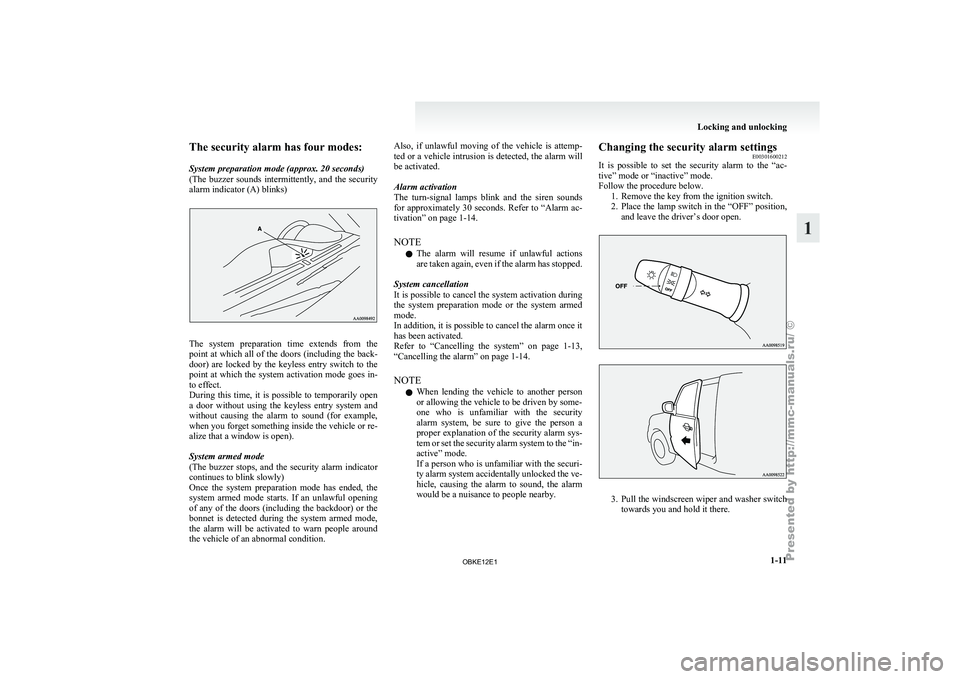
The security alarm has four modes:
System preparation mode (approx. 20 seconds)
(The buzzer
sounds
intermittently, and the security
alarm indicator (A) blinks) The system preparation time extends from the
point at
which
all of the doors (including the back-
door) are locked by the keyless entry switch to the
point at which the system activation mode goes in-
to effect.
During this time, it is possible to temporarily open
a door without using the keyless entry system and
without causing the alarm to sound (for example,
when you forget something inside the vehicle or re-
alize that a window is open).
System armed mode
(The buzzer stops, and the security alarm indicator
continues to blink slowly)
Once the system preparation mode has ended, the
system armed mode starts. If an unlawful opening
of any of the doors (including the backdoor) or the
bonnet is detected during the system armed mode,
the alarm will be activated to warn people around
the vehicle of an abnormal condition. Also, if unlawful moving of the vehicle is attemp-
ted or
a
vehicle intrusion is detected, the alarm will
be activated.
Alarm activation
The turn-signal lamps blink and the siren sounds
for approximately 30 seconds. Refer to “Alarm ac-
tivation” on page 1-14.
NOTE
l The alarm will resume if unlawful actions
are taken again, even if the alarm has stopped.
System cancellation
It is possible to cancel the system activation during
the system preparation mode or the system armed
mode.
In addition, it is possible to cancel the alarm once it
has been activated.
Refer to “Cancelling the system” on page 1-13,
“Cancelling the alarm” on page 1-14.
NOTE l When lending the vehicle to another person
or allowing the vehicle to be driven by some-
one who is unfamiliar with the security
alarm system, be sure to give the person a
proper explanation of the security alarm sys-
tem or set the security alarm system to the “in-
active” mode.
If a person who is unfamiliar with the securi-
ty alarm system accidentally unlocked the ve-
hicle, causing the alarm to sound, the alarm
would be a nuisance to people nearby. Changing the security alarm settings
E00301600212
It is possible
to set the security alarm to the “ac-
tive” mode or “inactive” mode.
Follow the procedure below. 1. Remove the key from the ignition switch.
2. Place the lamp switch in the “OFF” position,and leave the driver’s door open. 3. Pull
the windscreen wiper and washer switch
towards you and hold it there. Locking and unlocking
1-11 1
OBKE12E1
Page 30 of 377
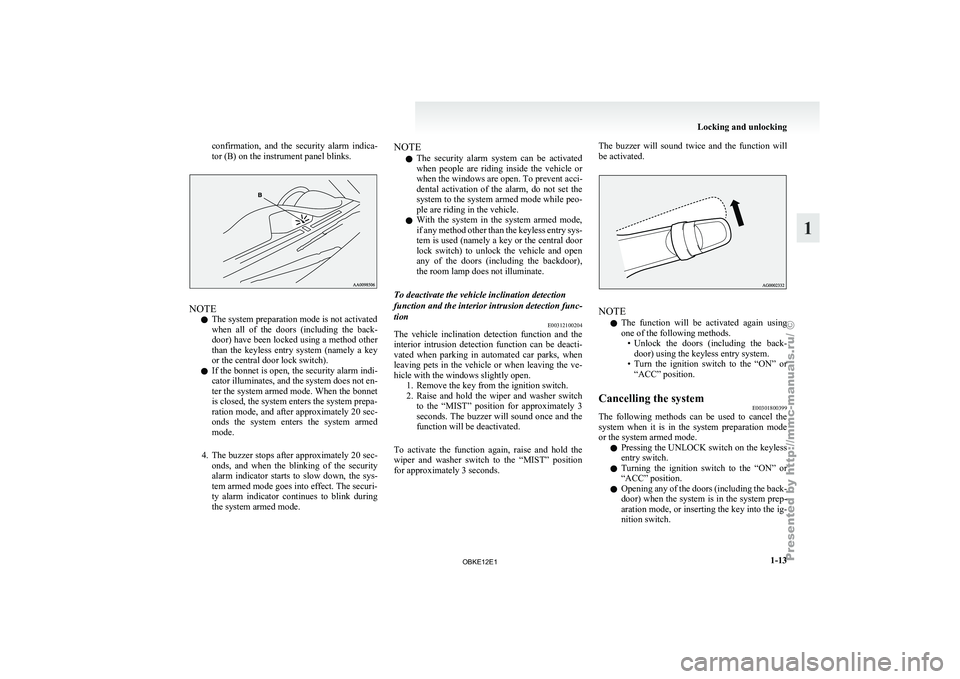
confirmation, and the security alarm indica-
tor (B) on the instrument panel blinks.
NOTE
l The system preparation mode is not activated
when
all of
the doors (including the back-
door) have been locked using a method other
than the keyless entry system (namely a key
or the central door lock switch).
l If the bonnet is open, the security alarm indi-
cator illuminates, and the system does not en-
ter the system armed mode. When the bonnet
is closed, the system enters the system prepa-
ration mode, and after approximately 20 sec-
onds the system enters the system armed
mode.
4. The buzzer stops after approximately 20 sec- onds, and when the blinking of the security
alarm indicator starts to slow down, the sys-
tem armed mode goes into effect. The securi-
ty alarm indicator continues to blink during
the system armed mode. NOTE
l The security
alarm
system can be activated
when people are riding inside the vehicle or
when the windows are open. To prevent acci-
dental activation of the alarm, do not set the
system to the system armed mode while peo-
ple are riding in the vehicle.
l With the system in the system armed mode,
if any method other than the keyless entry sys-
tem is used (namely a key or the central door
lock switch) to unlock the vehicle and open
any of the doors (including the backdoor),
the room lamp does not illuminate.
To deactivate the vehicle inclination detection
function and the interior intrusion detection func-
tion E00312100204
The vehicle inclination detection function and the
interior intrusion
detection
function can be deacti-
vated when parking in automated car parks, when
leaving pets in the vehicle or when leaving the ve-
hicle with the windows slightly open. 1. Remove the key from the ignition switch.
2. Raise and hold the wiper and washer switchto the “MIST” position for approximately 3
seconds. The buzzer will sound once and the
function will be deactivated.
To activate the function again, raise and hold the
wiper and washer switch to the “MIST” position
for approximately 3 seconds. The buzzer will sound twice and the function will
be activated.
NOTE
l The
function will
be activated again using
one of the following methods. • Unlock the doors (including the back-door) using the keyless entry system.
• Turn the ignition switch to the “ON” or “ACC” position.
Cancelling the system E00301800399
The following methods can be used to cancel the
system when it
is in the system preparation mode
or the system armed mode.
l Pressing the UNLOCK switch on the keyless
entry switch.
l Turning the ignition switch to the “ON” or
“ACC” position.
l Opening any of the doors (including the back-
door) when the system is in the system prep-
aration mode, or inserting the key into the ig-
nition switch. Locking and unlocking
1-13 1
OBKE12E1
Page 88 of 377
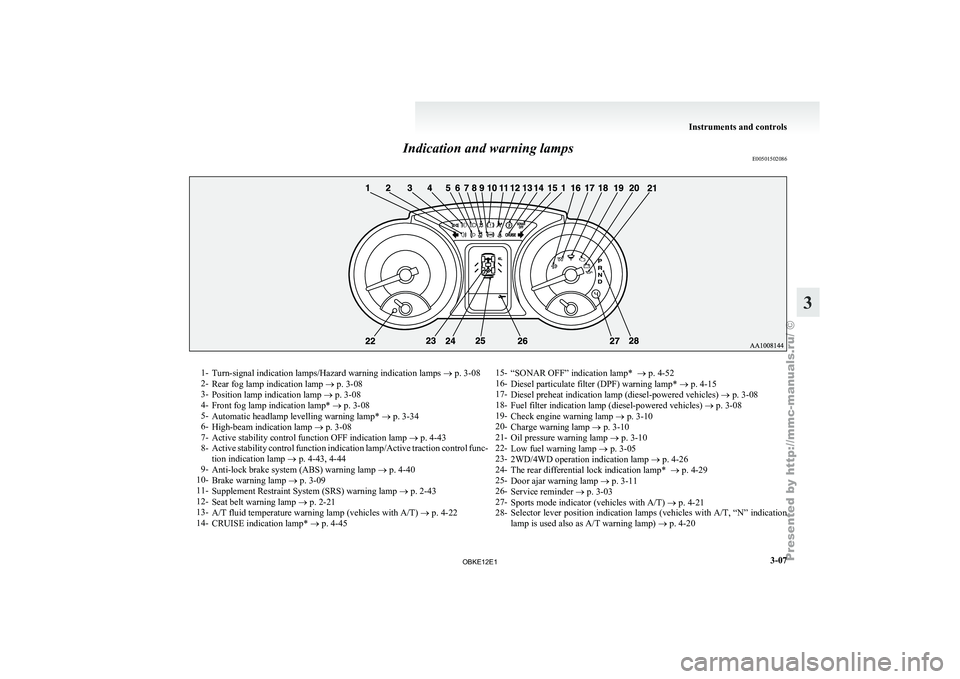
Indication and warning lamps
E005015020861-
Turn-signal indication lamps/Hazard warning indication lamps ® p. 3-08
2- Rear fog lamp indication lamp
® p. 3-08
3- Position lamp indication lamp ® p. 3-08
4- Front fog lamp indication lamp* ® p. 3-08
5- Automatic headlamp levelling warning lamp* ® p. 3-34
6- High-beam indication lamp ® p. 3-08
7- Active stability control function OFF indication lamp ® p. 4-43
8- Active stability control function indication lamp/Active traction control func-
tion indication lamp ® p. 4-43, 4-44
9- Anti-lock brake system (ABS) warning lamp ® p. 4-40
10- Brake warning lamp ® p. 3-09
11- Supplement Restraint System (SRS) warning lamp ® p. 2-43
12- Seat belt warning lamp ® p. 2-21
13- A/T fluid temperature warning lamp (vehicles with A/T) ® p. 4-22
14- CRUISE indication lamp* ® p. 4-45 15-
“SONAR OFF” indication lamp* ® p. 4-52
16- Diesel particulate filter (DPF) warning lamp* ®
p. 4-15
17- Diesel preheat indication lamp (diesel-powered vehicles) ® p. 3-08
18- Fuel filter indication lamp (diesel-powered vehicles) ® p. 3-08
19- Check engine warning lamp ® p. 3-10
20- Charge warning lamp ® p. 3-10
21- Oil pressure warning lamp ® p. 3-10
22- Low fuel warning lamp ® p. 3-05
23- 2WD/4WD operation indication lamp ® p. 4-26
24- The rear differential lock indication lamp* ® p. 4-29
25- Door ajar warning lamp ® p. 3-11
26- Service reminder ® p. 3-03
27- Sports mode indicator (vehicles with A/T) ® p. 4-21
28- Selector lever position indication lamps (vehicles with A/T, “N” indication
lamp is used also as A/T warning lamp) ® p. 4-20 Instruments and controls
3-07 3
OBKE12E1
Page 134 of 377

To reduce the glare
Type 1
The lever
(A)
at the bottom of the mirror can be
used to adjust the mirror to reduce the glare from
the headlamps of vehicles behind you during night
driving. 1- Normal
2- Anti-glare
Type 2
When the headlamps of the vehicles behind you are
very bright, the
reflection factor of the rear-view
mirror is automatically changed to reduce the glare. When the ignition switch is turned to the “ON” po-
sition, the reflection factor of the mirror is automat-
ically changed.
NOTE
l Do
not hang
items on, or spray glass cleaner
on the sensor (1), as reduced sensitivity
could result. Type 3
When the headlamps of the vehicles behind you are
very bright, the
reflection factor of the rear-view
mirror is automatically changed to reduce the glare. When the ignition switch is turned to the “ON” po-
sition, the
green
indicator (1) illuminates and the re-
flection factor of the mirror is automatically
changed.
NOTE
l Do not hang any items on, or spray glass clean-
er on the sensors (2) on the front and back
side, as reduced sensitivity could result.
l If you want to stop automatic mode, press
the switch (3) and the indicator will go off.
To return to automatic mode, press the
switch again or turn the ignition key to the
“ON” position after turning to “LOCK” or
“ACC” position. Starting and driving
4-09 4
OBKE12E1
Page 146 of 377
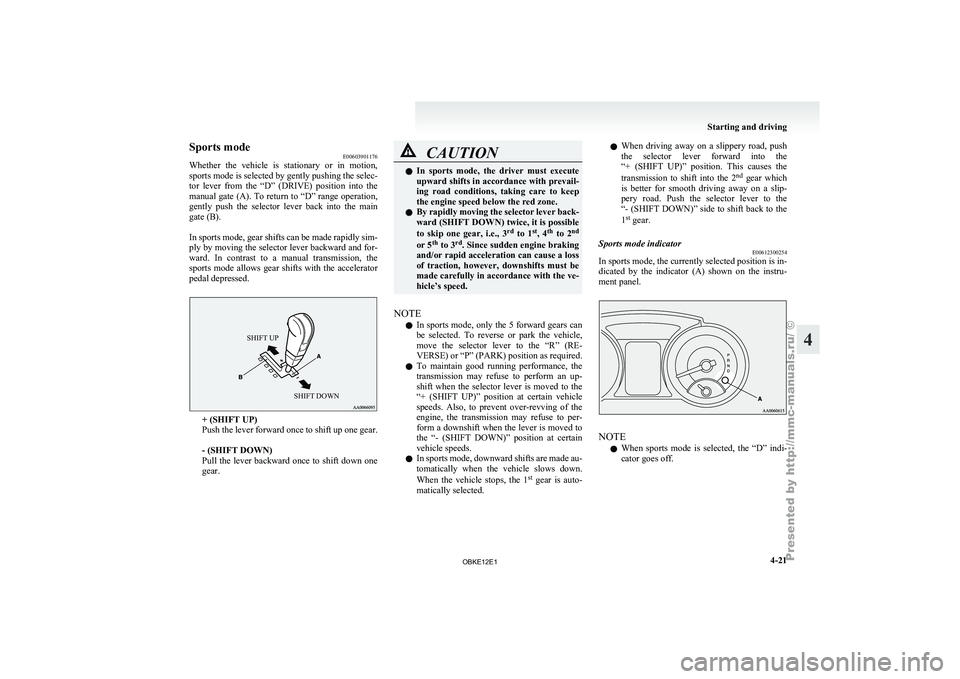
Sports mode
E00603901176
Whether the vehicle
is stationary or in motion,
sports mode is selected by gently pushing the selec-
tor lever from the “D” (DRIVE) position into the
manual gate (A). To return to “D” range operation,
gently push the selector lever back into the main
gate (B).
In sports mode, gear shifts can be made rapidly sim-
ply by moving the selector lever backward and for-
ward. In contrast to a manual transmission, the
sports mode allows gear shifts with the accelerator
pedal depressed.
SHIFT UP
SHIFT DOWN + (SHIFT UP)
Push the
lever
forward once to shift up one gear.
- (SHIFT DOWN)
Pull the lever backward once to shift down one
gear. CAUTION
l
In sports mode,
the driver must execute
upward shifts in accordance with prevail-
ing road conditions, taking care to keep
the engine speed below the red zone.
l By rapidly moving the selector lever back-
ward (SHIFT DOWN) twice, it is possible
to skip one gear, i.e., 3 rd
to 1 st
, 4 th
to 2 nd
or 5 th
to 3 rd
. Since sudden engine braking
and/or rapid acceleration can cause a loss
of traction, however, downshifts must be
made carefully in accordance with the ve-
hicle’s speed.
NOTE l In
sports mode,
only the 5 forward gears can
be selected. To reverse or park the vehicle,
move the selector lever to the “R” (RE-
VERSE) or “P” (PARK) position as required.
l To maintain good running performance, the
transmission may refuse to perform an up-
shift when the selector lever is moved to the
“+ (SHIFT UP)” position at certain vehicle
speeds. Also, to prevent over-revving of the
engine, the transmission may refuse to per-
form a downshift when the lever is moved to
the “- (SHIFT DOWN)” position at certain
vehicle speeds.
l In sports mode, downward shifts are made au-
tomatically when the vehicle slows down.
When the vehicle stops, the 1 st
gear is auto-
matically selected. l
When
driving
away
on a slippery road, push
the selector lever forward into the
“+ (SHIFT UP)” position. This causes the
transmission to shift into the 2 nd
gear which
is better for smooth driving away on a slip-
pery road. Push the selector lever to the
“- (SHIFT DOWN)” side to shift back to the
1 st
gear.
Sports mode indicator E00612300254
In sports mode, the currently selected position is in-
dicated by the
indicator (A) shown on the instru-
ment panel. NOTE
l When
sports mode
is selected, the “D” indi-
cator goes off. Starting and driving
4-21 4
OBKE12E1
Page 180 of 377
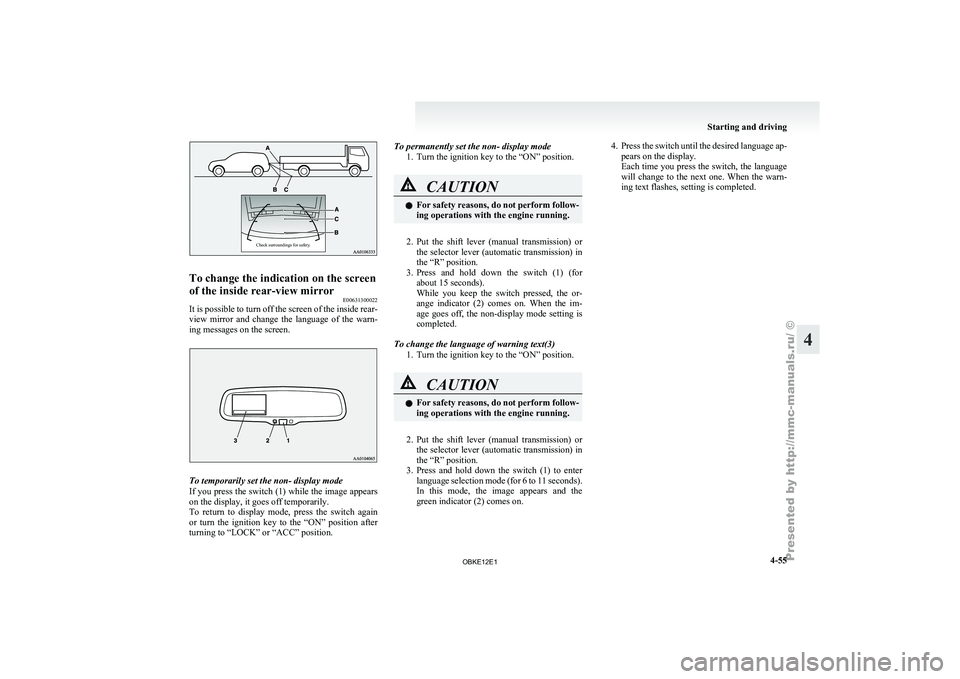
Check surroundings for safety.To change the indication on the screen
of the inside rear-view mirror
E00631300022
It is possible to turn off the screen of the inside rear-
view mirror and
change the language of the warn-
ing messages on the screen. To temporarily set the non- display mode
If you
press
the switch (1) while the image appears
on the display, it goes off temporarily.
To return to display mode, press the switch again
or turn the ignition key to the “ON” position after
turning to “LOCK” or “ACC” position. To permanently set the non- display mode
1. Turn the ignition key to the “ON” position. CAUTION
l
For safety
reasons,
do not perform follow-
ing operations with the engine running.
2. Put the shift lever (manual transmission) or
the selector
lever (automatic transmission) in
the “R” position.
3. Press and hold down the switch (1) (for about 15 seconds).
While you keep the switch pressed, the or-
ange indicator (2) comes on. When the im-
age goes off, the non-display mode setting is
completed.
To change the language of warning text(3) 1. Turn the ignition key to the “ON” position. CAUTION
l
For safety
reasons,
do not perform follow-
ing operations with the engine running.
2. Put the shift lever (manual transmission) or
the selector
lever (automatic transmission) in
the “R” position.
3. Press and hold down the switch (1) to enter language selection mode (for 6 to 11 seconds).
In this mode, the image appears and the
green indicator (2) comes on. 4. Press the switch until the desired language ap-
pears on the display.
Each time
you press the switch, the language
will change to the next one. When the warn-
ing text flashes, setting is completed. Starting and driving
4-55 4
OBKE12E1
Page 198 of 377
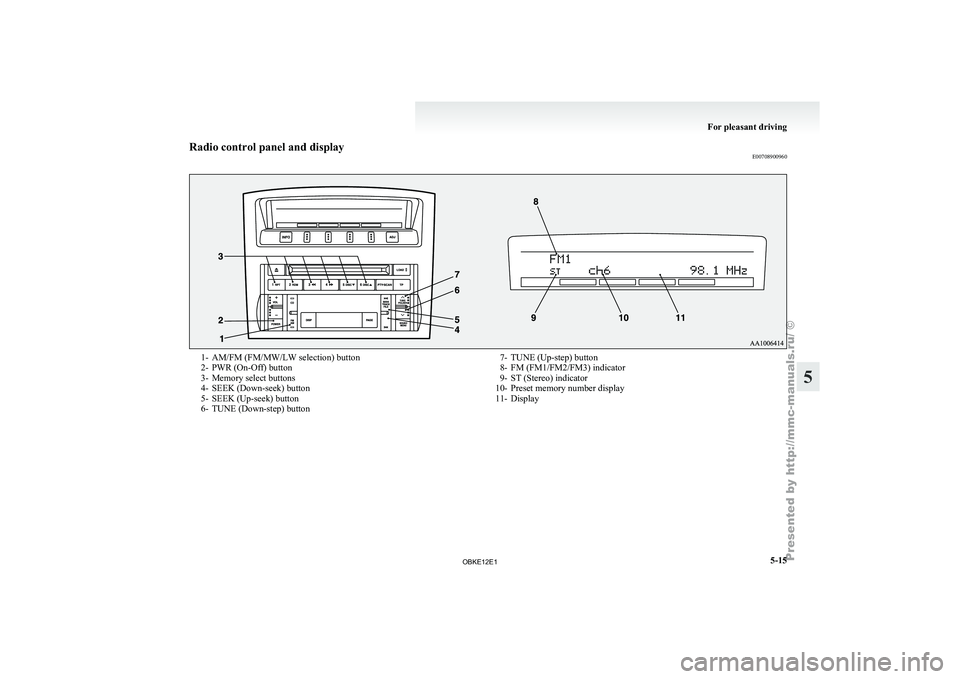
Radio control panel and display
E007089009601- AM/FM (FM/MW/LW selection) button
2- PWR (On-Off) button
3-
Memory select buttons
4-
SEEK (Down-seek) button
5- SEEK (Up-seek) button
6- TUNE (Down-step) button 7- TUNE (Up-step) button
8- FM (FM1/FM2/FM3) indicator
9- ST (Stereo) indicator
10-
Preset memory number display
11- Display For pleasant driving
5-15 5
OBKE12E1
Page 200 of 377
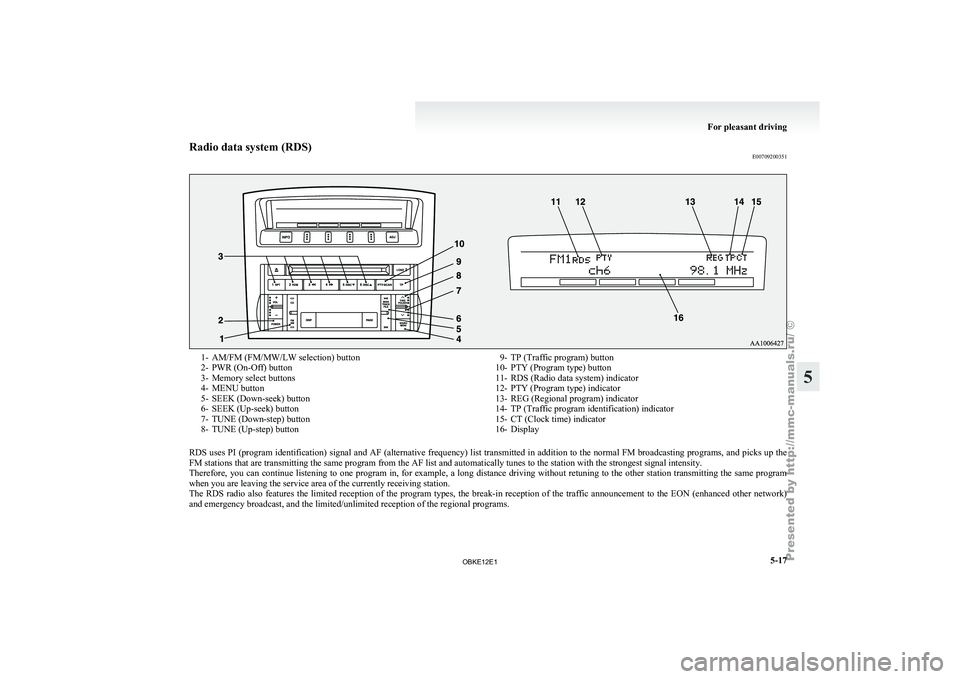
Radio data system (RDS)
E007092003511- AM/FM (FM/MW/LW selection) button
2- PWR (On-Off) button
3-
Memory select buttons
4-
MENU button
5- SEEK (Down-seek) button
6- SEEK (Up-seek) button
7- TUNE (Down-step) button
8- TUNE (Up-step) button 9- TP (Traffic program) button
10- PTY (Program type) button
11- RDS (Radio data system) indicator
12-
PTY (Program type) indicator
13- REG (Regional program) indicator
14- TP (Traffic program identification) indicator
15- CT (Clock time) indicator
16- Display
RDS uses PI (program identification) signal and AF (alternative frequency) list transmitted in addition to the normal FM broadcasting programs, and picks up the
FM stations that are transmitting the same program from the AF list and automatically tunes to the station with the strongest signal intensity.
Therefore, you can
continue listening to one program in, for example, a long distance driving without retuning to the other station transmitting the same program
when you are leaving the service area of the currently receiving station.
The RDS radio also features the limited reception of the program types, the break-in reception of the traffic announcement to the EON (enhanced other network)
and emergency broadcast, and the limited/unlimited reception of the regional programs. For pleasant driving
5-17 5
OBKE12E1
Page 201 of 377
AF (Alternative Frequencies) function
E00720900090
The AF function
finds a station broadcasting the
same program and selects the station with the stron-
gest signal of AF lists.
The AF function is turned on at all times unless
you manually switch it off.
The AF function can be turned ON and OFF.
Refer to “Adjusting the time” on page 3-13.
CT (Clock Time) function E00721000085
The clock can be set automatically by using the sig-
nal from the
local RDS stations. Refer to “Adjust-
ing the time” on page 3-13.
REG (Regional) function E00721100028
REG function limits to receive the stations broad-
casting regional programs.
Regional programming and
regional networks are
organized differently depending on the country or
area (they may be changed according to the hour,
state, or broadcast area), so if you don’t want to re-
ceive the regional programs automatically, you can
set up REG ON not to receive regional programs.
The REG function can be turned ON and OFF. Re-
fer to “Function setup mode” on page 5-20.
PI (Program Identification) search function E00721200247
When travelling long distance and the recalled pre-
set station is
weak, the radio searches another fre-
quency broadcasting the same programming with
the same PI code in AF list. If there are no frequencies broadcasting the same
programming, the
radio
searches a frequency broad-
casting the regional programming. The radio suc-
ceeds in searching the regional programming, then
the display shows the REG indicator (13).
If the radio does not succeed in searching the re-
gional programming, the radio returns to the recal-
led preset station.
The PI function can be turned ON and OFF.
Refer to “Function setup mode” on page 5-35.
NOTE
l While searching, the audio system is muted.
The display shows “WAIT” or “SEARCH”.
PTY (Program type) E00721300277
RDS broadcasts are classified according to pro-
gram type (PTY)
as follows. Use the TUNE button
(7 or 8) to select your desired PTY. 1. NEWS
2. AFFAIRS (Current affairs)
3. INFO (Information)
4. SPORT
5. EDUCATE (Education)
6. DRAMA
7. CULTURE
8. SCIENCE
9. VARIED
10. POP M (Pop music)
11. ROCK M (Rock music)
12. EASY M (Easy music)
13. LIGHT M (Light classics)
14. CLASSICS
15. OTHER M (Other music)
16. WEATHER (Weather information)
17. FINANCE
18. CHILDREN 19. SOCIAL
20. RELIGION
21.
PHONE IN
22.
TRAVEL
23. LEISURE
24. JAZZ
25. COUNTRY
26. NATION M (National music)
27. OLDIES
28. FOLK M (Folk music)
29. DOCUMENT
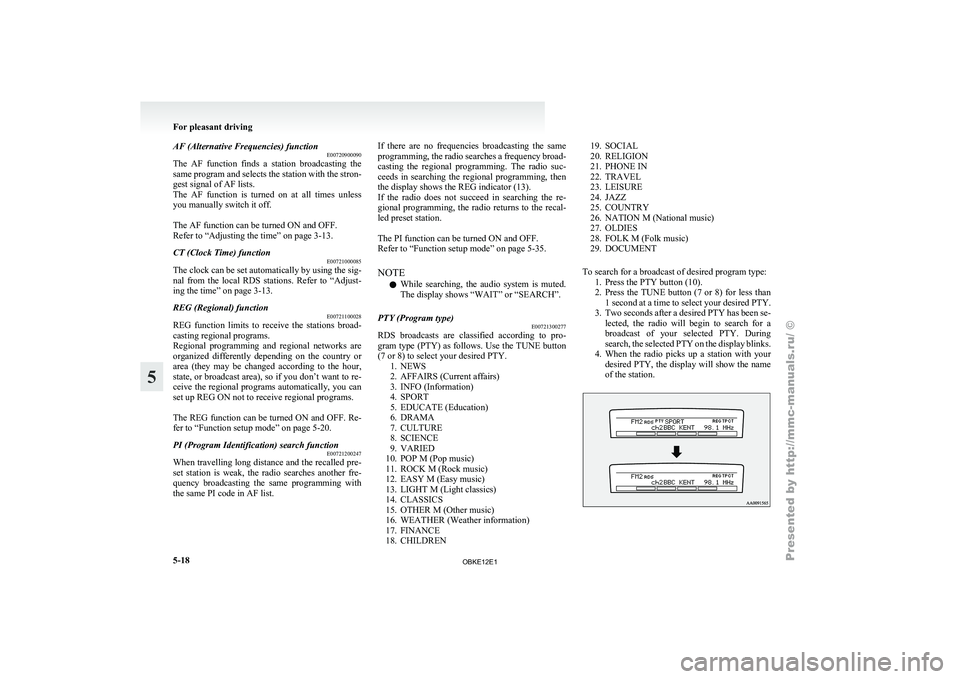
To search for a broadcast of desired program type: 1. Press the PTY button (10).
2. Press the TUNE button (7 or 8) for less than1 second at a time to select your desired PTY.
3. Two seconds after a desired PTY has been se- lected, the radio will begin to search for a
broadcast of your selected PTY. During
search, the selected PTY on the display blinks.
4. When the radio picks up a station with your desired PTY, the display will show the name
of the station. For pleasant driving
5-18
5
OBKE12E1
Page 202 of 377
NOTE
l If
the SEEK
button (5 or 6) is pressed for
less than 1 second,the radio will try to find
out another broadcast of the same program
type as currently selected.
l If no station is found with your desired PTY,
the display will show “EMPTY” for about
5 seconds and the radio will return to the pre-
vious station.
How to enter PTYs in the memory E00721400089
As many as 6 PTYs can be entered in the memory.
Follow the steps described below.
1. Press either
the
TUNE button (7 or 8) to tune
the PTY to be entered in the memory.
2. Press one of the memory select buttons (3) for 2 seconds or longer. The sound will be
momentarily interrupted while the PTY is be-
ing entered into the memory. The number of
the button corresponding to the entry into the
memory and the PTY are displayed.
3. The preset memory setting is retrieved by pressing the button and then releasing it with-
in about 2 seconds.
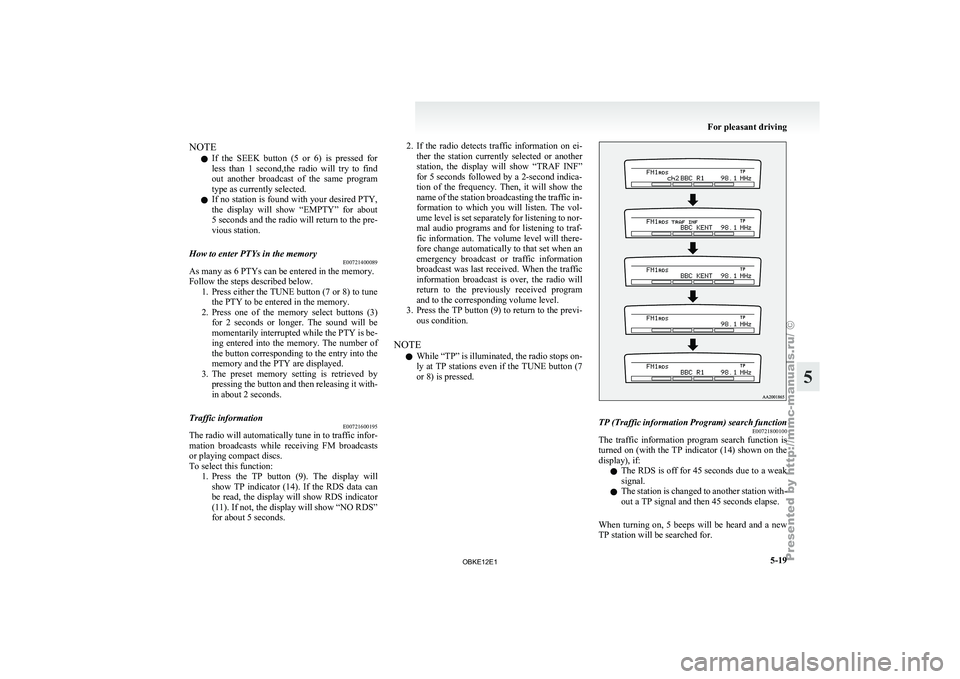
Traffic information E00721600195
The radio will automatically tune in to traffic infor-
mation broadcasts while
receiving FM broadcasts
or playing compact discs.
To select this function: 1. Press the TP button (9). The display willshow TP indicator (14). If the RDS data can
be read, the display will show RDS indicator
(11). If not, the display will show “NO RDS”
for about 5 seconds. 2. If the radio detects traffic information on ei-
ther the
station currently selected or another
station, the display will show “TRAF INF”
for 5 seconds followed by a 2-second indica-
tion of the frequency. Then, it will show the
name of the station broadcasting the traffic in-
formation to which you will listen. The vol-
ume level is set separately for listening to nor-
mal audio programs and for listening to traf-
fic information. The volume level will there-
fore change automatically to that set when an
emergency broadcast or traffic information
broadcast was last received. When the traffic
information broadcast is over, the radio will
return to the previously received program
and to the corresponding volume level.
3. Press the TP button (9) to return to the previ- ous condition.
NOTE l While “TP” is illuminated, the radio stops on-
ly at TP stations even if the TUNE button (7
or 8) is pressed. TP (Traffic information Program) search function
E00721800100
The traffic information program search function is
turned on (with
the TP indicator (14) shown on the
display), if:
l The RDS is off for 45 seconds due to a weak
signal.
l The station is changed to another station with-
out a TP signal and then 45 seconds elapse.
When turning on, 5 beeps will be heard and a new
TP station will be searched for. For pleasant driving
5-19 5
OBKE12E1