Indicator MITSUBISHI PAJERO IV 2011 Owner's Manual
[x] Cancel search | Manufacturer: MITSUBISHI, Model Year: 2011, Model line: PAJERO IV, Model: MITSUBISHI PAJERO IV 2011Pages: 377, PDF Size: 29.43 MB
Page 225 of 377

To find the start of each track on a disc for playback
Press the SCAN
button (14). “SCAN” will appear
on the display and the autochanger will play back
the first 10 seconds of each track on the selected disc.
The track number will blink while the scan mode is
selected. To exit the scan mode, press the SCAN
button again.
NOTE
l Once all tracks on the disc have been scan-
ned, playback of the disc will restart from the
beginning of the track that was playing when
scanning started.
l The scan mode will be cancelled when radio
or CD operation is selected.
l With a disc that contains both CD-DA and
MP3 files, the scan mode causes only files of
the same format (CD-DA only or MP3 files
only) to be played.
CD text and MP3 title display E00725000520
This autochanger can display CD text and MP3 ti-
tles including ID3 tag information. CD text
The autochanger can
display disc and track titles
for discs with converted disc and track title informa-
tion. Press the DISP button (3) repeatedly to make
selections in the following sequence: disc name →
track name → normal display mode.
Example
Disc
name
Track
name NOTE
l The
display can
show up to 16 characters. If
a disc name or track name has more than 16
characters, press the PAGE button (10) to
view the next 16 characters.
l When there is no title information to be dis-
played, the display shows “NO TITLE”.
l Characters that the autochanger cannot dis-
play are shown as “ ”. MP3 titles
The
autochanger
can
display folder and track titles
for discs with converted folder and track informa-
tion. Press the DISP button (7) repeatedly to make
selections in the following sequence: folder name
→ track name → normal display mode.
Track
name Folder
name Example ID3 tag information
The autochanger can
display ID3 tag information
for files that have been recorded with ID3 tag infor-
mation. 1. Press the DISP button (3) for 2 seconds or lon-ger to switch to the ID3 tag information. The
“TAG” indicator will appear on the display.
2. Then press the DISP button for less than 1 second repeatedly to make selections in the
following sequence: album name → track
name → artist name → normal display mode.
NOTE l To return from ID3 tag information to the
folder name, press the DISP button (3) again
for 2 seconds or longer.
l When there is no title information to be dis-
played, the display shows “NO TITLE”. For pleasant driving
5-42
5
OBKE12E1
Page 227 of 377
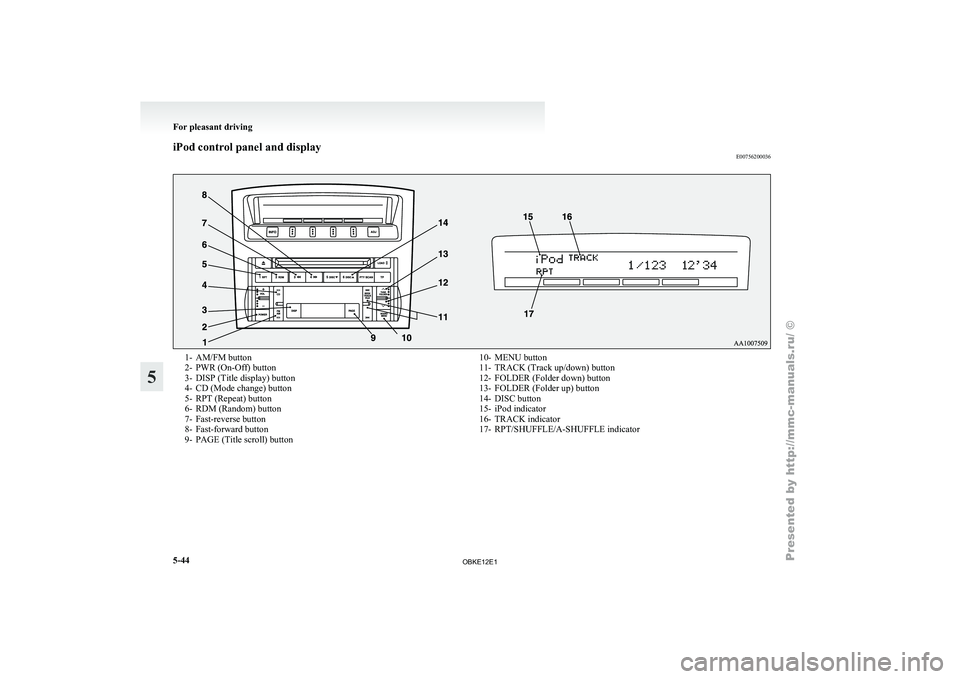
iPod control panel and display
E007562000361- AM/FM button
2-
PWR (On-Off) button
3- DISP (Title display) button
4-
CD (Mode change) button
5- RPT (Repeat) button
6- RDM (Random) button
7- Fast-reverse button
8- Fast-forward button
9- PAGE (Title scroll) button 10- MENU button
11- TRACK (Track up/down) button
12- FOLDER (Folder down) button
13-
FOLDER (Folder up) button
14- DISC button
15- iPod indicator
16- TRACK indicator
17- RPT/SHUFFLE/A-SHUFFLE indicator For pleasant driving
5-44
5
OBKE12E1
Page 232 of 377
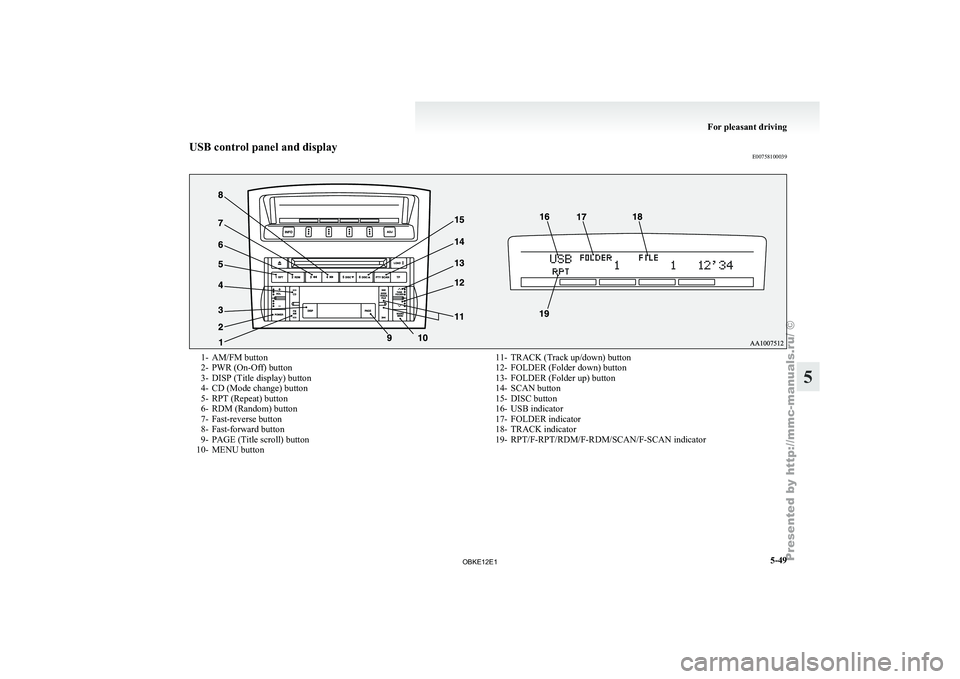
USB control panel and display
E007581000391- AM/FM button
2-
PWR (On-Off) button
3- DISP (Title display) button
4-
CD (Mode change) button
5- RPT (Repeat) button
6- RDM (Random) button
7- Fast-reverse button
8- Fast-forward button
9- PAGE (Title scroll) button
10- MENU button 11- TRACK (Track up/down) button
12- FOLDER (Folder down) button
13- FOLDER (Folder up) button
14-
SCAN button
15- DISC button
16- USB indicator
17- FOLDER indicator
18- TRACK indicator
19- RPT/F-RPT/RDM/F-RDM/SCAN/F-SCAN indicator For pleasant driving
5-49 5
OBKE12E1
Page 237 of 377

Bluetooth
®
device control panel and display
E007626000351- PWR (On-Off) button
2- DISP (Title display) button
3-
CD (Mode change) button
4-
RPT (Repeat) button
5- RDM (Random) button
6- PAGE (Title scroll) button
7- TRACK (Track up/down) button 8- SCAN button
9- Play button
10- Pause/Stop button
11- BT-A (Bluetooth ®
) indicator
12-
TRACK indicator
13- RPT/RDM/SCAN indicator For pleasant driving
5-54
5
OBKE12E1
Page 245 of 377
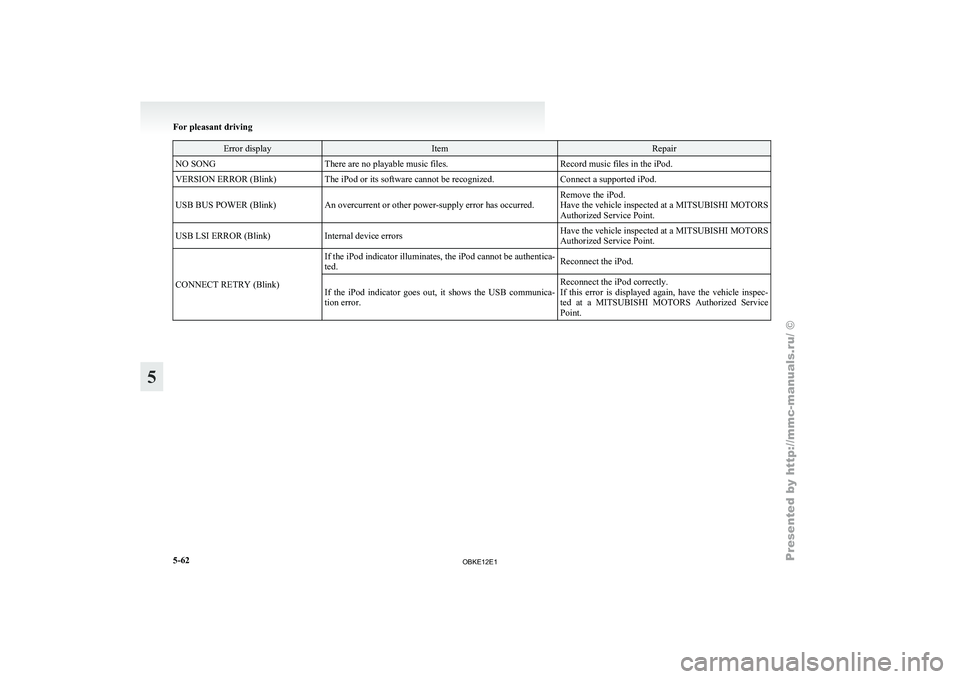
Error display Item Repair
NO SONG There are no playable music files. Record music files in the iPod.
VERSION ERROR (Blink) The iPod or its software cannot be recognized. Connect a supported iPod.
USB BUS POWER (Blink) An overcurrent or other power-supply error has occurred. Remove the iPod.
Have the vehicle inspected at a MITSUBISHI MOTORS
Authorized Service Point.
USB LSI ERROR (Blink) Internal device errors Have the vehicle inspected at a
MITSUBISHI MOTORS
Authorized Service Point.
CONNECT RETRY (Blink) If the iPod indicator illuminates, the iPod cannot be authentica-
ted.
Reconnect the iPod.
If the iPod indicator goes out, it shows the USB communica-
tion error. Reconnect the iPod correctly.
If this error
is displayed again, have the vehicle inspec-
ted at a MITSUBISHI MOTORS Authorized Service
Point. For pleasant driving
5-62
5
OBKE12E1
Page 321 of 377
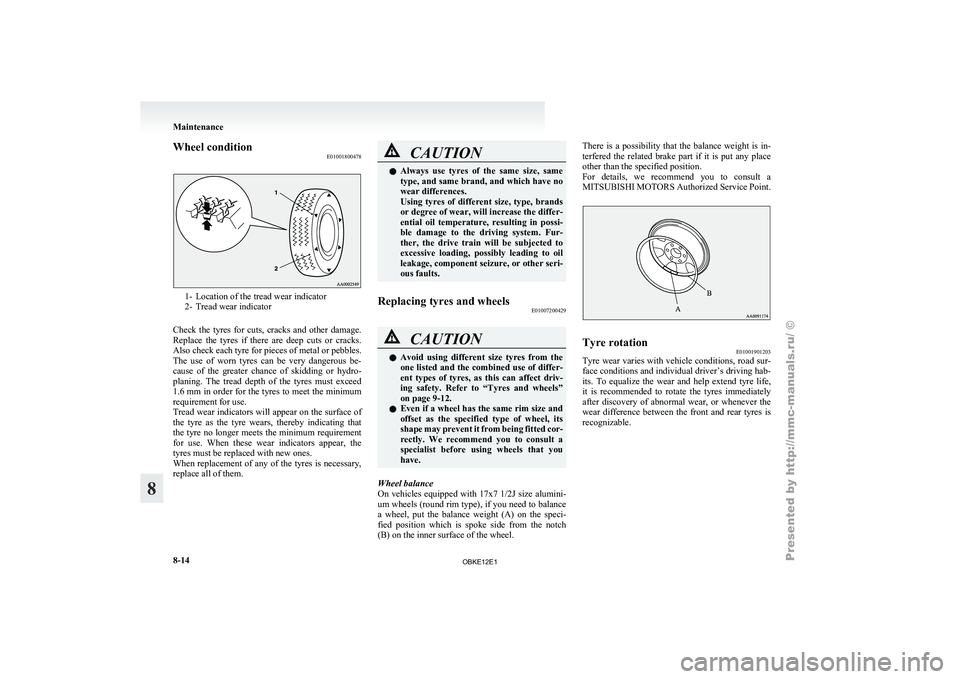
Wheel condition
E010018004781- Location of the tread wear indicator
2- Tread wear indicator
Check the
tyres for cuts, cracks and other damage.
Replace the tyres if there are deep cuts or cracks.
Also check each tyre for pieces of metal or pebbles.
The use of worn tyres can be very dangerous be-
cause of the greater chance of skidding or hydro-
planing. The tread depth of the tyres must exceed
1.6 mm in order for the tyres to meet the minimum
requirement for use.
Tread wear indicators will appear on the surface of
the tyre as the tyre wears, thereby indicating that
the tyre no longer meets the minimum requirement
for use. When these wear indicators appear, the
tyres must be replaced with new ones.
When replacement of any of the tyres is necessary,
replace all of them. CAUTION
l
Always use tyres
of the same size, same
type, and same brand, and which have no
wear differences.
Using tyres of different size, type, brands
or degree of wear, will increase the differ-
ential oil temperature, resulting in possi-
ble damage to the driving system. Fur-
ther, the drive train will be subjected to
excessive loading, possibly leading to oil
leakage, component seizure, or other seri-
ous faults.
Replacing tyres and wheels E01007200429 CAUTION
l
Avoid using different
size tyres from the
one listed and the combined use of differ-
ent types of tyres, as this can affect driv-
ing safety. Refer to “Tyres and wheels”
on page 9-12.
l Even if a wheel has the same rim size and
offset as the specified type of wheel, its
shape may prevent it from being fitted cor-
rectly. We recommend you to consult a
specialist before using wheels that you
have.
Wheel balance
On vehicles equipped
with 17x7 1/2J size alumini-
um wheels (round rim type), if you need to balance
a wheel, put the balance weight (A) on the speci-
fied position which is spoke side from the notch
(B) on the inner surface of the wheel. There is a possibility that the balance weight is in-
terfered the
related
brake part if it is put any place
other than the specified position.
For details, we recommend you to consult a
MITSUBISHI MOTORS Authorized Service Point. Tyre rotation
E01001901203
Tyre wear varies with vehicle conditions, road sur-
face conditions and
individual driver’s driving hab-
its. To equalize the wear and help extend tyre life,
it is recommended to rotate the tyres immediately
after discovery of abnormal wear, or whenever the
wear difference between the front and rear tyres is
recognizable. Maintenance
8-14
8
OBKE12E1
Page 325 of 377
NOTE
l Do
not allow
the wiper arm to fall onto the
window glass; it could damage the glass.
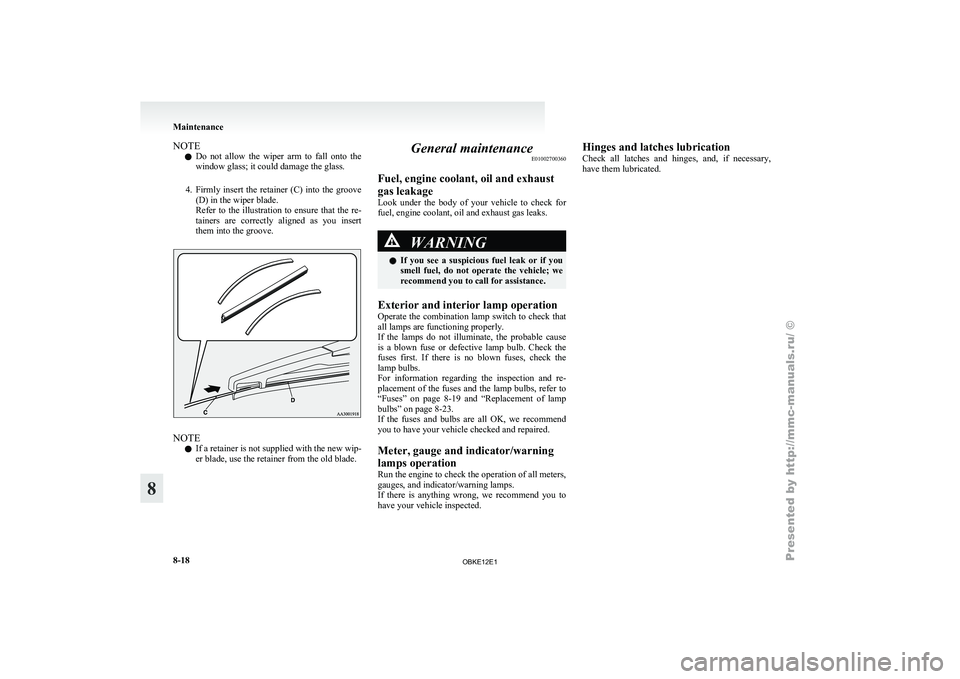
4. Firmly insert the retainer (C) into the groove (D) in the wiper blade.
Refer to the illustration to ensure that the re-
tainers are correctly aligned as you insert
them into the groove. NOTE
l If
a retainer
is not supplied with the new wip-
er blade, use the retainer from the old blade. General maintenance
E01002700360
Fuel, engine coolant, oil and exhaust
gas leakage
Look under
the
body of your vehicle to check for
fuel, engine coolant, oil and exhaust gas leaks. WARNING
l If
you
see
a suspicious fuel leak or if you
smell fuel, do not operate the vehicle; we
recommend you to call for assistance.
Exterior and interior lamp operation
Operate the combination
lamp switch to check that
all lamps are functioning properly.
If the lamps do not illuminate, the probable cause
is a blown fuse or defective lamp bulb. Check the
fuses first. If there is no blown fuses, check the
lamp bulbs.
For information regarding the inspection and re-
placement of the fuses and the lamp bulbs, refer to
“Fuses” on page 8-19 and “Replacement of lamp
bulbs” on page 8-23.
If the fuses and bulbs are all OK, we recommend
you to have your vehicle checked and repaired.
Meter, gauge and indicator/warning
lamps operation
Run the engine to check the operation of all meters,
gauges, and indicator/warning lamps.
If there is anything wrong, we recommend you to
have your vehicle inspected. Hinges and latches lubrication
Check all
latches
and hinges, and, if necessary,
have them lubricated. Maintenance
8-18
8
OBKE12E1