heater MITSUBISHI PAJERO IV 2011 Owners Manual
[x] Cancel search | Manufacturer: MITSUBISHI, Model Year: 2011, Model line: PAJERO IV, Model: MITSUBISHI PAJERO IV 2011Pages: 377, PDF Size: 29.43 MB
Page 45 of 377
NOTE
l To
prevent the
battery from running down,
operate the power seat with the engine run-
ning.
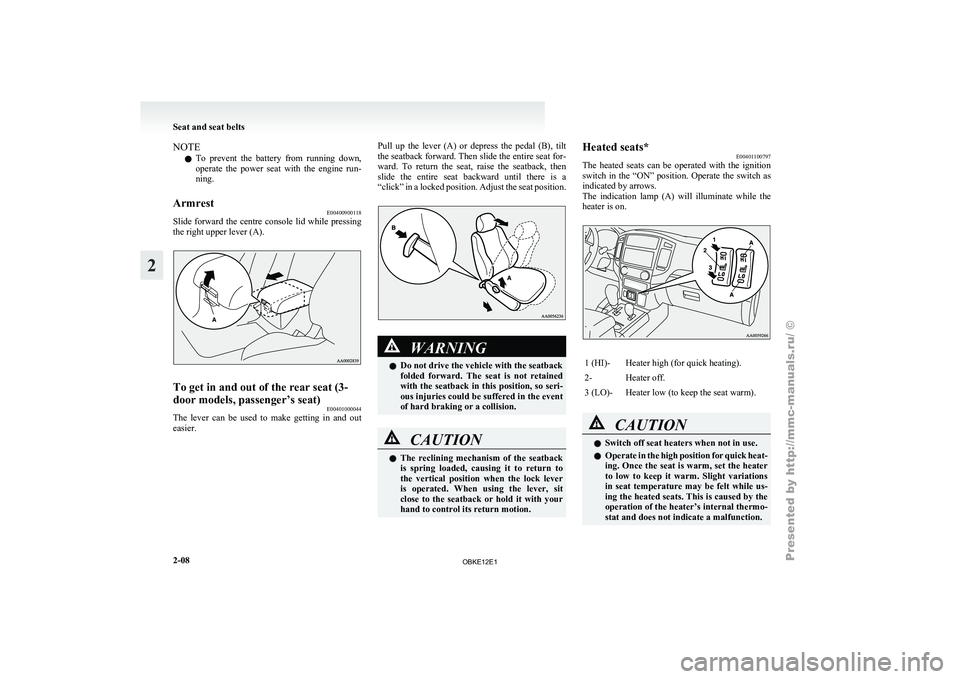
Armrest E00400900118
Slide forward the centre console lid while pressing
the right upper lever (A). To get in and out of the rear seat (3-
door models, passenger’s seat)
E00401000044
The lever can be used to make getting in and out
easier. Pull up the lever (A) or depress the pedal (B), tilt
the seatback forward.
Then slide the entire seat for-
ward. To return the seat, raise the seatback, then
slide the entire seat backward until there is a
“click” in a locked position. Adjust the seat position. WARNING
l Do not drive the vehicle with the seatback
folded forward. The
seat is not retained
with the seatback in this position, so seri-
ous injuries could be suffered in the event
of hard braking or a collision. CAUTION
l
The reclining
mechanism
of the seatback
is spring loaded, causing it to return to
the vertical position when the lock lever
is operated. When using the lever, sit
close to the seatback or hold it with your
hand to control its return motion. Heated seats*
E00401100797
The heated seats
can be operated with the ignition
switch in the “ON” position. Operate the switch as
indicated by arrows.
The indication lamp (A) will illuminate while the
heater is on. 1 (HI)- Heater high (for quick heating).
2- Heater off.
3 (LO)- Heater low (to keep the seat warm).
CAUTION
l
Switch off seat heaters when not in use.
l Operate in
the
high position for quick heat-
ing. Once the seat is warm, set the heater
to low to keep it warm. Slight variations
in seat temperature may be felt while us-
ing the heated seats. This is caused by the
operation of the heater’s internal thermo-
stat and does not indicate a malfunction. Seat and seat belts
2-08
2
OBKE12E1
Page 46 of 377
CAUTION
l
If the following types of persons use the
heated seats, they might become too hot
or receive minor burns (red skin, heat blis-
ters, etc.): • Children, elderly or ill people
• People with sensitive skin
• Excessively tired people
• People under the influence of alcoholor sleep inducing medication (cold
medicine, etc.)
l Do not place heavy objects on the seat or
stick pins, needles, or other pointed ob-
jects into it.
l Do not use a blanket, cushion, or other ma-
terial with high heat insulation properties
on the seat while using the heater; this
might cause the heater element to overheat
l When cleaning the seat, do not use ben-
zene, kerosene, petrol, alcohol, or other or-
ganic solvents; these might damage the
surface of the seat and also the heater ele-
ment.
l If water or any other liquid is spilled on
the seat, allow it to dry thoroughly before
attempting to use the heater.
l Turn the heater off immediately if it ap-
pears to be malfunctioning during use. Rear seats (3-door models)*/
Second seats (5-door models)* E00402000184 WARNING
l When a
person
is sitting in the middle seat-
ing position of the rear seats (3-door mod-
els)/second seats (5-door models), pull up
the head restraint to a height at which it
locks in position. Be sure to make this ad-
justment before starting to drive. Serious
injuries could otherwise be suffered as
the result of an impact. Refer to “Head re-
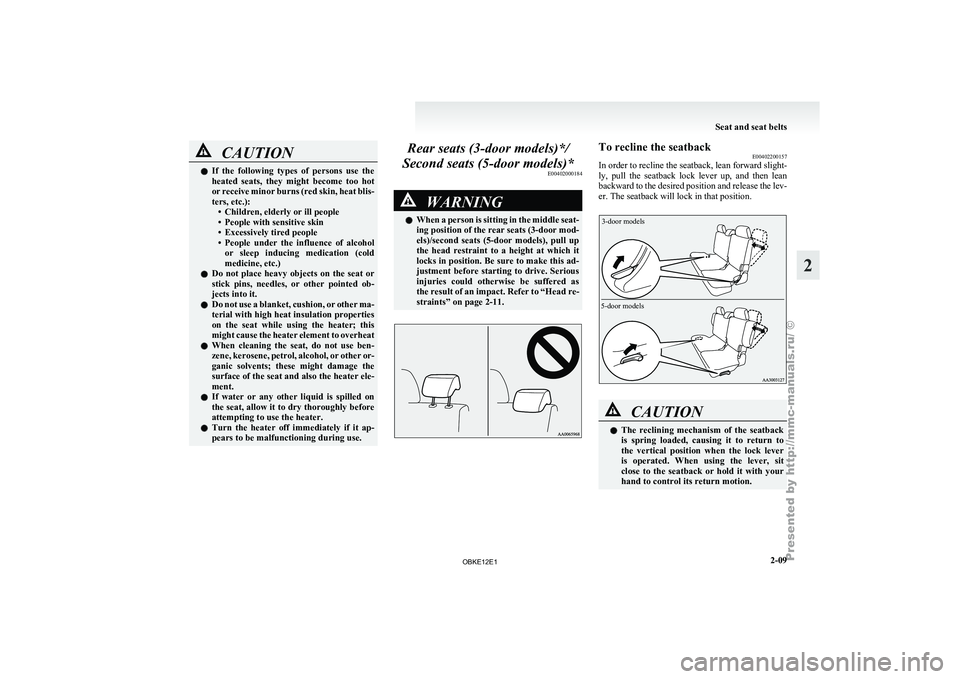
straints” on page 2-11. To recline the seatback
E00402200157
In order to
recline the seatback, lean forward slight-
ly, pull the seatback lock lever up, and then lean
backward to the desired position and release the lev-
er. The seatback will lock in that position.
3-door models
5-door models CAUTION
l
The reclining mechanism
of the seatback
is spring loaded, causing it to return to
the vertical position when the lock lever
is operated. When using the lever, sit
close to the seatback or hold it with your
hand to control its return motion. Seat and seat belts
2-09 2
OBKE12E1
Page 124 of 377
l
To avoid
unnecessary discharge of the bat-
tery, do not use the rear window demister dur-
ing starting of the engine or when the engine
is not running. Turn the demister off immedi-
ately after the window is clear.
l When cleaning the inside of the rear win-
dow, use a soft cloth and wipe gently along
the heater wires, being careful not to damage
the wires.
l Do not allow objects to touch the inside of
the rear window glass, damaged or broken
wires may result. Horn switch
E00508000347
Press the steering
wheel on or around the “ ” mark. Instruments and controls
3-43 3
OBKE12E1
Page 136 of 377
CAUTION
l
Do not drive the vehicle with the mirror
folded in. The lack of rearward visibility
normally provided the mirror could lead
to an accident.
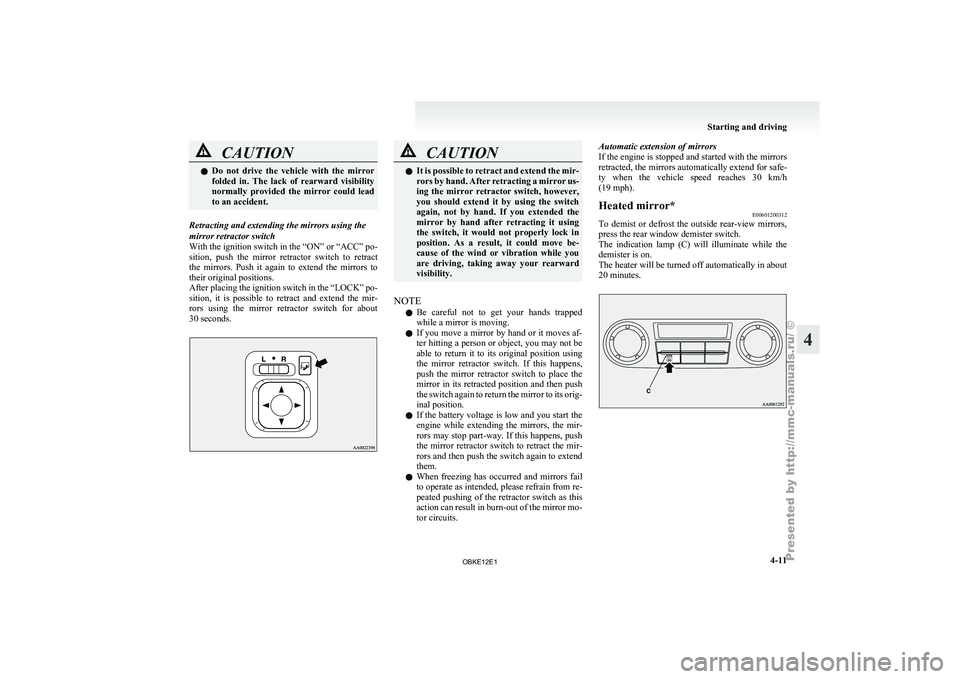
Retracting and extending the mirrors using the
mirror retractor switch
With the ignition
switch in the “ON” or “ACC” po-
sition, push the mirror retractor switch to retract
the mirrors. Push it again to extend the mirrors to
their original positions.
After placing the ignition switch in the “LOCK” po-
sition, it is possible to retract and extend the mir-
rors using the mirror retractor switch for about
30 seconds. CAUTION
l
It is possible
to retract and extend the mir-
rors by hand. After retracting a mirror us-
ing the mirror retractor switch, however,
you should extend it by using the switch
again, not by hand. If you extended the
mirror by hand after retracting it using
the switch, it would not properly lock in
position. As a result, it could move be-
cause of the wind or vibration while you
are driving, taking away your rearward
visibility.
NOTE l Be
careful not
to get your hands trapped
while a mirror is moving.
l If you move a mirror by hand or it moves af-
ter hitting a person or object, you may not be
able to return it to its original position using
the mirror retractor switch. If this happens,
push the mirror retractor switch to place the
mirror in its retracted position and then push
the switch again to return the mirror to its orig-
inal position.
l If the battery voltage is low and you start the
engine while extending the mirrors, the mir-
rors may stop part-way. If this happens, push
the mirror retractor switch to retract the mir-
rors and then push the switch again to extend
them.
l When freezing has occurred and mirrors fail
to operate as intended, please refrain from re-
peated pushing of the retractor switch as this
action can result in burn-out of the mirror mo-
tor circuits. Automatic extension of mirrors
If
the
engine
is stopped and started with the mirrors
retracted, the mirrors automatically extend for safe-
ty when the vehicle speed reaches 30 km/h
(19 mph).
Heated mirror* E00601200312
To demist or defrost the outside rear-view mirrors,
press the rear window demister switch.
The indication lamp
(C) will illuminate while the
demister is on.
The heater will be turned off automatically in about
20 minutes. Starting and driving
4-11 4
OBKE12E1
Page 188 of 377
NOTE
l There
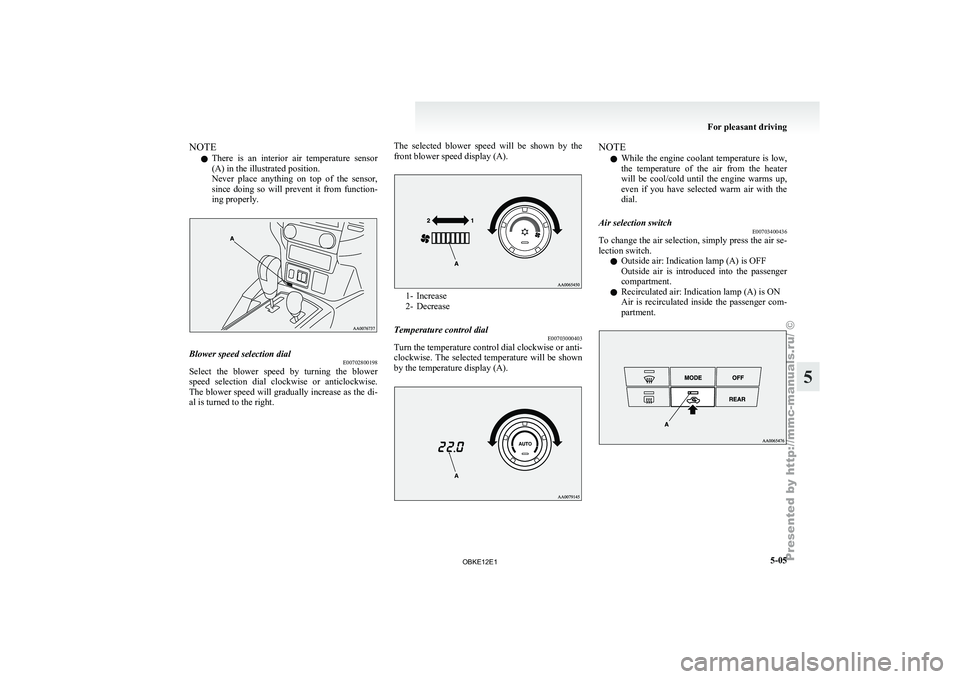
is an
interior air temperature sensor
(A) in the illustrated position.
Never place anything on top of the sensor,
since doing so will prevent it from function-
ing properly. Blower speed selection dial
E00702800198
Select the blower speed by turning the blower
speed selection dial
clockwise or anticlockwise.
The blower speed will gradually increase as the di-
al is turned to the right. The selected blower speed will be shown by the
front blower speed display (A). 1- Increase
2- Decrease
Temperature control dial E00703000403
Turn the temperature control dial clockwise or anti-
clockwise. The selected
temperature will be shown
by the temperature display (A). NOTE
l While
the engine
coolant temperature is low,
the temperature of the air from the heater
will be cool/cold until the engine warms up,
even if you have selected warm air with the
dial.
Air selection switch E00703400436
To change the air selection, simply press the air se-
lection switch.
l Outside air: Indication lamp (A) is OFF
Outside
air
is
introduced into the passenger
compartment.
l Recirculated air: Indication lamp (A) is ON
Air is recirculated inside the passenger com-
partment. For pleasant driving
5-05 5
OBKE12E1
Page 211 of 377

SOUND FIELD (Sound field type select)
To select the desired sound field.
Sound field
type Description
NORMAL Optimized for accurate vocal
and instrument reality.
STUDIO Places the listener in the control
room of
a
recording studio with
a crisp and accurate forward
placed sound stage.
CLUB Places the listener in the music
at a dance
or jazz club with
sound coming from all directions.
CONCERT Utilizing sound reflections in the
Digital Signal Processor,
CON-
CERT gives the impression that
the listener is at concert hall per-
formance. BASS (Bass tone control)
To select the desired bass level.
MID (Midrange tone control)
To select the desired midrange level.
TREBLE (Treble tone control)
To select the desired treble level.
FADER (Front/Rear balance control)
To balance
the
volume from the F (front) and the R
(rear) speakers.
BALANCE (Left/Right balance control)
To balance the volume from the L (left) and the R
(right) speakers. SURROUND CONTROL ADJUSTMENT MODE
(for premium sound system)
1. Press the MENU
button (4). The display will
show “AUDIO CONTROL/SURROUND
CONTROL”.
2. Press the sound adjust button (5) to align the cursor with “SURROUND CONTROL”.
Then press the MENU button (4) to select
the surround control adjustment mode.
Cursor 3. Press the MENU button (4) repeatedly to se-
lect your
desired sound customization setting
to change. The order is: SURROUND CON-
TROL → SURROUND MODE → SOUND
TYPE → LISTENING POSITION → Sound
customization mode off.
The status will be displayed in the display (6).
4. Press the sound adjust button (5) to adjust the sound customization features.
SURROUND MODE (Surround mode select) (for
premium sound system)
To select the desired surround mode. SURROUND MODE Description
5.1ch DOLBY DIGI- TAL · DTS Creates a realistic three-
dimensional sound field
using
5.1ch technology.
Gives clear surround-
sound with rich pres-
ence from digital sound
sources.
DOLBY PRO LOGIC II Creates a three-dimen-
sional listening environ-
ment from CDs and oth-
er
typical sound sour-
ces. Gives surround-
sound with rich pres-
ence.
2CH STEREO SOUND Gives high-quality ster-
eo sound using
a 12-
speaker system. NOTE
l 5.1ch
DOLBY DIGITAL
· DTS can be selec-
ted only when DVDs recorded with Dolby
Digital or DTS 5.1- channel surround are
played in the rear-seat display. With such
DVDs, DOLBY PRO LOGIC II cannot be se-
lected.
l Dolby Digital systems are manufactured un-
der licence from Dolby Laboratories Licens-
ing Corporation. “Dolby” and the double-D
symbol are trademarks of Dolby Laborato-
ries Licensing Corporation. DTS systems are
manufactured under licence from Digital The-
ater Systems. “DTS” and “Digital Surround”
are trademarks of Digital Theater Systems. For pleasant driving
5-28
5
OBKE12E1
Page 248 of 377

Handling of compact discs
E00723000106
l Use only
the
type of compact discs that have
the mark shown in the illustration below. Play-
back of CD-R or CD-RW discs may cause
problems. l
The use of
special shaped, damaged compact
discs (like cracked discs) or low-quality com-
pact discs (like warped discs or burrs on the
discs) will damage the CD player. l
In the
following
circumstances, moisture can
form on discs and inside the audio system,
preventing normal operation. • When there is high humidity (for exam-ple, when it is raining).
• When the temperature suddenly rises, such as right after the heater is turned on
in cold weather.
In this case, wait until the moisture has
had time to dry out.
l When the CD player is subjected to violent vi-
brations, such as during off-road driving, the
tracking may not work. l
When
storing compact
discs, always store
them in their separate cases. Never place com-
pact discs in direct sunlight, or in any place
where the temperature or humidity is high.
l Never touch the flat surface of the disc with-
out a label. This will damage the disc surface
and could affect the sound quality. When han-
dling a compact disc, always hold it by the
outer edge and the centre hole.
l To clean a disc, use a soft, clean, dry cloth.
Wipe directly from the centre hole towards
the outer edge. Do not wipe in a circle. Nev-
er use any chemicals such as benzine, paint
thinner, a disc spray cleaner, or an anti-static
agent on the disc. l
Do not
use
a ball point pen, felt pen, pencil,
etc. to write on the label surface of the disc.
l Do not put additional labels (A) or stickers
(B) on compact discs. Also, do not use any
compact disc on which a label or sticker has
started to peel off or any compact disc that
has stickiness or other contamination left by
a peeled-off label or sticker. If you use such
a compact disc, the CD player may stop work- For pleasant driving
5-65 5
OBKE12E1
Page 283 of 377
If the vehicle breaks down
E00800101179
If the vehicle
breaks down on the road, move it to
the shoulder and use the hazard warning flashers and/
or the warning triangle etc. Refer to “Hazard warn-
ing flasher switch” on page 3-35.
If the engine stops/fails
Vehicle operation and control are affected if the en-
gine stops. Before moving the vehicle to a safe
area, be aware of the following:
l The brake booster becomes inoperative and
the pedal effort will increase. Press down the
brake pedal harder than usual.
l Since the power steering pump is no longer
operative, the steering wheel feels heavy
when turning it. Emergency starting
E00800502587
If the engine
cannot be started because the battery
is weak or dead, the battery from another vehicle
can be used with jumper cables to start the engine. WARNING
l To start
the
engine using jumper cables
connected to another vehicle, perform the
correct procedures according to the in-
struction below. Incorrect procedures
could result in a fire or explosion or dam-
age to the vehicles. CAUTION
l
Do not attempt
to start the engine by pull-
ing or pushing the vehicle. It could dam-
age your vehicle.
l Always wear protective eye goggles when
working near the battery.
l Keep the battery out of the reach of chil-
dren.
1. Get the vehicles close enough so the jumper
cables can
reach, but be sure the vehicles
aren’t touching each other. CAUTION
l
Check the
other
vehicle. It must have a 12-
volt battery.
If the other system isn’t 12-volt, shorting
can damage both vehicles. 2. Set the parking brake firmly on each vehicle.
Put an
A/T in “P” (PARK) or a M/T in “N”
(Neutral). Turn off the ignition switch. WARNING
l Turn off
the
ignition on both vehicles be-
forehand. Make sure that the cables or
your clothes cannot be caught by the fan
or drive belt. Personal injury could result.
3. Turn off all lamps, heater and other electrical
loads.
4. Make
sure battery electrolyte is at the proper
level. Refer to “Battery” on page 8-10. WARNING
l If electrolyte
fluid
is not visible, or ap-
pears to be frozen, Do Not Attempt Jump
Starting!
A battery might rupture or explode if the
temperature is below the freezing point
or if it is not filled to the proper level.
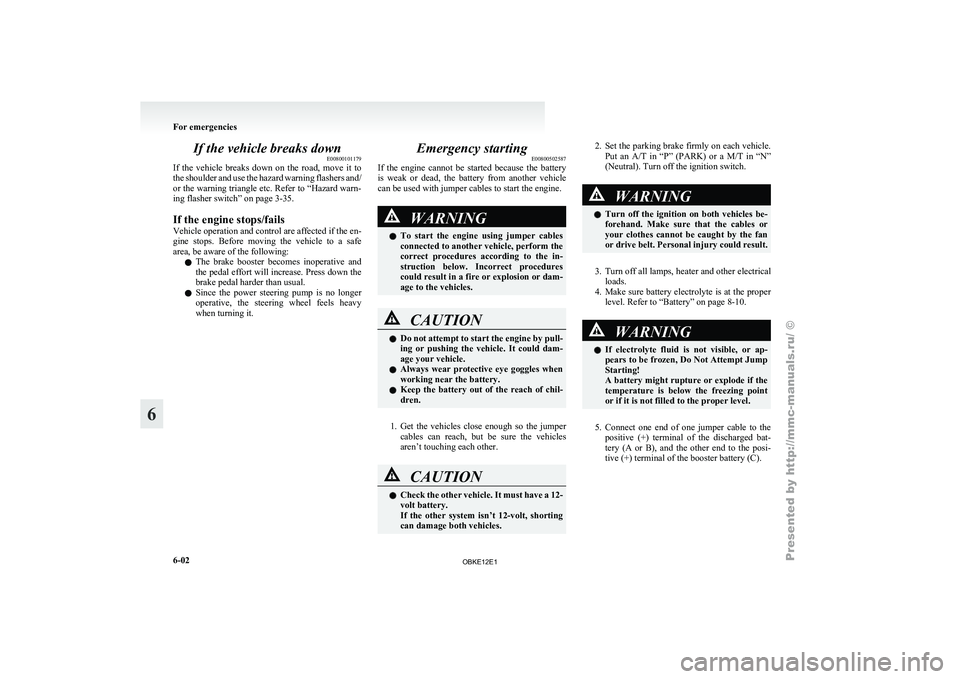
5. Connect one end of one jumper cable to the
positive (+)
terminal of the discharged bat-
tery (A or B), and the other end to the posi-
tive (+) terminal of the booster battery (C). For emergencies
6-02
6
OBKE12E1
Page 306 of 377
CAUTION
l
Do not use a scrubbing brush or other
hard tools as they may damage the plastic
part surface.
l Do not use wax containing compound (pol-
ishing powder) which may damage the
plastic part surface.
l Do not bring the plastic parts into contact
with petrol, light oil, brake fluids, engine
oils, greases, paint thinners, and sulphu-
ric acid (battery electrolyte) which may
crack, stain or discolour the plastic parts.
If they touch the plastic parts, wipe them
off with soft cloth, chamois or the like
and an aqueous solution of neutral deter-
gent then immediately rinse the affected
parts with water.
Chrome parts E00901400115
In order to prevent spots and corrosion of chrome
parts, wash with
water, dry thoroughly, and apply a
special protective coating. This should be done
more frequently in winter.
Aluminium wheels* E00901500321
1. Remove dirt using a sponge while sprinkling
water on the wheel.
2. Use
neutral detergent on any dirt that cannot
be removed easily with water.
Rinse off the neutral detergent after washing
the wheel.
3. Dry the vehicle thoroughly using a chamois leather or a soft cloth. CAUTION
l
Do not use
a brush or other hard imple-
ment on the wheels.
Doing so could scratch the wheels.
l Do not use any cleaner that contains an
abrasive substance or is acidic or alka-
line. Doing so could cause the coating on
the wheels to peel or become discoloured
or stained.
l Do not directly apply hot water using a
steam cleaner or by any other means.
l Contact with seawater and road deicer
can cause corrosion. Rinse off such sub-
stances as soon as possible.
Window glass E00901600032
The window glass can normally be cleaned using
only a sponge and water.
Glass cleaner can
be used to remove oil, grease,
dead insects, etc. After washing the glass, wipe dry
with a clean, dry, soft cloth. Never use the same
cloth to wipe the window glass as would be used to
wipe the paintwork; wax from the painted surfaces
could adhere to the glass and reduce its transparen-
cy and visibility.
NOTE
l To clean the inside of the backdoor window,
always use a soft cloth and wipe the window
glass along the demister heater element so as
not to cause damage. Wiper blades
E00901700059
Use a soft cloth and glass cleaner to remove grease,
dead insects, etc.,
from the wiper blades. Replace
the wiper blades when they no longer wipe proper-
ly. (Refer to page 8-17.)
Cleaning the sunroof* E00901800180
Clean the inside of the sunroof with a soft cloth.
Hard deposits should
be wiped away with a cloth
dipped in warm, neutral detergent solution. Wipe
away the solution with a sponge dipped in fresh wa-
ter.
NOTE
l The surface treatment on the inside of the
glass may be removed if hard cloth or organ-
ic solvent (benzine, kerosene, thinner, etc.) is
used.
Engine compartment E00902100311
Clean the engine compartment at the beginning and
end of winter.
Pay particular attention to flanges,
crevices and peripheral parts where dust containing
road chemicals and other corrosive materials might
collect.
If salt and other chemicals are used on the roads in
your area, clean the engine compartment at least ev-
ery three months.
Never spray or splash water on the electrical com-
ponents in the engine compartment, as this may
cause damage.
Do not bring the nearby parts, the plastic parts and
so on into contact with sulphuric acid (battery elec-
trolyte) which may crack, stain or discolour them. Vehicle care
7-05 7
OBKE12E1
Page 314 of 377
WARNING
l Do not open the radiator cap while the en-
gine is hot.
The coolant system is under pressure and
any hot coolant escaping could cause se-
vere burns.
Anti-freeze
The engine coolant
contains an ethylene glycol anti-
corrosion agent. The cylinder head and water pump
housing are cast aluminium alloy, and periodic
changing of the engine coolant is necessary to pre-
vent corrosion of these parts.
Use “DIA QUEEN SUPER LONG LIFE COOL-
ANT” or equivalent.
MITSUBISHI Genuine Coolant has excellent pro-
tection against corrosion and rust formation of all
metals including aluminium and can avoid block-
ages in the radiator, heater, cylinder head, engine
block, etc.
Because of the necessity of this anti-corrosion
agent, the coolant must not be replaced with plain
water even in summer. The required concentration
of anti-freeze differs depending on the expected am-
bient temperature. Ambient
temperature (mini-
mum) °C -15 -20 -25 -30 -35 -50 Anti-freeze
concentra- tion % 30 35 40 45 50 60 CAUTION
l
Do not use
alcohol or methanol anti-
freeze or any engine coolants mixed with
alcohol or methanol anti-freeze. The use
of an improper anti-freeze can cause cor-
rosion of the aluminium components.
l For effective anti-corrosion and anti-
freeze performance, keep the anti-freeze
concentration within the range of 30 to
60 %.
Concentrations exceeding 60 % will re-
sult in a reduction of both the anti-freeze
and cooling performance thus adversely
affecting the engine.
l Do not top up with water only.
During cold weather
The concentration should
be checked before the
start of cold weather and anti-freeze added to the
system if necessary to prevent damage to engine
and radiator due to freezing. Washer fluid
E01000700656
Windscreen washer fluid
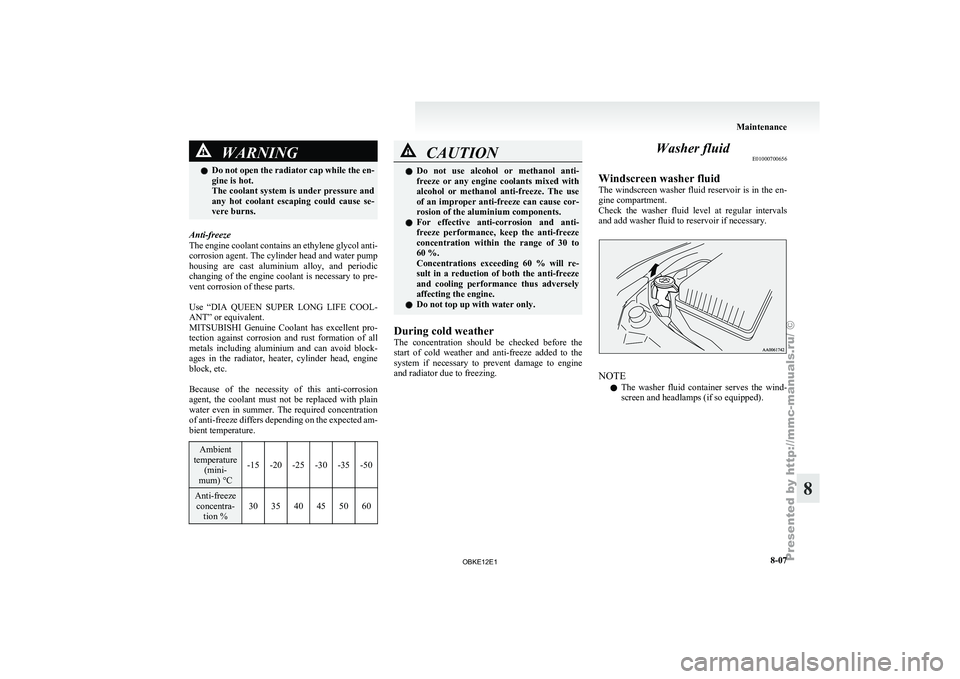
The windscreen washer
fluid reservoir is in the en-
gine compartment.
Check the washer fluid level at regular intervals
and add washer fluid to reservoir if necessary. NOTE
l The
washer fluid
container serves the wind-
screen and headlamps (if so equipped). Maintenance
8-07 8
OBKE12E1