mitsubishi multi communication system MITSUBISHI PAJERO IV 2011 Owners Manual
[x] Cancel search | Manufacturer: MITSUBISHI, Model Year: 2011, Model line: PAJERO IV, Model: MITSUBISHI PAJERO IV 2011Pages: 377, PDF Size: 29.43 MB
Page 5 of 377
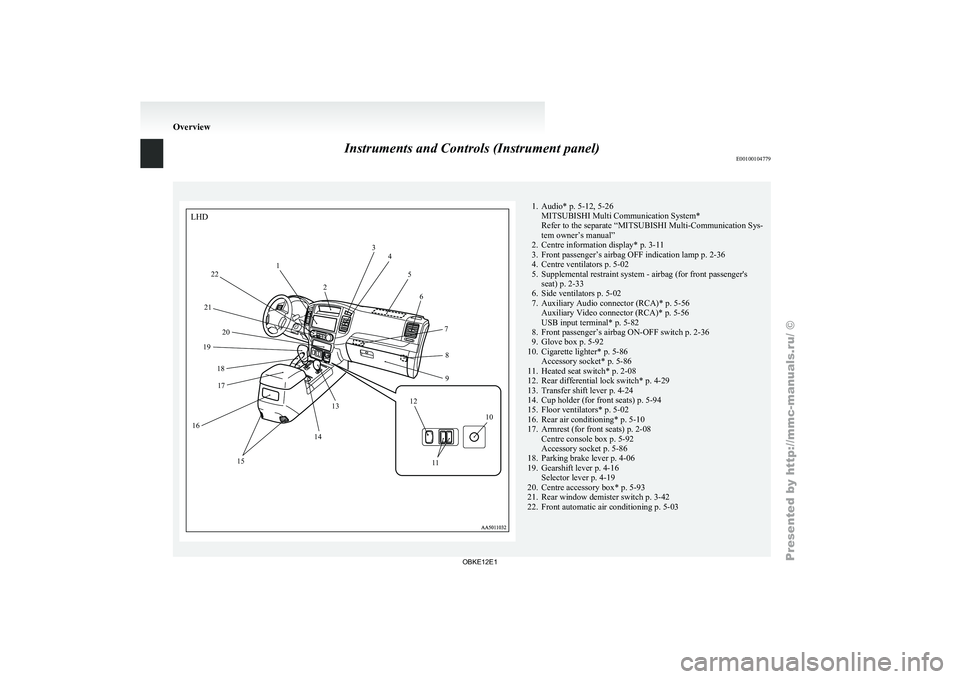
Instruments and Controls (Instrument panel)
E001001047791. Audio* p. 5-12, 5-26
MITSUBISHI Multi Communication System*
Refer to the separate “MITSUBISHI Multi-Communication Sys-
tem owner’s manual”
2. Centre information display*
p. 3-11
3. Front passenger’s airbag OFF indication lamp p. 2-36
4. Centre ventilators p. 5-02
5. Supplemental restraint system - airbag (for front passenger's seat) p. 2-33
6. Side ventilators p. 5-02
7. Auxiliary Audio connector (RCA)* p. 5-56 Auxiliary Video connector (RCA)* p. 5-56
USB input terminal* p. 5-82
8. Front passenger’s airbag ON-OFF switch p. 2-36
9. Glove box p. 5-92
10. Cigarette lighter* p. 5-86 Accessory socket* p. 5-86
11. Heated seat switch* p. 2-08
12. Rear differential lock switch* p. 4-29
13. Transfer shift lever p. 4-24
14. Cup holder (for front seats) p. 5-94
15. Floor ventilators* p. 5-02
16. Rear air conditioning* p. 5-10
17. Armrest (for front seats) p. 2-08 Centre console box p. 5-92
Accessory socket p. 5-86
18. Parking brake lever p. 4-06
19. Gearshift lever p. 4-16 Selector lever p. 4-19
20. Centre accessory box* p. 5-93
21. Rear window demister switch p. 3-42
22. Front automatic air conditioning p. 5-03 OverviewLHD
12 3
4
5
6
78
9
10
1
1
12
13
14
15
16 17
18
19
20
21 22
OBKE12E1
Page 6 of 377
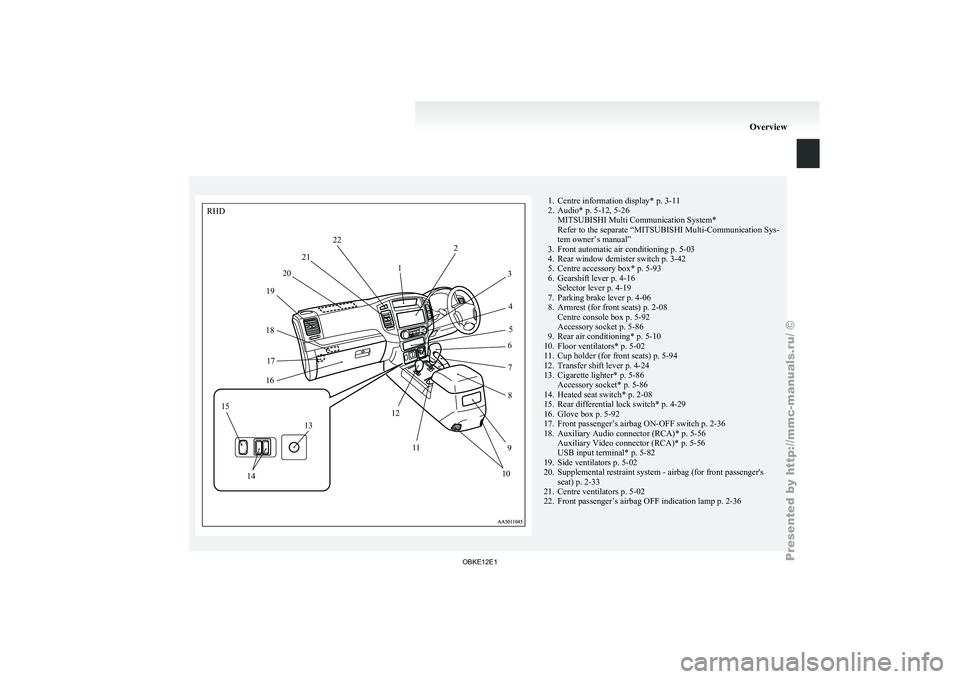
1. Centre information display* p. 3-11
2. Audio* p. 5-12, 5-26 MITSUBISHI Multi Communication System*
Refer to the separate “ MITSUBISHI Multi-Communication Sys-
tem owner’s manual”
3.
Front automatic air conditioning p. 5-03
4. Rear window demister switch p. 3-42
5. Centre accessory box* p. 5-93
6. Gearshift lever p. 4-16 Selector lever p. 4-19
7. Parking brake lever p. 4-06
8. Armrest (for front seats) p. 2-08 Centre console box p. 5-92
Accessory socket p. 5-86
9. Rear air conditioning* p. 5-10
10. Floor ventilators* p. 5-02
11. Cup holder (for front seats) p. 5-94
12. Transfer shift lever p. 4-24
13. Cigarette lighter* p. 5-86 Accessory socket* p. 5-86
14. Heated seat switch* p. 2-08
15. Rear differential lock switch* p. 4-29
16. Glove box p. 5-92
17. Front passenger’s airbag ON-OFF switch p. 2-36
18. Auxiliary Audio connector (RCA)* p. 5-56 Auxiliary Video connector (RCA)* p. 5-56
USB input terminal* p. 5-82
19. Side ventilators p. 5-02
20. Supplemental restraint system - airbag (for front passenger's seat) p. 2-33
21. Centre ventilators p. 5-02
22. Front passenger’s airbag OFF indication lamp p. 2-36 OverviewRHD
12
3
45
6
7
8
9
10
1
1
12
13
14
15
16
17
18 19
20
21 22
OBKE12E1
Page 102 of 377
NOTE
l Vehicles
equipped with
the MITSUBISHI
Multi Communication System (MMCS) also
have a clock indication, but the time shown
by the MMCS may differ from that shown
by the centre information display because dif-
ferent sources of data are used for automatic
adjustment.
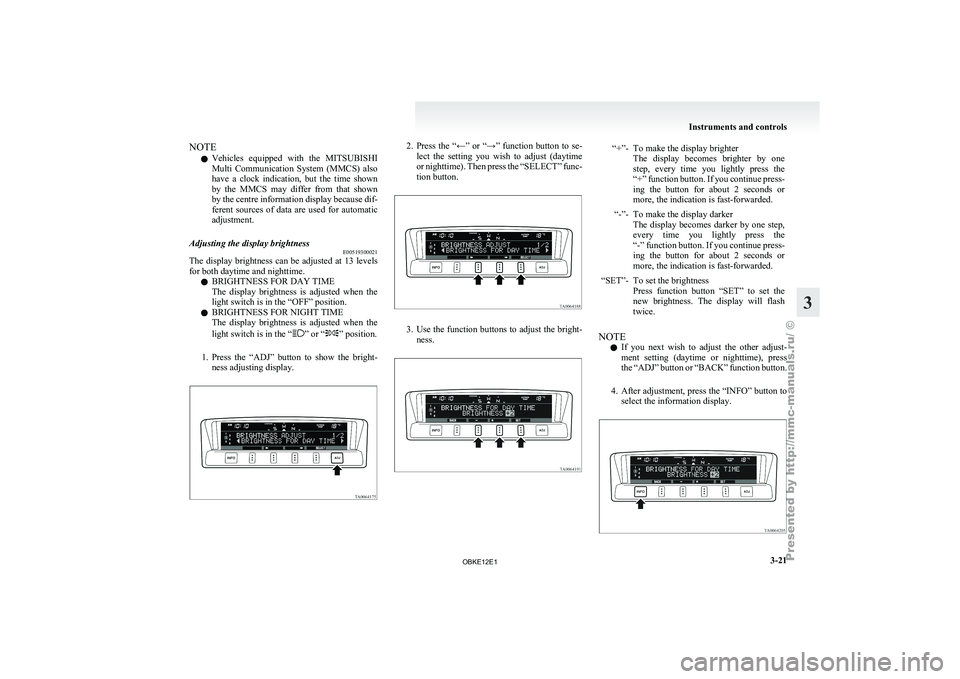
Adjusting the display brightness E00519300021
The display brightness can be adjusted at 13 levels
for both daytime and nighttime.
l BRIGHTNESS FOR DAY TIME
The
display
brightness
is adjusted when the
light switch is in the “OFF” position.
l BRIGHTNESS FOR NIGHT TIME
The display brightness is adjusted when the
light switch is in the “ ” or “ ” position.
1. Press the “ADJ”
button to show the bright-
ness adjusting display. 2. Press the “←” or “→” function button to se-
lect the
setting you wish to adjust (daytime
or nighttime). Then press the “SELECT” func-
tion button. 3. Use the function buttons to adjust the bright-
ness. “+”- To make the display brighter
The display becomes brighter by one
step, every time you lightly press the
“+” function button. If you continue press-
ing the button for about 2 seconds or
more, the indication is fast-forwarded.
“-”- To make the display darker The display becomes
darker by one step,
every time you lightly press the
“-” function button. If you continue press-
ing the button for about 2 seconds or
more, the indication is fast-forwarded.
“SET”- To set the brightness Press function button
“SET” to set the
new brightness. The display will flash
twice.
NOTE l If
you next
wish to adjust the other adjust-
ment setting (daytime or nighttime), press
the “ADJ” button or “BACK” function button.
4. After adjustment, press the “INFO” button to select the information display. Instruments and controls
3-21 3
OBKE12E1
Page 103 of 377
NOTE
l As
the display
brightness can be adjusted in
the center information display only, the bright-
ness inside the meter cannot be changed.
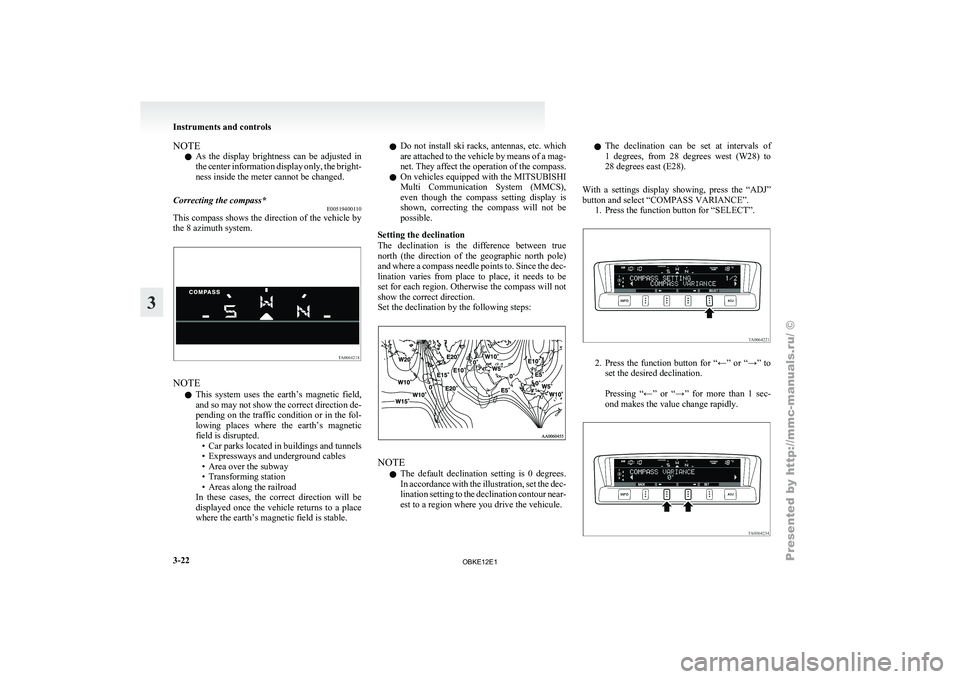
Correcting the compass* E00519400110
This compass shows the direction of the vehicle by
the 8 azimuth system.NOTE
l This
system uses
the earth’s magnetic field,
and so may not show the correct direction de-
pending on the traffic condition or in the fol-
lowing places where the earth’s magnetic
field is disrupted. • Car parks located in buildings and tunnels
• Expressways and underground cables
• Area over the subway
• Transforming station
• Areas along the railroad
In these cases, the correct direction will be
displayed once the vehicle returns to a place
where the earth’s magnetic field is stable. l
Do
not
install
ski racks, antennas, etc. which
are attached to the vehicle by means of a mag-
net. They affect the operation of the compass.
l On vehicles equipped with the MITSUBISHI
Multi Communication System (MMCS),
even though the compass setting display is
shown, correcting the compass will not be
possible.
Setting the declination
The declination is the difference between true
north (the direction of the geographic north pole)
and where a compass needle points to. Since the dec-
lination varies from place to place, it needs to be
set for each region. Otherwise the compass will not
show the correct direction.
Set the declination by the following steps: NOTE
l The
default declination
setting is 0 degrees.
In accordance with the illustration, set the dec-
lination setting to the declination contour near-
est to a region where you drive the vehicule. l
The declination
can
be set at intervals of
1 degrees, from 28 degrees west (W28) to
28 degrees east (E28).
With a settings display showing, press the “ADJ”
button and select “COMPASS VARIANCE”. 1. Press the function button for “SELECT”. 2. Press the function button for “←” or “→” to
set the desired declination.
Pressing “←”
or “→” for more than 1 sec-
ond makes the value change rapidly. Instruments and controls
3-22
3
OBKE12E1
Page 177 of 377
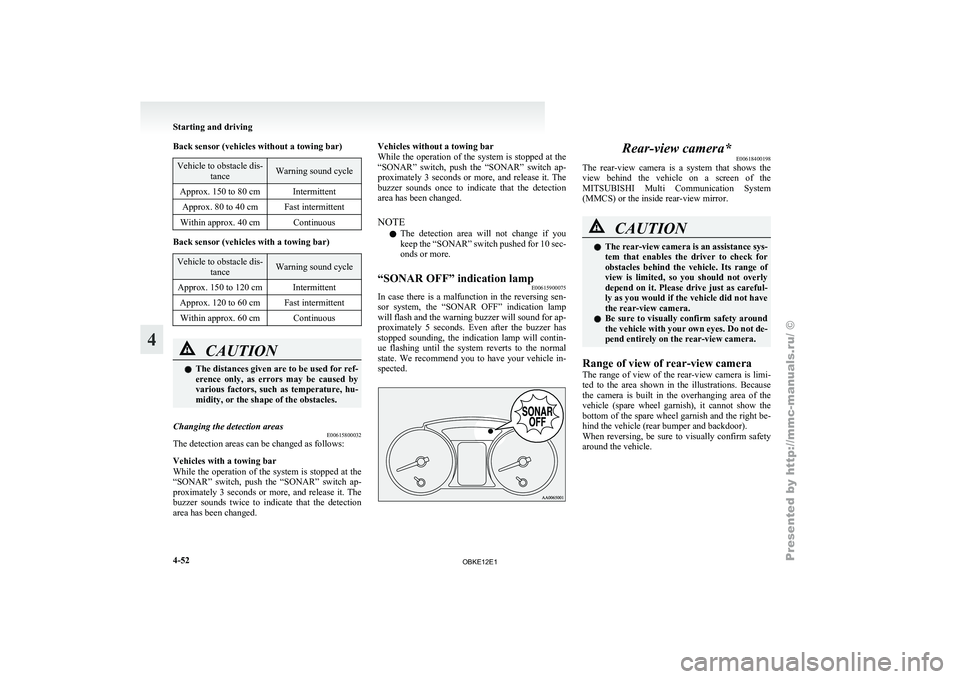
Back sensor (vehicles without a towing bar)
Vehicle to obstacle dis-
tance Warning sound cycle
Approx. 150 to 80 cm Intermittent Approx. 80 to 40 cm Fast intermittent
Within approx. 40 cm Continuous Back sensor (vehicles with a towing bar)
Vehicle to obstacle dis-
tance Warning sound cycle
Approx. 150 to 120 cm Intermittent Approx. 120 to 60 cm Fast intermittentWithin approx. 60 cm Continuous CAUTION
l
The distances given are to be used for ref-
erence
only, as
errors may be caused by
various factors, such as temperature, hu-
midity, or the shape of the obstacles.
Changing the detection areas E00615800032
The detection areas can be changed as follows:
Vehicles with a towing bar
While the operation
of the system is stopped at the
“SONAR” switch, push the “SONAR” switch ap-
proximately 3 seconds or more, and release it. The
buzzer sounds twice to indicate that the detection
area has been changed. Vehicles without a towing bar
While the
operation
of the system is stopped at the
“SONAR” switch, push the “SONAR” switch ap-
proximately 3 seconds or more, and release it. The
buzzer sounds once to indicate that the detection
area has been changed.
NOTE
l The detection area will not change if you
keep the “SONAR” switch pushed for 10 sec-
onds or more.
“SONAR OFF” indication lamp E00615900075
In case there is a malfunction in the reversing sen-
sor system, the
“SONAR OFF” indication lamp
will flash and the warning buzzer will sound for ap-
proximately 5 seconds. Even after the buzzer has
stopped sounding, the indication lamp will contin-
ue flashing until the system reverts to the normal
state. We recommend you to have your vehicle in-
spected. Rear-view camera*
E00618400198
The rear-view camera
is a system that shows the
view behind the vehicle on a screen of the
MITSUBISHI Multi Communication System
(MMCS) or the inside rear-view mirror. CAUTION
l
The rear-view
camera
is an assistance sys-
tem that enables the driver to check for
obstacles behind the vehicle. Its range of
view is limited, so you should not overly
depend on it. Please drive just as careful-
ly as you would if the vehicle did not have
the rear-view camera.
l Be sure to visually confirm safety around
the vehicle with your own eyes. Do not de-
pend entirely on the rear-view camera.
Range of view of rear-view camera
The range of
view of the rear-view camera is limi-
ted to the area shown in the illustrations. Because
the camera is built in the overhanging area of the
vehicle (spare wheel garnish), it cannot show the
bottom of the spare wheel garnish and the right be-
hind the vehicle (rear bumper and backdoor).
When reversing, be sure to visually confirm safety
around the vehicle. Starting and driving
4-52
4
OBKE12E1
Page 178 of 377
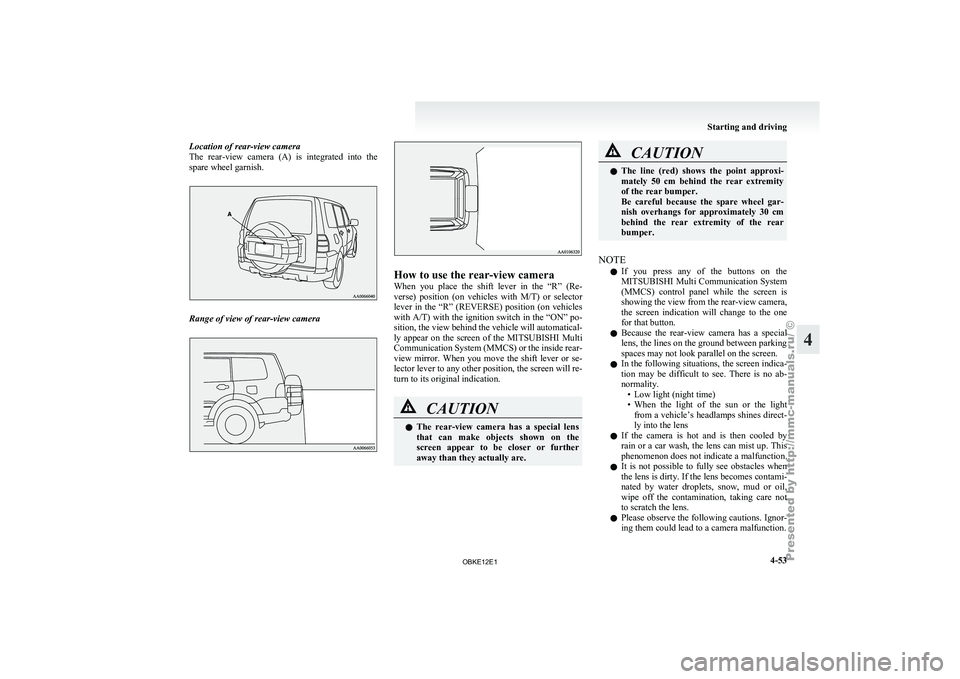
Location of rear-view camera
The rear-view camera
(A) is integrated into the
spare wheel garnish. Range of view of rear-view camera How to use the rear-view camera
When you
place
the shift lever in the “R” (Re-
verse) position (on vehicles with M/T) or selector
lever in the “R” (REVERSE) position (on vehicles
with A/T) with the ignition switch in the “ON” po-
sition, the view behind the vehicle will automatical-
ly appear on the screen of the MITSUBISHI Multi
Communication System (MMCS) or the inside rear-
view mirror. When you move the shift lever or se-
lector lever to any other position, the screen will re-
turn to its original indication. CAUTION
l
The rear-view
camera
has a special lens
that can make objects shown on the
screen appear to be closer or further
away than they actually are. CAUTION
l
The line (red)
shows the point approxi-
mately 50 cm behind the rear extremity
of the rear bumper.
Be careful because the spare wheel gar-
nish overhangs for approximately 30 cm
behind the rear extremity of the rear
bumper.
NOTE l If
you press
any of the buttons on the
MITSUBISHI Multi Communication System
(MMCS) control panel while the screen is
showing the view from the rear-view camera,
the screen indication will change to the one
for that button.
l Because the rear-view camera has a special
lens, the lines on the ground between parking
spaces may not look parallel on the screen.
l In the following situations, the screen indica-
tion may be difficult to see. There is no ab-
normality.
• Low light (night time)
• When the light of the sun or the lightfrom a vehicle’s headlamps shines direct-
ly into the lens
l If the camera is hot and is then cooled by
rain or a car wash, the lens can mist up. This
phenomenon does not indicate a malfunction.
l It is not possible to fully see obstacles when
the lens is dirty. If the lens becomes contami-
nated by water droplets, snow, mud or oil,
wipe off the contamination, taking care not
to scratch the lens.
l Please observe the following cautions. Ignor-
ing them could lead to a camera malfunction. Starting and driving
4-53 4
OBKE12E1
Page 239 of 377

NOTE
l Press
and hold
the DISP button (2) again un-
til you hear a beep, and the tag information
disappears.
l Up to 16 characters are shown in the display
at once. If the title is cut off in the middle,
press the PAGE button (6).
The next characters are displayed every time
this button is pressed.
l If no title is stored, “NO TITLE” is shown in
the display.
l Characters that cannot be displayed are sub-
stituted by “ ”. To use the external audio input
function* E00732200609
Auxiliary Video connector (RCA)
Auxiliary Audio connector (RCA) Auxiliary Audio connector (RCA)
A- Left audio input connector (white)B- Right audio input connector (red)
Auxiliary Video connector (RCA) A-
Left audio input connector (white)
B- Right audio input connector (red)
C- Video input connector (yellow)
You can listen to commercially available audio
equipment, such as a portable audio system, from
your vehicle’s speakers, by connecting the audio
equipment to the audio input connectors, which are
external input connectors (pin jacks).
NOTE l For information on using the Auxiliary Vid-
eo connector (RCA), refer to the separate own-
er’s manual for the rear-seat display or the
MITSUBISHI Multi Communication System. To activate the external audio input
mode
1. Use a commercially available audio cable to
connect the
audio equipment to the internal
audio input connector.
2. [Except for vehicles with a rear-seat display] Press the CD button (D) for more than 2 sec-
onds.
The display (E) will show “AUX” and then
the external audio input mode will be activa-
ted.
[Vehicles with a rear-seat display]
Press the CD button (D) for more than 2 sec-
onds.
The display (E) will show “REAR AUX”
and then the external audio input mode will
be activated.
When the power of the rear-seat display is
on, press the SOURCE button of the rear-
seat display to activate VIDEO mode. (For de-
tails, refer to the separate rear-seat display
owner’s manual.)
3. To deactivate the external audio input mode, press the AM/FM button (F) or the CD but-
ton (D) to switch to another mode. For pleasant driving
5-56
5
OBKE12E1