spare wheel MITSUBISHI PAJERO IV 2011 Owners Manual
[x] Cancel search | Manufacturer: MITSUBISHI, Model Year: 2011, Model line: PAJERO IV, Model: MITSUBISHI PAJERO IV 2011Pages: 377, PDF Size: 29.43 MB
Page 9 of 377
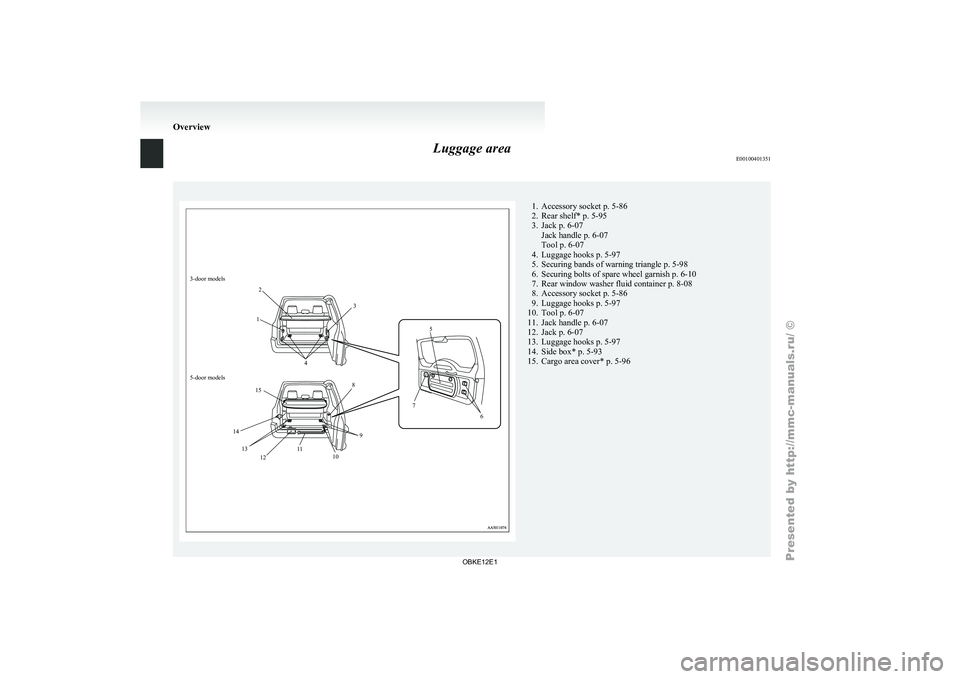
Luggage area
E001004013513-door models
12
3
4 5
6
7
8
9
10
12 11
13
14 15
5-door models 1. Accessory socket p. 5-86
2. Rear shelf* p. 5-95
3.
Jack p. 6-07
Jack handle p. 6-07
Tool p. 6-07
4.
Luggage hooks p. 5-97
5. Securing bands of warning triangle p. 5-98
6. Securing bolts of spare wheel garnish p. 6-10
7. Rear window washer fluid container p. 8-08
8. Accessory socket p. 5-86
9. Luggage hooks p. 5-97
10. Tool p. 6-07
11. Jack handle p. 6-07
12. Jack p. 6-07
13. Luggage hooks p. 5-97
14. Side box* p. 5-93
15. Cargo area cover* p. 5-96 Overview
OBKE12E1
Page 11 of 377
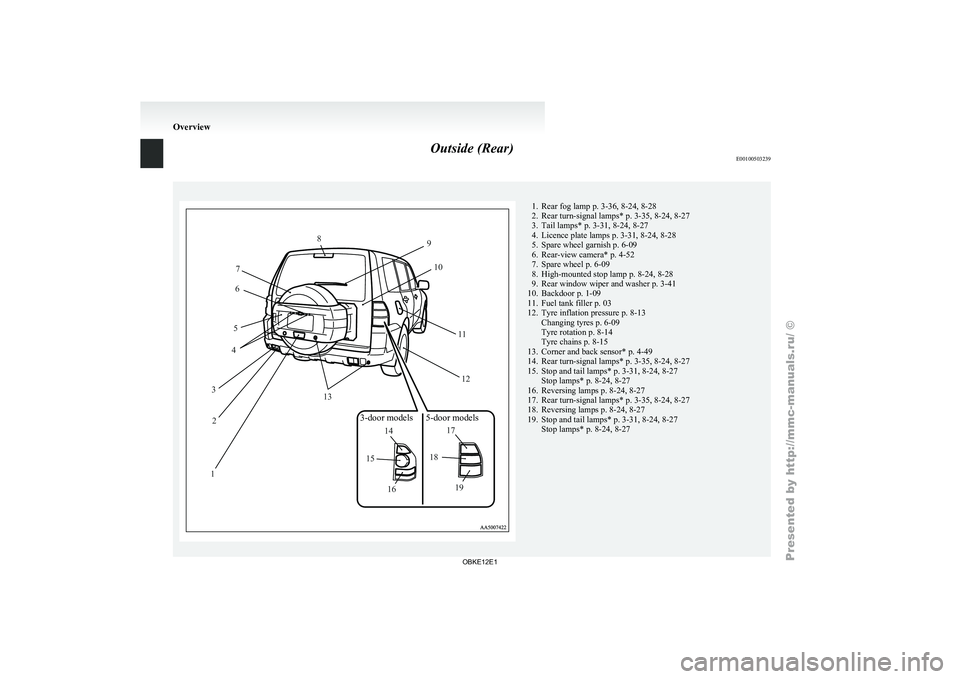
Outside (Rear)
E0010050323912
3 4
5 6
7 8
9
10
1112
13
14
15
16 17
18
19
3-door models 5-door models 1. Rear fog lamp p. 3-36, 8-24, 8-28
2. Rear turn-signal lamps*
p. 3-35, 8-24, 8-27
3.
Tail lamps* p. 3-31, 8-24, 8-27
4. Licence plate lamps p. 3-31, 8-24, 8-28
5. Spare wheel garnish p. 6-09
6. Rear-view camera* p. 4-52
7. Spare wheel p. 6-09
8. High-mounted stop lamp p. 8-24, 8-28
9. Rear window wiper and washer p. 3-41
10. Backdoor p. 1-09
11. Fuel tank filler p. 03
12. Tyre inflation pressure p. 8-13 Changing tyres p. 6-09
Tyre rotation p. 8-14
Tyre chains p. 8-15
13. Corner and back sensor* p. 4-49
14. Rear turn-signal lamps* p. 3-35, 8-24, 8-27
15. Stop and tail lamps* p. 3-31, 8-24, 8-27 Stop lamps* p. 8-24, 8-27
16. Reversing lamps p. 8-24, 8-27
17. Rear turn-signal lamps* p. 3-35, 8-24, 8-27
18. Reversing lamps p. 8-24, 8-27
19. Stop and tail lamps* p. 3-31, 8-24, 8-27 Stop lamps* p. 8-24, 8-27 Overview
OBKE12E1
Page 26 of 377
Backdoor
E00301300424WARNING
l It is
dangerous to drive with the back-
door open since carbon monoxide (CO)
gas can enter the cabin. You cannot see
or smell CO. It can cause unconscious-
ness and even death. CAUTION
l
When the
backdoor
is open, the rear-
right combination lamp is obscured by
the spare wheel.
If the backdoor is opened while the vehi-
cle is parked on the road, alert other road
users to the vehicle’s presence using a
warning triangle or other device as re-
quired by local legislation.
l When closing the backdoor, always en-
sure your or other person’s fingers can-
not be caught by the backdoor.
NOTE l The
backdoor is
equipped with an oil damper
type backdoor stopper, enabling you to hold
the backdoor at a desired position.
l While opening or closing the backdoor, you
may feel slight resistance. This is a structural
feature of the backdoor stopper that supports
the backdoor and does not indicate any abnor-
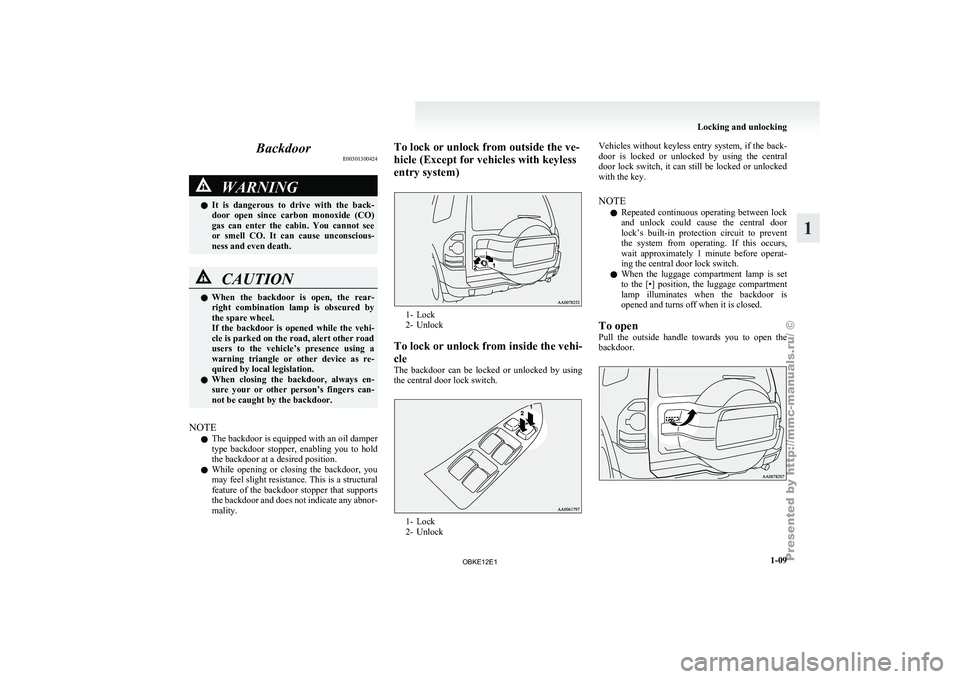
mality. To lock or unlock from outside the ve-
hicle (Except for vehicles with keyless
entry system)
1- Lock
2- Unlock
To lock
or unlock from inside the vehi-
cle
The backdoor can be locked or unlocked by using
the central door lock switch. 1- Lock
2- UnlockVehicles
without
keyless entry system, if the back-
door is locked
or unlocked by using the central
door lock switch, it can still be locked or unlocked
with the key.
NOTE
l Repeated continuous operating between lock
and unlock could cause the central door
lock’s built-in protection circuit to prevent
the system from operating. If this occurs,
wait approximately 1 minute before operat-
ing the central door lock switch.
l When the luggage compartment lamp is set
to the [•] position, the luggage compartment
lamp illuminates when the backdoor is
opened and turns off when it is closed.
To open
Pull the outside handle towards you to open the
backdoor. Locking and unlocking
1-09 1
OBKE12E1
Page 174 of 377
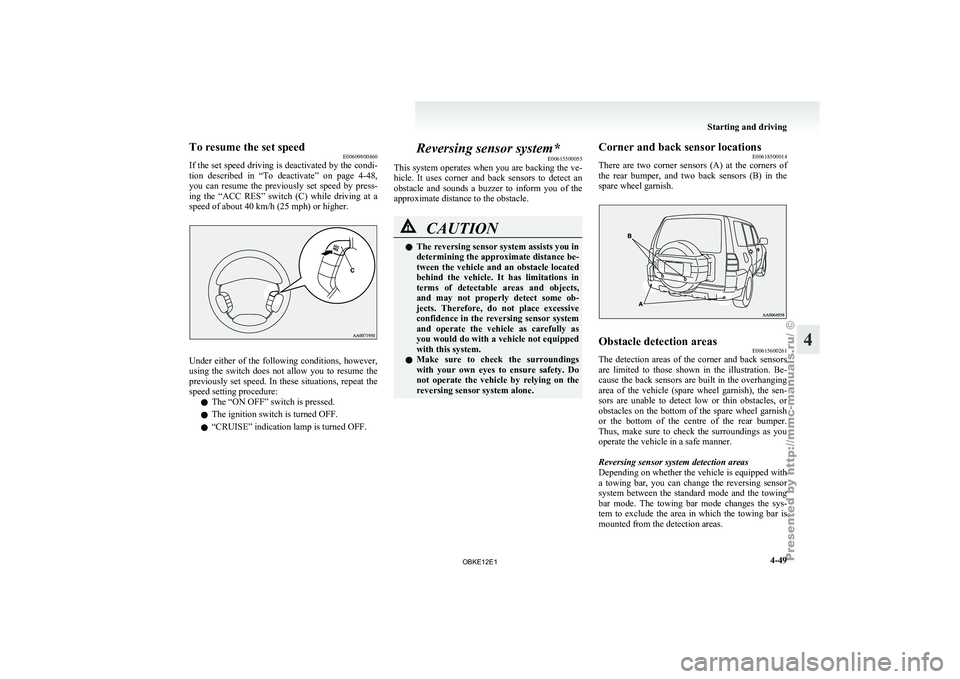
To resume the set speed
E00609800460
If the set
speed driving is deactivated by the condi-
tion described in “To deactivate” on page 4-48,
you can resume the previously set speed by press-
ing the “ACC RES” switch (C) while driving at a
speed of about 40 km/h (25 mph) or higher. Under either of the following conditions, however,
using the
switch
does not allow you to resume the
previously set speed. In these situations, repeat the
speed setting procedure:
l The “ON OFF” switch is pressed.
l The ignition switch is turned OFF.
l “CRUISE” indication lamp is turned OFF. Reversing sensor system*
E00615500055
This system operates
when you are backing the ve-
hicle. It uses corner and back sensors to detect an
obstacle and sounds a buzzer to inform you of the
approximate distance to the obstacle. CAUTION
l
The reversing sensor system assists you in
determining the approximate distance be-
tween the
vehicle
and an obstacle located
behind the vehicle. It has limitations in
terms of detectable areas and objects,
and may not properly detect some ob-
jects. Therefore, do not place excessive
confidence in the reversing sensor system
and operate the vehicle as carefully as
you would do with a vehicle not equipped
with this system.
l Make sure to check the surroundings
with your own eyes to ensure safety. Do
not operate the vehicle by relying on the
reversing sensor system alone. Corner and back sensor locations
E00618500014
There are two
corner sensors (A) at the corners of
the rear bumper, and two back sensors (B) in the
spare wheel garnish. Obstacle detection areas
E00615600261
The detection areas of the corner and back sensors
are limited to
those shown in the illustration. Be-
cause the back sensors are built in the overhanging
area of the vehicle (spare wheel garnish), the sen-
sors are unable to detect low or thin obstacles, or
obstacles on the bottom of the spare wheel garnish
or the bottom of the centre of the rear bumper.
Thus, make sure to check the surroundings as you
operate the vehicle in a safe manner.
Reversing sensor system detection areas
Depending on whether the vehicle is equipped with
a towing bar, you can change the reversing sensor
system between the standard mode and the towing
bar mode. The towing bar mode changes the sys-
tem to exclude the area in which the towing bar is
mounted from the detection areas. Starting and driving
4-49 4
OBKE12E1
Page 175 of 377
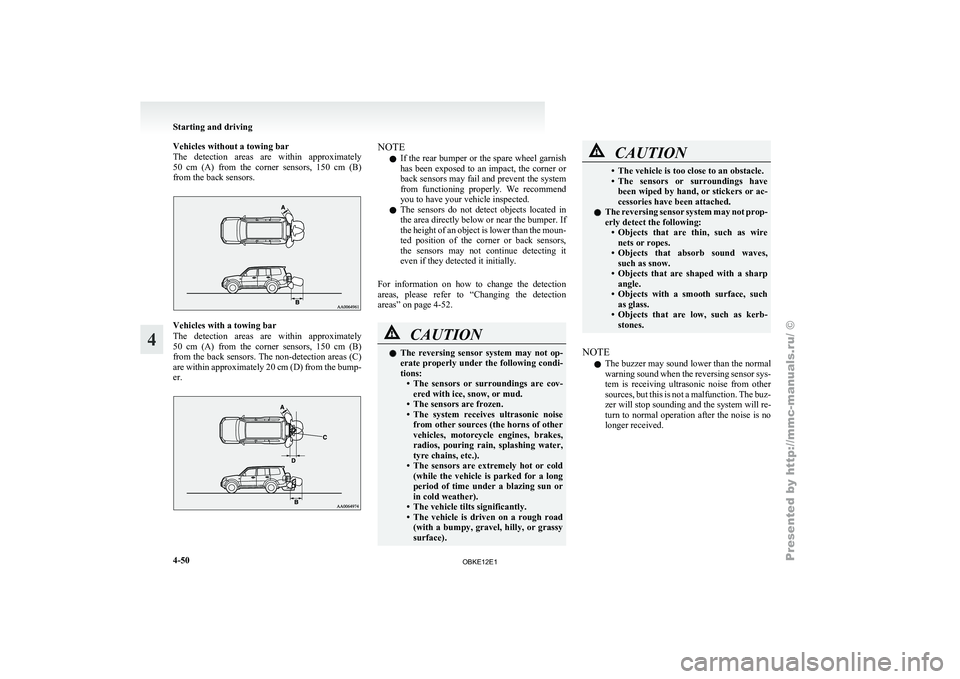
Vehicles without a towing bar
The detection areas
are within approximately
50 cm (A) from the corner sensors, 150 cm (B)
from the back sensors. Vehicles with a towing bar
The detection
areas
are within approximately
50 cm (A) from the corner sensors, 150 cm (B)
from the back sensors. The non-detection areas (C)
are within approximately 20 cm (D) from the bump-
er. NOTE
l If
the rear
bumper or the spare wheel garnish
has been exposed to an impact, the corner or
back sensors may fail and prevent the system
from functioning properly. We recommend
you to have your vehicle inspected.
l The sensors do not detect objects located in
the area directly below or near the bumper. If
the height of an object is lower than the moun-
ted position of the corner or back sensors,
the sensors may not continue detecting it
even if they detected it initially.
For information on how to change the detection
areas, please refer to “Changing the detection
areas” on page 4-52. CAUTION
l
The reversing
sensor
system may not op-
erate properly under the following condi-
tions: • The sensors or surroundings are cov-ered with ice, snow, or mud.
• The sensors are frozen.
• The system receives ultrasonic noise from other sources (the horns of other
vehicles, motorcycle engines, brakes,
radios, pouring rain, splashing water,
tyre chains, etc.).
• The sensors are extremely hot or cold (while the vehicle is parked for a long
period of time under a blazing sun or
in cold weather).
• The vehicle tilts significantly.
• The vehicle is driven on a rough road (with a bumpy, gravel, hilly, or grassy
surface). CAUTION
• The vehicle is too close to an obstacle.
• The sensors
or
surroundings have
been wiped by hand, or stickers or ac-
cessories have been attached.
l The reversing sensor system may not prop-
erly detect the following:
• Objects that are thin, such as wirenets or ropes.
• Objects that absorb sound waves, such as snow.
• Objects that are shaped with a sharp angle.
• Objects with a smooth surface, such as glass.
• Objects that are low, such as kerb- stones.
NOTE l The
buzzer may
sound lower than the normal
warning sound when the reversing sensor sys-
tem is receiving ultrasonic noise from other
sources, but this is not a malfunction. The buz-
zer will stop sounding and the system will re-
turn to normal operation after the noise is no
longer received. Starting and driving
4-50
4
OBKE12E1
Page 177 of 377
Back sensor (vehicles without a towing bar)
Vehicle to obstacle dis-
tance Warning sound cycle
Approx. 150 to 80 cm Intermittent Approx. 80 to 40 cm Fast intermittent
Within approx. 40 cm Continuous Back sensor (vehicles with a towing bar)
Vehicle to obstacle dis-
tance Warning sound cycle
Approx. 150 to 120 cm Intermittent Approx. 120 to 60 cm Fast intermittentWithin approx. 60 cm Continuous CAUTION
l
The distances given are to be used for ref-
erence
only, as
errors may be caused by
various factors, such as temperature, hu-
midity, or the shape of the obstacles.
Changing the detection areas E00615800032
The detection areas can be changed as follows:
Vehicles with a towing bar
While the operation
of the system is stopped at the
“SONAR” switch, push the “SONAR” switch ap-
proximately 3 seconds or more, and release it. The
buzzer sounds twice to indicate that the detection
area has been changed. Vehicles without a towing bar
While the
operation
of the system is stopped at the
“SONAR” switch, push the “SONAR” switch ap-
proximately 3 seconds or more, and release it. The
buzzer sounds once to indicate that the detection
area has been changed.
NOTE
l The detection area will not change if you
keep the “SONAR” switch pushed for 10 sec-
onds or more.
“SONAR OFF” indication lamp E00615900075
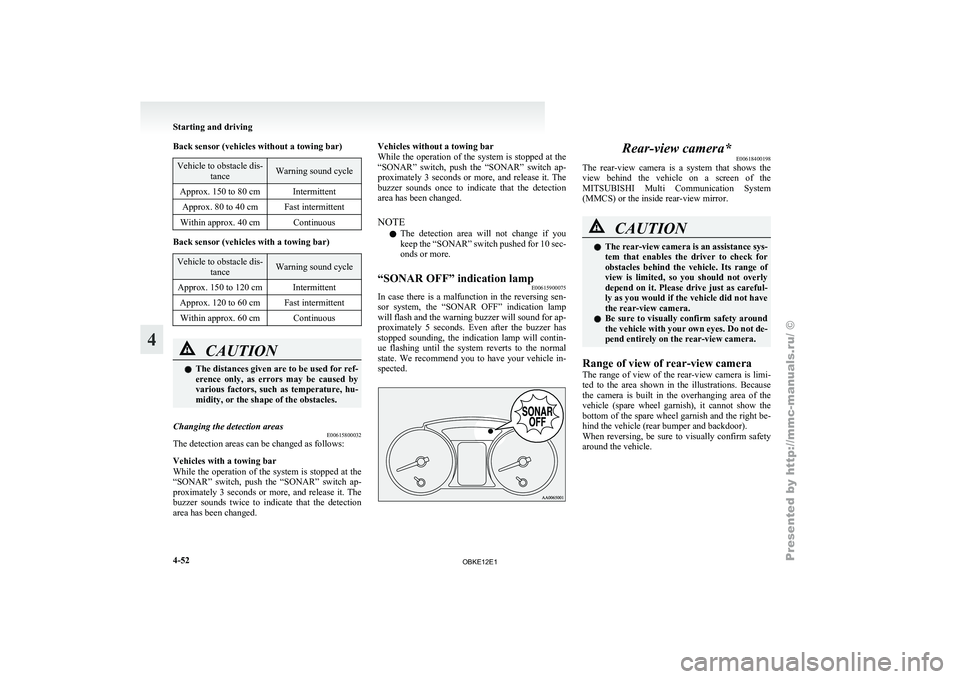
In case there is a malfunction in the reversing sen-
sor system, the
“SONAR OFF” indication lamp
will flash and the warning buzzer will sound for ap-
proximately 5 seconds. Even after the buzzer has
stopped sounding, the indication lamp will contin-
ue flashing until the system reverts to the normal
state. We recommend you to have your vehicle in-
spected. Rear-view camera*
E00618400198
The rear-view camera
is a system that shows the
view behind the vehicle on a screen of the
MITSUBISHI Multi Communication System
(MMCS) or the inside rear-view mirror. CAUTION
l
The rear-view
camera
is an assistance sys-
tem that enables the driver to check for
obstacles behind the vehicle. Its range of
view is limited, so you should not overly
depend on it. Please drive just as careful-
ly as you would if the vehicle did not have
the rear-view camera.
l Be sure to visually confirm safety around
the vehicle with your own eyes. Do not de-
pend entirely on the rear-view camera.
Range of view of rear-view camera
The range of
view of the rear-view camera is limi-
ted to the area shown in the illustrations. Because
the camera is built in the overhanging area of the
vehicle (spare wheel garnish), it cannot show the
bottom of the spare wheel garnish and the right be-
hind the vehicle (rear bumper and backdoor).
When reversing, be sure to visually confirm safety
around the vehicle. Starting and driving
4-52
4
OBKE12E1
Page 178 of 377
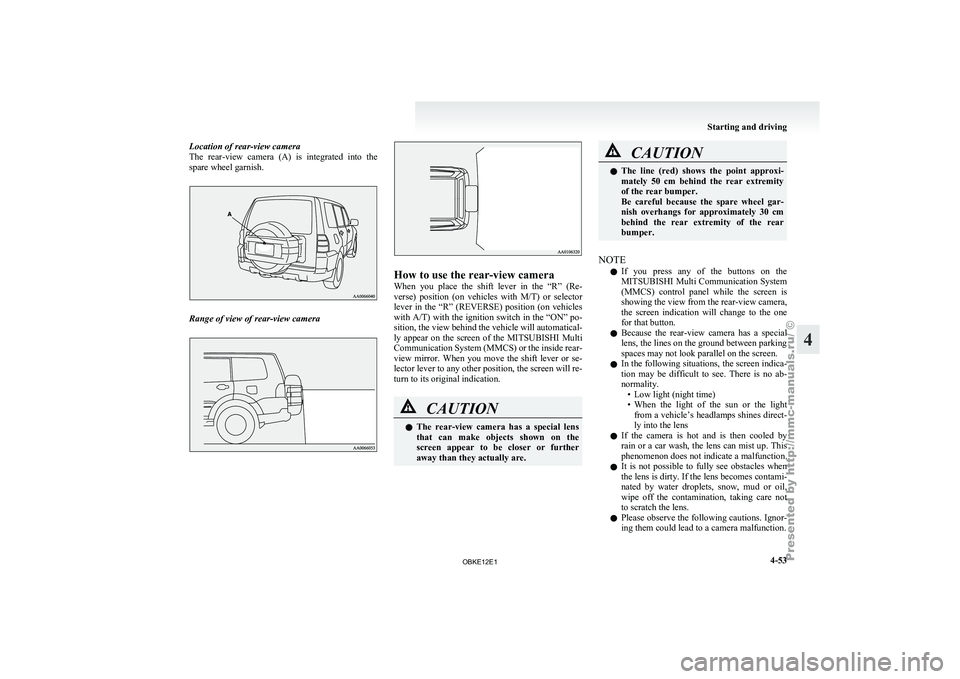
Location of rear-view camera
The rear-view camera
(A) is integrated into the
spare wheel garnish. Range of view of rear-view camera How to use the rear-view camera
When you
place
the shift lever in the “R” (Re-
verse) position (on vehicles with M/T) or selector
lever in the “R” (REVERSE) position (on vehicles
with A/T) with the ignition switch in the “ON” po-
sition, the view behind the vehicle will automatical-
ly appear on the screen of the MITSUBISHI Multi
Communication System (MMCS) or the inside rear-
view mirror. When you move the shift lever or se-
lector lever to any other position, the screen will re-
turn to its original indication. CAUTION
l
The rear-view
camera
has a special lens
that can make objects shown on the
screen appear to be closer or further
away than they actually are. CAUTION
l
The line (red)
shows the point approxi-
mately 50 cm behind the rear extremity
of the rear bumper.
Be careful because the spare wheel gar-
nish overhangs for approximately 30 cm
behind the rear extremity of the rear
bumper.
NOTE l If
you press
any of the buttons on the
MITSUBISHI Multi Communication System
(MMCS) control panel while the screen is
showing the view from the rear-view camera,
the screen indication will change to the one
for that button.
l Because the rear-view camera has a special
lens, the lines on the ground between parking
spaces may not look parallel on the screen.
l In the following situations, the screen indica-
tion may be difficult to see. There is no ab-
normality.
• Low light (night time)
• When the light of the sun or the lightfrom a vehicle’s headlamps shines direct-
ly into the lens
l If the camera is hot and is then cooled by
rain or a car wash, the lens can mist up. This
phenomenon does not indicate a malfunction.
l It is not possible to fully see obstacles when
the lens is dirty. If the lens becomes contami-
nated by water droplets, snow, mud or oil,
wipe off the contamination, taking care not
to scratch the lens.
l Please observe the following cautions. Ignor-
ing them could lead to a camera malfunction. Starting and driving
4-53 4
OBKE12E1
Page 290 of 377

To use the jack handle
E00802400023
1. While pushing the
snap pin (A), remove the
inside handle (B). 2. With the snap pin (C) pushed, insert the in-
side handle until it is locked. How to change a tyre
E00801201601
Before changing a
tyre, first stop your vehicle in a
safe, flat location. 1. Park the vehicle on level and stable ground.
2. Set the parking brake firmly.
3. On vehicles with M/T, turn the ignitionswitch to the “LOCK” position, move the
gearshift lever to the “R” (Reverse) position.
On vehicles with A/T, move the selector lev-
er to the “P” (PARK) position, turn the igni-
tion key to the “LOCK” position.
4. Turn on the hazard warning flashers and set up a warning triangle, flashing signal lamp,
etc., at an adequate distance from the vehi-
cle, and have all your passengers leave the ve-
hicle.
5. To prevent the vehicle from rolling when it is raised on the jack, place chocks or blocks
(A) at the tyre that is diagonally opposite
from the tyre (B) you are changing. WARNING
l Be sure to
apply chocks or blocks to the
correct tyre when jacking up the vehicle.
If the vehicle moves while jacked up, the
jack could slip out of position, leading to
an accident.
NOTE l The
chocks shown
in the illustration do not
come with your vehicle. It is recommended
that you keep one in the vehicle for use if nee-
ded.
l If chocks are not available, use stones or any
other objects that are large enough to hold
the wheel in position.
6. Get the spare wheel, jack, jack handle and wheel nut wrench ready. Refer to “Tool, jack
and jack handle” on page 6-07.
Spare wheel information E00803600266
Check the air pressure of the spare tyre frequently
and make sure
it is ready for emergency use at any
time.
Maintaining the spare wheel at the highest speci-
fied air pressure will ensure that it can always be
used under any conditions (city/high-speed driving,
varying load weight, etc.). For emergencies
6-09 6
OBKE12E1
Page 291 of 377
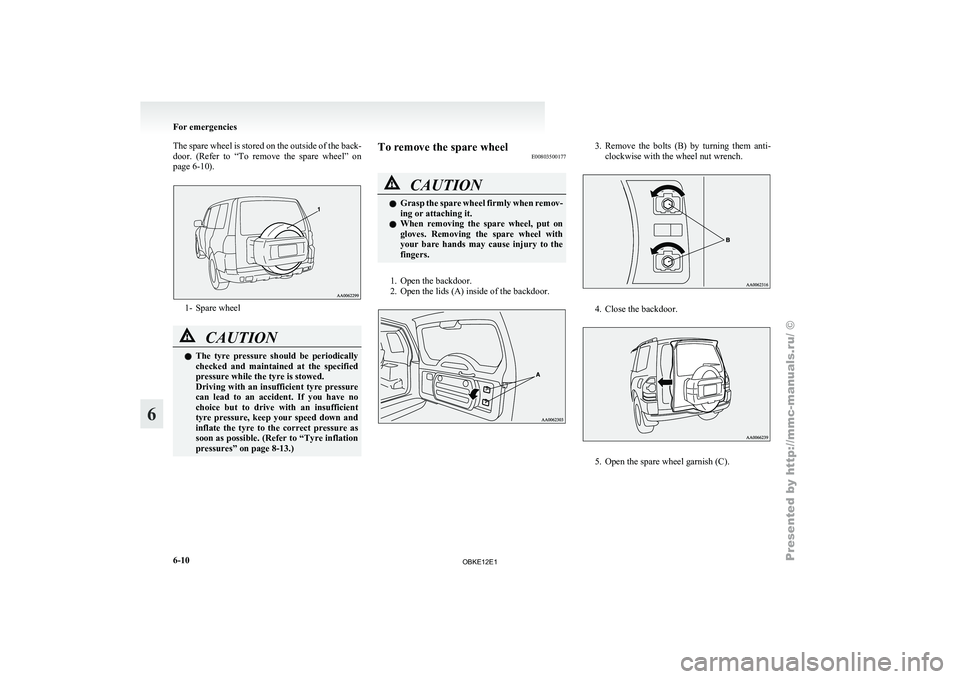
The spare wheel is stored on the outside of the back-
door. (Refer to
“To remove the spare wheel” on
page 6-10). 1- Spare wheel
CAUTION
l
The tyre pressure
should be periodically
checked and maintained at the specified
pressure while the tyre is stowed.
Driving with an insufficient tyre pressure
can lead to an accident. If you have no
choice but to drive with an insufficient
tyre pressure, keep your speed down and
inflate the tyre to the correct pressure as
soon as possible. (Refer to “Tyre inflation
pressures” on page 8-13.) To remove the spare wheel
E00803500177 CAUTION
l
Grasp the
spare
wheel firmly when remov-
ing or attaching it.
l When removing the spare wheel, put on
gloves. Removing the spare wheel with
your bare hands may cause injury to the
fingers.
1. Open the backdoor.
2. Open the lids (A) inside of the backdoor. 3. Remove the bolts (B) by turning them anti-
clockwise with the wheel nut wrench. 4. Close the backdoor.
5. Open the spare wheel garnish (C).For emergencies
6-10
6
OBKE12E1
Page 292 of 377
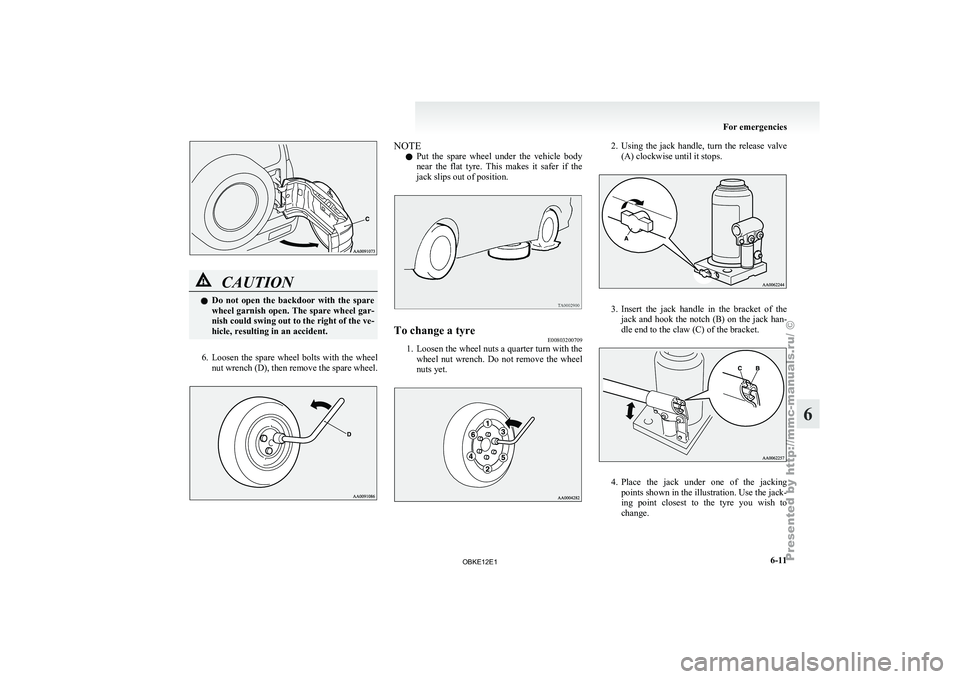
CAUTION
l
Do not
open the backdoor with the spare
wheel garnish open. The spare wheel gar-
nish could swing out to the right of the ve-
hicle, resulting in an accident.
6. Loosen the spare wheel bolts with the wheel
nut wrench
(D), then remove the spare wheel. NOTE
l Put
the spare
wheel under the vehicle body
near the flat tyre. This makes it safer if the
jack slips out of position. To change a tyre
E00803200709
1. Loosen the wheel nuts a quarter turn with the
wheel nut
wrench. Do not remove the wheel
nuts yet. 2. Using the jack handle, turn the release valve
(A) clockwise until it stops. 3. Insert the jack handle in the bracket of the
jack and
hook the notch (B) on the jack han-
dle end to the claw (C) of the bracket. 4. Place
the jack under one of the jacking
points shown in the illustration. Use the jack-
ing point
closest to the tyre you wish to
change. For emergencies
6-11 6
OBKE12E1