stereo MITSUBISHI PAJERO IV 2011 Owners Manual
[x] Cancel search | Manufacturer: MITSUBISHI, Model Year: 2011, Model line: PAJERO IV, Model: MITSUBISHI PAJERO IV 2011Pages: 377, PDF Size: 29.43 MB
Page 198 of 377
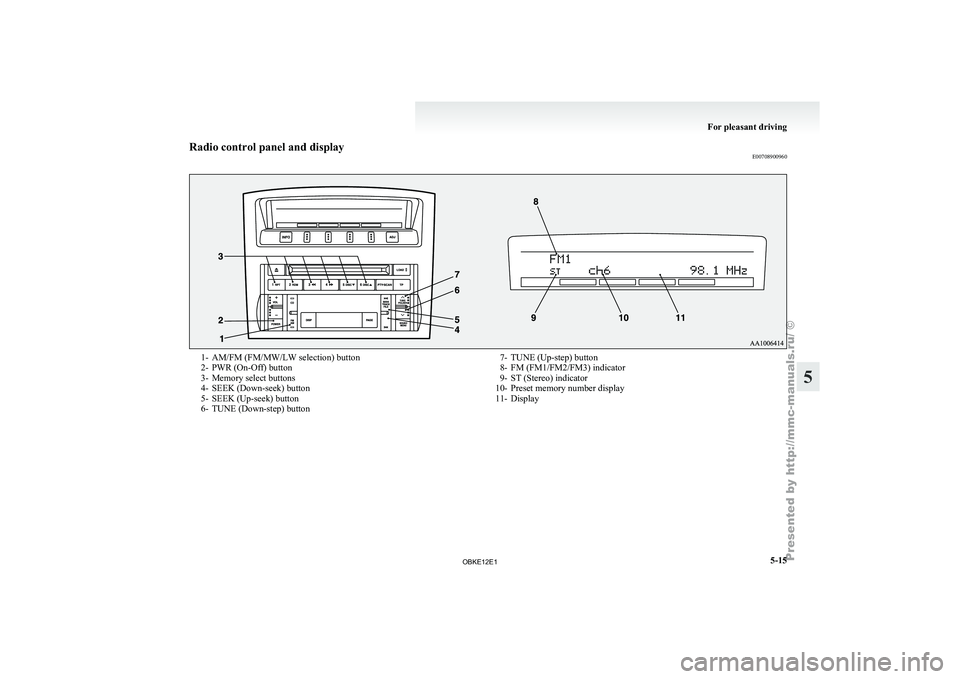
Radio control panel and display
E007089009601- AM/FM (FM/MW/LW selection) button
2- PWR (On-Off) button
3-
Memory select buttons
4-
SEEK (Down-seek) button
5- SEEK (Up-seek) button
6- TUNE (Down-step) button 7- TUNE (Up-step) button
8- FM (FM1/FM2/FM3) indicator
9- ST (Stereo) indicator
10-
Preset memory number display
11- Display For pleasant driving
5-15 5
OBKE12E1
Page 211 of 377

SOUND FIELD (Sound field type select)
To select the desired sound field.
Sound field
type Description
NORMAL Optimized for accurate vocal
and instrument reality.
STUDIO Places the listener in the control
room of
a
recording studio with
a crisp and accurate forward
placed sound stage.
CLUB Places the listener in the music
at a dance
or jazz club with
sound coming from all directions.
CONCERT Utilizing sound reflections in the
Digital Signal Processor,
CON-
CERT gives the impression that
the listener is at concert hall per-
formance. BASS (Bass tone control)
To select the desired bass level.
MID (Midrange tone control)
To select the desired midrange level.
TREBLE (Treble tone control)
To select the desired treble level.
FADER (Front/Rear balance control)
To balance
the
volume from the F (front) and the R
(rear) speakers.
BALANCE (Left/Right balance control)
To balance the volume from the L (left) and the R
(right) speakers. SURROUND CONTROL ADJUSTMENT MODE
(for premium sound system)
1. Press the MENU
button (4). The display will
show “AUDIO CONTROL/SURROUND
CONTROL”.
2. Press the sound adjust button (5) to align the cursor with “SURROUND CONTROL”.
Then press the MENU button (4) to select
the surround control adjustment mode.
Cursor 3. Press the MENU button (4) repeatedly to se-
lect your
desired sound customization setting
to change. The order is: SURROUND CON-
TROL → SURROUND MODE → SOUND
TYPE → LISTENING POSITION → Sound
customization mode off.
The status will be displayed in the display (6).
4. Press the sound adjust button (5) to adjust the sound customization features.
SURROUND MODE (Surround mode select) (for
premium sound system)
To select the desired surround mode. SURROUND MODE Description
5.1ch DOLBY DIGI- TAL · DTS Creates a realistic three-
dimensional sound field
using
5.1ch technology.
Gives clear surround-
sound with rich pres-
ence from digital sound
sources.
DOLBY PRO LOGIC II Creates a three-dimen-
sional listening environ-
ment from CDs and oth-
er
typical sound sour-
ces. Gives surround-
sound with rich pres-
ence.
2CH STEREO SOUND Gives high-quality ster-
eo sound using
a 12-
speaker system. NOTE
l 5.1ch
DOLBY DIGITAL
· DTS can be selec-
ted only when DVDs recorded with Dolby
Digital or DTS 5.1- channel surround are
played in the rear-seat display. With such
DVDs, DOLBY PRO LOGIC II cannot be se-
lected.
l Dolby Digital systems are manufactured un-
der licence from Dolby Laboratories Licens-
ing Corporation. “Dolby” and the double-D
symbol are trademarks of Dolby Laborato-
ries Licensing Corporation. DTS systems are
manufactured under licence from Digital The-
ater Systems. “DTS” and “Digital Surround”
are trademarks of Digital Theater Systems. For pleasant driving
5-28
5
OBKE12E1
Page 212 of 377
SOUND TYPE (Sound type select) (for premium
sound system)
To select the desired sound type.
SOUND TYPE Description
CINEMA The optimal setting for watching
a movie
MUSIC The optimal setting for listening
to music LISTENING POSITION (Listening position se-
lect) (for premium sound system)
To select the desired listening position.
LISTENING
POSITION Description
1 st
SEATS The optimal setting for enjoying
surround sound
in
the first-row
seats
2 nd
SEATS The optimal setting for enjoying
surround sound in
the second-
row seats
ALL SEATS The optimal setting for enjoying
surround sound in all seatsNOTE
l Depending
on the
selected tone adjustment
mode, certain other adjustment modes cannot
be used. Adjustments are not possible as fol-
lows: • When the surround mode menu setting is“STEREO”:
→ The sound type menu and listening po-
sition menu cannot be used. • When
the surround mode menu setting is
“5.1ch DOLBY
DIGITAL · DTS” or
“DOLBY PRO LOGIC II”:
→ The sound field menu cannot be used.
• When the sound type menu setting is “CINEMA”:
→ The equalizer type menu and sound
field menu cannot be used.
Speed Compensated Volume function E00726800280
Speed Compensated Volume function is a feature
that automatically adjusts
the VOL, BASS, MID,
and TREBLE settings in accordance with the vehi-
cle speed. It is possible to turn this function ON-
OFF using the following method: 1. If you are presently pushing the MENU but-ton (4) and making a tone adjustment, finish
making the tone adjustment.
2. Push the MENU button (4) for at least about 2 seconds. The system will switch to MENU
mode. Press the MENU button (4) repeatedly
until “SCV SETTING” appears on the dis-
play. Refer to “Function setup mode” on
page 5-20.
3. Press the sound adjust button (5) to turn the “SCV SETTING” ON and OFF.
4. To exit the menu mode, press the MENU but- ton for 2 seconds or longer.
NOTE l The MENU mode will automatically shut off
when either the radio or CD is selected or the
user does not operate any of the switches for
10 seconds. For pleasant driving
5-29 5
OBKE12E1
Page 213 of 377
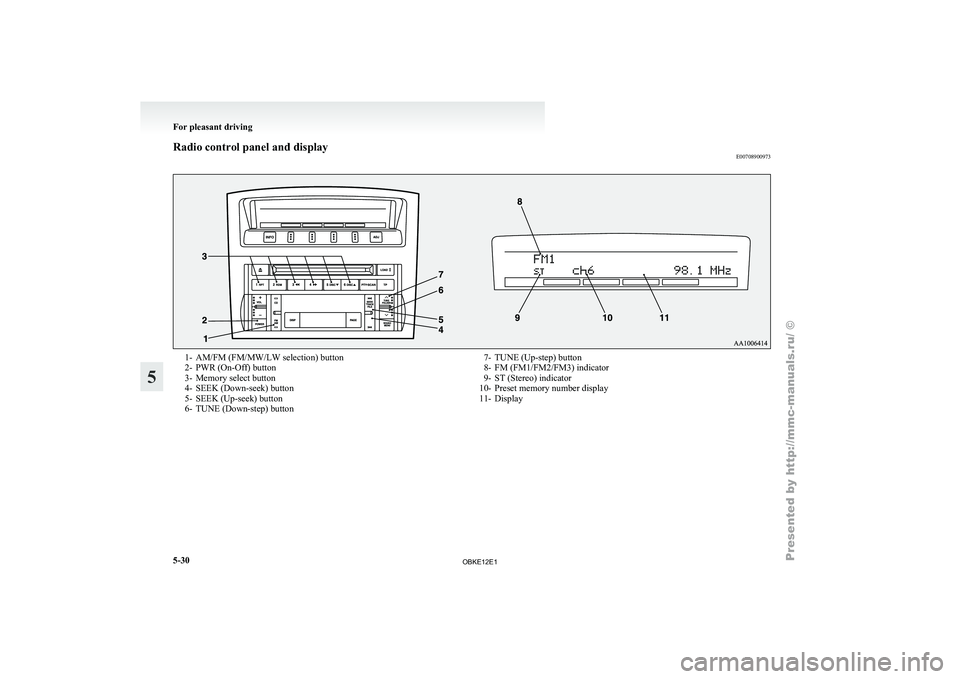
Radio control panel and display
E007089009731- AM/FM (FM/MW/LW selection) button
2- PWR (On-Off) button
3-
Memory select button
4-
SEEK (Down-seek) button
5- SEEK (Up-seek) button
6- TUNE (Down-step) button 7- TUNE (Up-step) button
8- FM (FM1/FM2/FM3) indicator
9- ST (Stereo) indicator
10-
Preset memory number display
11- Display For pleasant driving
5-30
5
OBKE12E1