tow MITSUBISHI PAJERO IV 2011 Owners Manual
[x] Cancel search | Manufacturer: MITSUBISHI, Model Year: 2011, Model line: PAJERO IV, Model: MITSUBISHI PAJERO IV 2011Pages: 377, PDF Size: 29.43 MB
Page 23 of 377
10. Check the keyless entry system to see that it
works.
NOTE l You may
purchase a replacement battery at
an electric appliance store.
l A MITSUBISHI MOTORS Authorized Serv-
ice Point can replace the battery for you if
you prefer. CAUTION
l
When the
remote
control switch case is
opened, be careful to keep water, dust,
etc. out. Also, do not touch the internal
components. Doors
E00300401177 CAUTION
l
Make sure
the
doors are closed: driving
with doors not completely closed is dan-
gerous.
l Never leave children in the vehicle unat-
tended.
l Be careful not to lock the doors while the
key is inside the vehicle.
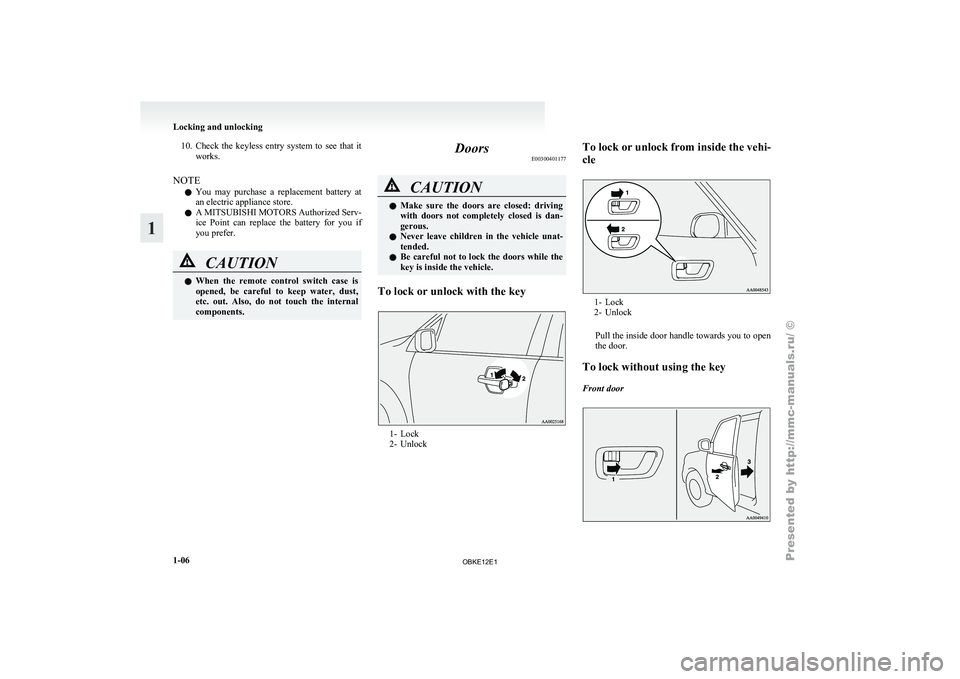
To lock or unlock with the key 1- Lock
2- UnlockTo
lock
or unlock from inside the vehi-
cle 1- Lock
2- Unlock
Pull the
inside door handle towards you to open
the door.
To lock without using the key
Front door Locking and unlocking
1-06
1
OBKE12E1
Page 26 of 377
Backdoor
E00301300424WARNING
l It is
dangerous to drive with the back-
door open since carbon monoxide (CO)
gas can enter the cabin. You cannot see
or smell CO. It can cause unconscious-
ness and even death. CAUTION
l
When the
backdoor
is open, the rear-
right combination lamp is obscured by
the spare wheel.
If the backdoor is opened while the vehi-
cle is parked on the road, alert other road
users to the vehicle’s presence using a
warning triangle or other device as re-
quired by local legislation.
l When closing the backdoor, always en-
sure your or other person’s fingers can-
not be caught by the backdoor.
NOTE l The
backdoor is
equipped with an oil damper
type backdoor stopper, enabling you to hold
the backdoor at a desired position.
l While opening or closing the backdoor, you
may feel slight resistance. This is a structural
feature of the backdoor stopper that supports
the backdoor and does not indicate any abnor-
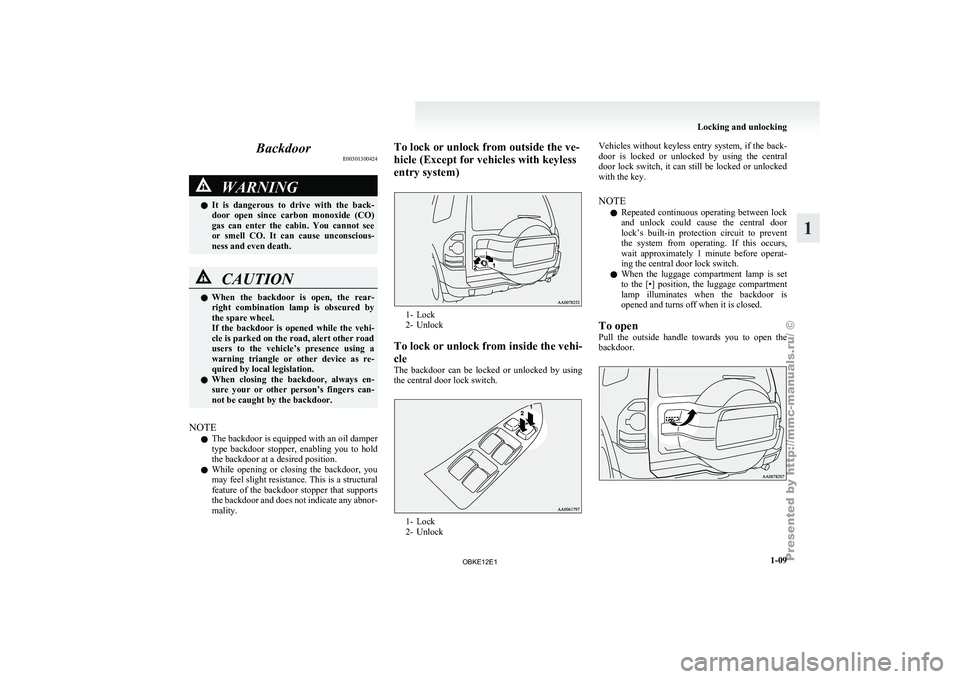
mality. To lock or unlock from outside the ve-
hicle (Except for vehicles with keyless
entry system)
1- Lock
2- Unlock
To lock
or unlock from inside the vehi-
cle
The backdoor can be locked or unlocked by using
the central door lock switch. 1- Lock
2- UnlockVehicles
without
keyless entry system, if the back-
door is locked
or unlocked by using the central
door lock switch, it can still be locked or unlocked
with the key.
NOTE
l Repeated continuous operating between lock
and unlock could cause the central door
lock’s built-in protection circuit to prevent
the system from operating. If this occurs,
wait approximately 1 minute before operat-
ing the central door lock switch.
l When the luggage compartment lamp is set
to the [•] position, the luggage compartment
lamp illuminates when the backdoor is
opened and turns off when it is closed.
To open
Pull the outside handle towards you to open the
backdoor. Locking and unlocking
1-09 1
OBKE12E1
Page 28 of 377
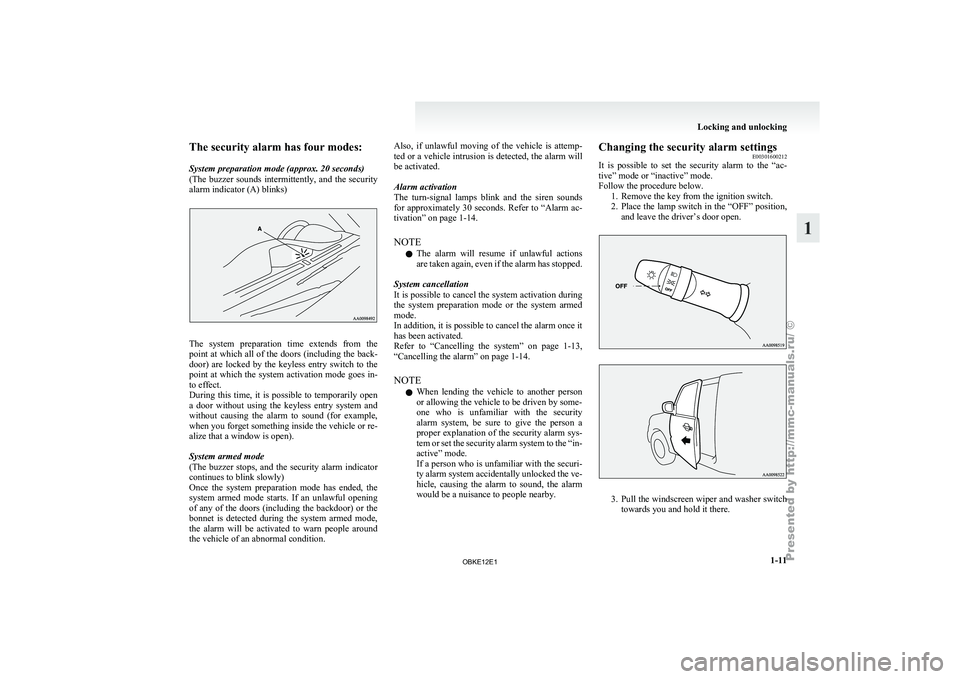
The security alarm has four modes:
System preparation mode (approx. 20 seconds)
(The buzzer
sounds
intermittently, and the security
alarm indicator (A) blinks) The system preparation time extends from the
point at
which
all of the doors (including the back-
door) are locked by the keyless entry switch to the
point at which the system activation mode goes in-
to effect.
During this time, it is possible to temporarily open
a door without using the keyless entry system and
without causing the alarm to sound (for example,
when you forget something inside the vehicle or re-
alize that a window is open).
System armed mode
(The buzzer stops, and the security alarm indicator
continues to blink slowly)
Once the system preparation mode has ended, the
system armed mode starts. If an unlawful opening
of any of the doors (including the backdoor) or the
bonnet is detected during the system armed mode,
the alarm will be activated to warn people around
the vehicle of an abnormal condition. Also, if unlawful moving of the vehicle is attemp-
ted or
a
vehicle intrusion is detected, the alarm will
be activated.
Alarm activation
The turn-signal lamps blink and the siren sounds
for approximately 30 seconds. Refer to “Alarm ac-
tivation” on page 1-14.
NOTE
l The alarm will resume if unlawful actions
are taken again, even if the alarm has stopped.
System cancellation
It is possible to cancel the system activation during
the system preparation mode or the system armed
mode.
In addition, it is possible to cancel the alarm once it
has been activated.
Refer to “Cancelling the system” on page 1-13,
“Cancelling the alarm” on page 1-14.
NOTE l When lending the vehicle to another person
or allowing the vehicle to be driven by some-
one who is unfamiliar with the security
alarm system, be sure to give the person a
proper explanation of the security alarm sys-
tem or set the security alarm system to the “in-
active” mode.
If a person who is unfamiliar with the securi-
ty alarm system accidentally unlocked the ve-
hicle, causing the alarm to sound, the alarm
would be a nuisance to people nearby. Changing the security alarm settings
E00301600212
It is possible
to set the security alarm to the “ac-
tive” mode or “inactive” mode.
Follow the procedure below. 1. Remove the key from the ignition switch.
2. Place the lamp switch in the “OFF” position,and leave the driver’s door open. 3. Pull
the windscreen wiper and washer switch
towards you and hold it there. Locking and unlocking
1-11 1
OBKE12E1
Page 29 of 377
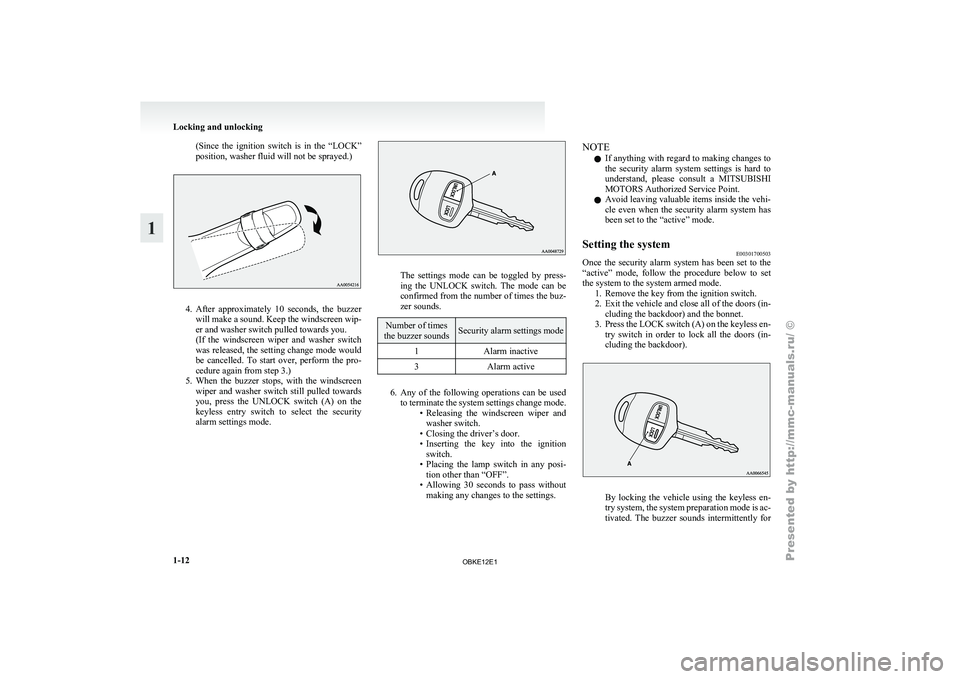
(Since the ignition switch is in the “LOCK”
position, washer fluid will not be sprayed.)
4. After approximately 10 seconds, the buzzer
will make
a sound. Keep the windscreen wip-
er and washer switch pulled towards you.
(If the windscreen wiper and washer switch
was released, the setting change mode would
be cancelled. To start over, perform the pro-
cedure again from step 3.)
5. When the buzzer stops, with the windscreen wiper and washer switch still pulled towards
you, press the UNLOCK switch (A) on the
keyless entry switch to select the security
alarm settings mode. The settings mode can be toggled by press-
ing the
UNLOCK
switch. The mode can be
confirmed from the number of times the buz-
zer sounds. Number of times
the buzzer sounds Security alarm settings mode
1 Alarm inactive
3 Alarm active 6. Any of the following operations can be used
to terminate
the system settings change mode.
• Releasing the windscreen wiper and washer switch.
• Closing the driver’s door.
• Inserting the key into the ignition switch.
• Placing the lamp switch in any posi- tion other than “OFF”.
• Allowing 30 seconds to pass without making any changes to the settings. NOTE
l If
anything with
regard to making changes to
the security alarm system settings is hard to
understand, please consult a MITSUBISHI
MOTORS Authorized Service Point.
l Avoid leaving valuable items inside the vehi-
cle even when the security alarm system has
been set to the “active” mode.
Setting the system E00301700503
Once the security alarm system has been set to the
“active” mode, follow
the procedure below to set
the system to the system armed mode. 1. Remove the key from the ignition switch.
2. Exit the vehicle and close all of the doors (in-cluding the backdoor) and the bonnet.
3. Press the LOCK switch (A) on the keyless en- try switch in order to lock all the doors (in-
cluding the backdoor). By locking the vehicle using the keyless en-
try system,
the
system preparation mode is ac-
tivated. The buzzer sounds intermittently for Locking and unlocking
1-12
1
OBKE12E1
Page 34 of 377
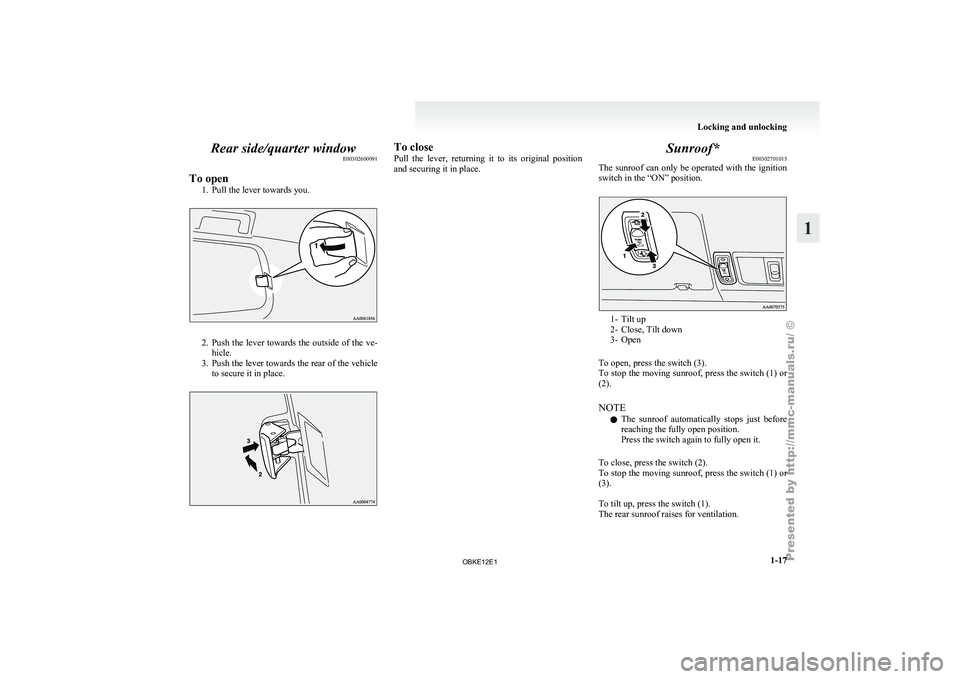
Rear side/quarter window
E00302600091
To open 1. Pull the lever towards you. 2. Push the lever towards the outside of the ve-
hicle.
3. Push
the lever towards the rear of the vehicle
to secure it in place. To close
Pull the
lever,
returning it to its original position
and securing it in place. Sunroof*
E00302701015
The sunroof can
only be operated with the ignition
switch in the “ON” position. 1- Tilt up
2- Close, Tilt down
3-
Open
To open, press the switch (3).
To
stop the moving sunroof, press the switch (1) or
(2).
NOTE
l The sunroof automatically stops just before
reaching the fully open position.
Press the switch again to fully open it.
To close, press the switch (2).
To stop the moving sunroof, press the switch (1) or
(3).
To tilt up, press the switch (1).
The rear sunroof raises for ventilation. Locking and unlocking
1-17 1
OBKE12E1
Page 41 of 377
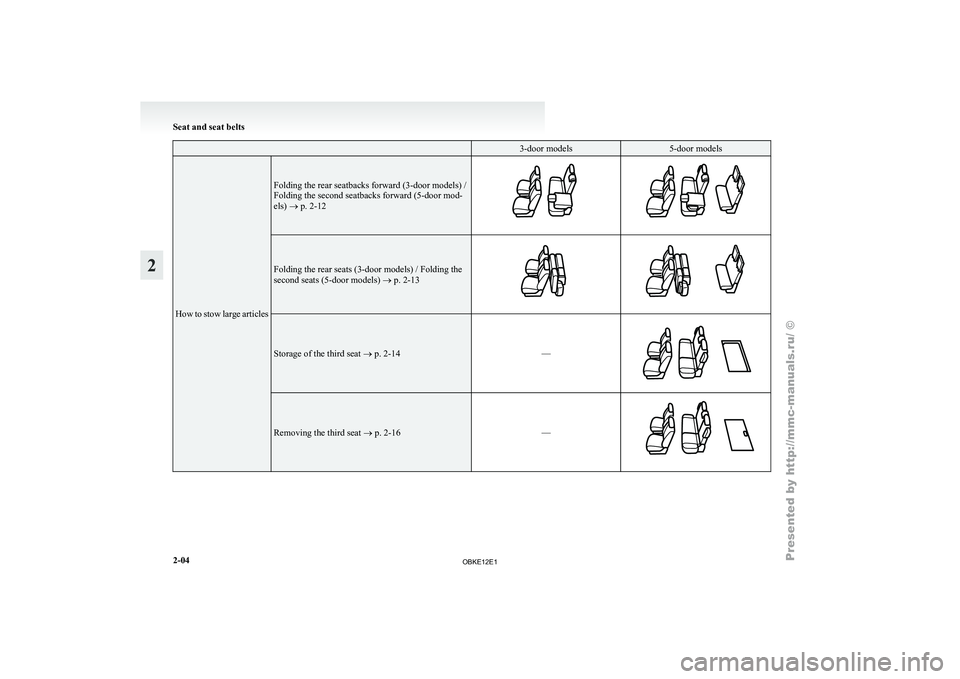
3-door models 5-door models
How to stow large articles Folding the rear seatbacks forward (3-door models) /
Folding the second seatbacks forward (5-door mod-
els) ® p. 2-12
Folding the rear seats (3-door models) / Folding the
second seats (5-door models)
® p. 2-13 Storage of the third seat ® p. 2-14
—Removing the third seat ® p. 2-16
—Seat and seat belts
2-04
2
OBKE12E1
Page 48 of 377
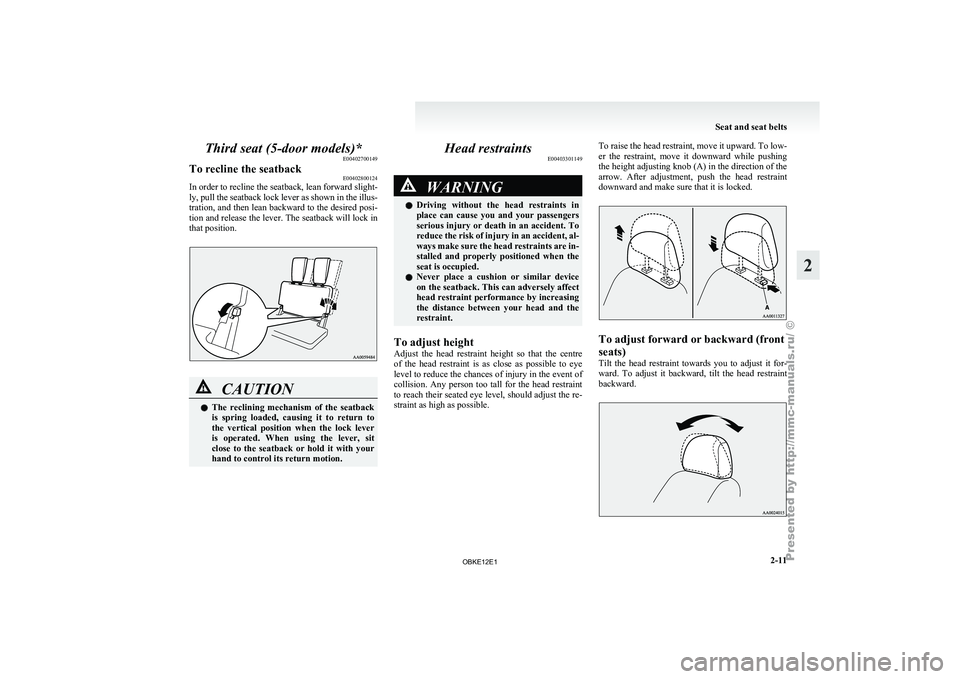
Third seat (5-door models)*
E00402700149
To recline the seatback E00402800124
In order to recline the seatback, lean forward slight-
ly, pull the
seatback lock lever as shown in the illus-
tration, and then lean backward to the desired posi-
tion and release the lever. The seatback will lock in
that position. CAUTION
l
The reclining
mechanism
of the seatback
is spring loaded, causing it to return to
the vertical position when the lock lever
is operated. When using the lever, sit
close to the seatback or hold it with your
hand to control its return motion. Head restraints
E00403301149 WARNING
l Driving without
the
head restraints in
place can cause you and your passengers
serious injury or death in an accident. To
reduce the risk of injury in an accident, al-
ways make sure the head restraints are in-
stalled and properly positioned when the
seat is occupied.
l Never place a cushion or similar device
on the seatback. This can adversely affect
head restraint performance by increasing
the distance between your head and the
restraint.
To adjust height
Adjust the head
restraint height so that the centre
of the head restraint is as close as possible to eye
level to reduce the chances of injury in the event of
collision. Any person too tall for the head restraint
to reach their seated eye level, should adjust the re-
straint as high as possible. To raise the head restraint, move it upward. To low-
er the
restraint,
move it downward while pushing
the height adjusting knob (A) in the direction of the
arrow. After adjustment, push the head restraint
downward and make sure that it is locked. To adjust forward or backward (front
seats)
Tilt
the
head
restraint towards you to adjust it for-
ward. To adjust it backward, tilt the head restraint
backward. Seat and seat belts
2-11 2
OBKE12E1
Page 51 of 377
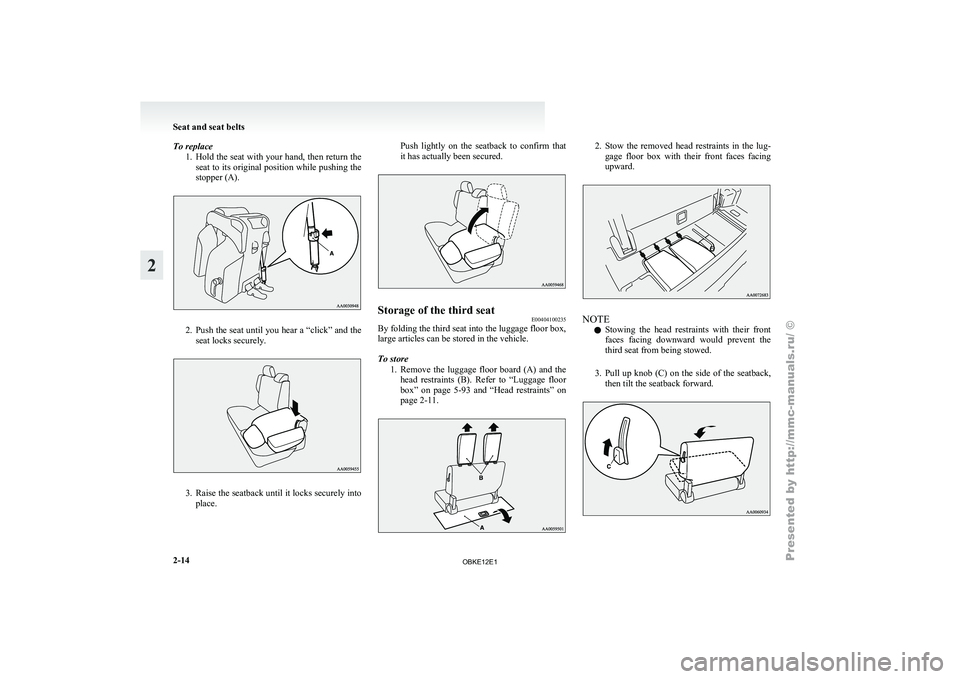
To replace
1. Hold the seat with your hand, then return the
seat to its original position while pushing the
stopper (A). 2. Push the seat until you hear a “click” and the
seat locks securely. 3. Raise the seatback until it locks securely into
place. Push
lightly
on the seatback to confirm that
it has actually been secured. Storage of the third seat
E00404100235
By folding the third seat into the luggage floor box,
large articles can be stored in the vehicle.
To store
1. Remove the luggage
floor board (A) and the
head restraints (B). Refer to “Luggage floor
box” on page 5-93 and “Head restraints” on
page 2-11. 2. Stow the removed head restraints in the lug-
gage floor
box with their front faces facing
upward. NOTE
l Stowing
the head
restraints with their front
faces facing downward would prevent the
third seat from being stowed.
3. Pull up knob (C) on the side of the seatback, then tilt the seatback forward. Seat and seat belts
2-14
2
OBKE12E1
Page 53 of 377
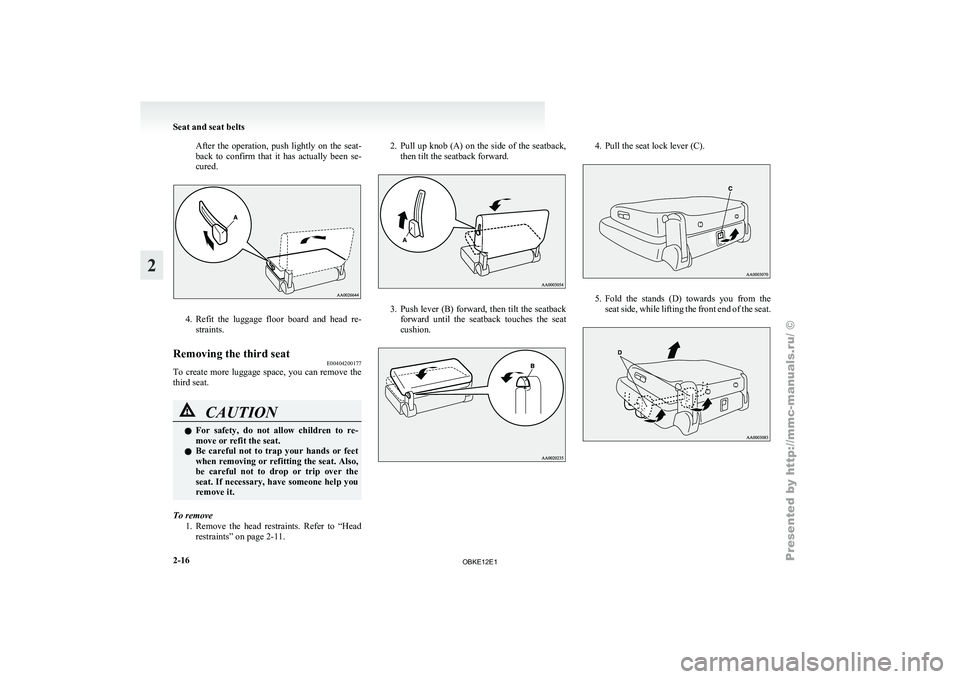
After the operation, push lightly on the seat-
back to confirm
that it has actually been se-
cured. 4. Refit the luggage floor board and head re-
straints.
Removing the third seat E00404200177
To create
more luggage space, you can remove the
third seat. CAUTION
l
For safety,
do
not allow children to re-
move or refit the seat.
l Be careful not to trap your hands or feet
when removing or refitting the seat. Also,
be careful not to drop or trip over the
seat. If necessary, have someone help you
remove it.
To remove 1. Remove the head
restraints. Refer to “Head
restraints” on page 2-11. 2. Pull up knob (A) on the side of the seatback,
then tilt the seatback forward. 3. Push lever (B) forward, then tilt the seatback
forward until
the seatback touches the seat
cushion. 4. Pull the seat lock lever (C).
5. Fold the stands (D) towards you from the
seat side,
while lifting the front end of the seat.Seat and seat belts
2-16
2
OBKE12E1
Page 58 of 377
WARNING
l The seat belts must not be twisted when
worn.
3. Pull the belt slightly to adjust slackness as de-
sired.
To unfasten
Hold the
latch plate and push the button on the buck-
le. NOTE
l As
the belt
retracts automatically, keep hold-
ing the latch plate while retracting so that the
belt stows slowly. Failure to do this could
damage the vehicle. Seat belt reminder/warning lamp
E00409800338
The seat belt
warning lamp is located on the instru-
ment panel. A tone and warning lamp are used to
remind the driver to fasten the seat belt. When the ignition key is turned to the “ON” posi-
tion, the warning
lamp will come on and a tone
will sound for about 6 seconds. If the driver’s seat
belt remains unfastened for approximately 1 mi-
nute later, the warning lamp will flash and the tone
sound intermittently (each 12 times) when the vehi-
cle is driven. If the driver subsequently unfastens
the seat belt while driving, the warning lamp and
tone will issue further warnings. And if the seat
belt remains unfastened, the warning lamp and tone
will issue further warnings each time the vehicle
starts moving from a stop. When the seat belt is fas-
tened, the warnings will stop.
Adjustable seat belt anchor (front
seats) E00405000286
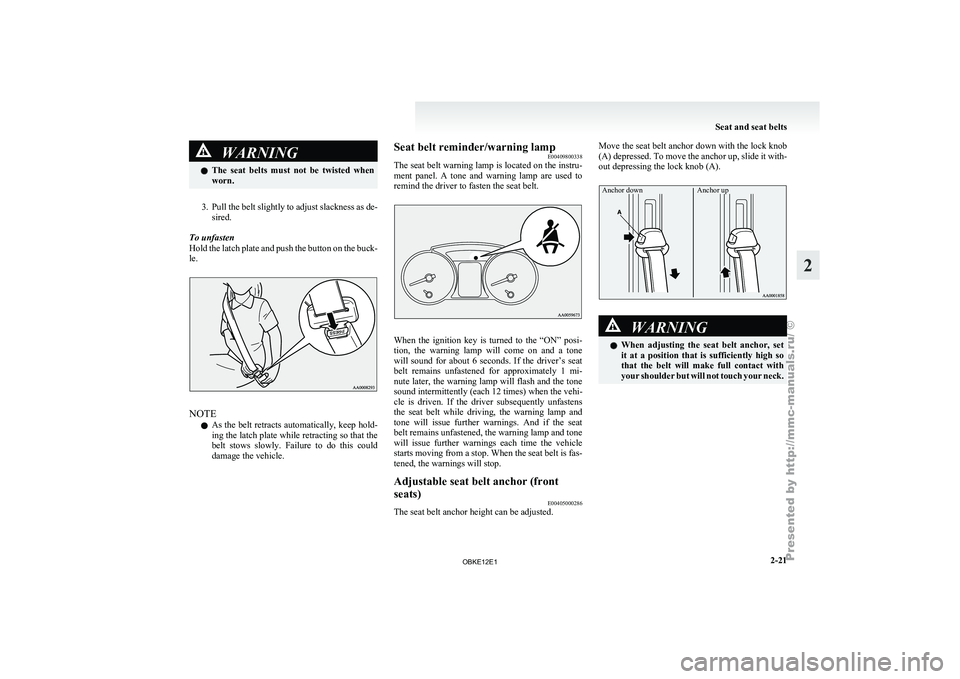
The seat belt anchor height can be adjusted. Move the seat belt anchor down with the lock knob
(A) depressed. To
move the anchor up, slide it with-
out depressing the lock knob (A).
Anchor down Anchor up WARNING
l When adjusting
the
seat belt anchor, set
it at a position that is sufficiently high so
that the belt will make full contact with
your shoulder but will not touch your neck. Seat and seat belts
2-21 2
OBKE12E1