tow MITSUBISHI PAJERO IV 2011 Owner's Manual
[x] Cancel search | Manufacturer: MITSUBISHI, Model Year: 2011, Model line: PAJERO IV, Model: MITSUBISHI PAJERO IV 2011Pages: 377, PDF Size: 29.43 MB
Page 175 of 377
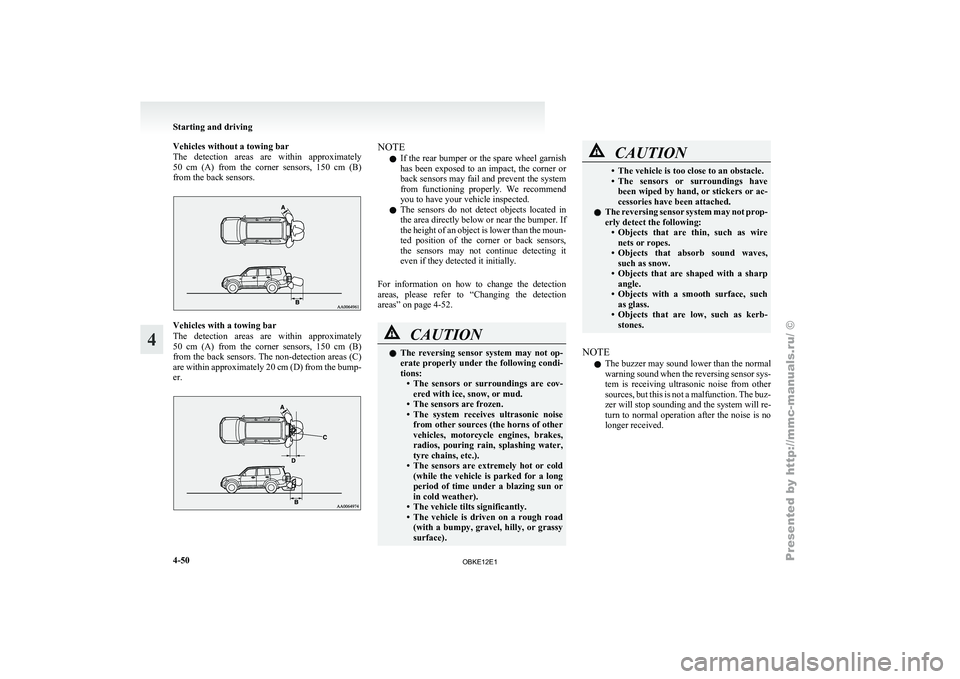
Vehicles without a towing bar
The detection areas
are within approximately
50 cm (A) from the corner sensors, 150 cm (B)
from the back sensors. Vehicles with a towing bar
The detection
areas
are within approximately
50 cm (A) from the corner sensors, 150 cm (B)
from the back sensors. The non-detection areas (C)
are within approximately 20 cm (D) from the bump-
er. NOTE
l If
the rear
bumper or the spare wheel garnish
has been exposed to an impact, the corner or
back sensors may fail and prevent the system
from functioning properly. We recommend
you to have your vehicle inspected.
l The sensors do not detect objects located in
the area directly below or near the bumper. If
the height of an object is lower than the moun-
ted position of the corner or back sensors,
the sensors may not continue detecting it
even if they detected it initially.
For information on how to change the detection
areas, please refer to “Changing the detection
areas” on page 4-52. CAUTION
l
The reversing
sensor
system may not op-
erate properly under the following condi-
tions: • The sensors or surroundings are cov-ered with ice, snow, or mud.
• The sensors are frozen.
• The system receives ultrasonic noise from other sources (the horns of other
vehicles, motorcycle engines, brakes,
radios, pouring rain, splashing water,
tyre chains, etc.).
• The sensors are extremely hot or cold (while the vehicle is parked for a long
period of time under a blazing sun or
in cold weather).
• The vehicle tilts significantly.
• The vehicle is driven on a rough road (with a bumpy, gravel, hilly, or grassy
surface). CAUTION
• The vehicle is too close to an obstacle.
• The sensors
or
surroundings have
been wiped by hand, or stickers or ac-
cessories have been attached.
l The reversing sensor system may not prop-
erly detect the following:
• Objects that are thin, such as wirenets or ropes.
• Objects that absorb sound waves, such as snow.
• Objects that are shaped with a sharp angle.
• Objects with a smooth surface, such as glass.
• Objects that are low, such as kerb- stones.
NOTE l The
buzzer may
sound lower than the normal
warning sound when the reversing sensor sys-
tem is receiving ultrasonic noise from other
sources, but this is not a malfunction. The buz-
zer will stop sounding and the system will re-
turn to normal operation after the noise is no
longer received. Starting and driving
4-50
4
OBKE12E1
Page 176 of 377
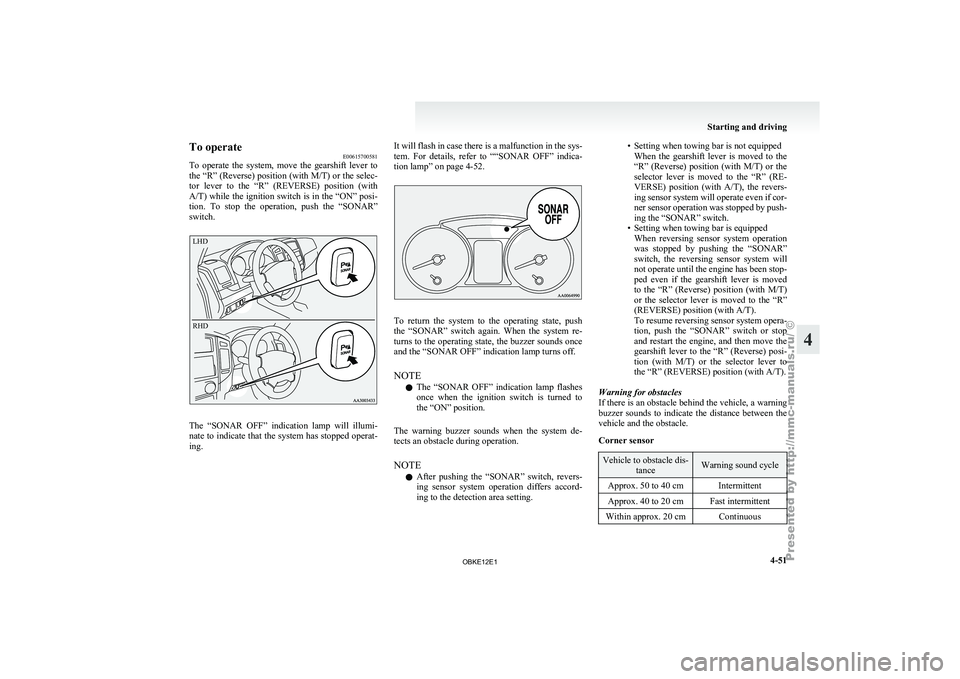
To operate
E00615700581
To operate the
system, move the gearshift lever to
the “R” (Reverse) position (with M/T) or the selec-
tor lever to the “R” (REVERSE) position (with
A/T) while the ignition switch is in the “ON” posi-
tion. To stop the operation, push the “SONAR”
switch.
LHD
RHD The “SONAR OFF” indication lamp will illumi-
nate to
indicate
that the system has stopped operat-
ing. It will flash in case there is a malfunction in the sys-
tem. For
details,
refer to ““SONAR OFF” indica-
tion lamp” on page 4-52. To return the system to the operating state, push
the “SONAR” switch
again. When the system re-
turns to the operating state, the buzzer sounds once
and the “SONAR OFF” indication lamp turns off.
NOTE
l The “SONAR OFF” indication lamp flashes
once when the ignition switch is turned to
the “ON” position.
The warning buzzer sounds when the system de-
tects an obstacle during operation.
NOTE l After pushing the “SONAR” switch, revers-
ing sensor system operation differs accord-
ing to the detection area setting. • Setting when towing bar is not equipped
When the gearshift
lever is moved to the
“R” (Reverse) position (with M/T) or the
selector lever is moved to the “R” (RE-
VERSE) position (with A/T), the revers-
ing sensor system will operate even if cor-
ner sensor operation was stopped by push-
ing the “SONAR” switch.
• Setting when towing bar is equipped When reversing sensor system operation
was stopped by pushing the “SONAR”
switch, the reversing sensor system will
not operate until the engine has been stop-
ped even if the gearshift lever is moved
to the “R” (Reverse) position (with M/T)
or the selector lever is moved to the “R”
(REVERSE) position (with A/T).
To resume reversing sensor system opera-
tion, push the “SONAR” switch or stop
and restart the engine, and then move the
gearshift lever to the “R” (Reverse) posi-
tion (with M/T) or the selector lever to
the “R” (REVERSE) position (with A/T).
Warning for obstacles
If there is an obstacle behind the vehicle, a warning
buzzer sounds to indicate the distance between the
vehicle and the obstacle.
Corner sensor Vehicle to obstacle dis-
tance Warning sound cycle
Approx. 50 to 40 cm Intermittent
Approx. 40 to 20 cm Fast intermittent
Within approx. 20 cm Continuous Starting and driving
4-51 4
OBKE12E1
Page 177 of 377
Back sensor (vehicles without a towing bar)
Vehicle to obstacle dis-
tance Warning sound cycle
Approx. 150 to 80 cm Intermittent Approx. 80 to 40 cm Fast intermittent
Within approx. 40 cm Continuous Back sensor (vehicles with a towing bar)
Vehicle to obstacle dis-
tance Warning sound cycle
Approx. 150 to 120 cm Intermittent Approx. 120 to 60 cm Fast intermittentWithin approx. 60 cm Continuous CAUTION
l
The distances given are to be used for ref-
erence
only, as
errors may be caused by
various factors, such as temperature, hu-
midity, or the shape of the obstacles.
Changing the detection areas E00615800032
The detection areas can be changed as follows:
Vehicles with a towing bar
While the operation
of the system is stopped at the
“SONAR” switch, push the “SONAR” switch ap-
proximately 3 seconds or more, and release it. The
buzzer sounds twice to indicate that the detection
area has been changed. Vehicles without a towing bar
While the
operation
of the system is stopped at the
“SONAR” switch, push the “SONAR” switch ap-
proximately 3 seconds or more, and release it. The
buzzer sounds once to indicate that the detection
area has been changed.
NOTE
l The detection area will not change if you
keep the “SONAR” switch pushed for 10 sec-
onds or more.
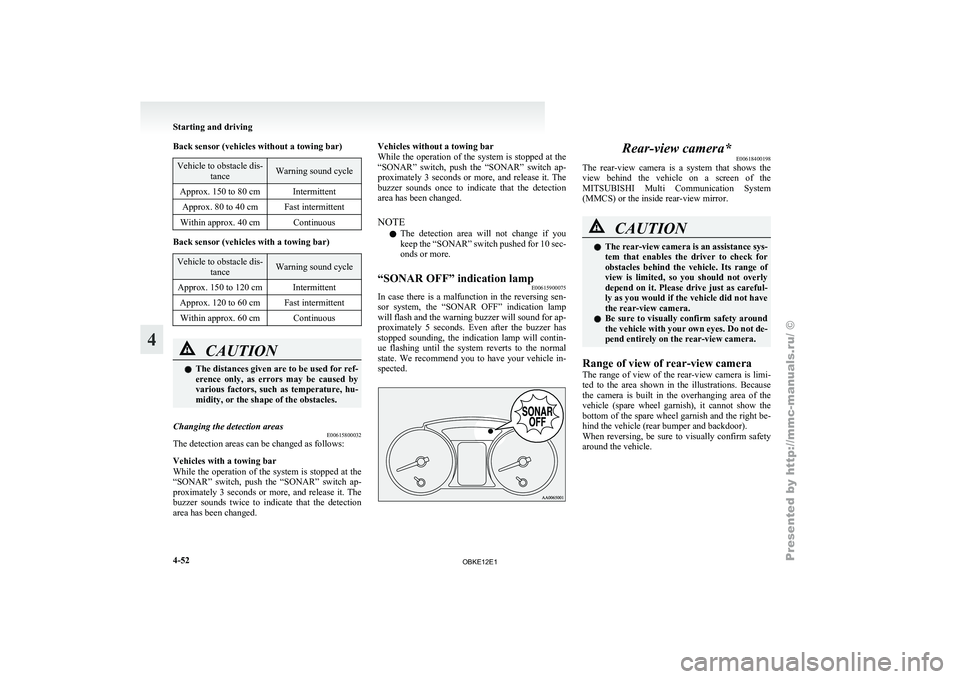
“SONAR OFF” indication lamp E00615900075
In case there is a malfunction in the reversing sen-
sor system, the
“SONAR OFF” indication lamp
will flash and the warning buzzer will sound for ap-
proximately 5 seconds. Even after the buzzer has
stopped sounding, the indication lamp will contin-
ue flashing until the system reverts to the normal
state. We recommend you to have your vehicle in-
spected. Rear-view camera*
E00618400198
The rear-view camera
is a system that shows the
view behind the vehicle on a screen of the
MITSUBISHI Multi Communication System
(MMCS) or the inside rear-view mirror. CAUTION
l
The rear-view
camera
is an assistance sys-
tem that enables the driver to check for
obstacles behind the vehicle. Its range of
view is limited, so you should not overly
depend on it. Please drive just as careful-
ly as you would if the vehicle did not have
the rear-view camera.
l Be sure to visually confirm safety around
the vehicle with your own eyes. Do not de-
pend entirely on the rear-view camera.
Range of view of rear-view camera
The range of
view of the rear-view camera is limi-
ted to the area shown in the illustrations. Because
the camera is built in the overhanging area of the
vehicle (spare wheel garnish), it cannot show the
bottom of the spare wheel garnish and the right be-
hind the vehicle (rear bumper and backdoor).
When reversing, be sure to visually confirm safety
around the vehicle. Starting and driving
4-52
4
OBKE12E1
Page 181 of 377
Cargo loads
E00609901224
Cargo loads precautions CAUTION
l
When
loading
luggage, be careful to the
following. • Stow cargo and luggage in the luggagecompartment whenever possible.
• Distribute cargo or luggage evenly not to be unbalanced in weight.
• Do not place cargo or luggage on the instrument panel.
Also, do not stack up cargo or luggage
on the front passenger’s seat or the
rear seats.
Having the driver’s vision blocked,
and your cargo being thrown inside
the cabin if you suddenly have to
brake can cause a serious accident or
injury.
Loading a roof carrier CAUTION
l
Use a
roof
carrier that properly fits your
vehicle.
Do not load luggage directly onto the roof.
For installation, refer to the instruction
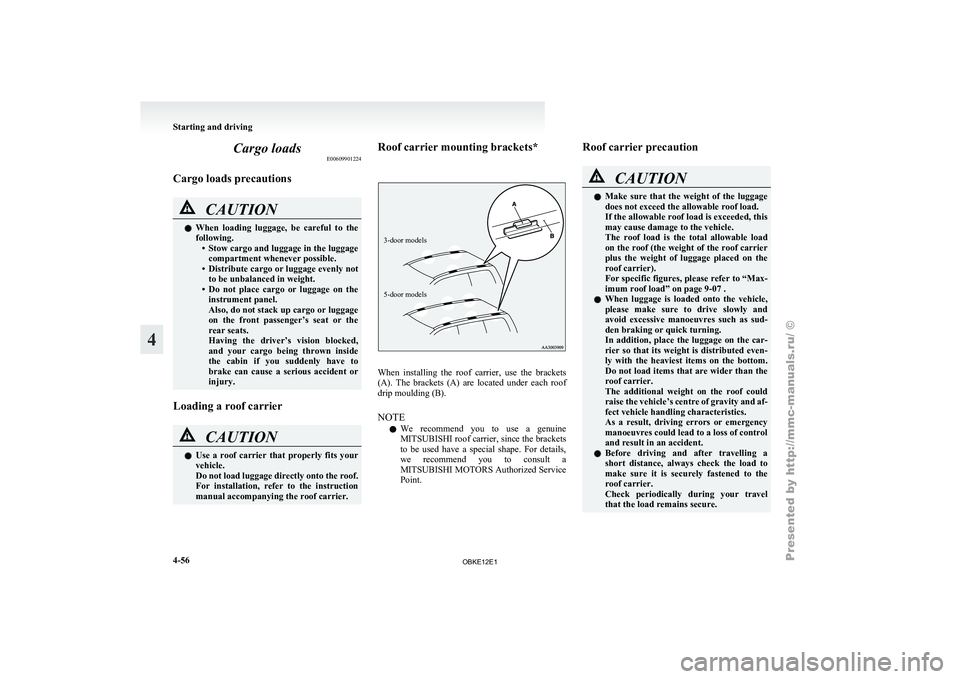
manual accompanying the roof carrier. Roof carrier mounting brackets*
3-door models
5-door models
When installing the roof carrier, use the brackets
(A). The
brackets
(A) are located under each roof
drip moulding (B).
NOTE
l We recommend you to use a genuine
MITSUBISHI roof carrier, since the brackets
to be used have a special shape. For details,
we recommend you to consult a
MITSUBISHI MOTORS Authorized Service
Point. Roof carrier precaution CAUTION
l
Make sure
that
the weight of the luggage
does not exceed the allowable roof load.
If the allowable roof load is exceeded, this
may cause damage to the vehicle.
The roof load is the total allowable load
on the roof (the weight of the roof carrier
plus the weight of luggage placed on the
roof carrier).
For specific figures, please refer to “Max-
imum roof load” on page 9-07 .
l When luggage is loaded onto the vehicle,
please make sure to drive slowly and
avoid excessive manoeuvres such as sud-
den braking or quick turning.
In addition, place the luggage on the car-
rier so that its weight is distributed even-
ly with the heaviest items on the bottom.
Do not load items that are wider than the
roof carrier.
The additional weight on the roof could
raise the vehicle’s centre of gravity and af-
fect vehicle handling characteristics.
As a result, driving errors or emergency
manoeuvres could lead to a loss of control
and result in an accident.
l Before driving and after travelling a
short distance, always check the load to
make sure it is securely fastened to the
roof carrier.
Check periodically during your travel
that the load remains secure. Starting and driving
4-56
4
OBKE12E1
Page 182 of 377
NOTE
l To
prevent wind
noise or reduction in fuel
economy, remove the roof carrier when not
in use.
l Before using an automatic car wash, remove
the roof carrier.
l Be sure that adequate clearance is main-
tained for raising the sunroof (if so equip-
ped) when installing a roof carrier. Trailer towing
E00610000550
In order
to
tow a trailer with your vehicle, when hav-
ing a trailer towing device mounted that meets all
relevant regulations in your area, consult a
MITSUBISHI MOTORS Authorized Service Point.
The regulations concerning the towing of a trailer
may differ from country to country. You are ad-
vised to obey the regulations in each area. CAUTION
l
Danger of Accident!
A towing
bar
should be fitted according
to MITSUBISHI MOTORS guidelines.
When you are going to tow a trailer,
move the transfer shift lever to “4H” posi-
tion.
Selecting the “2H” drive may increase the
differential oil temperature, resulting in
possible damage to the driving system.
Further, the drive train will be subjected
to excessive loading possibly leading to oil
leakage, component seizure, or other seri-
ous faults.
Maximum towable weight with brake
and maximum trailer-nose weight
Never exceed the
maximum towable weight with
brake and the maximum trailer-nose weight as lis-
ted in the specifications. (Refer to “Vehicle
weight” on page 9-07 .)
If you tow a trailer at an altitude of more than
1,000 m above sea-level, reduce your weight by
10 % of the gross combination weight for every in-
crease of 1,000 m above sea-level, as the engine out-
put is lowered owing to decrease in atmospheric
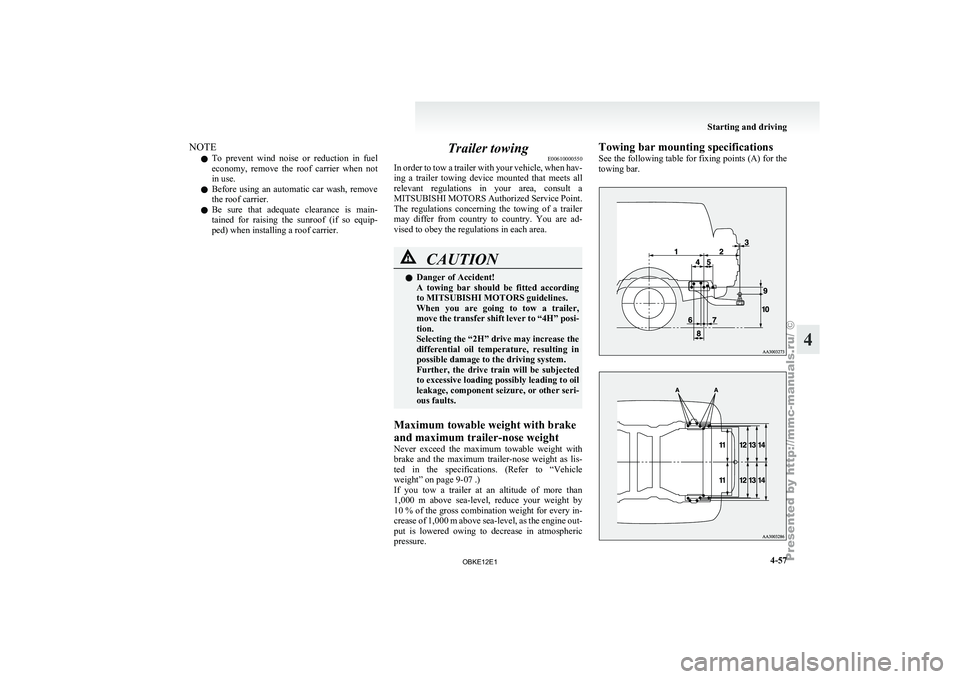
pressure. Towing bar mounting specifications
See
the following
table for fixing points (A) for the
towing bar. Starting and driving
4-57 4
OBKE12E1
Page 192 of 377
Operating the system in manual mode
E00704200154
Blower speed and
ventilator mode may be control-
led manually by setting the blower speed selection
dial and the MODE switch to the desired positions.
To return to automatic operation, set the AUTO op-
eration.
Demisting of the windscreen and door windows E00704300591
To remove frost or mist from the windscreen and
door windows, use
the MODE switch or Demister
switch (“ ” or “ ”).
CAUTION
l
For safety,
make
sure you have a clear
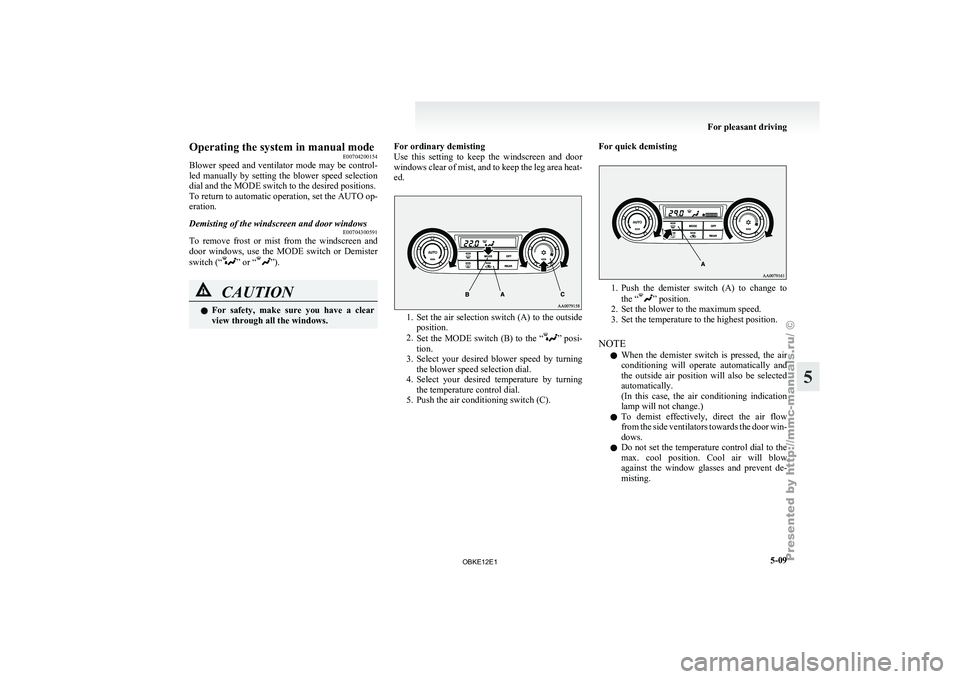
view through all the windows. For ordinary demisting
Use this
setting
to keep the windscreen and door
windows clear of mist, and to keep the leg area heat-
ed. 1. Set the air selection switch (A) to the outside
position.
2. Set the
MODE switch (B) to the “ ” posi-
tion.
3. Select
your desired blower speed by turning
the blower speed selection dial.
4. Select your desired temperature by turning the temperature control dial.
5. Push the air conditioning switch (C). For quick demisting 1. Push the demister switch (A) to change to
the “ ” position.
2. Set the blower to the maximum speed.
3. Set the temperature to the highest position.
NOTE l When
the demister switch is pressed, the air
conditioning will operate automatically and
the outside air position will also be selected
automatically.
(In this case, the air conditioning indication
lamp will not change.)
l To demist effectively, direct the air flow
from the side ventilators towards the door win-
dows.
l Do not set the temperature control dial to the
max. cool position. Cool air will blow
against the window glasses and prevent de-
misting. For pleasant driving
5-09 5
OBKE12E1
Page 248 of 377

Handling of compact discs
E00723000106
l Use only
the
type of compact discs that have
the mark shown in the illustration below. Play-
back of CD-R or CD-RW discs may cause
problems. l
The use of
special shaped, damaged compact
discs (like cracked discs) or low-quality com-
pact discs (like warped discs or burrs on the
discs) will damage the CD player. l
In the
following
circumstances, moisture can
form on discs and inside the audio system,
preventing normal operation. • When there is high humidity (for exam-ple, when it is raining).
• When the temperature suddenly rises, such as right after the heater is turned on
in cold weather.
In this case, wait until the moisture has
had time to dry out.
l When the CD player is subjected to violent vi-
brations, such as during off-road driving, the
tracking may not work. l
When
storing compact
discs, always store
them in their separate cases. Never place com-
pact discs in direct sunlight, or in any place
where the temperature or humidity is high.
l Never touch the flat surface of the disc with-
out a label. This will damage the disc surface
and could affect the sound quality. When han-
dling a compact disc, always hold it by the
outer edge and the centre hole.
l To clean a disc, use a soft, clean, dry cloth.
Wipe directly from the centre hole towards
the outer edge. Do not wipe in a circle. Nev-
er use any chemicals such as benzine, paint
thinner, a disc spray cleaner, or an anti-static
agent on the disc. l
Do not
use
a ball point pen, felt pen, pencil,
etc. to write on the label surface of the disc.
l Do not put additional labels (A) or stickers
(B) on compact discs. Also, do not use any
compact disc on which a label or sticker has
started to peel off or any compact disc that
has stickiness or other contamination left by
a peeled-off label or sticker. If you use such
a compact disc, the CD player may stop work- For pleasant driving
5-65 5
OBKE12E1
Page 282 of 377
If the vehicle breaks down
............................................................ 6-02
Emergency starting ....................................................................... 6-02
Engine overheating ....................................................................... 6-04
Bleeding the fuel system (diesel-powered vehicles only) ............6-06
Removal of water from the fuel filter (diesel-powered vehicles only) ........................................................................... 6-06
Tool, jack and jack handle ............................................................ 6-07
How to change a tyre .................................................................... 6-09
Towing.......................................................................................... 6-15
Operation under adverse driving conditions .................................6-18For emergencies
6
OBKE12E1
Page 291 of 377
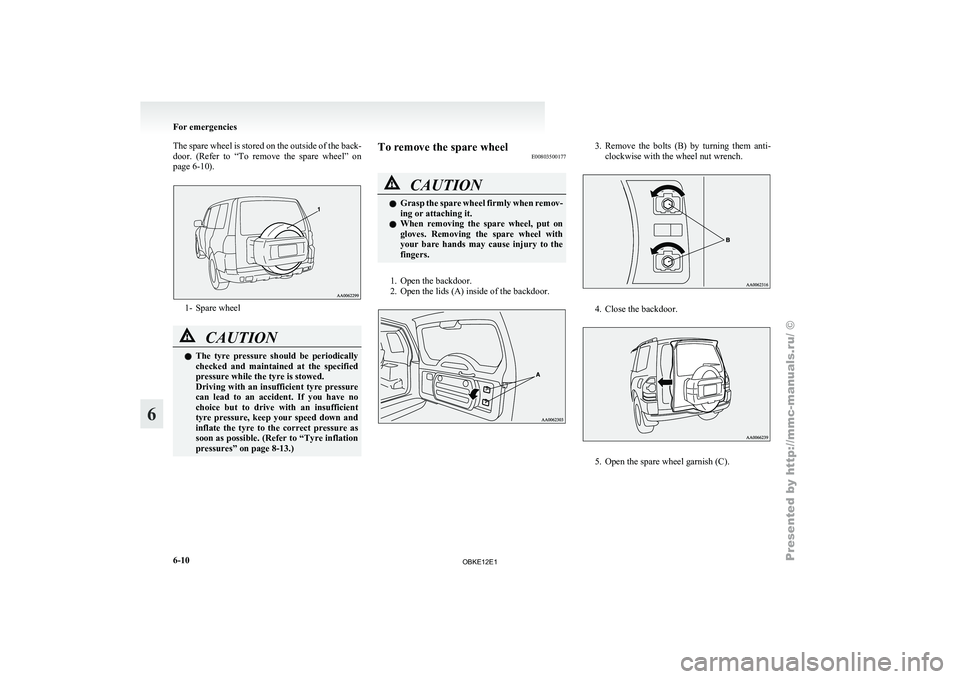
The spare wheel is stored on the outside of the back-
door. (Refer to
“To remove the spare wheel” on
page 6-10). 1- Spare wheel
CAUTION
l
The tyre pressure
should be periodically
checked and maintained at the specified
pressure while the tyre is stowed.
Driving with an insufficient tyre pressure
can lead to an accident. If you have no
choice but to drive with an insufficient
tyre pressure, keep your speed down and
inflate the tyre to the correct pressure as
soon as possible. (Refer to “Tyre inflation
pressures” on page 8-13.) To remove the spare wheel
E00803500177 CAUTION
l
Grasp the
spare
wheel firmly when remov-
ing or attaching it.
l When removing the spare wheel, put on
gloves. Removing the spare wheel with
your bare hands may cause injury to the
fingers.
1. Open the backdoor.
2. Open the lids (A) inside of the backdoor. 3. Remove the bolts (B) by turning them anti-
clockwise with the wheel nut wrench. 4. Close the backdoor.
5. Open the spare wheel garnish (C).For emergencies
6-10
6
OBKE12E1
Page 296 of 377
CAUTION
l
After
changing
the tyre and driving the ve-
hicle about 1,000 km (620 miles), retight-
en the wheel nuts to make sure that they
have not come loose.
l If the steering wheel vibrates when driv-
ing after changing the tyre, we recom-
mend you to have the tyres checked for
balance.
l Do not mix one type of tyre with another
or use a different size from the one listed.
This would cause early wear and poor han-
dling.
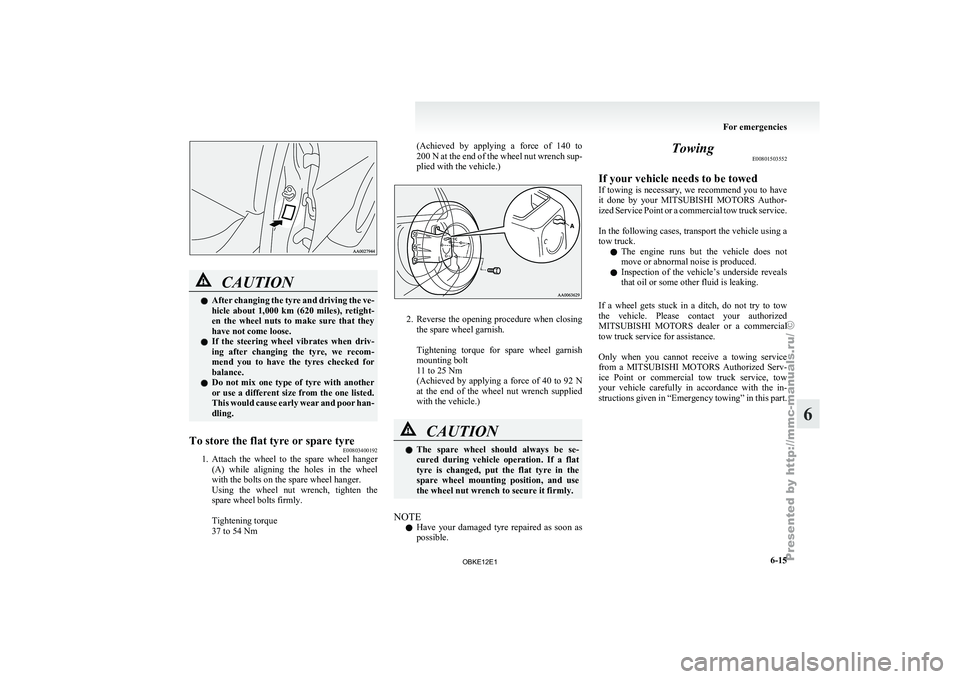
To store the flat tyre or spare tyre E00803400192
1. Attach the wheel to the spare wheel hanger
(A) while
aligning the holes in the wheel
with the bolts on the spare wheel hanger.
Using the wheel nut wrench, tighten the
spare wheel bolts firmly.
Tightening torque
37 to 54 Nm (Achieved by applying a force of 140 to
200 N
at the end of the wheel nut wrench sup-
plied with the vehicle.) 2. Reverse the opening procedure when closing
the spare wheel garnish.
Tightening torque
for spare wheel garnish
mounting bolt
11 to 25 Nm
(Achieved by applying a force of 40 to 92 N
at the end of the wheel nut wrench supplied
with the vehicle.) CAUTION
l
The spare
wheel
should always be se-
cured during vehicle operation. If a flat
tyre is changed, put the flat tyre in the
spare wheel mounting position, and use
the wheel nut wrench to secure it firmly.
NOTE l Have
your damaged
tyre repaired as soon as
possible. Towing
E00801503552
If your vehicle needs to be towed
If towing
is
necessary, we recommend you to have
it done by your MITSUBISHI MOTORS Author-
ized Service Point or a commercial tow truck service.
In the following cases, transport the vehicle using a
tow truck.
l The engine runs but the vehicle does not
move or abnormal noise is produced.
l Inspection of the vehicle’s underside reveals
that oil or some other fluid is leaking.
If a wheel gets stuck in a ditch, do not try to tow
the vehicle. Please contact your authorized
MITSUBISHI MOTORS dealer or a commercial
tow truck service for assistance.
Only when you cannot receive a towing service
from a MITSUBISHI MOTORS Authorized Serv-
ice Point or commercial tow truck service, tow
your vehicle carefully in accordance with the in-
structions given in “Emergency towing” in this part.
For emergencies
6-15 6
OBKE12E1