steering wheel MITSUBISHI SHOGUN 2016 (in English) Owner's Guide
[x] Cancel search | Manufacturer: MITSUBISHI, Model Year: 2016, Model line: SHOGUN, Model: MITSUBISHI SHOGUN 2016Pages: 404, PDF Size: 18.95 MB
Page 180 of 404
When driving downhill
It is important to take advantage of the en-
gine braking by shifting to a lower shift posi- tion while driving on steep downhill roads in
order to prevent the brakes from overheating.
WARNINGl Do not leave any objects near the brake
pedal or let a floor mat slide under it; do-
ing so could prevent the full pedal stroke that would be necessary in an emergency.Make sure that the pedal can be operated freely at all times. Make sure the floor mat is securely held in place.
Brake pads
l Avoid hard braking situations.
New brakes need to be broken-in by
moderate use for the first 200 km (125 miles).
l The disc brakes are provided with a
warning device which emits a shrieking
metallic sound while braking if the brake pads have reached their wear limit.
If you hear this sound, have the brake pads replaced immediately.
WARNINGl Driving with worn brake pads will make
it harder to stop, and can cause an acci-
dent.Brake assist system
E00627000376
The brake assist system is a device assistingdrivers who cannot depress the brake pedalfirmly when it is necessary to do so (such as
in emergency stop situations) and provides
greater braking force.
If the brake pedal is depressed suddenly, the brakes will be applied with more force thanusual.
CAUTIONl The brake assist system is not a device de-
signed to exercise braking force greater than its capacity. Make sure to always keep a suf-
ficient distance between vehicles in front of
you without relying too much on the brake
assist system.NOTEl Once the brake assist system is operational,
it maintains great braking force even if the
brake pedal is lightly released.
To stop its operation, completely remove
your foot from the brake pedal.
l When the brake assist system is in use while
driving, you may feel the brake pedal at-
tempt to resist, the pedal moves in small mo- tions in conjunction with the operation
noise, or the vehicle body and the steering wheel vibrate. This occurs when the brake
assist system is operating normally and does not indicate faulty operation. Continue to
firmly depress the brake pedal.
l When the anti-lock brake system warning
lamp is illuminated, the brake assist system is not functioning.Anti-lock brake system
(ABS) E00607101248
Environmental conditions can have an effect
on braking. During sudden braking when
there is snow, ice, oil, water etc. on the road
surface, a skid may occur. In this situation, steering control and braking effectiveness is
reduced and the stopping distance is in-
creased. The vehicle may also go into an un- controlled spin.
Brake assist system
6-41OVWE16E1Starting and driving6
Page 181 of 404
The ABS helps prevent the wheels from lock-
ing during braking, thus maintaining direc-
tional stability, ensuring controllability and
providing optimum braking force.
Driving hints
l Always maintain the same distance from
the vehicle in front of you as you would
for a vehicle not equipped with ABS.
Compared with vehicles not fitted with ABS, your vehicle may require a longer
stopping distance in the following cases: • Driving on gravel or snow-covered
roads.
• Driving with tyre chains installed.
• Driving on roads where the road sur-
face is pitted or has other differencesin surface height.
• Driving on bumpy roads or other poor
driving surfaces.
l In order to ensure that the ABS will op-
erate correctly in situations where tyre chains have been fitted, drive in the“4H”, “4HLc”, or “4LLc” position.
l Operation of ABS is not restricted to sit-
uations where brakes are applied sud- denly. This system may also operate to
prevent wheel lock when you are driving
over manholes, steel road-work plates, or the vehicle is driven over steps or lev-
el differences in the road, road markings,
or other surfaces which are difficult for the wheels to grip.
l When the ABS is activated, you may
feel the brake pedal pulsation and the vi- brations of the vehicle body and steering
wheel. You may also hear a characteris-
tic noise. At this time, you may feel as if
the pedal attempts to resist being de- pressed.
This is a normal result of the ABS oper- ation, and does not indicate a problem.
In this situation, to let the ABS work for you, just hold the brake pedal
down more firmly. Do not pump the brake. This will result in reduced
braking performance.
l When the engine starts and after starting
to drive, you might hear operation noise from the engine compartment or feel a shock from the brake pedal. This is nor-
mal. The ABS is performing self-check.
l The ABS will operate after the vehicle
has accelerated to a speed in excess ofapproximately 10 km/h (6 mph). It stops
operating when the vehicle decelerates
to a speed below about 5 km/h (3 mph).CAUTIONl Even the ABS cannot prevent the natural
laws of physics from acting on the vehicle. Itcannot for instance avoid accidents that may
result from excessive speed on bends or fol- lowing another vehicle too closely or aqua- planing. It should remain the driver’s task to
observe safety precautions to judge speeds and brake applications correctly in such con-
ditions.
l Be sure to use tyres of the same type and
size on 4 wheels.
If tyre types or sizes are mixed, ABS may not function normally.
l Never install a limited-slip differential,
which is not a MITSUBISHI MOTORS gen-
uine part, as the ABS may not function nor-
mally.
We recommend you to consult a MITSUBISHI MOTORS Authorized Serv-
ice Point.
Anti-lock brake system (ABS)
6-42OVWE16E1Starting and driving6
Page 183 of 404
If the ABS warning lamp and
brake warning lamp illuminate at the same time
l The ABS and brake force distribution
function will not work, so hard braking
could make the vehicle unstable.
Avoid hard braking and high-speed driv- ing. Stop the vehicle in a safe place and we recommend you to have it checked.
Inspection following snowy
road operation
E00618300012
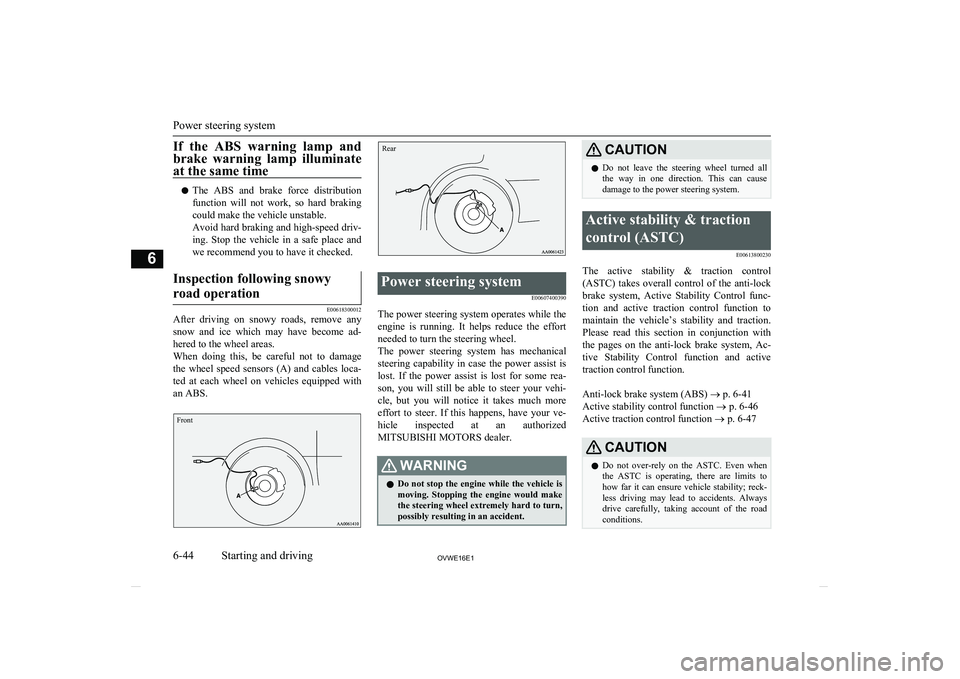
After driving on snowy roads, remove any snow and ice which may have become ad-
hered to the wheel areas.
When doing this, be careful not to damage the wheel speed sensors (A) and cables loca-ted at each wheel on vehicles equipped with an ABS.
FrontRear
Power steering system
E00607400390
The power steering system operates while the
engine is running. It helps reduce the effort needed to turn the steering wheel.
The power steering system has mechanical
steering capability in case the power assist is lost. If the power assist is lost for some rea-
son, you will still be able to steer your vehi-
cle, but you will notice it takes much more effort to steer. If this happens, have your ve-
hicle inspected at an authorized MITSUBISHI MOTORS dealer.
WARNINGl Do not stop the engine while the vehicle is
moving. Stopping the engine would make the steering wheel extremely hard to turn,
possibly resulting in an accident.CAUTIONl Do not leave the steering wheel turned all
the way in one direction. This can causedamage to the power steering system.Active stability & traction
control (ASTC) E00613800230
The active stability & traction control(ASTC) takes overall control of the anti-lockbrake system, Active Stability Control func-
tion and active traction control function to
maintain the vehicle’s stability and traction. Please read this section in conjunction withthe pages on the anti-lock brake system, Ac-
tive Stability Control function and active
traction control function.
Anti-lock brake system (ABS) ® p. 6-41
Active stability control function ® p. 6-46
Active traction control function ® p. 6-47
CAUTIONl Do not over-rely on the ASTC. Even when
the ASTC is operating, there are limits to how far it can ensure vehicle stability; reck-
less driving may lead to accidents. Always
drive carefully, taking account of the road conditions.
Power steering system
6-44OVWE16E1Starting and driving6
Page 194 of 404
Your vehicle has also been equipped with a
warning lamp to indicate when the system is
not operating properly.
The warning lamp is combined with the low tyre pressure telltale.
When the system detects a malfunction, the
telltale will flash for approximately one mi- nute and then remain continuously illumina-
ted. This sequence will continue upon subse- quent vehicle start-ups as long as the mal-
function exists.
When the warning lamp is illuminated, the
system may not be able to detect or signal low tyre pressure as intended.
The tyre pressure monitoring system (TPMS)
malfunctions may occur for a variety of rea- sons, including the installation of replace- ment or alternate tyres or wheels on the vehi-cle that prevent the tyre pressure monitoring
system (TPMS) from functioning properly. Always check the tyre pressure monitoring
system (TPMS) malfunction telltale after re- placing one or more tyres or wheels on yourvehicle to ensure that the replacement or al- ternate tyres and wheels allow the tyre pres-
sure monitoring system (TPMS) to continue to function properly.If the warning lamp illuminates
while driving
E00637300082
1. If the warning lamp illuminates, avoid
hard braking, sharp steering manoeuvres
and high speeds. You should stop and
adjust the tyres to the proper inflation pressure as soon as possible. Refer to “Tyres” on page 10-12.NOTEl When inspecting or adjusting the tyre pres-
sure, do not apply excessive force to the valve stem to avoid breakage.
l After inspecting or adjusting the tyre pres-
sure, always reinstall the valve cap on the valve stem.
Without the valve cap, dirt or moisture could
get into the valve, resulting in damage to the tyre inflation pressure sensor.
l Do not use metal valve caps, which may
cause a metal reaction, resulting in corrosion
and damage of the tyre inflation pressure sensors.
l Once adjustments have been made, the
warning lamp will go off after a few minutes of driving.
2. If the warning lamp remains illuminated
after you have been driving for about 10
minutes after you adjust the tyre infla- tion pressure, one or more of the tyresmay have a puncture. Inspect the tyreand if it has a puncture, have it repaired
by a MITSUBISHI MOTORS Author-
ized Service Point as soon as possible.
WARNINGl If the warning lamp illuminates while you
are driving, avoid hard braking, sharp steering manoeuvres and high speeds.
Driving with an under-inflated tyre ad-
versely affects vehicle performance and
can result in an accident.CAUTIONl The warning lamp may not illuminate imme-
diately in the event of a tyre blowout or rap-
id leak.NOTEl To avoid the risk of damage to the tyre infla-
tion pressure sensors, have any punctured
tyre repaired by a MITSUBISHI MOTORS
Authorized Service Point. If the tyre repair is
not done by a MITSUBISHI MOTORS Au-
thorized Service Point, damage to the tyre
inflation pressure sensor is not covered by your warranty.
l Do not use an aerosol puncture-repair spray
on any tyre.
Such a spray could damage the tyre inflation
pressure sensors.
Have any puncture repaired by a MITSUBISHI MOTORS Authorized Serv-
ice Point.
Tyre pressure monitoring system (TPMS)*
6-55OVWE16E1Starting and driving6
Page 229 of 404
15- key/ key
For audio, select audio track/file; for ra-
dio, perform automatic station selection
or ensemble/service station selection.16- MENU key Switch to Menu mode.17-/SEL key
Adjust audio quality and select items.
For radio, manually select stations.*:Requires a separately-purchased Bluetooth-capable audio device in equipment by type (vehicles with a Bluetooth ®
2.0 interface).
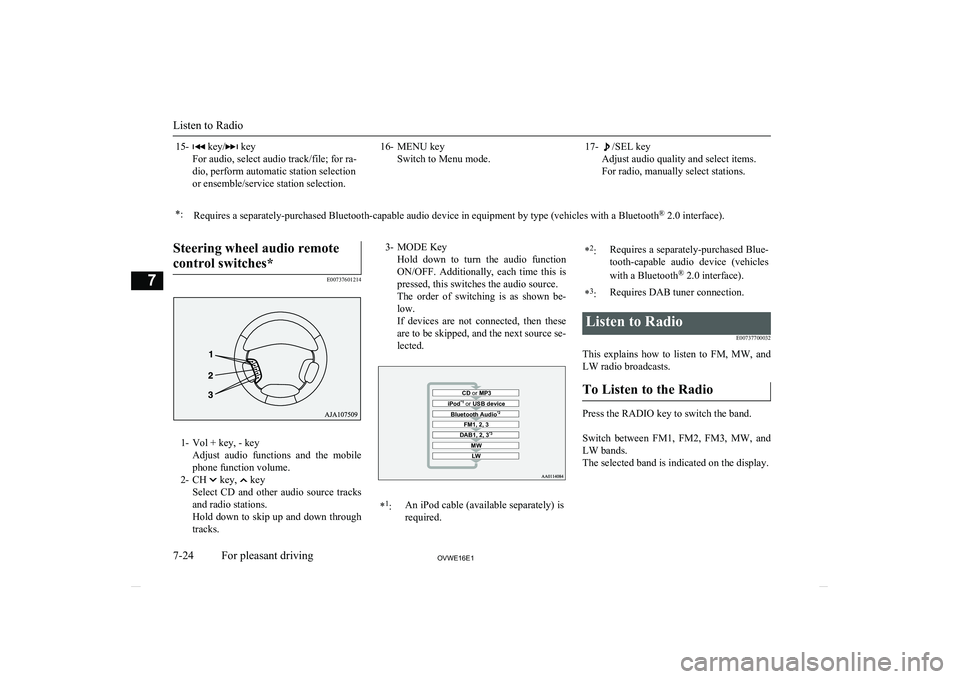
Steering wheel audio remote
control switches*
E00737601214
1- Vol + key, - key Adjust audio functions and the mobile
phone function volume.
2- CH
key, key
Select CD and other audio source tracks
and radio stations.
Hold down to skip up and down through tracks.
3- MODE Key
Hold down to turn the audio functionON/OFF. Additionally, each time this is
pressed, this switches the audio source.
The order of switching is as shown be- low.
If devices are not connected, then these are to be skipped, and the next source se-lected.CD or MP3MWLWDAB1, 2, 3 *3FM1, 2, 3Bluetooth Audio *2iPod*1
or USB device*1
:An iPod cable (available separately) is
required.* 2
:Requires a separately-purchased Blue-
tooth-capable audio device (vehicles
with a Bluetooth ®
2.0 interface).*3
:Requires DAB tuner connection.Listen to Radio
E00737700032
This explains how to listen to FM, MW, and
LW radio broadcasts.
To Listen to the Radio
Press the RADIO key to switch the band.
Switch between FM1, FM2, FM3, MW, and LW bands.
The selected band is indicated on the display.
Listen to Radio
7-24OVWE16E1For pleasant driving7
Page 268 of 404
5.If only one telephone number is regis-
tered under the name you just said, the
voice guide proceeds to Step 6.
If two or more telephone numbers are registered that match the name you just
said, the voice guide will say “Would you like to call
location to call.NOTEl If the name you selected has matching data
in the vehicle phone book but no telephone
number is registered under the selected loca- tion, the voice guide will say “{home/work/
mobile/other} not found for
Would you like to add location or try again?”
Say “Try again,” and the system will return to Step 3.
Say “Add location” and you can register an
additional telephone number under the selec-
ted location.
l If the name you selected has matching data
in the mobile phone book but no telephone
number is registered under the selected loca- tion, the voice guide will say “{home/work/
mobile/other} not found for
Would you like to try again?”
Answer “Yes,” and the system will return to Step 3.
Answer “No,” and the call will be cancelled. Start over again from Step 1.6. The voice guide will say “Calling
tem will dial the telephone number.NOTEl When the confirmation function is on, the
system will ask if the name and location of the receiver are correct.
If the name is correct, answer “Yes.”
If you want to change the name or location
to call, answer “No.” The system will return to Step 3.
Redialing
You can redial the last number called, based
on the history of dialed calls in the paired cel-
lular phone.
Use the following procedure to redial. 1. Press the SPEECH button.
2. Say “Redial.”
SEND function
E00761300035
During a call, press the SPEECH button to
enter voice recognition mode, then say “
For example, if during a call you need to sim-
ulate the press of a phone button as a re-
sponse to an automated system, press the SPEECH button and speak “1 2 3 4 pound SEND” and the 1234# will be sent on your
cellular phone.Receiving calls
E00761600012
If an incoming phone call is received while the ignition switch is in the “ACC” or “ON”
position, the audio system will be automati- cally turned on and switched to the incomingcall, even when the audio system was origi-
nally off.
The voice guide announcement for the in- coming call will be output from the front pas- senger’s seat speaker.
If the CD player or radio was playing when
the incoming call was received, the audio
system will mute the sound from the CD player or radio and output only the incomingcall.
To receive the call, press the PICK-UP but-
ton on the steering wheel control switch.
When the call is over, the audio system will
return to its previous state.
MUTE function
E00760300041
At any time during a call, you can mute the vehicle microphone.
Bluetooth ®
2.0 interface*
7-63OVWE16E1For pleasant driving7
Page 297 of 404
If the vehicle breaks downE00800101179
If the vehicle breaks down on the road, move it to the shoulder and use the hazard warning
flashers and/or the warning triangle etc. Refer
to “Hazard warning flasher switch” on page 5-42.
If the engine stops/fails
Vehicle operation and control are affected if
the engine stops. Before moving the vehicle to a safe area, be aware of the following:
l The brake booster becomes inoperative
and the pedal effort will increase. Press
down the brake pedal harder than usual.
l Since the power steering pump is no lon-
ger operative, the steering wheel feelsheavy when turning it.
Emergency starting
E00800504015
If the engine cannot be started because thebattery is weak or dead, the battery from an-other vehicle can be used with jumper cables to start the engine.
WARNINGl To start the engine using jumper cables
connected to another vehicle, perform the
correct procedures according to the in- struction below. Incorrect procedures could result in a fire or explosion or dam-
age to the vehicles.CAUTIONl Do not attempt to start the engine by pulling
or pushing the vehicle. It could damage your vehicle.
l Always wear protective eye goggles when
working near the battery.
l Keep the battery out of the reach of children.
1.
Get the vehicles close enough so the
jumper cables can reach, but be sure the vehicles aren’t touching each other.
CAUTIONl Check the other vehicle. It must have a 12-
volt battery.
If the other system isn’t 12-volt, shorting can
damage both vehicles.
2. Set the parking brake firmly on each ve-
hicle. Put an A/T in “P” (PARK) or a
M/T in “N” (Neutral). Turn off the igni-
tion switch.
WARNINGl Turn off the ignition on both vehicles be-
forehand. Make sure that the cables or your clothes cannot be caught by the fan or drive belt. Personal injury could result.
3. Turn off all lamps, heater and other elec-
trical loads.
4. Make sure battery electrolyte is at the
proper level. Refer to “Battery” on page
10-11.
WARNINGl If electrolyte fluid is not visible, or ap-
pears to be frozen, Do Not Attempt Jump
Starting!
A battery might rupture or explode if the temperature is below the freezing point orif it is not filled to the proper level.
5. Connect one end of one jumper cable to
the positive (+) terminal of the dis-charged battery (A or B), and the other
end to the positive (+) terminal of the booster battery (C).
If the vehicle breaks down
8-02OVWE16E1For emergencies8
Page 310 of 404
Tightening torque
105 to 125 Nm
(Achieved by applying a force of 390
to 460 N at the end of the wheel nut wrench supplied with the vehicle.)CAUTIONl Never use your foot or a pipe extension for
extra force in the wheel nut wrench. If you
do so, you will tighten the nut too much.
12. Lower the jack all the way and remove
it.
CAUTIONl If the release valve is loosened too much (2
or more turns) in the anticlockwise direction, the jack’s oil will leak and the jack cannotbe used.CAUTIONl Close the release valve slowly when lower-
ing the vehicle, or the valve may be dam-
aged.NOTEl Occasionally when the vehicle is jacked up,
the grooved portion of the designated pointwill not come off. When this happens, rock
the vehicle to lower the ram.
l If the jack is difficult to remove by hand, in-
sert the jack handle (L) into the bracket (M).Then using the handle, remove the jack.
13. Press the piston down all the way, and
turn the release valve clockwise as far as possible.
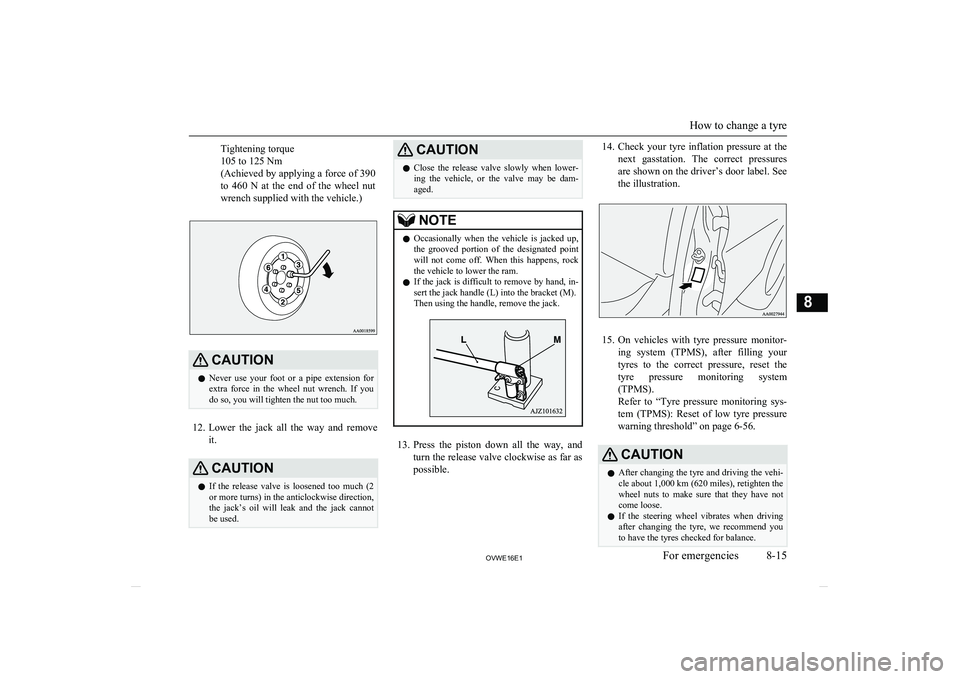
14. Check your tyre inflation pressure at the
next gasstation. The correct pressures
are shown on the driver’s door label. See the illustration.
15. On vehicles with tyre pressure monitor-
ing system (TPMS), after filling your tyres to the correct pressure, reset the tyre pressure monitoring system(TPMS).
Refer to “Tyre pressure monitoring sys-
tem (TPMS): Reset of low tyre pressure
warning threshold” on page 6-56.
CAUTIONl After changing the tyre and driving the vehi-
cle about 1,000 km (620 miles), retighten the
wheel nuts to make sure that they have not come loose.
l If the steering wheel vibrates when driving
after changing the tyre, we recommend you to have the tyres checked for balance.
How to change a tyre
8-15OVWE16E1For emergencies8
Page 313 of 404
Towing with rear wheels off the
ground (Type C)
Place the gearshift lever in the “N” (Neutral) position ( M/T) or the selector lever in the
“N” (NEUTRAL) position ( A/T). Turn the
ignition key to the “ACC” position and se-
cure the steering wheel in a straight ahead position with a rope or tie-down strap. Neverplace the ignition switch in the “LOCK” po-sition when towing.
Emergency towing
If towing service is not available in an emer- gency, your vehicle may be temporarily tow-ed by a rope secured to the towing hook.If your vehicle is to be towed by another ve-
hicle or if your vehicle tows another vehicle, pay careful attention to the following points:
If your vehicle is to be towed by
another vehicle
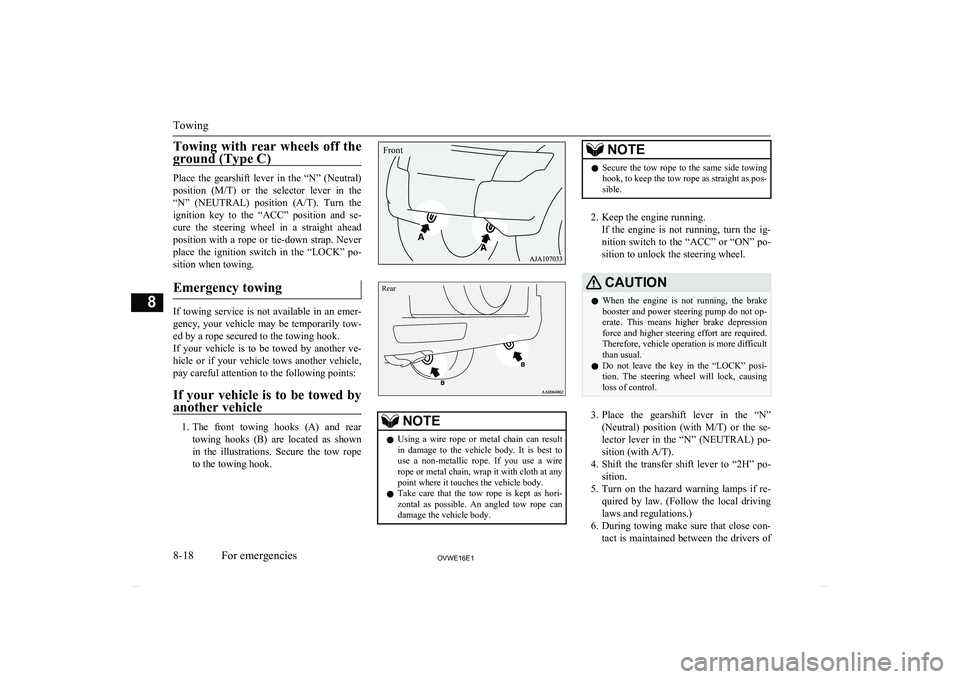
1. The front towing hooks (A) and rear
towing hooks (B) are located as shown
in the illustrations. Secure the tow rope to the towing hook.
Rear
NOTEl Using a wire rope or metal chain can result
in damage to the vehicle body. It is best to use a non-metallic rope. If you use a wire
rope or metal chain, wrap it with cloth at any
point where it touches the vehicle body.
l Take care that the tow rope is kept as hori-
zontal as possible. An angled tow rope can
damage the vehicle body.NOTEl Secure the tow rope to the same side towing
hook, to keep the tow rope as straight as pos-
sible.
2. Keep the engine running.
If the engine is not running, turn the ig-
nition switch to the “ACC” or “ON” po- sition to unlock the steering wheel.
CAUTIONl When the engine is not running, the brake
booster and power steering pump do not op- erate. This means higher brake depression
force and higher steering effort are required. Therefore, vehicle operation is more difficult
than usual.
l Do not leave the key in the “LOCK” posi-
tion. The steering wheel will lock, causing
loss of control.
3. Place the gearshift lever in the “N”
(Neutral) position (with M/T) or the se-
lector lever in the “N” (NEUTRAL) po-
sition (with A/T).
4. Shift the transfer shift lever to “2H” po-
sition.
5. Turn on the hazard warning lamps if re-
quired by law. (Follow the local driving laws and regulations.)
6. During towing make sure that close con-
tact is maintained between the drivers of
Towing
8-18OVWE16E1For emergencies8Front
Page 315 of 404
Avoid racing the engine or spinning thewheels. Prolonged efforts to free a stuck ve-
hicle may result in overheating, transmission and drivetrain failure. Allow the engine toidle for a few minutes to let the transmissioncool between rocking attempts.
If the vehicle remains stuck after several rocking attempts, seek other assistance.WARNINGl When attempting to rock your vehicle out
of a stuck position, be sure that the area around the vehicle is clear of people and
physical objects. The rocking motion may cause the vehicle to suddenly launch for-ward or backward, causing injury or
damage to nearby people or objects.
On a flooded road
l Avoid flooded roads. Water could enter
the brake discs, resulting in temporarily
ineffective brakes. In such cases, lightly
depress the brake pedal to see if the brakes operate properly. If they do not,
lightly depress the pedal several times while driving in order to dry the brake
pads.
l When driving in rain or on a road with
many puddles a layer of water may form between the tyres and the road surface.
This reduces a tyre’s frictional resistance
on the road, resulting in loss of steering stability and braking capability.
To cope with this, observe the following
items: (a)Drive your vehicle at slow speed. (b)Do not drive on worn tyres. (c)Always maintain the specified
tyre inflation pressures.
On a snow-covered or frozen
road
l When driving on a snow-covered or fro-
zen road, it is recommended that you use snow tyres or tyre chains.
Refer to the “Snow tyres” and “Tyre
chains” sections.
CAUTION• Avoid sudden braking, sudden acceleration,
and sharp turning; such operations could cause skidding and spinouts. Also, doing so could cause damage to the drivetrain.l Depressing the brake pedal during travel
on snowy or icy roads may cause tyre slippage and skidding. When traction be-
tween the tyres and the road is reduced
the wheels may skid and the vehicle can-
not readily be brought to a stop by con- ventional braking techniques. Brakingwill differ, depending upon whether you have anti-lock brakes (ABS). As your
vehicle is equipped with ABS, brake by pressing the brake pedal hard, and keep-
ing it pressed.
l Allow extra distance between your vehi-
cle and the vehicle in front of you, and avoid sudden braking.
l Accumulation of ice on the braking sys-
tem can cause the wheels to lock. Pullaway from a standstill slowly after con-
firming safety around the vehicle.CAUTIONl Do not press the accelerator pedal rapidly. If
the wheels break free of the ice, the vehicle
could suddenly start moving and possibly
cause an accident.
On a bumpy or rutted road
Drive as slow as possible when driving on
bumpy or rutted roads.
Operation under adverse driving conditions
8-20OVWE16E1For emergencies8