warning light MITSUBISHI SHOGUN 2016 Owner's Manual (in English)
[x] Cancel search | Manufacturer: MITSUBISHI, Model Year: 2016, Model line: SHOGUN, Model: MITSUBISHI SHOGUN 2016Pages: 404, PDF Size: 18.95 MB
Page 21 of 404
KeysE00300103631
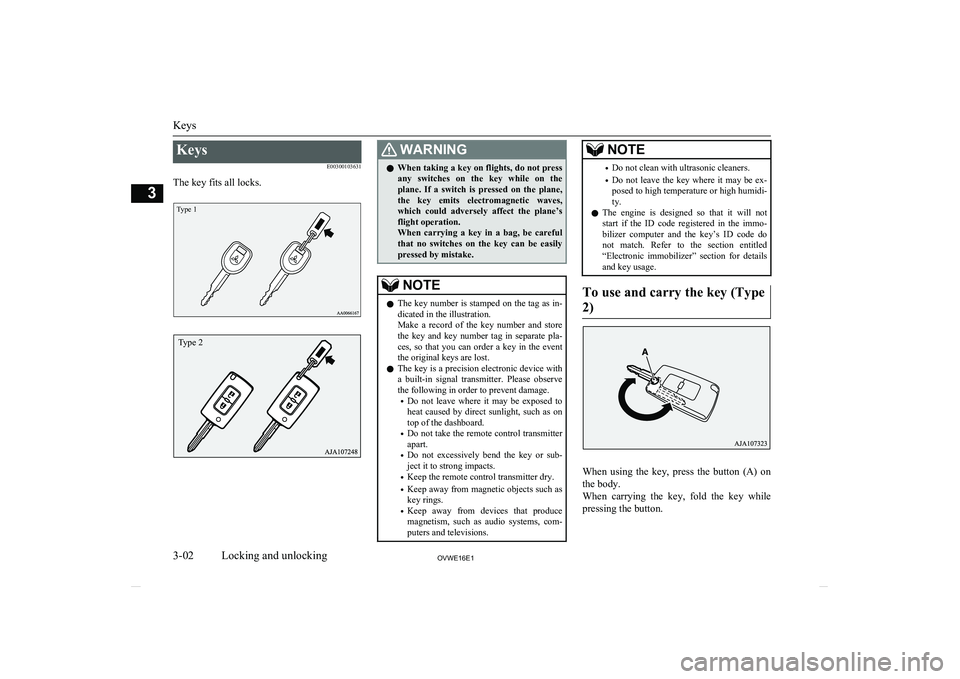
The key fits all locks.
Type 1
WARNINGl When taking a key on flights, do not press
any switches on the key while on the plane. If a switch is pressed on the plane,the key emits electromagnetic waves,which could adversely affect the plane’s
flight operation.
When carrying a key in a bag, be careful that no switches on the key can be easily
pressed by mistake.NOTEl The key number is stamped on the tag as in-
dicated in the illustration.
Make a record of the key number and store the key and key number tag in separate pla-
ces, so that you can order a key in the event the original keys are lost.
l The key is a precision electronic device with
a built-in signal transmitter. Please observe the following in order to prevent damage.
• Do not leave where it may be exposed to
heat caused by direct sunlight, such as on
top of the dashboard.
• Do not take the remote control transmitter
apart.
• Do not excessively bend the key or sub-
ject it to strong impacts.
• Keep the remote control transmitter dry.
• Keep away from magnetic objects such as
key rings.
• Keep away from devices that produce
magnetism, such as audio systems, com-
puters and televisions.NOTE• Do not clean with ultrasonic cleaners.
• Do not leave the key where it may be ex-
posed to high temperature or high humidi-ty.
l The engine is designed so that it will not
start if the ID code registered in the immo- bilizer computer and the key’s ID code do
not match. Refer to the section entitled “Electronic immobilizer” section for details
and key usage.
To use and carry the key (Type
2)
When using the key, press the button (A) on the body.
When carrying the key, fold the key while
pressing the button.
Keys
3-02OVWE16E1Locking and unlocking3Type 2
Page 28 of 404
CAUTIONlWhen the backdoor is open, the rear-right
combination lamp is obscured by the spare wheel.
If the backdoor is opened while the vehicle is parked on the road, alert other road users
to the vehicle’s presence using a warning tri- angle or other device as required by local legislation.
l When closing the backdoor, always ensure
your or other person’s fingers cannot be
caught by the backdoor.NOTEl The backdoor is equipped with an oil damp-
er type backdoor stopper, enabling you to hold the backdoor at a desired position.
l While opening or closing the backdoor, you
may feel slight resistance. This is a structural
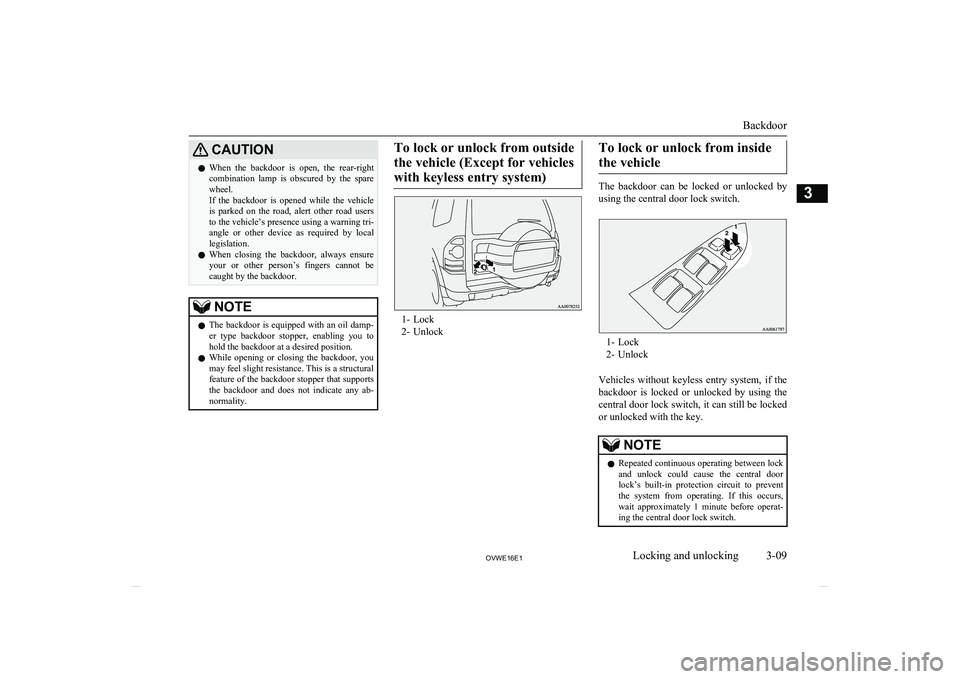
feature of the backdoor stopper that supports the backdoor and does not indicate any ab-normality.To lock or unlock from outside
the vehicle (Except for vehicles with keyless entry system)
1- Lock
2- Unlock
To lock or unlock from inside
the vehicle
The backdoor can be locked or unlocked by
using the central door lock switch.
1- Lock
2- Unlock
Vehicles without keyless entry system, if the
backdoor is locked or unlocked by using the central door lock switch, it can still be locked
or unlocked with the key.
NOTEl Repeated continuous operating between lock
and unlock could cause the central doorlock’s built-in protection circuit to preventthe system from operating. If this occurs,
wait approximately 1 minute before operat-
ing the central door lock switch.
Backdoor
3-09OVWE16E1Locking and unlocking3
Page 35 of 404
lPressing the LOCK or UNLOCK switch
on the keyless entry switch.
(After pressing the LOCK switch, the
vehicle will lock if all the doors (includ-
ing the backdoor) are closed, after which
the system preparation mode will once again go into effect.)
l Turning the ignition switch to the “ON”
or “ACC” position.NOTEl When the ignition switch is turned to the
“ON” position, the buzzer sounds 4 times.This operation indicates that the alarm was
activated while the vehicle was parked.
Please check the inside of the vehicle to con-
firm that nothing was stolen.
l Even if the battery is disconnected, the alarm
activation memory will not be erased.Electric window control
E00302200185
The electric windows can only be operatedwith the ignition switch in the “ON” position.
Electric window control switch
E00302301226
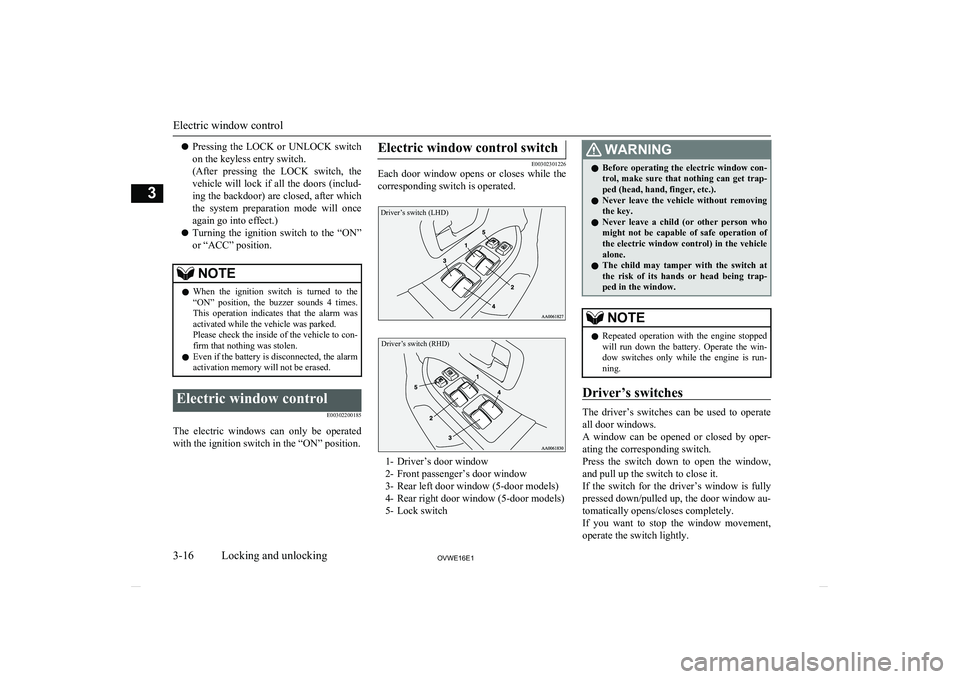
Each door window opens or closes while the
corresponding switch is operated.
Driver’s switch (LHD)Driver’s switch (RHD)
1- Driver’s door window
2- Front passenger’s door window
3- Rear left door window (5-door models)
4- Rear right door window (5-door models) 5- Lock switch
WARNINGl Before operating the electric window con-
trol, make sure that nothing can get trap-
ped (head, hand, finger, etc.).
l Never leave the vehicle without removing
the key.
l Never leave a child (or other person who
might not be capable of safe operation of
the electric window control) in the vehicle alone.
l The child may tamper with the switch at
the risk of its hands or head being trap- ped in the window.NOTEl Repeated operation with the engine stopped
will run down the battery. Operate the win-
dow switches only while the engine is run- ning.
Driver’s switches
The driver’s switches can be used to operate
all door windows.
A window can be opened or closed by oper- ating the corresponding switch.
Press the switch down to open the window, and pull up the switch to close it.
If the switch for the driver’s window is fully
pressed down/pulled up, the door window au-
tomatically opens/closes completely.
If you want to stop the window movement, operate the switch lightly.
Electric window control
3-16OVWE16E1Locking and unlocking3
Page 38 of 404
Sunroof*E00302701015
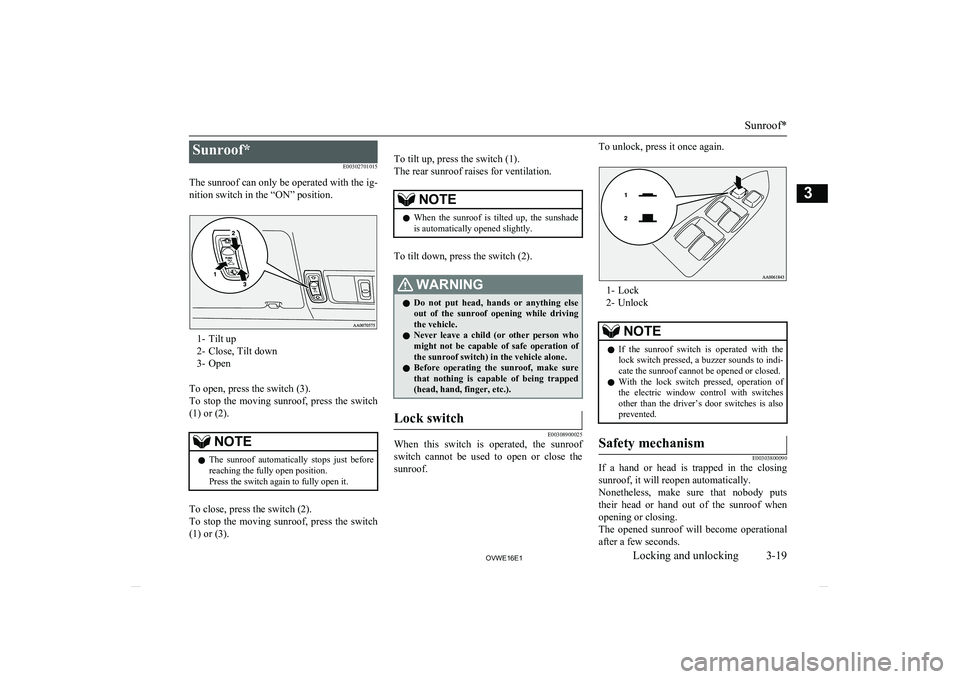
The sunroof can only be operated with the ig- nition switch in the “ON” position.
1- Tilt up
2- Close, Tilt down
3- Open
To open, press the switch (3).
To stop the moving sunroof, press the switch
(1) or (2).
NOTEl The sunroof automatically stops just before
reaching the fully open position.
Press the switch again to fully open it.
To close, press the switch (2).
To stop the moving sunroof, press the switch
(1) or (3).
To tilt up, press the switch (1).
The rear sunroof raises for ventilation.NOTEl When the sunroof is tilted up, the sunshade
is automatically opened slightly.
To tilt down, press the switch (2).
WARNINGl Do not put head, hands or anything else
out of the sunroof opening while driving
the vehicle.
l Never leave a child (or other person who
might not be capable of safe operation of
the sunroof switch) in the vehicle alone.
l Before operating the sunroof, make sure
that nothing is capable of being trapped
(head, hand, finger, etc.).Lock switch
E00308900025
When this switch is operated, the sunroof
switch cannot be used to open or close the sunroof.
To unlock, press it once again.
1- Lock
2- Unlock
NOTEl If the sunroof switch is operated with the
lock switch pressed, a buzzer sounds to indi-cate the sunroof cannot be opened or closed.
l With the lock switch pressed, operation of
the electric window control with switches
other than the driver’s door switches is also prevented.Safety mechanism
E00303800090
If a hand or head is trapped in the closing
sunroof, it will reopen automatically.Nonetheless, make sure that nobody puts
their head or hand out of the sunroof when
opening or closing.
The opened sunroof will become operational after a few seconds.
Sunroof*
3-19OVWE16E1Locking and unlocking3
Page 50 of 404
CAUTIONlThe reclining mechanism of the seatback is
spring loaded, causing it to return to the ver- tical position when the lock lever is operat- ed. When using the lever, sit close to the
seatback or hold it with your hand to control its return motion.Heated seats*
E00401100797
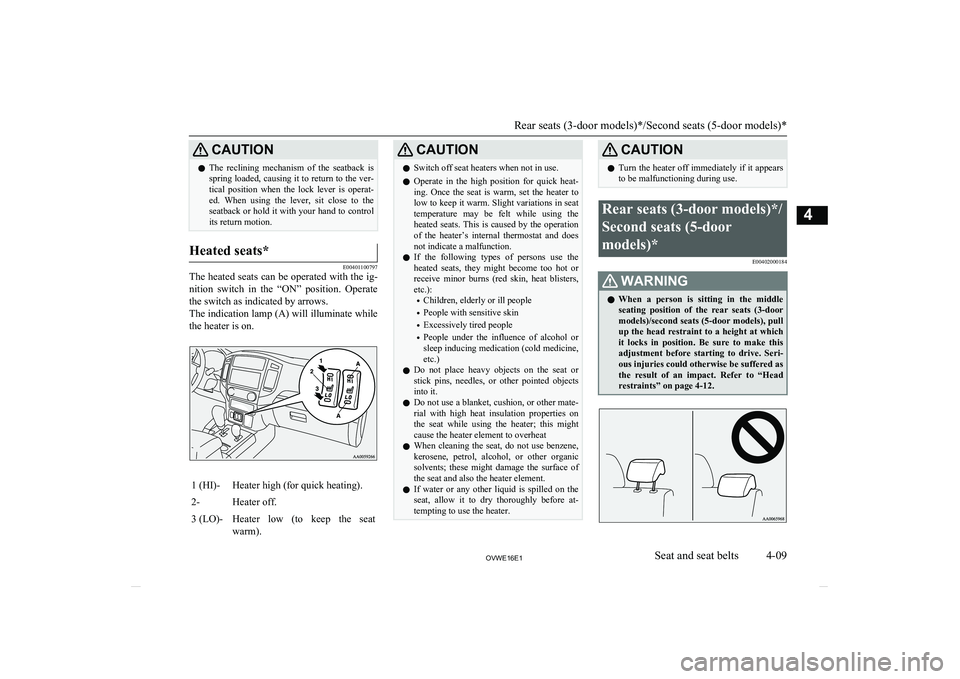
The heated seats can be operated with the ig-
nition switch in the “ON” position. Operate
the switch as indicated by arrows.
The indication lamp (A) will illuminate while the heater is on.
1 (HI)-Heater high (for quick heating).2-Heater off.3 (LO)-Heater low (to keep the seat
warm).CAUTIONl Switch off seat heaters when not in use.
l Operate in the high position for quick heat-
ing. Once the seat is warm, set the heater to low to keep it warm. Slight variations in seat
temperature may be felt while using the heated seats. This is caused by the operation
of the heater’s internal thermostat and does not indicate a malfunction.
l If the following types of persons use the
heated seats, they might become too hot or receive minor burns (red skin, heat blisters,
etc.):
• Children, elderly or ill people
• People with sensitive skin
• Excessively tired people
• People under the influence of alcohol or
sleep inducing medication (cold medicine, etc.)
l Do not place heavy objects on the seat or
stick pins, needles, or other pointed objects into it.
l Do not use a blanket, cushion, or other mate-
rial with high heat insulation properties on the seat while using the heater; this might
cause the heater element to overheat
l When cleaning the seat, do not use benzene,
kerosene, petrol, alcohol, or other organicsolvents; these might damage the surface of the seat and also the heater element.
l If water or any other liquid is spilled on the
seat, allow it to dry thoroughly before at-tempting to use the heater.CAUTIONl Turn the heater off immediately if it appears
to be malfunctioning during use.Rear seats (3-door models)*/
Second seats (5-door
models)* E00402000184WARNINGlWhen a person is sitting in the middle
seating position of the rear seats (3-doormodels)/second seats (5-door models), pull
up the head restraint to a height at which
it locks in position. Be sure to make this adjustment before starting to drive. Seri- ous injuries could otherwise be suffered as
the result of an impact. Refer to “Head
restraints” on page 4-12.
Rear seats (3-door models)*/Second seats (5-door models)*
4-09OVWE16E1Seat and seat belts4
Page 55 of 404
3.Push the seat until you hear a “click”
and the seat locks securely.
To replace
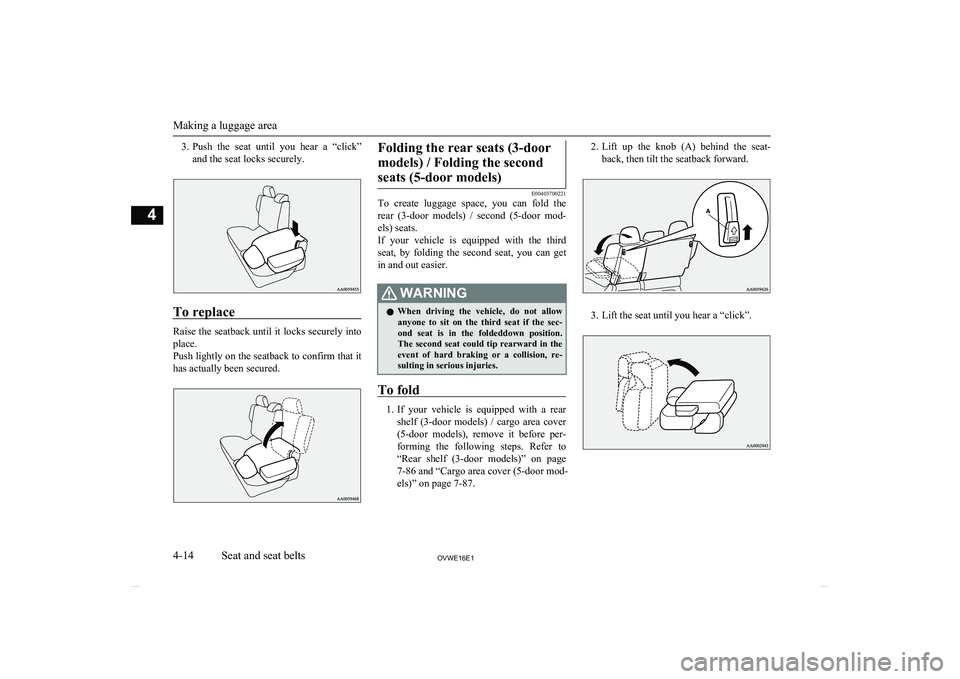
Raise the seatback until it locks securely into
place.
Push lightly on the seatback to confirm that it has actually been secured.
Folding the rear seats (3-door
models) / Folding the secondseats (5-door models)
E00403700221
To create luggage space, you can fold the
rear (3-door models) / second (5-door mod- els) seats.
If your vehicle is equipped with the third
seat, by folding the second seat, you can get
in and out easier.
WARNINGl When driving the vehicle, do not allow
anyone to sit on the third seat if the sec-
ond seat is in the foldeddown position. The second seat could tip rearward in the event of hard braking or a collision, re-
sulting in serious injuries.
To fold
1. If your vehicle is equipped with a rear
shelf (3-door models) / cargo area cover
(5-door models), remove it before per- forming the following steps. Refer to“Rear shelf (3-door models)” on page
7-86 and “Cargo area cover (5-door mod-
els)” on page 7-87.
2. Lift up the knob (A) behind the seat-
back, then tilt the seatback forward.
3. Lift the seat until you hear a “click”.
Making a luggage area
4-14OVWE16E1Seat and seat belts4
Page 61 of 404
After the operation, push the seatback
lightly to confirm that it has actually been secured.
6. Refit the head restraints.
Making a flat seat (Except
for 3-door models equipped
with the power seat) E00404301960
By removing the head restraints and fully re-
clining the seatbacks of the seats, one large flat seat is achieved.
WARNINGl Never drive with passengers on the flat
seat. This is highly dangerous.CAUTIONl To make a flat seat, stop the vehicle in a safe
place.
l Make sure the seat is adjusted by an adult or
with adult supervision for correct and safe
operation.
l When sliding the seat, be sure not to catch
your hand or leg.
l Do not walk around on top of the seats after
they have been laid flat.
l To ensure the seats are locked securely, at-
tempt to move them back and forth.
l Do not jump on, or impact the seatbacks
heavily.
l To raise the seatback, put a hand on the seat-
back and raise slowly. Never have a child do this operation, or an unexpected accident
may result.
1. If your vehicle is equipped with a rear
shelf (3-door models) / cargo area cover
(5-door models), remove it before per- forming the following steps. Refer to“Rear shelf (3-door models)” on page
7-86 and “Cargo area cover (5-door mod-
els)” on page 7-87.
2. Remove the head restraints from the
front seats.
If your vehicle is equipped with the third seat (5-door models), store the third seat into the luggage floor box.
Refer to “Head restraints” on page 4-12
and “Storage of the third seat” on page
4-15.
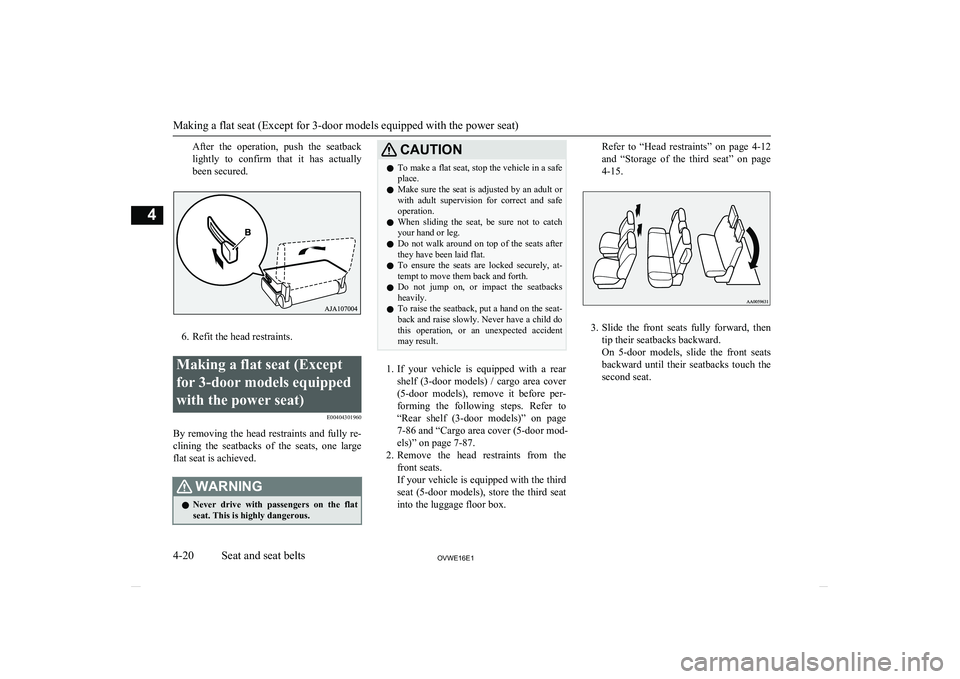
3. Slide the front seats fully forward, then
tip their seatbacks backward.
On 5-door models, slide the front seats backward until their seatbacks touch the second seat.
Making a flat seat (Except for 3-door models equipped with the power seat)
4-20OVWE16E1Seat and seat belts4
Page 63 of 404
WARNINGlAlways place the shoulder belt over your
shoulder and across your chest. Never put it behind you or under your arm.
l One seat belt should be used by only one
person. Doing otherwise can be danger-
ous.
l The seat belt will provide its wearer with
maximum protection if the recliner seat- back is placed in fully upright position.
When the seatback is reclined, there is
greater risk that the passenger will slide under the belt, especially in a forward im-
pact accident, and may be injured by the
belt or by striking the instrument panel or seatbacks.
l Seat belts should always be worn by every
adult who drives or rides in this vehicle, and by all children who are tall enough towear seat belts properly.
Other children should always use proper child restraint systems.
l Remove any twists when using the belt.
l No modifications or additions should be
made by the user which will either pre- vent the seat belt adjusting devices fromoperating to remove slack, or prevent the
seat belt assembly from being adjusted to
remove slack.
l Never hold a child in your arms or on
your lap when riding in this vehicle, even
if you are wearing your seat belt. To do so risks severe or fatal injury to the child in
a collision or sudden stop.
l Always adjust the belt to a snug fit.WARNINGlAlways wear the lap portion of the belt
over your hips.3-point type seat belt (with
emergency locking mechanism)
E00404901243
This type of belt requires no length adjust- ment. Once worn, the belt adjusts itself to the
movement of the wearer, but in the event of a sudden or strong shock, the belt automatical-
ly locks to hold the wearer’s body.
NOTEl You can check if the belt locks by pulling it
forward quickly.
To fasten
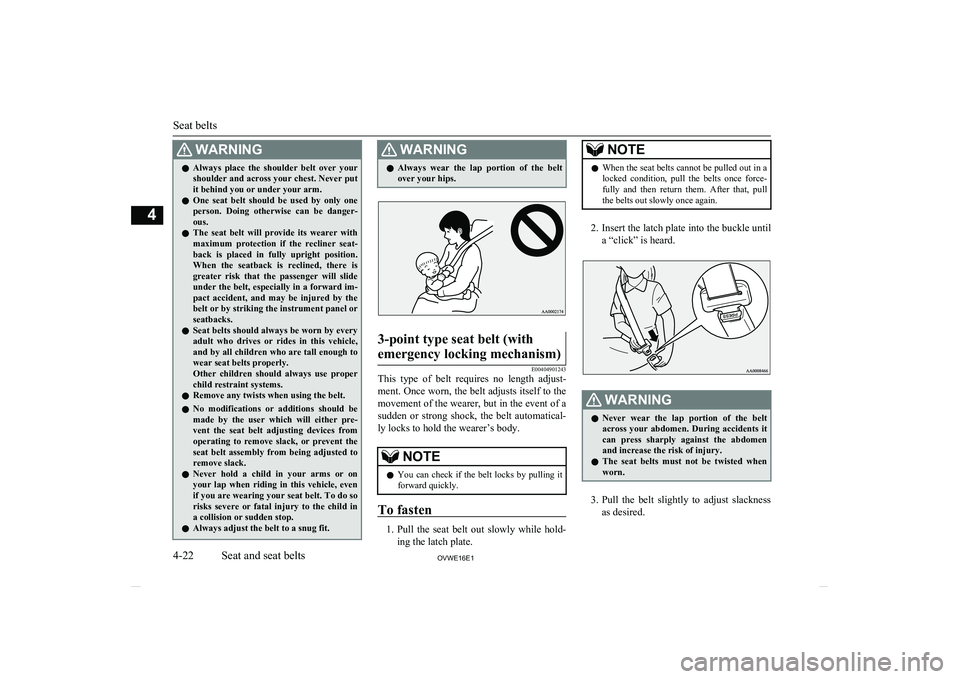
1. Pull the seat belt out slowly while hold-
ing the latch plate.
NOTEl When the seat belts cannot be pulled out in a
locked condition, pull the belts once force-
fully and then return them. After that, pull
the belts out slowly once again.
2. Insert the latch plate into the buckle until
a “click” is heard.
WARNINGl Never wear the lap portion of the belt
across your abdomen. During accidents it
can press sharply against the abdomen and increase the risk of injury.
l The seat belts must not be twisted when
worn.
3. Pull the belt slightly to adjust slackness
as desired.
Seat belts
4-22OVWE16E1Seat and seat belts4
Page 99 of 404
CAUTIONlIf the diesel preheat indication lamp comes
on after the engine is started, the engine speed may not rise above the idling speedbecause of fuel freezing. In this case, keep
the engine idling for about ten minutes, then turn off the ignition switch and immediately
turn it on again to confirm that the diesel
preheat indication lamp is off.NOTEl If the engine is cold, the diesel preheat indi-
cation lamp is on for a longer time.
l When the engine has not been started within
about 5 seconds after the diesel preheat indi- cation lamp went out, return the ignition
switch to the “LOCK” position. Then, turn
the switch to the “ON” position to preheat the engine again.
l When the engine is warm, the diesel preheat
indication lamp does not come on even if the
ignition switch is placed in the “ON” posi-
tion.Fuel filter indication lamp (die-
sel-powered vehicles)
E00509901337
This indication lamp illumi-
nates when the ignition
switch is turned to the “ON” position and goes off after
the engine has started. If it lights up while the engine is
running, it indicates that water has accumula-
ted inside the fuel filter; if this happens, re- move the water from the fuel filter. Refer to
“ Removal of water from the fuel filter (die- sel-powered vehicles only) ” on page 8-06.
When the lamp goes out, you can resume
driving. If it either does not go out or comes on from time to time, we recommend you to
have the vehicle inspected.
Warning lamps
E00502400017Brake warning lamp (brake
warning buzzer)
E00502501712
This lamp illuminates when
the ignition switch is turned to the “ON” position, and goes off after a few seconds.
Always make sure that the
lamp goes off before driving.
With the ignition switch in the “ON” posi-
tion, the brake warning lamp illuminates un- der the following conditions:
l When the parking brake lever has been
engaged.
l When the brake fluid level in the reser-
voir falls to a low level.
l When the brake force distribution func-
tion or the brake system is not operating
correctly.Brake warning buzzer
When there is a danger of brake performance
becoming compromised, a buzzer will sound
to alert the driver. If this buzzer should con-
tinue to sound, park your vehicle in a safe place and we recommend you to have itchecked.
NOTEl Depressing the brake pedal repeatedly may
turn on the brake warning lamp, ABS warn-ing lamp and brake warning buzzer. It is
normal if the lamp goes out and the buzzer stops sounding after a few seconds.CAUTIONl In the situations listed below, brake perform-
ance may be compromised or the vehicle may become unstable if brakes are applied
Warning lamps
5-10OVWE16E1Instruments and controls5
Page 108 of 404
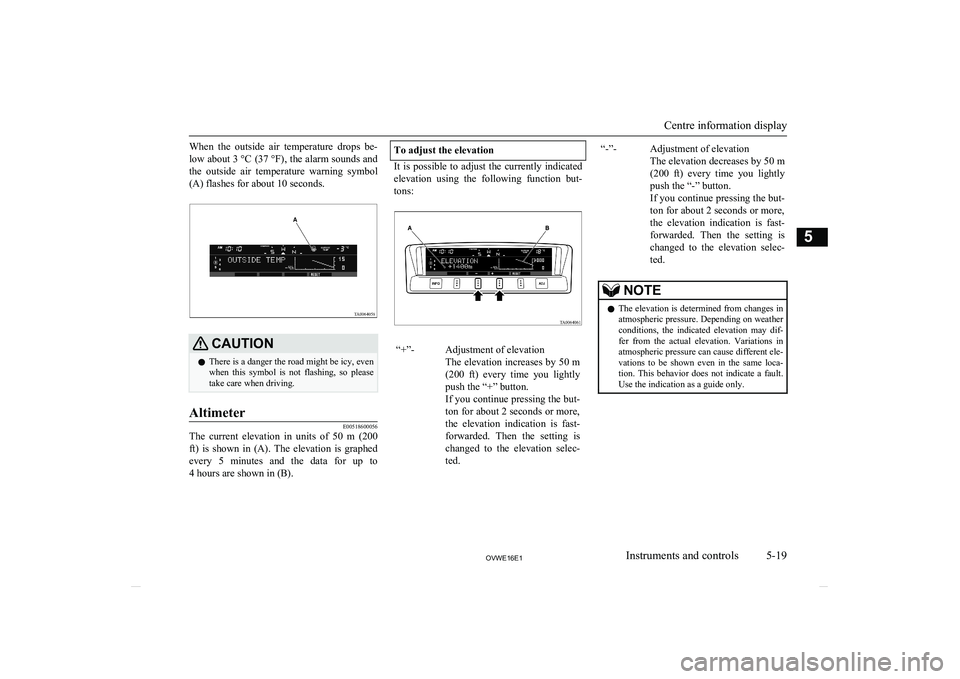
When the outside air temperature drops be-low about 3 °C (37 °F) , the alarm sounds and
the outside air temperature warning symbol (A) flashes for about 10 seconds.CAUTIONl There is a danger the road might be icy, even
when this symbol is not flashing, so please take care when driving.Altimeter
E00518600056
The current elevation in units of 50 m (200
ft) is shown in (A). The elevation is graphed every 5 minutes and the data for up to 4 hours are shown in (B).
To adjust the elevation
It is possible to adjust the currently indicated
elevation using the following function but-
tons:
“+”-Adjustment of elevation
The elevation increases by 50 m (200 ft) every time you lightlypush the “+” button.
If you continue pressing the but-
ton for about 2 seconds or more,
the elevation indication is fast-
forwarded. Then the setting is changed to the elevation selec-
ted.“-”-Adjustment of elevation
The elevation decreases by 50 m (200 ft) every time you lightlypush the “-” button.
If you continue pressing the but- ton for about 2 seconds or more,
the elevation indication is fast-
forwarded. Then the setting is changed to the elevation selec-
ted.NOTEl The elevation is determined from changes in
atmospheric pressure. Depending on weather
conditions, the indicated elevation may dif- fer from the actual elevation. Variations in
atmospheric pressure can cause different ele- vations to be shown even in the same loca-
tion. This behavior does not indicate a fault.
Use the indication as a guide only.
Centre information display
5-19OVWE16E1Instruments and controls5