clock MITSUBISHI SHOGUN 2017 Owner's Manual (in English)
[x] Cancel search | Manufacturer: MITSUBISHI, Model Year: 2017, Model line: SHOGUN, Model: MITSUBISHI SHOGUN 2017Pages: 394, PDF Size: 19 MB
Page 16 of 394
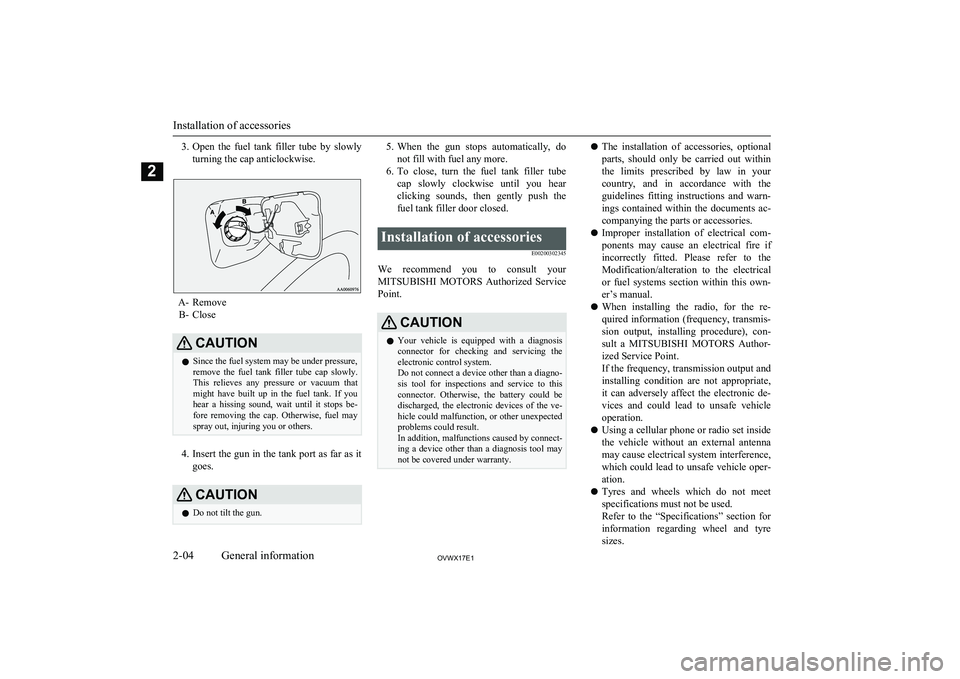
3.Open the fuel tank filler tube by slowly
turning the cap anticlockwise.
A- Remove B- Close
CAUTIONl Since the fuel system may be under pressure,
remove the fuel tank filler tube cap slowly. This relieves any pressure or vacuum that
might have built up in the fuel tank. If you
hear a hissing sound, wait until it stops be- fore removing the cap. Otherwise, fuel may
spray out, injuring you or others.
4. Insert the gun in the tank port as far as it
goes.
CAUTIONl Do not tilt the gun.5.
When the gun stops automatically, do
not fill with fuel any more.
6. To close, turn the fuel tank filler tube
cap slowly clockwise until you hear clicking sounds, then gently push the
fuel tank filler door closed.Installation of accessories
E00200302345
We recommend you to consult yourMITSUBISHI MOTORS Authorized Service
Point.
CAUTIONl Your vehicle is equipped with a diagnosis
connector for checking and servicing theelectronic control system.
Do not connect a device other than a diagno-
sis tool for inspections and service to this connector. Otherwise, the battery could be
discharged, the electronic devices of the ve- hicle could malfunction, or other unexpected
problems could result.
In addition, malfunctions caused by connect-
ing a device other than a diagnosis tool may not be covered under warranty.l The installation of accessories, optional
parts, should only be carried out within
the limits prescribed by law in your
country, and in accordance with the guidelines fitting instructions and warn-
ings contained within the documents ac-
companying the parts or accessories.
l Improper installation of electrical com-
ponents may cause an electrical fire if
incorrectly fitted. Please refer to the Modification/alteration to the electrical
or fuel systems section within this own-
er’s manual.
l When installing the radio, for the re-
quired information (frequency, transmis-
sion output, installing procedure), con- sult a MITSUBISHI MOTORS Author-
ized Service Point.
If the frequency, transmission output and installing condition are not appropriate,
it can adversely affect the electronic de- vices and could lead to unsafe vehicle operation.
l Using a cellular phone or radio set inside
the vehicle without an external antenna
may cause electrical system interference, which could lead to unsafe vehicle oper-ation.
l Tyres and wheels which do not meet
specifications must not be used.
Refer to the “Specifications” section for
information regarding wheel and tyre
sizes.
Installation of accessories
2-04OVWX17E1General information2
Page 58 of 394
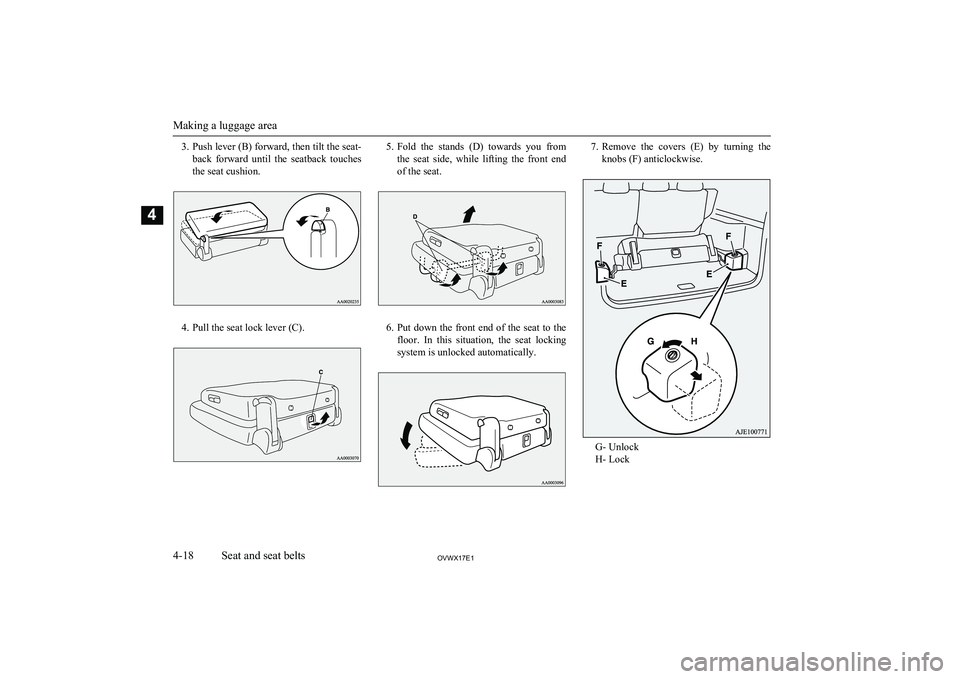
3.Push lever (B) forward, then tilt the seat-
back forward until the seatback touches
the seat cushion.
4. Pull the seat lock lever (C).
5. Fold the stands (D) towards you from
the seat side, while lifting the front end
of the seat.
6. Put down the front end of the seat to the
floor. In this situation, the seat locking system is unlocked automatically.
7. Remove the covers (E) by turning the
knobs (F) anticlockwise.
G- Unlock
H- Lock
Making a luggage area
4-18OVWX17E1Seat and seat belts4
Page 101 of 394
NOTElPlacing a cellular phone in the monitor’s
small storage compartment may weaken the
phone’s reception. This does not indicate a fault with the system.
l Use of wireless devices such as transceivers
or a cellular phone near the monitor mayNOTEmake the following condition on the display. This does not indicate a fault with the sys-tem.
• The screen goes dark temporarily.
• The compass may not show the correct di-
rection.NOTEl Depending on the angle of view, you may
see reddish horizontal lines on the monitor.The lines are a characteristic of the vacuum
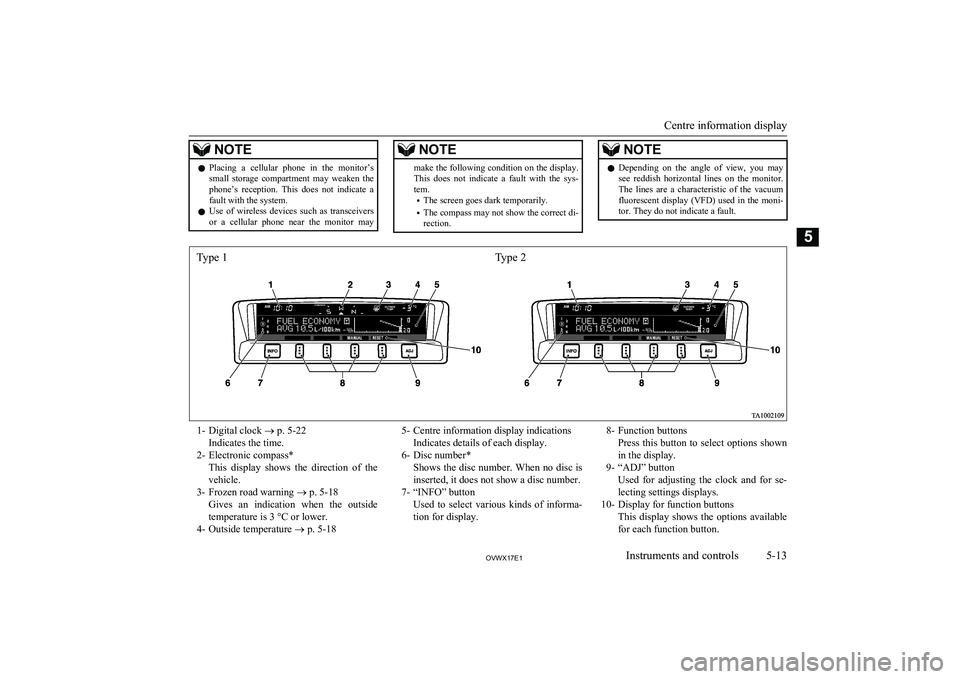
fluorescent display (VFD) used in the moni- tor. They do not indicate a fault.1- Digital clock ® p. 5-22
Indicates the time.
2- Electronic compass* This display shows the direction of the
vehicle.
3- Frozen road warning ® p. 5-18
Gives an indication when the outside temperature is 3 °C or lower.
4- Outside temperature ® p. 5-185- Centre information display indications
Indicates details of each display.
6- Disc number* Shows the disc number. When no disc is
inserted, it does not show a disc number.
7- “INFO” button Used to select various kinds of informa-tion for display.8- Function buttons Press this button to select options shown
in the display.
9- “ADJ” button Used for adjusting the clock and for se-lecting settings displays.
10- Display for function buttons This display shows the options available
for each function button.
Centre information display
5-13OVWX17E1Instruments and controls5 Type 1Type 2
Page 103 of 394
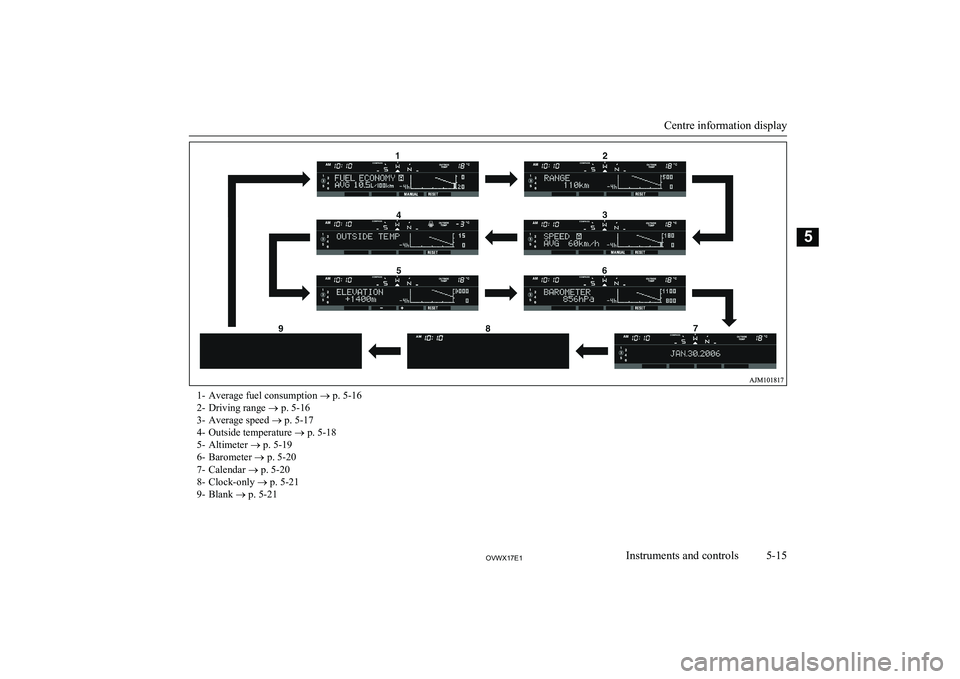
1- Average fuel consumption ® p. 5-16
2- Driving range ® p. 5-16
3- Average speed ® p. 5-17
4- Outside temperature ® p. 5-18
5- Altimeter ® p. 5-19
6- Barometer ® p. 5-20
7- Calendar ® p. 5-20
8- Clock-only ® p. 5-21
9- Blank ® p. 5-21
Centre information display
5-15OVWX17E1Instruments and controls5
Page 109 of 394
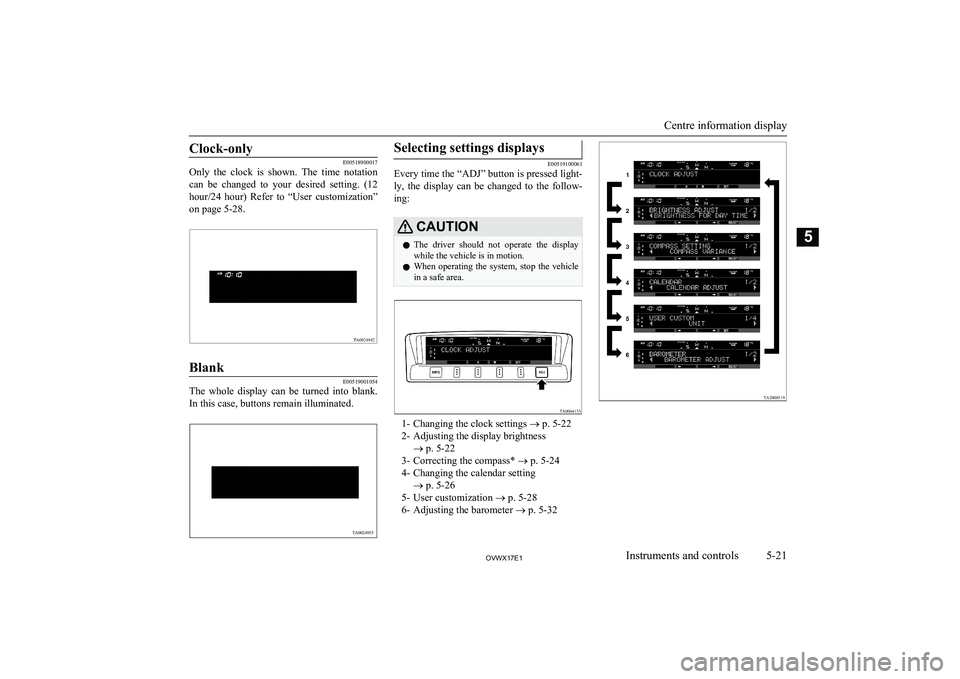
Clock-only
E00518900017
Only the clock is shown. The time notation
can be changed to your desired setting. (12
hour/24 hour) Refer to “User customization”
on page 5-28.
Blank
E00519001054
The whole display can be turned into blank.
In this case, buttons remain illuminated.
Selecting settings displays
E00519100061
Every time the “ADJ” button is pressed light-
ly, the display can be changed to the follow-ing:
CAUTIONl The driver should not operate the display
while the vehicle is in motion.
l When operating the system, stop the vehicle
in a safe area.
1- Changing the clock settings ® p. 5-22
2- Adjusting the display brightness ® p. 5-22
3- Correcting the compass* ® p. 5-24
4- Changing the calendar setting ® p. 5-26
5- User customization ® p. 5-28
6- Adjusting the barometer ® p. 5-32
Centre information display
5-21OVWX17E1Instruments and controls5 TA0024955
Page 110 of 394
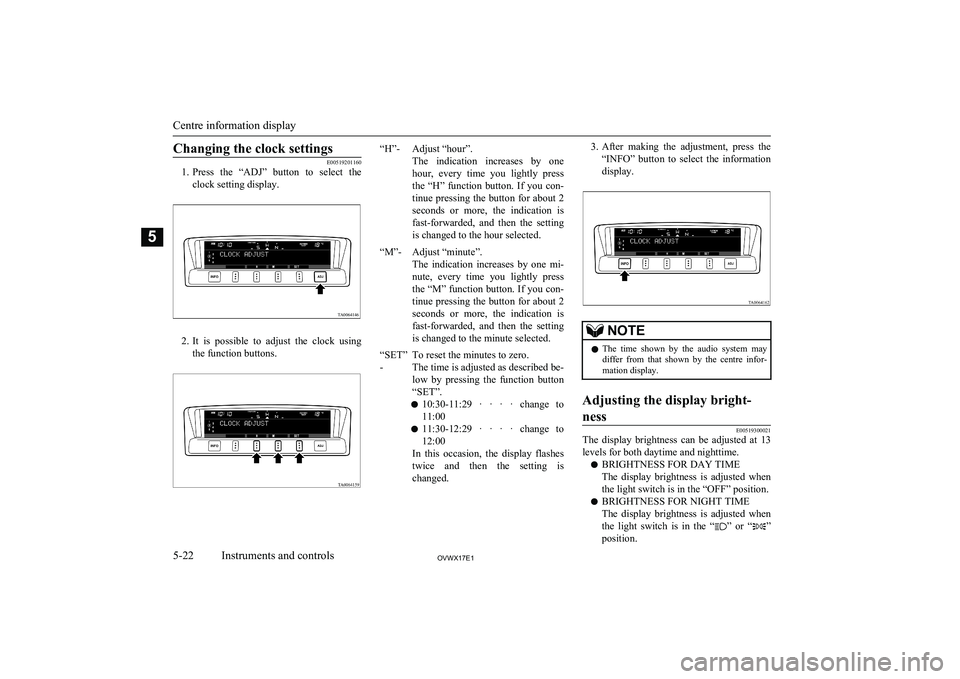
Changing the clock settings
E00519201160
1. Press the “ADJ” button to select the
clock setting display.
2. It is possible to adjust the clock using
the function buttons.
“H”-Adjust “hour”.
The indication increases by one
hour, every time you lightly press the “H” function button. If you con-tinue pressing the button for about 2 seconds or more, the indication is fast-forwarded, and then the settingis changed to the hour selected.“M”-Adjust “minute”.
The indication increases by one mi-
nute, every time you lightly press
the “M” function button. If you con- tinue pressing the button for about 2 seconds or more, the indication is fast-forwarded, and then the settingis changed to the minute selected.“SET”
-To reset the minutes to zero.
The time is adjusted as described be-
low by pressing the function button
“SET”.
l 10:30-11:29 · · · · change to
11:00
l 11:30-12:29 · · · · change to
12:00
In this occasion, the display flashes twice and then the setting is changed.3. After making the adjustment, press the
“INFO” button to select the information display.NOTEl The time shown by the audio system may
differ from that shown by the centre infor-
mation display.Adjusting the display bright-
ness
E00519300021
The display brightness can be adjusted at 13
levels for both daytime and nighttime.
l BRIGHTNESS FOR DAY TIME
The display brightness is adjusted when the light switch is in the “OFF” position.
l BRIGHTNESS FOR NIGHT TIME
The display brightness is adjusted when the light switch is in the “
” or “”
position.
Centre information display
5-22OVWX17E1Instruments and controls5TA0064146
Page 206 of 394
NOTEBlower speed selection dial
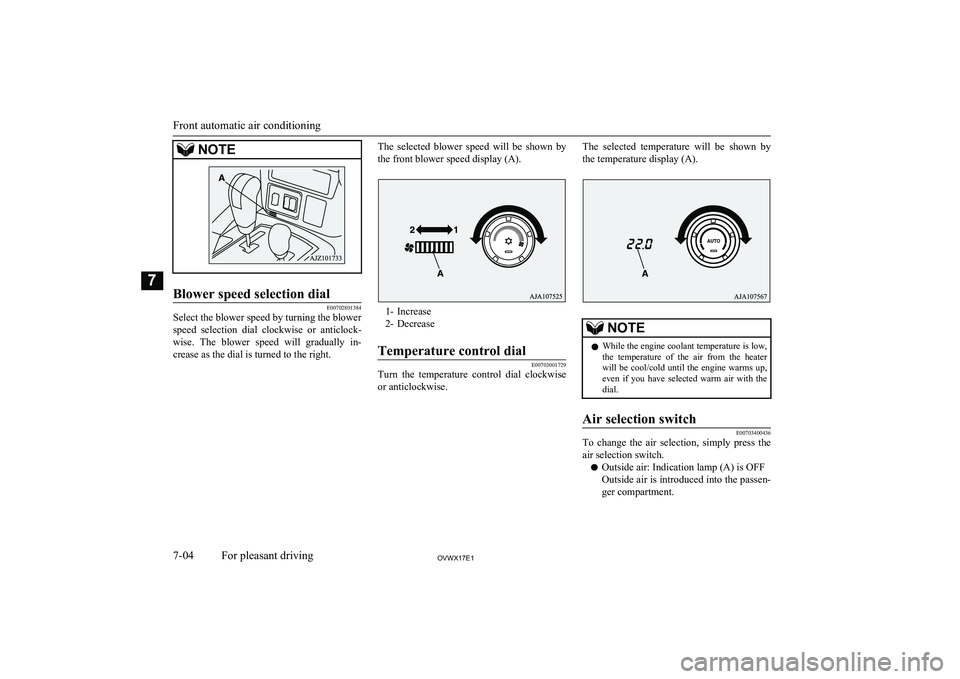
E00702801384
Select the blower speed by turning the blowerspeed selection dial clockwise or anticlock- wise. The blower speed will gradually in-
crease as the dial is turned to the right.
The selected blower speed will be shown by
the front blower speed display (A).
1- Increase
2- Decrease
Temperature control dial
E00703001729
Turn the temperature control dial clockwise or anticlockwise.
The selected temperature will be shown by
the temperature display (A).NOTEl While the engine coolant temperature is low,
the temperature of the air from the heaterwill be cool/cold until the engine warms up, even if you have selected warm air with the
dial.Air selection switch
E00703400436
To change the air selection, simply press the
air selection switch.
l Outside air: Indication lamp (A) is OFF
Outside air is introduced into the passen- ger compartment.
Front automatic air conditioning
7-04OVWX17E1For pleasant driving7
Page 212 of 394
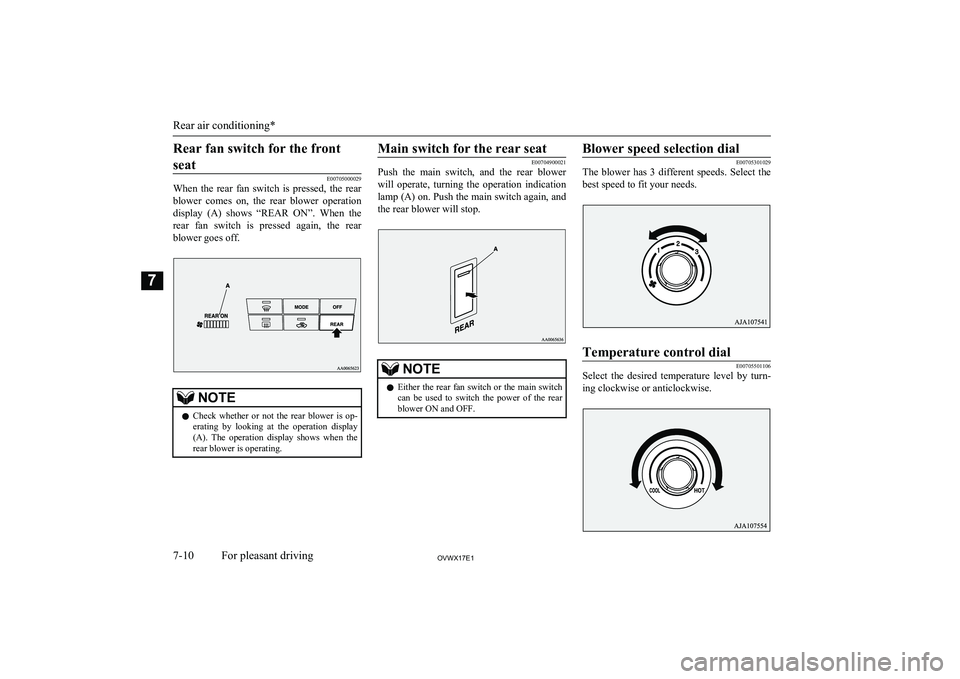
Rear fan switch for the frontseat
E00705000029
When the rear fan switch is pressed, the rear
blower comes on, the rear blower operation display (A) shows “REAR ON”. When the
rear fan switch is pressed again, the rear blower goes off.
NOTEl Check whether or not the rear blower is op-
erating by looking at the operation display
(A). The operation display shows when the rear blower is operating.Main switch for the rear seat
E00704900021
Push the main switch, and the rear blower
will operate, turning the operation indication
lamp (A) on. Push the main switch again, and the rear blower will stop.NOTEl Either the rear fan switch or the main switch
can be used to switch the power of the rear
blower ON and OFF.Blower speed selection dial
E00705301029
The blower has 3 different speeds. Select the
best speed to fit your needs.
Temperature control dial
E00705501106
Select the desired temperature level by turn-
ing clockwise or anticlockwise.
Rear air conditioning*
7-10OVWX17E1For pleasant driving7
Page 224 of 394
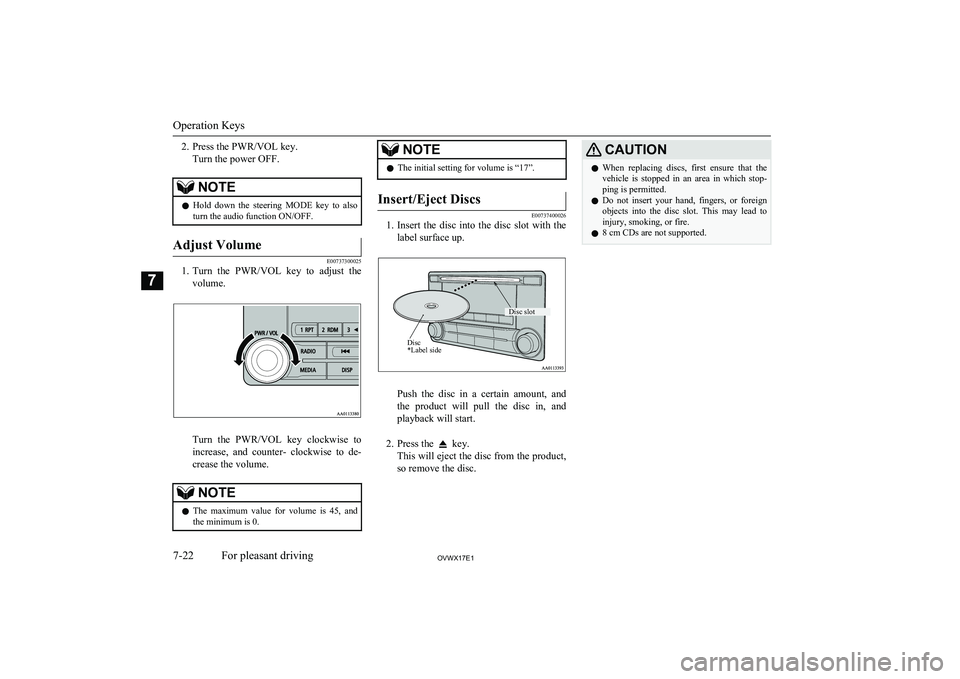
2. Press the PWR/VOL key.Turn the power OFF.NOTEl Hold down the steering MODE key to also
turn the audio function ON/OFF.Adjust Volume
E00737300025
1. Turn the PWR/VOL key to adjust the
volume.
Turn the PWR/VOL key clockwise toincrease, and counter- clockwise to de-
crease the volume.
NOTEl The maximum value for volume is 45, and
the minimum is 0.NOTEl The initial setting for volume is “17”.Insert/Eject Discs
E00737400026
1.
Insert the disc into the disc slot with the
label surface up.
Push the disc in a certain amount, and
the product will pull the disc in, and playback will start.
2. Press the
key.
This will eject the disc from the product,
so remove the disc.
CAUTIONl When replacing discs, first ensure that the
vehicle is stopped in an area in which stop-ping is permitted.
l Do not insert your hand, fingers, or foreign
objects into the disc slot. This may lead to injury, smoking, or fire.
l 8 cm CDs are not supported.
Operation Keys
7-22OVWX17E1For pleasant driving7 Disc *Label sideDisc slot
Page 227 of 394
NOTElThis switches in the order FM1, FM2, FM3,
DAB1*, DAB2*, DAB3*, MW, and LW. *:When a DAB tuner is connected.
Manual/Seek Station Selection
Turn the /SEL key to the frequency to lis-
ten to.
/SEL key
(counter-
clockwise)Reduces the frequency being
received./SEL key
(clockwise)Increases the frequency be-
ing received. key
(hold down)Release the button to start
seek station selection, and
when a station is received,
scanning stops. key
(hold down)
Preset Memory
Register the broadcast station in advance, and select this at a later time.
1. Tune in to the frequency to register.
2. Hold down any of the keys from the
1RPT key to the 6
key.
A “Beep” sounds, and the preset key is registered.NOTEl The preset memory can register a maximum
of 6 stations for each band (FM1, FM2,
FM3).
l If a preset key that already has a station reg-
istered is selected, then this is overwritten with the new preset.
l Pressing the preset key will select the previ-
ously registered frequency.
Auto Memory (Auto Store)
The top 6 stations with a strong signal can be
automatically registered in order with preset keys.
Hold down the RADIO key.
After completion of auto store operations, the
product will receive the station registered in
the preset key [1].
CAUTIONl Please be aware that the formerly-registered
frequency in the memory will be overwrit- ten.NOTEl Using auto store for FM1 and FM2 switches
to FM3.
PTY Search
Select PTY (program content), and automati-
cally scan for stations. 1. During FM reception, press the PTY/
SCAN key.
This switches to the PTY selection mode.
2. Turn the
/SEL key to select PTY.
The PTY (program content) indicator
will flash, and station selection will au- tomatically start. When a station is re-
ceived, the station name is displayed.
NOTEl This receives the station detected first.
l 10 seconds after reception, PTY search
mode will be cancelled.Listen to DAB*
E00739100014
This explains how to listen to DAB.
Listen to DAB*
7-25OVWX17E1For pleasant driving7