differential MITSUBISHI SHOGUN 2017 Owner's Manual (in English)
[x] Cancel search | Manufacturer: MITSUBISHI, Model Year: 2017, Model line: SHOGUN, Model: MITSUBISHI SHOGUN 2017Pages: 394, PDF Size: 19 MB
Page 6 of 394
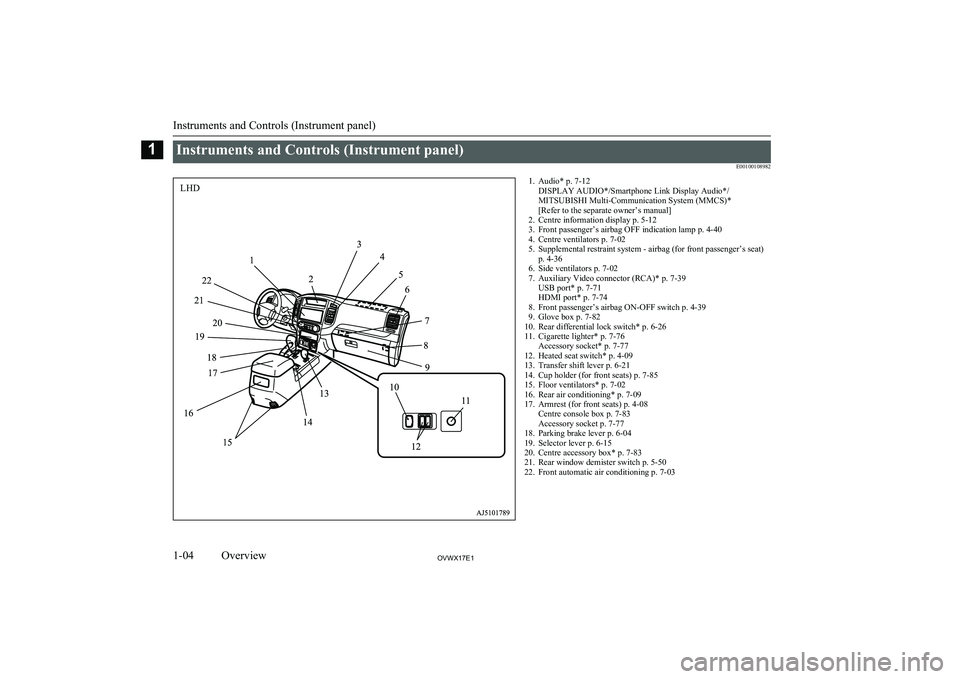
Instruments and Controls (Instrument panel)E001001089821. Audio* p. 7-12DISPLAY AUDIO*/Smartphone Link Display Audio*/
MITSUBISHI Multi-Communication System (MMCS)*
[Refer to the separate owner’s manual]
2. Centre information display p. 5-12
3. Front passenger’s airbag OFF indication lamp p. 4-40
4. Centre ventilators p. 7-02
5. Supplemental restraint system - airbag (for front passenger’s seat) p. 4-36
6. Side ventilators p. 7-02
7. Auxiliary Video connector (RCA)* p. 7-39 USB port* p. 7-71
HDMI port* p. 7-74
8. Front passenger’s airbag ON-OFF switch p. 4-39
9. Glove box p. 7-82
10. Rear differential lock switch* p. 6-26
11. Cigarette lighter* p. 7-76 Accessory socket* p. 7-77
12. Heated seat switch* p. 4-09
13. Transfer shift lever p. 6-21
14. Cup holder (for front seats) p. 7-85
15. Floor ventilators* p. 7-02
16. Rear air conditioning* p. 7-09
17. Armrest (for front seats) p. 4-08 Centre console box p. 7-83
Accessory socket p. 7-77
18. Parking brake lever p. 6-04
19. Selector lever p. 6-15
20. Centre accessory box* p. 7-83
21. Rear window demister switch p. 5-50
22. Front automatic air conditioning p. 7-03
Instruments and Controls (Instrument panel)
1-04OVWX17E1Overview1LHD
Page 7 of 394
![MITSUBISHI SHOGUN 2017 Owners Manual (in English) 1. Audio* p. 7-12DISPLAY AUDIO*/Smartphone Link Display Audio*/
MITSUBISHI Multi-Communication System (MMCS)*
[Refer to the separate owner’s manual]
2. Front automatic air conditioning p. 7-03
3. Re](/img/19/34886/w960_34886-6.png "MITSUBISHI SHOGUN 2017 Owners Manual (in English) 1. Audio* p. 7-12DISPLAY AUDIO*/Smartphone Link Display Audio*/
MITSUBISHI Multi-Communication System (MMCS)*
[Refer to the separate owner’s manual]
2. Front automatic air conditioning p. 7-03
3. Re")
1. Audio* p. 7-12DISPLAY AUDIO*/Smartphone Link Display Audio*/
MITSUBISHI Multi-Communication System (MMCS)*
[Refer to the separate owner’s manual]
2. Front automatic air conditioning p. 7-03
3. Rear window demister switch p. 5-50
4. Centre accessory box* p. 7-83
5. Selector lever p. 6-15
6. Parking brake lever p. 6-04
7. Armrest (for front seats) p. 4-08 Centre console box p. 7-83
Accessory socket p. 7-77
8. Rear air conditioning* p. 7-09
9. Floor ventilators* p. 7-02
10. Cup holder (for front seats) p. 7-85
11. Transfer shift lever p. 6-21
12. Cigarette lighter* p. 7-76 Accessory socket* p. 7-77
13. Heated seat switch* p. 4-09
14. Rear differential lock switch* p. 6-26
15. Glove box p. 7-82
16. Front passenger’s airbag ON-OFF switch p. 4-39
17. Auxiliary Video connector (RCA)* p. 7-39 USB port* p. 7-71
HDMI port* p. 7-74
18. Side ventilators p. 7-02
19. Supplemental restraint system - airbag (for front passenger’s seat) p. 4-36
20. Centre ventilators p. 7-02
21. Front passenger’s airbag OFF indication lamp p. 4-40
22. Centre information display p. 5-12
Instruments and Controls (Instrument panel)
1-05OVWX17E1Overview1RHD
Page 97 of 394
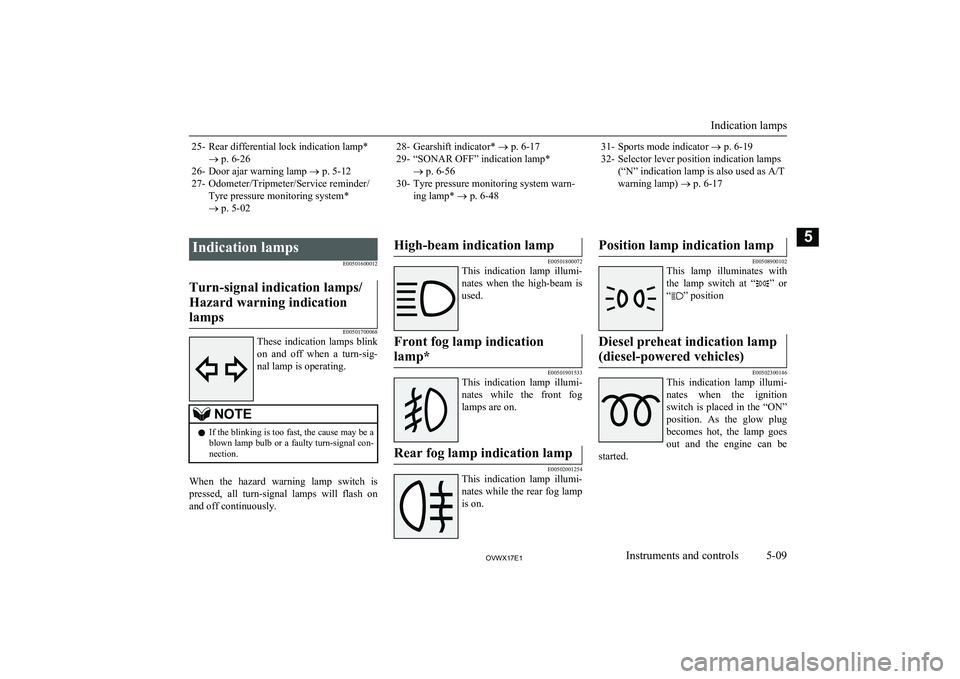
25- Rear differential lock indication lamp*® p. 6-26
26- Door ajar warning lamp ® p. 5-12
27- Odometer/Tripmeter/Service reminder/ Tyre pressure monitoring system*
® p. 5-0228- Gearshift indicator* ® p. 6-17
29- “SONAR OFF” indication lamp* ® p. 6-56
30- Tyre pressure monitoring system warn- ing lamp* ® p. 6-4831- Sports mode indicator ® p. 6-19
32- Selector lever position indication lamps (“N” indication lamp is also used as A/T
warning lamp) ® p. 6-17
Indication lamps
E00501600012Turn-signal indication lamps/
Hazard warning indication lamps
E00501700068
These indication lamps blink
on and off when a turn-sig-
nal lamp is operating.
NOTEl If the blinking is too fast, the cause may be a
blown lamp bulb or a faulty turn-signal con-
nection.
When the hazard warning lamp switch is
pressed, all turn-signal lamps will flash on and off continuously.
High-beam indication lamp
E00501800072
This indication lamp illumi-
nates when the high-beam is used.
Front fog lamp indication
lamp*
E00501901533
This indication lamp illumi-
nates while the front fog lamps are on.
Rear fog lamp indication lamp
E00502001254
This indication lamp illumi-
nates while the rear fog lamp is on.
Position lamp indication lamp
E00508900102
This lamp illuminates with
the lamp switch at “
” or
“
” position
Diesel preheat indication lamp
(diesel-powered vehicles)
E00502300146
This indication lamp illumi-
nates when the ignition
switch is placed in the “ON”
position. As the glow plug becomes hot, the lamp goes
out and the engine can be
started.
Indication lamps
5-09OVWX17E1Instruments and controls5
Page 139 of 394
Economical driving............................................................................. 6-02
Driving, alcohol and drugs.................................................................. 6-02
Safe driving techniques....................................................................... 6-03
Running-in recommendations............................................................. 6-04 Parking brake...................................................................................... 6-04
Parking................................................................................................ 6-05
Steering wheel height adjustment....................................................... 6-06
Inside rear-view mirror....................................................................... 6-07 Outside rear-view mirrors................................................................... 6-08
Ignition switch.....................................................................................6-10 Steering wheel lock............................................................................. 6-12
Starting................................................................................................ 6-12 NOx trap catalyst (dieselpowered vehicles)*......................................6-14
Diesel particulate filter (DPF)*........................................................... 6-14 Automatic transmission INVECS-II Sports Mode 5A/T (Intelligent & Innovative Vehicle Electronic Control System II)...6-15
Super select 4WD II (SS4 II).............................................................. 6-21
Rear differential lock*........................................................................ 6-26 4-wheel drive operation...................................................................... 6-30
Inspection and maintenance following rough road operation............. 6-33
Cautions on handling of 4-wheel drive vehicles................................. 6-33
Braking................................................................................................ 6-35
Brake assist system............................................................................. 6-36
Anti-lock brake system (ABS)............................................................ 6-37
Power steering system.........................................................................6-39
Active stability & traction control (ASTC).........................................6-40
Cruise control*.................................................................................... 6-44
Tyre pressure monitoring system (TPMS)*........................................ 6-48 Reversing sensor system*................................................................... 6-52Rear-view camera*............................................................................. 6-56
Cargo loads......................................................................................... 6-59Trailer towing......................................................................................6-60Starting and driving
OVWX17E16
Page 160 of 394
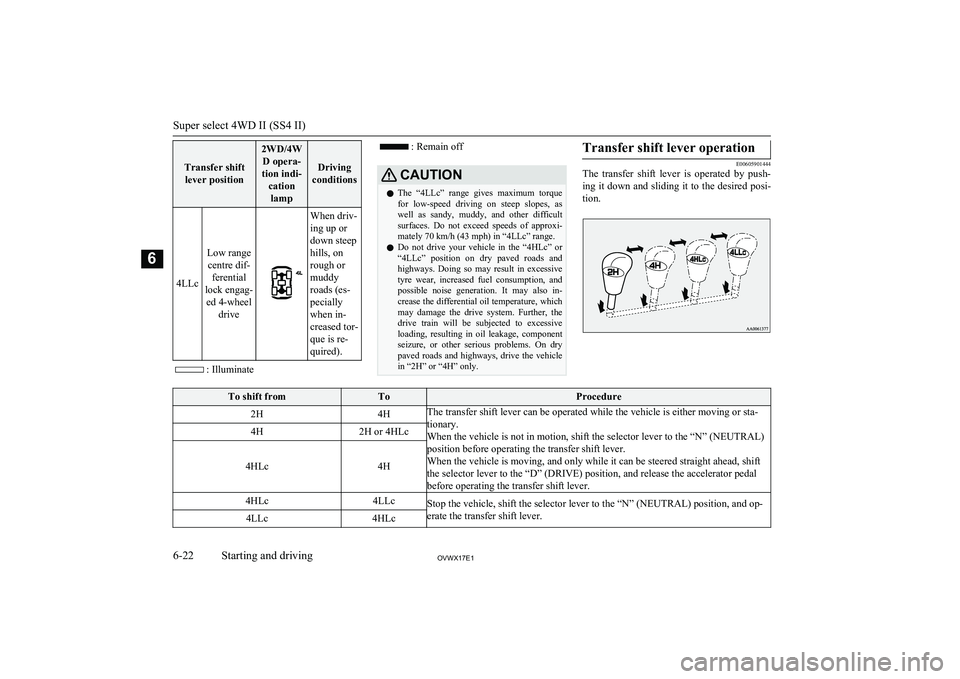
Transfer shiftlever position
2WD/4W D opera-
tion indi- cationlamp
Driving
conditions
4LLc
Low range centre dif- ferential
lock engag- ed 4-wheel drive
When driv-
ing up or
down steep
hills, on
rough or
muddy
roads (es-
pecially
when in-
creased tor-
que is re-
quired).
: Illuminate
: Remain offCAUTIONl The “4LLc” range gives maximum torque
for low-speed driving on steep slopes, as
well as sandy, muddy, and other difficult
surfaces. Do not exceed speeds of approxi-
mately 70 km/h (43 mph) in “4LLc” range.
l Do not drive your vehicle in the “4HLc” or
“4LLc” position on dry paved roads and
highways. Doing so may result in excessive tyre wear, increased fuel consumption, and
possible noise generation. It may also in-
crease the differential oil temperature, which may damage the drive system. Further, thedrive train will be subjected to excessive
loading, resulting in oil leakage, component
seizure, or other serious problems. On dry
paved roads and highways, drive the vehicle
in “2H” or “4H” only.Transfer shift lever operation
E00605901444
The transfer shift lever is operated by push-
ing it down and sliding it to the desired posi-
tion.
To shift fromToProcedure2H4HThe transfer shift lever can be operated while the vehicle is either moving or sta-
tionary.
When the vehicle is not in motion, shift the selector lever to the “N” (NEUTRAL) position before operating the transfer shift lever.
When the vehicle is moving, and only while it can be steered straight ahead, shift
the selector lever to the “D” (DRIVE) position, and release the accelerator pedal before operating the transfer shift lever.4H2H or 4HLc
4HLc4H
4HLc4LLcStop the vehicle, shift the selector lever to the “N” (NEUTRAL) position, and op-
erate the transfer shift lever.4LLc4HLc
Super select 4WD II (SS4 II)
6-22OVWX17E1Starting and driving6
Page 161 of 394
NOTElShifting of the lever among “2H” ↔ “4H”
↔ “4HLc” should only be done at speedsbelow 100 km/h (62 mph).
l When shifting from “2H” to “4H” in cold
weather while the vehicle is in motion, the transmission gear may make some noise. In
cold weather, try to shift the gear while the
vehicle is stopped.
l When the lever is shifted between “2H” ↔
“4H” or “4H” ↔ “4HLc” while the vehicle is stopped, the 2WD/4WD operation indica-
tion lamp blinks while the selection is in process. Drive slowly and normally after
confirming that the lamp is illuminated. Re- fer to “2WD/4WD operation indicationlamp” on page 6-23.
l Do not move the selector lever while the
2WD/4WD operation indication lamp isblinking.
l On vehicles with cruise control, when the
lever is shifted among “2H” ↔ “4H” ↔
“4HLc” while the cruise control is activated,
the transfer gear may make some noise.CAUTIONl Do not operate the transfer shift lever while
the rear wheels of the vehicle are slipping on snow or ice.2WD/4WD operation indica-
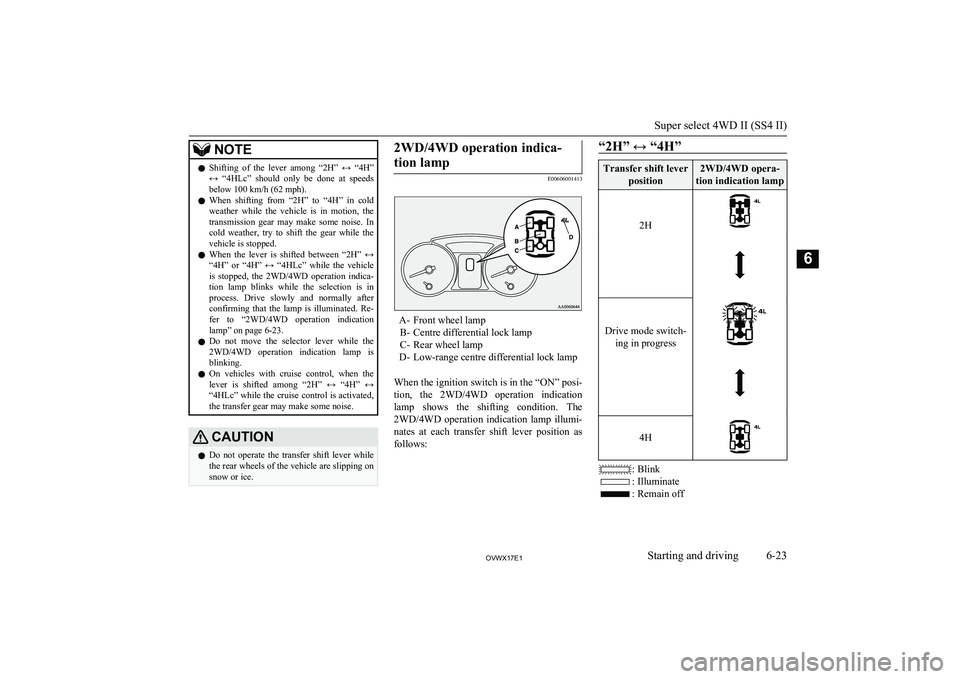
tion lamp
E00606001413
A- Front wheel lamp B- Centre differential lock lamp
C- Rear wheel lamp
D- Low-range centre differential lock lamp
When the ignition switch is in the “ON” posi-
tion, the 2WD/4WD operation indication lamp shows the shifting condition. The 2WD/4WD operation indication lamp illumi-
nates at each transfer shift lever position as follows:
“2H” ↔ “4H”Transfer shift lever
position2WD/4WD opera-
tion indication lamp
2H Drive mode switch- ing in progress 4H
: Blink
: Illuminate
: Remain off
Super select 4WD II (SS4 II)
6-23OVWX17E1Starting and driving6
Page 163 of 394
NOTElThe 2WD/4WD operation indication lamp
blinks while the selection is in process. Takethe following precautions when the indica-tion lamp is blinking.
• Keep the steering wheel in the straight
ahead position while making range selec- tions. If you attempt to drive forward with
the steering wheel turned, gear rattling may occur and the desired range may notactually be selected.
• If the front wheel and/or centre differen-
tial lock lamps continue blinking after a“2H” ↔ “4H” ↔ “4HLc” selection has
been made with the vehicle moving, hold the steering wheel in the straight ahead
position and slowly depress the accelera-
tor pedal several times.
• If, after a “4HLc” ↔ “4LLc” selection
has been made, the front and rear wheel
lamps continue blinking and the desired range is not actually selected, return the
transfer shift lever to its previous position.
Place the steering wheel in the straight
ahead position, drive the vehicle forward, and release the accelerator pedal. Next,
place the selector lever in the “N” (NEU- TRAL) position and make the range se-
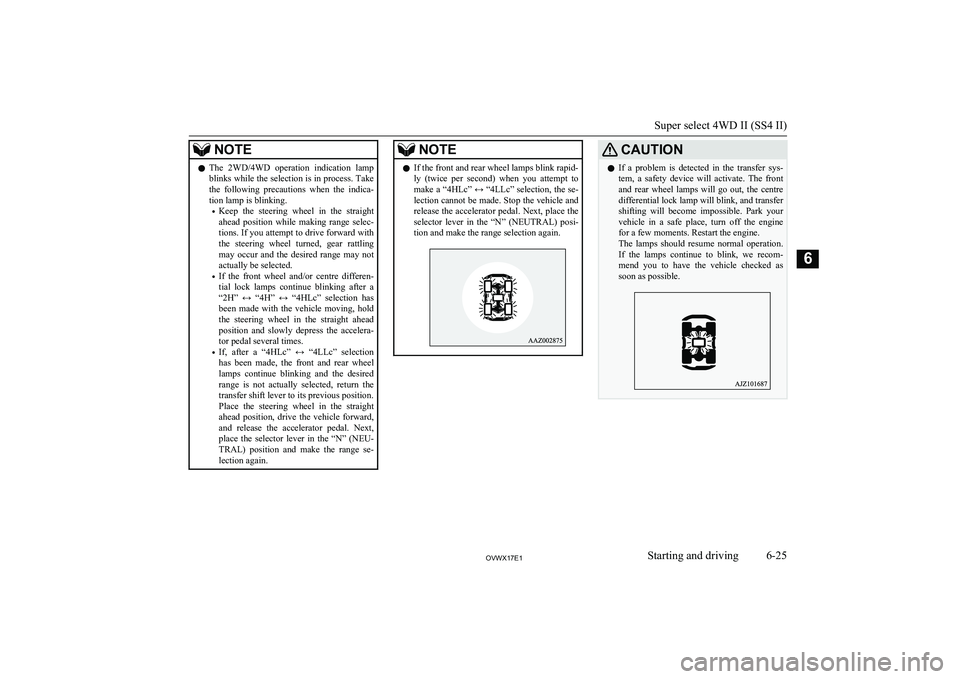
lection again.NOTEl If the front and rear wheel lamps blink rapid-
ly (twice per second) when you attempt to make a “4HLc” ↔ “4LLc” selection, the se- lection cannot be made. Stop the vehicle and
release the accelerator pedal. Next, place the selector lever in the “N” (NEUTRAL) posi-
tion and make the range selection again.CAUTIONl If a problem is detected in the transfer sys-
tem, a safety device will activate. The front and rear wheel lamps will go out, the centre
differential lock lamp will blink, and transfer shifting will become impossible. Park your vehicle in a safe place, turn off the engine
for a few moments. Restart the engine.
The lamps should resume normal operation. If the lamps continue to blink, we recom-
mend you to have the vehicle checked as soon as possible.
Super select 4WD II (SS4 II)
6-25OVWX17E1Starting and driving6
Page 164 of 394
Rear differential lock*E00606200043
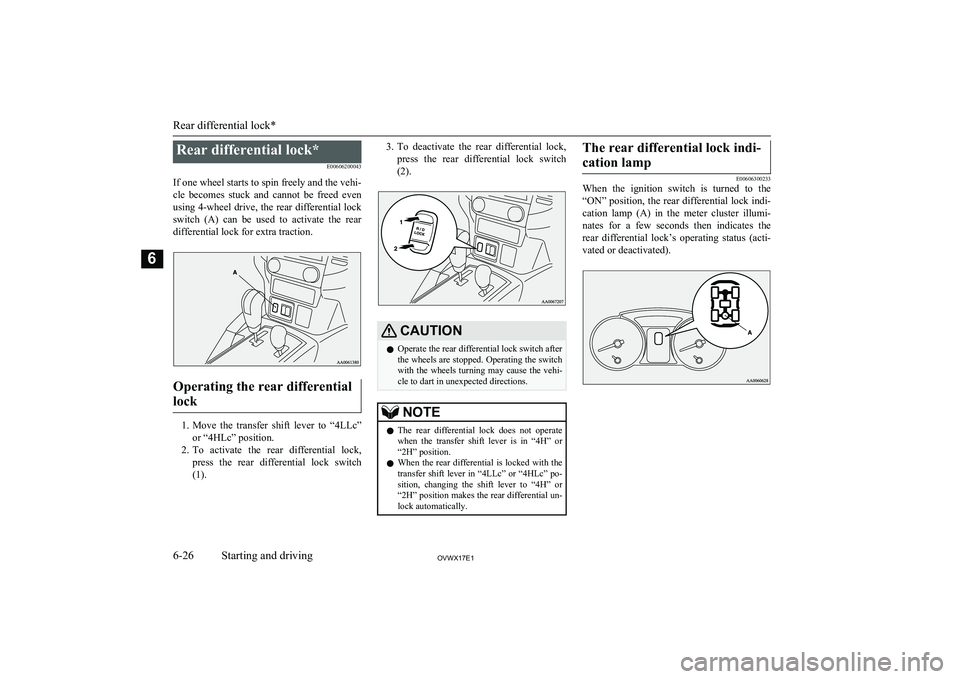
If one wheel starts to spin freely and the vehi-
cle becomes stuck and cannot be freed even using 4-wheel drive, the rear differential lock
switch (A) can be used to activate the rear differential lock for extra traction.
Operating the rear differential
lock
1. Move the transfer shift lever to “4LLc”
or “4HLc” position.
2. To activate the rear differential lock,
press the rear differential lock switch
(1).
3. To deactivate the rear differential lock,
press the rear differential lock switch
(2).CAUTIONl Operate the rear differential lock switch after
the wheels are stopped. Operating the switch
with the wheels turning may cause the vehi- cle to dart in unexpected directions.NOTEl The rear differential lock does not operate
when the transfer shift lever is in “4H” or
“2H” position.
l When the rear differential is locked with the
transfer shift lever in “4LLc” or “4HLc” po- sition, changing the shift lever to “4H” or“2H” position makes the rear differential un- lock automatically.The rear differential lock indi-
cation lamp
E00606300233
When the ignition switch is turned to the
“ON” position, the rear differential lock indi- cation lamp (A) in the meter cluster illumi-nates for a few seconds then indicates the
rear differential lock’s operating status (acti-
vated or deactivated).Rear differential lock*
6-26OVWX17E1Starting and driving6
Page 165 of 394
NOTElThe 2WD/4WD operation indication lamp
also illuminates for a few seconds when the
ignition switch is turned to the “ON” posi- tion.
Refer to “2WD/4WD operation indication
lamp” on page 6-23.
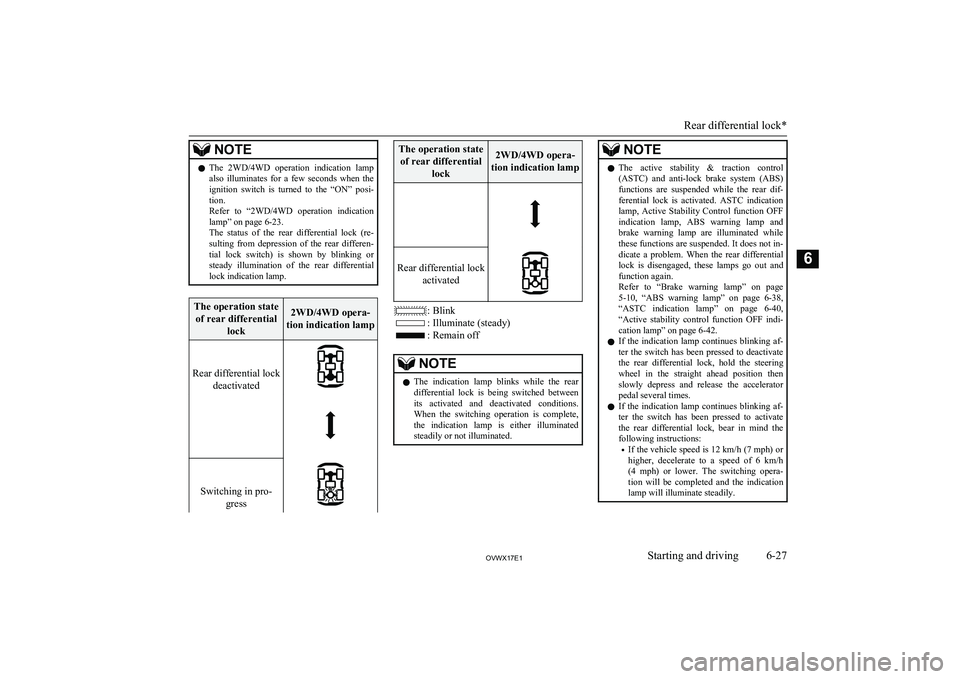
The status of the rear differential lock (re- sulting from depression of the rear differen-
tial lock switch) is shown by blinking or steady illumination of the rear differential
lock indication lamp.The operation state
of rear differential lock2WD/4WD opera-
tion indication lamp
Rear differential lock deactivated Switching in pro- gress
The operation stateof rear differential lock2WD/4WD opera-
tion indication lamp
Rear differential lock activated
: Blink
: Illuminate (steady)
: Remain off
NOTElThe indication lamp blinks while the rear
differential lock is being switched between
its activated and deactivated conditions. When the switching operation is complete,
the indication lamp is either illuminated steadily or not illuminated.NOTEl The active stability & traction control
(ASTC) and anti-lock brake system (ABS)
functions are suspended while the rear dif- ferential lock is activated. ASTC indication
lamp, Active Stability Control function OFF indication lamp, ABS warning lamp and
brake warning lamp are illuminated while
these functions are suspended. It does not in- dicate a problem. When the rear differential lock is disengaged, these lamps go out and
function again.
Refer to “Brake warning lamp” on page
5-10 , “ABS warning lamp” on page 6-38,
“ASTC indication lamp” on page 6-40,
“Active stability control function OFF indi- cation lamp” on page 6-42.
l If the indication lamp continues blinking af-
ter the switch has been pressed to deactivate the rear differential lock, hold the steering
wheel in the straight ahead position then
slowly depress and release the accelerator pedal several times.
l If the indication lamp continues blinking af-
ter the switch has been pressed to activate the rear differential lock, bear in mind thefollowing instructions:
• If the vehicle speed is
12 km/h (7 mph) or
higher, decelerate to a speed of 6 km/h (4 mph) or lower. The switching opera-tion will be completed and the indication lamp will illuminate steadily.
Rear differential lock*
6-27OVWX17E1Starting and driving6
Page 166 of 394
NOTE•If the vehicle speed is
12 km/h (7 mph) or
lower, turn the steering wheel from side to
side until the indication lamp illuminates steadily. If the vehicle is stuck in softground, make sure the area around the ve-
hicle is clear then repeatedly attempt to
drive forward and backward. The switch- ing operation will be completed and the
indication lamp will illuminate steadily.CAUTIONl If a problem is detected in the rear differen-
tial lock system, a safety device will acti- vate. The centre differential lock lamp, front and rear wheel lamps will go out, the reardifferential lock indication lamp will blink,
and the rear differential lock will deactivate.
Park your vehicle in a safe place, turn off the engine for a few moments. Restart the en-gine.
It is safe to continue driving if the lamps re- sume normal operation. If the rear differen-
tial lock indication lamp blinks when the rear differential lock is reactivated, we rec-
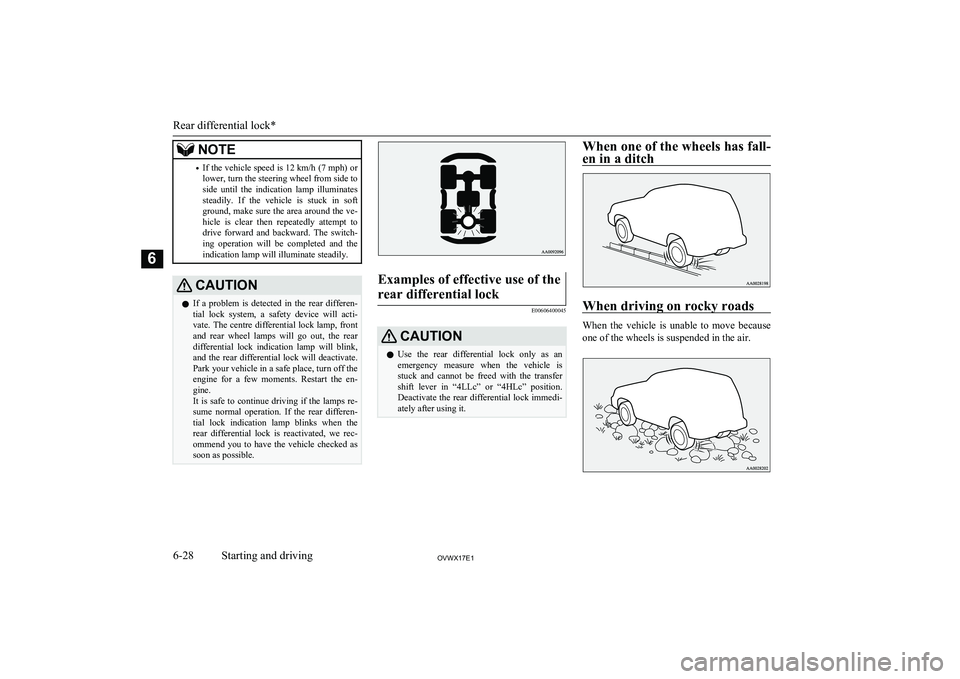
ommend you to have the vehicle checked as soon as possible.Examples of effective use of the
rear differential lock
E00606400045
CAUTIONl Use the rear differential lock only as an
emergency measure when the vehicle is stuck and cannot be freed with the transfer
shift lever in “4LLc” or “4HLc” position.
Deactivate the rear differential lock immedi- ately after using it.When one of the wheels has fall-
en in a ditch
When driving on rocky roads
When the vehicle is unable to move because
one of the wheels is suspended in the air.
Rear differential lock*
6-28OVWX17E1Starting and driving6