light MITSUBISHI TRITON 2011 Owner's Manual
[x] Cancel search | Manufacturer: MITSUBISHI, Model Year: 2011, Model line: TRITON, Model: MITSUBISHI TRITON 2011Pages: 369, PDF Size: 26.15 MB
Page 116 of 369
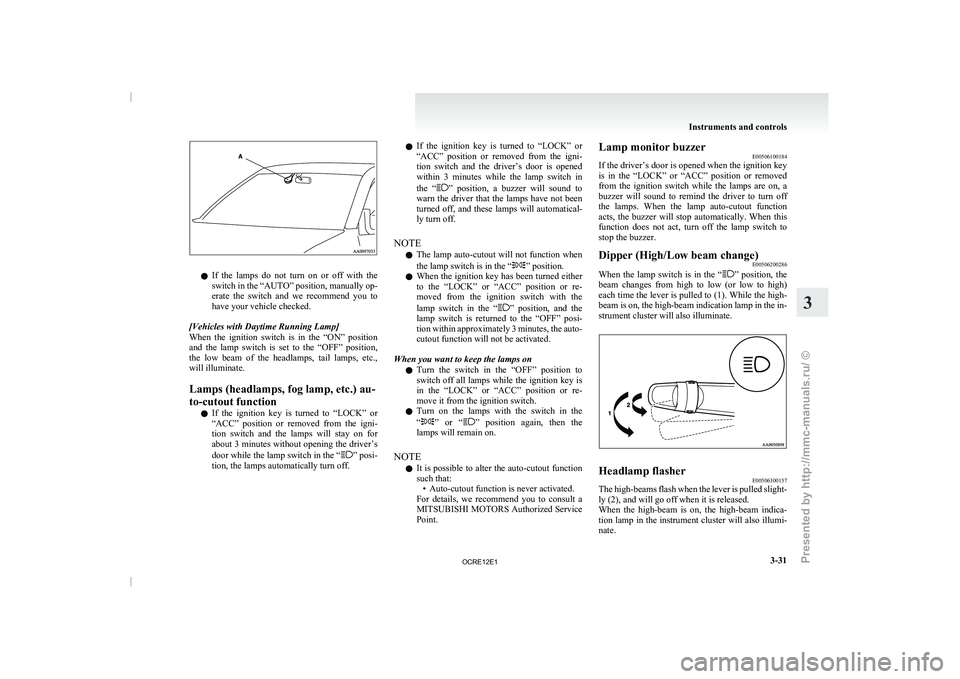
l
If the lamps do
not turn on or off with the
switch in the “AUTO” position, manually op-
erate the switch and we recommend you to
have your vehicle checked.
[Vehicles with Daytime Running Lamp]
When the ignition switch is in the “ON” position
and the lamp switch is set to the “OFF” position,
the low beam of the headlamps, tail lamps, etc.,
will illuminate.
Lamps (headlamps, fog lamp, etc.) au-
to-cutout function l If the ignition key is turned to “LOCK” or
“ACC” position or removed from the igni-
tion switch and the lamps will stay on for
about 3 minutes without opening the driver’s
door while the lamp switch in the “ ” posi-
tion, the lamps automatically turn off. l
If the ignition key
is
turned to “LOCK” or
“ACC” position or removed from the igni-
tion switch and the driver’s door is opened
within 3 minutes while the lamp switch in
the “ ” position, a buzzer will sound to
warn the driver that
the lamps have not been
turned off, and these lamps will automatical-
ly turn off.
NOTE l The lamp auto-cutout will not function when
the lamp switch is in the “ ” position.
l When the ignition key
has
been turned either
to the “LOCK” or “ACC” position or re-
moved from the ignition switch with the
lamp switch in the “ ” position, and the
lamp switch is returned
to the “OFF” posi-
tion within approximately 3 minutes, the auto-
cutout function will not be activated.
When you want to keep the lamps on l Turn the switch in the “OFF” position to
switch off all lamps while the ignition key is
in the “LOCK” or “ACC” position or re-
move it from the ignition switch.
l Turn on the lamps with the switch in the
“ ” or “ ” position again, then the
lamps will remain on.
NOTE l It is possible
to
alter the auto-cutout function
such that: • Auto-cutout function is never activated.
For details, we recommend you to consult a
MITSUBISHI MOTORS Authorized Service
Point. Lamp monitor buzzer
E00506100184
If the driver’s door is
opened when the ignition key
is in the “LOCK” or “ACC” position or removed
from the ignition switch while the lamps are on, a
buzzer will sound to remind the driver to turn off
the lamps. When the lamp auto-cutout function
acts, the buzzer will stop automatically. When this
function does not act, turn off the lamp switch to
stop the buzzer.
Dipper (High/Low beam change) E00506200286
When the lamp switch is in the “ ” position, the
beam changes from high
to low (or low to high)
each time the lever is pulled to (1). While the high-
beam is on, the high-beam indication lamp in the in-
strument cluster will also illuminate. Headlamp flasher
E00506300157
The high-beams flash when the lever is pulled slight-
ly (2), and will go off when it is released.
When the high-beam is on,
the high-beam indica-
tion lamp in the instrument cluster will also illumi-
nate. Instruments and controls
3-31 3
OCRE12E1
Presented by http://mmc-manuals.ru/ \251
Page 118 of 369
Switch position 0- Driver only
Switch position 3- Driver + Full luggage load-
ing
{Vehicles with heavy duty
suspension}
Switch position 4- Driver
+ Full luggage load-
ing
{Vehicles without heavy du-
ty suspension}
Double cab Vehicle condi-
tion Switch position “0”
“2” or “3” or
“4” ●: 1 person
: Full luggage loading Switch position 0- Driver only
Switch position 2- Driver + Full luggage load-
ing
{Vehicles with heavy duty
suspension for
Russia, Ka-
zakhstan and Ukraine}
Switch position 3- Driver + Full luggage load- ing
{Vehicles with heavy duty
suspension except
for Rus-
sia, Kazakhstan and Uk-
raine}
{Vehicles without heavy du-
ty suspension for Russia,
Kazakhstan and Ukraine}
Switch position 4- Driver + Full luggage load- ing
{Vehicles without heavy du-
ty suspension
except for
Russia, Kazakhstan and Uk-
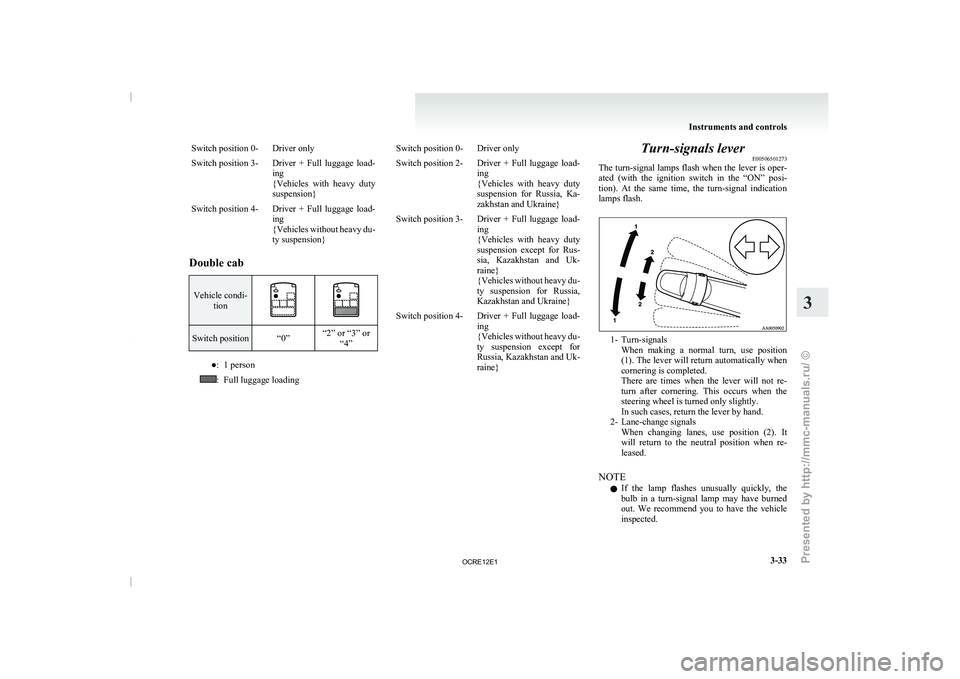
raine} Turn-signals lever
E00506501273
The turn-signal lamps flash when
the lever is oper-
ated (with the ignition switch in the “ON” posi-
tion). At the same time, the turn-signal indication
lamps flash. 1- Turn-signals
When making a normal turn,
use position
(1). The lever will return automatically when
cornering is completed.
There are times when the lever will not re-
turn after cornering. This occurs when the
steering wheel is turned only slightly.
In such cases, return the lever by hand.
2- Lane-change signals When changing lanes, use position (2). It
will return to the neutral position when re-
leased.
NOTE l If the lamp flashes unusually quickly, the
bulb in a turn-signal lamp may have burned
out. We recommend you to have the vehicle
inspected. Instruments and controls
3-33 3
OCRE12E1
Presented by http://mmc-manuals.ru/ \251
Page 119 of 369
l
It is possible to
activate the following func-
tions. For further information, we recom-
mend you to consult a MITSUBISHI
MOTORS Authorized Service Point. • Flashing of the turn-signal lamps and theindication lamp in the instrument cluster
when the lever is operated with the igni-
tion switch in the “ACC” position
• Flashing of the turn-signal lamps and the indication lamp in the instrument cluster
three times when you move the lever to
(2) slightly then release it
• The time required to operate the lever for the 3-flash function can be adjusted. Hazard warning flasher switch
E00506600903
Use the hazard warning flasher
switch when the ve-
hicle has to be parked on the road for any emergency.
The hazard warning flashers can always be operat-
ed, regardless of the position of the ignition key.
Push the switch to turn on the hazard warning flash-
ers; push the switch again to turn them off.
When this switch is operated, all turn-signal lamps
flash continuously, as do the turn-signal indication
lamps in the instrument cluster. NOTE
l If
the lamps are kept
flashing for a long time,
the battery will be discharged, resulting in
hard engine starting or no start condition.
l If the lamp flashes unusually quickly, the
bulb in a turn-signal lamp may have burned
out.
We recommend you to have the vehicle in-
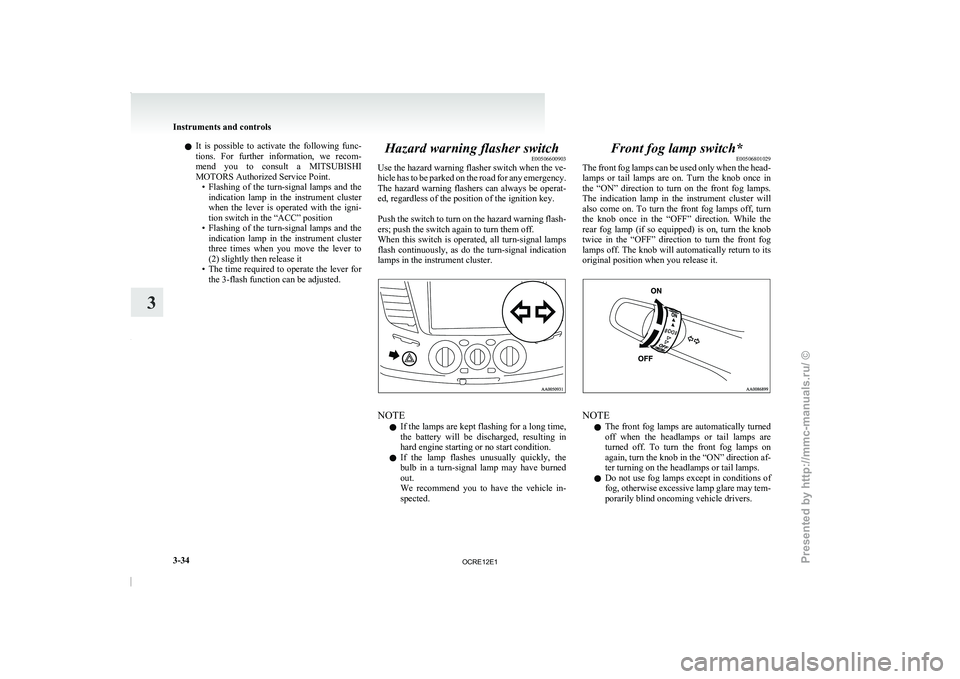
spected. Front fog lamp switch*
E00506801029
The front fog lamps
can
be used only when the head-
lamps or tail lamps are on. Turn the knob once in
the “ON” direction to turn on the front fog lamps.
The indication lamp in the instrument cluster will
also come on. To turn the front fog lamps off, turn
the knob once in the “OFF” direction. While the
rear fog lamp (if so equipped) is on, turn the knob
twice in the “OFF” direction to turn the front fog
lamps off. The knob will automatically return to its
original position when you release it. NOTE
l The
front fog lamps are
automatically turned
off when the headlamps or tail lamps are
turned off. To turn the front fog lamps on
again, turn the knob in the “ON” direction af-
ter turning on the headlamps or tail lamps.
l Do not use fog lamps except in conditions of
fog, otherwise excessive lamp glare may tem-
porarily blind oncoming vehicle drivers. Instruments and controls
3-34
3
OCRE12E1
Presented by http://mmc-manuals.ru/ \251
Page 123 of 369
Have the vehicle inspected at a
MITSUBISHI MOTORS Authorized Service
Point.
•
When the wipers operate at a constant in-terval despite changes in the extent of rain.
• When the wipers do not operate even though it is raining.
l The wipers may automatically operate when
things such as insects or foreign objects are
affixed to the windscreen on top of the rain
sensor or when the windscreen is frozen. Ob-
jects affixed to the windscreen will stop the
wipers when the wipers cannot remove them.
To make the wipers operate again, place the
lever in the “LO” or “HI” position.
Also, the wipers may operate automatically
due to strong direct sunlight or electromag-
netic wave. To stop the wipers, place the lev-
er in the “OFF” position.
l Contact a MITSUBISHI MOTORS Author-
ized Service Point when replacing the wind-
screen or reinforcing the glass around the sen-
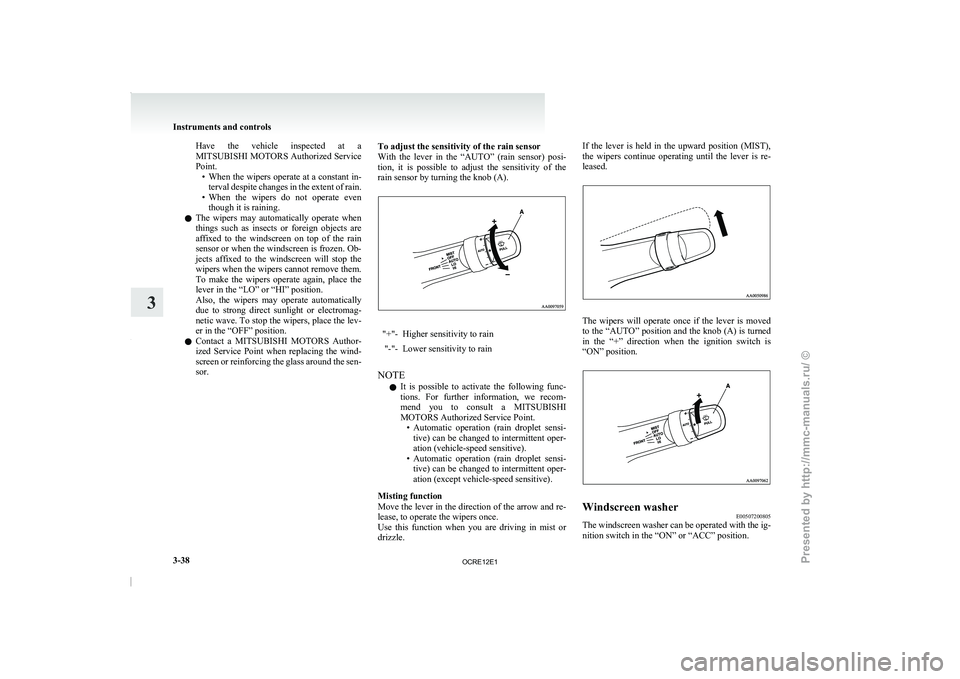
sor. To adjust the sensitivity of the rain sensor
With the lever in the
“AUTO” (rain sensor) posi-
tion, it is possible to adjust the sensitivity of the
rain sensor by turning the knob (A). "+"- Higher sensitivity to rain
"-"- Lower sensitivity to rain
NOTE l It
is possible to activate
the following func-
tions. For further information, we recom-
mend you to consult a MITSUBISHI
MOTORS Authorized Service Point. • Automatic operation (rain droplet sensi-tive) can be changed to intermittent oper-
ation (vehicle-speed sensitive).
• Automatic operation (rain droplet sensi- tive) can be changed to intermittent oper-
ation (except vehicle-speed sensitive).
Misting function
Move the lever in the direction of the arrow and re-
lease, to operate the wipers once.
Use this function when you are driving in mist or
drizzle. If the lever is held in the upward position (MIST),
the wipers continue operating until
the lever is re-
leased. The wipers will operate once if the lever is moved
to the “AUTO” position and
the knob (A) is turned
in the “+” direction when the ignition switch is
“ON” position. Windscreen washer
E00507200805
The windscreen washer can be operated with the ig-
nition switch in the “ON” or “ACC” position. Instruments and controls
3-38
3
OCRE12E1
Presented by http://mmc-manuals.ru/ \251
Page 127 of 369
Economical driving
E00600100620
For economical driving, there are
some technical re-
quirements that have to be met. The prerequisite
for low fuel consumption is a properly adjusted en-
gine. In order to achieve longer life of the vehicle
and the most economical operation, we recommend
you to have the vehicle checked at regular intervals
in accordance with the service standards.
Fuel economy and generation of exhaust gas and
noise are highly influenced by personal driving hab-
its as well as the particular operating conditions.
The following points should be observed in order
to minimize wear of brakes, tyres and engine as
well as to reduce environmental pollution.
Starting
Avoid rapid acceleration and sudden starts; such op-
eration will result in higher fuel consumption.
Shifting
Shift only at an appropriate speed and engine
speed. Always use the highest gear possible.
The transfer shift lever should be set to “2H” when
driving 4WD vehicles on normal roads and express
ways to obtain best possible fuel economy.
City traffic
Frequent starting and stopping increases the aver-
age fuel consumption. Use roads with smooth traf-
fic flow whenever possible. When driving on con-
gested roads, avoid use of a low gear at high en-
gine speeds.
Idling
The vehicle consumes fuel even during idling.
Avoid extended idling whenever possible. Speed
The higher the vehicle
speed,
the more fuel con-
sumed. Avoid driving at full speed. Even a slight re-
lease of the accelerator pedal will save a significant
amount of fuel.
Tyre inflation pressure
Check the tyre inflation pressures at regular inter-
vals. Low tyre inflation pressure increases road re-
sistance and fuel consumption. In addition, low
tyre pressures adversely affect tyre wear and driv-
ing stability.
Load
Do not drive with unnecessary articles in the cargo
area. Especially during city driving where frequent
starting and stopping is necessary, the increased
weight of the vehicle will greatly affect fuel con-
sumption.
Cold engine starting
Starting of a cold engine consumes more fuel.
Unnecessary fuel consumption is also caused by
keeping a hot engine running. After the engine is
started, commence driving as soon as possible.
Air conditioning*
The use of the air conditioning will increase the
fuel consumption. Driving, alcohol and drugs
E00600200012
Driving after drinking alcohol is
one of the most fre-
quent causes of accidents.
Your driving ability can be seriously impaired even
with blood alcohol levels far below the legal mini-
mum. If you have been drinking, don’t drive. Ride
with a designated non-drinking driver, call a cab or
a friend, or use public transportation.
Drinking coffee or taking a cold shower will not
make you sober.
Similarly, prescription and nonprescription drugs af-
fect your alertness, perception and reaction time.
Consult with your doctor or pharmacist before driv-
ing while under the influence of any of these medi-
cations. WARNING
l NEVER DRINK AND DRIVE.
Your perceptions are less
accurate,
your
reflexes are slower and your judgment is
impaired. Starting and driving
4-02
4
OCRE12E1
Presented by http://mmc-manuals.ru/ \251
Page 132 of 369
Parking brake
E00600501562
To park the vehicle, first
bring it to a complete
stop, fully engage the parking brake, and then
move the gearshift lever to 1 st
(on an uphill) or Re-
verse (on a downhill) position for vehicles with man-
ual transmission or set the selector lever to “P”
(PARK) position on automatic transmission vehi-
cles. CAUTION
l
Before driving, be sure
that
the parking
brake is fully released and brake warning
lamp is off.
If a vehicle is driven without releasing the
parking brake, the brake will be overhea-
ted, resulting in ineffective braking and
possible brake failure.
l When you intend to apply the parking
brake, firmly press the brake pedal to
bring the vehicle to a complete stop be-
fore pulling the parking brake lever. Pull-
ing the parking brake lever with the vehi-
cle moving could make the rear wheels
lock up, thereby making the vehicle unsta-
ble. It could also make the parking brake
malfunction.
l If the brake warning lamp does not extin-
guish when the parking brake is fully re-
leased, the brake system may be abnormal.
Have your vehicle checked immediately.
For details, refer to “Brake warning
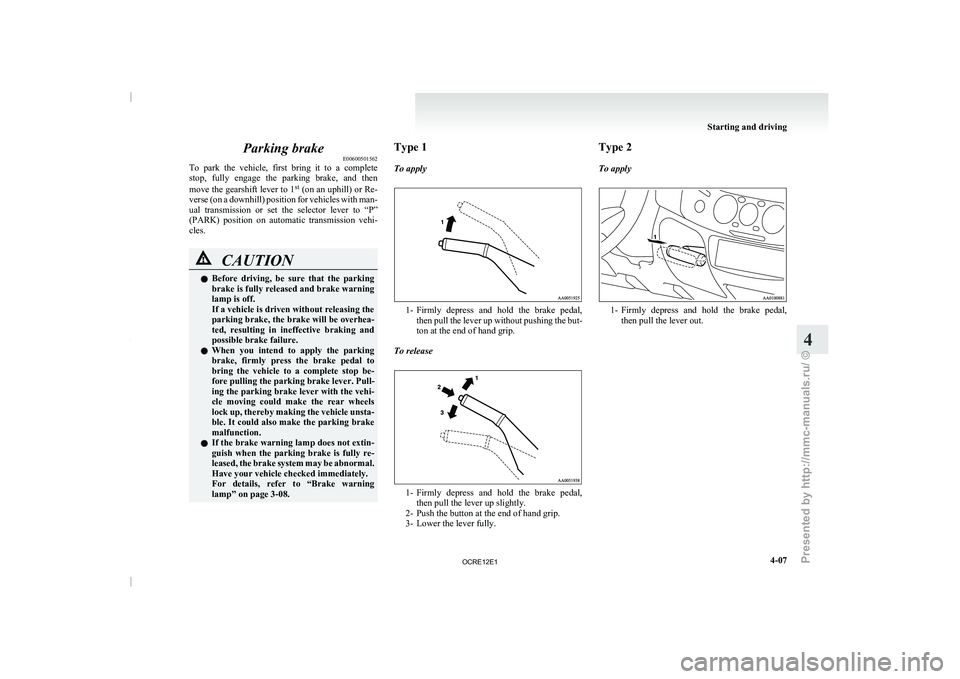
lamp” on page 3-08. Type 1
To apply
1- Firmly depress and hold the brake pedal,
then pull the lever
up without pushing the but-
ton at the end of hand grip.
To release 1- Firmly depress and hold the brake pedal,
then pull the lever up slightly.
2- Push the button at the end of hand grip.
3- Lower the lever fully. Type 2
To apply
1- Firmly depress and hold the brake pedal,
then pull the lever out. Starting and driving
4-07 4
OCRE12E1
Presented by http://mmc-manuals.ru/ \251
Page 133 of 369
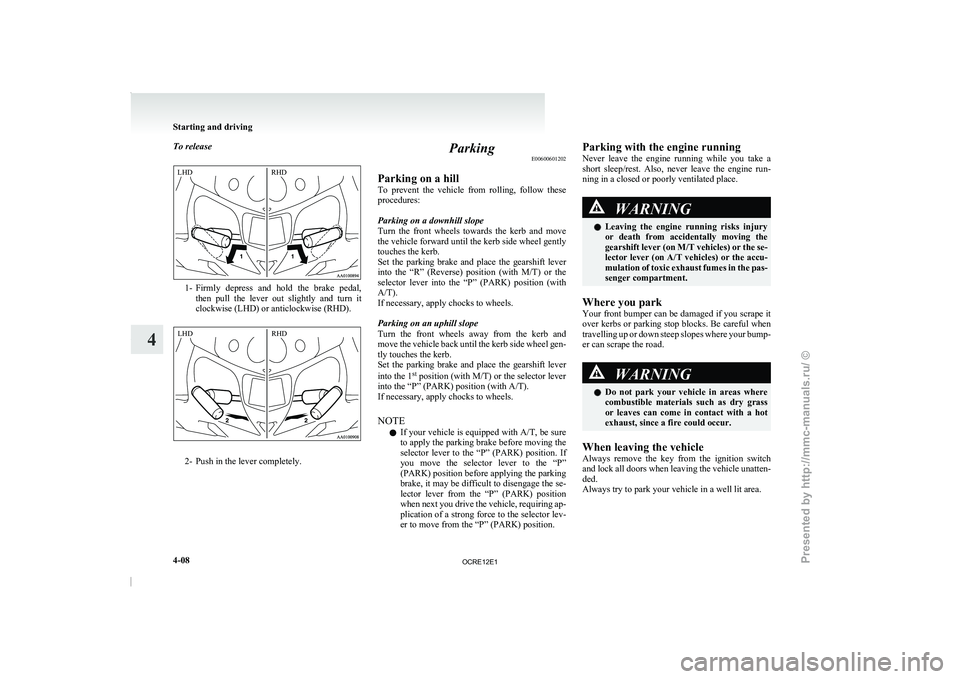
To release
1- Firmly depress and hold the brake pedal,
then pull the lever
out slightly and turn it
clockwise (LHD) or anticlockwise (RHD). 2- Push in the lever completely. Parking
E00600601202
Parking on a hill
To prevent the vehicle from
rolling, follow these
procedures:
Parking on a downhill slope
Turn the front wheels towards the kerb and move
the vehicle forward until the kerb side wheel gently
touches the kerb.
Set the parking brake and place the gearshift lever
into the “R” (Reverse) position (with M/T) or the
selector lever into the “P” (PARK) position (with
A/T).
If necessary, apply chocks to wheels.
Parking on an uphill slope
Turn the front wheels away from the kerb and
move the vehicle back until the kerb side wheel gen-
tly touches the kerb.
Set the parking brake and place the gearshift lever
into the 1 st
position (with M/T) or the selector lever
into the “P” (PARK) position (with A/T).
If necessary, apply chocks to wheels.
NOTE
l If your vehicle is equipped with A/T, be sure
to apply the parking brake before moving the
selector lever to the “P” (PARK) position. If
you move the selector lever to the “P”
(PARK) position before applying the parking
brake, it may be difficult to disengage the se-
lector lever from the “P” (PARK) position
when next you drive the vehicle, requiring ap-
plication of a strong force to the selector lev-
er to move from the “P” (PARK) position. Parking with the engine running
Never leave the engine
running
while you take a
short sleep/rest. Also, never leave the engine run-
ning in a closed or poorly ventilated place. WARNING
l Leaving the engine running
risks
injury
or death from accidentally moving the
gearshift lever (on M/T vehicles) or the se-
lector lever (on A/T vehicles) or the accu-
mulation of toxic exhaust fumes in the pas-
senger compartment.
Where you park
Your front bumper can be
damaged if you scrape it
over kerbs or parking stop blocks. Be careful when
travelling up or down steep slopes where your bump-
er can scrape the road. WARNING
l Do not park your vehicle
in areas where
combustible materials such as dry grass
or leaves can come in contact with a hot
exhaust, since a fire could occur.
When leaving the vehicle
Always remove the key from
the ignition switch
and lock all doors when leaving the vehicle unatten-
ded.
Always try to park your vehicle in a well lit area. Starting and driving
4-08
4LHD
RHD LHD
RHD
OCRE12E1
Presented by http://mmc-manuals.ru/ \251
Page 135 of 369
Outside rear-view mirrors
E00600900149
To adjust the mirror position E00601000482WARNING
l Do not attempt to
adjust the rear-view
mirrors while driving. This can be danger-
ous.
Always adjust the mirrors before driving.
l Your vehicle is equipped with convex
type mirrors.
Please take into consideration, that ob-
jects you see in the mirror will look small-
er and farther away compared to a nor-
mal flat mirror.
Do not use this mirror to estimate dis-
tance of following vehicles when changing
lanes.
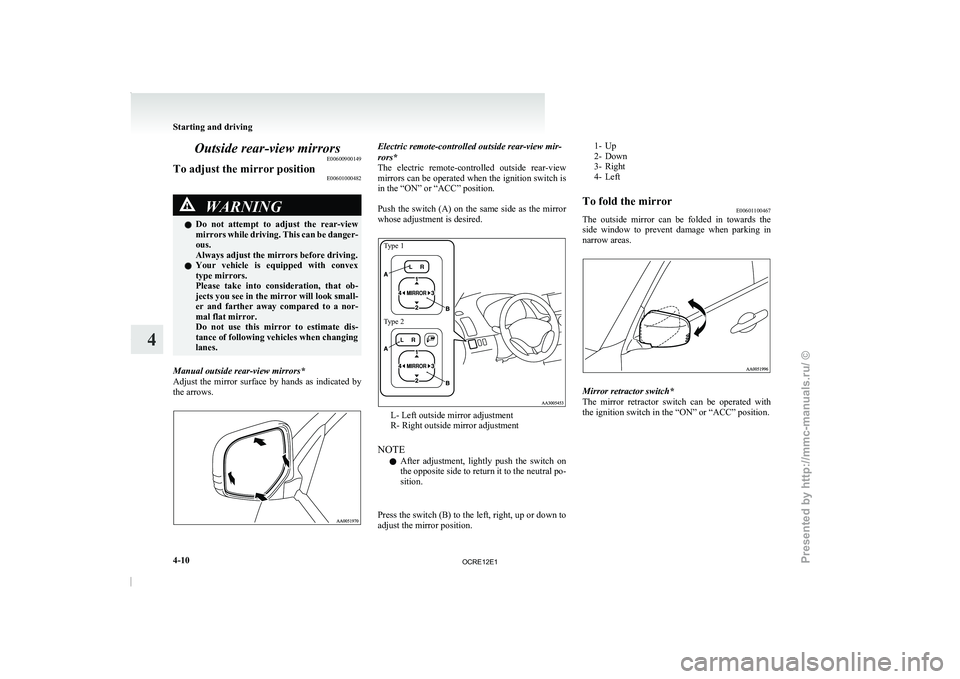
Manual outside rear-view mirrors*
Adjust the mirror surface by
hands as indicated by
the arrows. Electric remote-controlled outside rear-view mir-
rors*
The electric remote-controlled outside rear-view
mirrors
can be operated when the ignition switch is
in the “ON” or “ACC” position.
Push the switch (A) on the same side as the mirror
whose adjustment is desired.
Type 1
Type 2 L- Left outside mirror adjustment
R- Right outside mirror adjustment
NOTE l After
adjustment, lightly push the
switch on
the opposite side to return it to the neutral po-
sition.
Press the switch (B) to the left, right, up or down to
adjust the mirror position.
1- Up
2- Down
3- Right
4- Left
To fold the mirror E00601100467
The outside
mirror can be folded in towards the
side window to prevent damage
when parking in
narrow areas. Mirror retractor switch*
The mirror retractor switch
can
be operated with
the ignition switch in the “ON” or “ACC” position. Starting and driving
4-10
4
OCRE12E1
Presented by http://mmc-manuals.ru/ \251
Page 136 of 369
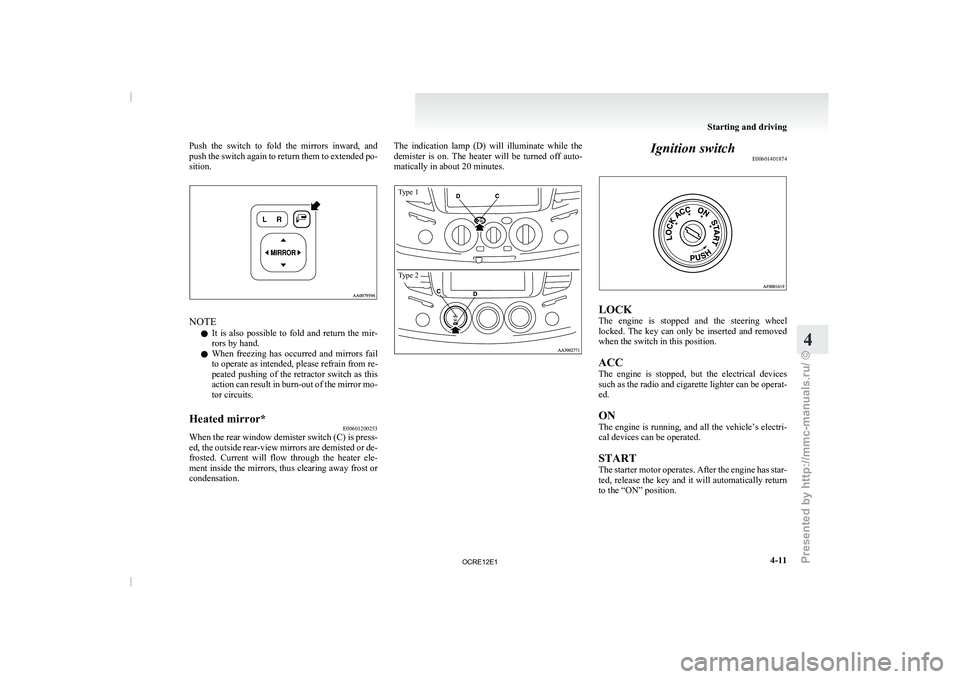
Push the switch to fold the mirrors inward, and
push the switch again to
return them to extended po-
sition. NOTE
l It
is also possible to
fold and return the mir-
rors by hand.
l When freezing has occurred and mirrors fail
to operate as intended, please refrain from re-
peated pushing of the retractor switch as this
action can result in burn-out of the mirror mo-
tor circuits.
Heated mirror* E00601200253
When the rear window demister switch (C) is press-
ed, the outside rear-view mirrors
are demisted or de-
frosted. Current will flow through the heater ele-
ment inside the mirrors, thus clearing away frost or
condensation. The indication lamp (D) will illuminate while the
demister is on. The
heater
will be turned off auto-
matically in about 20 minutes.
Type 1
Type 2 Ignition switch
E00601401874 LOCK
The engine is stopped
and
the steering wheel
locked. The key can only be inserted and removed
when the switch in this position.
ACC
The engine is stopped, but the electrical devices
such as the radio and cigarette lighter can be operat-
ed.
ON
The engine is running, and all the vehicle’s electri-
cal devices can be operated.
START
The starter motor operates. After the engine has star-
ted, release the key and it will automatically return
to the “ON” position. Starting and driving
4-11 4
OCRE12E1
Presented by http://mmc-manuals.ru/ \251
Page 137 of 369
NOTE
l If
your vehicle is equipped
with the Daytime
Running Lamp, when the ignition switch is
in the “ON”, the headlamp low beams etc.
are turned on.
Refer to “Headlamps” on page 3-30.
l Your vehicle is equipped with an electronic
immobilizer.
To start the engine, the ID code which the
transponder inside the key sends must match
the one registered in the immobilizer comput-
er.
Refer to “Electronic immobilizer” on page
1-03.
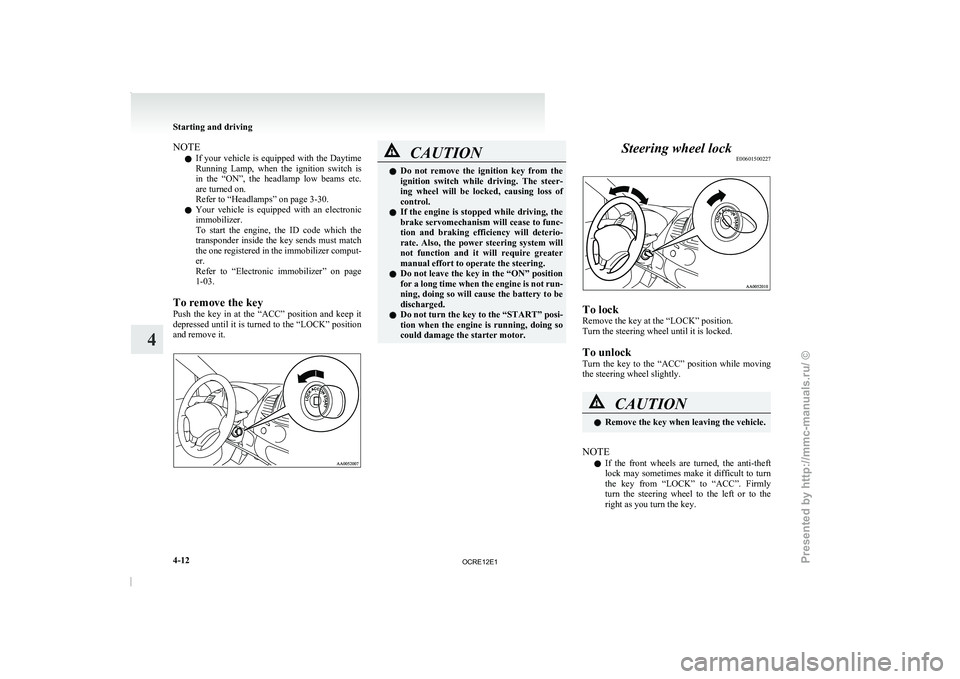
To remove the key
Push the key in at the “ACC” position and keep it
depressed until it is turned to the “LOCK” position
and remove it. CAUTION
l
Do not remove the ignition
key from the
ignition switch while driving. The steer-
ing wheel will be locked, causing loss of
control.
l If the engine is stopped while driving, the
brake servomechanism will cease to func-
tion and braking efficiency will deterio-
rate. Also, the power steering system will
not function and it will require greater
manual effort to operate the steering.
l Do not leave the key in the “ON” position
for a long time when the engine is not run-
ning, doing so will cause the battery to be
discharged.
l Do not turn the key to the “START” posi-
tion when the engine is running, doing so
could damage the starter motor. Steering wheel lock
E00601500227 To lock
Remove the key at the “LOCK” position.
Turn the steering wheel until it is locked.
To unlock
Turn the key to
the
“ACC” position while moving
the steering wheel slightly. CAUTION
l
Remove the key when leaving the vehicle.
NOTE l If
the front wheels are
turned, the anti-theft
lock may sometimes make it difficult to turn
the key from “LOCK” to “ACC”. Firmly
turn the steering wheel to the left or to the
right as you turn the key. Starting and driving
4-12
4
OCRE12E1
Presented by http://mmc-manuals.ru/ \251