engine NISSAN 350Z 2003 Z33 User Guide
[x] Cancel search | Manufacturer: NISSAN, Model Year: 2003, Model line: 350Z, Model: NISSAN 350Z 2003 Z33Pages: 227, PDF Size: 2.39 MB
Page 49 of 227
by sending a signal from a sensor that is installed
in each wheel. Press the trip computer setting
switch
qBto change the display to F (front) or R
(rear).
The tire pressure sensor will activate only when
the vehicle is driven at speeds above 20 MPH
(32 km/h). If the tire pressure signal cannot be
received correctly, the display shows (----).
The tire pressure indicator mode includes a low
tire pressure warning feature. If the vehicle is
being driven with very low tire pressure or a flat
tire, the tire pressure indicator mode is automati-
cally selected and the PSI indicator will blink in
order to attract the driver's attention. Press the
trip computer mode switch
qA
if you wish to
return to the mode that was selected before the
warning occurred. The PSI indicator will con-
tinue blinking until the tire pressure of each tire is
properly adjusted.
For additional information, see ªLow tire pres-
sure warning systemº in the ª5. Starting and
drivingº section and ªFlat tireº in the ª6. In case
of emergencyº section.
Tire pressure shown in the display may rise
or fall while driving depending on the driv-
ing conditions (heat, etc.) and/or the out-
side temperature. This does not indicate a
system malfunction.
WARNING
The low tire pressure warning system is
not a substitute for the regular tire pres-
sure check. Be sure to check the tire
pressure regularly and adjust it to the
COLD tire pressure shown in the tire
placard.Up-shift indicator setting (rpm) (for
manual transmission models)The up-shift indicator setting mode is used to
set the desired engine speed (rpm) for the
up-shift indicator (situated in the tachometer) to
illuminate. When the engine speed approaches
or reaches the set figure, the up-shift indicator
will flash or illuminate to show the driver the
timing for shifting into a higher gear. See ªDriving
the vehicleº in the ª5. Starting and drivingº
section for the use of the up-shift indicator.
When the up-shift indicator setting mode is
selected, the rpm indicator blinks and the engine
speed currently set is displayed. (The initial
factory setting is 6,600 rpm.) The figure can be
changed between 2,000 and 8,000 rpm by
pressing trip computer setting switch
qB. Press-
ing the switch for less than approximately 1second will add the figure by 100 rpm. If press-
ing for more than approximately 1 second, the
figure will increase by 500 rpm.
If the battery cable is disconnected, the set
engine speed will be returned to the initial figure
(6,600 rpm).
Display priorityIf a low outside air temperature warning,
low dte (distance to empty) range warning
and low tire pressure warning occur simul-
taneously, other display modes switch au-
tomatically to the outside air temperature
display.
When trip computer mode switch
qA
is
pressed, the display switches to the mode
chosen before the warning display, but the
ICY indicator will continue blinking.
2-10
Instruments and controls
Z
02.9.13/Z33-D/V5.0
X
Page 50 of 227

or
Anti-lock brake warning light
Low washer fluid warning light
Malfunction indicator lamp (MIL)
Automatic transmission check warning
light
Seat belt warning light
Slip indicator light
or
Brake warning light
Supplemental air bag warning light
Traction control system off indicator light
(if so equipped)
Charge warning light
Automatic transmission position indicator
light
Vehicle dynamic control off indicator light
(if so equipped)
Door open warning light
Cruise main switch indicator light (if so
equipped)
Turn signal/hazard indicator lights
Engine oil pressure warning light
Cruise set switch indicator light (if so
equipped)
Low tire pressure warning light (if so
equipped)
High beam indicator light (Blue)
CHECKING BULBSApply the parking brake and turn the ignition key
to ON without starting the engine. The following
lights will come on:
,
or
,
,
The following lights come on briefly and then go
off:
,
or
,
,
,
,
,
If any light fails to come on, it may indicate a
burned-out bulb or an open circuit in the elec-trical system. Have the system repaired
promptly.
WARNING LIGHTS
or
Anti-lock brake
warning light
After turning the ignition key to the ON position,
the light will illuminate. The light will turn off after
about 1 second if the system is operational.
If the light comes on while the engine is running,
it may indicate the anti-lock brake system is notfunctioning properly. Have the system checked
by your NISSAN dealer.
If an abnormality occurs in the system, the
anti-lock function will cease but the ordinary
brakes will continue to operate normally. See
ªAnti-lock brake system (ABS)º in the ª5. Start-
ing and drivingº section for further details.
If the light comes on while you are driving,
contact your NISSAN dealer for repair.
WARNING/INDICATOR LIGHTS
AND AUDIBLE REMINDERS
Instruments and controls
2-11
Z
02.9.13/Z33-D/V5.0
X
Page 51 of 227
Automatic transmission check
warning light (A/T models)
When the ignition switch is turned ON, the light
comes on for 2 seconds. If the light blinks for
approximately 8 seconds, it may indicate the
automatic transmission system is not functioning
properly. Have your NISSAN dealer check and
repair the transmission.
or
Brake warning light
This light functions for both the parking brake
and the foot brake systems.
Parking brake indicator:
When the ignition key is in the ON position, the
light comes on when the parking brake is ap-
plied.
Low brake fluid warning light:
The light warns of a low brake fluid level. If the
light comes on while the engine is running with
the parking brake not applied, stop the vehicle
and perform the following:
1. Check the brake fluid level. Add brake fluid as
necessary. See ªBrake and clutch fluidº in the
ª8. Maintenance and do-it-yourselfº section.
WARNING
IYour brake system may not be work-
ing properly if the warning light is on.
Driving could be dangerous. If you
judge it to be safe, drive carefully to
the nearest service station for re-
pairs. Otherwise, have your vehicle
towed because driving it could be
dangerous.
IPressing the brake pedal with the
engine stopped and/or low brake
fluid level may increase your stop-
ping distance and braking will re-
quire greater pedal effort as well as
greater pedal travel.
IIf the brake fluid level is below the
MIN mark on the brake fluid reser-
voir, do not drive until the brake sys-
tem has been checked at a NISSAN
dealer.
2. If the brake fluid level is correct, have the
warning system checked by a NISSAN
dealer. Avoid high speed driving and abrupt
braking.
If both the brake warning light and the anti-lock brake warning light come on simulta-
neously, it may indicate the anti-lock brake
system is not functioning properly. See ªAnti-
lock brake warning lightº earlier in this sec-
tion.
Charge warning light
If the light comes on while the engine is running,
it may indicate that the charging system is not
functioning properly. Turn the engine off and
check the alternator belt. If the belt is loose,
broken, missing or if the light remains on, see
your NISSAN dealer immediately.
CAUTION
Do not continue driving if the belt is
loose, broken or missing.
Door open warning light
This light comes on when any of the doors
and/or rear hatch are not closed securely while
the ignition key is ON.
Engine oil pressure warning
light
This light warns of low engine oil pressure. If the
light flickers or comes on during normal driving,
pull off the road in a safe area, stop the engine
2-12
Instruments and controls
Z
02.9.13/Z33-D/V5.0
X
Page 52 of 227
immediatelyand call a NISSAN dealer or other
authorized repair shop.
The engine oil pressure warning light is not
designed to indicate a low oil level. Use the
dipstick to check the oil level.See ªEngine
oilº in the ª8. Maintenance and do-it-yourselfº
section.
CAUTION
Running the engine with the engine oil
pressure warning light on could cause
serious damage to the engine almost
immediately. Turn off the engine as
soon as it is safe to do so.
Low tire pressure warning light
(if so equipped)
The light comes on for about 1 second when the
key switch is turned ON, and then it turns off.
If the vehicle is being driven with a flat tire or
extremely low tire pressure, the light will illumi-
nate. Also a chime will sound for about 10
seconds if a tire is flat.
For additional information, see ªLow tire pres-
sure warning systemº in the ª5. Starting and
drivingº section and ªFlat tireº in the ª6. In caseof emergencyº section. Also, you can check the
tire pressure of all 4 tires on the trip computer
display. See ªTrip computerº earlier in this sec-
tion.
WARNING
IIf the light does not come on with the
key switch turned ON, have the ve-
hicle checked by a NISSAN dealer as
soon as possible.
IIf the light comes on while driving,
avoid sudden steering maneuvers or
abrupt braking, reduce vehicle speed,
pull off the road to a safe location
and stop the vehicle as soon as pos-
sible. Serious vehicle damage could
occur and may lead to an accident
and could result in serious personal
injury. Check the pressure for all four
tires and adjust the pressure to the
COLD tire pressure shown on the tire
placard. If the light still comes on
while driving after adjusting the tire
pressure, a tire may be flat. If you
have a flat tire, replace it with a spare
tire as soon as possible.IWhen a spare tire is mounted or a
wheel is replaced, tire pressure will
not be indicated and the low tire
pressure warning system will not
function. Contact your NISSAN
dealer as soon as possible for tire
replacement and/or system reset-
ting.
CAUTION
IThe low tire pressure warning is not a
substitute for the regular tire pres-
sure check. Be sure to check the tire
pressure regularly.
IIf the vehicle is being driven at
speeds of less than 20 MPH (32
km/h), the low tire pressure warning
system may not operate correctly.
IBe sure to install the specified size
for the front and rear tires.
Low washer fluid warning light
This light comes on when the washer tank fluid is
Instruments and controls
2-13
Z
02.9.13/Z33-D/V5.0
X
Page 53 of 227
at a low level. Add washer fluid as necessary.
See ªWindow washer fluidº in the ª8. Mainte-
nance and do-it-yourselfº section.
Seat belt warning light and
chime
The light and chime remind you to fasten seat
belts. The light illuminates whenever the ignition
key is turned to ON, and will remain illuminated
until the driver's seat belt is fastened.
See ªSeat beltsº in the ª1. Seats, restraints and
supplemental air bag systemsº section for pre-
cautions on seat belt usage.
Supplemental air bag warning
light
After turning the ignition key to the ON position,
the supplemental air bag warning light will illu-
minate. The supplemental air bag warning light
will turn off after about 7 seconds if the system is
operational.
If any of the following conditions occur, the
supplemental front air bag, supplemental side air
bag and curtain side-impact air bag systems,
and pre-tensioner seat belt need servicing and
your vehicle must be taken to your nearest
NISSAN dealer.
IThe supplemental air bag warning light re-
mains on after approximately 7 seconds.IThe supplemental air bag warning light
flashes intermittently.
IThe supplemental air bag warning light does
not come on at all.
Unless checked and repaired, the Supplemental
Restraint Systems and/or the pre-tensioner seat
belt may not function properly. For additional
information, see ªSupplemental restraint systemº
in the ª1. Seats, restraints and supplemental air
bag systemsº section.
WARNING
If the supplemental air bag warning
light is on, it could mean that the
supplemental front air bag, supplemen-
tal side air bag and curtain side-impact
air bag systems and/or pre-tensioner
seat belt system will not operate in an
accident.INDICATOR LIGHTS
Automatic transmission
position indicator light (A/T
models)
When the ignition key is turned to the ONposition, the indicator in the tachometer shows
the automatic transmission selector lever posi-
tion. See ªDriving with automatic transmissionº
in the ª5. Starting and drivingº section.
Cruise main switch indicator
light (if so equipped)
The light comes on when the cruise control main
switch is pushed. The light goes out when the
main switch is pushed again. When the cruise
main switch indicator light comes on, the cruise
control system is operational.
Cruise set switch indicator
light (if so equipped)
The light comes on while the vehicle speed is
controlled by the cruise control system. If the
light blinks while the engine is running, it may
indicate the cruise control system is not func-
tioning properly. Have the system checked by
your NISSAN dealer.
High beam indicator light
(Blue)
This light comes on when the headlight high
beam is on and goes out when the low beam is
selected.
2-14
Instruments and controls
Z
02.9.13/Z33-D/V5.0
X
Page 54 of 227
Malfunction indicator lamp
(MIL)
If the malfunction indicator lamp comes on
steady or blinks while the engine is running, it
may indicate a potential emission control mal-
function.
The malfunction indicator lamp may also come
on steady if the fuel filler cap is loose or missing,
or if the vehicle runs out of fuel. Check to make
sure the fuel filler cap is installed and closed
tightly, and that the vehicle has at least 3 US
gallons (14 liters) of fuel in the fuel tank.
After a few driving trips, the
lamp should
turn off if no other potential emission control
system malfunction exists.
Operation
The malfunction indicator lamp will come on in
one of two ways:
IMalfunction indicator lamp on steady Ð An
emission control system malfunction has
been detected. Check the fuel filler cap. If the
fuel filler cap is loose or missing, tighten or
install the cap and continue to drive the
vehicle. The
lamp should turn off after a
few driving trips. If the
lamp does not
turn off after a few driving trips, have the
vehicle inspected by a NISSAN dealer. Youdo not need to have your vehicle towed to the
retailer.
IMalfunction indicator lamp blinking Ð An
engine misfire has been detected which may
damage the emission control system. To re-
duce or avoid emission control system dam-
age:
a) Do not drive at speeds above 45 MPH
(72 km/h).
b) Avoid hard acceleration or deceleration.
c) Avoid steep uphill grades.
d) If possible, reduce the amount of cargo
being hauled or towed.
The malfunction indicator lamp may stop
blinking and come on steady.
Have the vehicle inspected by a NISSAN
dealer. You do not need to have your vehicle
towed to the retailer.
CAUTION
Continued vehicle operation without
having the emission control system
checked and repaired as necessary
could lead to poor driveability, reduced
fuel economy, and possible damage to
the emission control system.
Slip indicator light
The light will come on for about 1 second and go
off after the ignition switch is turned to the ON
position. This light will blink when the vehicle
dynamic control (VDC) system or the traction
control system (TCS) is operating, thus alerting
the driver to the fact that the road surface is
slippery and the vehicle is nearing its traction
limits.
Traction control system off
indicator light (if so equipped)
After turning the ignition key to the ON position,
the light will illuminate. The light will turn off in
about 1 second if the traction control system
(TCS) is operational.
The light comes on when the traction control
system (TCS) off switch is pushed to OFF. This
indicates the traction control system is not op-
erating. When the traction control system off
indicator light and slip indicator light come on
with the traction control system turned on, this
light alerts the driver to the fact that the traction
control system's fail-safe mode is operating, that
is the system may not be functioning properly.
Have the system checked by your NISSAN
dealer. If an abnormality occurs in the system,
the traction control function will be canceled but
the vehicle is still driveable. For additional infor-
Instruments and controls
2-15
Z
02.9.13/Z33-D/V5.0
X
Page 57 of 227

scribed above, have it checked by your
NISSAN dealer.NISSAN VEHICLE IMMOBILIZER
SYSTEM (NVIS)The Nissan Vehicle Immobilizer System will not
allow the engine to start without the use of the
registered Nissan Vehicle Immobilizer System
key.
If the engine fails to start using the registered
Nissan Vehicle Immobilizer System key, it may be
due to interference caused by another Nissan
Vehicle Immobilizer System key, an automated
toll road device or automated payment device on
the key ring. Restart the engine using the follow-
ing procedures:
1. Leave the ignition switch in the ON position
for approximately 5 seconds.
2. Turn the ignition switch to the OFF or LOCK
position and wait approximately 10 seconds.
3. Repeat step 1 and 2 again.
4. Restart the engine while holding the device
(which may have caused the interference)
separate from the registered Nissan Vehicle
Immobilizer System key.
If this procedure allows the engine to start,
NISSAN recommends placing the registeredNissan Vehicle Immobilizer System key on a
separate key ring to avoid interference from
other devices.
Statement related to section 15 of FCC
rules for Nissan Vehicle Immobilizer Sys-
tem (CONT ASSY-BCM, ANT ASSY-
IMMOBILIZER)
This device complies with part 15 of the
FCC Rules and RSS-210 of Industry
Canada. Operation is subject to the follow-
ing two conditions;
(1) This device may not cause harmful in-
terference, and (2) this device must accept
any interference received, including inter-
ference that may cause undesired opera-
tion of the device.
CHANGES OR MODIFICATIONS NOT EX-
PRESSLY APPROVED BY THE MANUFAC-
TURE RESPONSIBLE FOR COMPLIANCE
COULD VOID THE USER'S AUTHORITY TO
OPERATE THE EQUIPMENT.
Security indicator lightThis light blinks whenever the ignition switch is in
the LOCK, OFF or ACC position. This function
indicates the security system equipped on the
vehicle is operational.
If the Nissan Vehicle Immobilizer System is
malfunctioning, this light will remain on while the
ignition key is in the ON position.
If the light still remains on and/or the
engine will not start, see your NISSAN
dealer for Nissan Vehicle Immobilizer Sys-
tem service as soon as possible. Please
bring all Nissan Vehicle Immobilizer Sys-
SIC1699
2-18
Instruments and controls
Z
02.9.13/Z33-D/V5.0
X
Page 60 of 227
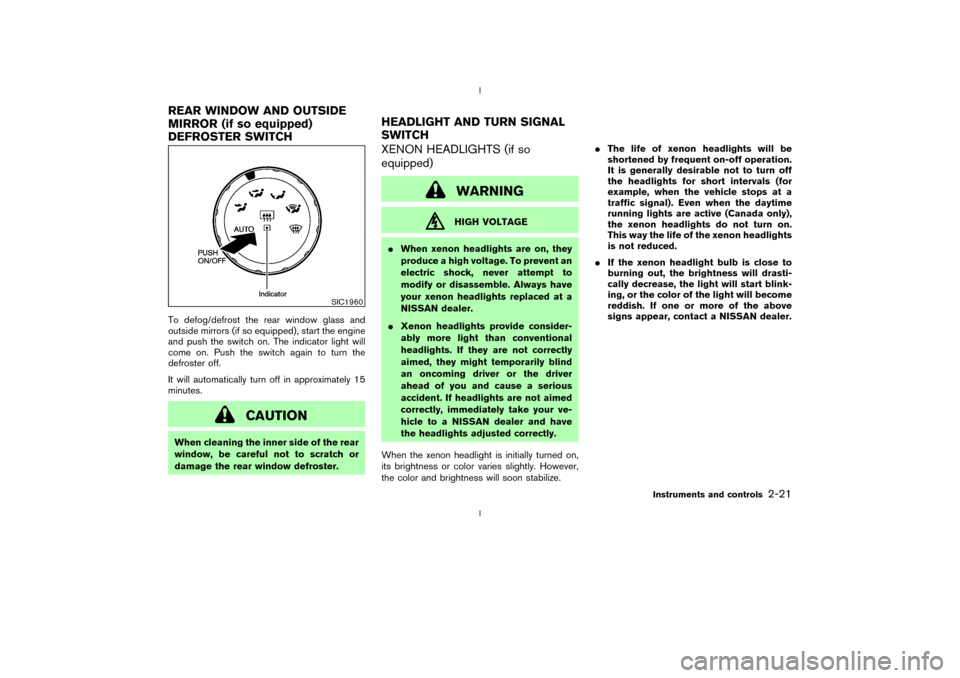
To defog/defrost the rear window glass and
outside mirrors (if so equipped), start the engine
and push the switch on. The indicator light will
come on. Push the switch again to turn the
defroster off.
It will automatically turn off in approximately 15
minutes.
CAUTION
When cleaning the inner side of the rear
window, be careful not to scratch or
damage the rear window defroster.
XENON HEADLIGHTS (if so
equipped)
WARNINGHIGH VOLTAGE
IWhen xenon headlights are on, they
produce a high voltage. To prevent an
electric shock, never attempt to
modify or disassemble. Always have
your xenon headlights replaced at a
NISSAN dealer.
IXenon headlights provide consider-
ably more light than conventional
headlights. If they are not correctly
aimed, they might temporarily blind
an oncoming driver or the driver
ahead of you and cause a serious
accident. If headlights are not aimed
correctly, immediately take your ve-
hicle to a NISSAN dealer and have
the headlights adjusted correctly.
When the xenon headlight is initially turned on,
its brightness or color varies slightly. However,
the color and brightness will soon stabilize.IThe life of xenon headlights will be
shortened by frequent on-off operation.
It is generally desirable not to turn off
the headlights for short intervals (for
example, when the vehicle stops at a
traffic signal). Even when the daytime
running lights are active (Canada only),
the xenon headlights do not turn on.
This way the life of the xenon headlights
is not reduced.
IIf the xenon headlight bulb is close to
burning out, the brightness will drasti-
cally decrease, the light will start blink-
ing, or the color of the light will become
reddish. If one or more of the above
signs appear, contact a NISSAN dealer.
SIC1960
REAR WINDOW AND OUTSIDE
MIRROR (if so equipped)
DEFROSTER SWITCHHEADLIGHT AND TURN SIGNAL
SWITCH
Instruments and controls
2-21
Z
02.9.13/Z33-D/V5.0
X
Page 61 of 227
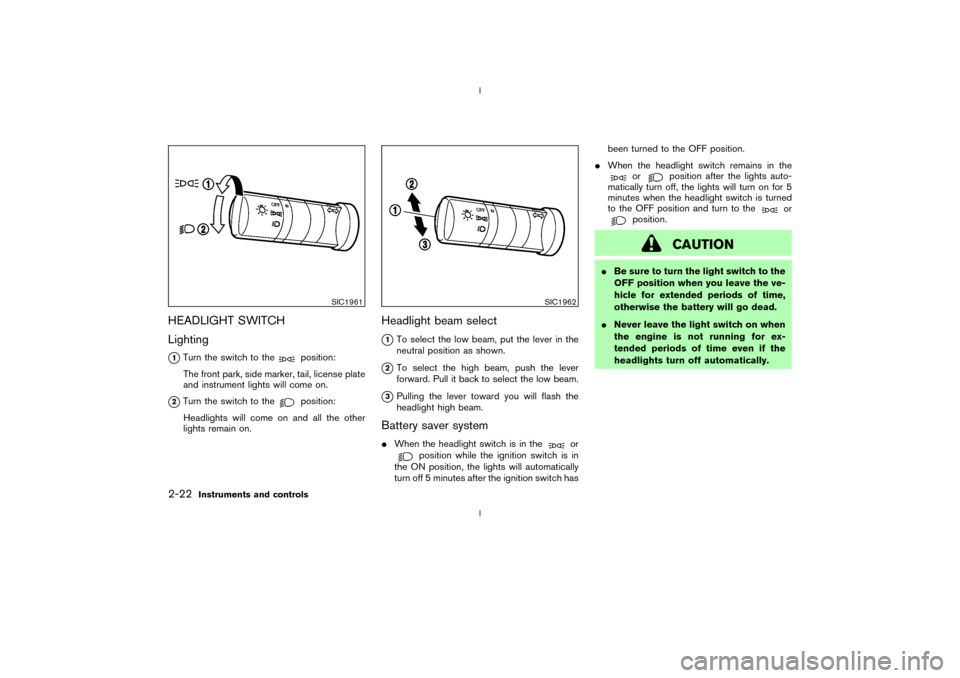
HEADLIGHT SWITCH
Lighting
q1Turn the switch to the
position:
The front park, side marker, tail, license plate
and instrument lights will come on.
q2Turn the switch to the
position:
Headlights will come on and all the other
lights remain on.
Headlight beam select
q1To select the low beam, put the lever in the
neutral position as shown.
q2To select the high beam, push the lever
forward. Pull it back to select the low beam.
q3Pulling the lever toward you will flash the
headlight high beam.
Battery saver systemIWhen the headlight switch is in the
or
position while the ignition switch is in
the ON position, the lights will automatically
turn off 5 minutes after the ignition switch hasbeen turned to the OFF position.
IWhen the headlight switch remains in the
or
position after the lights auto-
matically turn off, the lights will turn on for 5
minutes when the headlight switch is turned
to the OFF position and turn to the
or
position.
CAUTION
IBe sure to turn the light switch to the
OFF position when you leave the ve-
hicle for extended periods of time,
otherwise the battery will go dead.
INever leave the light switch on when
the engine is not running for ex-
tended periods of time even if the
headlights turn off automatically.
SIC1961
SIC1962
2-22
Instruments and controls
Z
02.9.13/Z33-D/V5.0
X
Page 62 of 227
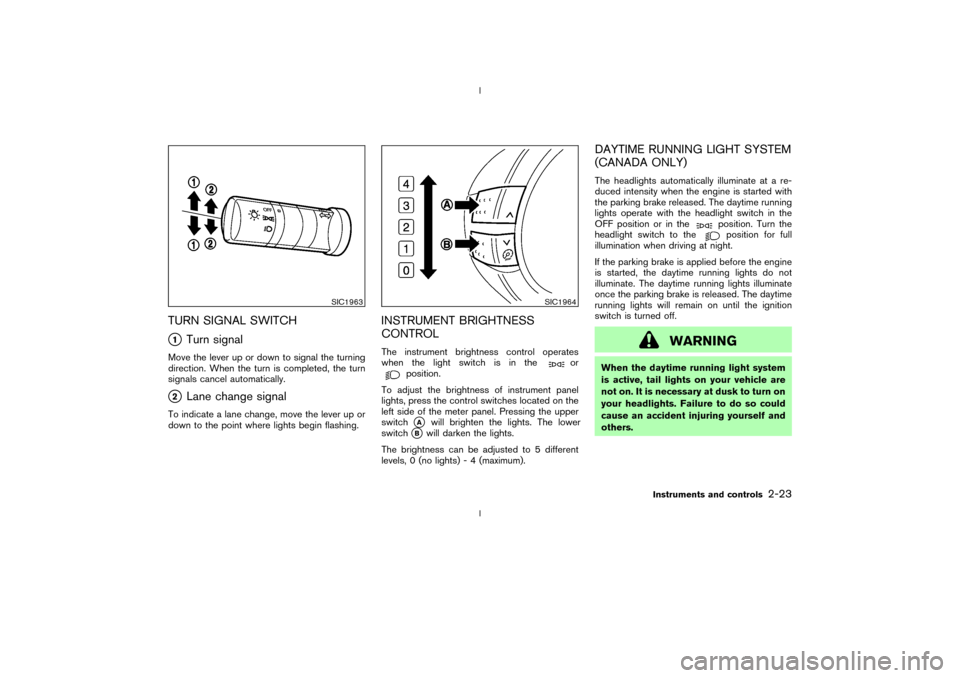
TURN SIGNAL SWITCHq1
Turn signal
Move the lever up or down to signal the turning
direction. When the turn is completed, the turn
signals cancel automatically.q2
Lane change signal
To indicate a lane change, move the lever up or
down to the point where lights begin flashing.
INSTRUMENT BRIGHTNESS
CONTROLThe instrument brightness control operates
when the light switch is in the
or
position.
To adjust the brightness of instrument panel
lights, press the control switches located on the
left side of the meter panel. Pressing the upper
switchqA
will brighten the lights. The lower
switch
qB
will darken the lights.
The brightness can be adjusted to 5 different
levels, 0 (no lights) - 4 (maximum).
DAYTIME RUNNING LIGHT SYSTEM
(CANADA ONLY)The headlights automatically illuminate at a re-
duced intensity when the engine is started with
the parking brake released. The daytime running
lights operate with the headlight switch in the
OFF position or in the
position. Turn the
headlight switch to theposition for full
illumination when driving at night.
If the parking brake is applied before the engine
is started, the daytime running lights do not
illuminate. The daytime running lights illuminate
once the parking brake is released. The daytime
running lights will remain on until the ignition
switch is turned off.
WARNING
When the daytime running light system
is active, tail lights on your vehicle are
not on. It is necessary at dusk to turn on
your headlights. Failure to do so could
cause an accident injuring yourself and
others.
SIC1963
SIC1964
Instruments and controls
2-23
Z
02.9.13/Z33-D/V5.0
X