light NISSAN 350Z 2003 Z33 Owner's Guide
[x] Cancel search | Manufacturer: NISSAN, Model Year: 2003, Model line: 350Z, Model: NISSAN 350Z 2003 Z33Pages: 227, PDF Size: 2.39 MB
Page 71 of 227
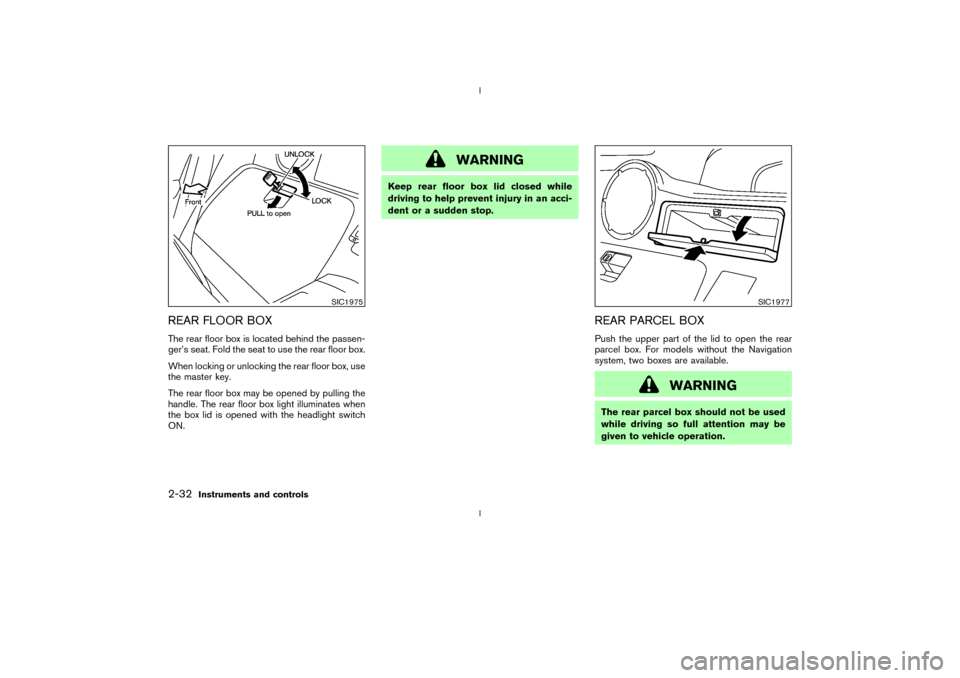
REAR FLOOR BOXThe rear floor box is located behind the passen-
ger's seat. Fold the seat to use the rear floor box.
When locking or unlocking the rear floor box, use
the master key.
The rear floor box may be opened by pulling the
handle. The rear floor box light illuminates when
the box lid is opened with the headlight switch
ON.
WARNING
Keep rear floor box lid closed while
driving to help prevent injury in an acci-
dent or a sudden stop.
REAR PARCEL BOXPush the upper part of the lid to open the rear
parcel box. For models without the Navigation
system, two boxes are available.
WARNING
The rear parcel box should not be used
while driving so full attention may be
given to vehicle operation.
SIC1975
SIC1977
2-32
Instruments and controls
Z
02.9.13/Z33-D/V5.0
X
Page 73 of 227

Automatic operationTo fully open or close the window, completely
press or lift the switch and release it; it need not
be held. The window will automatically open or
close all the way. To stop the window, just press
or lift the switch on the opposite side.Auto reverse functionIf the control unit detects something caught in a
window as it moves up, the window will be
immediately lowered.
The auto reverse function can be activated when
a window is closed by automatic operation when
the ignition key is in the ON position or for about45 seconds after the ignition key is turned to the
OFF position.
Depending on the environment or driving
conditions, the auto reverse function may
be activated if an impact or load similar to
something being caught in the window
occurs.
WARNING
There are some small distances imme-
diately before the closed position which
cannot be detected. Make sure that all
passengers have their hands, etc., in-
side the vehicle before closing the win-
dow.AUTOMATIC ADJUSTING
FUNCTION
CAUTION
When the battery cable is removed from
the battery terminal, do not close either
of front doors. The automatic window
adjusting function will not work, and theside roof panel may be damaged.
The power window has an automatic adjusting
function. When the door is being opened, the
window is automatically lowered slightly to avoid
contact between the window and the side roof
panel. When the door is closed, the window is
automatically raised slightly.
SIC1979
2-34
Instruments and controls
Z
02.9.13/Z33-D/V5.0
X
Page 74 of 227
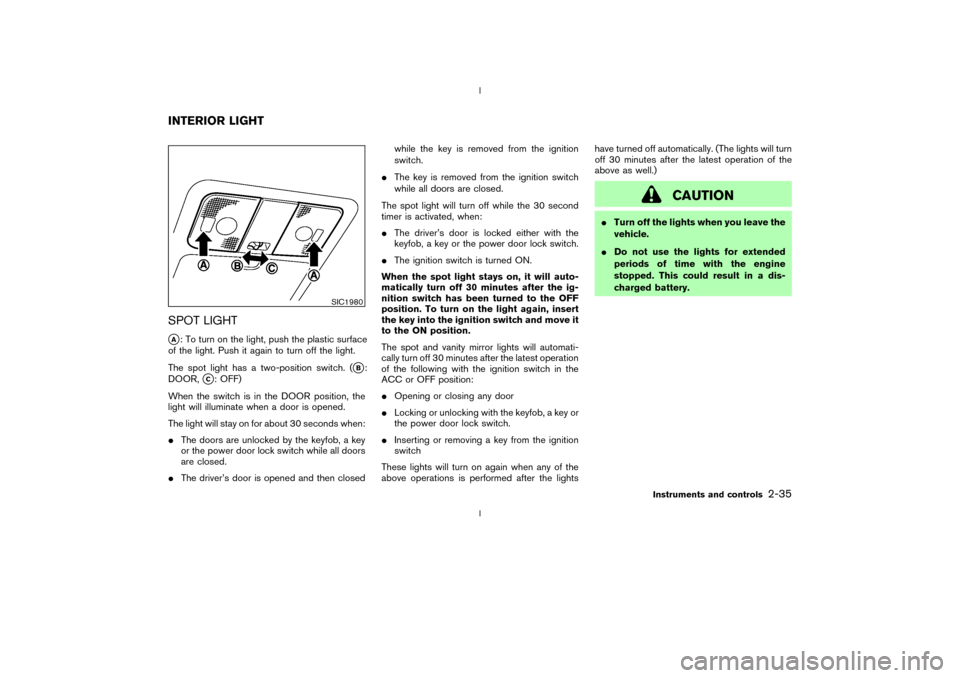
SPOT LIGHTqA: To turn on the light, push the plastic surface
of the light. Push it again to turn off the light.
The spot light has a two-position switch. (
qB:
DOOR,
qC: OFF)
When the switch is in the DOOR position, the
light will illuminate when a door is opened.
The light will stay on for about 30 seconds when:
IThe doors are unlocked by the keyfob, a key
or the power door lock switch while all doors
are closed.
IThe driver's door is opened and then closedwhile the key is removed from the ignition
switch.
IThe key is removed from the ignition switch
while all doors are closed.
The spot light will turn off while the 30 second
timer is activated, when:
IThe driver's door is locked either with the
keyfob, a key or the power door lock switch.
IThe ignition switch is turned ON.
When the spot light stays on, it will auto-
matically turn off 30 minutes after the ig-
nition switch has been turned to the OFF
position. To turn on the light again, insert
the key into the ignition switch and move it
to the ON position.
The spot and vanity mirror lights will automati-
cally turn off 30 minutes after the latest operation
of the following with the ignition switch in the
ACC or OFF position:
IOpening or closing any door
ILocking or unlocking with the keyfob, a key or
the power door lock switch.
IInserting or removing a key from the ignition
switch
These lights will turn on again when any of the
above operations is performed after the lightshave turned off automatically. (The lights will turn
off 30 minutes after the latest operation of the
above as well.)
CAUTION
ITurn off the lights when you leave the
vehicle.
IDo not use the lights for extended
periods of time with the engine
stopped. This could result in a dis-
charged battery.
SIC1980
INTERIOR LIGHT
Instruments and controls
2-35
Z
02.9.13/Z33-D/V5.0
X
Page 75 of 227

The light on the vanity mirror will turn on when
the cover on the vanity mirror is opened.
When the vanity mirror light stays on, it will
automatically turn off 30 minutes after the
ignition switch has been turned to the OFF
position. To turn on the light again, turn the
ignition switch to the ON position.The light illuminates when the rear hatch is
opened. When the rear hatch is closed, the light
will go off.The HomeLink
Universal Transceiver provides a
convenient way to consolidate the functions of
up to three individual hand-held transmitters into
one built-in device.
HomeLink
Universal Transceiver:
IWill operate most Radio Frequency (RF)
devices such as garage doors, gates, home
and office lighting, entry door locks and se-
curity systems.
IIs powered by your vehicle's battery. No
separate batteries are required. If the vehi-
cle's battery is discharged or is discon-
nected, HomeLink
will retain all program-
ming.
Once the HomeLinkUniversal Transceiver
is programmed, retain the original trans-
mitter for future programming procedures
(for example, new vehicle purchases).
Upon sale of the vehicle, the programmed
HomeLink
Universal Transceiver buttons
should be erased for security purposes.
For additional information, refer to ªPro-
gramming HomeLink
º later in this section.
SIC1859
VANITY MIRROR LIGHT (if so
equipped)LUGGAGE COMPARTMENT LIGHT
HomeLink
UNIVERSAL
TRANSCEIVER (if so equipped)
2-36
Instruments and controls
Z
02.9.13/Z33-D/V5.0
X
Page 76 of 227
WARNING
IDo not use the HomeLink
Universal
Transceiver with any garage door
opener that lacks safety stop and
reverse features as required by fed-
eral safety standards. (These stan-
dards became effective for opener
models manufactured after April 1,
1982). A garage door opener which
cannot detect an object in the path of
a closing garage door and then auto-
matically stop and reverse, does not
meet current federal safety stan-
dards. Using a garage door opener
without these features increases the
risk of serious injury or death.
IDuring programming, your garage
door or gate may open or close.
Make sure that people and objects
are clear of the garage door or gate
that you are programming.
IYour vehicle's engine should be
turned off while programming the
HomeLink
Universal Transceiver.
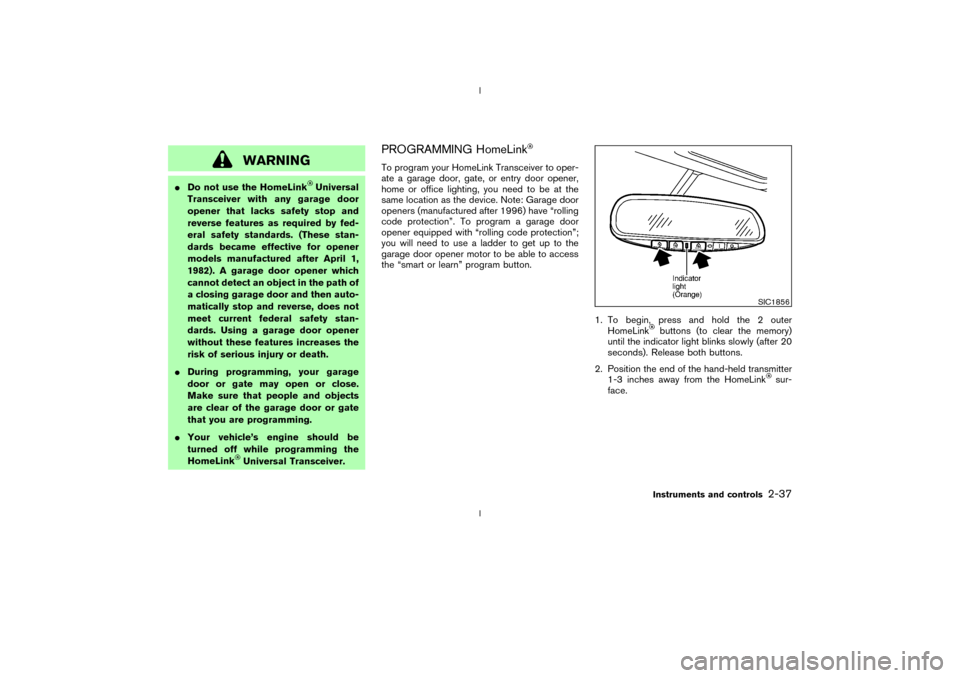
PROGRAMMING HomeLinkTo program your HomeLink Transceiver to oper-
ate a garage door, gate, or entry door opener,
home or office lighting, you need to be at the
same location as the device. Note: Garage door
openers (manufactured after 1996) have ªrolling
code protectionº. To program a garage door
opener equipped with ªrolling code protectionº;
you will need to use a ladder to get up to the
garage door opener motor to be able to access
the ªsmart or learnº program button.
1. To begin, press and hold the 2 outer
HomeLink
buttons (to clear the memory)
until the indicator light blinks slowly (after 20
seconds). Release both buttons.
2. Position the end of the hand-held transmitter
1-3 inches away from the HomeLink
sur-
face.
SIC1856
Instruments and controls
2-37
Z
02.9.13/Z33-D/V5.0
X
Page 77 of 227

3. Using both hands, simultaneously press and
hold both the HomeLink
button you want to
program and the hand-held transmitter but-
ton.
DO NOT release the buttons until step 4 has
been completed.
4. Hold down both buttons until the indicator
light on the HomeLinkflashes, changing
from a ªslow blinkº to a ªrapidly flashing
blinkº. This could take up to 90 seconds.
When the indicator light flashes rapidly, both
buttons may be released. The rapidly flashing
light indicates successful programming. To
activate the garage door or other pro-
grammed device, press and hold the pro-grammed HomeLink
button - releasing
when the device begins to activate.
5. If the indicator light on the HomeLink
blinks
rapidly for two seconds and then turns solid,
HomeLink
has picked up a ªrolling codeº
garage door opener signal. You will need to
proceed with the next steps to train the
HomeLinkto complete the programming
which may require a ladder and another
person for convenience.
6. Press and release the ªsmartº or ªlearnº
program button located on the garage door
opener's motor to activate the ªtraining
modeº. This button is usually located near the
antenna wire that hangs down from the mo-
tor. If the wire originates from under a light
lens, you will need to remove the lens to
access the program button.
NOTE:
Once you have pressed and released the
program button on the garage door open-
er's motor and the ªtraining lightº is lit, you
have 30 seconds in which to perform step
7. Use the help of a second person for
convenience to assist when performing
this step.
7. Quickly within 30 seconds of pressing and
releasing the garage door opener programbutton, firmly press and release the
HomeLink
button you've just programmed.
Press and release the HomeLink
button up
to three times to complete the training.
8. Your HomeLink
button should now be pro-
grammed. (To program the remaining
HomeLink
buttons for additional door or
gate openers, follow steps 2-8 only.
NOTE:
Do not repeat step one unless you want to
ªclearº all previously programmed
HomeLinkbuttons).
If you have any questions or are having difficulty
programming your HomeLink
buttons, please
refer to the HomeLink
web site at: ww-
w.homelink.com or call 1-800-662-6200.
PROGRAMMING HomeLink
FOR
CANADIAN CUSTOMERS
Prior to 1992, D.O.C. regulations required hand-
held transmitters to stop transmitting after 2
seconds. To program your hand-held transmitter
to HomeLink
, continue to press and hold the
HomeLinkbutton (note steps 2 through 4
under ªProgramming HomeLink
º) while you
press and re-press (ªcycleº) your hand-held
transmitter every 2 seconds until the indicator
SIC1863
2-38
Instruments and controls
Z
02.9.13/Z33-D/V5.0
X
Page 78 of 227

light flashes rapidly (indicating successful pro-
gramming).
NOTE:
If programming a garage door opener, etc.,
it is advised to unplug the device during
the ªcyclingº process to prevent possible
damage to the garage door opener compo-
nents.OPERATING THE HomeLinkUNIVERSAL TRANSCEIVERThe HomeLink
Universal Transceiver (once
programmed) may now be used to activate the
garage door, etc. To operate, simply press the
appropriate programmed HomeLink
Universal
Transceiver button. The red indicator light will
illuminate while the signal is being transmitted.
PROGRAMMING TROUBLE
DIAGNOSISIf the HomeLink
does not quickly learn the
hand-held transmitter information:
Ireplace the hand-held transmitter batteries
with new batteries.
Iposition the hand-held transmitter with its
battery area facing away from the HomeLink
surface.Ipress and hold both the HomeLink
and
hand-held transmitter buttons without inter-
ruption.
Iposition the hand-held transmitter 2 to 5
inches (50 to 127 mm) away from the
HomeLink
surface. Hold the transmitter in
that position for up to 15 seconds. If
HomeLinkis not programmed within that
time, try holding the transmitter in another
position - keeping the indicator light in view at
all times.
If you continue to have programming difficulties,
please contact the NISSAN Consumer Affairs
Department. The phone numbers are located in
the Foreword of this Owner's Manual.
CLEARING THE PROGRAMMED
INFORMATIONIndividual buttons cannot be cleared, however to
clear all programming, press and hold the two
outside buttons and release when the indicator
light begins to flash (approximately 20 seconds).
REPROGRAMMING A SINGLE
HomeLink
BUTTON
To reprogram a HomeLink
Universal Trans-
ceiver button, complete the following.
1. Press and hold the desired HomeLink
but-
ton.Do notrelease the button until step 4
has been completed.
2. When the indicator light begins to flash
slowly (after 20 seconds), position the hand-
held transmitter 2 to 5 inches (50 to 127 mm)
away from the HomeLink
surface.
3. Press and hold the hand-held transmitter
button.
4. The HomeLink
indicator light will flash, first
slowly and then rapidly. When the indicator
light begins to flash rapidly, release both
buttons.
The HomeLinkUniversal Transceiver button
has now been reprogrammed. The new device
can be activated by pushing the HomeLink
button that was just programmed. This proce-
dure will not affect any other programmed
HomeLink
buttons.
IF YOUR VEHICLE IS STOLENIf your vehicle is stolen, you should change the
codes of any non-rolling code device that has
Instruments and controls
2-39
Z
02.9.13/Z33-D/V5.0
X
Page 87 of 227

*2: Doors lock with the keyfob while the ignition
switch is in the ON position. However, the
hazard indicator and horn will not function.
*3: Doors lock with the keyfob while any door is
open. However, the hazard indicator and
horn will not function.
Unlocking doors1. Push the UNLOCK button on the keyfob
once.
IThe driver's door and rear hatch unlock
IThe hazard indicator flashes once if all doors
are completely closed with the ignition key in
any position except the ON position.
IThe interior light turns on and the light timer
activates for 30 seconds when the switch is
in the DOOR position with the ignition key in
any position except the ON position.
2. Push the UNLOCK button on the keyfobagain within 5 seconds.
IPassenger's door unlocks
IThe hazard indicator flashes once if all doors
are completely closed.
All doors will be locked automatically unless one
of the following operations is performed within 1
minutes of pressing the UNLOCK button.
Iany door or rear hatch is opened
Ithe ignition switch is turned to the ON posi-
tion
The interior light can be turned off without
waiting for 30 seconds by turning the ignition
switch to the ON position or by locking the
doors with the keyfob.
Opening the windowsPush the UNLOCK button on the keyfob.
The driver's door will unlock.
Continue to press the UNLOCK button for 3
seconds. All the door windows will be lowered.
Continue to press the UNLOCK button until
windows are fully open.
To stop lowering the windows, release the UN-
LOCK button.
To start lowering the windows, press the UN-
SPA1433A
3-6
Pre-driving checks and adjustments
Z
02.9.13/Z33-D/V5.0
X
Page 88 of 227
LOCK button again for 3 more seconds.Releasing the rear hatch1. Push the REAR HATCH button on the keyfob
for longer than 0.5 seconds with the key
removed from the ignition key cylinder.
2. The rear hatch opens.Using the panic alarmIf you are near your vehicle and feel threatened,
you may activate the alarm to call attention as
follows:
1. Push the PANIC button on the keyfob for
longer than 0.5 secondswith the key
removed from the ignition key cylinder.
2. The theft warning alarm and headlights will
stay on for 30 seconds.
3. The panic alarm stops when:
IIt has run for 30 seconds, or
IThe LOCK or the UNLOCK button is
pressed, or
IThe PANIC or the REAR HATCH button is
pushed on the keyfob for longer than 0.5
seconds.
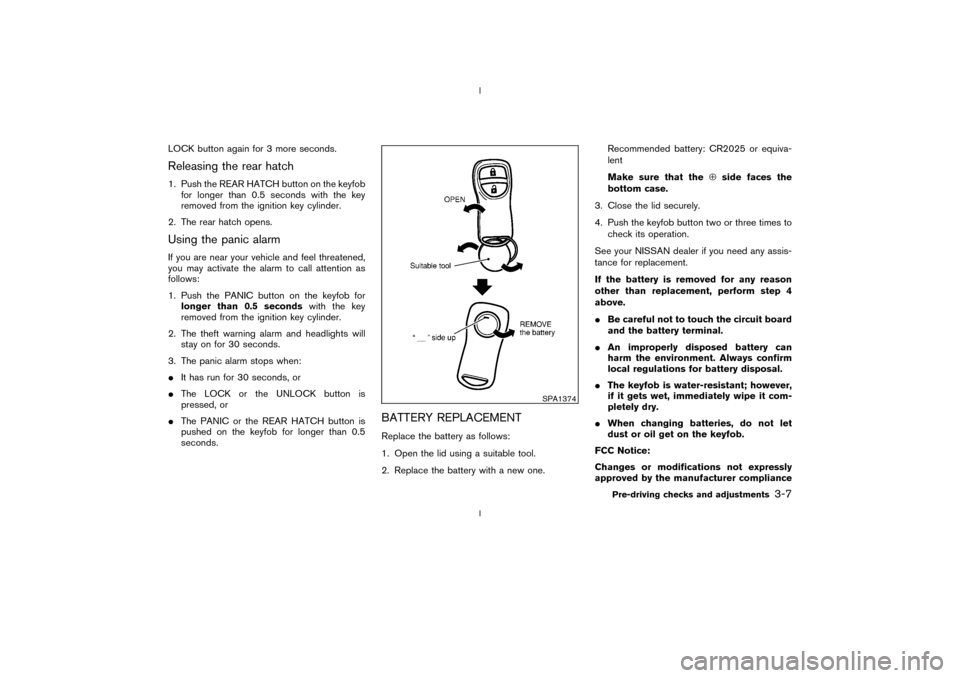
BATTERY REPLACEMENTReplace the battery as follows:
1. Open the lid using a suitable tool.
2. Replace the battery with a new one.Recommended battery: CR2025 or equiva-
lent
Make sure that theÅside faces the
bottom case.
3. Close the lid securely.
4. Push the keyfob button two or three times to
check its operation.
See your NISSAN dealer if you need any assis-
tance for replacement.
If the battery is removed for any reason
other than replacement, perform step 4
above.
IBe careful not to touch the circuit board
and the battery terminal.
IAn improperly disposed battery can
harm the environment. Always confirm
local regulations for battery disposal.
IThe keyfob is water-resistant; however,
if it gets wet, immediately wipe it com-
pletely dry.
IWhen changing batteries, do not let
dust or oil get on the keyfob.
FCC Notice:
Changes or modifications not expressly
approved by the manufacturer compliance
SPA1374
Pre-driving checks and adjustments
3-7
Z
02.9.13/Z33-D/V5.0
X
Page 89 of 227
could void the user's authority to operate
the equipment. This device complies with
Part 15 of the FCC Rules and RSS-210 of
Industry Canada. Operation is subject to
the following two conditions: (1) This de-
vice may not cause harmful interference,
and (2) this device must accept any inter-
ference received, including interference
that may cause undesired operation of the
device.
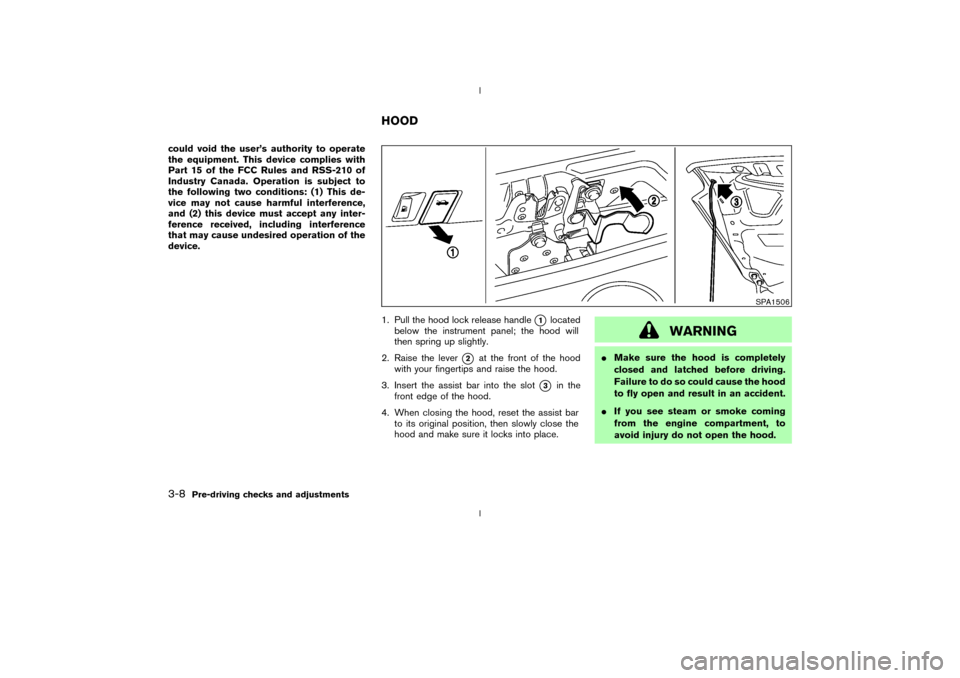
1. Pull the hood lock release handle
q1
located
below the instrument panel; the hood will
then spring up slightly.
2. Raise the lever
q2
at the front of the hood
with your fingertips and raise the hood.
3. Insert the assist bar into the slot
q3
in the
front edge of the hood.
4. When closing the hood, reset the assist bar
to its original position, then slowly close the
hood and make sure it locks into place.
WARNING
IMake sure the hood is completely
closed and latched before driving.
Failure to do so could cause the hood
to fly open and result in an accident.
IIf you see steam or smoke coming
from the engine compartment, to
avoid injury do not open the hood.
SPA1506
HOOD
3-8
Pre-driving checks and adjustments
Z
02.9.13/Z33-D/V5.0
X