battery NISSAN 350Z 2007 Z33 Wiper, Washer And Horn User Guide
[x] Cancel search | Manufacturer: NISSAN, Model Year: 2007, Model line: 350Z, Model: NISSAN 350Z 2007 Z33Pages: 54
Page 29 of 54
FRONT WIPER AND WASHER SYSTEM
WW-29
C
D
E
F
G
H
I
J
L
MA
B
WW
Revision: 2006 November2007 350Z
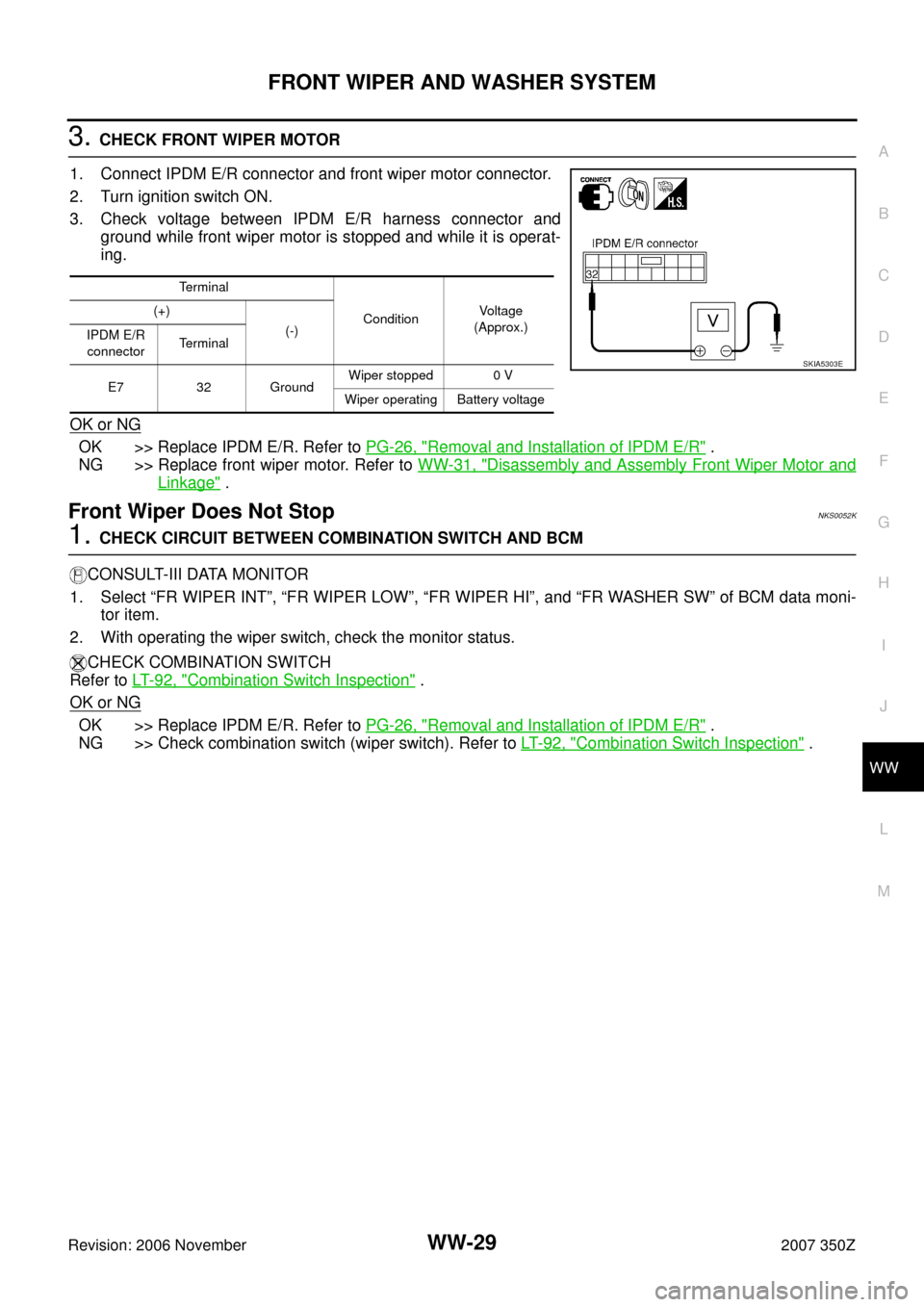
3. CHECK FRONT WIPER MOTOR
1. Connect IPDM E/R connector and front wiper motor connector.
2. Turn ignition switch ON.
3. Check voltage between IPDM E/R harness connector and
ground while front wiper motor is stopped and while it is operat-
ing.
OK or NG
OK >> Replace IPDM E/R. Refer to PG-26, "Removal and Installation of IPDM E/R" .
NG >> Replace front wiper motor. Refer to WW-31, "
Disassembly and Assembly Front Wiper Motor and
Linkage" .
Front Wiper Does Not StopNKS0052K
1. CHECK CIRCUIT BETWEEN COMBINATION SWITCH AND BCM
CONSULT-III DATA MONITOR
1. Select “FR WIPER INT”, “FR WIPER LOW”, “FR WIPER HI”, and “FR WASHER SW” of BCM data moni-
tor item.
2. With operating the wiper switch, check the monitor status.
CHECK COMBINATION SWITCH
Refer to LT- 9 2 , "
Combination Switch Inspection" .
OK or NG
OK >> Replace IPDM E/R. Refer to PG-26, "Removal and Installation of IPDM E/R" .
NG >> Check combination switch (wiper switch). Refer to LT- 9 2 , "
Combination Switch Inspection" .
Terminal
ConditionVoltage
(Approx.) (+)
(-)
IPDM E/R
connectorTerminal
E7 32 GroundWiper stopped 0 V
Wiper operating Battery voltage
SKIA5303E
Page 41 of 54
REAR WIPER AND WASHER SYSTEM
WW-41
C
D
E
F
G
H
I
J
L
MA
B
WW
Revision: 2006 November2007 350Z
How to Proceed With Trouble DiagnosisNKS00531
1. Confirm the symptoms and customer complaint.
2. Understand operation description and function description. Refer to WW-36, "
System Description" .
3. Perform preliminary check. Refer to WW-42, "
Preliminary Check" .
4. Check symptom and repair or replace the cause of malfunction.
5. Does rear wiper and washer operate normally? If YES, GO TO 6. If NO, GO TO 4.
6. INSPECTION END
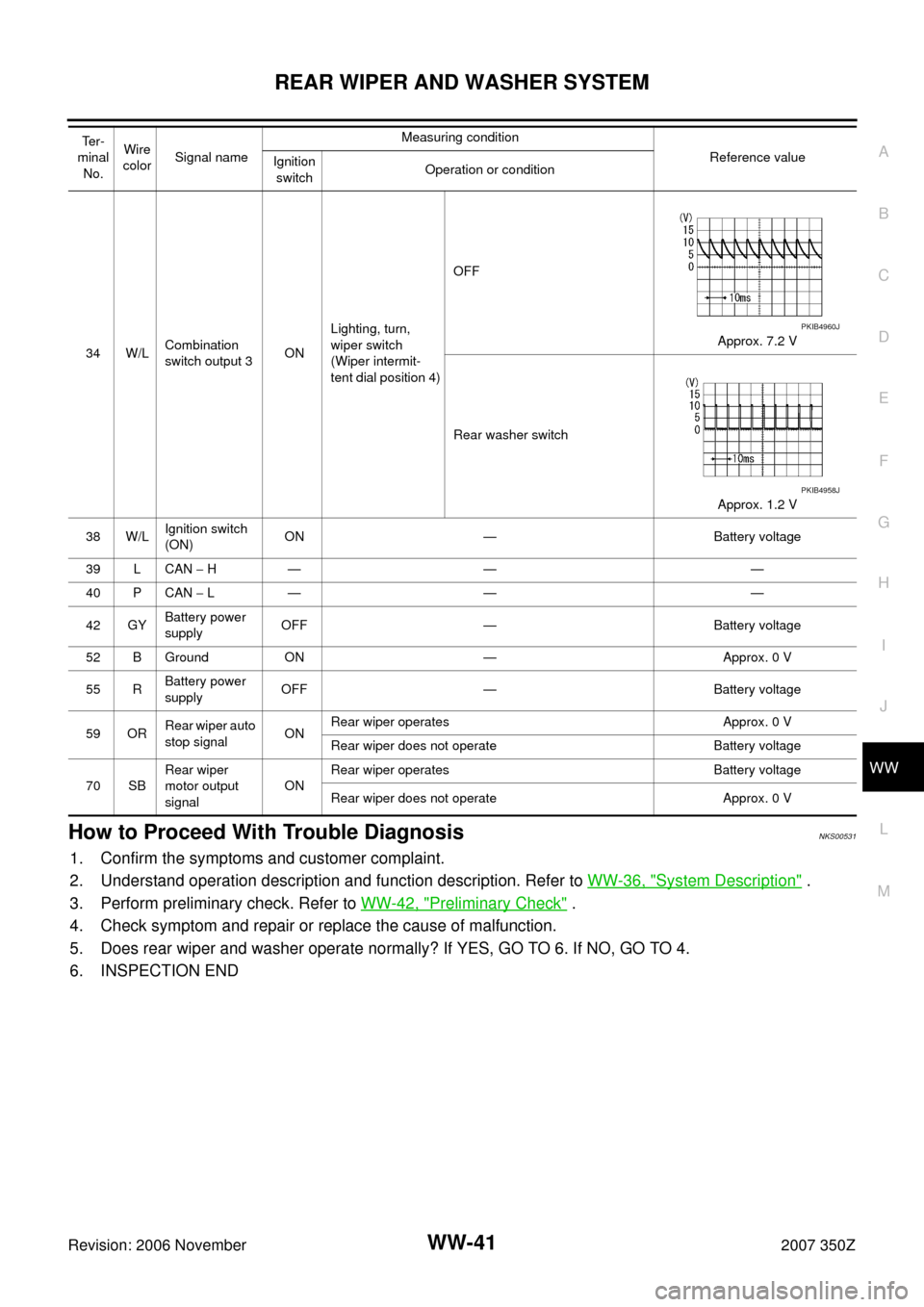
34 W/LCombination
switch output 3ONLighting, turn,
wiper switch
(Wiper intermit-
tent dial position 4)OFF
Approx. 7.2 V
Rear washer switch
Approx. 1.2 V
38 W/LIgnition switch
(ON) ON — Battery voltage
39 L CAN − H— — —
40 P CAN − L— — —
42 GYBattery power
supplyOFF — Battery voltage
52 B Ground ON — Approx. 0 V
55 RBattery power
supplyOFF — Battery voltage
59 ORRear wiper auto
stop signalONRear wiper operates Approx. 0 V
Rear wiper does not operate Battery voltage
70 SBRear wiper
motor output
signalONRear wiper operates Battery voltage
Rear wiper does not operate Approx. 0 V Te r -
minal
No.Wire
colorSignal nameMeasuring condition
Reference value
Ignition
switchOperation or condition
PKIB4960J
PKIB4958J
Page 42 of 54
WW-42
REAR WIPER AND WASHER SYSTEM
Revision: 2006 November2007 350Z
Preliminary CheckNKS00532
CHECK POWER SUPPLY AND GROUND CIRCUIT
1. CHECK FUSES AND FUSIBLE LINK
Check for blown fuses and fusible link.
Refer to WW-38, "
Wiring Diagram — WIP/ R —" .
OK or NG
OK >> GO TO 2.
NG >> If fuse is blown, be sure to eliminate cause of malfunction before installing new fuse. Refer to PG-
4, "POWER SUPPLY ROUTING CIRCUIT" .
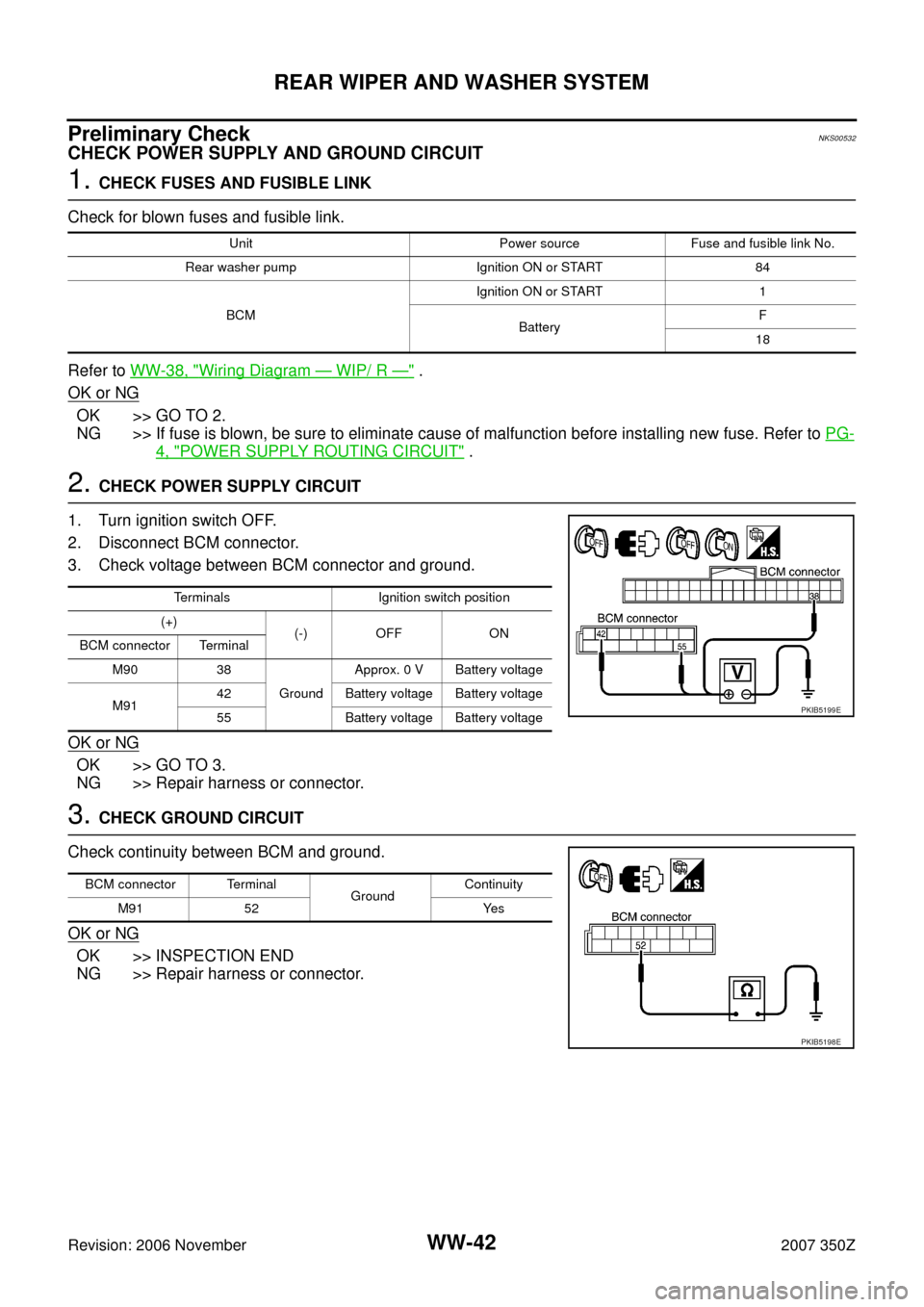
2. CHECK POWER SUPPLY CIRCUIT
1. Turn ignition switch OFF.
2. Disconnect BCM connector.
3. Check voltage between BCM connector and ground.
OK or NG
OK >> GO TO 3.
NG >> Repair harness or connector.
3. CHECK GROUND CIRCUIT
Check continuity between BCM and ground.
OK or NG
OK >> INSPECTION END
NG >> Repair harness or connector.
Unit Power source Fuse and fusible link No.
Rear washer pump Ignition ON or START 84
BCMIgnition ON or START 1
BatteryF
18
Terminals Ignition switch position
(+)
(-) OFF ON
BCM connector Terminal
M90 38
GroundApprox. 0 V Battery voltage
M9142 Battery voltage Battery voltage
55 Battery voltage Battery voltage
PKIB5199E
BCM connector Terminal
GroundContinuity
M91 52 Yes
PKIB5198E
Page 44 of 54
WW-44
REAR WIPER AND WASHER SYSTEM
Revision: 2006 November2007 350Z
2. ACTIVE TEST
CONSULT-III ACTIVE TEST
1. Select "REAR WIPER" of BCM active test item.
2. With operating the test item, check that rear wiper operation.
GO TO 3
Does rear wiper operate normally?
YES >> Replace BCM. Refer to BCS-17, "Removal and Installation of BCM" .
NO >> GO TO 3.
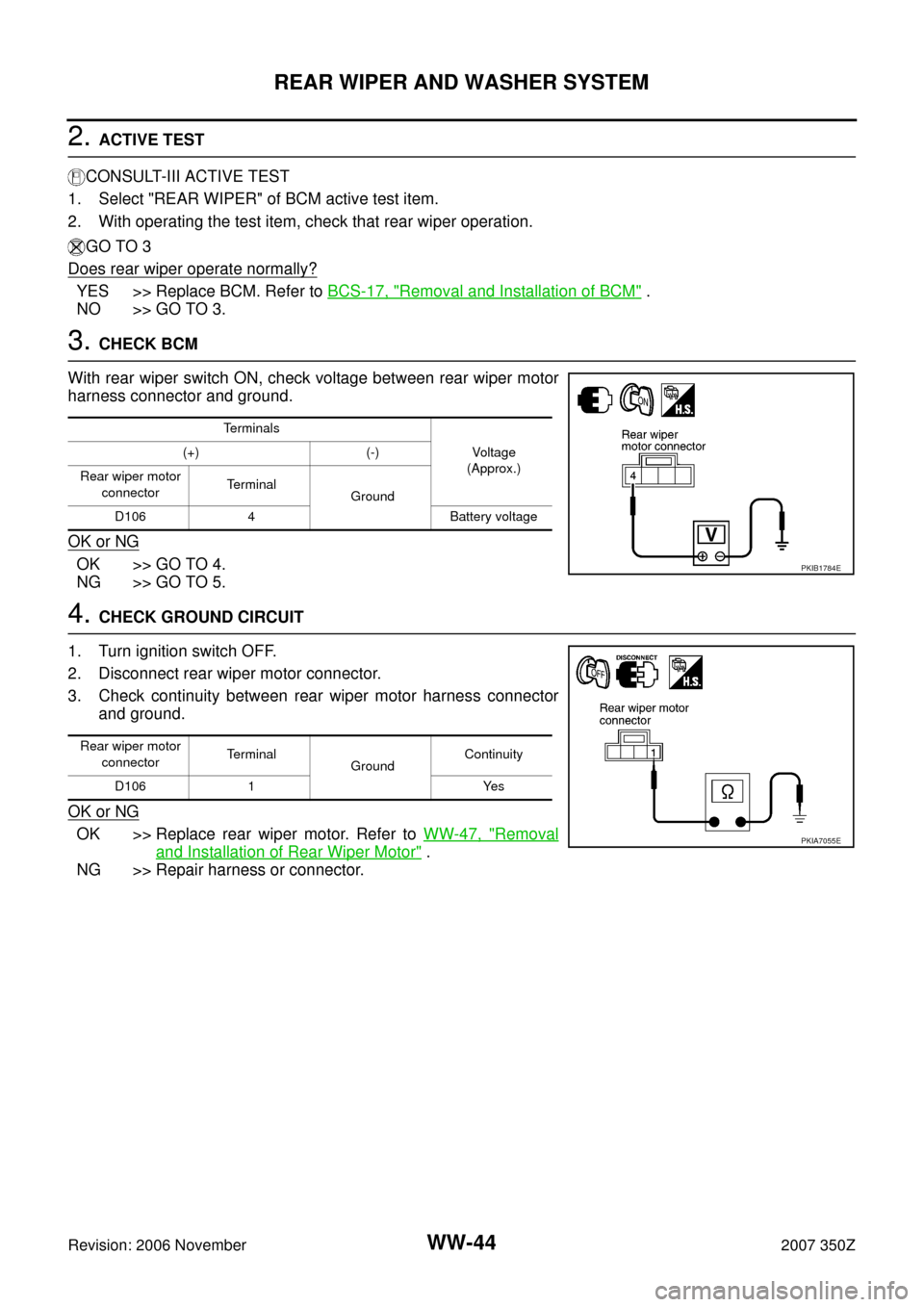
3. CHECK BCM
With rear wiper switch ON, check voltage between rear wiper motor
harness connector and ground.
OK or NG
OK >> GO TO 4.
NG >> GO TO 5.
4. CHECK GROUND CIRCUIT
1. Turn ignition switch OFF.
2. Disconnect rear wiper motor connector.
3. Check continuity between rear wiper motor harness connector
and ground.
OK or NG
OK >> Replace rear wiper motor. Refer to WW-47, "Removal
and Installation of Rear Wiper Motor" .
NG >> Repair harness or connector.
Te r m i n a l s
Voltag e
(Approx.) (+) (-)
Rear wiper motor
connectorTe r m i n a l
Ground
D106 4 Battery voltage
PKIB1784E
Rear wiper motor
connectorTe r m i n a l
Ground Continuity
D106 1 Yes
PKIA7055E
Page 46 of 54
WW-46
REAR WIPER AND WASHER SYSTEM
Revision: 2006 November2007 350Z
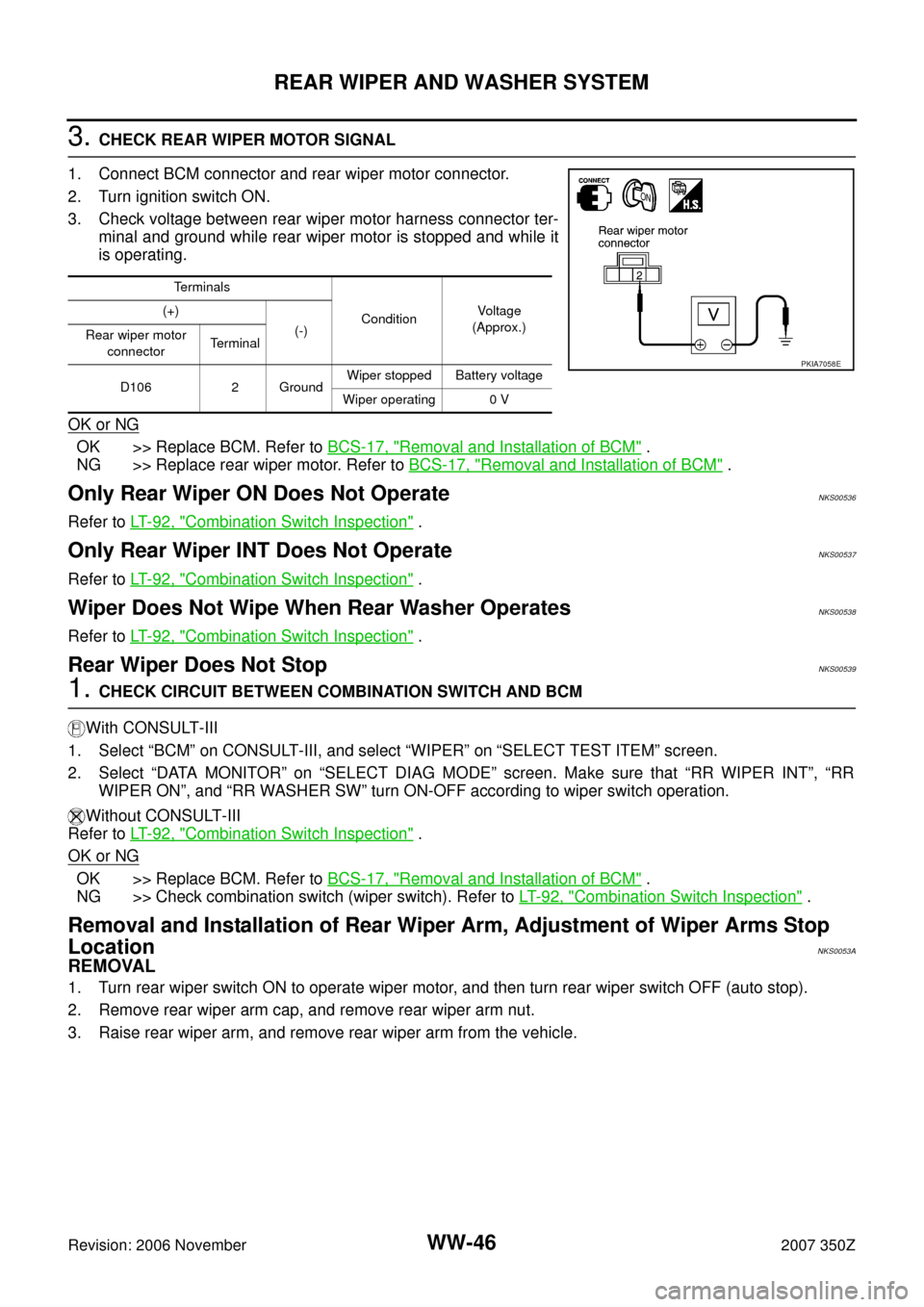
3. CHECK REAR WIPER MOTOR SIGNAL
1. Connect BCM connector and rear wiper motor connector.
2. Turn ignition switch ON.
3. Check voltage between rear wiper motor harness connector ter-
minal and ground while rear wiper motor is stopped and while it
is operating.
OK or NG
OK >> Replace BCM. Refer to BCS-17, "Removal and Installation of BCM" .
NG >> Replace rear wiper motor. Refer to BCS-17, "
Removal and Installation of BCM" .
Only Rear Wiper ON Does Not OperateNKS00536
Refer to LT- 9 2 , "Combination Switch Inspection" .
Only Rear Wiper INT Does Not OperateNKS00537
Refer to LT- 9 2 , "Combination Switch Inspection" .
Wiper Does Not Wipe When Rear Washer OperatesNKS00538
Refer to LT- 9 2 , "Combination Switch Inspection" .
Rear Wiper Does Not StopNKS00539
1. CHECK CIRCUIT BETWEEN COMBINATION SWITCH AND BCM
With CONSULT-III
1. Select “BCM” on CONSULT-III, and select “WIPER” on “SELECT TEST ITEM” screen.
2. Select “DATA MONITOR” on “SELECT DIAG MODE” screen. Make sure that “RR WIPER INT”, “RR
WIPER ON”, and “RR WASHER SW” turn ON-OFF according to wiper switch operation.
Without CONSULT-III
Refer to LT- 9 2 , "
Combination Switch Inspection" .
OK or NG
OK >> Replace BCM. Refer to BCS-17, "Removal and Installation of BCM" .
NG >> Check combination switch (wiper switch). Refer to LT- 9 2 , "
Combination Switch Inspection" .
Removal and Installation of Rear Wiper Arm, Adjustment of Wiper Arms Stop
Location
NKS0053A
REMOVAL
1. Turn rear wiper switch ON to operate wiper motor, and then turn rear wiper switch OFF (auto stop).
2. Remove rear wiper arm cap, and remove rear wiper arm nut.
3. Raise rear wiper arm, and remove rear wiper arm from the vehicle.
Terminals
ConditionVoltag e
(Approx.) (+)
(-)
Rear wiper motor
connectorTerminal
D106 2 GroundWiper stopped Battery voltage
Wiper operating 0 V
PKIA7058E