battery NISSAN 370Z 2018 Owner´s Manual
[x] Cancel search | Manufacturer: NISSAN, Model Year: 2018, Model line: 370Z, Model: NISSAN 370Z 2018Pages: 453, PDF Size: 2.19 MB
Page 119 of 453
Automatic window lowering
(Roadster models)
When the soft top operating switch is
pressed, the power windows will auto-
matically be lowered completely. The
windows do not rise automatically after
the soft top open/close operation is
completed. Use the power window
switches to raise them.
Automatic adjusting function
CAUTION
When the battery cable is removed
from the battery terminal, do not
close either of the front doors. The
automatic window adjusting func-
tion will not work and the side roof
panel may be damaged.
The power window has an automatic
adjusting function. When the door is
being opened, the window is automati-
cally lowered slightly to avoid contact
between the window and the side roof
panel. When the door is closed, the
window is automatically raised slightly.
While the automatic adjusting function
does not work, the window will be con-
trolled as follows: .
When the door is opened, the window
lowers for approximately 2 seconds.
. While the door is open, the window
cannot be raised.
If the windows do not close auto-
matically
If the power window automatic function
(closing only) does not operate properly,
perform the following procedure to initi-
alize the power window system.
1. Push the ignition switch to the ON
position.
2. Close the door and soft top (Roadster models).
3. Open the window completely by op- erating the power window switch.
4. Pull the power window switch and hold it to close the window, and then
hold the switch more than 3 seconds
after the window is closed completely.
5. Release the power window switch. Operate the window by the automatic
function to confirm the initialization is
complete.
6. Perform steps 2 through 5 above for other windows.
If the power window automatic function
does not operate properly after perform-
ing the procedure above, have your vehicle checked. It is recommended you
visit a NISSAN dealer for this service.
Instruments and controls2-49
Page 120 of 453
2-50Instruments and controls
SIC4238
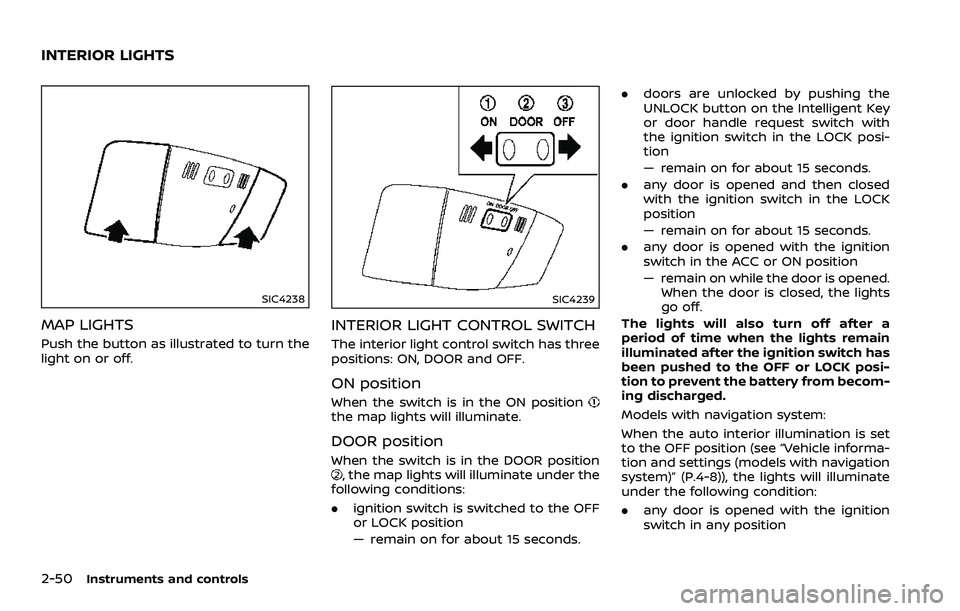
MAP LIGHTS
Push the button as illustrated to turn the
light on or off.
SIC4239
INTERIOR LIGHT CONTROL SWITCH
The interior light control switch has three
positions: ON, DOOR and OFF.
ON position
When the switch is in the ON positionthe map lights will illuminate.
DOOR position
When the switch is in the DOOR position, the map lights will illuminate under the
following conditions:
. ignition switch is switched to the OFF
or LOCK position
— remain on for about 15 seconds. .
doors are unlocked by pushing the
UNLOCK button on the Intelligent Key
or door handle request switch with
the ignition switch in the LOCK posi-
tion
— remain on for about 15 seconds.
. any door is opened and then closed
with the ignition switch in the LOCK
position
— remain on for about 15 seconds.
. any door is opened with the ignition
switch in the ACC or ON position
— remain on while the door is opened.
When the door is closed, the lights
go off.
The lights will also turn off after a
period of time when the lights remain
illuminated after the ignition switch has
been pushed to the OFF or LOCK posi-
tion to prevent the battery from becom-
ing discharged.
Models with navigation system:
When the auto interior illumination is set
to the OFF position (see “Vehicle informa-
tion and settings (models with navigation
system)” (P.4-8)), the lights will illuminate
under the following condition:
. any door is opened with the ignition
switch in any position
INTERIOR LIGHTS
Page 121 of 453
— remain on while the door is opened.When the door is closed, the lights
go off.
OFF position
When the switch is in the OFF position,
the lights will not illuminate, regardless of
the condition.
CAUTION
Do not use for extended periods of
time with the engine stopped. This
could result in a discharged battery.
SIC3869
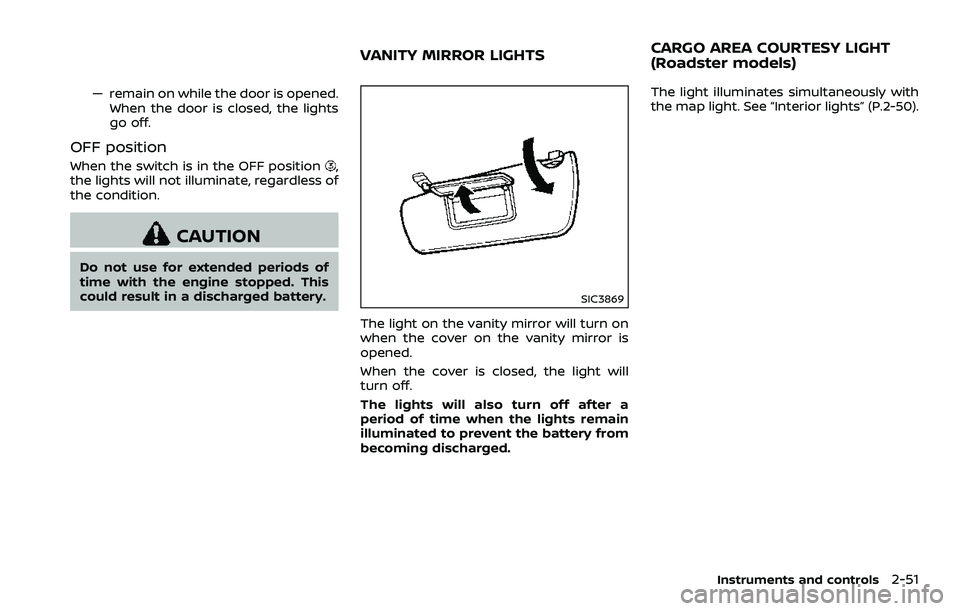
The light on the vanity mirror will turn on
when the cover on the vanity mirror is
opened.
When the cover is closed, the light will
turn off.
The lights will also turn off after a
period of time when the lights remain
illuminated to prevent the battery from
becoming discharged. The light illuminates simultaneously with
the map light. See “Interior lights” (P.2-50).
Instruments and controls2-51
VANITY MIRROR LIGHTS
CARGO AREA COURTESY LIGHT
(Roadster models)
Page 122 of 453
2-52Instruments and controls
The light illuminates when the rear hatch
is opened. When the rear hatch is closed,
the light will turn off.
The light will also turn off after a period
of time when the light remains illumi-
nated after the ignition switch has been
pushed to the OFF or LOCK position to
prevent the battery from becoming
discharged.The light illuminates when the trunk lid is
opened. When the trunk lid is closed, the
light turns off.
The HomeLink® Universal Transceiver
provides a convenient way to consolidate
the functions of up to three individual
hand-held transmitters into one built-in
device.
HomeLink® Universal Transceiver:
.
Will operate most Radio Frequency
(RF) devices such as garage doors,
gates, home and office lighting, entry
door locks and security systems.
. Is powered by your vehicle’s battery.
No separate batteries are required. If
the vehicle’s battery is discharged or is
disconnected, HomeLink® will retain
all programming.
When the HomeLink® Universal Trans-
ceiver is programmed, retain the origi-
nal transmitter for future programming
procedures (Example: new vehicle pur-
chases). Upon sale of the vehicle, the
programmed HomeLink® Universal
Transceiver buttons should be erased
for security purposes. For additional
information, refer to “Programming
HomeLink®” (P.2-53).
WARNING
. Do not use the HomeLink® Uni-
versal Transceiver with any gar-
age door opener that lacks safety
CARGO LIGHT (Coupe models) TRUNK LIGHT (Roadster models) HomeLink® UNIVERSAL
TRANSCEIVER (if so equipped)
Page 123 of 453
stop and reverse features as re-
quired by federal safety stan-
dards. (These standards became
effective for opener models man-
ufactured after April 1, 1982). A
garage door opener which cannot
detect an object in the path of a
closing garage door and then
automatically stop and reverse,
does not meet current federal
safety standards. Using a garage
door opener without these fea-
tures increases the risk of serious
injury or death.
. During the programming proce-
dure your garage door or security
gate will open and close (if the
transmitter is within range). Make
sure that people or objects are
clear of the garage door, gate,
etc. that you are programming.
. Your vehicle’s engine should be
turned off while programming
the HomeLink® Universal Trans-
ceiver. Do not breathe exhaust
gases; they contain colorless
and odorless carbon monoxide.
Carbon monoxide is dangerous. It
can cause unconsciousness or
death.PROGRAMMING HomeLink®
If you have any questions or are having
difficulty programming your HomeLink®
buttons, refer to the HomeLink® web site
at: www.homelink.com or call 1-800-355-
3515.
NOTE:
It is also recommended that a new
battery be placed in the hand-held
transmitter of the device being pro-
grammed to HomeLink® for quicker
programming and accurate transmis-
sion of the radio-frequency.
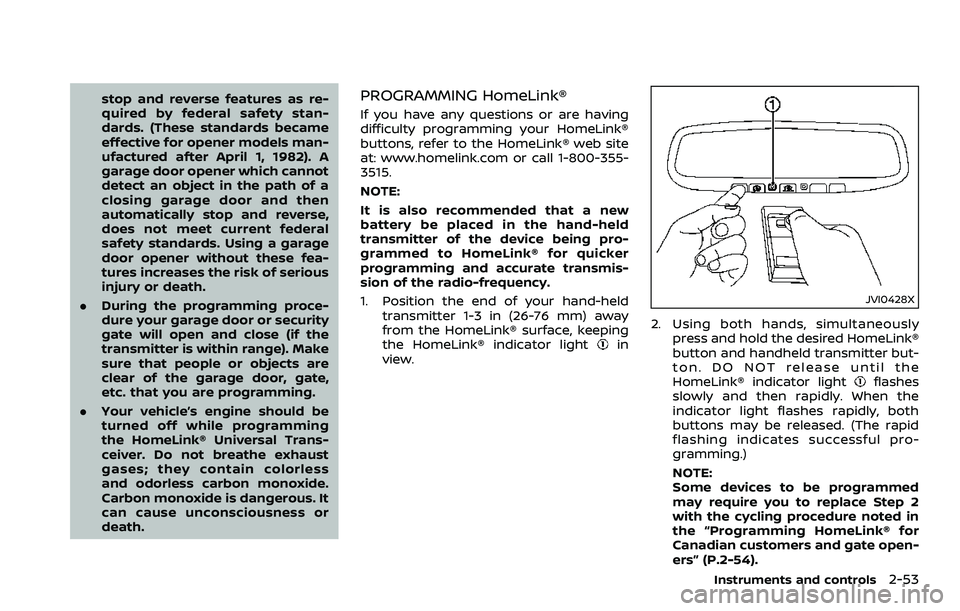
1. Position the end of your hand-held
transmitter 1-3 in (26-76 mm) away
from the HomeLink® surface, keeping
the HomeLink® indicator light
in
view.
JVI0428X
2. Using both hands, simultaneously press and hold the desired HomeLink®
button and handheld transmitter but-
ton. DO NOT release until the
HomeLink® indicator light
flashes
slowly and then rapidly. When the
indicator light flashes rapidly, both
buttons may be released. (The rapid
flashing indicates successful pro-
gramming.)
NOTE:
Some devices to be programmed
may require you to replace Step 2
with the cycling procedure noted in
the “Programming HomeLink® for
Canadian customers and gate open-
ers” (P.2-54).
Instruments and controls2-53
Page 125 of 453
held transmitter every two seconds until
the frequency signal has been learned.
The HomeLink® indicator light will flash
slowly and then rapidly after several
seconds upon successful programming.
DO NOTrelease until the HomeLink®
indicator light flashes slowly and then
rapidly. When the indicator light flashes
rapidly, both buttons may be released.
The rapid flashing indicates successful
programming.
Proceed with “Programming HomeLink®”
step 3 to complete.
Remember to plug the device back in
when programming is completed.
OPERATING THE HomeLink® UNI-
VERSAL TRANSCEIVER
The HomeLink® Universal Transceiver,
after it is programmed, can be used to
activate the programmed device. To op-
erate, simply press and release the appro-
priate programmed HomeLink® Universal
Transceiver button. The amber indicator
light will illuminate while the signal is
being transmitted.
For convenience, the hand-held transmit-
ter of the device may also be used at any
time.
PROGRAMMING TROUBLESHOOT-
ING
If the HomeLink® does not quickly learn
the hand-held transmitter information:
. replace the hand-held transmitter
batteries with new batteries.
. position the hand-held transmitter
with its battery area facing away from
the HomeLink® surface.
. press and hold both the HomeLink®
and hand-held transmitter buttons
without interruption.
. position the hand-held transmitter 1-3
in (26-76 mm) away from the
HomeLink® surface. Hold the transmit-
ter in that position for up to 15
seconds. If HomeLink® is not pro-
grammed within that time, try holding
the transmitter in another position -
keeping the indicator light in view at
all times.
If you have any questions or are having
difficulty programming your HomeLink®
buttons, refer to the HomeLink® web site
at: www.homelink.com or 1-800-355-3515.
CLEARING THE PROGRAMMED IN-
FORMATION
The following procedure clears the pro-
grammed information from both buttons.
Individual buttons cannot be cleared.
However, individual buttons can be re-
programmed, see “Reprogramming a sin-
gle HomeLink® button” (P.2-55).
To clear all programming
1. Press and hold the two outer HomeLink® buttons until the indicator
light begins to flash in approximately
10 seconds. Do not hold for longer
than 20 seconds.
2. Release both buttons.
HomeLink® is now in the programming
mode and can be programmed at any
time beginning with “Programming
HomeLink®” - Step 1.
REPROGRAMMING A SINGLE
HomeLink® BUTTON
To reprogram a HomeLink® Universal
Transceiver button, complete the follow-
ing.
1. Press and hold the desired HomeLink® button. DO NOT release the button.
2. The indicator light will begin to flash after 20 seconds. Without releasing
the HomeLink® button, proceed with
Instruments and controls2-55
Page 127 of 453

3 Pre-driving checks and adjustments
Keys ........................................................................\
.................................. 3-3Intelligent Key ........................................................................\
.... 3-3
Valet hand-off ........................................................................\
.... 3-4
Doors ........................................................................\
............................... 3-5 Locking with mechanical key ....................................... 3-5
Opening and closing windows with the
mechanical key ........................................................................\
. 3-5
Locking with inside lock knob ...................................... 3-6
Locking with power door lock switch .................... 3-6
Automatic door locks .......................................................... 3-6
Intelligent Key system ............................................................... 3-7 Intelligent Key operating range ................................. 3-9
Door locks/unlocks precaution ................................. 3-9
Intelligent Key operation ................................................ 3-10
Battery saver system ......................................................... 3-12
Warning signals ...................................................................... 3-12
Troubleshooting guide ..................................................... 3-13
Remote keyless entry system ........................................... 3-14 How to use remote keyless entry system ........ 3-14
Hood ........................................................................\
............................... 3-17
Rear hatch (Coupe models) ................................................ 3-18 Rear hatch opener switch ............................................. 3-18
Rear hatch release switch ............................................. 3-19
Secondary rear hatch release ................................... 3-20 Trunk lid (Roadster models) .............................................. 3-20
Trunk lid opener switch ................................................ 3-21
Trunk release power cancel switch .................... 3-21
Interior trunk lid release ............................................... 3-21
Secondary trunk lid release ...................................... 3-22
Soft top (Roadster models) ............................................... 3-23
Before operating the top ............................................ 3-23
When operating the top .............................................. 3-25
Opening the top ................................................................. 3-27
Closing the top .................................................................... 3-27
Opening the top using the Intelligent Key ...... 3-28
Troubleshooting guide ................................................. 3-29
If the top does not open or
close electrically ................................................................. 3-30
Care of the soft top and the vehicle body ...... 3-33
Front, side and rear unique parts
(NISMO models) ........................................................................\
... 3-34
Fuel-filler door ........................................................................\
...... 3-35 Opening the fuel-filler door ....................................... 3-35
Fuel-filler cap ........................................................................\
3-36
Tilt steering ........................................................................\
............. 3-38 Manual operation .............................................................. 3-38
Sun visors ........................................................................\
................. 3-38
Page 129 of 453
A key number plate is supplied with your
keys. Record the key number and keep it
in a safe place (such as your wallet), not in
the vehicle. If you lose your keys, it is
recommended you visit a NISSAN dealer
for duplicates by using the key number.
NISSAN does not record any key numbers
so it is very important to keep track of
your key number plate.
A key number is only necessary when you
have lost all keys and do not have one to
duplicate from. If you still have a key, it
can be duplicated without knowing the
key number.
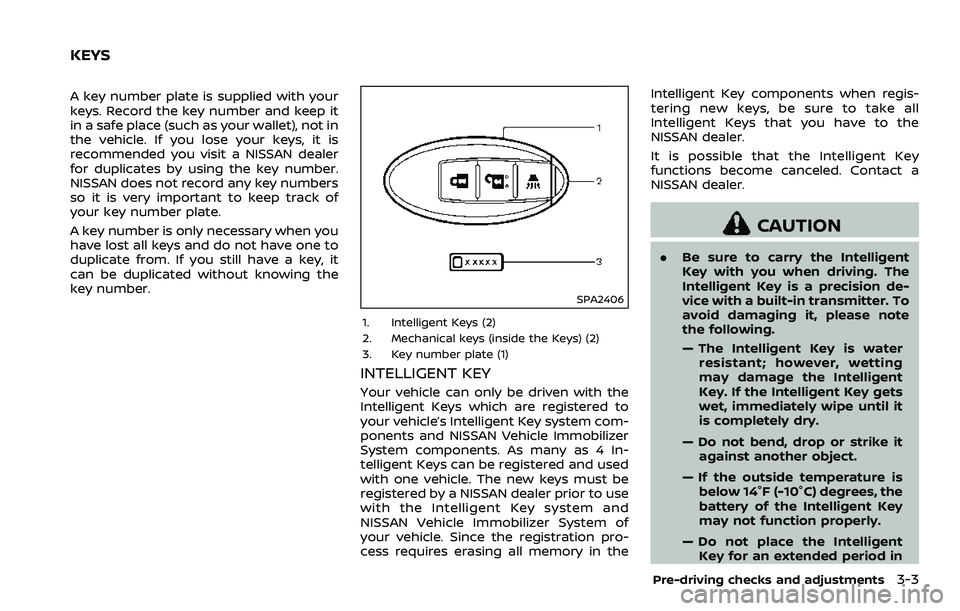
SPA2406
1. Intelligent Keys (2)
2. Mechanical keys (inside the Keys) (2)
3. Key number plate (1)
INTELLIGENT KEY
Your vehicle can only be driven with the
Intelligent Keys which are registered to
your vehicle’s Intelligent Key system com-
ponents and NISSAN Vehicle Immobilizer
System components. As many as 4 In-
telligent Keys can be registered and used
with one vehicle. The new keys must be
registered by a NISSAN dealer prior to use
with the Intelligent Key system and
NISSAN Vehicle Immobilizer System of
your vehicle. Since the registration pro-
cess requires erasing all memory in theIntelligent Key components when regis-
tering new keys, be sure to take all
Intelligent Keys that you have to the
NISSAN dealer.
It is possible that the Intelligent Key
functions become canceled. Contact a
NISSAN dealer.
CAUTION
.
Be sure to carry the Intelligent
Key with you when driving. The
Intelligent Key is a precision de-
vice with a built-in transmitter. To
avoid damaging it, please note
the following.
— The Intelligent Key is water
resistant; however, wetting
may damage the Intelligent
Key. If the Intelligent Key gets
wet, immediately wipe until it
is completely dry.
— Do not bend, drop or strike it against another object.
— If the outside temperature is below 14°F (-10°C) degrees, the
battery of the Intelligent Key
may not function properly.
— Do not place the Intelligent Key for an extended period in
Pre-driving checks and adjustments3-3
KEYS
Page 134 of 453

3-8Pre-driving checks and adjustments
.When the vehicle is parked near a
parking meter.
In such cases, correct the operating
conditions before using the Intelligent
Key function or use the mechanical key.
Although the life of the battery varies
depending on the operating conditions,
the battery’s life is approximately 2 years.
If the battery is discharged, replace it with
a new one.
When the Intelligent Key battery is almost
discharged, insert the Intelligent Key into
the Intelligent Key port to start the
engine. Replace the discharged battery
with a new one as soon as possible. For
more details, see “Push-button ignition
switch” (P.5-8).
Since the Intelligent Key is continuously
receiving radio waves, if the key is left
near equipment which transmits strong
radio waves, such as signals from a TV
and personal computer, the battery life
may become shorter.
For information regarding replacement of
a battery, see “Intelligent Key battery
replacement” (P.8-20).
As many as 4 Intelligent Keys can be
registered and used with one vehicle. For
information about the purchase and use
of additional Intelligent Keys, contact a
NISSAN dealer.
CAUTION
. Do not allow the Intelligent Key,
which contains electrical compo-
nents, to come into contact with
water or salt water. This could
affect the system function.
. Do not drop the Intelligent Key.
. Do not strike the Intelligent Key
sharply against another object.
. Do not change or modify the
Intelligent Key.
. Wetting may damage the Intelli-
gent Key. If the Intelligent Key
gets wet, immediately wipe until
it is completely dry.
. If the outside temperature is be-
low 14°F (−10°C), the battery of the
Intelligent Key may not function
properly.
. Do not place the Intelligent Key
for an extended period in an area
where temperatures exceed
140°F (60°C).
. Do not attach the Intelligent Key
with a key holder that contains a
magnet.
. Do not place the Intelligent Key
near equipment that produces a magnetic field, such as a TV,
audio equipment, personal com-
puter or cellular phone.
If an Intelligent Key is lost or stolen,
NISSAN recommends erasing the ID code
of that Intelligent Key from the vehicle.
This may prevent the unauthorized use of
the Intelligent Key to operate the vehicle.
For information regarding the erasing
procedure, contact a NISSAN dealer.
The Intelligent Key function can be dis-
abled. For information about disabling
the Intelligent Key function, contact a
NISSAN dealer.
Page 135 of 453
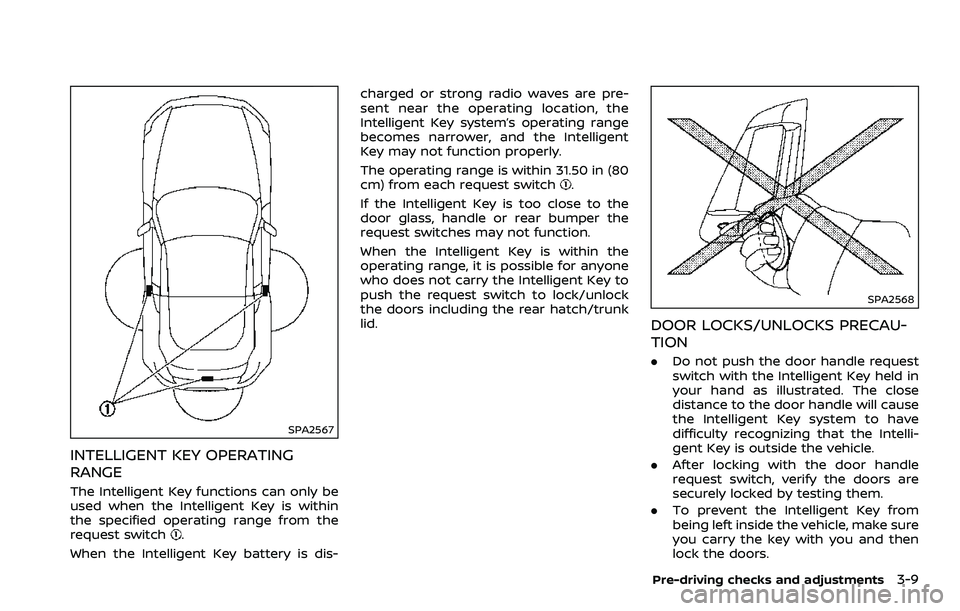
SPA2567
INTELLIGENT KEY OPERATING
RANGE
The Intelligent Key functions can only be
used when the Intelligent Key is within
the specified operating range from the
request switch
.
When the Intelligent Key battery is dis- charged or strong radio waves are pre-
sent near the operating location, the
Intelligent Key system’s operating range
becomes narrower, and the Intelligent
Key may not function properly.
The operating range is within 31.50 in (80
cm) from each request switch
.
If the Intelligent Key is too close to the
door glass, handle or rear bumper the
request switches may not function.
When the Intelligent Key is within the
operating range, it is possible for anyone
who does not carry the Intelligent Key to
push the request switch to lock/unlock
the doors including the rear hatch/trunk
lid.
SPA2568
DOOR LOCKS/UNLOCKS PRECAU-
TION
. Do not push the door handle request
switch with the Intelligent Key held in
your hand as illustrated. The close
distance to the door handle will cause
the Intelligent Key system to have
difficulty recognizing that the Intelli-
gent Key is outside the vehicle.
. After locking with the door handle
request switch, verify the doors are
securely locked by testing them.
. To prevent the Intelligent Key from
being left inside the vehicle, make sure
you carry the key with you and then
lock the doors.
Pre-driving checks and adjustments3-9