service NISSAN 370Z 2018 Owner´s Manual
[x] Cancel search | Manufacturer: NISSAN, Model Year: 2018, Model line: 370Z, Model: NISSAN 370Z 2018Pages: 453, PDF Size: 2.19 MB
Page 87 of 453
Rear fog light indicator light (if
so equipped)
The rear fog light indicator light illumi-
nates when the rear fog light is on. (See
“Fog light switch” (P.2-38).)
Security indicator light
The light blinks when the ignition switch
is in the ACC, OFF or LOCK position. This
function indicates the security system
equipped on the vehicle is operational.
If the security system is malfunctioning,
this light will remain on while the ignition
switch is in the ON position. For additional
information, see “Security systems” (P.2-
29).
Soft top indicator light (Road-
ster models)
This light illuminates when the soft top is
being operated or it is stopped before
reaching a full open/close state. When the
top is fully opened or closed, the light will
turn off.
The light blinks while the soft top is not
fully opened or closed under the following
conditions:
. When the vehicle is driven. .
When the shift lever is in the R
(Reverse) position.
Be sure to fully open or close the soft top
when driving the vehicle.
The soft top can be moved with the soft
top operating switch only under all of the
following conditions:
. When the vehicle is stopped.
. When the ignition switch is ON.
. When the trunk is closed.
. When the shift lever is in a position
other than the R (Reverse) position.
CAUTION
Operate the soft top with the engine
running to prevent a discharged
battery.
When the soft top is operating, if any of
the above conditions are discontinued or
any of the following conditions are met,
the top will stop operating.
. When the shift lever is in the R
(Reverse) position.
. When the vehicle moves at a speed of
3 MPH (5 km/h) or more.
. When the battery voltage is extremely
low. .
When the temperature of the soft top
system becomes extremely high.
Release the operating switch, and push it
again under the above conditions until
the top is fully opened or closed. The soft
top indicator light will turn off when the
top operation is completely finished.
If the soft top indicator light illuminates
with the ignition switch ON, it may
indicate the electric soft top control unit
is not functioning properly. Have your
vehicle checked as soon as possible. It is
recommended you visit a NISSAN dealer
for this service.
For more details about the electric soft
top operation, see “Soft top (Roadster
models)” (P.3-23).
SynchroRev Match mode (S-
MODE) indicator (if so equipped)
This indicator will illuminate when the
SynchroRev Match mode (S-MODE) is
activated. (See “SynchroRev Match mode
(S-MODE) (if so equipped for Manual
Transmission models)” (P.5-18).)
Instruments and controls2-17
Page 92 of 453
2-22Instruments and controls
COLD tire pressure shown on the recom-
mended COLD tire pressure shown on the
Tire and Loading Information label. (See
“Tire Pressure Monitoring System (TPMS)”
(P.5-3) and “Tire Pressure Monitoring Sys-
tem (TPMS)” (P.6-3).
7. “TIMER” indicator
This indicator appears when the set
“TIMER” indicator activates. You can set
the time for up to 6 hours. (See “Trip
computer” (P.2-23).)
8. Low outside temperature warn-
ing
This warning appears if the outside tem-
perature is below 37°F (3°C). The warning
can be set not to be displayed. (See “Trip
computer” (P.2-23).)
9. SynchroRev Match mode (S-
MODE) warning
This warning appears if a system mal-
function occurs. When the warning ap-
pears, the S-MODE function will not
operate, but the manual transmission will
operate normally and driving can be
continued. Have the system checked. It
is recommended you visit a NISSAN dealer
for this service.
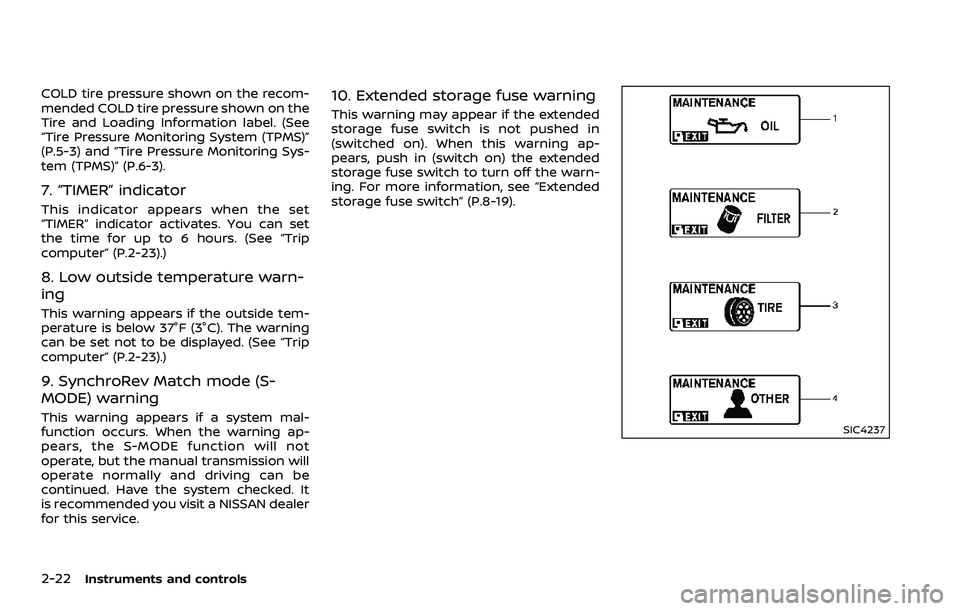
10. Extended storage fuse warning
This warning may appear if the extended
storage fuse switch is not pushed in
(switched on). When this warning ap-
pears, push in (switch on) the extended
storage fuse switch to turn off the warn-
ing. For more information, see “Extended
storage fuse switch” (P.8-19).
SIC4237
Page 101 of 453
accept any interference received, in-
cluding interference that may cause
undesired operation.
Note: Changes or modifications not
expressly approved by the party re-
sponsible for compliance could void
the user’s authority to operate the
equipment.
For Canada:
This device complies with Industry Ca-
nada licence-exempt RSS standard(s).
Operation is subject to the following
two conditions:
(1) this device may not cause interfer-
ence, and (2) this device must accept
any interference, including interference
that may cause undesired operation of
the device.
SIC2045
Security indicator light
The security indicator light is located on
the meter panel. It indicates the status of
the NISSAN Vehicle Immobilizer System.
The light blinks after the ignition switch is
in the LOCK, ACC or OFF position. This
function indicates the security systems
equipped on the vehicle are operational.
If the NISSAN Vehicle Immobilizer System
is malfunctioning, this light will remain on
while the ignition switch is in the ON
position.
If the light still remains on and/or the
engine will not start, seek service for
NISSAN Vehicle Immobilizer System assoon as possible. Please bring all In-
telligent Keys that you have. It is re-
commended you visit a NISSAN dealer
for this service.
Instruments and controls2-31
Page 104 of 453
2-34Instruments and controls
XENON HEADLIGHTS
WARNING
HIGH VOLTAGE
. When xenon headlights are on,
they produce a high voltage. To
prevent an electric shock, never
attempt to modify or disassem-
ble. Always have your xenon
headlights replaced by a certified
service technician.
. Xenon headlights provide consid-
erably more light than conven-
tional headlights. If they are not
correctly aimed, they might tem-
porarily blind an oncoming driver
or the driver ahead of you and
cause a serious accident. If head-
lights are not aimed correctly, it is
recommended you immediately
take your vehicle to a NISSAN
dealer and have the headlights
adjusted correctly.
When the xenon headlight is initially
turned on, its brightness or color varies
slightly. However, the color and bright-
ness will soon stabilize. .
The life of xenon headlights will be
shortened by frequent on-off opera-
tion. It is generally desirable not to
turn off the headlights for short
intervals (for example, when the
vehicle stops at a traffic signal).
. If the xenon headlight bulb is close
to burning out, the brightness will
drastically decrease, the light will
start blinking, or the color of the
light will become reddish. If one or
more of the above signs appear, it is
recommended you visit a NISSAN
dealer.
SIC3994
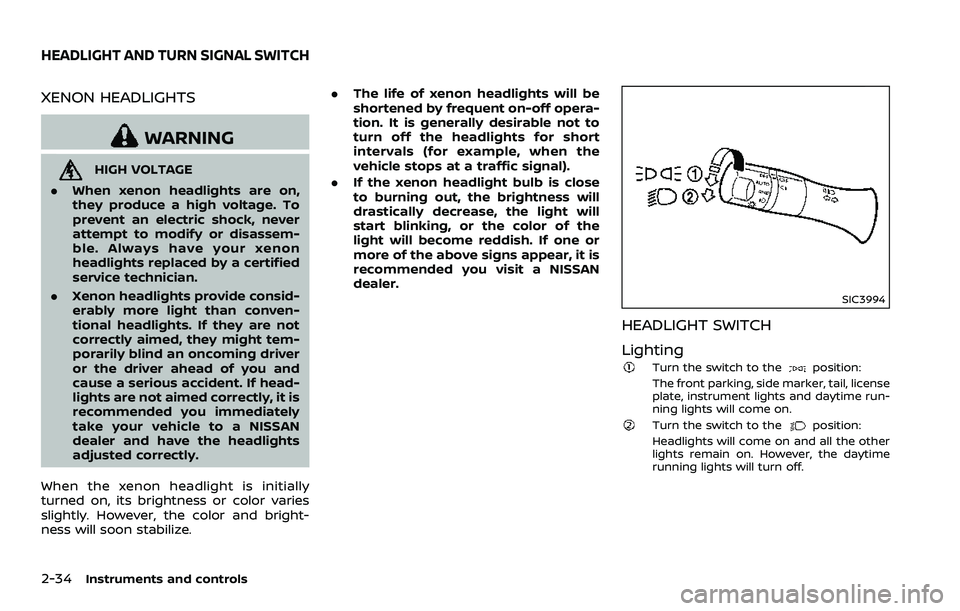
HEADLIGHT SWITCH
Lighting
Turn the switch to theposition:
The front parking, side marker, tail, license
plate, instrument lights and daytime run-
ning lights will come on.
Turn the switch to theposition:
Headlights will come on and all the other
lights remain on. However, the daytime
running lights will turn off.
HEADLIGHT AND TURN SIGNAL SWITCH
Page 109 of 453
.Any liquid spilled on the heated
seat should be removed immedi-
ately with a dry cloth.
. When cleaning the seat, never use
gasoline, thinner, or any similar
materials.
. If any malfunctions are found or
the heated seat does not operate,
turn the switch off and have the
system checked. It is recom-
mended you visit a NISSAN dealer
for this service.
SIC2770
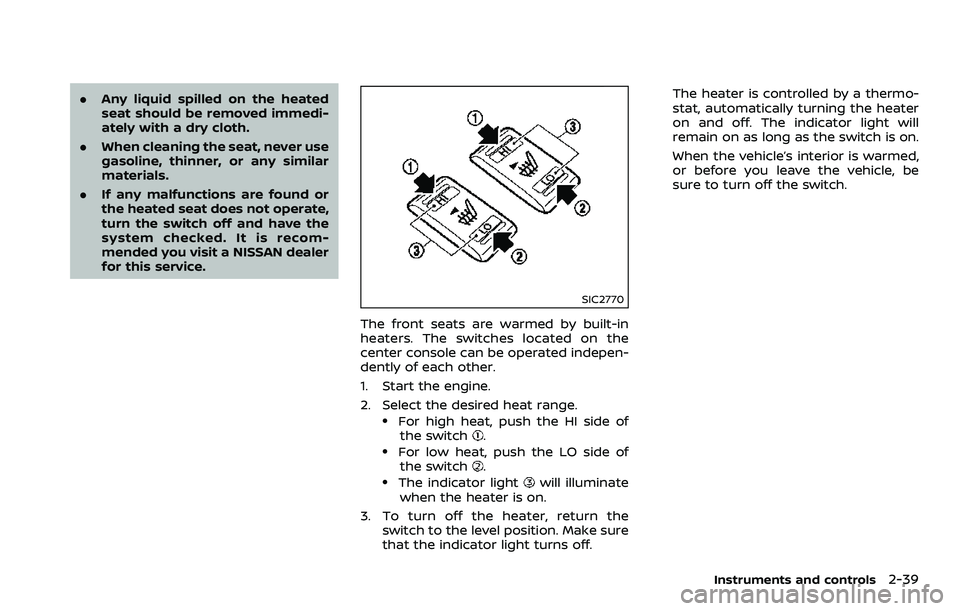
The front seats are warmed by built-in
heaters. The switches located on the
center console can be operated indepen-
dently of each other.
1. Start the engine.
2. Select the desired heat range.
.For high heat, push the HI side of
the switch..For low heat, push the LO side ofthe switch..The indicator lightwill illuminate
when the heater is on.
3. To turn off the heater, return the switch to the level position. Make sure
that the indicator light turns off. The heater is controlled by a thermo-
stat, automatically turning the heater
on and off. The indicator light will
remain on as long as the switch is on.
When the vehicle’s interior is warmed,
or before you leave the vehicle, be
sure to turn off the switch.
Instruments and controls2-39
Page 111 of 453
.The climate controlled seat has
air filters. Do not operate the
climate controlled seat without
the air filters. This may result in
damage to the system.
. When cleaning the seat, never use
gasoline, thinner, or any similar
materials.
. If any malfunctions are found or
the climate controlled seat does
not operate, turn the switch off
and have the system checked. It
is recommended you visit a
NISSAN dealer for this service.
SSD1161
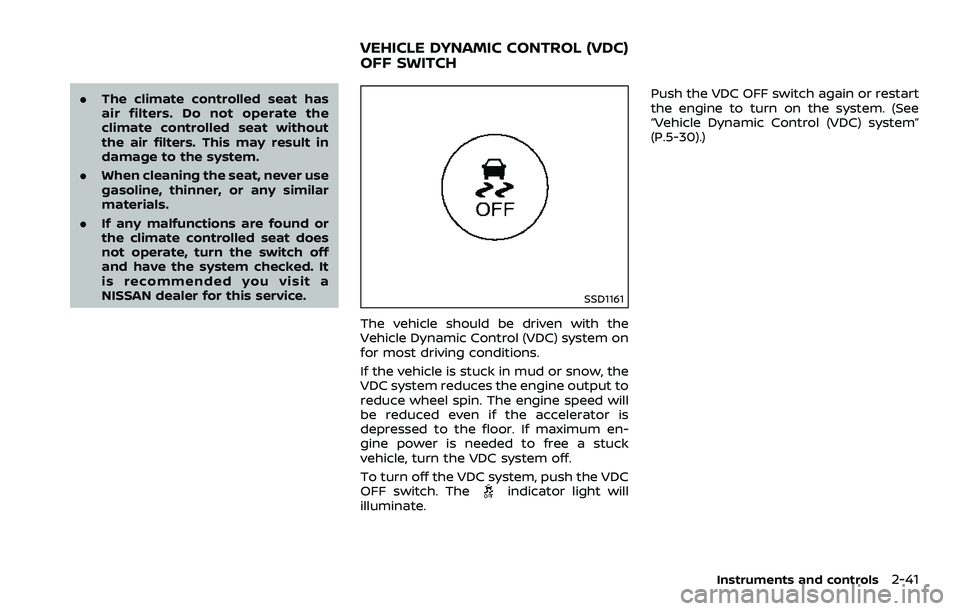
The vehicle should be driven with the
Vehicle Dynamic Control (VDC) system on
for most driving conditions.
If the vehicle is stuck in mud or snow, the
VDC system reduces the engine output to
reduce wheel spin. The engine speed will
be reduced even if the accelerator is
depressed to the floor. If maximum en-
gine power is needed to free a stuck
vehicle, turn the VDC system off.
To turn off the VDC system, push the VDC
OFF switch. The
indicator light will
illuminate. Push the VDC OFF switch again or restart
the engine to turn on the system. (See
“Vehicle Dynamic Control (VDC) system”
(P.5-30).)
Instruments and controls2-41
VEHICLE DYNAMIC CONTROL (VDC)
OFF SWITCH
Page 119 of 453
Automatic window lowering
(Roadster models)
When the soft top operating switch is
pressed, the power windows will auto-
matically be lowered completely. The
windows do not rise automatically after
the soft top open/close operation is
completed. Use the power window
switches to raise them.
Automatic adjusting function
CAUTION
When the battery cable is removed
from the battery terminal, do not
close either of the front doors. The
automatic window adjusting func-
tion will not work and the side roof
panel may be damaged.
The power window has an automatic
adjusting function. When the door is
being opened, the window is automati-
cally lowered slightly to avoid contact
between the window and the side roof
panel. When the door is closed, the
window is automatically raised slightly.
While the automatic adjusting function
does not work, the window will be con-
trolled as follows: .
When the door is opened, the window
lowers for approximately 2 seconds.
. While the door is open, the window
cannot be raised.
If the windows do not close auto-
matically
If the power window automatic function
(closing only) does not operate properly,
perform the following procedure to initi-
alize the power window system.
1. Push the ignition switch to the ON
position.
2. Close the door and soft top (Roadster models).
3. Open the window completely by op- erating the power window switch.
4. Pull the power window switch and hold it to close the window, and then
hold the switch more than 3 seconds
after the window is closed completely.
5. Release the power window switch. Operate the window by the automatic
function to confirm the initialization is
complete.
6. Perform steps 2 through 5 above for other windows.
If the power window automatic function
does not operate properly after perform-
ing the procedure above, have your vehicle checked. It is recommended you
visit a NISSAN dealer for this service.
Instruments and controls2-49
Page 152 of 453
3-26Pre-driving checks and adjustments
SPA1691
Soft top indicator light
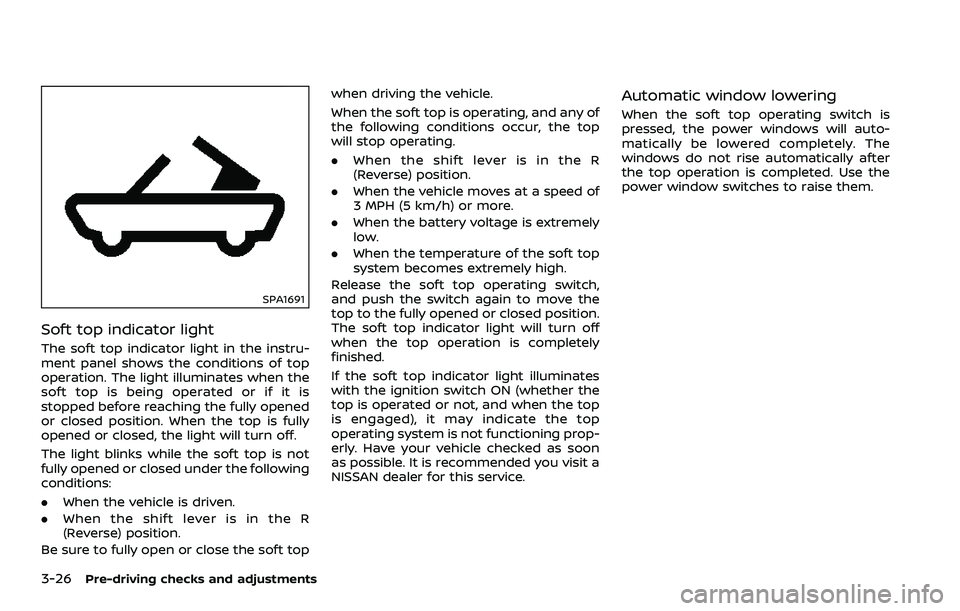
The soft top indicator light in the instru-
ment panel shows the conditions of top
operation. The light illuminates when the
soft top is being operated or if it is
stopped before reaching the fully opened
or closed position. When the top is fully
opened or closed, the light will turn off.
The light blinks while the soft top is not
fully opened or closed under the following
conditions:
.When the vehicle is driven.
. When the shift lever is in the R
(Reverse) position.
Be sure to fully open or close the soft top when driving the vehicle.
When the soft top is operating, and any of
the following conditions occur, the top
will stop operating.
.
When the shift lever is in the R
(Reverse) position.
. When the vehicle moves at a speed of
3 MPH (5 km/h) or more.
. When the battery voltage is extremely
low.
. When the temperature of the soft top
system becomes extremely high.
Release the soft top operating switch,
and push the switch again to move the
top to the fully opened or closed position.
The soft top indicator light will turn off
when the top operation is completely
finished.
If the soft top indicator light illuminates
with the ignition switch ON (whether the
top is operated or not, and when the top
is engaged), it may indicate the top
operating system is not functioning prop-
erly. Have your vehicle checked as soon
as possible. It is recommended you visit a
NISSAN dealer for this service.
Automatic window lowering
When the soft top operating switch is
pressed, the power windows will auto-
matically be lowered completely. The
windows do not rise automatically after
the top operation is completed. Use the
power window switches to raise them.
Page 155 of 453
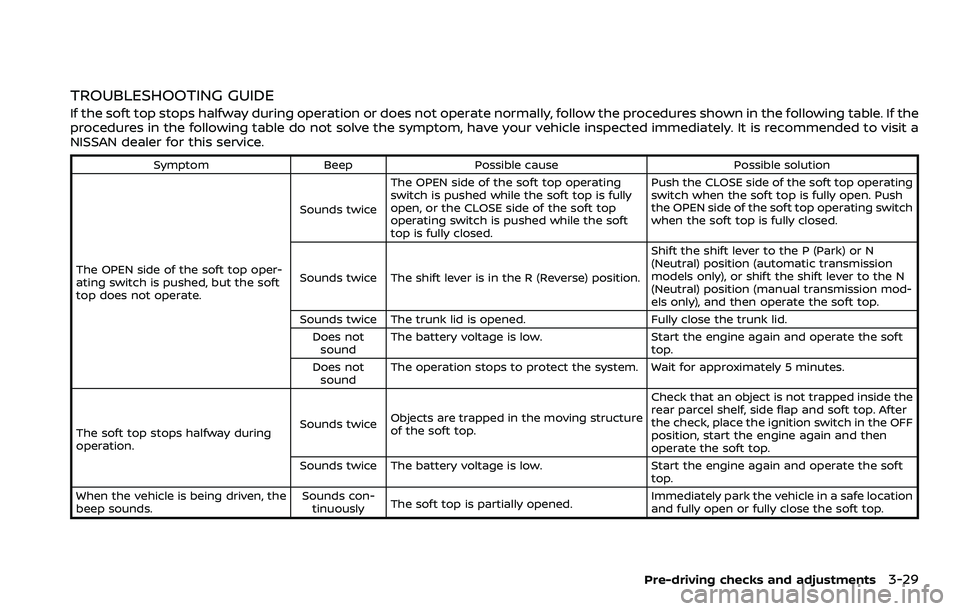
TROUBLESHOOTING GUIDE
If the soft top stops halfway during operation or does not operate normally, follow the procedures shown in the following table. If the
procedures in the following table do not solve the symptom, have your vehicle inspected immediately. It is recommended to visit a
NISSAN dealer for this service.
SymptomBeepPossible cause Possible solution
The OPEN side of the soft top oper-
ating switch is pushed, but the soft
top does not operate. Sounds twice
The OPEN side of the soft top operating
switch is pushed while the soft top is fully
open, or the CLOSE side of the soft top
operating switch is pushed while the soft
top is fully closed. Push the CLOSE side of the soft top operating
switch when the soft top is fully open. Push
the OPEN side of the soft top operating switch
when the soft top is fully closed.
Sounds twice The shift lever is in the R (Reverse) position. Shift the shift lever to the P (Park) or N
(Neutral) position (automatic transmission
models only), or shift the shift lever to the N
(Neutral) position (manual transmission mod-
els only), and then operate the soft top.
Sounds twice The trunk lid is opened. Fully close the trunk lid.
Does not sound The battery voltage is low.
Start the engine again and operate the soft
top.
Does not sound The operation stops to protect the system. Wait for approximately 5 minutes.
The soft top stops halfway during
operation. Sounds twice
Objects are trapped in the moving structure
of the soft top. Check that an object is not trapped inside the
rear parcel shelf, side flap and soft top. After
the check, place the ignition switch in the OFF
position, start the engine again and then
operate the soft top.
Sounds twice The battery voltage is low. Start the engine again and operate the soft
top.
When the vehicle is being driven, the
beep sounds. Sounds con-
tinuously The soft top is partially opened. Immediately park the vehicle in a safe location
and fully open or fully close the soft top.
Pre-driving checks and adjustments3-29
Page 156 of 453
3-30Pre-driving checks and adjustments
IF THE TOP DOES NOT OPEN OR
CLOSE ELECTRICALLY
If you cannot operate the soft top with
the operating switch, first check whether
all the following operating conditions are
met.
.vehicle is stopped
. ignition switch is ON (Run the engine
when operating the top.)
. the trunk is closed
. the shift lever is in a position other
than the R (Reverse) position
If the top still does not move under the
above conditions or has any system
malfunction, it is recommended you visit
a NISSAN dealer as soon as possible.
When you must close the top by yourself,
in the event of emergency or when an
immediate dealer service is not available,
close the top manually according to the
procedures shown in this section.
When closing the soft top manually:
. Move the vehicle to a safe place, away
from traffic.
. Two people should perform this pro-
cedure, as some of the top parts are
extremely heavy.
The top cannot be opened manually.
WARNING
. Do not drive with the top partially
opened.
. If the top cannot be operated
properly, have your vehicle
checked as soon as possible. It is
recommended you visit a NISSAN
dealer for this service.
CAUTION
The storage lid is extremely heavy.
The storage lid should be manually
opened or closed by two people.
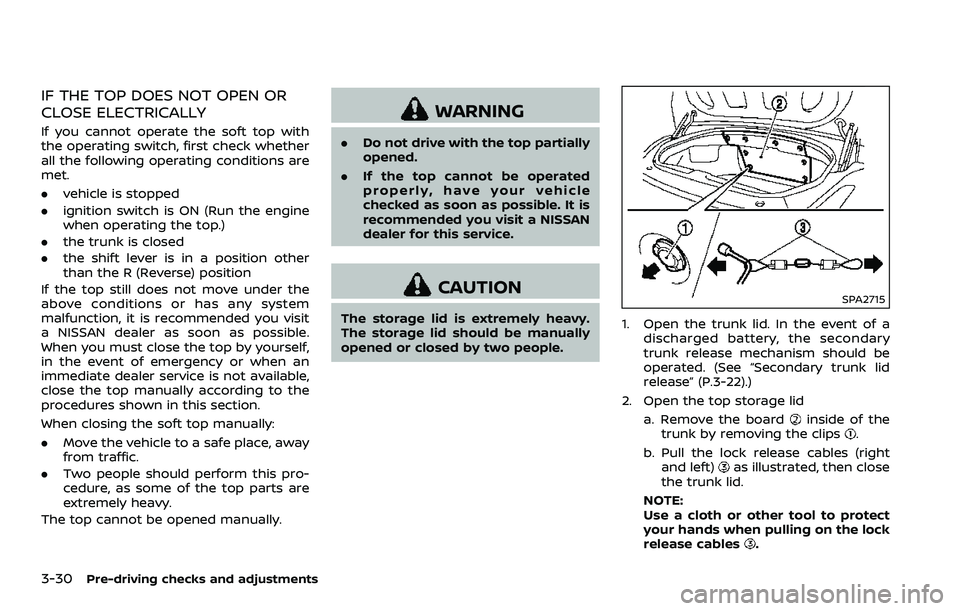
SPA2715
1. Open the trunk lid. In the event of a
discharged battery, the secondary
trunk release mechanism should be
operated. (See “Secondary trunk lid
release” (P.3-22).)
2. Open the top storage lid a. Remove the board
inside of the
trunk by removing the clips.
b. Pull the lock release cables (right and left)
as illustrated, then close
the trunk lid.
NOTE:
Use a cloth or other tool to protect
your hands when pulling on the lock
release cables
.