USB NISSAN 370Z 2018 Owner´s Manual
[x] Cancel search | Manufacturer: NISSAN, Model Year: 2018, Model line: 370Z, Model: NISSAN 370Z 2018Pages: 453, PDF Size: 2.19 MB
Page 18 of 453
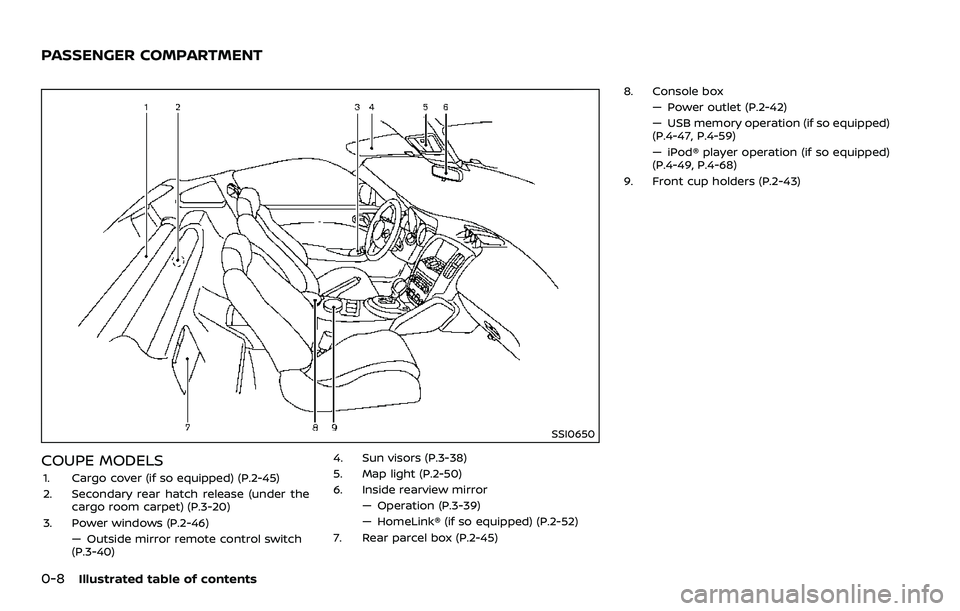
0-8Illustrated table of contents
SSI0650
COUPE MODELS
1. Cargo cover (if so equipped) (P.2-45)
2. Secondary rear hatch release (under thecargo room carpet) (P.3-20)
3. Power windows (P.2-46) — Outside mirror remote control switch
(P.3-40) 4. Sun visors (P.3-38)
5. Map light (P.2-50)
6. Inside rearview mirror
— Operation (P.3-39)
— HomeLink® (if so equipped) (P.2-52)
7. Rear parcel box (P.2-45) 8. Console box
— Power outlet (P.2-42)
— USB memory operation (if so equipped)
(P.4-47, P.4-59)
— iPod® player operation (if so equipped)
(P.4-49, P.4-68)
9. Front cup holders (P.2-43)
PASSENGER COMPARTMENT
Page 19 of 453
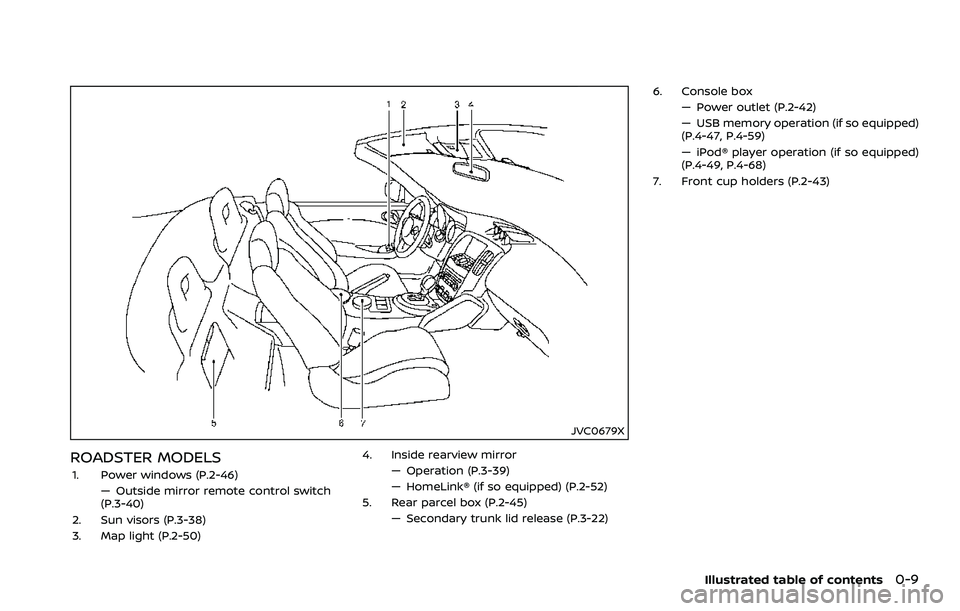
JVC0679X
ROADSTER MODELS
1. Power windows (P.2-46)— Outside mirror remote control switch
(P.3-40)
2. Sun visors (P.3-38)
3. Map light (P.2-50) 4. Inside rearview mirror
— Operation (P.3-39)
— HomeLink® (if so equipped) (P.2-52)
5. Rear parcel box (P.2-45)
— Secondary trunk lid release (P.3-22) 6. Console box
— Power outlet (P.2-42)
— USB memory operation (if so equipped)
(P.4-47, P.4-59)
— iPod® player operation (if so equipped)
(P.4-49, P.4-68)
7. Front cup holders (P.2-43)
Illustrated table of contents0-9
Page 169 of 453

4 Center display, heater, air conditioner,audio, phone and voice recognition sys-
tems
Safety note ........................................................................\
................. 4-3
Center multi-function control panel (models with
navigation system) ....................................................................... 4-4
How to use multi-function controller ..................... 4-4
How to use touch screen ................................................. 4-5
Menu options ........................................................................\
..... 4-7
How to select menus on the screen ....................... 4-7
Vehicle information and settings (models with
navigation system) ....................................................................... 4-8 How to use STATUS button ........................................... 4-8
How to use brightness control and display
ON/OFF button ........................................................................\
. 4-8
How to use INFO button ................................................... 4-8
How to use SETTING button ......................................... 4-11
RearView Monitor (models with
navigation system) ..................................................................... 4-17 RearView Monitor system operation .................... 4-18
How to read displayed lines ......................................... 4-18
How to park with predictive course lines ......... 4-19
Adjusting the screen ......................................................... 4-22
Predictive course line settings .................................. 4-22
RearView Monitor system limitations .................. 4-22
System maintenance ........................................................ 4-23 Ventilators ........................................................................\
............... 4-24
Center ventilators ............................................................. 4-24
Side ventilators ................................................................... 4-24
Heater and air conditioner ................................................. 4-25
Automatic air conditioner (Type A) (if
so equipped) ........................................................................\
.. 4-26
Automatic air conditioner (Type B) (if
so equipped) ........................................................................\
.. 4-28
Operating tips ...................................................................... 4-30
In-cabin microfilter ........................................................... 4-30
Servicing air conditioner .............................................. 4-30
Audio system ........................................................................\
........ 4-30 Audio operation precautions ................................... 4-30
FM-AM radio with Compact Disc
(CD) player ........................................................................\
....... 4-43
FM-AM-SAT radio with Compact Disc
(CD) player ........................................................................\
....... 4-52
DVD (Digital Versatile Disc) player operation
(models with navigation system) ......................... 4-55
USB (Universal Serial Bus) connection port
(models with navigation system) ......................... 4-59
Bluetooth® streaming audio (models with
navigation system) ........................................................... 4-63
Page 170 of 453
iPod® player operation (models with
navigation system) ............................................................. 4-68
Auxiliary input jacks (models with
navigation system) ............................................................. 4-70
CD/DVD/USB memory care and cleaning ....... 4-72
Steering-wheel-mounted controls
for audio ........................................................................\
.............. 4-73
Antenna ........................................................................\
............... 4-74
Car phone or CB radio ........................................................... 4-75
Bluetooth® hands-free phone system
(models with navigation system) .................................. 4-76 Regulatory information ................................................... 4-77
Voice commands ................................................................. 4-77
Control buttons ..................................................................... 4-78
Connecting procedure .................................................... 4-78
Phone selection ..................................................................... 4-79
Quick Dial ........................................................................\
........... 4-79
Making a call ........................................................................\
.... 4-82
Receiving a call ...................................................................... 4-82
During a call ........................................................................\
..... 4-83 Phone setting ....................................................................... 4-84
Troubleshooting guide ................................................. 4-85
Bluetooth® hands-free phone system (models
without navigation system) .............................................. 4-86
Regulatory information ................................................ 4-87
Using the system ............................................................... 4-88
Control buttons ................................................................. 4-90
Getting started ................................................................... 4-90
List of voice commands ............................................... 4-92
Speaker Adaptation (SA) mode .............................. 4-96
Troubleshooting guide ................................................. 4-98
NISSAN Voice Recognition System
(models with navigation system) .................................. 4-99 NISSAN voice recognition
Standard Mode .................................................................... 4-99
Using the system ............................................................. 4-102
NISSAN voice recognition Alternate
Command Mode ............................................................... 4-110
Using the system .............................................................. 4-119
Troubleshooting guide ............................................... 4-124
Page 180 of 453
4-12Center display, heater, air conditioner, audio, phone and voice recognition systems
Sensitive Vol.” and adjust the effect level
with the multi-function controller. The
Speed Sensitive Volume function is
turned off when the level is set to “OFF”.
Increasing the value will cause the vo-
lume to increase faster with vehicle
speed.
DivX® Registration Code:
The registration code for a device that is
used to download DivX® files will be
displayed on the screen. If a disc is loaded
or a USB memory is connected to the
audio system, this function will not be
activated.
Display Album Cover Art:
When this item is turned to ON, the album
cover image is displayed when playing
iPod® or MP3 music files through a CD,
DVD or USB memory. When the image is
not properly embedded in the file or
device, the image will not be displayed.
Phone settings
For details of the “Phone” settings, see
“Bluetooth® hands-free phone system
(models with navigation system)” (P.4-76).
Bluetooth® settings
For details of the “Bluetooth” settings, see
“Bluetooth® hands-free phone system
(models with navigation system)” (P.4-76)
or “Bluetooth® streaming audio (models
with navigation system)” (P.4-63).
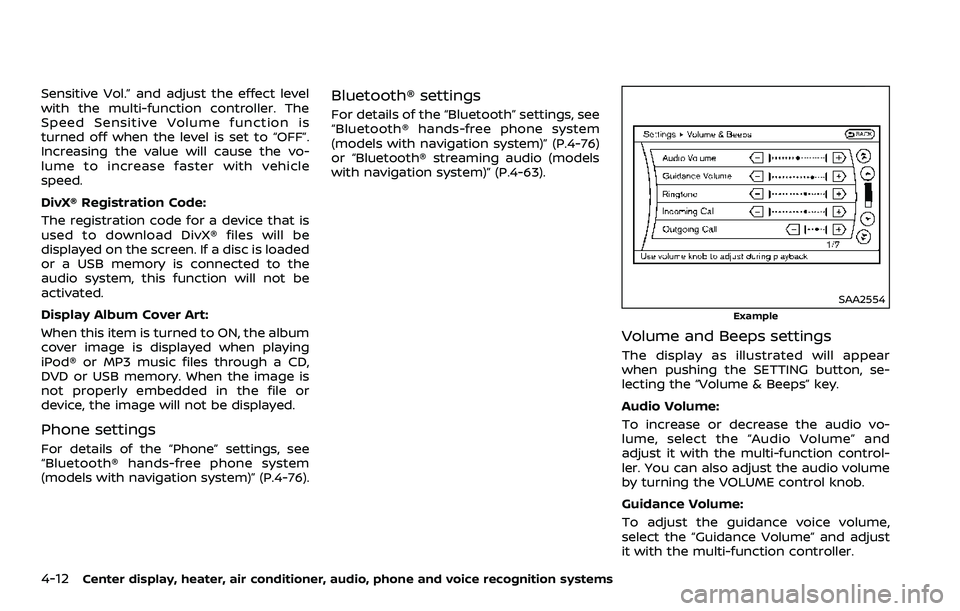
SAA2554
Example
Volume and Beeps settings
The display as illustrated will appear
when pushing the SETTING button, se-
lecting the “Volume & Beeps” key.
Audio Volume:
To increase or decrease the audio vo-
lume, select the “Audio Volume” and
adjust it with the multi-function control-
ler. You can also adjust the audio volume
by turning the VOLUME control knob.
Guidance Volume:
To adjust the guidance voice volume,
select the “Guidance Volume” and adjust
it with the multi-function controller.
Page 184 of 453
4-16Center display, heater, air conditioner, audio, phone and voice recognition systems
Select Units:
Select the “Select Units” key. Choose “US”
(Mile, °F, MPG) or “Metric” (km, °C, L/100
km) for your favorite display appearance.
Voice Recognition settings
For details about the “Voice Recognition”
settings, see “NISSAN Voice Recognition
System (models with navigation system)”
(P.4-99).
Camera settings
The “Camera” screen will appear when
selecting the “Camera” key.
For details about the camera system
operation, see “RearView Monitor (models
with navigation system)” (P.4-17).
SAA2491
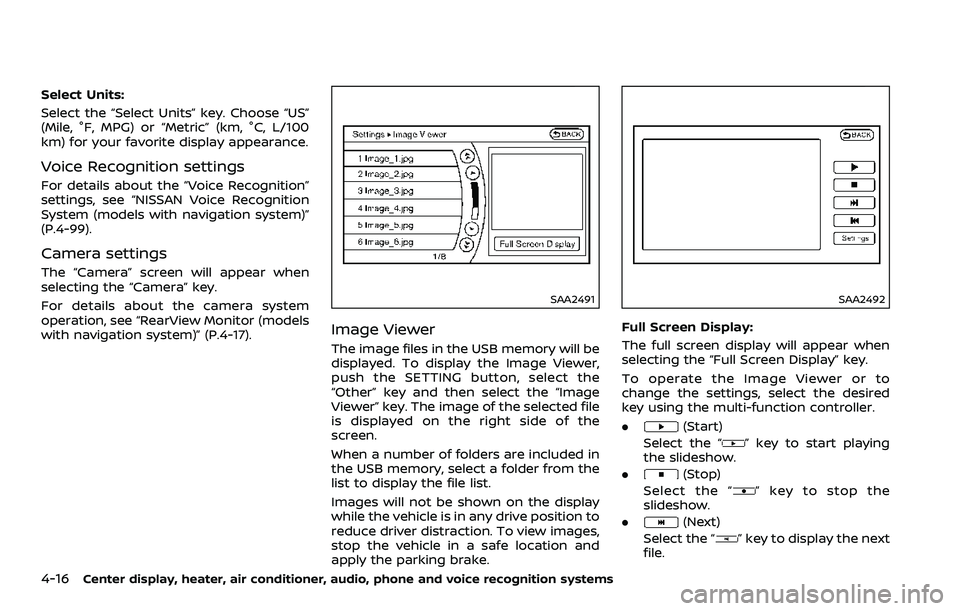
Image Viewer
The image files in the USB memory will be
displayed. To display the Image Viewer,
push the SETTING button, select the
“Other” key and then select the “Image
Viewer” key. The image of the selected file
is displayed on the right side of the
screen.
When a number of folders are included in
the USB memory, select a folder from the
list to display the file list.
Images will not be shown on the display
while the vehicle is in any drive position to
reduce driver distraction. To view images,
stop the vehicle in a safe location and
apply the parking brake.
SAA2492
Full Screen Display:
The full screen display will appear when
selecting the “Full Screen Display” key.
To operate the Image Viewer or to
change the settings, select the desired
key using the multi-function controller.
.
(Start)
Select the “
” key to start playing
the slideshow.
.
(Stop)
Select the “
” key to stop the
slideshow.
.
(Next)
Select the “
” key to display the next
file.
Page 185 of 453
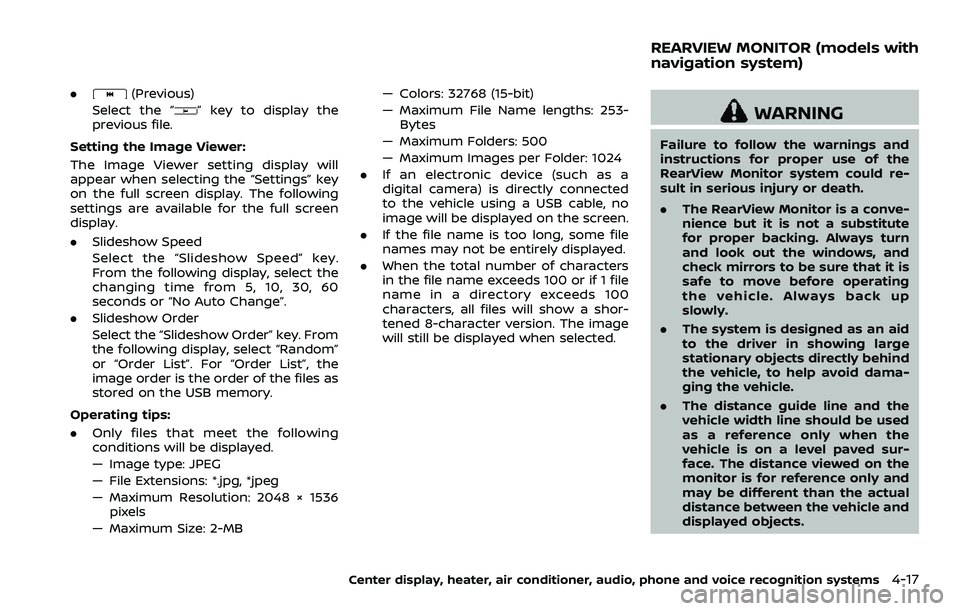
.(Previous)
Select the “
” key to display the
previous file.
Setting the Image Viewer:
The Image Viewer setting display will
appear when selecting the “Settings” key
on the full screen display. The following
settings are available for the full screen
display.
. Slideshow Speed
Select the “Slideshow Speed” key.
From the following display, select the
changing time from 5, 10, 30, 60
seconds or “No Auto Change”.
. Slideshow Order
Select the “Slideshow Order” key. From
the following display, select “Random”
or “Order List”. For “Order List”, the
image order is the order of the files as
stored on the USB memory.
Operating tips:
. Only files that meet the following
conditions will be displayed.
— Image type: JPEG
— File Extensions: *.jpg, *jpeg
— Maximum Resolution: 2048 × 1536
pixels
— Maximum Size: 2-MB — Colors: 32768 (15-bit)
— Maximum File Name lengths: 253-
Bytes
— Maximum Folders: 500
— Maximum Images per Folder: 1024
. If an electronic device (such as a
digital camera) is directly connected
to the vehicle using a USB cable, no
image will be displayed on the screen.
. If the file name is too long, some file
names may not be entirely displayed.
. When the total number of characters
in the file name exceeds 100 or if 1 file
name in a directory exceeds 100
characters, all files will show a shor-
tened 8-character version. The image
will still be displayed when selected.
WARNING
Failure to follow the warnings and
instructions for proper use of the
RearView Monitor system could re-
sult in serious injury or death.
.The RearView Monitor is a conve-
nience but it is not a substitute
for proper backing. Always turn
and look out the windows, and
check mirrors to be sure that it is
safe to move before operating
the vehicle. Always back up
slowly.
. The system is designed as an aid
to the driver in showing large
stationary objects directly behind
the vehicle, to help avoid dama-
ging the vehicle.
. The distance guide line and the
vehicle width line should be used
as a reference only when the
vehicle is on a level paved sur-
face. The distance viewed on the
monitor is for reference only and
may be different than the actual
distance between the vehicle and
displayed objects.
Center display, heater, air conditioner, audio, phone and voice recognition systems4-17
REARVIEW MONITOR (models with
navigation system)
Page 202 of 453
4-34Center display, heater, air conditioner, audio, phone and voice recognition systems
— 3.1 in (8 cm) discs
— CD/DVDs that are not round
— CD/DVDs with a paper label
— CD/DVDs that are warped,scratched or have abnormal edges
— This audio system can only play prerecorded CD/DVDs. It has no
capabilities to record or burn CD/
DVDs.
. If the CD/DVD cannot be played, one
of the following messages will be
displayed.
Disc Read Error:
— Confirm that the CD/DVD is in-
serted correctly (the label side is
facing up, etc.).
— Confirm that the CD/DVD is not bent or warped and it is free of
scratches.
Please Eject Disc:
— This may be an error due to the temperature inside the player being
too high. Remove the CD/DVD by
pushing the EJECT button, and
after a short time reinsert the CD/
DVD. The CD/DVD can be played
when the temperature of the player
returns to normal. If the error
persists, consult your local dealer. Unplayable File:
— The file may be copy protected.
— The file is not MP3, WMA, AAC, M4A
or DivX® type.
Region Invalid:
— The DVD is not for region 1 or all regions. Use DVDs with a region
code “1”, “ALL” or “1 included” for
your DVD entertainment system.
(The region code
is displayed as
a small symbol printed on the top
of the DVD
.) This vehicle-installed
DVD player cannot play DVDs with a
region code other than “1” or “ALL”.
Copyright and trademark:
. The technology protected by the U.S.
patent and other intellectual property
rights owned by Macrovision Corpora-
tion and other right holders is
adopted for this system.
. This copyright protected technology
cannot be used without a permit from
Macrovision Corporation. It is limited
to be personal use, etc., as long as the
permit from Macrovision Corporation
is not issued.
. Modifying or disassembling is prohib-
ited.
. Dolby digital is manufactured under
license from Dolby Laboratories, Inc. .
Dolby and the double D mark “
” are
trademarks of Dolby Laboratories, Inc.
. DTS and DTS 2.0 “
” are registered
trademarks of DTS, Inc.
Parental level (parental control):
DVDs with the parental control setting
can be played with this system. Please
use your own judgement to set the
parental control with the system.
Disc selection:
The following disc formats can be played
with the DVD drive.
. DVD-VIDEO
. VIDEO-CD
. CD-DA (Conventional Compact Disc)
. DTS-CD
USB (Universal Serial Bus) connec-
tion port
WARNING
Do not connect, disconnect or oper-
ate the USB device while driving.
Doing so can be a distraction. If
distracted you could lose control of
your vehicle and cause an accident
or serious injury.
Page 203 of 453
CAUTION
.Do not force the USB device into
the USB connection port. Insert-
ing the USB device tilted or up-
side-down into the port may da-
mage the port. Make sure that
the USB device is connected cor-
rectly into the USB connection
port.
. Do not grab the USB connection
port cover (if so equipped) when
pulling the USB device out of the
port. This could damage the port
and the cover.
. Do not leave the USB cable in a
place where it can be pulled
unintentionally. Pulling the cable
may damage the port.
The vehicle is not equipped with a USB
device. USB devices should be purchased
separately as necessary.
This system cannot be used to format
USB devices. To format a USB device, use
a personal computer.
In some states/area, the USB device for
the front seats plays only sound without
images for regulatory reasons, even when
the vehicle is parked. This system supports various USB mem-
ory devices, USB hard drives and iPod®
players. Some USB devices may not be
supported by this system.
.
Partitioned USB devices may not be
played correctly.
. Some characters used in other lan-
guages (Chinese, Japanese, etc.) may
not appear properly in the display.
Using English language characters
with a USB device is recommended.
General notes for USB use:
Refer to your device manufacturer’s own-
er information regarding the proper use
and care of the device.
Notes for iPod® use:
“Made for iPod®”, “Made for iPhone®”, and
“Made for iPad®” mean that an electronic
accessory has been designed to connect
specifically to iPod®, iPhone®, or iPad®,
respectively, and has been certified by the
developer to meet Apple performance
standards.
Apple is not responsible for the operation
of this device or its compliance with
safety and regulatory standards.
Please note that the use of this accessory
with iPod®, iPhone®, or iPad® may affect
wireless performance.
iPad®, iPhone®, iPod®, iPod classic®, iPod
nano®, iPod shuffle®, and iPod touch® are trademarks of Apple Inc., registered in the
U.S. and other countries. Lightning is a
trademark of Apple Inc.
.
Improperly plugging in the iPod® may
cause a checkmark to be displayed on
and off (flickering). Always make sure
that the iPod® is connected properly.
. An iPod nano® (1st Generation) may
remain in fast forward or rewind mode
if it is connected during a seek opera-
tion. In this case, please manually
reset the iPod®.
. An iPod nano® (2nd Generation) will
continue to fast-forward or rewind if it
is disconnected during a seek opera-
tion.
. An incorrect song title may appear
when the Play Mode is changed while
using an iPod nano® (2nd Generation)
. Audiobooks may not play in the same
order as they appear on an iPod®.
. Large video files cause slow responses
in an iPod®. The vehicle center display
may momentarily black out, but will
soon recover.
. If an iPod® automatically selects large
video files while in the shuffle mode,
the vehicle center display may mo-
mentarily black out, but will soon
recover.
Center display, heater, air conditioner, audio, phone and voice recognition systems4-35
Page 205 of 453
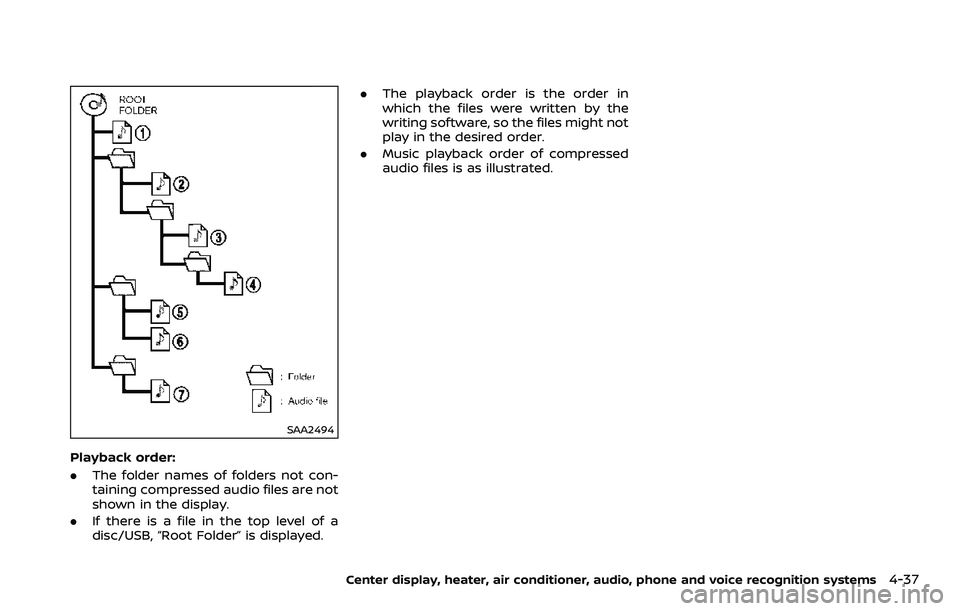
SAA2494
Playback order:
.The folder names of folders not con-
taining compressed audio files are not
shown in the display.
. If there is a file in the top level of a
disc/USB, “Root Folder” is displayed. .
The playback order is the order in
which the files were written by the
writing software, so the files might not
play in the desired order.
. Music playback order of compressed
audio files is as illustrated.
Center display, heater, air conditioner, audio, phone and voice recognition systems4-37