ECU NISSAN 370Z 2019 Owner´s Manual
[x] Cancel search | Manufacturer: NISSAN, Model Year: 2019, Model line: 370Z, Model: NISSAN 370Z 2019Pages: 460, PDF Size: 2.26 MB
Page 142 of 460
3-18Pre-driving checks and adjustments
open the hood.WARNING
Do not drive with the rear hatch
open. This could allow dangerous
exhaust gases to be drawn into the
vehicle. See “Exhaust gas (carbon
monoxide)” (P.5-2) of this manual.
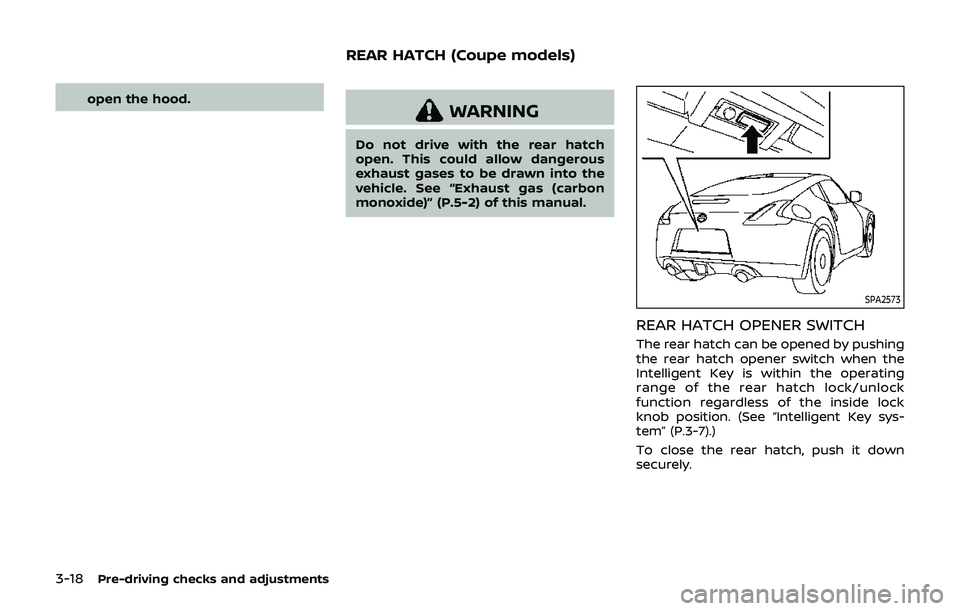
SPA2573
REAR HATCH OPENER SWITCH
The rear hatch can be opened by pushing
the rear hatch opener switch when the
Intelligent Key is within the operating
range of the rear hatch lock/unlock
function regardless of the inside lock
knob position. (See “Intelligent Key sys-
tem” (P.3-7).)
To close the rear hatch, push it down
securely.
REAR HATCH (Coupe models)
Page 145 of 460
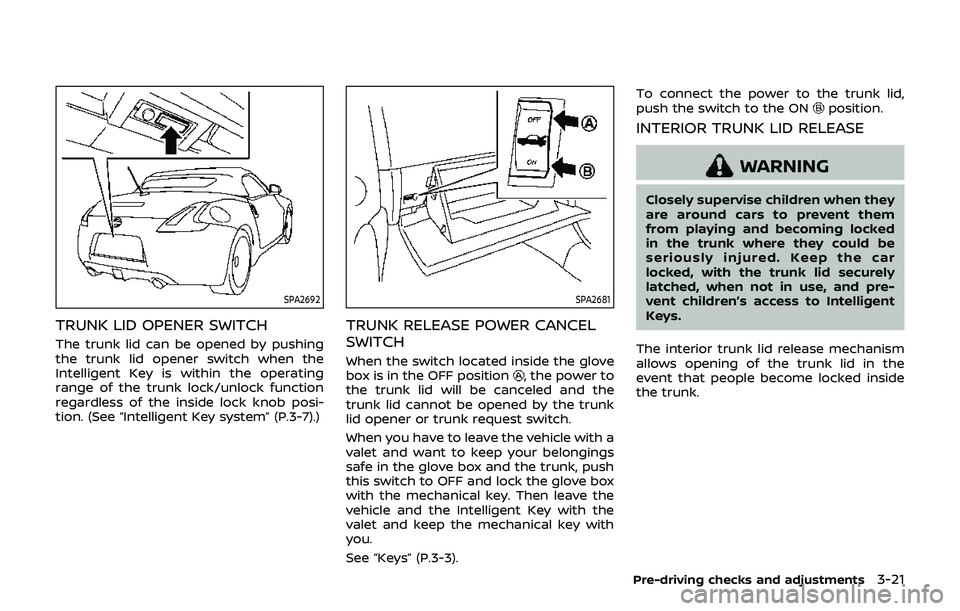
SPA2692
TRUNK LID OPENER SWITCH
The trunk lid can be opened by pushing
the trunk lid opener switch when the
Intelligent Key is within the operating
range of the trunk lock/unlock function
regardless of the inside lock knob posi-
tion. (See “Intelligent Key system” (P.3-7).)
SPA2681
TRUNK RELEASE POWER CANCEL
SWITCH
When the switch located inside the glove
box is in the OFF position, the power to
the trunk lid will be canceled and the
trunk lid cannot be opened by the trunk
lid opener or trunk request switch.
When you have to leave the vehicle with a
valet and want to keep your belongings
safe in the glove box and the trunk, push
this switch to OFF and lock the glove box
with the mechanical key. Then leave the
vehicle and the Intelligent Key with the
valet and keep the mechanical key with
you.
See “Keys” (P.3-3). To connect the power to the trunk lid,
push the switch to the ON
position.
INTERIOR TRUNK LID RELEASE
WARNING
Closely supervise children when they
are around cars to prevent them
from playing and becoming locked
in the trunk where they could be
seriously injured. Keep the car
locked, with the trunk lid securely
latched, when not in use, and pre-
vent children’s access to Intelligent
Keys.
The interior trunk lid release mechanism
allows opening of the trunk lid in the
event that people become locked inside
the trunk.
Pre-driving checks and adjustments3-21
Page 149 of 460
.Do not place anything in the top
storage area. The top will not fit
there properly, and this could
damage the top and/or the vehi-
cle body.
. Do not sit or place excessive
weight on the top and the sto-
rage lid, especially when the top
is being operated. The top may be
damaged.
. Do not drive the vehicle with the
top partially opened. Always
make sure the top is either fully
opened or closed before driving.
. Secure items so that they cannot
be blown from the vehicle while
driving with the top open.
. Do not operate the top manually
except for emergency cases.
Manual operation may damage
the top.
. Be sure to fully open or fully close
the top. Do not release the switch
half way through the roof open-
ing or closing process. If the top is
only partially opened, significant
damage to the top could occur.
Make sure the trunk lid is securely closed
before operating the top.
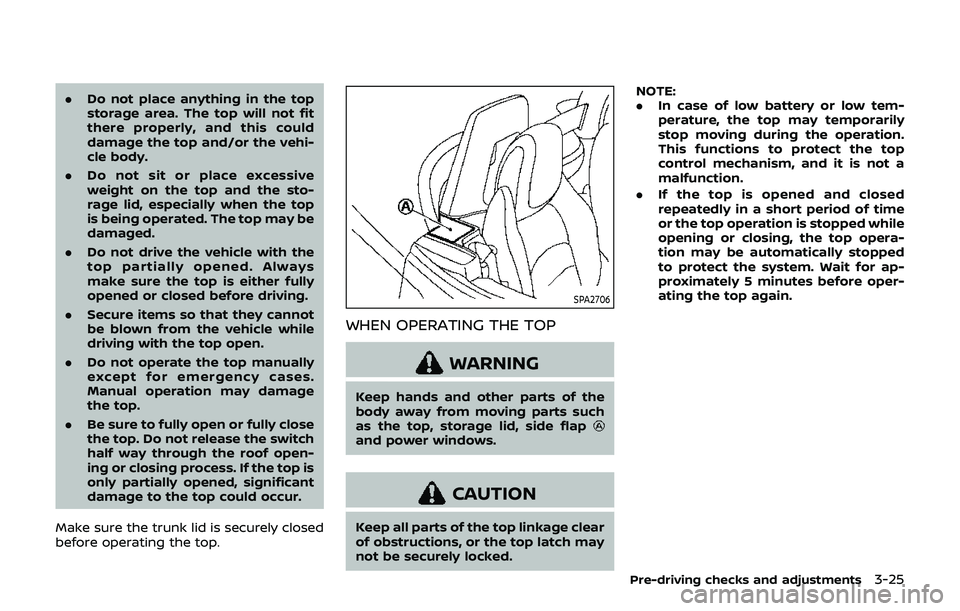
SPA2706
WHEN OPERATING THE TOP
WARNING
Keep hands and other parts of the
body away from moving parts such
as the top, storage lid, side flap
and power windows.
CAUTION
Keep all parts of the top linkage clear
of obstructions, or the top latch may
not be securely locked. NOTE:
.
In case of low battery or low tem-
perature, the top may temporarily
stop moving during the operation.
This functions to protect the top
control mechanism, and it is not a
malfunction.
. If the top is opened and closed
repeatedly in a short period of time
or the top operation is stopped while
opening or closing, the top opera-
tion may be automatically stopped
to protect the system. Wait for ap-
proximately 5 minutes before oper-
ating the top again.
Pre-driving checks and adjustments3-25
Page 160 of 460
3-36Pre-driving checks and adjustments
To lock, close the fuel-filler door securely
and lock all doors by operating the door
handle request switch, the LOCK button
on the Intelligent Key, the mechanical key
or the power door lock switch.
FUEL-FILLER CAP
WARNING
.Gasoline is extremely flammable
and highly explosive under cer-
tain conditions. You could be
burned or seriously injured if it is
misused or mishandled. Always
stop engine and do not smoke or
allow open flames or sparks near
the vehicle when refueling.
. Do not attempt to top off the fuel
tank after the fuel pump nozzle
shuts off automatically. Contin-
ued refueling may cause fuel
overflow, resulting in fuel spray
and possibly a fire.
. Use only an original equipment
type fuel-filler cap as a replace-
ment. It has a built-in safety valve
needed for proper operation of
the fuel system and emission
control system. An incorrect cap
can result in a serious malfunc-
tion and possible injury. It could also cause the malfunction indi-
cator light to come on.
. Never pour fuel into the throttle
body to attempt to start your
vehicle.
. Do not fill a portable fuel contain-
er in the vehicle or trailer. Static
electricity can cause an explosion
of flammable liquid, vapor or gas
in any vehicle or trailer. To reduce
the risk of serious injury or death
when filling portable fuel contain-
ers:
— Always place the container on
the ground when filling.
— Do not use electronic devices when filling.
— Keep the pump nozzle in con- tact with the container while
you are filling it.
— Use only approved portable fuel containers for flammable
liquid.
CAUTION
. If fuel is spilled on the vehicle
body, flush it away with water to avoid paint damage.
. Insert the cap straight into the
fuel-filler tube, then tighten until
the fuel-filler cap clicks. Failure to
tighten the fuel-filler cap properly
may cause the
malfunction
indicator light (MIL) to illuminate.
If the
light illuminates be-
cause the fuel-filler cap is loose
or missing, tighten or install the
cap and continue to drive the
vehicle. The
light should turn
off after a few driving trips. If the
light does not turn off after a
few driving trips, have the vehicle
inspected. It is recommended you
visit a NISSAN dealer for this
service.
. The LOOSE FUEL CAP warning will
appear if the fuel-filler cap is not
properly tightened. It may take a
few driving trips for the message
to be displayed. Failure to tighten
the fuel-filler cap properly after
the LOOSE FUEL CAP warning
appears may cause the
Mal-
function Indicator Light (MIL) to
illuminate.
Page 162 of 460
3-38Pre-driving checks and adjustments
WARNING
.Do not adjust the steering wheel
while driving. You could lose con-
trol of your vehicle and cause an
accident.
. Do not adjust the steering wheel
any closer to you than is neces-
sary for proper steering opera-
tion and comfort. The driver’s air
bag inflates with great force. If
you are unrestrained, leaning for-
ward, sitting sideways or out of
position in any way, you are at
greater risk of injury or death in a
crash. You may also receive ser-
ious or fatal injuries from the air
bag if you are up against it when
it inflates. Always sit back against
the seatback and as far away as
practical from the steering wheel.
Always use the seat belts.
SPA2583
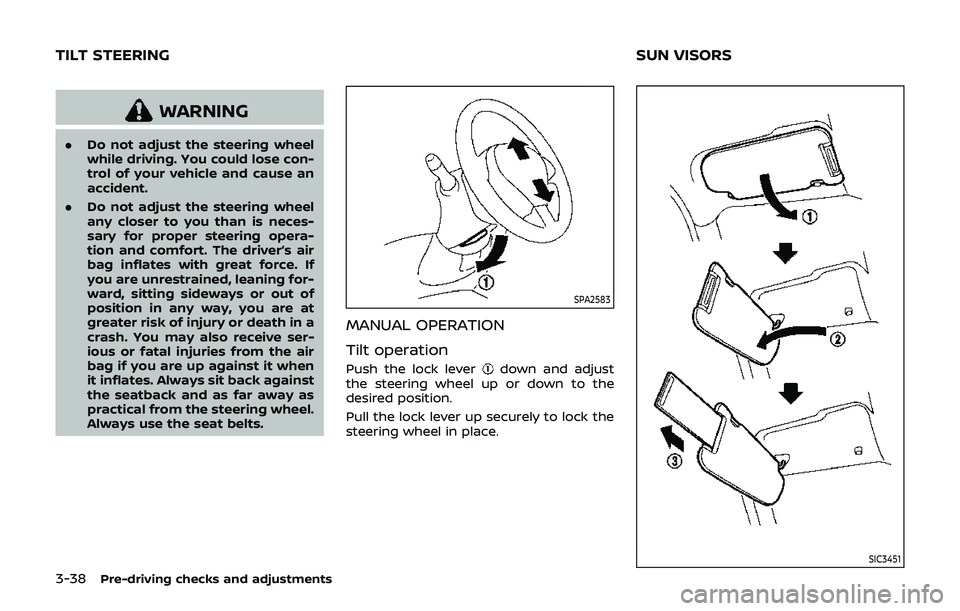
MANUAL OPERATION
Tilt operation
Push the lock leverdown and adjust
the steering wheel up or down to the
desired position.
Pull the lock lever up securely to lock the
steering wheel in place.
SIC3451
TILT STEERING SUN VISORS
Page 188 of 460
4-22Center display, heater, air conditioner, audio, phone and voice recognition systems
.When the ignition switch is placed in
the OFF position and then placed back
in the ON position.
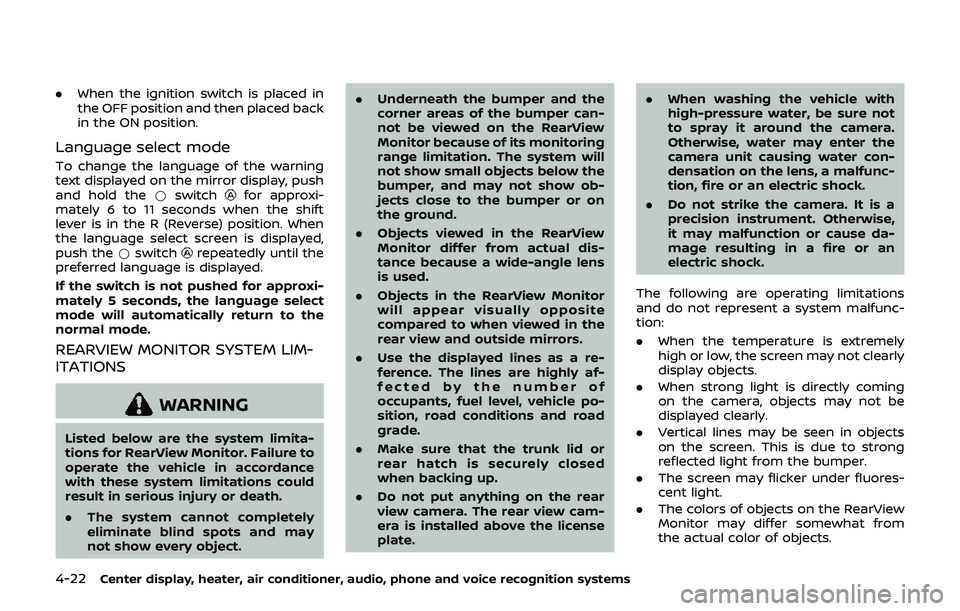
Language select mode
To change the language of the warning
text displayed on the mirror display, push
and hold the *switch
for approxi-
mately 6 to 11 seconds when the shift
lever is in the R (Reverse) position. When
the language select screen is displayed,
push the *switch
repeatedly until the
preferred language is displayed.
If the switch is not pushed for approxi-
mately 5 seconds, the language select
mode will automatically return to the
normal mode.
REARVIEW MONITOR SYSTEM LIM-
ITATIONS
WARNING
Listed below are the system limita-
tions for RearView Monitor. Failure to
operate the vehicle in accordance
with these system limitations could
result in serious injury or death.
. The system cannot completely
eliminate blind spots and may
not show every object. .
Underneath the bumper and the
corner areas of the bumper can-
not be viewed on the RearView
Monitor because of its monitoring
range limitation. The system will
not show small objects below the
bumper, and may not show ob-
jects close to the bumper or on
the ground.
. Objects viewed in the RearView
Monitor differ from actual dis-
tance because a wide-angle lens
is used.
. Objects in the RearView Monitor
will appear visually opposite
compared to when viewed in the
rear view and outside mirrors.
. Use the displayed lines as a re-
ference. The lines are highly af-
fected by the number of
occupants, fuel level, vehicle po-
sition, road conditions and road
grade.
. Make sure that the trunk lid or
rear hatch is securely closed
when backing up.
. Do not put anything on the rear
view camera. The rear view cam-
era is installed above the license
plate. .
When washing the vehicle with
high-pressure water, be sure not
to spray it around the camera.
Otherwise, water may enter the
camera unit causing water con-
densation on the lens, a malfunc-
tion, fire or an electric shock.
. Do not strike the camera. It is a
precision instrument. Otherwise,
it may malfunction or cause da-
mage resulting in a fire or an
electric shock.
The following are operating limitations
and do not represent a system malfunc-
tion:
. When the temperature is extremely
high or low, the screen may not clearly
display objects.
. When strong light is directly coming
on the camera, objects may not be
displayed clearly.
. Vertical lines may be seen in objects
on the screen. This is due to strong
reflected light from the bumper.
. The screen may flicker under fluores-
cent light.
. The colors of objects on the RearView
Monitor may differ somewhat from
the actual color of objects.
Page 195 of 460
REARVIEW MONITOR SYSTEM LIM-
ITATIONS
WARNING
Listed below are the system limita-
tions for RearView Monitor. Failure to
operate the vehicle in accordance
with these system limitations could
result in serious injury or death.
.The system cannot completely
eliminate blind spots and may
not show every object.
. Underneath the bumper and the
corner areas of the bumper can-
not be viewed on the RearView
Monitor because of its monitoring
range limitation. The system will
not show small objects below the
bumper, and may not show ob-
jects close to the bumper or on
the ground.
. Objects viewed in the RearView
Monitor differ from actual dis-
tance because a wide-angle lens
is used.
. Objects in the RearView Monitor
will appear visually opposite
compared to when viewed in the
rear view and outside mirrors. .
Use the displayed lines as a re-
ference. The lines are highly af-
fected by the number of
occupants, fuel level, vehicle po-
sition, road conditions and road
grade.
. Make sure that the trunk lid or
rear hatch is securely closed
when backing up.
. Do not put anything on the rear
view camera. The rear view cam-
era is installed above the license
plate.
. When washing the vehicle with
high-pressure water, be sure not
to spray it around the camera.
Otherwise, water may enter the
camera unit causing water con-
densation on the lens, a malfunc-
tion, fire or an electric shock.
. Do not strike the camera. It is a
precision instrument. Otherwise,
it may malfunction or cause da-
mage resulting in a fire or an
electric shock.
The following are operating limitations
and do not represent a system malfunc-
tion:
. When the temperature is extremely
high or low, the screen may not clearly display objects.
. When strong light is directly coming
on the camera, objects may not be
displayed clearly.
. Vertical lines may be seen in objects
on the screen. This is due to strong
reflected light from the bumper.
. The screen may flicker under fluores-
cent light.
. The colors of objects on the RearView
Monitor may differ somewhat from
the actual color of objects.
. Objects on the monitor may not be
clear in a dark environment.
. If dirt, rain or snow accumulates on
the camera, the RearView Monitor
may not display objects clearly. Clean
the camera.
. Do not use wax on the camera win-
dow. Wipe off any wax with a clean
cloth dampened with mild detergent
diluted with water.
Center display, heater, air conditioner, audio, phone and voice recognition systems4-29
Page 250 of 460
4-84Center display, heater, air conditioner, audio, phone and voice recognition systems
SAA2518
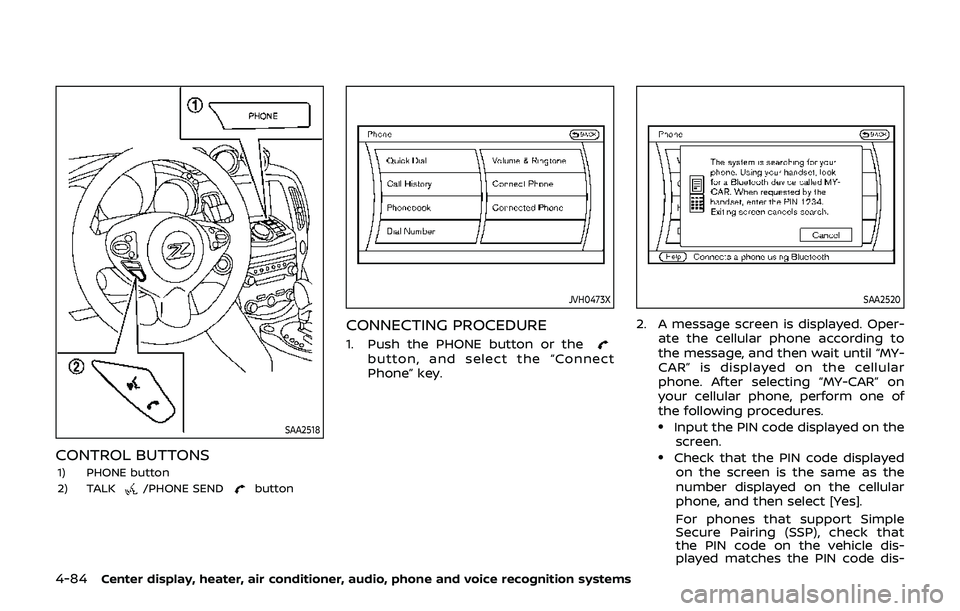
CONTROL BUTTONS
1) PHONE button
2) TALK/PHONE SENDbutton
JVH0473X
CONNECTING PROCEDURE
1. Push the PHONE button or thebutton, and select the “Connect
Phone” key.
SAA2520
2. A message screen is displayed. Oper-ate the cellular phone according to
the message, and then wait until “MY-
CAR” is displayed on the cellular
phone. After selecting “MY-CAR” on
your cellular phone, perform one of
the following procedures.
.Input the PIN code displayed on thescreen.
.Check that the PIN code displayedon the screen is the same as the
number displayed on the cellular
phone, and then select [Yes].
For phones that support Simple
Secure Pairing (SSP), check that
the PIN code on the vehicle dis-
played matches the PIN code dis-
Page 298 of 460
5-2Starting and driving
WARNING
.Do not leave children or adults
who would normally require the
support of others alone in your
vehicle. Pets should not be left
alone either. They could acciden-
tally injure themselves or others
through inadvertent operation of
the vehicle. Also, on hot, sunny
days, temperatures in a closed
vehicle could quickly become
high enough to cause severe or
possibly fatal injuries to people or
animals.
. Properly secure all cargo to help
prevent it from sliding or shifting.
Do not place cargo higher than
the seatbacks. In a sudden stop
or collision, unsecured cargo
could cause personal injury
(Coupe models).
. Closely supervise children when
they are around cars to prevent
them from playing and becoming
locked in the trunk where they
could be seriously injured. Keep
the car locked with the trunk
closed when not in use, and pre-
vent children’s access to car keys (Roadster models).
If the engine oil temperature is high, the
engine protection mode, which helps
reduce the chance of engine damage,
could activate and automatically de-
crease engine power. Driving while the
engine oil temperature is high may
result in engine damage.
EXHAUST GAS (carbon monoxide)
WARNING
. Do not breathe exhaust gases;
they contain colorless and odor-
less carbon monoxide. Carbon
monoxide is dangerous. It can
cause unconsciousness or death.
. If you suspect that exhaust fumes
are entering the vehicle, drive
with all windows fully open, and
have the vehicle inspected imme-
diately.
. Do not run the engine in closed
spaces such as a garage.
. Do not park the vehicle with the
engine running for any extended
length of time.
. Keep the rear hatch/trunk lid
closed while driving, otherwise exhaust gases could be drawn
into the passenger compartment.
If you must drive with the rear
hatch/trunk lid open, follow these
precautions:
1) Open all the windows.
2) Set the
air recirculation to
off and the fan control to high
to circulate the air.
. The exhaust system and body
should be inspected by a quali-
fied mechanic whenever:
— The vehicle is raised for ser-
vice.
— You suspect that exhaust fumes are entering into the
passenger compartment.
— You notice a change in the sound of the exhaust system.
— You have had an accident involving damage to the ex-
haust system, underbody, or
rear of the vehicle.
PRECAUTIONS WHEN STARTING
AND DRIVING
Page 304 of 460
5-8Starting and driving
WARNING
Do not operate the push-button
ignition switch while driving the ve-
hicle except in an emergency. (The
engine will stop when the ignition
switch is pushed 3 consecutive times
or the ignition switch is pushed and
held for more than 2 seconds.) If the
engine stops while the vehicle is
being driven, this could lead to a
crash and serious injury.
Before operating the push-button igni-
tion switch, be sure to move the shift
lever to the P (Park) position (for auto-
matic transmission model) or the shift
lever to the N (Neutral) position (for
manual transmission model).
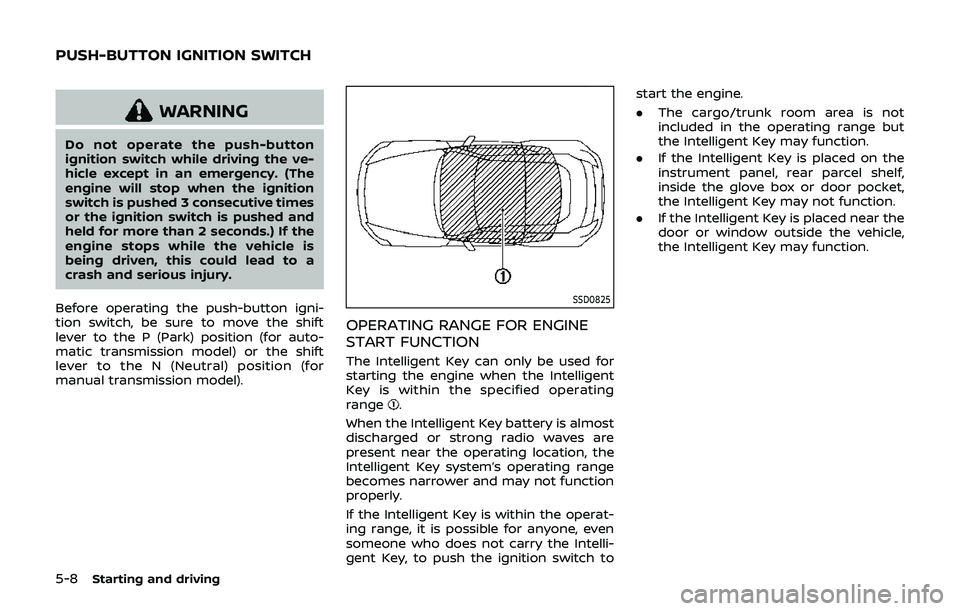
SSD0825
OPERATING RANGE FOR ENGINE
START FUNCTION
The Intelligent Key can only be used for
starting the engine when the Intelligent
Key is within the specified operating
range
.
When the Intelligent Key battery is almost
discharged or strong radio waves are
present near the operating location, the
Intelligent Key system’s operating range
becomes narrower and may not function
properly.
If the Intelligent Key is within the operat-
ing range, it is possible for anyone, even
someone who does not carry the Intelli-
gent Key, to push the ignition switch to start the engine.
.
The cargo/trunk room area is not
included in the operating range but
the Intelligent Key may function.
. If the Intelligent Key is placed on the
instrument panel, rear parcel shelf,
inside the glove box or door pocket,
the Intelligent Key may not function.
. If the Intelligent Key is placed near the
door or window outside the vehicle,
the Intelligent Key may function.
PUSH-BUTTON IGNITION SWITCH