lock NISSAN 370Z 2020 Owner´s Manual
[x] Cancel search | Manufacturer: NISSAN, Model Year: 2020, Model line: 370Z, Model: NISSAN 370Z 2020Pages: 455, PDF Size: 2.22 MB
Page 78 of 455
2-10Instruments and controls
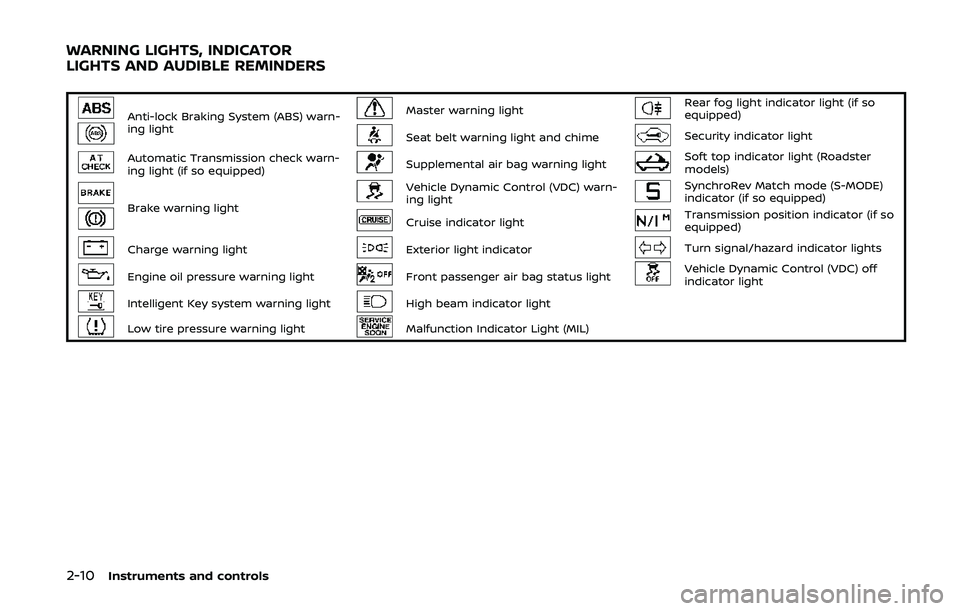
Anti-lock Braking System (ABS) warn-
ing lightMaster warning lightRear fog light indicator light (if so
equipped)
Seat belt warning light and chimeSecurity indicator light
Automatic Transmission check warn-
ing light (if so equipped)Supplemental air bag warning lightSoft top indicator light (Roadster
models)
Brake warning light
Vehicle Dynamic Control (VDC) warn-
ing lightSynchroRev Match mode (S-MODE)
indicator (if so equipped)
Cruise indicator lightTransmission position indicator (if so
equipped)
Charge warning lightExterior light indicatorTurn signal/hazard indicator lights
Engine oil pressure warning lightFront passenger air bag status lightVehicle Dynamic Control (VDC) off
indicator light
Intelligent Key system warning lightHigh beam indicator light
Low tire pressure warning lightMalfunction Indicator Light (MIL)
WARNING LIGHTS, INDICATOR
LIGHTS AND AUDIBLE REMINDERS
Page 79 of 455
CHECKING LIGHTS
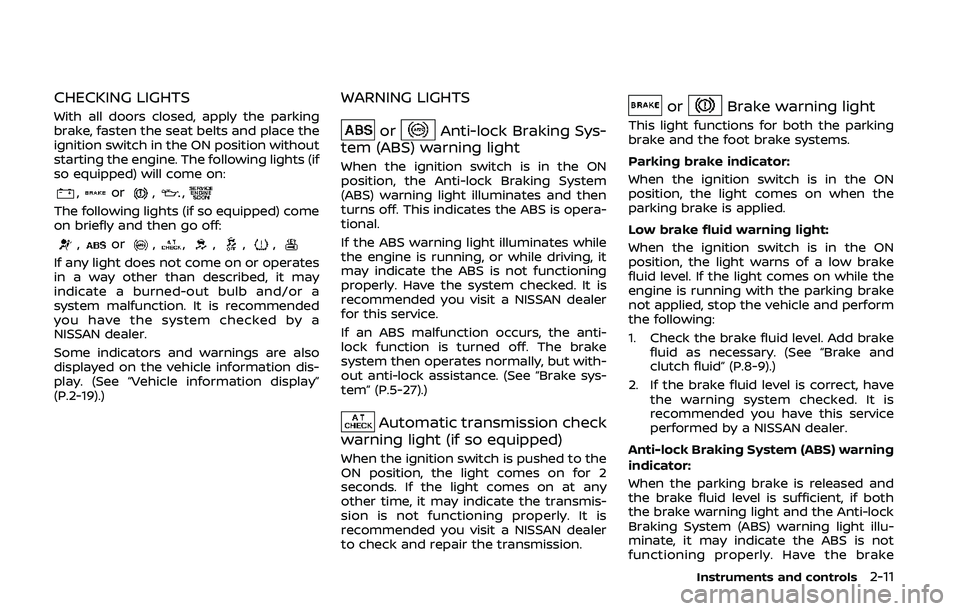
With all doors closed, apply the parking
brake, fasten the seat belts and place the
ignition switch in the ON position without
starting the engine. The following lights (if
so equipped) will come on:
,or,,
The following lights (if so equipped) come
on briefly and then go off:
,or,,,,,
If any light does not come on or operates
in a way other than described, it may
indicate a burned-out bulb and/or a
system malfunction. It is recommended
you have the system checked by a
NISSAN dealer.
Some indicators and warnings are also
displayed on the vehicle information dis-
play. (See “Vehicle information display”
(P.2-19).)
WARNING LIGHTS
orAnti-lock Braking Sys-
tem (ABS) warning light
When the ignition switch is in the ON
position, the Anti-lock Braking System
(ABS) warning light illuminates and then
turns off. This indicates the ABS is opera-
tional.
If the ABS warning light illuminates while
the engine is running, or while driving, it
may indicate the ABS is not functioning
properly. Have the system checked. It is
recommended you visit a NISSAN dealer
for this service.
If an ABS malfunction occurs, the anti-
lock function is turned off. The brake
system then operates normally, but with-
out anti-lock assistance. (See “Brake sys-
tem” (P.5-27).)
Automatic transmission check
warning light (if so equipped)
When the ignition switch is pushed to the
ON position, the light comes on for 2
seconds. If the light comes on at any
other time, it may indicate the transmis-
sion is not functioning properly. It is
recommended you visit a NISSAN dealer
to check and repair the transmission.
orBrake warning light
This light functions for both the parking
brake and the foot brake systems.
Parking brake indicator:
When the ignition switch is in the ON
position, the light comes on when the
parking brake is applied.
Low brake fluid warning light:
When the ignition switch is in the ON
position, the light warns of a low brake
fluid level. If the light comes on while the
engine is running with the parking brake
not applied, stop the vehicle and perform
the following:
1. Check the brake fluid level. Add brake
fluid as necessary. (See “Brake and
clutch fluid” (P.8-9).)
2. If the brake fluid level is correct, have the warning system checked. It is
recommended you have this service
performed by a NISSAN dealer.
Anti-lock Braking System (ABS) warning
indicator:
When the parking brake is released and
the brake fluid level is sufficient, if both
the brake warning light and the Anti-lock
Braking System (ABS) warning light illu-
minate, it may indicate the ABS is not
functioning properly. Have the brake
Instruments and controls2-11
Page 80 of 455
2-12Instruments and controls
system checked, and if necessary re-
paired. It is recommended you visit a
NISSAN dealer for this service. (See “Anti-
lock Braking System (ABS) warning light”
(P.2-11).)
WARNING
.Your brake system may not be
working properly if the warning
light is on. Driving could be dan-
gerous. If you judge it to be safe,
drive carefully to the nearest
service station for repairs. Other-
wise, have your vehicle towed
because driving it could be dan-
gerous.
. Pressing the brake pedal with the
engine stopped and/or low brake
fluid level may increase your
stopping distance and braking
will require greater pedal effort
as well as pedal travel.
. If the brake fluid level is below the
minimum or MIN mark on the
brake fluid reservoir, do not drive
until the brake system has been
checked. It is recommended you
visit a NISSAN dealer for this
service.
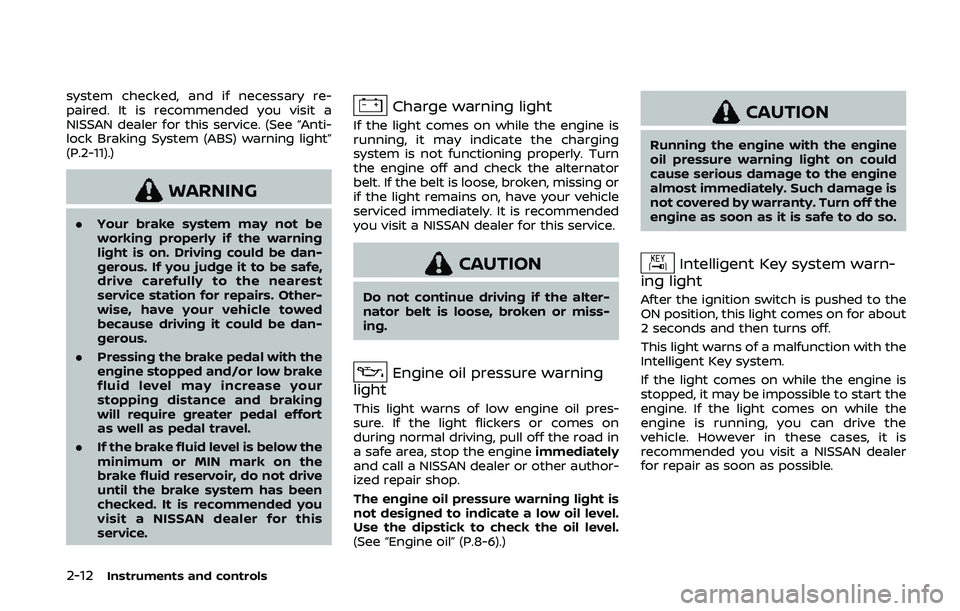
Charge warning light
If the light comes on while the engine is
running, it may indicate the charging
system is not functioning properly. Turn
the engine off and check the alternator
belt. If the belt is loose, broken, missing or
if the light remains on, have your vehicle
serviced immediately. It is recommended
you visit a NISSAN dealer for this service.
CAUTION
Do not continue driving if the alter-
nator belt is loose, broken or miss-
ing.
Engine oil pressure warning
light
This light warns of low engine oil pres-
sure. If the light flickers or comes on
during normal driving, pull off the road in
a safe area, stop the engine immediately
and call a NISSAN dealer or other author-
ized repair shop.
The engine oil pressure warning light is
not designed to indicate a low oil level.
Use the dipstick to check the oil level.
(See “Engine oil” (P.8-6).)
CAUTION
Running the engine with the engine
oil pressure warning light on could
cause serious damage to the engine
almost immediately. Such damage is
not covered by warranty. Turn off the
engine as soon as it is safe to do so.
Intelligent Key system warn-
ing light
After the ignition switch is pushed to the
ON position, this light comes on for about
2 seconds and then turns off.
This light warns of a malfunction with the
Intelligent Key system.
If the light comes on while the engine is
stopped, it may be impossible to start the
engine. If the light comes on while the
engine is running, you can drive the
vehicle. However in these cases, it is
recommended you visit a NISSAN dealer
for repair as soon as possible.
Page 85 of 455
commended you visit a NISSAN dealer
for this service. You do not need to
have your vehicle towed to the dealer.
CAUTION
Continued vehicle operation without
having the emission control system
checked and repaired as necessary
could lead to poor driveability, re-
duced fuel economy, and possible
damage to the emission control sys-
tem.
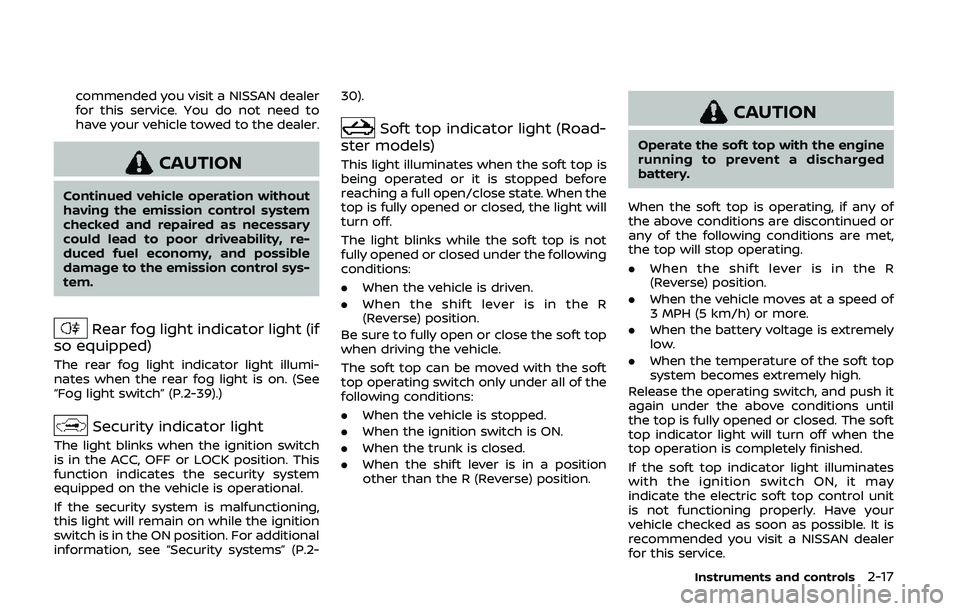
Rear fog light indicator light (if
so equipped)
The rear fog light indicator light illumi-
nates when the rear fog light is on. (See
“Fog light switch” (P.2-39).)
Security indicator light
The light blinks when the ignition switch
is in the ACC, OFF or LOCK position. This
function indicates the security system
equipped on the vehicle is operational.
If the security system is malfunctioning,
this light will remain on while the ignition
switch is in the ON position. For additional
information, see “Security systems” (P.2- 30).
Soft top indicator light (Road-
ster models)
This light illuminates when the soft top is
being operated or it is stopped before
reaching a full open/close state. When the
top is fully opened or closed, the light will
turn off.
The light blinks while the soft top is not
fully opened or closed under the following
conditions:
. When the vehicle is driven.
. When the shift lever is in the R
(Reverse) position.
Be sure to fully open or close the soft top
when driving the vehicle.
The soft top can be moved with the soft
top operating switch only under all of the
following conditions:
. When the vehicle is stopped.
. When the ignition switch is ON.
. When the trunk is closed.
. When the shift lever is in a position
other than the R (Reverse) position.
CAUTION
Operate the soft top with the engine
running to prevent a discharged
battery.
When the soft top is operating, if any of
the above conditions are discontinued or
any of the following conditions are met,
the top will stop operating.
. When the shift lever is in the R
(Reverse) position.
. When the vehicle moves at a speed of
3 MPH (5 km/h) or more.
. When the battery voltage is extremely
low.
. When the temperature of the soft top
system becomes extremely high.
Release the operating switch, and push it
again under the above conditions until
the top is fully opened or closed. The soft
top indicator light will turn off when the
top operation is completely finished.
If the soft top indicator light illuminates
with the ignition switch ON, it may
indicate the electric soft top control unit
is not functioning properly. Have your
vehicle checked as soon as possible. It is
recommended you visit a NISSAN dealer
for this service.
Instruments and controls2-17
Page 86 of 455
2-18Instruments and controls
For more details about the electric soft
top operation, see “Soft top (Roadster
models)” (P.3-22).
SynchroRev Match mode (S-
MODE) indicator (if so equipped)
This indicator will illuminate when the
SynchroRev Match mode (S-MODE) is
activated. (See “SynchroRev Match mode
(S-MODE) (if so equipped for Manual
Transmission models)” (P.5-18).)
Transmission position indica-
tor (if so equipped)
When the ignition switch is pushed to the
ON position, the indicator shows the
transmission position.
For AT models:
In the manual shift mode, when the
transmission does not shift to the se-
lected gear due to the transmission
protection mode, the AT position indica-
tor light will blink and a buzzer will sound.
(See “Driving the vehicle” (P.5-12).)
Turn signal/hazard indicator
lights
The light flashes when the turn signal
switch lever or hazard switch is turned on.
Vehicle Dynamic Control (VDC)
off indicator light
When the ignition switch is in the ON
position, the Vehicle Dynamic Control
(VDC) off indicator light illuminates and
then turns off.
The light comes on when the VDC off
switch is pushed to OFF. This indicates
that the VDC system and traction control
system are not operating.
AUDIBLE REMINDERS
Key reminder chime
A chime will sound if the driver side door
is opened while the ignition switch is
pushed to the ACC position or pushed
to the OFF or LOCK position with the
Intelligent Key left in the Intelligent Key
port. Make sure the ignition switch is
pushed to the OFF position, and take
the Intelligent Key with you when leaving
the vehicle.
Light reminder chime
A chime will sound when the driver side
door is opened with the light switch in the
orposition and the ignition
switch in the ACC, OFF or LOCK position.
Turn the light switch off when you leave
the vehicle.
Parking brake reminder chime
A chime will sound if the vehicle speed is
above 4 MPH (7 km/h) with the parking
brake applied. Stop the vehicle and re-
lease the parking brake.
Brake pad wear warning
The disc brake pads have audible wear
warnings. When a brake pad requires
replacement, it will make a high pitched
scraping sound when the vehicle is in
motion. This scraping sound will first
occur only when the brake pedal is
depressed. After more wear of the brake
pad the sound will always be heard even
if the brake pedal is not depressed. Have
the brakes checked as soon as possible if
the warning sound is heard.
Page 88 of 455
2-20Instruments and controls
JVI0351X
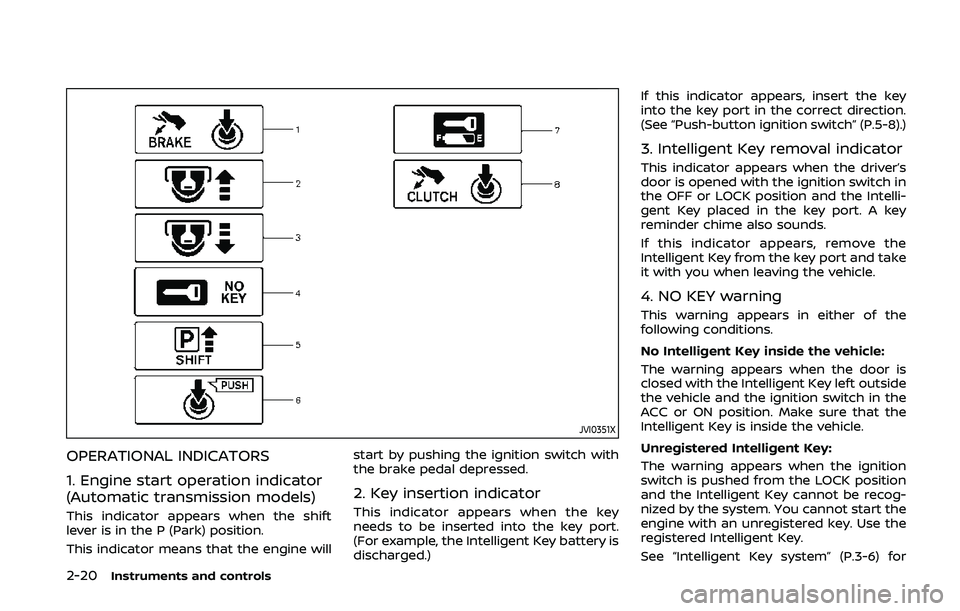
OPERATIONAL INDICATORS
1. Engine start operation indicator
(Automatic transmission models)
This indicator appears when the shift
lever is in the P (Park) position.
This indicator means that the engine willstart by pushing the ignition switch with
the brake pedal depressed.
2. Key insertion indicator
This indicator appears when the key
needs to be inserted into the key port.
(For example, the Intelligent Key battery is
discharged.)If this indicator appears, insert the key
into the key port in the correct direction.
(See “Push-button ignition switch” (P.5-8).)
3. Intelligent Key removal indicator
This indicator appears when the driver’s
door is opened with the ignition switch in
the OFF or LOCK position and the Intelli-
gent Key placed in the key port. A key
reminder chime also sounds.
If this indicator appears, remove the
Intelligent Key from the key port and take
it with you when leaving the vehicle.
4. NO KEY warning
This warning appears in either of the
following conditions.
No Intelligent Key inside the vehicle:
The warning appears when the door is
closed with the Intelligent Key left outside
the vehicle and the ignition switch in the
ACC or ON position. Make sure that the
Intelligent Key is inside the vehicle.
Unregistered Intelligent Key:
The warning appears when the ignition
switch is pushed from the LOCK position
and the Intelligent Key cannot be recog-
nized by the system. You cannot start the
engine with an unregistered key. Use the
registered Intelligent Key.
See “Intelligent Key system” (P.3-6) for
Page 93 of 455
WAC0051X
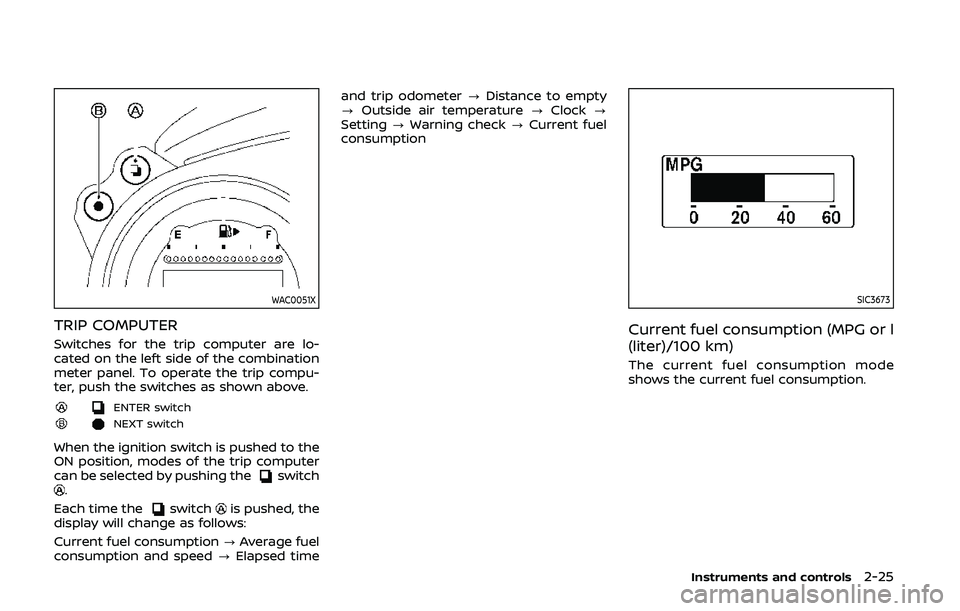
TRIP COMPUTER
Switches for the trip computer are lo-
cated on the left side of the combination
meter panel. To operate the trip compu-
ter, push the switches as shown above.
ENTER switch
NEXT switch
When the ignition switch is pushed to the
ON position, modes of the trip computer
can be selected by pushing the
switch.
Each time the
switchis pushed, the
display will change as follows:
Current fuel consumption ?Average fuel
consumption and speed ?Elapsed time and trip odometer
?Distance to empty
? Outside air temperature ?Clock ?
Setting ?Warning check ?Current fuel
consumption
SIC3673
Current fuel consumption (MPG or l
(liter)/100 km)
The current fuel consumption mode
shows the current fuel consumption.
Instruments and controls2-25
Page 96 of 455
2-28Instruments and controls
billboards.
JVI1447X
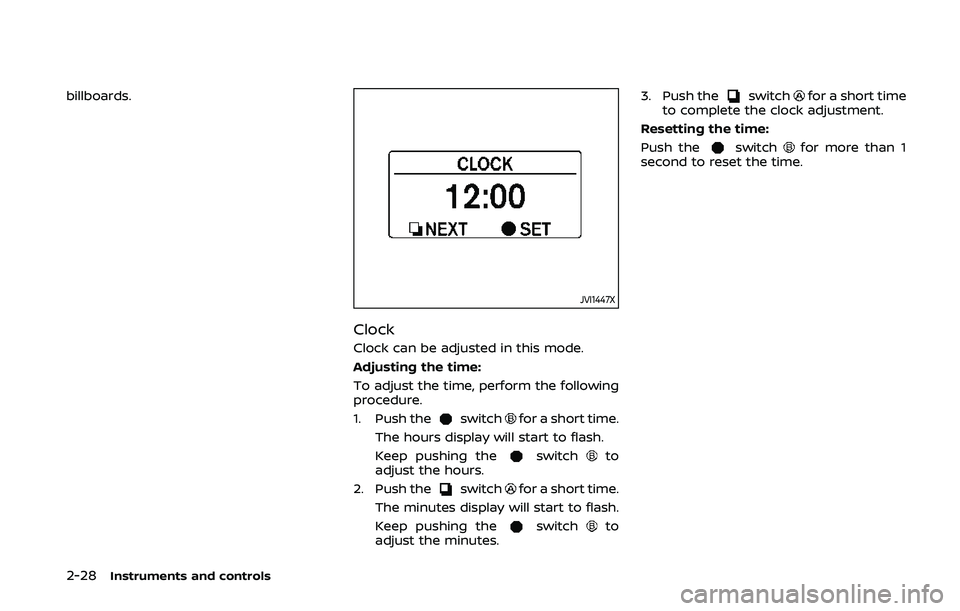
Clock
Clock can be adjusted in this mode.
Adjusting the time:
To adjust the time, perform the following
procedure.
1. Push the
switchfor a short time.
The hours display will start to flash.
Keep pushing the
switchto
adjust the hours.
2. Push the
switchfor a short time.
The minutes display will start to flash.
Keep pushing the
switchto
adjust the minutes. 3. Push the
switchfor a short time
to complete the clock adjustment.
Resetting the time:
Push the
switchfor more than 1
second to reset the time.
Page 99 of 455
cannot prevent it, nor can it prevent the
theft of interior or exterior vehicle com-
ponents in all situations. Always secure
your vehicle even if parking for a brief
period. Never leave your Intelligent Key(s)
in the vehicle, and always lock it when
unattended. Be aware of your surround-
ings, and park in secure, well-lit areas
whenever possible.
Many devices offering additional protec-
tion, such as component locks, identifica-
tion markers, and tracking systems, are
available at auto supply stores and speci-
alty shops. Your NISSAN dealer may also
offer such equipment. Check with your
insurance company to see if you may be
eligible for discounts for various theft
protection features.
SIC2045
How to arm the vehicle security
system
1. Close all windows.The system can be armed even if the
windows are open.
2. Push the ignition switch to the OFF position.
3. Remove the Intelligent Key from the vehicle.
4. Close all doors, hood and rear hatch/ trunk. Lock all doors and trunk (Road-
ster models). The doors can be locked
with the Intelligent Key, door handle
request switch or power door lock
switch. 5. Confirm that the security indicator
light comes on. The security indicator
light stays on for about 30 seconds.
The vehicle security system is now
pre-armed. After about 30 seconds
the vehicle security system automati-
cally shifts into the armed phase. The
security light begins to flash once
every approximately 3 seconds. If,
during this 30-second pre-arm time
period, the door is unlocked, or the
ignition switch is pushed to ACC or
ON, the system will not arm.
Even when the driver and/or passen-
gers are in the vehicle, the system will
activate with all doors, hood and rear
hatch locked with the ignition switch in
the LOCK position. When pushing the
ignition switch to the ACC or ON posi-
tion, the system will be released.
Vehicle security system activation
The vehicle security system will give the
following alarm:
. The headlights blink and the horn
sounds intermittently.
. The alarm automatically turns off
after approximately 1 minute. How-
ever, the alarm reactivates if the
vehicle is tampered with again.
The alarm is activated by:
Instruments and controls2-31
Page 100 of 455
2-32Instruments and controls
.Unlocking the door or opening the
rear hatch without using the UNLOCK
button on the Intelligent Key or the
door handle request switch. (Even if
the door is opened by releasing the
door inside lock knob or using the
mechanical key, the alarm will acti-
vate.)
. Opening the hood.
How to stop an activated alarm
The alarm will stop by unlocking a door
by pushing the UNLOCK button on the
Intelligent Key or the door handle request
switch. The alarm will not stop if the
ignition switch is pushed to the ACC or
ON position.
If the Intelligent Key battery is dis-
charged:
If the Intelligent Key battery is discharged,
the alarm will not stop by pushing the
UNLOCK button on the Intelligent Key or
the door handle request switch. In such a
case, insert the Intelligent Key into the
Intelligent Key port to stop the alarm. See
“Intelligent Key battery discharge” (P.5-10)
for details about the Intelligent Key port.
If the system does not operate as
described above, it is recommended
you have it checked by a NISSAN dealer.
NISSAN VEHICLE IMMOBILIZER SYS-
TEM
The NISSAN Vehicle Immobilizer System
will not allow the engine to start without
the use of the registered Intelligent Key.
Never leave these keys in the vehicle.
For USA:
This device complies with Part 15 of the
FCC Rules. Operation is subject to the
following two conditions:
(1) This device may not cause harmful
interference, and (2) this device must
accept any interference received, in-
cluding interference that may cause
undesired operation.
Note: Changes or modifications not
expressly approved by the party re-
sponsible for compliance could void
the user’s authority to operate the
equipment.
For Canada:
This device complies with Industry Ca-
nada licence-exempt RSS standard(s).
Operation is subject to the following
two conditions:
(1) this device may not cause interfer-
ence, and (2) this device must accept
any interference, including interference
that may cause undesired operation of
the device.
SIC2045
Security indicator light
The security indicator light is located on
the meter panel. It indicates the status of
the NISSAN Vehicle Immobilizer System.
The light blinks after the ignition switch is
in the LOCK, ACC or OFF position. This
function indicates the security systems
equipped on the vehicle are operational.
If the NISSAN Vehicle Immobilizer System
is malfunctioning, this light will remain on
while the ignition switch is in the ON
position.
If the light still remains on and/or the
engine will not start, seek service for
NISSAN Vehicle Immobilizer System as