ECU NISSAN 370Z COUPE 2010 Owner's Manual
[x] Cancel search | Manufacturer: NISSAN, Model Year: 2010, Model line: 370Z COUPE, Model: NISSAN 370Z COUPE 2010Pages: 409, PDF Size: 3.56 MB
Page 89 of 409
Black plate (87,1)
Model "Z34-D" EDITED: 2009/ 9/ 10
SIC2045
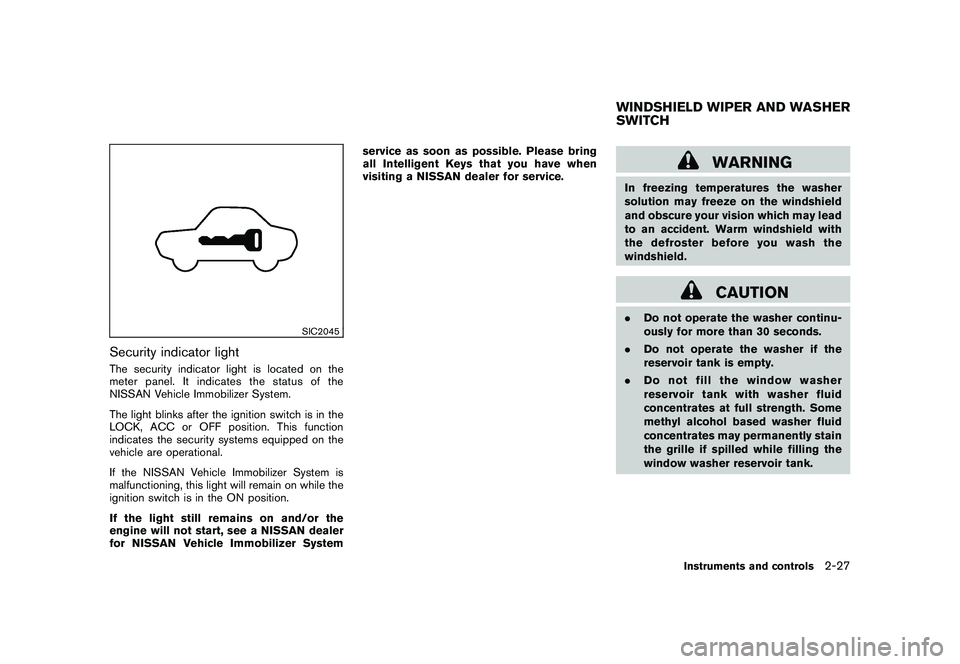
Security indicator lightThe security indicator light is located on the
meter panel. It indicates the status of the
NISSAN Vehicle Immobilizer System.
The light blinks after the ignition switch is in the
LOCK, ACC or OFF position. This function
indicates the security systems equipped on the
vehicle are operational.
If the NISSAN Vehicle Immobilizer System is
malfunctioning, this light will remain on while the
ignition switch is in the ON position.
If the light still remains on and/or the
engine will not start, see a NISSAN dealer
for NISSAN Vehicle Immobilizer Systemservice as soon as possible. Please bring
all Intelligent Keys that you have when
visiting a NISSAN dealer for service.
WARNING
In freezing temperatures the washer
solution may freeze on the windshield
and obscure your vision which may lead
to an accident. Warm windshield with
the defroster before you wash the
windshield.
CAUTION
.
Do not operate the washer continu-
ously for more than 30 seconds.
. Do not operate the washer if the
reservoir tank is empty.
. Do not fill the window washer
reservoir tank with washer fluid
concentrates at full strength. Some
methyl alcohol based washer fluid
concentrates may permanently stain
the grille if spilled while filling the
window washer reservoir tank.WINDSHIELD WIPER AND WASHER
SWITCH
Instruments and controls
2-27
Page 103 of 409
Black plate (101,1)
Model "Z34-D" EDITED: 2009/ 9/ 10
SIC4026
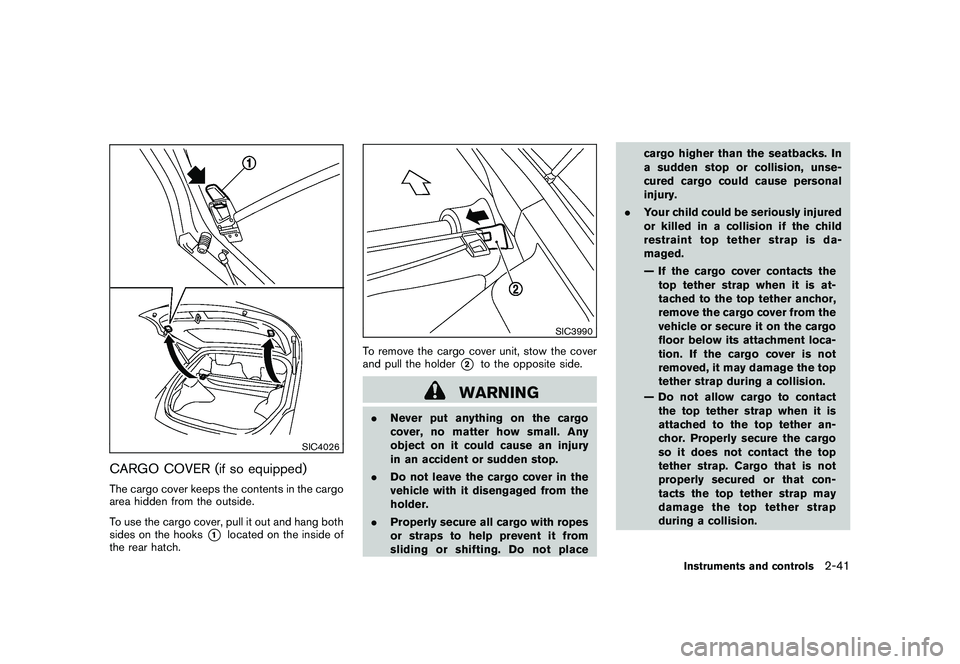
CARGO COVER (if so equipped)The cargo cover keeps the contents in the cargo
area hidden from the outside.
To use the cargo cover, pull it out and hang both
sides on the hooks
*1
located on the inside of
the rear hatch.
SIC3990
To remove the cargo cover unit, stow the cover
and pull the holder
*2
to the opposite side.
WARNING
. Never put anything on the cargo
cover, no matter how small. Any
object on it could cause an injury
in an accident or sudden stop.
. Do not leave the cargo cover in the
vehicle with it disengaged from the
holder.
. Properly secure all cargo with ropes
or straps to help prevent it from
sliding or shifting. Do not place cargo higher than the seatbacks. In
a sudden stop or collision, unse-
cured cargo could cause personal
injury.
. Your child could be seriously injured
or killed in a collision if the child
restraint top tether strap is da-
maged.
— If the cargo cover contacts the
top tether strap when it is at-
tached to the top tether anchor,
remove the cargo cover from the
vehicle or secure it on the cargo
floor below its attachment loca-
tion. If the cargo cover is not
removed, it may damage the top
tether strap during a collision.
— Do not allow cargo to contact the top tether strap when it is
attached to the top tether an-
chor. Properly secure the cargo
so it does not contact the top
tether strap. Cargo that is not
properly secured or that con-
tacts the top tether strap may
damage the top tether strap
during a collision.
Instruments and controls
2-41
Page 109 of 409
Black plate (107,1)
Model "Z34-D" EDITED: 2009/ 9/ 10
HomeLink
®Universal Transceiver provides a
convenient way to consolidate the functions of
up to three individual hand-held transmitters into
one built-in device.
HomeLink®Universal Transceiver:
. Will operate most Radio Frequency (RF)
devices such as garage doors, gates, home
and office lighting, entry door locks and
security systems.
. Is powered by your vehicle’s battery. No
separate batteries are required. If the
vehicle’s battery is discharged or is dis-
connected, HomeLink
®will retain all pro-
gramming.
Once HomeLink
®Universal Transceiver is
programmed, retain the original transmit-
ter for future programming procedures
(Example: new vehicle purchases) . Upon
sale of the vehicle, the programmed
HomeLink
®Universal Transceiver buttons
should be erased for security purposes.
For additional information, see “PRO-
GRAMMING HomeLink
®” later in this sec-
tion.
WARNING
. Do not use HomeLink
®Universal
Transceiver with any garage door
opener that lacks safety stop and reverse features as required by
federal safety standards. (These
standards became effective for
opener models manufactured after
April 1, 1982.) A garage door opener
which cannot detect an object in the
path of a closing garage door and
then automatically stop and reverse,
does not meet current federal safety
standards. Using a garage door
opener without these features in-
creases the risk of serious injury or
death.
. During programming procedure,
your garage door or security gate
may open or close. Make sure that
people and objects are clear of the
garage door, gate, etc. that you are
programming.
. Your vehicle’s engine should be
turned off while programming
HomeLink
®Universal Transceiver.
PROGRAMMING HomeLink
®
To program your HomeLink
®Transceiver to
operate a garage door, gate, or entry door
opener, home or office lighting, you need to be
at the same location as the device. Note:
Garage door openers (manufactured after 1996) have “rolling code protection”. To pro-
gram a garage door opener equipped with
“rolling code protection”; you will need to use
a ladder to get up to the garage door opener
motor to be able to access the “smart or learn”
program button.
HomeLink
®UNIVERSAL
TRANSCEIVER (if so equipped)
Instruments and controls
2-47
Page 120 of 409
Black plate (120,1)
Model "Z34-D" EDITED: 2009/ 9/ 10
SPA2567
INTELLIGENT KEY OPERATING
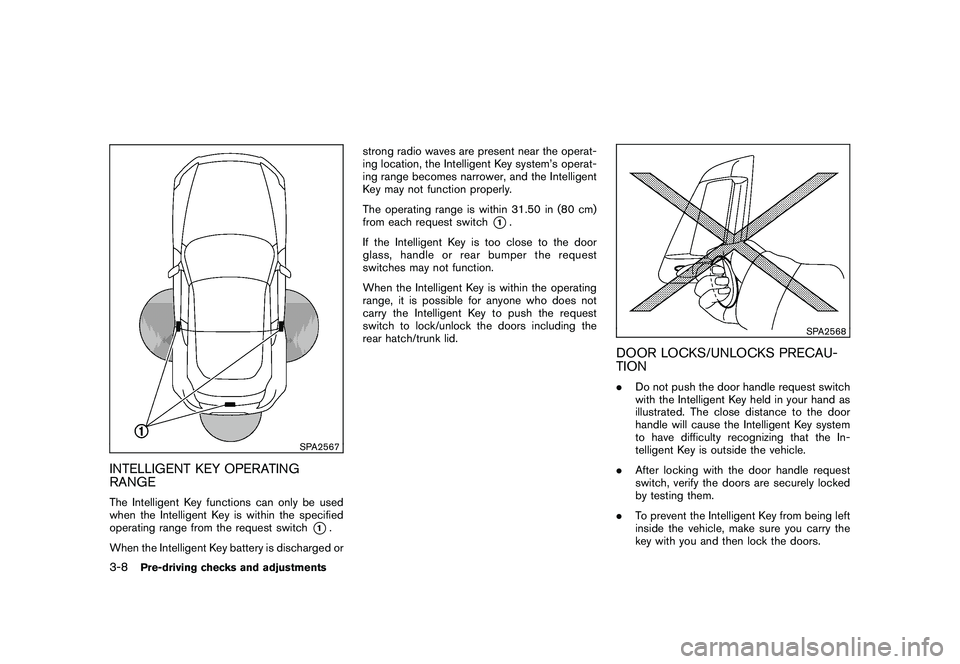
RANGEThe Intelligent Key functions can only be used
when the Intelligent Key is within the specified
operating range from the request switch
*1.
When the Intelligent Key battery is discharged or strong radio waves are present near the operat-
ing location, the Intelligent Key system’s operat-
ing range becomes narrower, and the Intelligent
Key may not function properly.
The operating range is within 31.50 in (80 cm)
from each request switch
*1.
If the Intelligent Key is too close to the door
glass, handle or rear bumper the request
switches may not function.
When the Intelligent Key is within the operating
range, it is possible for anyone who does not
carry the Intelligent Key to push the request
switch to lock/unlock the doors including the
rear hatch/trunk lid.
SPA2568
DOOR LOCKS/UNLOCKS PRECAU-
TION. Do not push the door handle request switch
with the Intelligent Key held in your hand as
illustrated. The close distance to the door
handle will cause the Intelligent Key system
to have difficulty recognizing that the In-
telligent Key is outside the vehicle.
. After locking with the door handle request
switch, verify the doors are securely locked
by testing them.
. To prevent the Intelligent Key from being left
inside the vehicle, make sure you carry the
key with you and then lock the doors.
3-8
Pre-driving checks and adjustments
Page 124 of 409
Black plate (124,1)
Model "Z34-D" EDITED: 2009/ 9/ 10
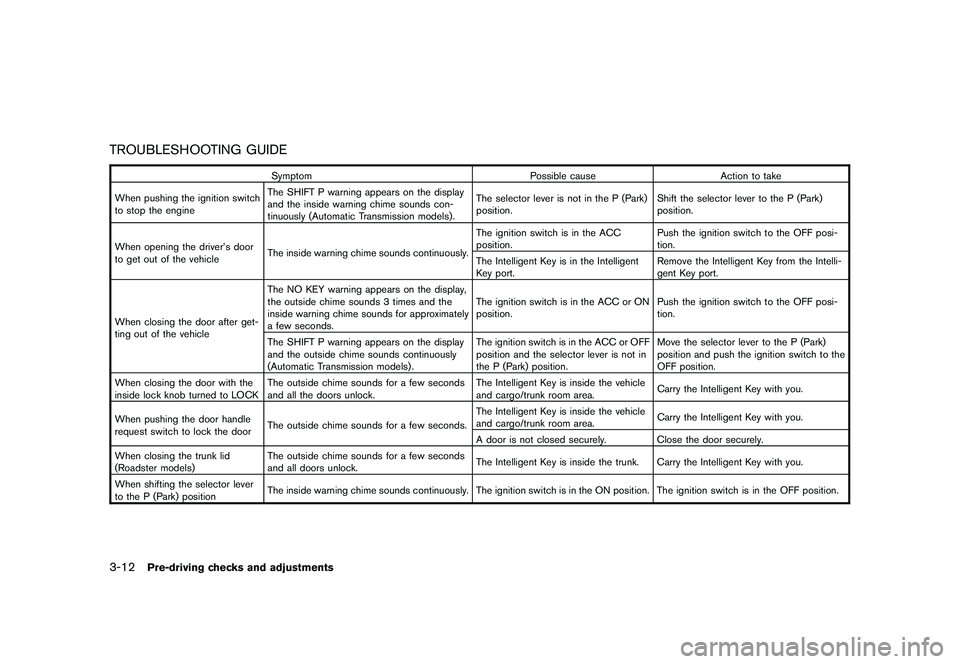
TROUBLESHOOTING GUIDE
SymptomPossible causeAction to take
When pushing the ignition switch
to stop the engine The SHIFT P warning appears on the display
and the inside warning chime sounds con-
tinuously (Automatic Transmission models) . The selector lever is not in the P (Park)
position.
Shift the selector lever to the P (Park)
position.
When opening the driver’s door
to get out of the vehicle The inside warning chime sounds continuously. The ignition switch is in the ACC
position.
Push the ignition switch to the OFF posi-
tion.
The Intelligent Key is in the Intelligent
Key port. Remove the Intelligent Key from the Intelli-
gent Key port.
When closing the door after get-
ting out of the vehicle The NO KEY warning appears on the display,
the outside chime sounds 3 times and the
inside warning chime sounds for approximately
a few seconds.
The ignition switch is in the ACC or ON
position.
Push the ignition switch to the OFF posi-
tion.
The SHIFT P warning appears on the display
and the outside chime sounds continuously
(Automatic Transmission models) . The ignition switch is in the ACC or OFF
position and the selector lever is not in
the P (Park) position.Move the selector lever to the P (Park)
position and push the ignition switch to the
OFF position.
When closing the door with the
inside lock knob turned to LOCK The outside chime sounds for a few seconds
and all the doors unlock. The Intelligent Key is inside the vehicle
and cargo/trunk room area.
Carry the Intelligent Key with you.
When pushing the door handle
request switch to lock the door The outside chime sounds for a few seconds. The Intelligent Key is inside the vehicle
and cargo/trunk room area.
Carry the Intelligent Key with you.
A door is not closed securely. Close the door securely.
When closing the trunk lid
(Roadster models) The outside chime sounds for a few seconds
and all doors unlock.
The Intelligent Key is inside the trunk. Carry the Intelligent Key with you.
When shifting the selector lever
to the P (Park) position The inside warning chime sounds continuously. The ignition switch is in the ON position.
The ignition switch is in the OFF position.
3-12
Pre-driving checks and adjustments
Page 125 of 409
Black plate (125,1)
Model "Z34-D" EDITED: 2009/ 9/ 10
WARNING
The Intelligent Key transmits radio
waves when the buttons are pushed.
The FAA advises that the radio waves
may affect aircraft navigation and com-
munication systems. Do not operate the
Intelligent Key while on an airplane.
Make sure the buttons are not operated
unintentionally when the unit is stored
during a flight.
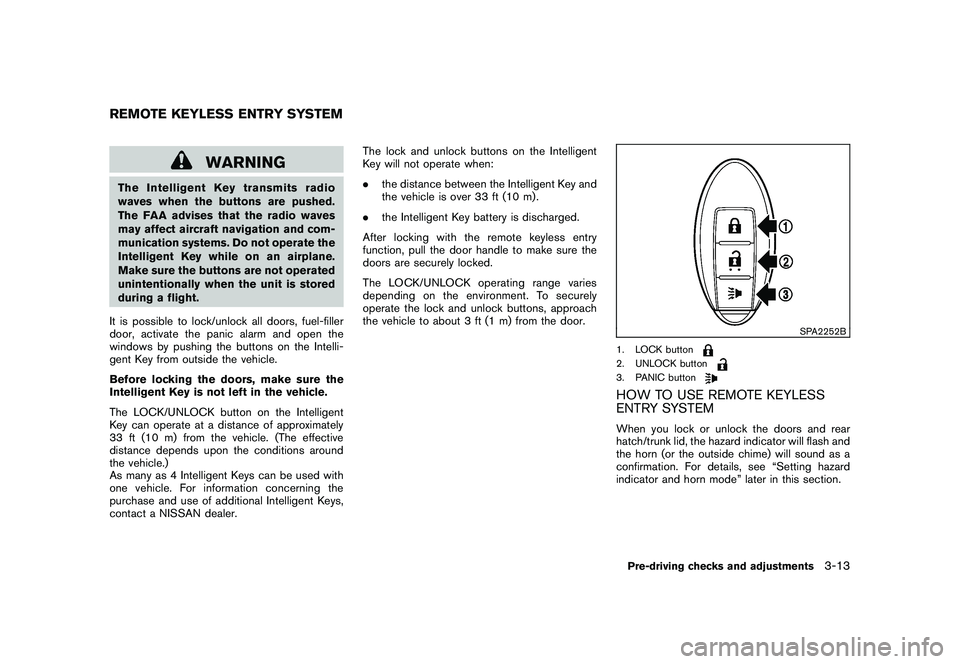
It is possible to lock/unlock all doors, fuel-filler
door, activate the panic alarm and open the
windows by pushing the buttons on the Intelli-
gent Key from outside the vehicle.
Before locking the doors, make sure the
Intelligent Key is not left in the vehicle.
The LOCK/UNLOCK button on the Intelligent
Key can operate at a distance of approximately
33 ft (10 m) from the vehicle. (The effective
distance depends upon the conditions around
the vehicle.)
As many as 4 Intelligent Keys can be used with
one vehicle. For information concerning the
purchase and use of additional Intelligent Keys,
contact a NISSAN dealer. The lock and unlock buttons on the Intelligent
Key will not operate when:
.
the distance between the Intelligent Key and
the vehicle is over 33 ft (10 m) .
. the Intelligent Key battery is discharged.
After locking with the remote keyless entry
function, pull the door handle to make sure the
doors are securely locked.
The LOCK/UNLOCK operating range varies
depending on the environment. To securely
operate the lock and unlock buttons, approach
the vehicle to about 3 ft (1 m) from the door.
SPA2252B
1. LOCK button2. UNLOCK button3. PANIC buttonHOW TO USE REMOTE KEYLESS
ENTRY SYSTEMWhen you lock or unlock the doors and rear
hatch/trunk lid, the hazard indicator will flash and
the horn (or the outside chime) will sound as a
confirmation. For details, see “Setting hazard
indicator and horn mode” later in this section.
REMOTE KEYLESS ENTRY SYSTEM
Pre-driving checks and adjustments
3-13
Page 129 of 409
Black plate (129,1)
Model "Z34-D" EDITED: 2009/ 9/ 10
WARNING
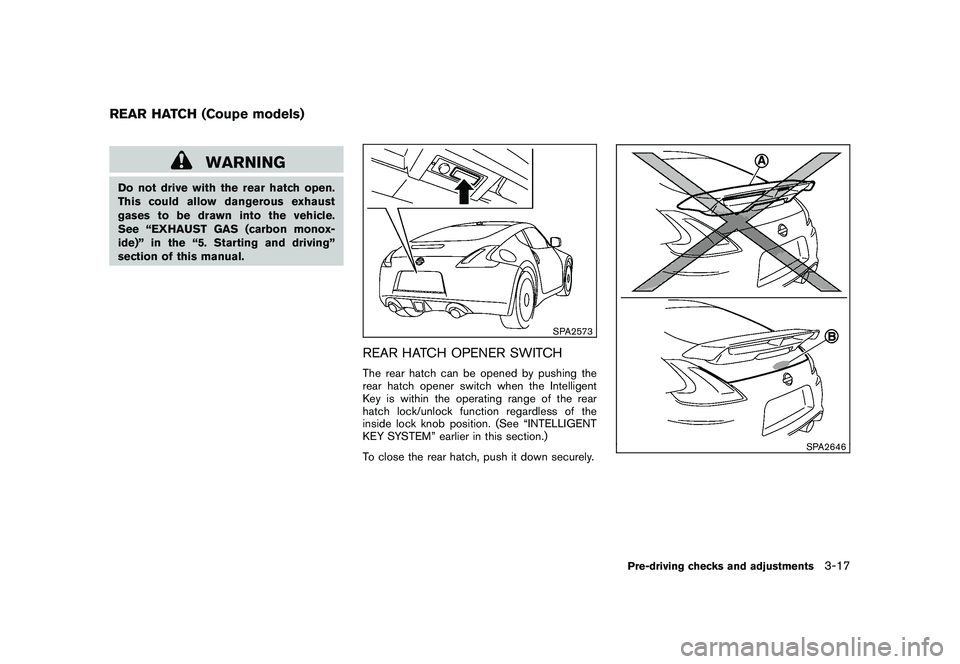
Do not drive with the rear hatch open.
This could allow dangerous exhaust
gases to be drawn into the vehicle.
See “EXHAUST GAS (carbon monox-
ide)” in the “5. Starting and driving”
section of this manual.
SPA2573
REAR HATCH OPENER SWITCHThe rear hatch can be opened by pushing the
rear hatch opener switch when the Intelligent
Key is within the operating range of the rear
hatch lock/unlock function regardless of the
inside lock knob position. (See “INTELLIGENT
KEY SYSTEM” earlier in this section.)
To close the rear hatch, push it down securely.
SPA2646
REAR HATCH (Coupe models)
Pre-driving checks and adjustments
3-17
Page 132 of 409
Black plate (132,1)
Model "Z34-D" EDITED: 2009/ 9/ 10
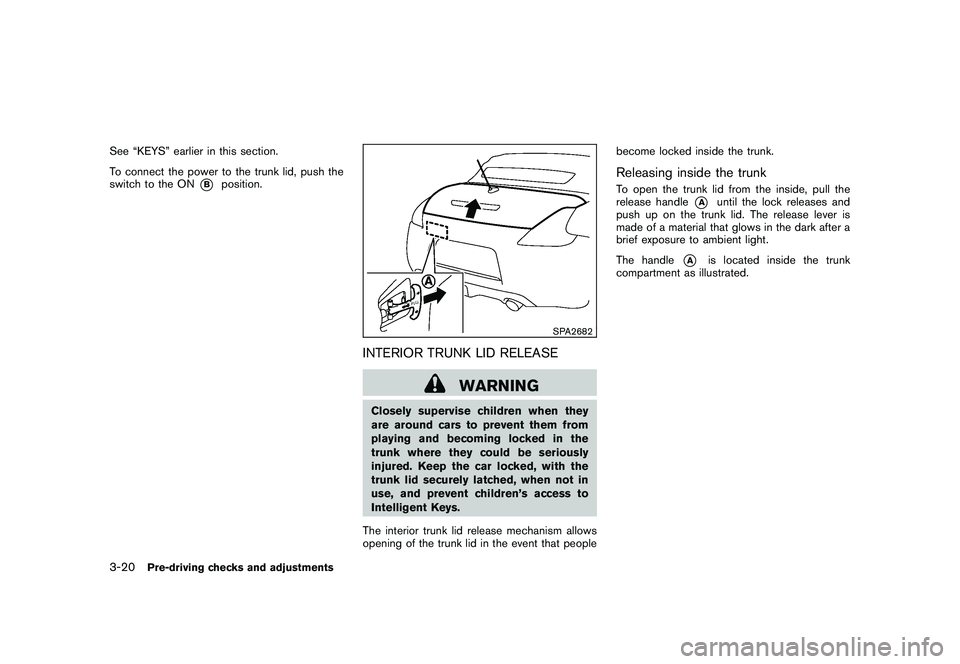
See “KEYS” earlier in this section.
To connect the power to the trunk lid, push the
switch to the ON
*B
position.
SPA2682
INTERIOR TRUNK LID RELEASE
WARNING
Closely supervise children when they
are around cars to prevent them from
playing and becoming locked in the
trunk where they could be seriously
injured. Keep the car locked, with the
trunk lid securely latched, when not in
use, and prevent children’s access to
Intelligent Keys.
The interior trunk lid release mechanism allows
opening of the trunk lid in the event that people become locked inside the trunk.
Releasing inside the trunkTo open the trunk lid from the inside, pull the
release handle
*A
until the lock releases and
push up on the trunk lid. The release lever is
made of a material that glows in the dark after a
brief exposure to ambient light.
The handle
*A
is located inside the trunk
compartment as illustrated.
3-20
Pre-driving checks and adjustments
Page 135 of 409
Black plate (135,1)
Model "Z34-D" EDITED: 2009/ 9/ 10
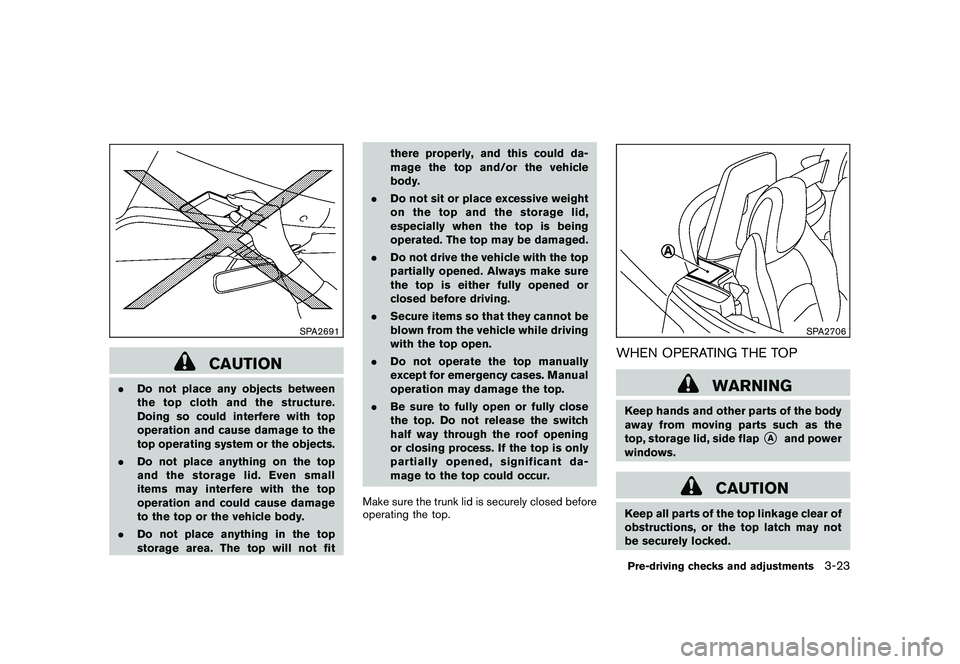
SPA2691
CAUTION
.Do not place any objects between
the top cloth and the structure.
Doing so could interfere with top
operation and cause damage to the
top operating system or the objects.
. Do not place anything on the top
and the storage lid. Even small
items may interfere with the top
operation and could cause damage
to the top or the vehicle body.
. Do not place anything in the top
storage area. The top will not fit there properly, and this could da-
mage the top and/or the vehicle
body.
. Do not sit or place excessive weight
on the top and the storage lid,
especially when the top is being
operated. The top may be damaged.
. Do not drive the vehicle with the top
partially opened. Always make sure
the top is either fully opened or
closed before driving.
. Secure items so that they cannot be
blown from the vehicle while driving
with the top open.
. Do not operate the top manually
except for emergency cases. Manual
operation may damage the top.
. Be sure to fully open or fully close
the top. Do not release the switch
half way through the roof opening
or closing process. If the top is only
partially opened, significant da-
mage to the top could occur.
Make sure the trunk lid is securely closed before
operating the top.
SPA2706
WHEN OPERATING THE TOP
WARNING
Keep hands and other parts of the body
away from moving parts such as the
top, storage lid, side flap
*A
and power
windows.
CAUTION
Keep all parts of the top linkage clear of
obstructions, or the top latch may not
be securely locked.Pre-driving checks and adjustments
3-23
Page 146 of 409
Black plate (146,1)
Model "Z34-D" EDITED: 2009/ 9/ 10
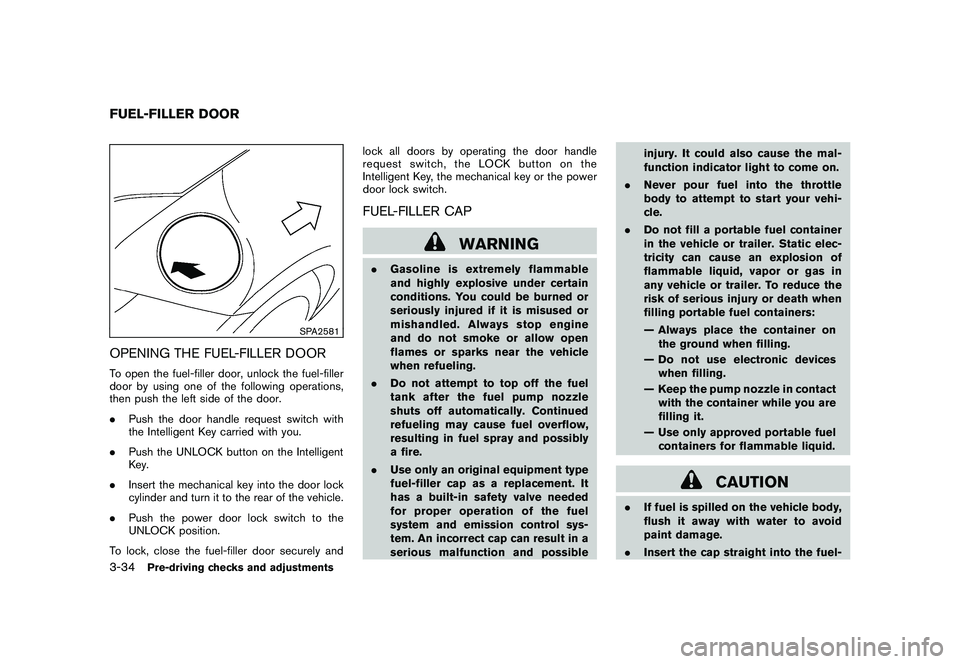
SPA2581
OPENING THE FUEL-FILLER DOORTo open the fuel-filler door, unlock the fuel-filler
door by using one of the following operations,
then push the left side of the door.
.Push the door handle request switch with
the Intelligent Key carried with you.
. Push the UNLOCK button on the Intelligent
Key.
. Insert the mechanical key into the door lock
cylinder and turn it to the rear of the vehicle.
. Push the power door lock switch to the
UNLOCK position.
To lock, close the fuel-filler door securely and lock all doors by operating the door handle
request switch, the LOCK button on the
Intelligent Key, the mechanical key or the power
door lock switch.
FUEL-FILLER CAP
WARNING
.
Gasoline is extremely flammable
and highly explosive under certain
conditions. You could be burned or
seriously injured if it is misused or
mishandled. Always stop engine
and do not smoke or allow open
flames or sparks near the vehicle
when refueling.
. Do not attempt to top off the fuel
tank after the fuel pump nozzle
shuts off automatically. Continued
refueling may cause fuel overflow,
resulting in fuel spray and possibly
a fire.
. Use only an original equipment type
fuel-filler cap as a replacement. It
has a built-in safety valve needed
for proper operation of the fuel
system and emission control sys-
tem. An incorrect cap can result in a
serious malfunction and possible injury. It could also cause the mal-
function indicator light to come on.
. Never pour fuel into the throttle
body to attempt to start your vehi-
cle.
. Do not fill a portable fuel container
in the vehicle or trailer. Static elec-
tricity can cause an explosion of
flammable liquid, vapor or gas in
any vehicle or trailer. To reduce the
risk of serious injury or death when
filling portable fuel containers:
— Always place the container on
the ground when filling.
— Do not use electronic devices when filling.
— Keep the pump nozzle in contact with the container while you are
filling it.
— Use only approved portable fuel containers for flammable liquid.
CAUTION
. If fuel is spilled on the vehicle body,
flush it away with water to avoid
paint damage.
. Insert the cap straight into the fuel-
FUEL-FILLER DOOR3-34
Pre-driving checks and adjustments