lights NISSAN 370Z COUPE 2010 Owners Manual
[x] Cancel search | Manufacturer: NISSAN, Model Year: 2010, Model line: 370Z COUPE, Model: NISSAN 370Z COUPE 2010Pages: 409, PDF Size: 3.56 MB
Page 7 of 409
Black plate (1,1)
Seats, seat belts and Supplemental Restraint
System (SRS)................................................... 0-2
Coupe models ............................................... 0-2
Roadster models ............................................ 0-3
Exterior front ..................................................... 0-4
Exterior rear ...................................................... 0-5
Coupe models ............................................... 0-5
Roadster models ............................................ 0-6
Exterior (NISMO models) ..................................... 0-7 Passenger compartment
...................................... 0-8
Coupe models ............................................... 0-8
Roadster models ............................................ 0-9
Cockpit .......................................................... 0-10
Instrument panel .............................................. 0-11
Meters and gauges ........................................... 0-12
Engine compartment ......................................... 0-13
VQ37VHR engine model. ............................... 0-13
Warning and indicator lights ............................... 0-140 Illustrated table of contents
Model "Z34-D" EDITED: 2009/ 9/ 10
Page 18 of 409
Black plate (14,1)
Model "Z34-D" EDITED: 2009/ 9/ 10
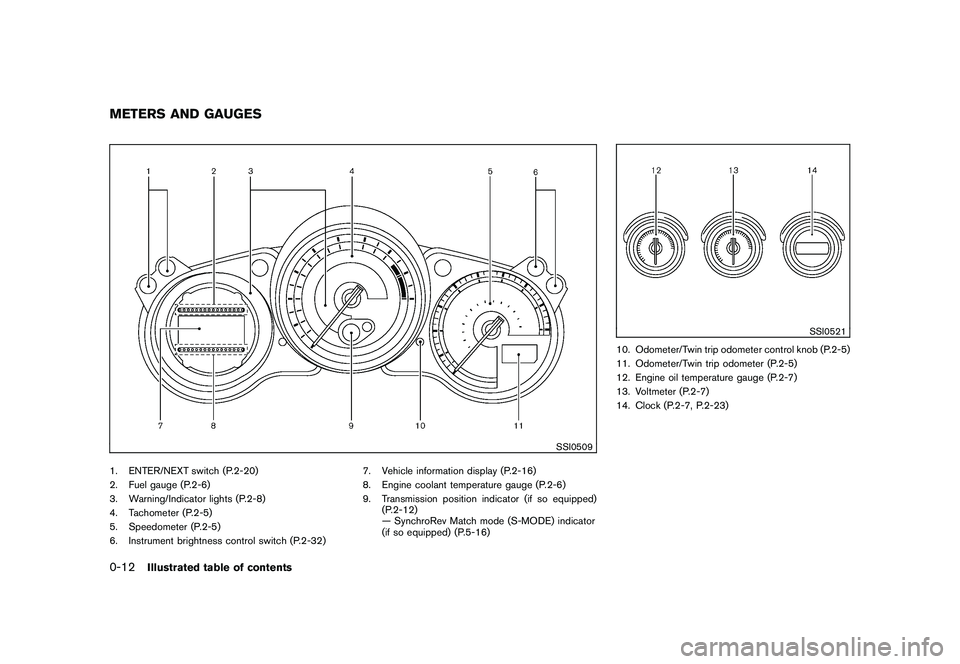
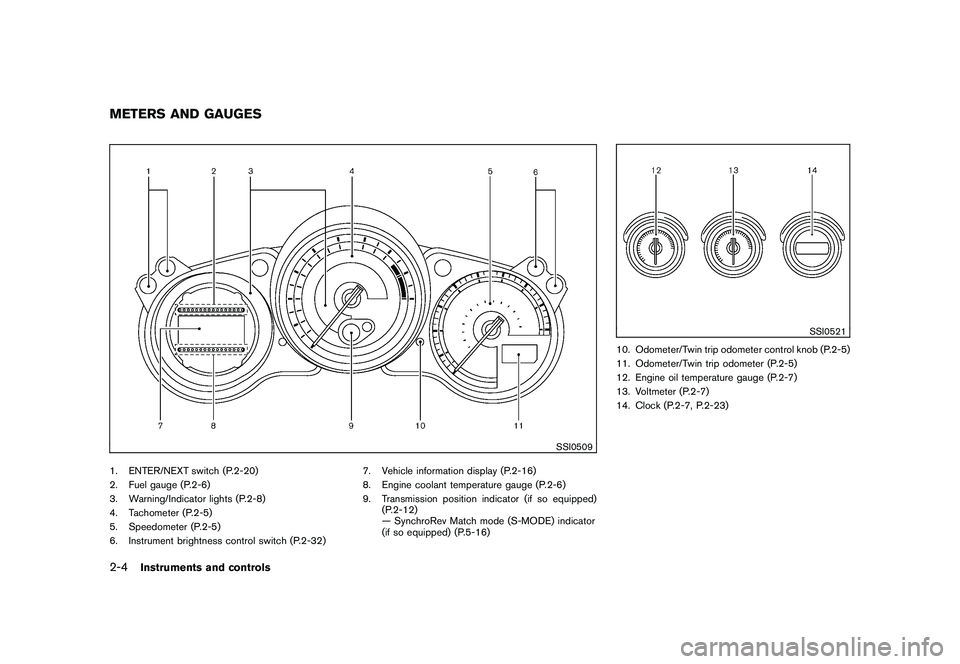
SSI0509
1. ENTER/NEXT switch (P.2-20)
2. Fuel gauge (P.2-6)
3. Warning/Indicator lights (P.2-8)
4. Tachometer (P.2-5)
5. Speedometer (P.2-5)
6. Instrument brightness control switch (P.2-32)7. Vehicle information display (P.2-16)
8. Engine coolant temperature gauge (P.2-6)
9. Transmission position indicator (if so equipped)
(P.2-12)
— SynchroRev Match mode (S-MODE) indicator
(if so equipped) (P.5-16)
SSI0521
10. Odometer/Twin trip odometer control knob (P.2-5)
11. Odometer/Twin trip odometer (P.2-5)
12. Engine oil temperature gauge (P.2-7)
13. Voltmeter (P.2-7)
14. Clock (P.2-7, P.2-23)
METERS AND GAUGES0-12
Illustrated table of contents
Page 20 of 409
Black plate (16,1)
Model "Z34-D" EDITED: 2009/ 9/ 10
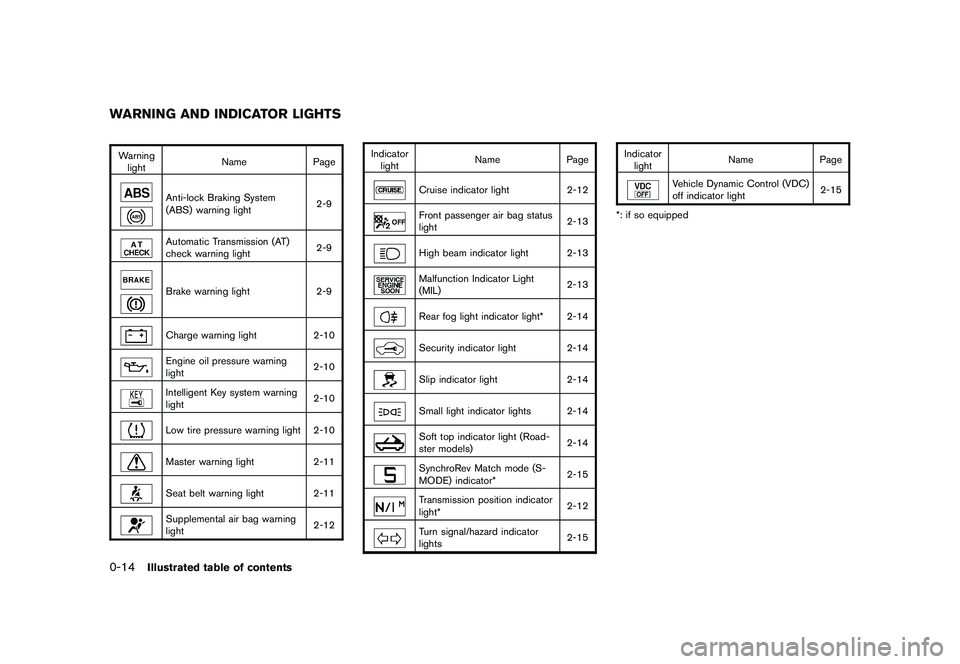
Warninglight Name
Page
Anti-lock Braking System
(ABS) warning light 2-9Automatic Transmission (AT)
check warning light2-9Brake warning light
2-9Charge warning light2-10Engine oil pressure warning
light 2-10Intelligent Key system warning
light2-10Low tire pressure warning light 2-10Master warning light
2-11Seat belt warning light 2-11Supplemental air bag warning
light 2-12Indicator
light Name
Page
Cruise indicator light 2-12Front passenger air bag status
light 2-13High beam indicator light 2-13Malfunction Indicator Light
(MIL)2-13Rear fog light indicator light* 2-14Security indicator light
2-14Slip indicator light 2-14Small light indicator lights 2-14Soft top indicator light (Road-
ster models) 2-14SynchroRev Match mode (S-
MODE) indicator*2-15Transmission position indicator
light*2-12Turn signal/hazard indicator
lights2-15Indicator
light Name Page
Vehicle Dynamic Control (VDC)
off indicator light
2-15
*: if so equipped
WARNING AND INDICATOR LIGHTS0-14
Illustrated table of contents
Page 62 of 409
Black plate (7,1)
2 Instruments and controls
Model "Z34-D" EDITED: 2009/ 9/ 10
Cockpit............................................................ 2-2
Instrument panel ................................................ 2-3
Meters and gauges ............................................. 2-4
Speedometer and odometer ............................. 2-5
Tachometer ................................................... 2-5
Engine coolant temperature gauge ..................... 2-6
Fuel gauge ................................................... 2-6
Triple meter .................................................. 2-7
Warning/indicator lights and audible reminders ......... 2-8
Checking bulbs ............................................. 2-8
Warning lights ............................................... 2-9
Indicator lights ............................................. 2-12
Audible reminders ........................................ 2-15
Vehicle information display .................................. 2-16
Indicators for operation .................................. 2-16
Warnings and alerts ...................................... 2-18
Indicators for maintenance .............................. 2-19
Trip computer .............................................. 2-20
Security systems .............................................. 2-25
Vehicle security system .................................. 2-25
NISSAN Vehicle Immobilizer System ................. 2-26
Windshield wiper and washer switch .................... 2-27
Rear window defroster switch ............................. 2-29
Headlight and turn signal switch .......................... 2-29
Xenon headlights ......................................... 2-29
Headlight switch .......................................... 2-30 Turn signal switch
........................................ 2-33
Fog light switch (if so equipped) ...................... 2-33
Hazard warning flasher switch ............................. 2-33
Horn ............................................................. 2-34
Heated seats (if so equipped) ............................. 2-34
Climate controlled seats (if so equipped) ............... 2-36
Vehicle Dynamic Control (VDC) OFF switch ........... 2-37
Power outlet ................................................... 2-37
Storage ......................................................... 2-38
Instrument pocket (except for navigation system
equipped models) ........................................ 2-38
Cup holders ................................................ 2-38
Glove box .................................................. 2-39
Console box ............................................... 2-40
Rear parcel box ........................................... 2-40
Cargo cover (if so equipped) .......................... 2-41
Windows ....................................................... 2-42
Power windows ........................................... 2-42
Interior lights ................................................... 2-44
Map lights .................................................. 2-44
Interior light control switch ............................. 2-44
Vanity mirror lights ............................................ 2-45
Cargo area courtesy light (Roadster models) .......... 2-46
Cargo light (Coupe models) ............................... 2-46
Trunk light (Roadster models) .............................. 2-46
Page 66 of 409
Black plate (64,1)
Model "Z34-D" EDITED: 2009/ 9/ 10
SSI0509
1. ENTER/NEXT switch (P.2-20)
2. Fuel gauge (P.2-6)
3. Warning/Indicator lights (P.2-8)
4. Tachometer (P.2-5)
5. Speedometer (P.2-5)
6. Instrument brightness control switch (P.2-32)7. Vehicle information display (P.2-16)
8. Engine coolant temperature gauge (P.2-6)
9. Transmission position indicator (if so equipped)
(P.2-12)
— SynchroRev Match mode (S-MODE) indicator
(if so equipped) (P.5-16)
SSI0521
10. Odometer/Twin trip odometer control knob (P.2-5)
11. Odometer/Twin trip odometer (P.2-5)
12. Engine oil temperature gauge (P.2-7)
13. Voltmeter (P.2-7)
14. Clock (P.2-7, P.2-23)
METERS AND GAUGES2-4
Instruments and controls
Page 70 of 409
Black plate (68,1)
Model "Z34-D" EDITED: 2009/ 9/ 10
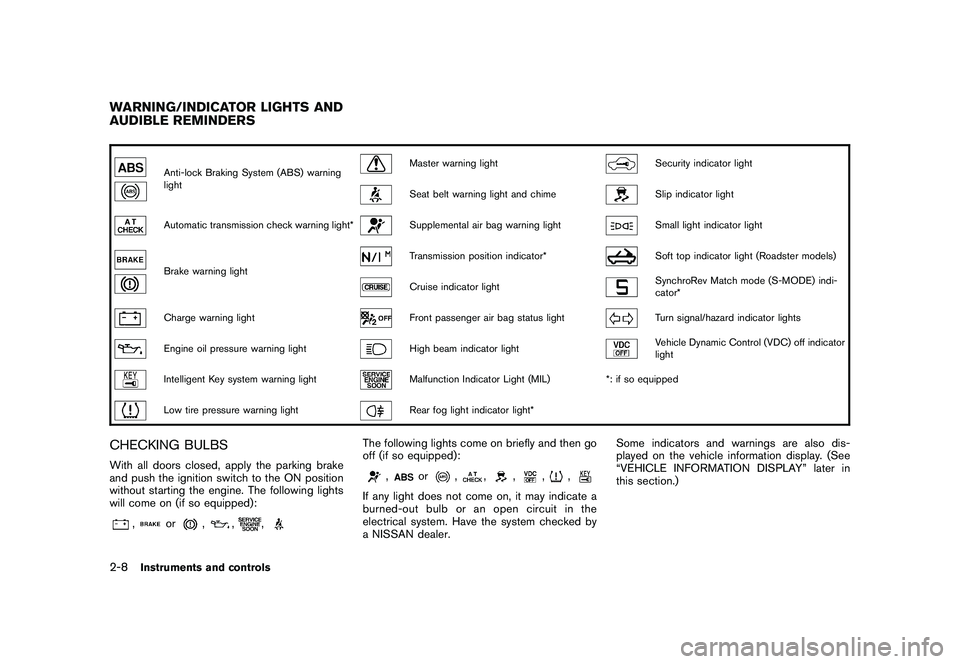
Anti-lock Braking System (ABS) warning
light
Master warning light
Security indicator light
Seat belt warning light and chime
Slip indicator light
Automatic transmission check warning light*
Supplemental air bag warning light
Small light indicator light
Brake warning light
Transmission position indicator*
Soft top indicator light (Roadster models)
Cruise indicator light
SynchroRev Match mode (S-MODE) indi-
cator*
Charge warning light
Front passenger air bag status light
Turn signal/hazard indicator lights
Engine oil pressure warning light
High beam indicator light
Vehicle Dynamic Control (VDC) off indicator
light
Intelligent Key system warning light
Malfunction Indicator Light (MIL)*: if so equipped
Low tire pressure warning light
Rear fog light indicator light*
CHECKING BULBSWith all doors closed, apply the parking brake
and push the ignition switch to the ON position
without starting the engine. The following lights
will come on (if so equipped):
,
or
,
,
,
The following lights come on briefly and then go
off (if so equipped):
,
or
,
,
,
,
,
If any light does not come on, it may indicate a
burned-out bulb or an open circuit in the
electrical system. Have the system checked by
a NISSAN dealer. Some indicators and warnings are also dis-
played on the vehicle information display. (See
“VEHICLE INFORMATION DISPLAY” later in
this section.)
WARNING/INDICATOR LIGHTS AND
AUDIBLE REMINDERS2-8
Instruments and controls
Page 71 of 409
Black plate (69,1)
Model "Z34-D" EDITED: 2009/ 9/ 10
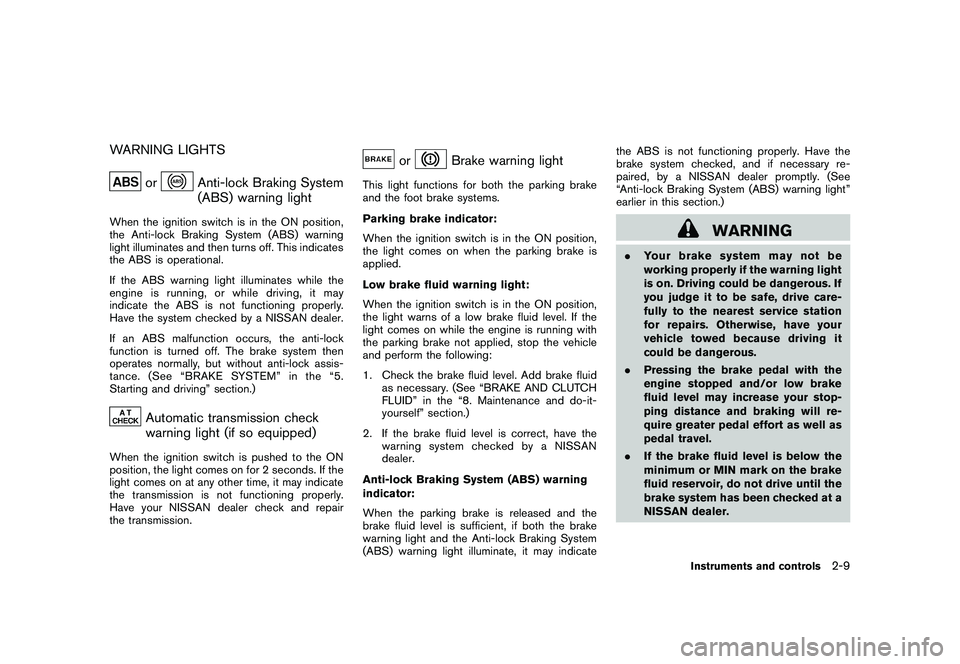
WARNING LIGHTS
or
Anti-lock Braking System
(ABS) warning light
When the ignition switch is in the ON position,
the Anti-lock Braking System (ABS) warning
light illuminates and then turns off. This indicates
the ABS is operational.
If the ABS warning light illuminates while the
engine is running, or while driving, it may
indicate the ABS is not functioning properly.
Have the system checked by a NISSAN dealer.
If an ABS malfunction occurs, the anti-lock
function is turned off. The brake system then
operates normally, but without anti-lock assis-
tance. (See “BRAKE SYSTEM” in the “5.
Starting and driving” section.)
Automatic transmission check
warning light (if so equipped)
When the ignition switch is pushed to the ON
position, the light comes on for 2 seconds. If the
light comes on at any other time, it may indicate
the transmission is not functioning properly.
Have your NISSAN dealer check and repair
the transmission.
or
Brake warning light
This light functions for both the parking brake
and the foot brake systems.
Parking brake indicator:
When the ignition switch is in the ON position,
the light comes on when the parking brake is
applied.
Low brake fluid warning light:
When the ignition switch is in the ON position,
the light warns of a low brake fluid level. If the
light comes on while the engine is running with
the parking brake not applied, stop the vehicle
and perform the following:
1. Check the brake fluid level. Add brake fluidas necessary. (See “BRAKE AND CLUTCH
FLUID” in the “8. Maintenance and do-it-
yourself” section.)
2. If the brake fluid level is correct, have the warningsystemcheckedbyaNISSAN
dealer.
Anti-lock Braking System (ABS) warning
indicator:
When the parking brake is released and the
brake fluid level is sufficient, if both the brake
warning light and the Anti-lock Braking System
(ABS) warning light illuminate, it may indicate the ABS is not functioning properly. Have the
brake system checked, and if necessary re-
paired, by a NISSAN dealer promptly. (See
“Anti-lock Braking System (ABS) warning light”
earlier in this section.)
WARNING
.
Your brake system may not be
working properly if the warning light
is on. Driving could be dangerous. If
you judge it to be safe, drive care-
fully to the nearest service station
for repairs. Otherwise, have your
vehicle towed because driving it
could be dangerous.
. Pressing the brake pedal with the
engine stopped and/or low brake
fluid level may increase your stop-
ping distance and braking will re-
quire greater pedal effort as well as
pedal travel.
. If the brake fluid level is below the
minimum or MIN mark on the brake
fluid reservoir, do not drive until the
brake system has been checked at a
NISSAN dealer.
Instruments and controls
2-9
Page 74 of 409
Black plate (72,1)
Model "Z34-D" EDITED: 2009/ 9/ 10
The seat belt warning light for the front
passenger will illuminate if the seat belt is not
fastened when the front passenger’s seat is
occupied. For 5 seconds after the ignition
switch is in the ON position, the system does
not activate the warning light for the front
passenger.
See “SEAT BELTS” in the “1. Safety — Seats,
seat belts and supplemental restraint system”
section for precautions on seat belt usage.
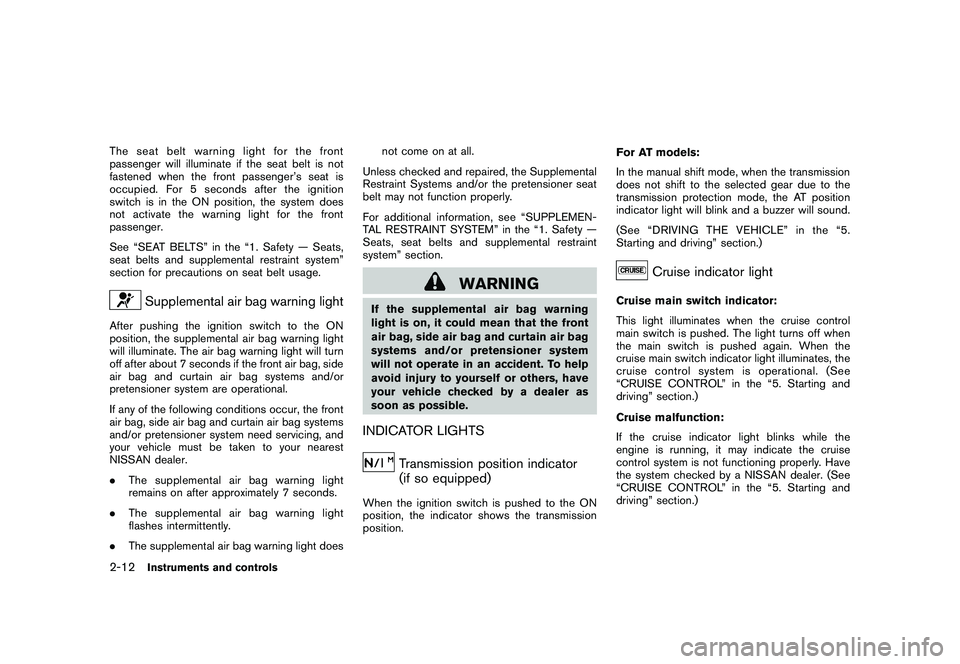
Supplemental air bag warning light
After pushing the ignition switch to the ON
position, the supplemental air bag warning light
will illuminate. The air bag warning light will turn
off after about 7 seconds if the front air bag, side
air bag and curtain air bag systems and/or
pretensioner system are operational.
If any of the following conditions occur, the front
air bag, side air bag and curtain air bag systems
and/or pretensioner system need servicing, and
your vehicle must be taken to your nearest
NISSAN dealer.
.The supplemental air bag warning light
remains on after approximately 7 seconds.
. The supplemental air bag warning light
flashes intermittently.
. The supplemental air bag warning light does not come on at all.
Unless checked and repaired, the Supplemental
Restraint Systems and/or the pretensioner seat
belt may not function properly.
For additional information, see “SUPPLEMEN-
TAL RESTRAINT SYSTEM” in the “1. Safety —
Seats, seat belts and supplemental restraint
system” section.
WARNING
If the supplemental air bag warning
light is on, it could mean that the front
air bag, side air bag and curtain air bag
systems and/or pretensioner system
will not operate in an accident. To help
avoid injury to yourself or others, have
your vehicle checked by a dealer as
soon as possible.INDICATOR LIGHTS
Transmission position indicator
(if so equipped)
When the ignition switch is pushed to the ON
position, the indicator shows the transmission
position. For AT models:
In the manual shift mode, when the transmission
does not shift to the selected gear due to the
transmission protection mode, the AT position
indicator light will blink and a buzzer will sound.
(See “DRIVING THE VEHICLE” in the “5.
Starting and driving” section.)
Cruise indicator light
Cruise main switch indicator:
This light illuminates when the cruise control
main switch is pushed. The light turns off when
the main switch is pushed again. When the
cruise main switch indicator light illuminates, the
cruise control system is operational. (See
“CRUISE CONTROL” in the “5. Starting and
driving” section.)
Cruise malfunction:
If the cruise indicator light blinks while the
engine is running, it may indicate the cruise
control system is not functioning properly. Have
the system checked by a NISSAN dealer. (See
“CRUISE CONTROL” in the “5. Starting and
driving” section.)
2-12
Instruments and controls
Page 77 of 409
Black plate (75,1)
Model "Z34-D" EDITED: 2009/ 9/ 10
For more details about the electric soft top
operation, see “SOFT TOP (Roadster models)”
in the “3. Pre-driving checks and adjustments”
section.
SynchroRev Match mode
(S-MODE) indicator
(if so equipped)
This indicator will illuminate when the
SynchroRev Match mode (S-MODE) is acti-
vated. (“SynchroRev Match mode (S-MODE) (if
so equipped for Manual Transmission models)”
in the “5. Starting and driving” section)
Turn signal/hazard indicator lights
The light flashes when the turn signal switch
lever or hazard switch is turned on.
Vehicle Dynamic Control (VDC) off
indicator light
The light comes on when the vehicle dynamic
control off switch is pushed to OFF. This
indicates that the vehicle dynamic control
system and traction control system are not
operating. When the vehicle dynamic control
off indicator light and slip indicator light come on
with the vehicle dynamic control system turned
on, this light alerts the driver to the fact that thevehicle dynamic control system’s fail-safe mode
is operating, for example the vehicle dynamic
control system may not be functioning properly.
Have the system checked by a NISSAN dealer.
If an abnormality occurs in the system, the
vehicle dynamic control system function will be
canceled but the vehicle is still driveable. For
additional information, see “VEHICLE DYNAMIC
CONTROL (VDC) SYSTEM” in the “5. Starting
and driving” section of this manual.
AUDIBLE REMINDERS
Key reminder chimeA chime will sound if the driver side door is
opened while the ignition switch is pushed to
the ACC position or pushed to the OFF or
LOCK position with the Intelligent Key left in the
Intelligent Key port. Make sure the ignition
switch is pushed to the OFF position, and take
the Intelligent Key with you when leaving the
vehicle.Light reminder chimeA chime will sound when the driver side door is
opened with the light switch in the
or
position and the ignition switch in the ACC, OFF
or LOCK position.
Turn the light switch off when you leave the
vehicle.
Parking brake reminder chimeA chime will sound if the vehicle speed is above
4 MPH (7 km/h) with the parking brake applied.
Stop the vehicle and release the parking brake.Brake pad wear warningThe disc brake pads have audible wear warn-
ings. When a brake pad requires replacement, it
will make a high pitched scraping sound when
the vehicle is in motion. This scraping sound will
first occur only when the brake pedal is
depressed. After more wear of the brake pad
the sound will always be heard even if the brake
pedal is not depresse
d. Have the brakes
checked as soon as possible if the warning
sound is heard.
Instruments and controls
2-15
Page 88 of 409
Black plate (86,1)
Model "Z34-D" EDITED: 2009/ 9/ 10
on for about 30 seconds. The vehicle
security system is now pre-armed. After
about 30 seconds the vehicle security
system automatically shifts into the armed
phase. The security light begins to flash
once every approximately 3 seconds. If,
during this 30-second pre-arm time period,
the door is unlocked, or the ignition switch is
pushed to ACC or ON, the system will not
arm.
Even when the driver and/or passengers
are in the vehicle, the system will activate
with all doors, hood and rear hatch locked
withtheignitionswitchintheLOCK
position. When pushing the ignition switch
to the ACC or ON position, the system will
be released.
Vehicle security system activationThe vehicle security system will give the follow-
ing alarm:
. The headlights blink and the horn sounds
intermittently.
. The alarm automatica lly turns off after
approximately 1 minute. However, the alarm
reactivates if the vehicle is tampered with
again.
The alarm is activated by:
. Unlocking the door or opening the rear hatch without using the button on the
Intelligent Key, the door handle request
switch or the mechanical key. (Even if the
door is opened by releasing the door inside
lock knob, the alarm will activate.)
. Opening the hood.
How to stop an activated alarmThe alarm will stop by unlocking a door by
pushing the unlock button on the Intelligent Key,
the door handle request switch or using the
mechanical key. The alarm will not stop if the
ignition switch is pushed to the ACC or ON
position.
If the system does not operate as de-
scribed above, have it checked by a
NISSAN dealer.NISSAN VEHICLE IMMOBILIZER SYS-
TEMThe NISSAN Vehicle Immobilizer System will not
allow the engine to start without the use of the
registered Intelligent Key. Never leave these
keys in the vehicle.
Statement related to section 15 of FCC
rules for NISSAN Vehicle Immobilizer
System (CONT ASSY - CARD SLOT)
This device complies with part 15 of the
FCC Rules and RSS-210 of Industry Cana- da. Operation is subject to the following
two conditions;
(1) This device may not cause harmful
interference, and (2) this device must
accept any interference received, including
interference that may cause undesired
operation of the device.
CHANGES OR MODIFICATIONS NOT EX-
PRESSLY APPROVED BY THE PARTY
RESPONSIBLE FOR COMPLIANCE COULD
VOID THE USER’S AUTHORITY TO OPER-
ATE THE EQUIPMENT.
2-26
Instruments and controls