instrument panel NISSAN 370Z COUPE 2012 Owner's Manual
[x] Cancel search | Manufacturer: NISSAN, Model Year: 2012, Model line: 370Z COUPE, Model: NISSAN 370Z COUPE 2012Pages: 427, PDF Size: 3.25 MB
Page 132 of 427
3-16Pre-driving checks and adjustments
SPA2572
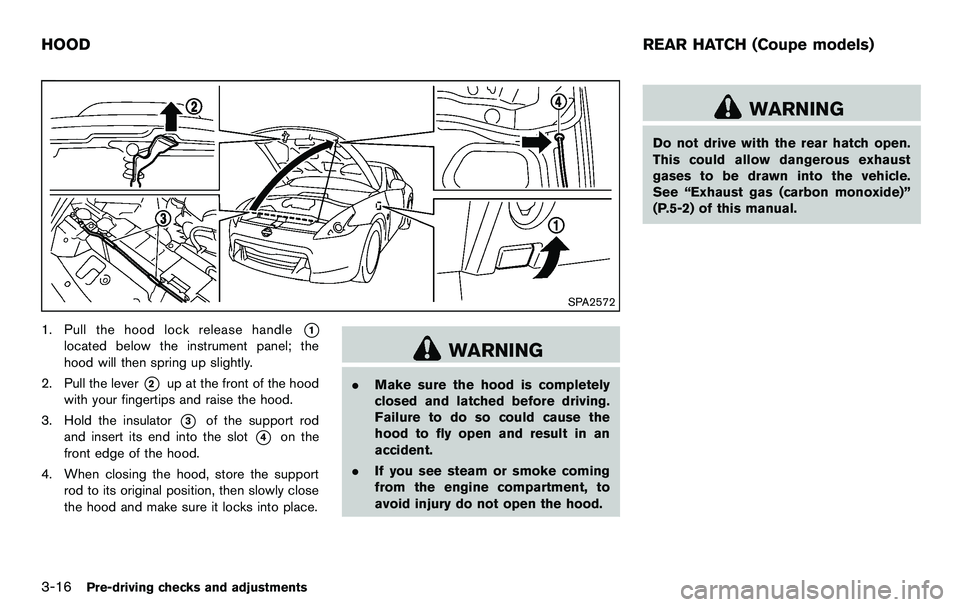
1. Pull the hood lock release handle*1
located below the instrument panel; the
hood will then spring up slightly.
2. Pull the lever
*2up at the front of the hood
with your fingertips and raise the hood.
3. Hold the insulator
*3of the support rod
and insert its end into the slot
*4on the
front edge of the hood.
4. When closing the hood, store the support rod to its original position, then slowly close
the hood and make sure it locks into place.
WARNING
.Make sure the hood is completely
closed and latched before driving.
Failure to do so could cause the
hood to fly open and result in an
accident.
. If you see steam or smoke coming
from the engine compartment, to
avoid injury do not open the hood.
WARNING
Do not drive with the rear hatch open.
This could allow dangerous exhaust
gases to be drawn into the vehicle.
See “Exhaust gas (carbon monoxide)”
(P.5-2) of this manual.
HOOD REAR HATCH (Coupe models)
Page 140 of 427
3-24Pre-driving checks and adjustments
SPA1691
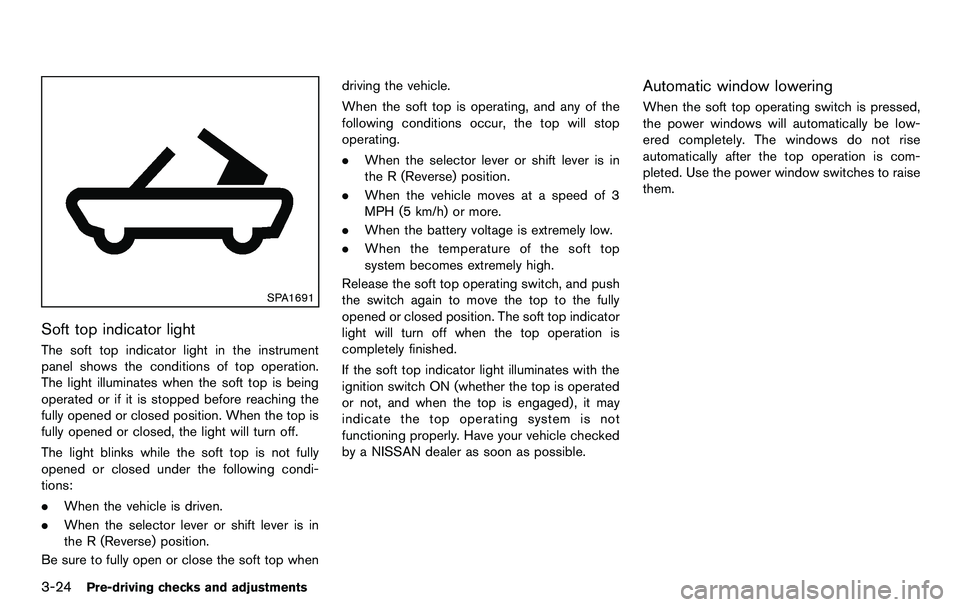
Soft top indicator light
The soft top indicator light in the instrument
panel shows the conditions of top operation.
The light illuminates when the soft top is being
operated or if it is stopped before reaching the
fully opened or closed position. When the top is
fully opened or closed, the light will turn off.
The light blinks while the soft top is not fully
opened or closed under the following condi-
tions:
.When the vehicle is driven.
. When the selector lever or shift lever is in
the R (Reverse) position.
Be sure to fully open or close the soft top when driving the vehicle.
When the soft top is operating, and any of the
following conditions occur, the top will stop
operating.
.
When the selector lever or shift lever is in
the R (Reverse) position.
. When the vehicle moves at a speed of 3
MPH (5 km/h) or more.
. When the battery voltage is extremely low.
. When the temperature of the soft top
system becomes extremely high.
Release the soft top operating switch, and push
the switch again to move the top to the fully
opened or closed position. The soft top indicator
light will turn off when the top operation is
completely finished.
If the soft top indicator light illuminates with the
ignition switch ON (whether the top is operated
or not, and when the top is engaged) , it may
indicate the top operating system is not
functioning properly. Have your vehicle checked
by a NISSAN dealer as soon as possible.
Automatic window lowering
When the soft top operating switch is pressed,
the power windows will automatically be low-
ered completely. The windows do not rise
automatically after the top operation is com-
pleted. Use the power window switches to raise
them.
Page 186 of 427
4-30Center display, heater, air conditioner, audio, phone and voice recognition systems
SAA2324
SAA2315
OPERATING TIPS
When the engine coolant temperature and
outside air temperature are low, the air flow
from the foot outlets may not operate for a
maximum of 150 seconds. This is not a
malfunction. After the coolant temperature
warms up, air will flow normally from the foot
outlets.
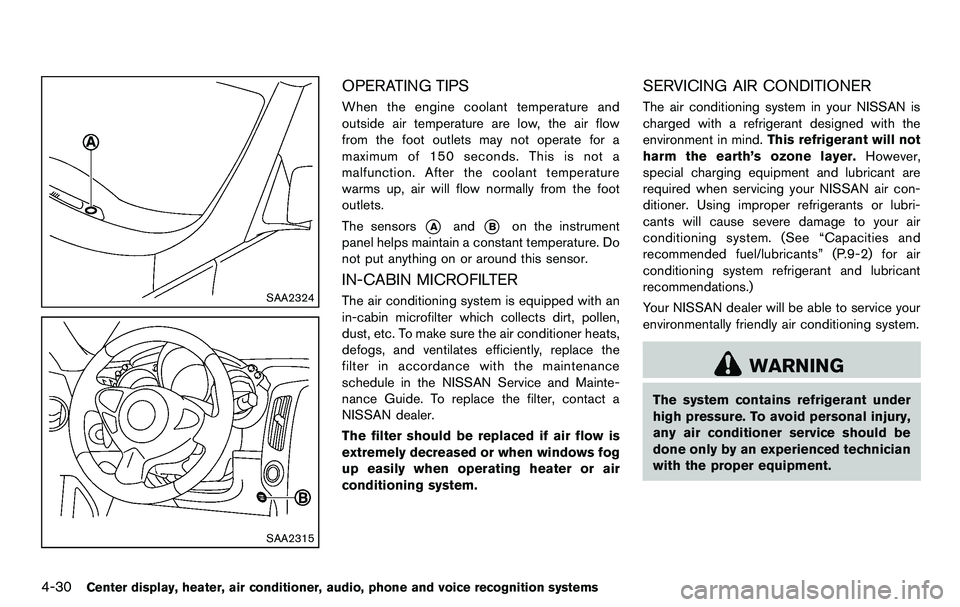
The sensors
*Aand*Bon the instrument
panel helps maintain a constant temperature. Do
not put anything on or around this sensor.
IN-CABIN MICROFILTER
The air conditioning system is equipped with an
in-cabin microfilter which collects dirt, pollen,
dust, etc. To make sure the air conditioner heats,
defogs, and ventilates efficiently, replace the
filter in accordance with the maintenance
schedule in the NISSAN Service and Mainte-
nance Guide. To replace the filter, contact a
NISSAN dealer.
The filter should be replaced if air flow is
extremely decreased or when windows fog
up easily when operating heater or air
conditioning system.
SERVICING AIR CONDITIONER
The air conditioning system in your NISSAN is
charged with a refrigerant designed with the
environment in mind. This refrigerant will not
harm the earth’s ozone layer. However,
special charging equipment and lubricant are
required when servicing your NISSAN air con-
ditioner. Using improper refrigerants or lubri-
cants will cause severe damage to your air
conditioning system. (See “Capacities and
recommended fuel/lubricants” (P.9-2) for air
conditioning system refrigerant and lubricant
recommendations.)
Your NISSAN dealer will be able to service your
environmentally friendly air conditioning system.
WARNING
The system contains refrigerant under
high pressure. To avoid personal injury,
any air conditioner service should be
done only by an experienced technician
with the proper equipment.
Page 213 of 427
SAA2497
Playing a DVD
DISC·AUX button:
Park the vehicle in a safe location for the
front seat occupants to operate the DVD
drive while watching the images.
Push the DISC·AUX button on the instrument
panel and turn the display to the DVD mode.
When a DVD is loaded, it will be replayed
automatically.
The operation screen will be turned on when the
DISC·AUX button located on the instrument
panel is pushed while a DVD is being played,
and it will turn off automatically after a period of
time. To turn it on again, push the DISC·AUXbutton again.
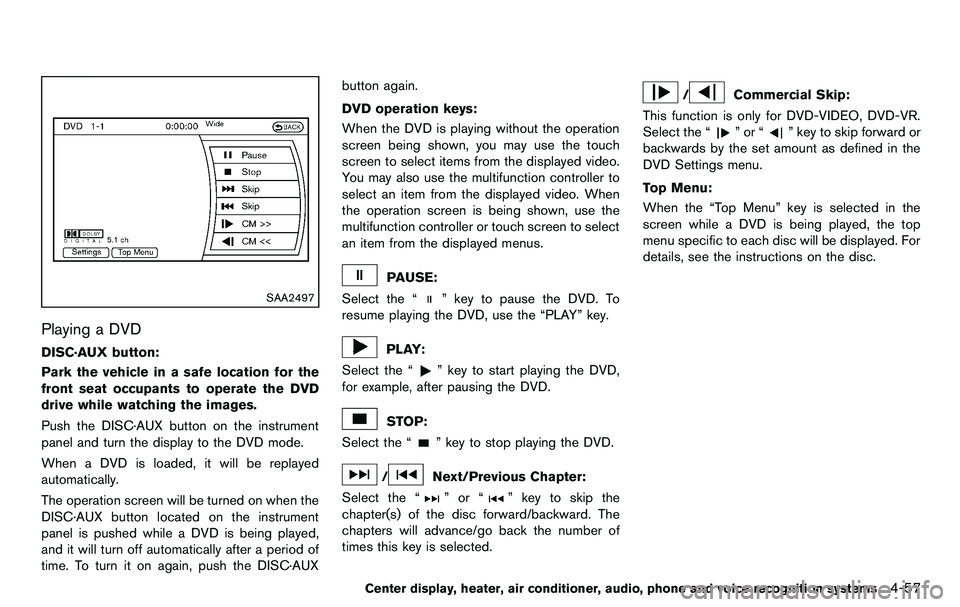
DVD operation keys:
When the DVD is playing without the operation
screen being shown, you may use the touch
screen to select items from the displayed video.
You may also use the multifunction controller to
select an item from the displayed video. When
the operation screen is being shown, use the
multifunction controller or touch screen to select
an item from the displayed menus.
PAUSE:
Select the “
” key to pause the DVD. To
resume playing the DVD, use the “PLAY” key.
PLAY:
Select the “
” key to start playing the DVD,
for example, after pausing the DVD.
STOP:
Select the “
” key to stop playing the DVD.
/Next/Previous Chapter:
Select the “
”or“” key to skip the
chapter(s) of the disc forward/backward. The
chapters will advance/go back the number of
times this key is selected.
/Commercial Skip:
This function is only for DVD-VIDEO, DVD-VR.
Select the “
”or“” key to skip forward or
backwards by the set amount as defined in the
DVD Settings menu.
Top Menu:
When the “Top Menu” key is selected in the
screen while a DVD is being played, the top
menu specific to each disc will be displayed. For
details, see the instructions on the disc.
Center display, heater, air conditioner, audio, phone and voice recognition systems4-57
Page 242 of 427
4-86Center display, heater, air conditioner, audio, phone and voice recognition systems
SAA2523
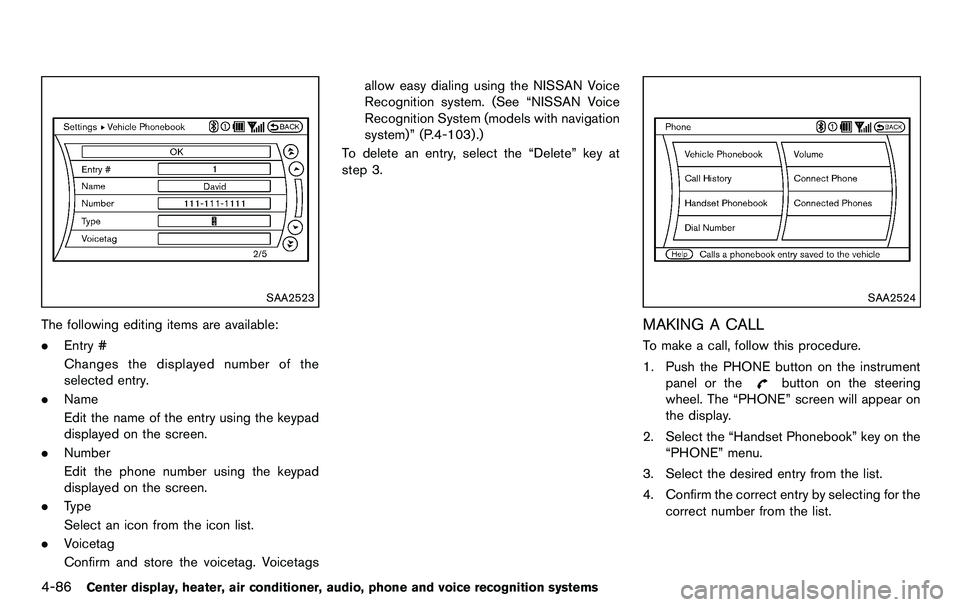
The following editing items are available:
.Entry #
Changes the displayed number of the
selected entry.
. Name
Edit the name of the entry using the keypad
displayed on the screen.
. Number
Edit the phone number using the keypad
displayed on the screen.
. Type
Select an icon from the icon list.
. Voicetag
Confirm and store the voicetag. Voicetags allow easy dialing using the NISSAN Voice
Recognition system. (See “NISSAN Voice
Recognition System (models with navigation
system)” (P.4-103) .)
To delete an entry, select the “Delete” key at
step 3.
SAA2524
MAKING A CALL
To make a call, follow this procedure.
1. Push the PHONE button on the instrument panel or the
button on the steering
wheel. The “PHONE” screen will appear on
the display.
2. Select the “Handset Phonebook” key on the “PHONE” menu.
3. Select the desired entry from the list.
4. Confirm the correct entry by selecting for the correct number from the list.
Page 243 of 427
SAA2621
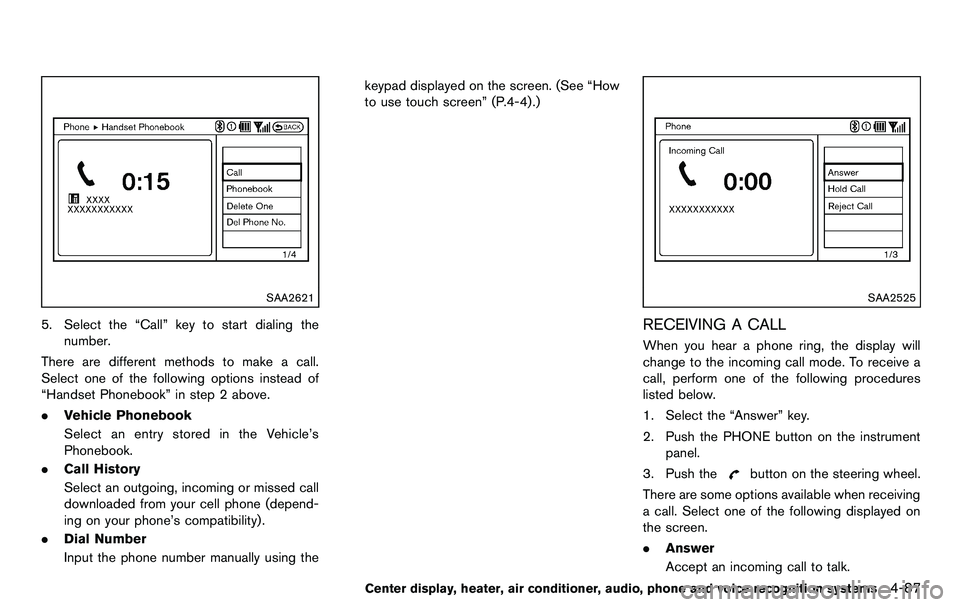
5. Select the “Call” key to start dialing thenumber.
There are different methods to make a call.
Select one of the following options instead of
“Handset Phonebook” in step 2 above.
. Vehicle Phonebook
Select an entry stored in the Vehicle’s
Phonebook.
. Call History
Select an outgoing, incoming or missed call
downloaded from your cell phone (depend-
ing on your phone’s compatibility) .
. Dial Number
Input the phone number manually using the keypad displayed on the screen. (See “How
to use touch screen” (P.4-4) .)
SAA2525
RECEIVING A CALL
When you hear a phone ring, the display will
change to the incoming call mode. To receive a
call, perform one of the following procedures
listed below.
1. Select the “Answer” key.
2. Push the PHONE button on the instrument
panel.
3. Push the
button on the steering wheel.
There are some options available when receiving
a call. Select one of the following displayed on
the screen.
. Answer
Accept an incoming call to talk.
Center display, heater, air conditioner, audio, phone and voice recognition systems4-87
Page 244 of 427
4-88Center display, heater, air conditioner, audio, phone and voice recognition systems
.Hold Call
Put an incoming call on hold.
. Reject Call
Reject an incoming call.
To finish the call, perform one of the
following procedures listed below.
1. Select the “Hang up” key.
2. Push the PHONE button on the instrument panel.
3. Push the
button on the steering wheel.
SAA3587
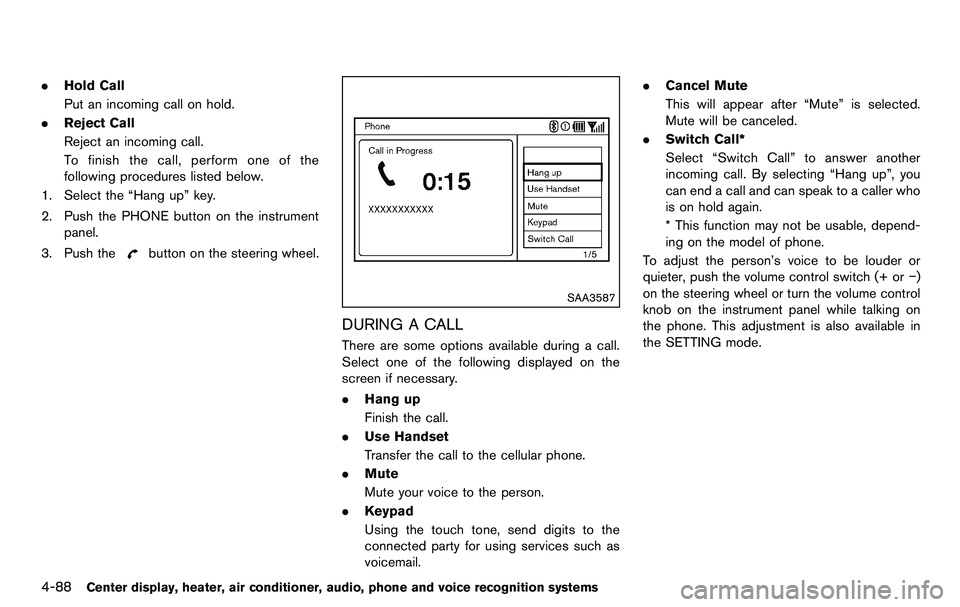
DURING A CALL
There are some options available during a call.
Select one of the following displayed on the
screen if necessary.
. Hang up
Finish the call.
. Use Handset
Transfer the call to the cellular phone.
. Mute
Mute your voice to the person.
. Keypad
Using the touch tone, send digits to the
connected party for using services such as
voicemail. .
Cancel Mute
This will appear after “Mute” is selected.
Mute will be canceled.
. Switch Call*
Select “Switch Call” to answer another
incoming call. By selecting “Hang up”, you
can end a call and can speak to a caller who
is on hold again.
* This function may not be usable, depend-
ing on the model of phone.
To adjust the person’s voice to be louder or
quieter, push the volume control switch (+ or −)
on the steering wheel or turn the volume control
knob on the instrument panel while talking on
the phone. This adjustment is also available in
the SETTING mode.
Page 245 of 427
JVH0136M
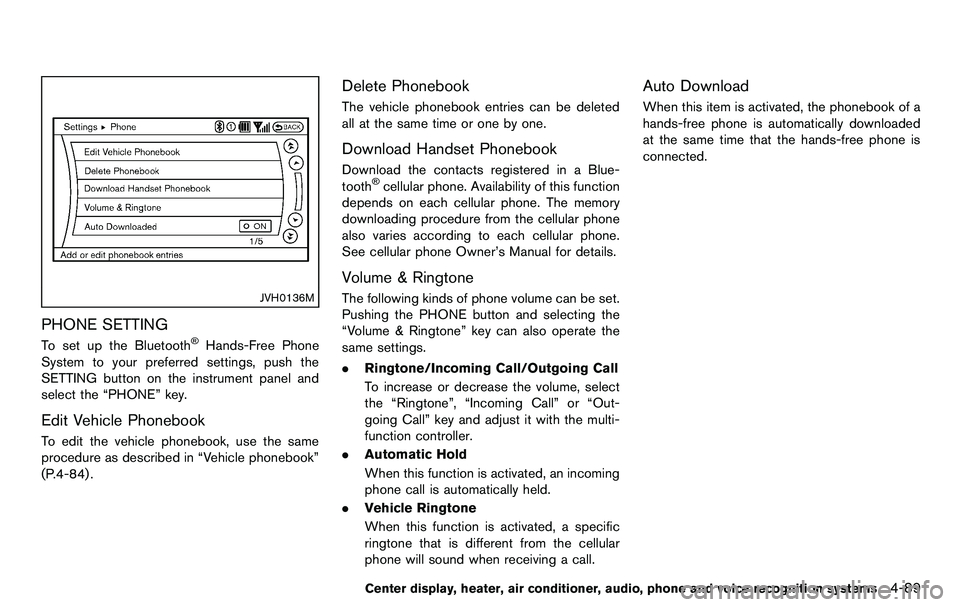
PHONE SETTING
To set up the Bluetooth®Hands-Free Phone
System to your preferred settings, push the
SETTING button on the instrument panel and
select the “PHONE” key.
Edit Vehicle Phonebook
To edit the vehicle phonebook, use the same
procedure as described in “Vehicle phonebook”
(P.4-84) .
Delete Phonebook
The vehicle phonebook entries can be deleted
all at the same time or one by one.
Download Handset Phonebook
Download the contacts registered in a Blue-
tooth®cellular phone. Availability of this function
depends on each cellular phone. The memory
downloading procedure from the cellular phone
also varies according to each cellular phone.
See cellular phone Owner’s Manual for details.
Volume & Ringtone
The following kinds of phone volume can be set.
Pushing the PHONE button and selecting the
“Volume & Ringtone” key can also operate the
same settings.
. Ringtone/Incoming Call/Outgoing Call
To increase or decrease the volume, select
the “Ringtone”, “Incoming Call” or “Out-
going Call” key and adjust it with the multi-
function controller.
. Automatic Hold
When this function is activated, an incoming
phone call is automatically held.
. Vehicle Ringtone
When this function is activated, a specific
ringtone that is different from the cellular
phone will sound when receiving a call.
Auto Download
When this item is activated, the phonebook of a
hands-free phone is automatically downloaded
at the same time that the hands-free phone is
connected.
Center display, heater, air conditioner, audio, phone and voice recognition systems4-89
Page 259 of 427
NISSAN Voice Recognition allows hands-free
operation of the Phone, Navigation, Information
and Audio systems in one of two modes,
Standard Mode or Alternate Command Mode.
In Standard Mode, commands that are available
are always shown on the display and announced
by the system. You can complete your desired
operation by simply following the prompts given
by the system. (See “NISSAN voice recognition
Standard Mode” (P.4-103) for details.)
For advanced operation, you can use the
Alternate Command Mode. (See “NISSAN voice
recognition Alternate Command Mode” (P.4-
114) for details.) When this mode is active, an
expanded list of commands can be spoken after
pushing the TALK
switch, and the voice
command menu prompts are turned off. Review
the expanded command list, which is available
when this mode is active. Note that in this mode
the recognition success rate may be affected as
the number of available commands and the ways
of speaking each command are increased.
To switch one mode to another, see each mode
description later in this section.
To improve the recognition success rate when
Alternate Command Mode is active, try using the
Speaker Adaptation Function available in that
mode. Otherwise, it is recommended that
Alternate Command Mode be turned off and Standard Mode be used for the best recognition
performance.
For the voice commands for the navigation
system, refer to the Navigation System Owner’s
Manual of your vehicle.
For Roadster models:
The voice recognition system cannot be oper-
ated when the soft top is not closed.
NISSAN VOICE RECOGNITION
STANDARD MODE
The following section is applicable when the
Standard Mode is activated.
The Standard Mode enables you to complete
the desired operation by simply following the
prompts that appear on the display and also are
announced by the system.
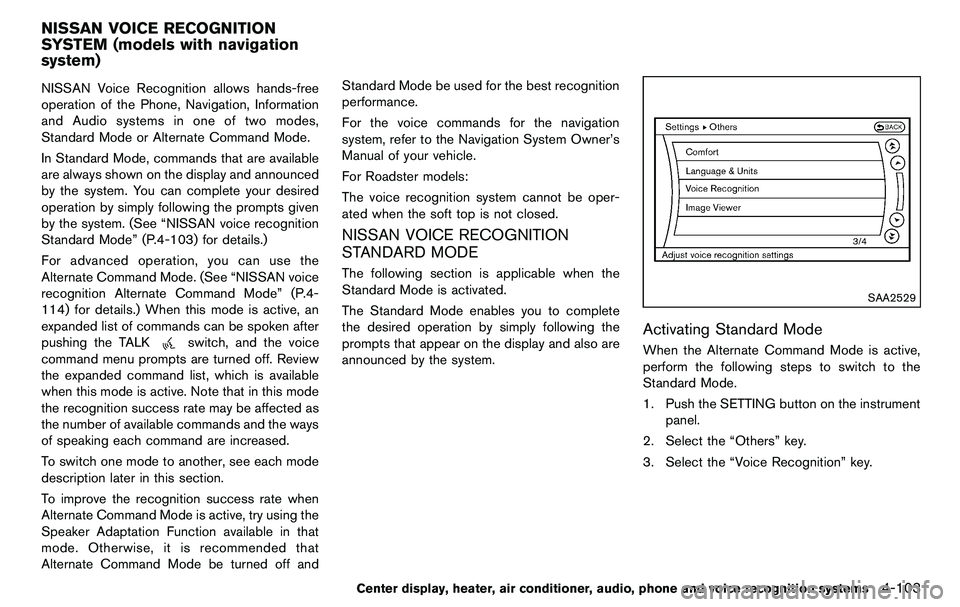
SAA2529
Activating Standard Mode
When the Alternate Command Mode is active,
perform the following steps to switch to the
Standard Mode.
1. Push the SETTING button on the instrument
panel.
2. Select the “Others” key.
3. Select the “Voice Recognition” key.
Center display, heater, air conditioner, audio, phone and voice recognition systems4-103
NISSAN VOICE RECOGNITION
SYSTEM (models with navigation
system)
Page 260 of 427
4-104Center display, heater, air conditioner, audio, phone and voice recognition systems
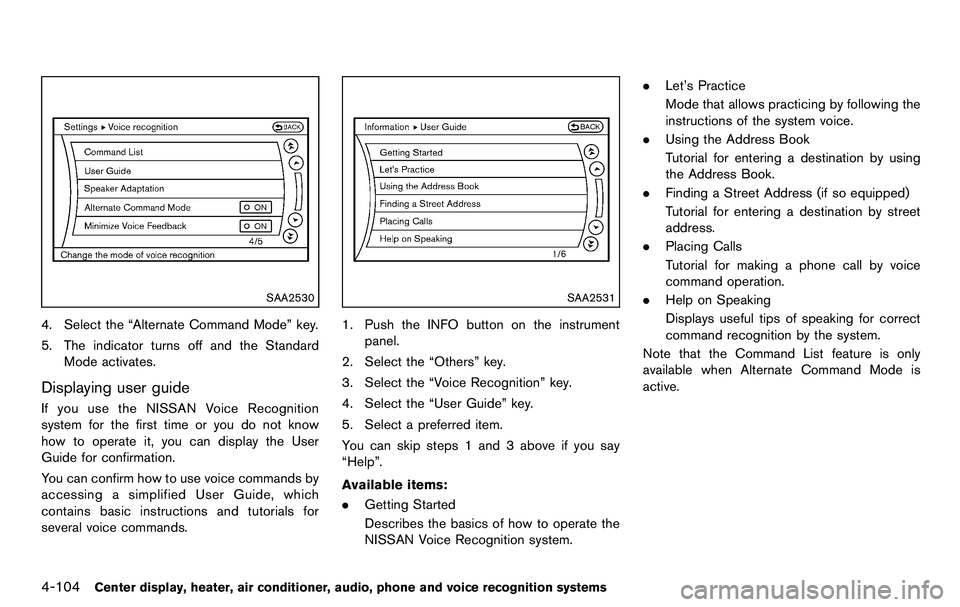
SAA2530
4. Select the “Alternate Command Mode” key.
5. The indicator turns off and the StandardMode activates.
Displaying user guide
If you use the NISSAN Voice Recognition
system for the first time or you do not know
how to operate it, you can display the User
Guide for confirmation.
You can confirm how to use voice commands by
accessing a simplified User Guide, which
contains basic instructions and tutorials for
several voice commands.
SAA2531
1. Push the INFO button on the instrument
panel.
2. Select the “Others” key.
3. Select the “Voice Recognition” key.
4. Select the “User Guide” key.
5. Select a preferred item.
You can skip steps 1 and 3 above if you say
“Help”.
Available items:
. Getting Started
Describes the basics of how to operate the
NISSAN Voice Recognition system. .
Let’s Practice
Mode that allows practicing by following the
instructions of the system voice.
. Using the Address Book
Tutorial for entering a destination by using
the Address Book.
. Finding a Street Address (if so equipped)
Tutorial for entering a destination by street
address.
. Placing Calls
Tutorial for making a phone call by voice
command operation.
. Help on Speaking
Displays useful tips of speaking for correct
command recognition by the system.
Note that the Command List feature is only
available when Alternate Command Mode is
active.