trunk NISSAN 370Z COUPE 2012 Owner's Manual
[x] Cancel search | Manufacturer: NISSAN, Model Year: 2012, Model line: 370Z COUPE, Model: NISSAN 370Z COUPE 2012Pages: 427, PDF Size: 3.25 MB
Page 136 of 427
3-20Pre-driving checks and adjustments
SPA2682
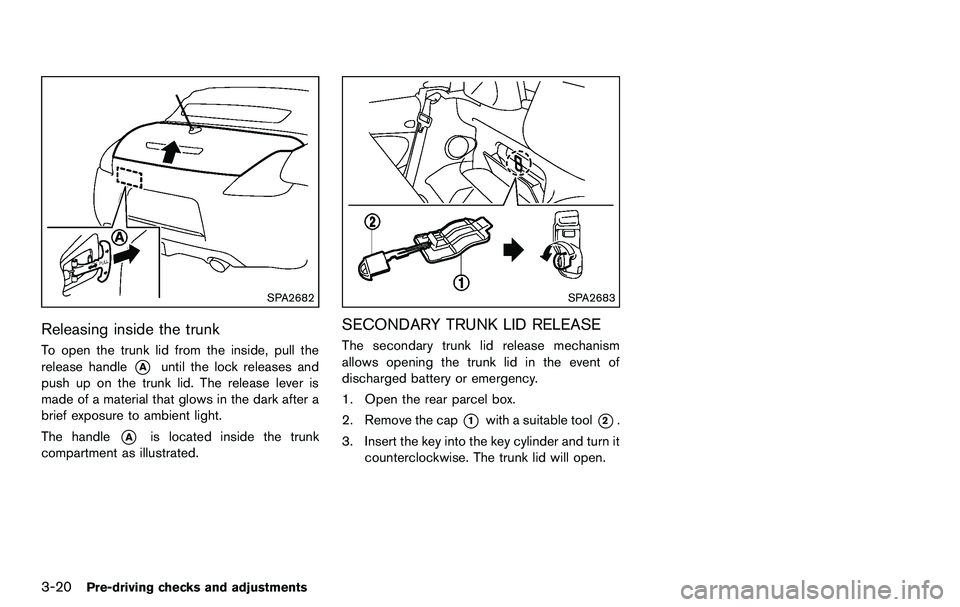
Releasing inside the trunk
To open the trunk lid from the inside, pull the
release handle
*Auntil the lock releases and
push up on the trunk lid. The release lever is
made of a material that glows in the dark after a
brief exposure to ambient light.
The handle
*Ais located inside the trunk
compartment as illustrated.
SPA2683
SECONDARY TRUNK LID RELEASE
The secondary trunk lid release mechanism
allows opening the trunk lid in the event of
discharged battery or emergency.
1. Open the rear parcel box.
2. Remove the cap
*1with a suitable tool*2.
3. Insert the key into the key cylinder and turn it counterclockwise. The trunk lid will open.
Page 137 of 427
SPA2685
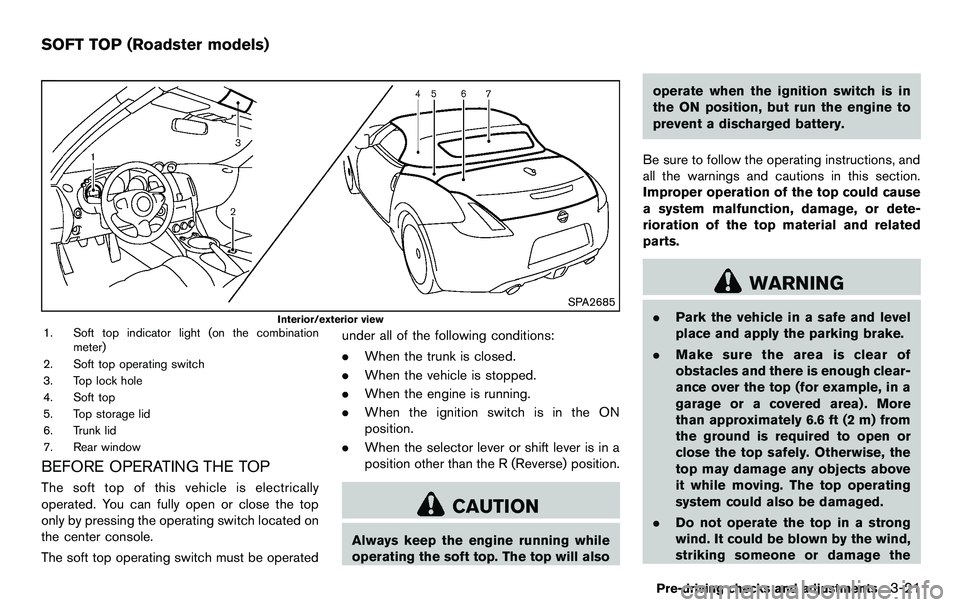
Interior/exterior view1. Soft top indicator light (on the combinationmeter)
2. Soft top operating switch
3. Top lock hole
4. Soft top
5. Top storage lid
6. Trunk lid
7. Rear window
BEFORE OPERATING THE TOP
The soft top of this vehicle is electrically
operated. You can fully open or close the top
only by pressing the operating switch located on
the center console.
The soft top operating switch must be operated under all of the following conditions:
.
When the trunk is closed.
. When the vehicle is stopped.
. When the engine is running.
. When the ignition switch is in the ON
position.
. When the selector lever or shift lever is in a
position other than the R (Reverse) position.
CAUTION
Always keep the engine running while
operating the soft top. The top will also operate when the ignition switch is in
the ON position, but run the engine to
prevent a discharged battery.
Be sure to follow the operating instructions, and
all the warnings and cautions in this section.
Improper operation of the top could cause
a system malfunction, damage, or dete-
rioration of the top material and related
parts.
WARNING
. Park the vehicle in a safe and level
place and apply the parking brake.
. Make sure the area is clear of
obstacles and there is enough clear-
ance over the top (for example, in a
garage or a covered area) . More
than approximately 6.6 ft (2 m) from
the ground is required to open or
close the top safely. Otherwise, the
top may damage any objects above
it while moving. The top operating
system could also be damaged.
. Do not operate the top in a strong
wind. It could be blown by the wind,
striking someone or damage the
Pre-driving checks and adjustments3-21
SOFT TOP (Roadster models)
Page 139 of 427
.Do not place anything in the top
storage area. The top will not fit
there properly, and this could da-
mage the top and/or the vehicle
body.
. Do not sit or place excessive weight
on the top and the storage lid,
especially when the top is being
operated. The top may be damaged.
. Do not drive the vehicle with the top
partially opened. Always make sure
the top is either fully opened or
closed before driving.
. Secure items so that they cannot be
blown from the vehicle while driving
with the top open.
. Do not operate the top manually
except for emergency cases. Manual
operation may damage the top.
. Be sure to fully open or fully close
the top. Do not release the switch
half way through the roof opening
or closing process. If the top is only
partially opened, significant da-
mage to the top could occur.
Make sure the trunk lid is securely closed before
operating the top.
SPA2706
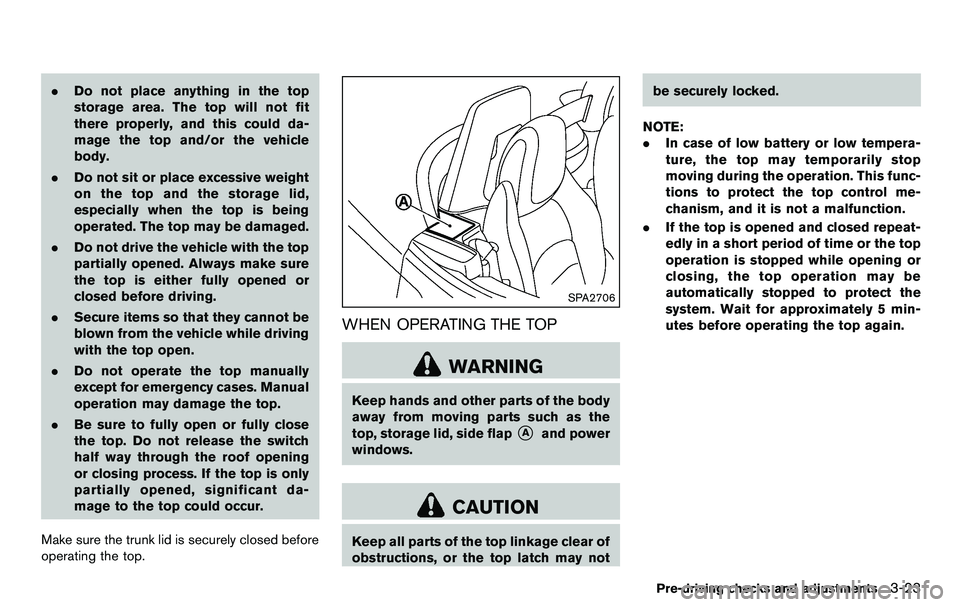
WHEN OPERATING THE TOP
WARNING
Keep hands and other parts of the body
away from moving parts such as the
top, storage lid, side flap
*Aand power
windows.
CAUTION
Keep all parts of the top linkage clear of
obstructions, or the top latch may not be securely locked.
NOTE:
. In case of low battery or low tempera-
ture, the top may temporarily stop
moving during the operation. This func-
tions to protect the top control me-
chanism, and it is not a malfunction.
. If the top is opened and closed repeat-
edly in a short period of time or the top
operation is stopped while opening or
closing, the top operation may be
automatically stopped to protect the
system. Wait for approximately 5 min-
utes before operating the top again.
Pre-driving checks and adjustments3-23
Page 143 of 427
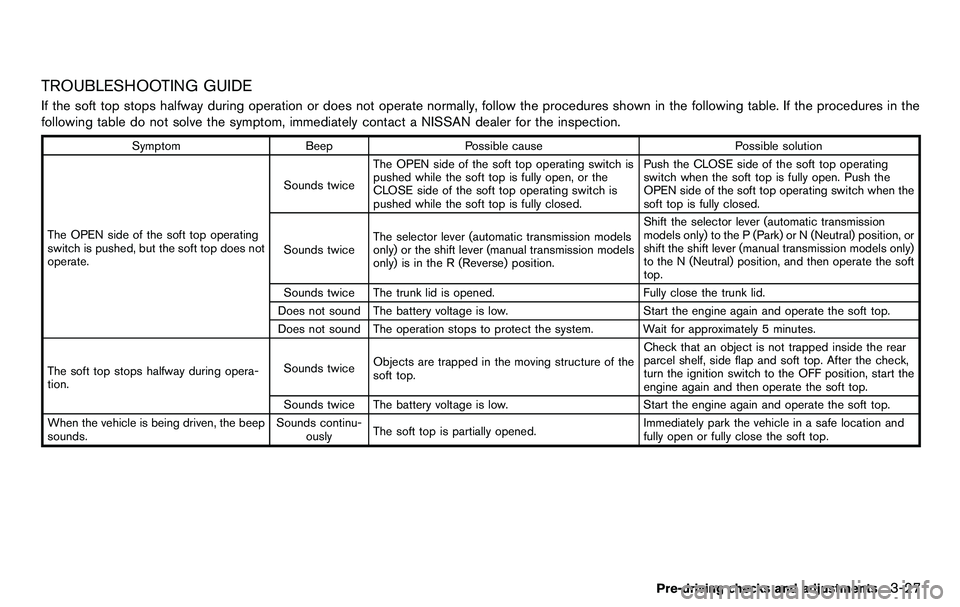
TROUBLESHOOTING GUIDE
If the soft top stops halfway during operation or does not operate normally, follow the procedures shown in the following table. If the procedures in the
following table do not solve the symptom, immediately contact a NISSAN dealer for the inspection.
SymptomBeepPossible cause Possible solution
The OPEN side of the soft top operating
switch is pushed, but the soft top does not
operate. Sounds twice
The OPEN side of the soft top operating switch is
pushed while the soft top is fully open, or the
CLOSE side of the soft top operating switch is
pushed while the soft top is fully closed. Push the CLOSE side of the soft top operating
switch when the soft top is fully open. Push the
OPEN side of the soft top operating switch when the
soft top is fully closed.
Sounds twice The selector lever (automatic transmission models
only) or the shift lever (manual transmission models
only) is in the R (Reverse) position. Shift the selector lever (automatic transmission
models only) to the P (Park) or N (Neutral) position, or
shift the shift lever (manual transmission models only)
to the N (Neutral) position, and then operate the soft
top.
Sounds twice The trunk lid is opened. Fully close the trunk lid.
Does not sound The battery voltage is low. Start the engine again and operate the soft top.
Does not sound The operation stops to protect the system. Wait for approximately 5 minutes.
The soft top stops halfway during opera-
tion. Sounds twice
Objects are trapped in the moving structure of the
soft top. Check that an object is not trapped inside the rear
parcel shelf, side flap and soft top. After the check,
turn the ignition switch to the OFF position, start the
engine again and then operate the soft top.
Sounds twice The battery voltage is low. Start the engine again and operate the soft top.
When the vehicle is being driven, the beep
sounds. Sounds continu-
ously The soft top is partially opened. Immediately park the vehicle in a safe location and
fully open or fully close the soft top.
Pre-driving checks and adjustments3-27
Page 144 of 427
3-28Pre-driving checks and adjustments
IF THE TOP DOES NOT OPEN OR
CLOSE ELECTRICALLY
If you cannot operate the soft top with the
operating switch, first check whether all the
following operating conditions are met.
.vehicle is stopped
. ignition switch is ON (Run the engine when
operating the top.)
. the trunk is closed
. the selector lever or shift lever is in a position
other than the R (Reverse) position
If the top still does not move under the above
conditions or has any system malfunction, see a
NISSAN dealer as soon as possible. When you
must close the top by yourself, in the event of
emergency or when an immediate dealer service
is not available, close the top manually accord-
ing to the procedures shown in this section.
When closing the soft top manually:
. Move the vehicle to a safe place, away from
traffic.
. Two people should perform this procedure,
as some of the top parts are extremely
heavy.
The top cannot be opened manually.
WARNING
. Do not drive with the top partially
opened.
. If the top cannot be operated prop-
erly, see a NISSAN dealer as soon
as possible to have your vehicle
checked.
CAUTION
The storage lid is extremely heavy. The
storage lid should be manually opened
or closed by two people.SPA2715
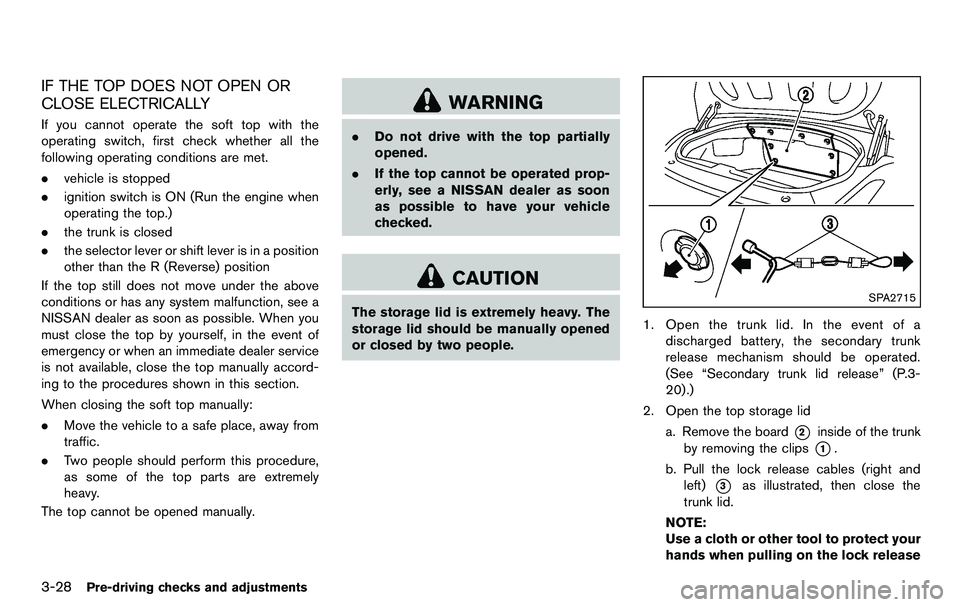
1. Open the trunk lid. In the event of a
discharged battery, the secondary trunk
release mechanism should be operated.
(See “Secondary trunk lid release” (P.3-
20).)
2. Open the top storage lid a. Remove the board
*2inside of the trunk
by removing the clips
*1.
b. Pull the lock release cables (right and left)
*3as illustrated, then close the
trunk lid.
NOTE:
Use a cloth or other tool to protect your
hands when pulling on the lock release
Page 145 of 427
cables*3.
SPA2686
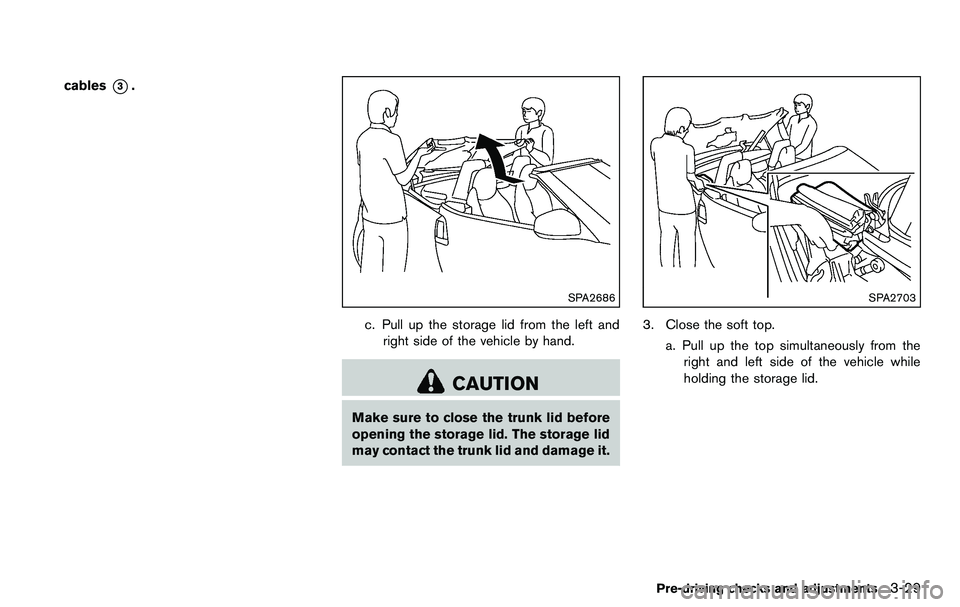
c. Pull up the storage lid from the left andright side of the vehicle by hand.
CAUTION
Make sure to close the trunk lid before
opening the storage lid. The storage lid
may contact the trunk lid and damage it.
SPA2703
3. Close the soft top.
a. Pull up the top simultaneously from theright and left side of the vehicle while
holding the storage lid.
Pre-driving checks and adjustments3-29
Page 147 of 427
CAUTION
Make sure to close the storage lid
completely. The storage lid may contact
the soft top and damage it.
SPA2688
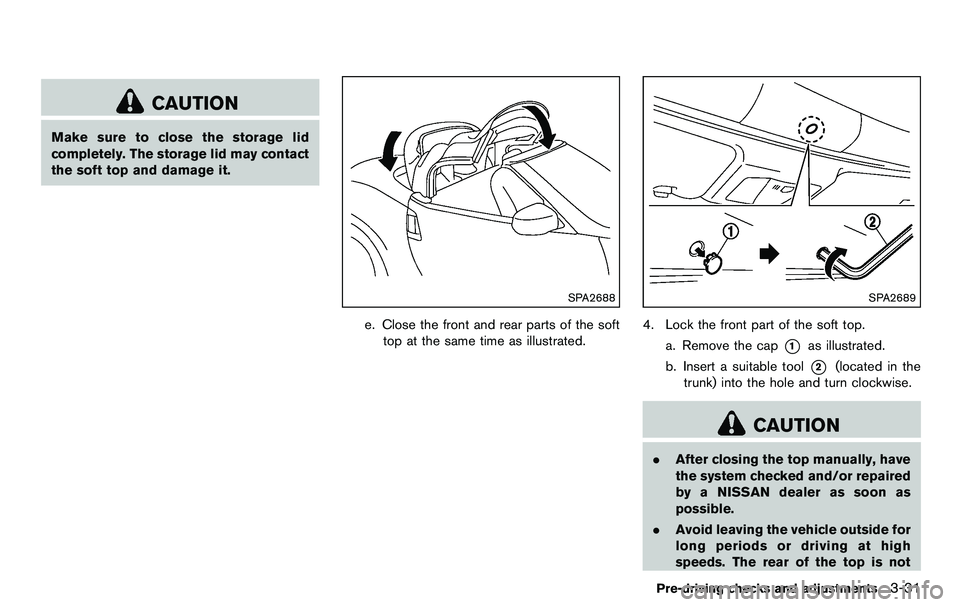
e. Close the front and rear parts of the softtop at the same time as illustrated.
SPA2689
4. Lock the front part of the soft top.
a. Remove the cap
*1as illustrated.
b. Insert a suitable tool
*2(located in the
trunk) into the hole and turn clockwise.
CAUTION
. After closing the top manually, have
the system checked and/or repaired
by a NISSAN dealer as soon as
possible.
. Avoid leaving the vehicle outside for
long periods or driving at high
speeds. The rear of the top is not
Pre-driving checks and adjustments3-31
Page 148 of 427
3-32Pre-driving checks and adjustments
locked completely, and this may
allow wind and rain to get into your
vehicle.
CARE OF THE SOFT TOP AND THE
VEHICLE BODY
To use your Roadster safely and comfortably,
you need to observe all the warnings and
cautions shown in the previous pages. Also, to
maintain a good appearance of the soft top and
the vehicle body, you need to care for them by
cleaning and/or washing properly.
CAUTION
.Do not use an automatic car wash or
a high-pressure car wash to clean
your vehicle. The top may be da-
maged and water may leak into the
inside of the vehicle.
. Store the vehicle with the top closed
if it is not to be used for long
periods. Keeping the top stowed
for long periods may cause wrinkles
on the surface of the top.
See “Cleaning exterior” (P.7-2) for detailed
instructions. .
A protective clear tape is applied to the top
storage lid painted surface where the soft
top contacts the surface. When the top is
fully closed, the tape may transmit some
light, visible from the inside of the vehicle.
This does not affect the water and air
tightness of the seal.
. The inner surface of the trunk and top
storage lids may show a fibrous, or marbled
pattern. This is the normal appearance of the
material used in these parts.
SPA2647
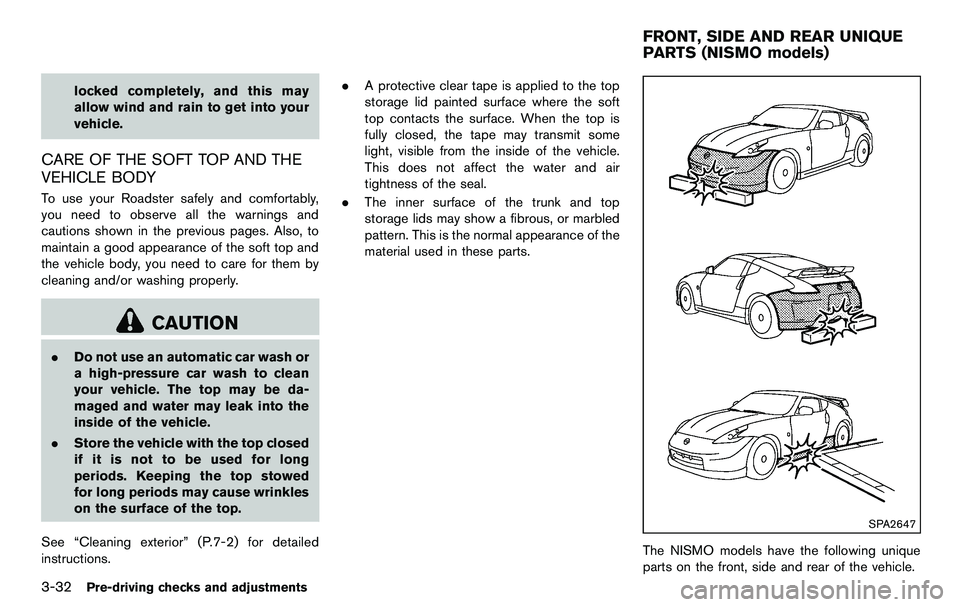
The NISMO models have the following unique
parts on the front, side and rear of the vehicle.
FRONT, SIDE AND REAR UNIQUE
PARTS (NISMO models)
Page 174 of 427
4-18Center display, heater, air conditioner, audio, phone and voice recognition systems
When the selector/shift lever is shifted into the R
(Reverse) position, the monitor display shows
view to the rear of the vehicle.
The system is designed as an aid to the driver in
detecting large stationary objects to help avoid
damaging the vehicle. The system will not detect
small objects below the bumper and may not
detect objects close to the bumper or on the
ground.
WARNING
.The rearview camera is a conveni-
ence but it is not a substitute for
proper backing up. Always turn and
check that it is safe to do so before
backing up. Always back up slowly.
. Objects viewed in the RearView
Monitor differ from actual distance
because a wide-angle lens is used.
Objects in the RearView Monitor
will appear visually opposite like
ones viewed in the inside and out-
side mirrors.
. Make sure that the trunk is securely
closed when backing up.
. Underneath the bumper and the
corner areas of the bumper cannot
be viewed on the RearView monitor because of its monitoring range
limitation.
. Do not put anything on the rearview
camera. The rearview camera is
installed above the license plate.
. When washing the vehicle with
high-pressure water, be sure not to
spray it around the camera. Other-
wise, water may enter the camera
unit causing water condensation on
the lens, a malfunction, fire or an
electric shock.
. Do not strike the camera. It is a
precision instrument. Otherwise, it
may malfunction or cause damage
resulting in a fire or an electric
shock.
CAUTION
There is a plastic cover over the camera.
Do not scratch the cover when cleaning
dirt or snow from the cover.
SAA1896
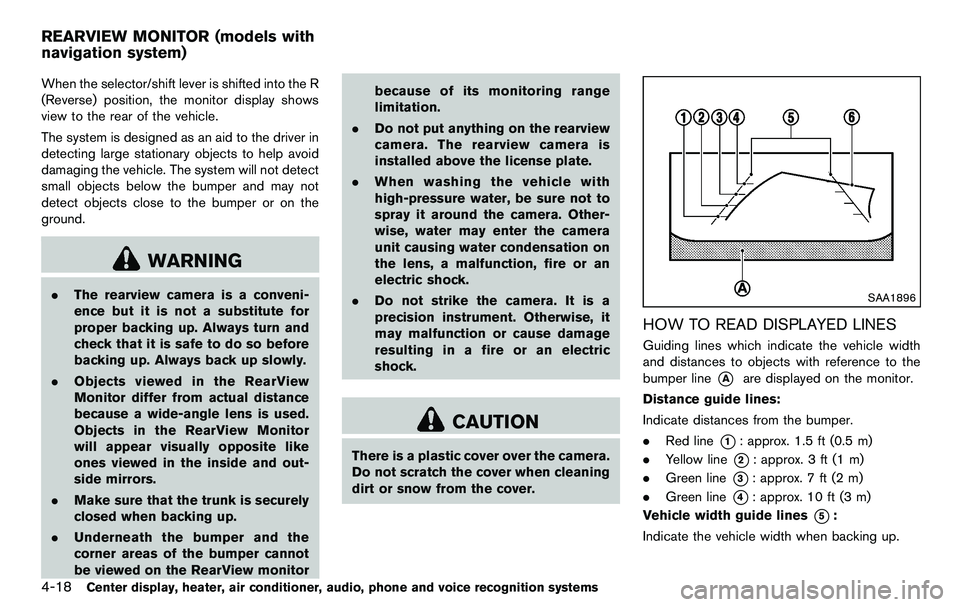
HOW TO READ DISPLAYED LINES
Guiding lines which indicate the vehicle width
and distances to objects with reference to the
bumper line
*Aare displayed on the monitor.
Distance guide lines:
Indicate distances from the bumper.
. Red line
*1: approx. 1.5 ft (0.5 m)
. Yellow line
*2: approx. 3 ft (1 m)
. Green line
*3: approx. 7 ft (2 m)
. Green line
*4: approx. 10 ft (3 m)
Vehicle width guide lines
*5:
Indicate the vehicle width when backing up.
REARVIEW MONITOR (models with
navigation system)
Page 235 of 427
Media not connected/inserted will be skipped.ANTENNA
Window antenna (for Coupe models)
The antenna pattern is printed inside the rear
window.
CAUTION
.Do not place metalized film near the
rear window glass or attach any
metal parts to it. This may cause
poor reception or noise.
. When cleaning the inside of the rear
window, be careful not to scratch or
damage the rear window antenna.
Lightly wipe along the antenna with
a dampened soft cloth.
SAA2374
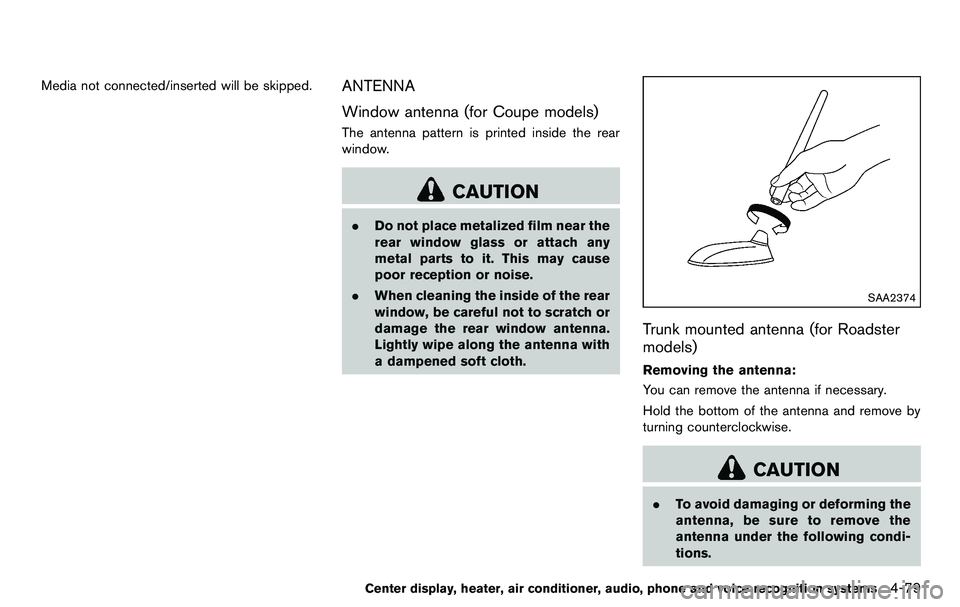
Trunk mounted antenna (for Roadster
models)
Removing the antenna:
You can remove the antenna if necessary.
Hold the bottom of the antenna and remove by
turning counterclockwise.
CAUTION
.To avoid damaging or deforming the
antenna, be sure to remove the
antenna under the following condi-
tions.
Center display, heater, air conditioner, audio, phone and voice recognition systems4-79