navigation NISSAN ALMERA 2001 Workshop Manual
[x] Cancel search | Manufacturer: NISSAN, Model Year: 2001, Model line: ALMERA, Model: NISSAN ALMERA 2001Pages: 2898, PDF Size: 60.76 MB
Page 2054 of 2898
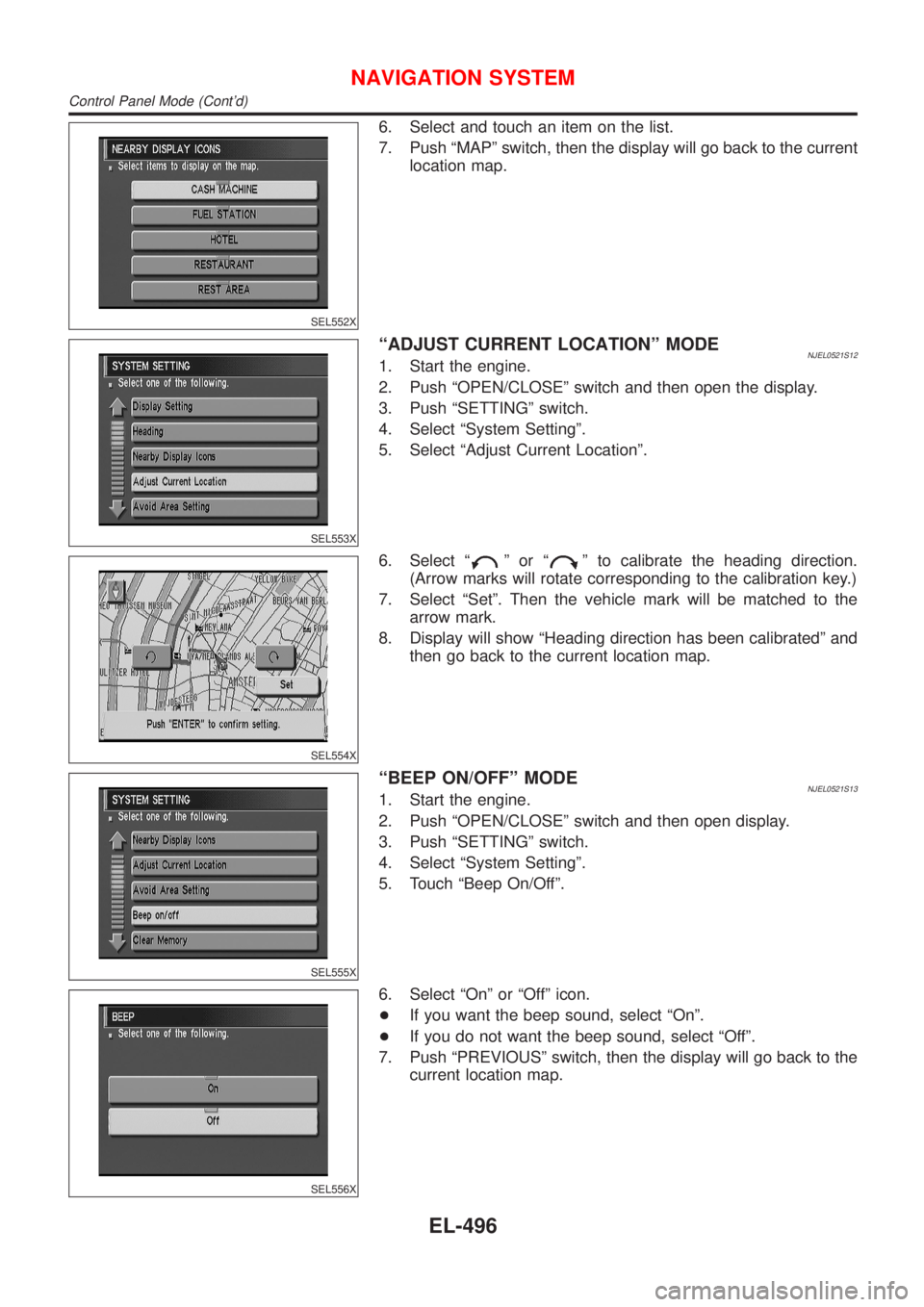
SEL552X
6. Select and touch an item on the list.
7. Push ªMAPº switch, then the display will go back to the current
location map.
SEL553X
ªADJUST CURRENT LOCATIONº MODENJEL0521S121. Start the engine.
2. Push ªOPEN/CLOSEº switch and then open the display.
3. Push ªSETTINGº switch.
4. Select ªSystem Settingº.
5. Select ªAdjust Current Locationº.
SEL554X
6. Select ªºorªº to calibrate the heading direction.
(Arrow marks will rotate corresponding to the calibration key.)
7. Select ªSetº. Then the vehicle mark will be matched to the
arrow mark.
8. Display will show ªHeading direction has been calibratedº and
then go back to the current location map.
SEL555X
ªBEEP ON/OFFº MODENJEL0521S131. Start the engine.
2. Push ªOPEN/CLOSEº switch and then open display.
3. Push ªSETTINGº switch.
4. Select ªSystem Settingº.
5. Touch ªBeep On/Offº.
SEL556X
6. Select ªOnº or ªOffº icon.
+If you want the beep sound, select ªOnº.
+If you do not want the beep sound, select ªOffº.
7. Push ªPREVIOUSº switch, then the display will go back to the
current location map.
NAVIGATION SYSTEM
Control Panel Mode (Cont'd)
EL-496
Page 2055 of 2898
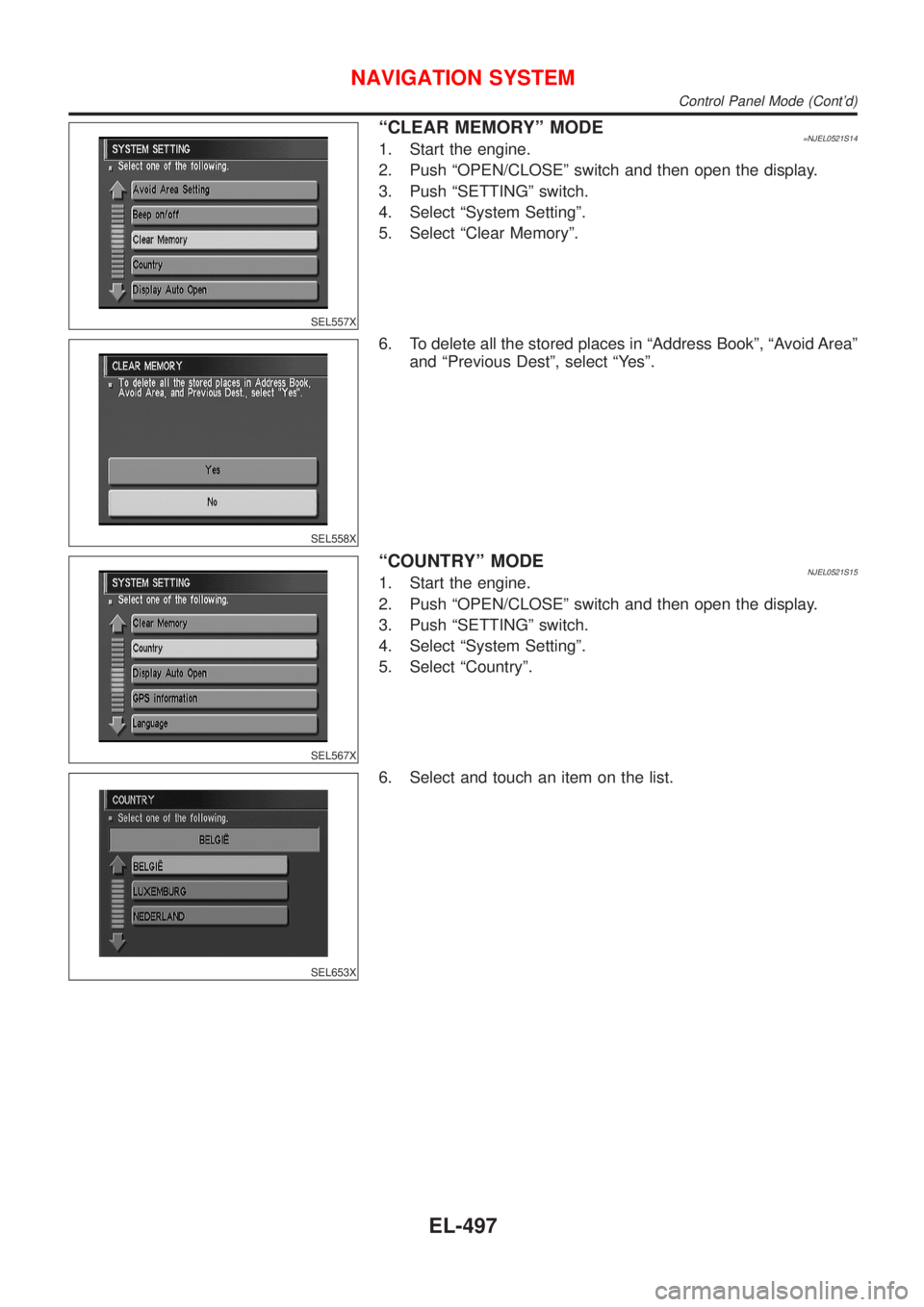
SEL557X
ªCLEAR MEMORYº MODE=NJEL0521S141. Start the engine.
2. Push ªOPEN/CLOSEº switch and then open the display.
3. Push ªSETTINGº switch.
4. Select ªSystem Settingº.
5. Select ªClear Memoryº.
SEL558X
6. To delete all the stored places in ªAddress Bookº, ªAvoid Areaº
and ªPrevious Destº, select ªYesº.
SEL567X
ªCOUNTRYº MODENJEL0521S151. Start the engine.
2. Push ªOPEN/CLOSEº switch and then open the display.
3. Push ªSETTINGº switch.
4. Select ªSystem Settingº.
5. Select ªCountryº.
SEL653X
6. Select and touch an item on the list.
NAVIGATION SYSTEM
Control Panel Mode (Cont'd)
EL-497
Page 2056 of 2898
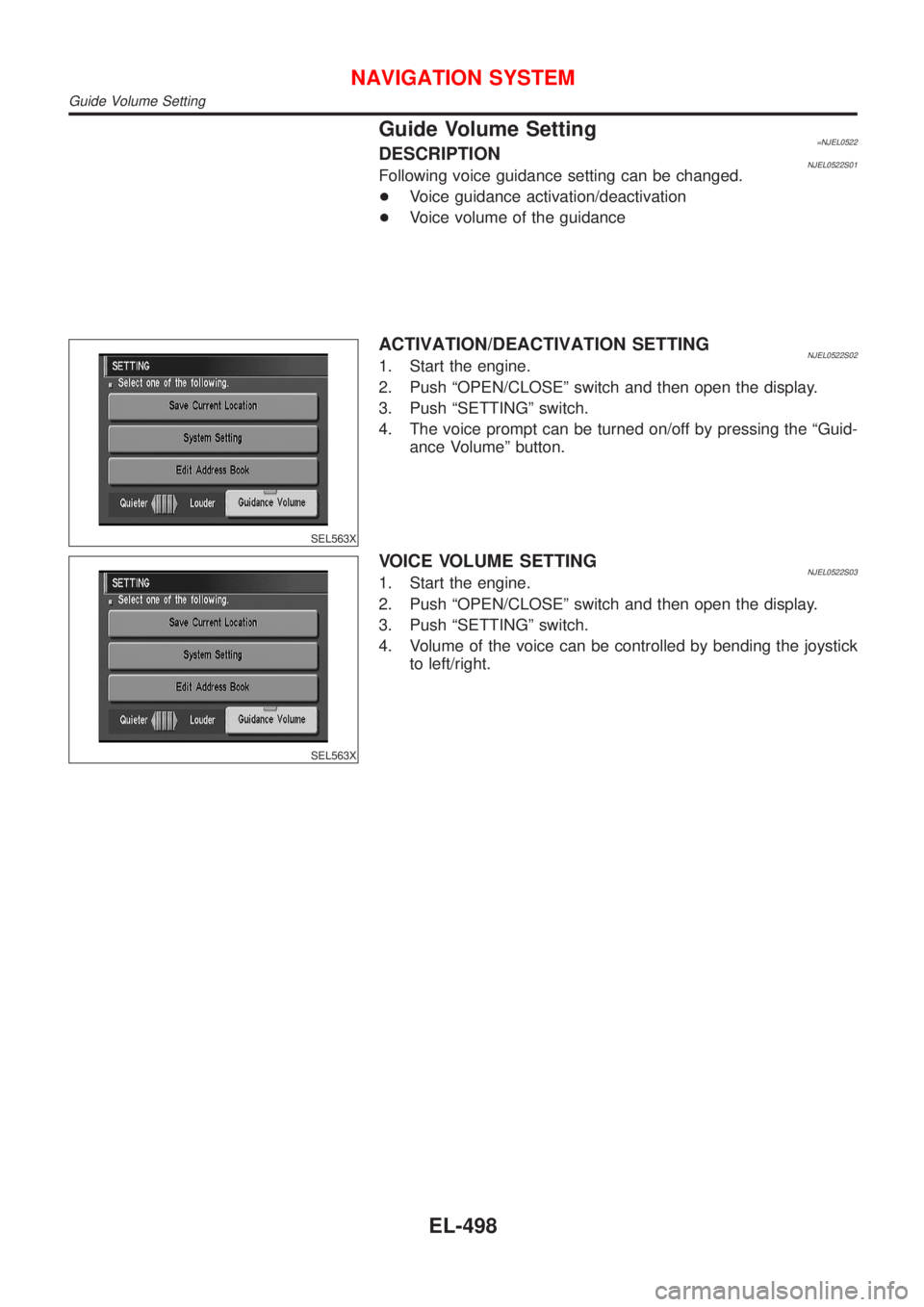
Guide Volume Setting=NJEL0522DESCRIPTIONNJEL0522S01Following voice guidance setting can be changed.
+Voice guidance activation/deactivation
+Voice volume of the guidance
SEL563X
ACTIVATION/DEACTIVATION SETTINGNJEL0522S021. Start the engine.
2. Push ªOPEN/CLOSEº switch and then open the display.
3. Push ªSETTINGº switch.
4. The voice prompt can be turned on/off by pressing the ªGuid-
ance Volumeº button.
SEL563X
VOICE VOLUME SETTINGNJEL0522S031. Start the engine.
2. Push ªOPEN/CLOSEº switch and then open the display.
3. Push ªSETTINGº switch.
4. Volume of the voice can be controlled by bending the joystick
to left/right.
NAVIGATION SYSTEM
Guide Volume Setting
EL-498
Page 2057 of 2898
Anti-theft System=NJEL0523DESCRIPTIONNJEL0523S03The 4-digit PIN must be entered when the display shows ªenter your PINº at the time the vehicle is purchased.
RHD ModelsNJEL0523S0301By integrating the Navigation System in the vehicle's interior and linking it to the vehicle's immobilizer system,
the possibility of the Navigation unit being stolen is effectively reduced. Each time the Navigation System is
switched on, the Navigation System will start up communication with the vehicle's immobilizer control unit
(IMMU) and verify an identification code. If communication cannot be established, or the verified code is
incorrect, the Navigation System will lock up showing ªANTI-THEFT FUNCTIONº on the Navigation display.
NAVIGATION SYSTEM
Anti-theft System
EL-499
Page 2058 of 2898
SEF289X
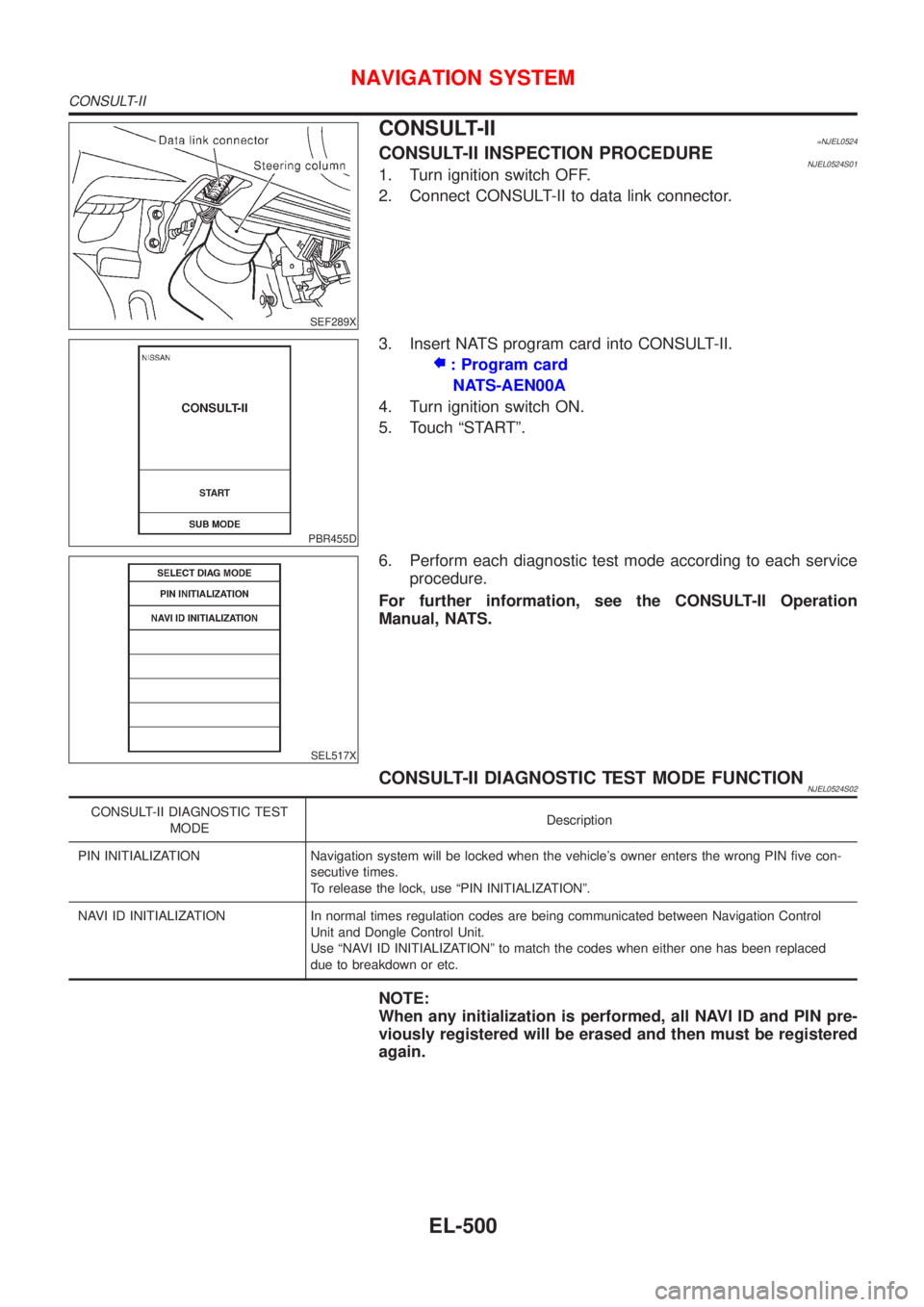
CONSULT-II=NJEL0524CONSULT-II INSPECTION PROCEDURENJEL0524S011. Turn ignition switch OFF.
2. Connect CONSULT-II to data link connector.
PBR455D
3. Insert NATS program card into CONSULT-II.
: Program card
NATS-AEN00A
4. Turn ignition switch ON.
5. Touch ªSTARTº.
SEL517X
6. Perform each diagnostic test mode according to each service
procedure.
For further information, see the CONSULT-II Operation
Manual, NATS.
CONSULT-II DIAGNOSTIC TEST MODE FUNCTIONNJEL0524S02
CONSULT-II DIAGNOSTIC TEST
MODEDescription
PIN INITIALIZATION Navigation system will be locked when the vehicle's owner enters the wrong PIN five con-
secutive times.
To release the lock, use ªPIN INITIALIZATIONº.
NAVI ID INITIALIZATION In normal times regulation codes are being communicated between Navigation Control
Unit and Dongle Control Unit.
Use ªNAVI ID INITIALIZATIONº to match the codes when either one has been replaced
due to breakdown or etc.
NOTE:
When any initialization is performed, all NAVI ID and PIN pre-
viously registered will be erased and then must be registered
again.
NAVIGATION SYSTEM
CONSULT-II
EL-500
Page 2059 of 2898
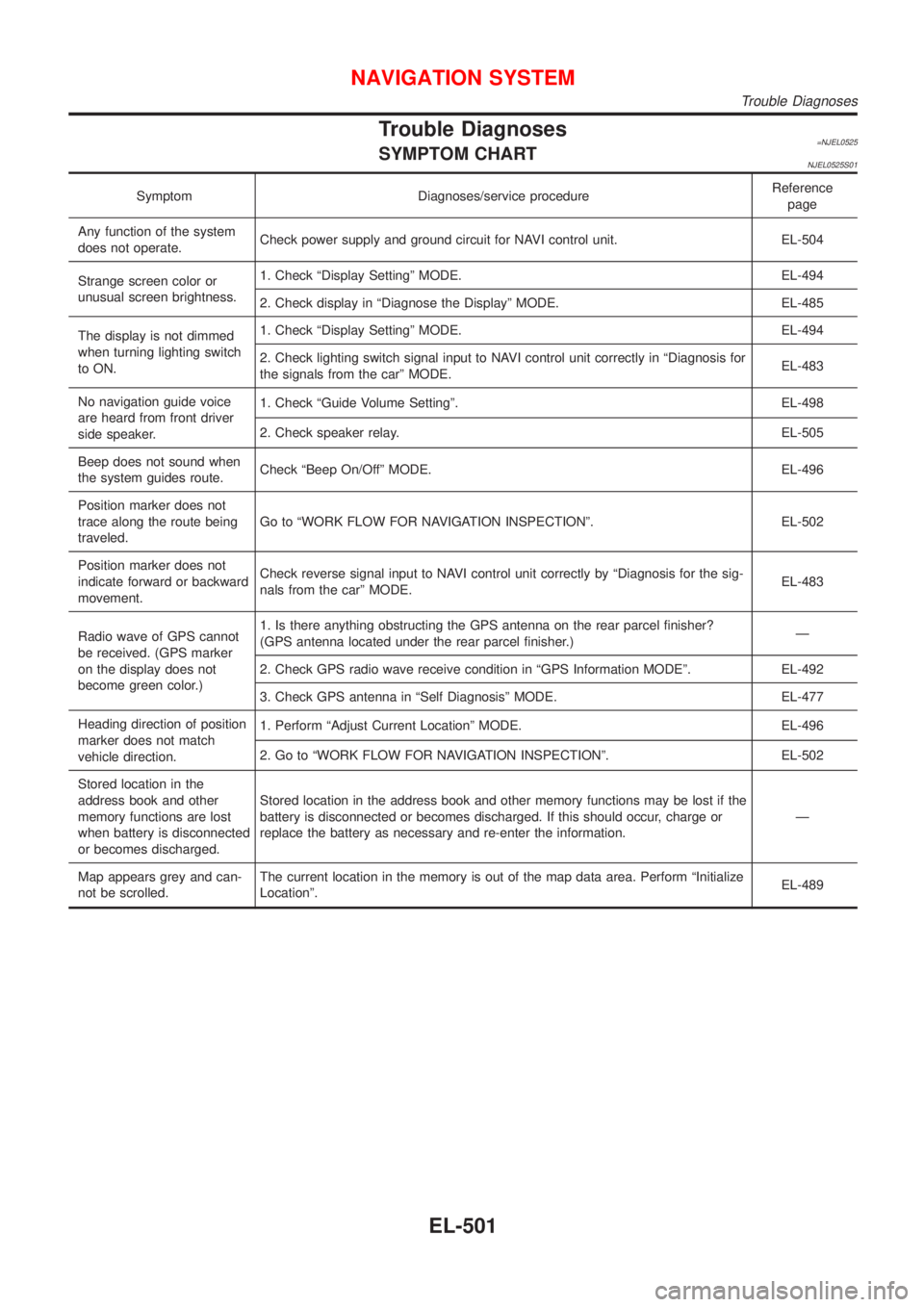
Trouble Diagnoses=NJEL0525SYMPTOM CHARTNJEL0525S01
Symptom Diagnoses/service procedureReference
page
Any function of the system
does not operate.Check power supply and ground circuit for NAVI control unit. EL-504
Strange screen color or
unusual screen brightness.1. Check ªDisplay Settingº MODE. EL-494
2. Check display in ªDiagnose the Displayº MODE. EL-485
The display is not dimmed
when turning lighting switch
to ON.1. Check ªDisplay Settingº MODE. EL-494
2. Check lighting switch signal input to NAVI control unit correctly in ªDiagnosis for
the signals from the carº MODE.EL-483
No navigation guide voice
are heard from front driver
side speaker.1. Check ªGuide Volume Settingº. EL-498
2. Check speaker relay. EL-505
Beep does not sound when
the system guides route.Check ªBeep On/Offº MODE. EL-496
Position marker does not
trace along the route being
traveled.Go to ªWORK FLOW FOR NAVIGATION INSPECTIONº. EL-502
Position marker does not
indicate forward or backward
movement.Check reverse signal input to NAVI control unit correctly by ªDiagnosis for the sig-
nals from the carº MODE.EL-483
Radio wave of GPS cannot
be received. (GPS marker
on the display does not
become green color.)1. Is there anything obstructing the GPS antenna on the rear parcel finisher?
(GPS antenna located under the rear parcel finisher.)Ð
2. Check GPS radio wave receive condition in ªGPS Information MODEº. EL-492
3. Check GPS antenna in ªSelf Diagnosisº MODE. EL-477
Heading direction of position
marker does not match
vehicle direction.1. Perform ªAdjust Current Locationº MODE. EL-496
2. Go to ªWORK FLOW FOR NAVIGATION INSPECTIONº. EL-502
Stored location in the
address book and other
memory functions are lost
when battery is disconnected
or becomes discharged.Stored location in the address book and other memory functions may be lost if the
battery is disconnected or becomes discharged. If this should occur, charge or
replace the battery as necessary and re-enter the information.Ð
Map appears grey and can-
not be scrolled.The current location in the memory is out of the map data area. Perform ªInitialize
Locationº.EL-489
NAVIGATION SYSTEM
Trouble Diagnoses
EL-501
Page 2060 of 2898
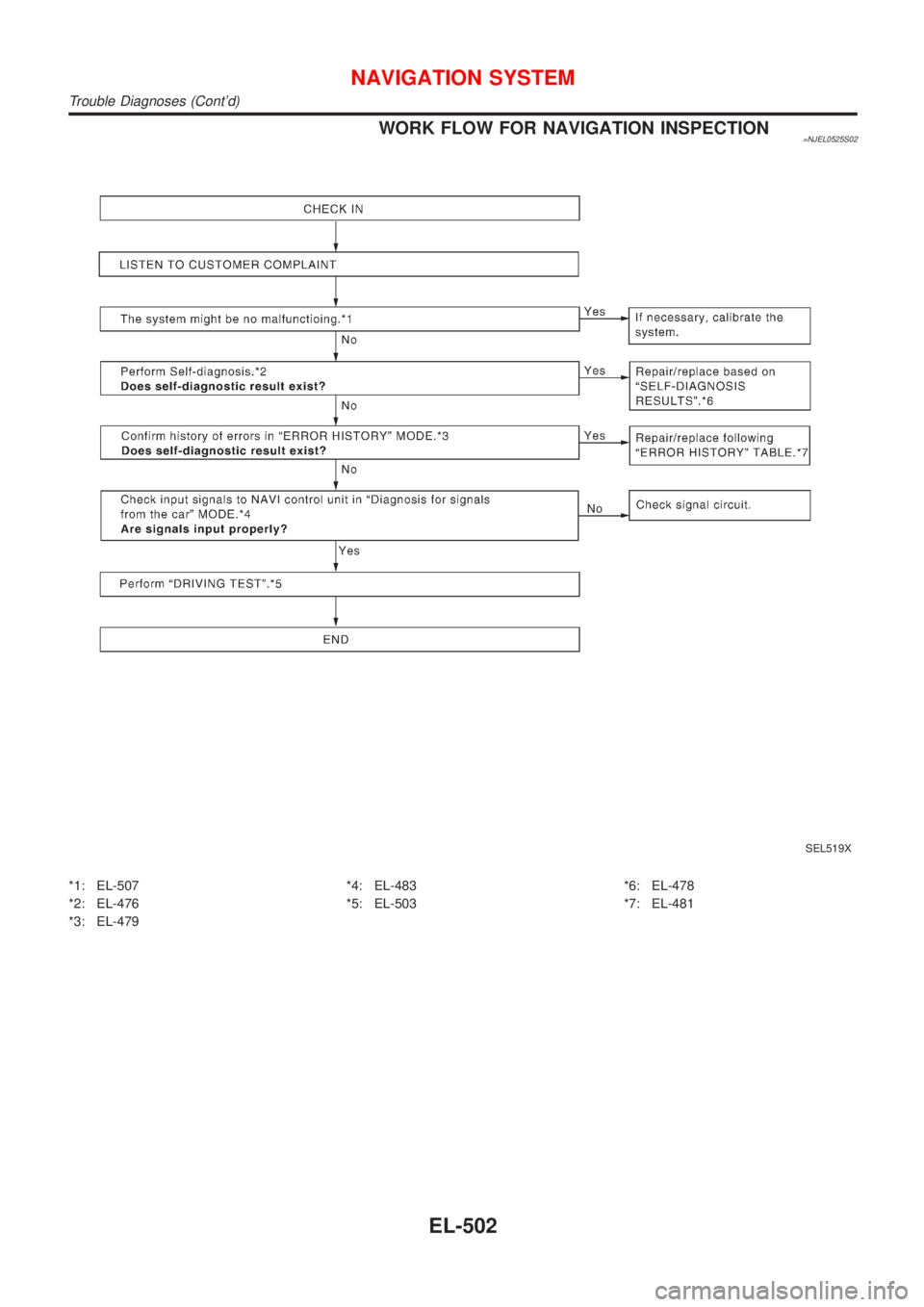
WORK FLOW FOR NAVIGATION INSPECTION=NJEL0525S02
SEL519X
*1: EL-507
*2: EL-476
*3: EL-479*4: EL-483
*5: EL-503*6: EL-478
*7: EL-481
NAVIGATION SYSTEM
Trouble Diagnoses (Cont'd)
EL-502
Page 2061 of 2898
DRIVING TEST=NJEL0525S03During the driving test, diagnose the system by checking the dif-
ference of symptoms with each sensor ON or OFF.
Test Pattern 1NJEL0525S0301Test method in which current position adjustment is not made
according to GPS data.
+Remove the GPS antenna connector from the NAVI control
unit. Drive the vehicle.
Before driving the vehicle, perform ªAdjust Current Locationº
MODE (EL-496).
Test Pattern 2NJEL0525S0302Test procedure in which map matching is not used.
+Before driving the vehicle, perform ªAdjust Current Locationº
MODE (EL-496). With the ignition switch OFF and the map
CD-ROM removed from the NAVI control unit, drive the
vehicle. After driving the vehicle, reinstall the map CD-ROM.
Compare the saved driving tracks for the vehicle's current loca-
tion with roads on the map.
ExampleNJEL0525S0303
map matching function or the GPS function.>
®Perform test pattern 1.
®Perform test patterns 1 and 2.
+Compare the map and the saved driving tracks. The precision
of the saved driving tracks is within several hundred meters.
®Perform test patterns 1 and 2.
+Make adjustments by driving the vehicle over a known course
(highway or other road where distances are clearly marked).
Calibrate the distance against the known distance. Use the
formula below.
Calibration value = Screen display distance/Actual distance
NAVIGATION SYSTEM
Trouble Diagnoses (Cont'd)
EL-503
Page 2062 of 2898

SEL693VF
POWER SUPPLY AND GROUND CIRCUIT CHECK FOR
NAVI CONTROL UNIT
=NJEL0525S04Power Supply Circuit CheckNJEL0525S0401
Terminal Ignition switch
(+) (þ) OFF ACC ON
1 Ground Battery voltage Battery voltage Battery voltage
2 Ground Battery voltage Battery voltage Battery voltage
5 Ground 0V 0V Battery voltage
6 Ground 0V Battery voltage Battery voltage
If NG, check the following.
+10A fuse [No. 1, located in the fuse block (J/B)]
+10A fuse [No. 10, located in the fuse block (J/B)]
+15A fuse [No. 32, located in the fuse block (J/B)]
+Harness for open or short between fuse and NAVI control unit
SEL694VE
Ground Circuit CheckNJEL0525S0402
Terminals Continuity
3 - Ground Yes
4 - Ground Yes
NAVIGATION SYSTEM
Trouble Diagnoses (Cont'd)
EL-504
Page 2063 of 2898
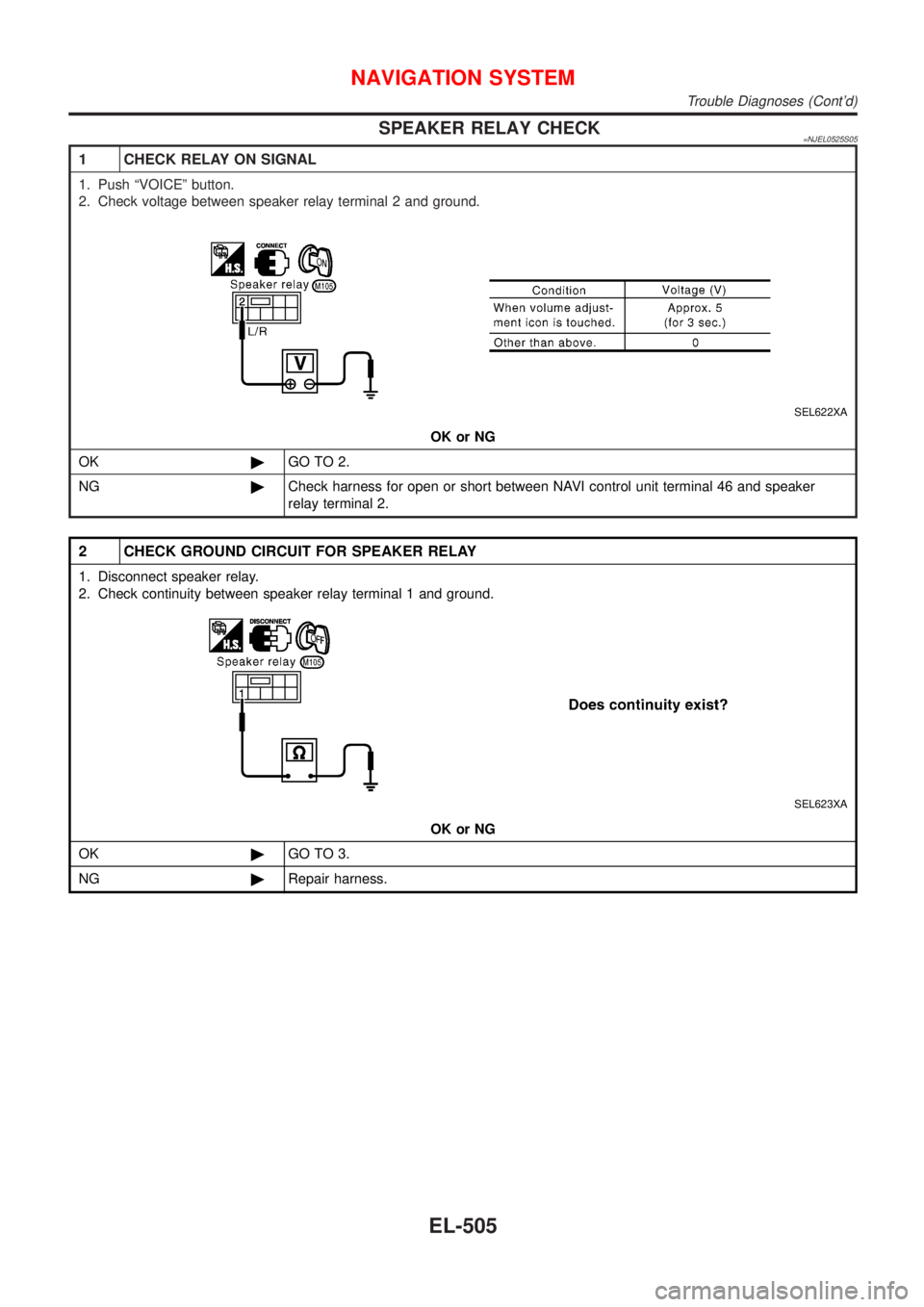
SPEAKER RELAY CHECK=NJEL0525S05
1 CHECK RELAY ON SIGNAL
1. Push ªVOICEº button.
2. Check voltage between speaker relay terminal 2 and ground.
SEL622XA
OK or NG
OK©GO TO 2.
NG©Check harness for open or short between NAVI control unit terminal 46 and speaker
relay terminal 2.
2 CHECK GROUND CIRCUIT FOR SPEAKER RELAY
1. Disconnect speaker relay.
2. Check continuity between speaker relay terminal 1 and ground.
SEL623XA
OK or NG
OK©GO TO 3.
NG©Repair harness.
NAVIGATION SYSTEM
Trouble Diagnoses (Cont'd)
EL-505