Multi function display NISSAN ALMERA N16 2003 Electronic User Guide
[x] Cancel search | Manufacturer: NISSAN, Model Year: 2003, Model line: ALMERA N16, Model: NISSAN ALMERA N16 2003Pages: 3189, PDF Size: 54.76 MB
Page 2562 of 3189
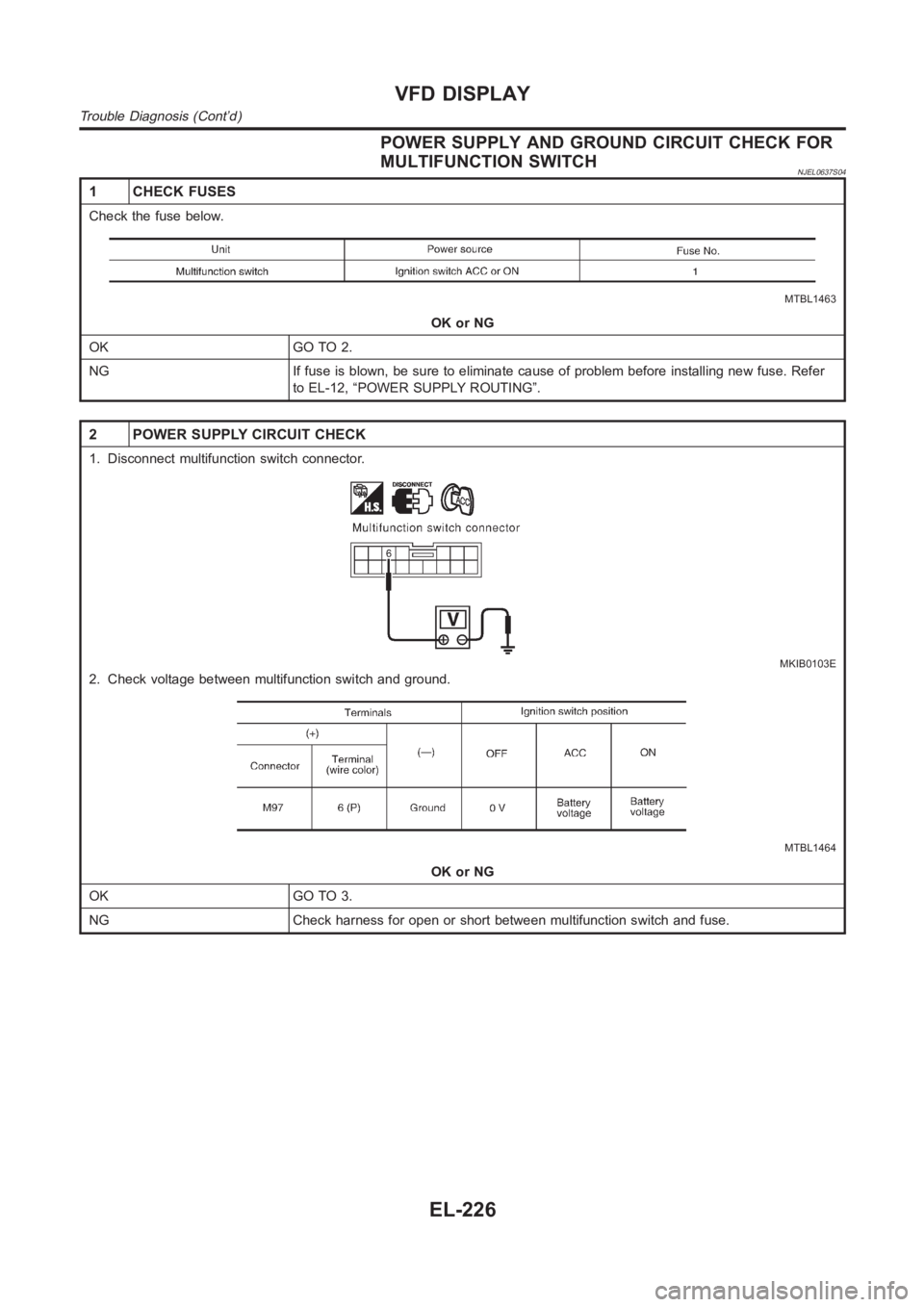
POWER SUPPLY AND GROUND CIRCUIT CHECK FOR
MULTIFUNCTION SWITCH
NJEL0637S04
1 CHECK FUSES
Check the fuse below.
MTBL1463
OK or NG
OK GO TO 2.
NG If fuse is blown, be sure to eliminate cause of problem before installingnew fuse. Refer
to EL-12, “POWER SUPPLY ROUTING”.
2 POWER SUPPLY CIRCUIT CHECK
1. Disconnect multifunction switch connector.
MKIB0103E
2. Check voltage between multifunction switch and ground.
MTBL1464
OK or NG
OK GO TO 3.
NG Check harness for open or short between multifunction switch and fuse.
VFD DISPLAY
Trouble Diagnosis (Cont’d)
EL-226
Page 2563 of 3189
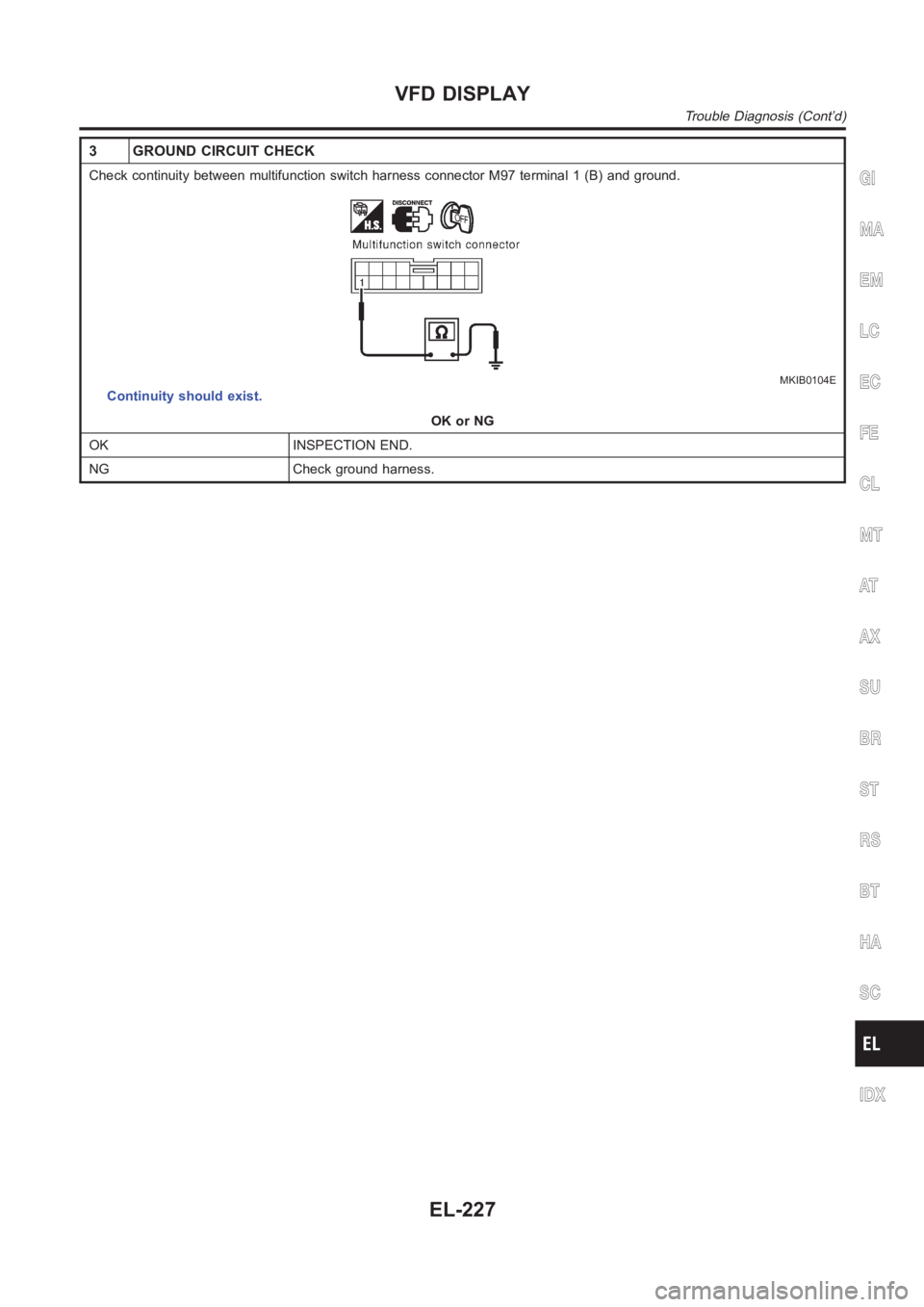
3 GROUND CIRCUIT CHECK
Check continuity between multifunction switch harness connector M97 terminal 1 (B) and ground.
MKIB0104E
Continuity should exist.
OK or NG
OK INSPECTION END.
NG Check ground harness.
GI
MA
EM
LC
EC
FE
CL
MT
AT
AX
SU
BR
ST
RS
BT
HA
SC
IDX
VFD DISPLAY
Trouble Diagnosis (Cont’d)
EL-227
Page 2565 of 3189
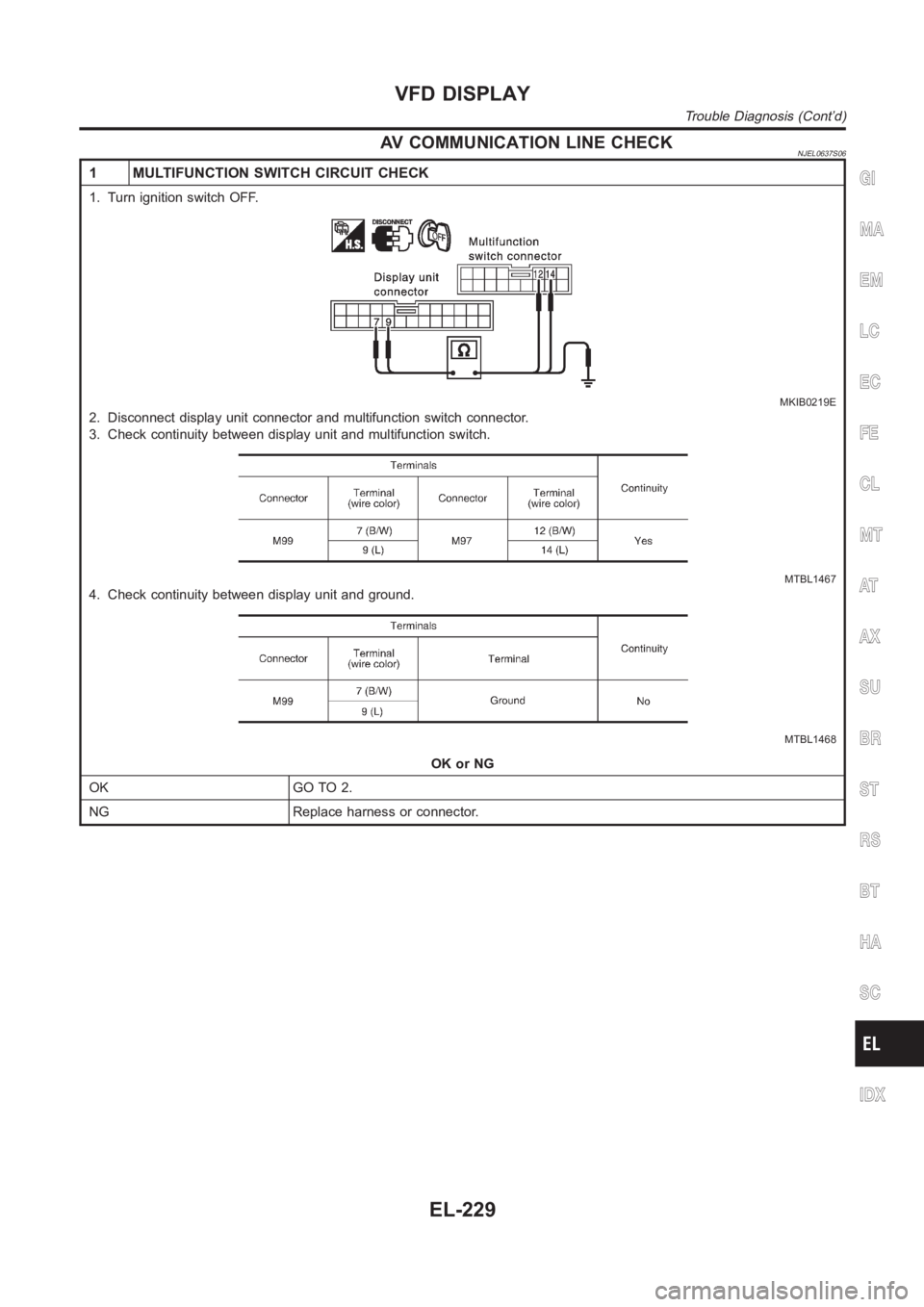
AV COMMUNICATION LINE CHECKNJEL0637S06
1 MULTIFUNCTION SWITCH CIRCUIT CHECK
1. Turn ignition switch OFF.
MKIB0219E
2. Disconnect display unit connector and multifunction switch connector.
3. Check continuity between display unit and multifunction switch.
MTBL1467
4. Check continuity between display unit and ground.
MTBL1468
OK or NG
OK GO TO 2.
NG Replace harness or connector.
GI
MA
EM
LC
EC
FE
CL
MT
AT
AX
SU
BR
ST
RS
BT
HA
SC
IDX
VFD DISPLAY
Trouble Diagnosis (Cont’d)
EL-229
Page 2566 of 3189
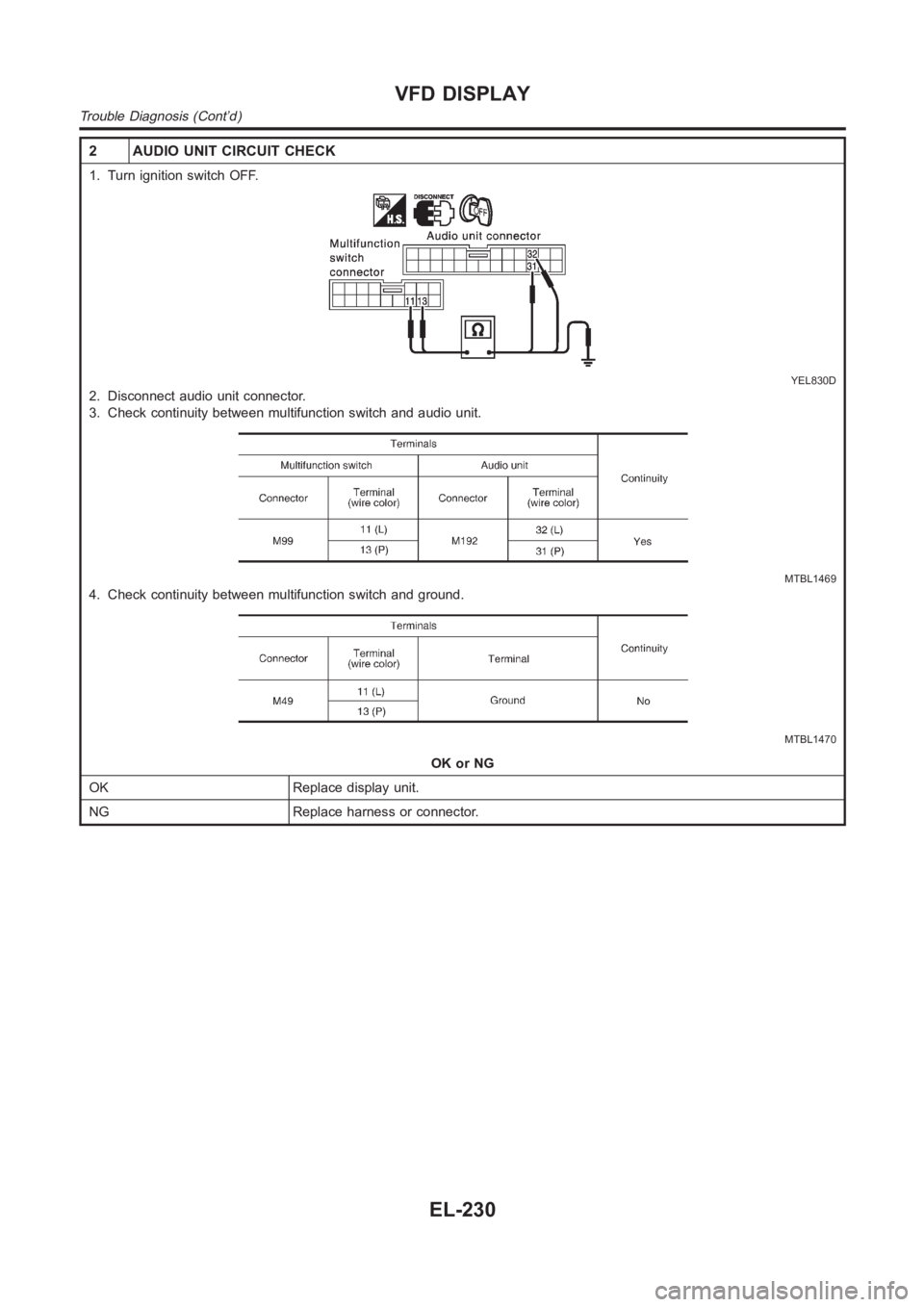
2 AUDIO UNIT CIRCUIT CHECK
1. Turn ignition switch OFF.
YEL830D
2. Disconnect audio unit connector.
3. Check continuity between multifunction switch and audio unit.
MTBL1469
4. Check continuity between multifunction switch and ground.
MTBL1470
OK or NG
OK Replace display unit.
NG Replace harness or connector.
VFD DISPLAY
Trouble Diagnosis (Cont’d)
EL-230
Page 2567 of 3189
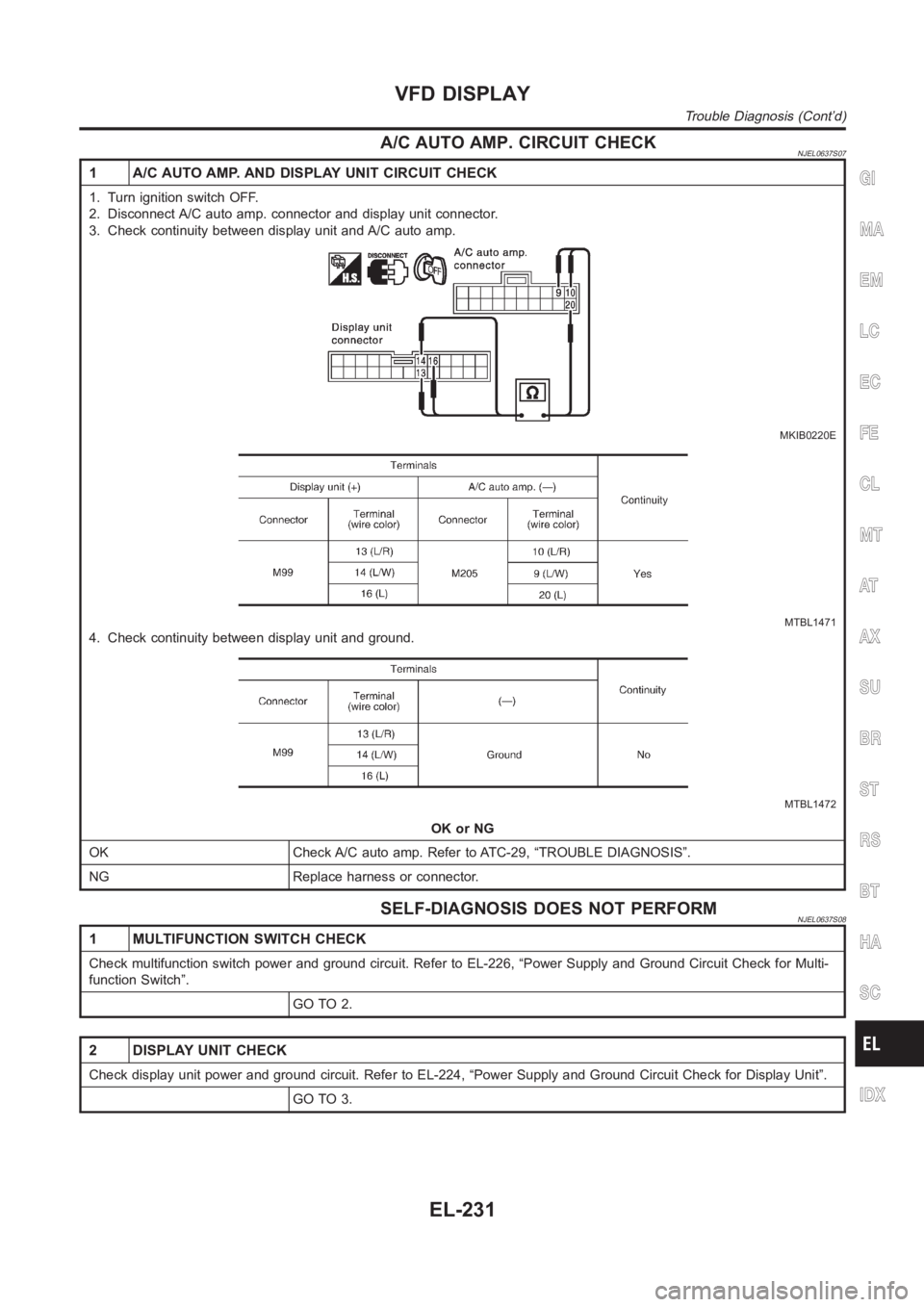
A/C AUTO AMP. CIRCUIT CHECKNJEL0637S07
1 A/C AUTO AMP. AND DISPLAY UNIT CIRCUIT CHECK
1. Turn ignition switch OFF.
2. Disconnect A/C auto amp. connector and display unit connector.
3. Check continuity between display unit and A/C auto amp.
MKIB0220E
MTBL1471
4. Check continuity between display unit and ground.
MTBL1472
OK or NG
OK Check A/C auto amp. Refer to ATC-29, “TROUBLE DIAGNOSIS”.
NG Replace harness or connector.
SELF-DIAGNOSIS DOES NOT PERFORMNJEL0637S08
1 MULTIFUNCTION SWITCH CHECK
Check multifunction switch power and ground circuit. Refer to EL-226, “Power Supply and Ground Circuit Check for Multi-
function Switch”.
GO TO 2.
2 DISPLAY UNIT CHECK
Check display unit power and ground circuit. Refer to EL-224, “Power Supply and Ground Circuit Check for Display Unit”.
GO TO 3.
GI
MA
EM
LC
EC
FE
CL
MT
AT
AX
SU
BR
ST
RS
BT
HA
SC
IDX
VFD DISPLAY
Trouble Diagnosis (Cont’d)
EL-231
Page 2568 of 3189
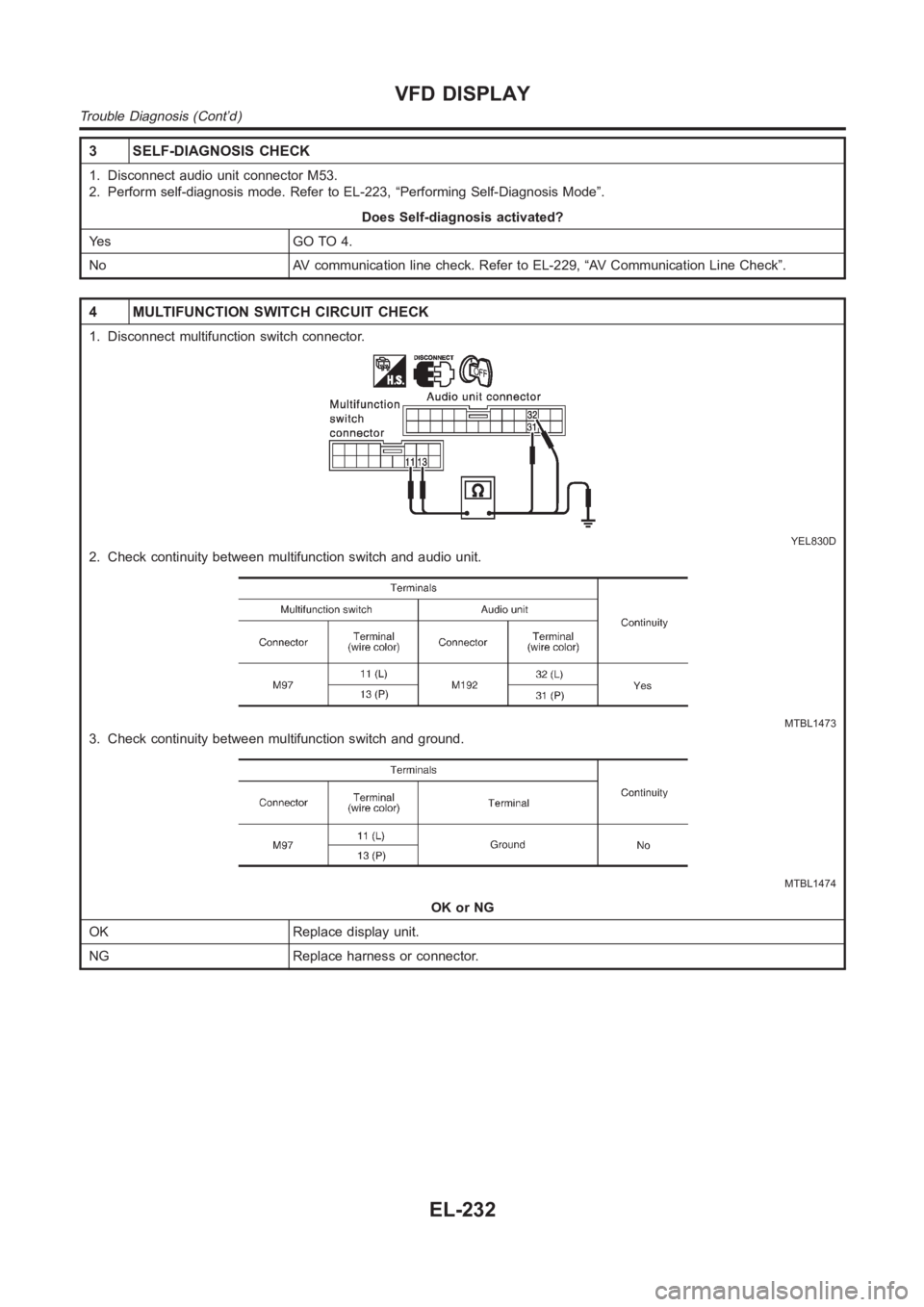
3 SELF-DIAGNOSIS CHECK
1. Disconnect audio unit connector M53.
2. Perform self-diagnosis mode. Refer to EL-223, “Performing Self-Diagnosis Mode”.
Does Self-diagnosis activated?
Ye s G O T O 4 .
No AV communication line check. Refer to EL-229, “AV Communication Line Check”.
4 MULTIFUNCTION SWITCH CIRCUIT CHECK
1. Disconnect multifunction switch connector.
YEL830D
2. Check continuity between multifunction switch and audio unit.
MTBL1473
3. Check continuity between multifunction switch and ground.
MTBL1474
OK or NG
OK Replace display unit.
NG Replace harness or connector.
VFD DISPLAY
Trouble Diagnosis (Cont’d)
EL-232
Page 2574 of 3189
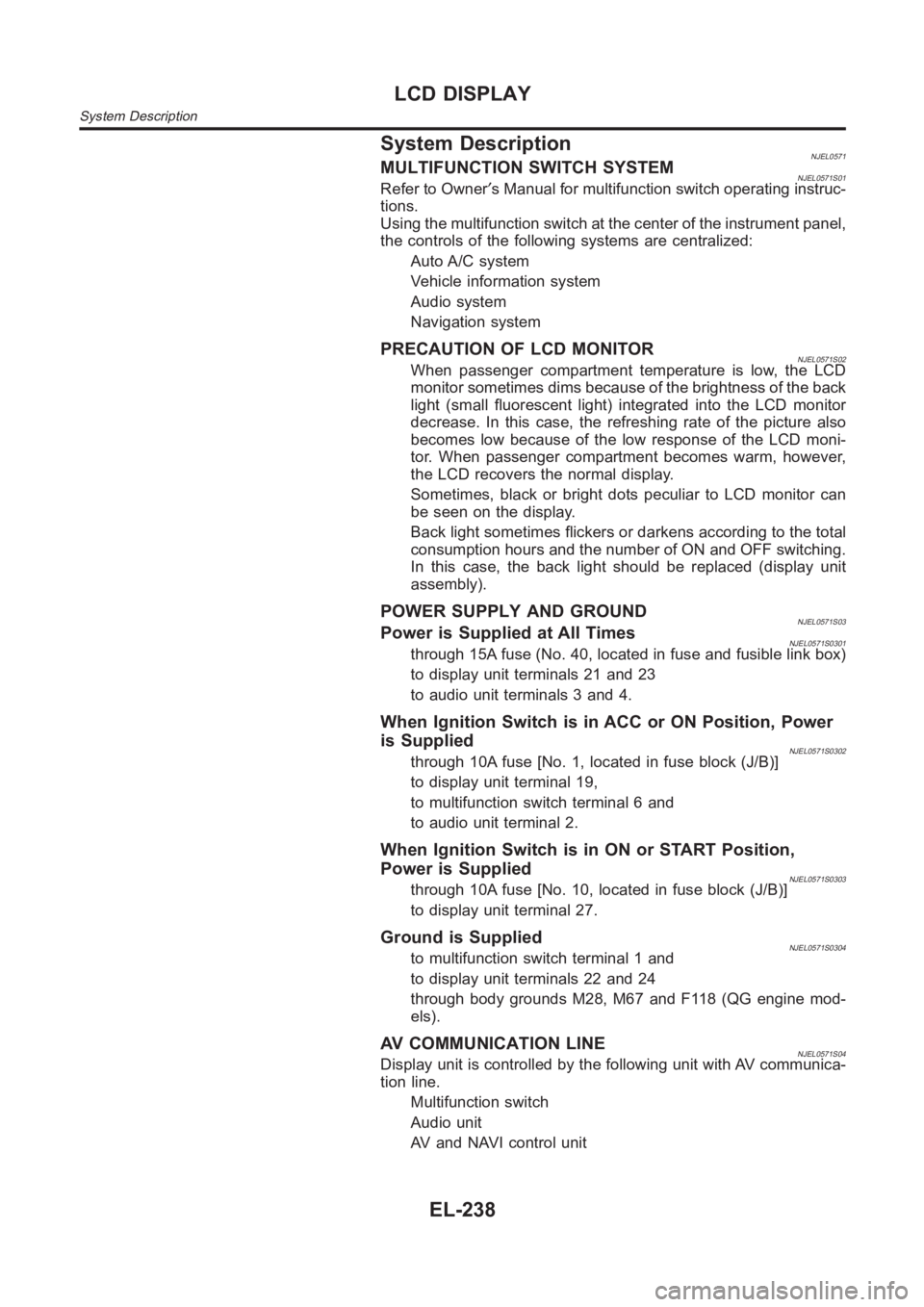
System DescriptionNJEL0571MULTIFUNCTION SWITCH SYSTEMNJEL0571S01Refer to Owner′s Manual for multifunction switch operating instruc-
tions.
Using the multifunction switch at the center of the instrument panel,
the controls of the following systems are centralized:
Auto A/C system
Vehicle information system
Audio system
Navigation system
PRECAUTION OF LCD MONITORNJEL0571S02When passenger compartment temperature is low, the LCD
monitor sometimes dims because of the brightness of the back
light (small fluorescent light) integrated into the LCD monitor
decrease. In this case, the refreshing rate of the picture also
becomes low because of the low response of the LCD moni-
tor. When passenger compartment becomes warm, however,
the LCD recovers the normal display.
Sometimes, black or bright dots peculiar to LCD monitor can
be seen on the display.
Back light sometimes flickers or darkens according to the total
consumption hours and the number of ON and OFF switching.
In this case, the back light should be replaced (display unit
assembly).
POWER SUPPLY AND GROUNDNJEL0571S03Power is Supplied at All TimesNJEL0571S0301through 15A fuse (No. 40, located in fuse and fusible link box)
to display unit terminals 21 and 23
to audio unit terminals 3 and 4.
When Ignition Switch is in ACC or ON Position, Power
is Supplied
NJEL0571S0302through 10A fuse [No. 1, located in fuse block (J/B)]
to display unit terminal 19,
to multifunction switch terminal 6 and
to audio unit terminal 2.
When Ignition Switch is in ON or START Position,
Power is Supplied
NJEL0571S0303through 10A fuse [No. 10, located in fuse block (J/B)]
to display unit terminal 27.
Ground is SuppliedNJEL0571S0304to multifunction switch terminal 1 and
to display unit terminals 22 and 24
through body grounds M28, M67 and F118 (QG engine mod-
els).
AV COMMUNICATION LINENJEL0571S04Display unit is controlled by the following unit with AV communica-
tion line.
Multifunction switch
Audio unit
AV and NAVI control unit
LCD DISPLAY
System Description
EL-238
Page 2581 of 3189
Terminals and Reference Value for Display UnitNJEL0575Refer to EL-162.
Terminals and Reference Value for AV and
NAVI Control Unit
NJEL0576Refer to EL-450.
Terminals and Reference Value for
Multifunction Switch
NJEL0577Refer to EL-456.
Trouble DiagnosesNJEL0578Refer to EL-457, “Self-Diagnosis Function”.
GI
MA
EM
LC
EC
FE
CL
MT
AT
AX
SU
BR
ST
RS
BT
HA
SC
IDX
LCD DISPLAY
Terminals and Reference Value for Display Unit
EL-245
Page 2770 of 3189
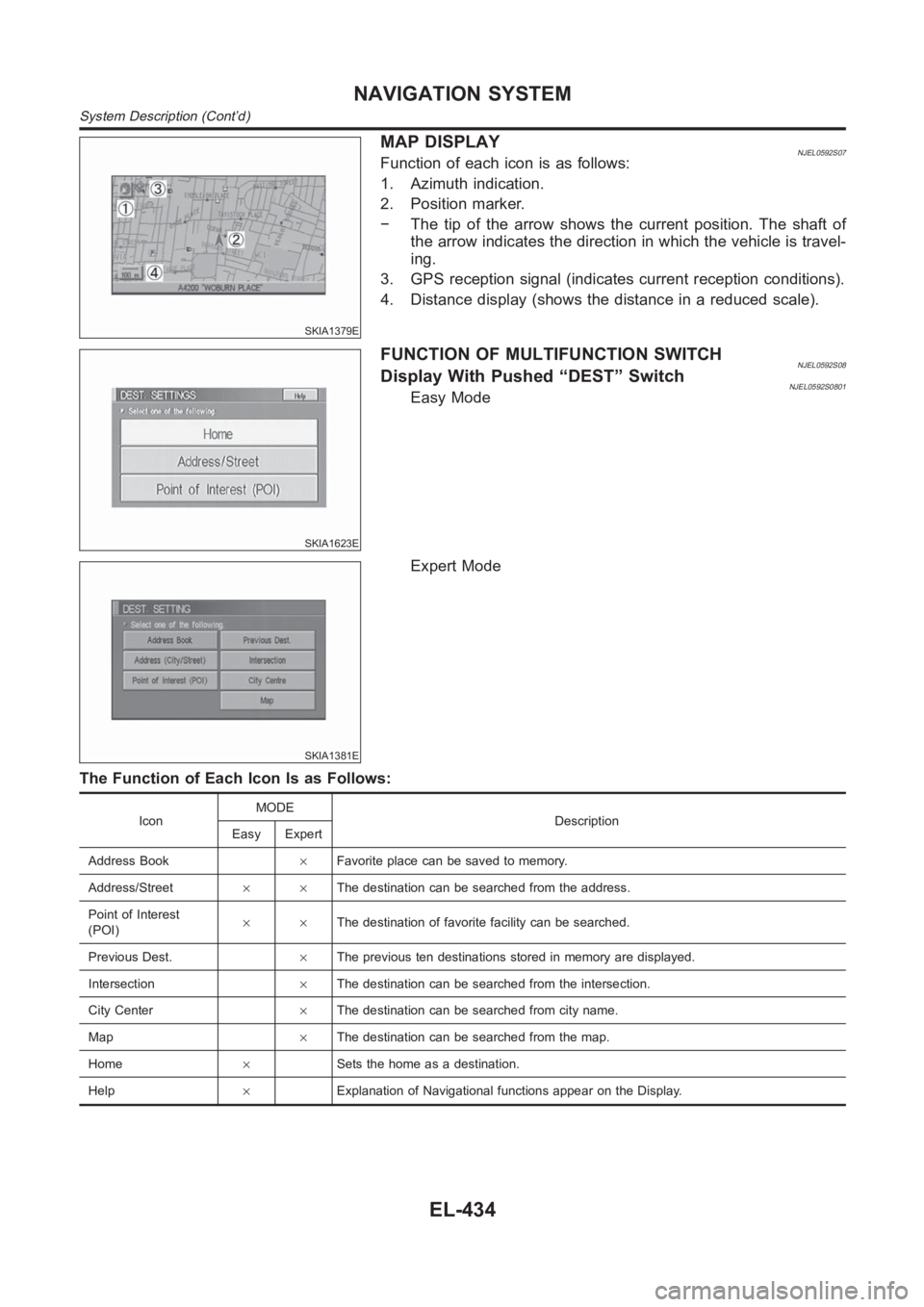
SKIA1379E
MAP DISPLAYNJEL0592S07Function of each icon is as follows:
1. Azimuth indication.
2. Position marker.
− The tip of the arrow shows the current position. The shaft of
the arrow indicates the direction in which the vehicle is travel-
ing.
3. GPS reception signal (indicates current reception conditions).
4. Distance display (shows the distance in a reduced scale).
SKIA1623E
FUNCTION OF MULTIFUNCTION SWITCHNJEL0592S08Display With Pushed “DEST” SwitchNJEL0592S0801Easy Mode
SKIA1381E
Expert Mode
The Function of Each Icon Is as Follows:
IconMODE
Description
Easy Expert
Address Book×Favorite place can be saved to memory.
Address/Street××The destination can be searched from the address.
Point of Interest
(POI)××The destination of favorite facility can be searched.
Previous Dest.×The previous ten destinations stored in memory are displayed.
Intersection×The destination can be searched from the intersection.
City Center×The destination can be searched from city name.
Map×The destination can be searched from the map.
Home×Sets the home as a destination.
Help×Explanation of Navigational functions appear on the Display.
NAVIGATION SYSTEM
System Description (Cont’d)
EL-434
Page 2796 of 3189
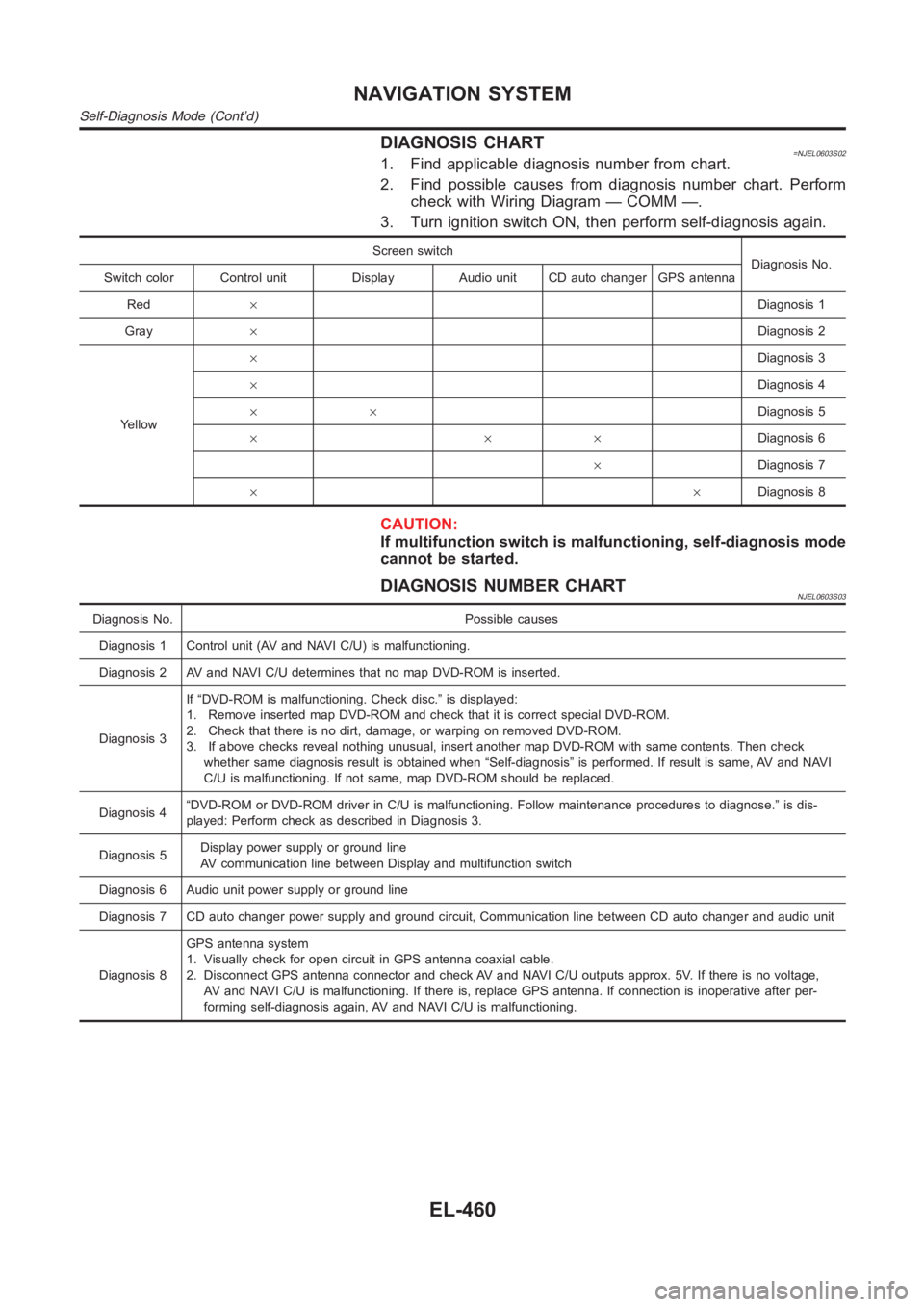
DIAGNOSIS CHART=NJEL0603S021. Find applicable diagnosis number from chart.
2. Find possible causes from diagnosis number chart. Perform
check with Wiring Diagram — COMM —.
3. Turn ignition switch ON, then perform self-diagnosis again.
Screen switch
Diagnosis No.
Switch color Control unit Display Audio unit CD auto changer GPS antenna
Red×Diagnosis 1
Gray×Diagnosis 2
Yellow×Diagnosis 3
×Diagnosis 4
××Diagnosis 5
×××Diagnosis 6
×Diagnosis 7
××Diagnosis 8
CAUTION:
If multifunction switch is malfunctioning, self-diagnosis mode
cannot be started.
DIAGNOSIS NUMBER CHARTNJEL0603S03
Diagnosis No. Possible causes
Diagnosis 1 Control unit (AV and NAVI C/U) is malfunctioning.
Diagnosis 2 AV and NAVI C/U determines that no map DVD-ROM is inserted.
Diagnosis 3If “DVD-ROM is malfunctioning. Check disc.” is displayed:
1. Remove inserted map DVD-ROM and check that it is correct special DVD-ROM.
2. Check that there is no dirt, damage, or warping on removed DVD-ROM.
3. If above checks reveal nothing unusual, insert another map DVD-ROM withsame contents. Then check
whether same diagnosis result is obtained when “Self-diagnosis” is performed. If result is same, AV and NAVI
C/U is malfunctioning. If not same, map DVD-ROM should be replaced.
Diagnosis 4“DVD-ROM or DVD-ROM driver in C/U is malfunctioning. Follow maintenance procedures to diagnose.” is dis-
played: Perform check as described in Diagnosis 3.
Diagnosis 5Display power supply or ground line
AV communication line between Display and multifunction switch
Diagnosis 6 Audio unit power supply or ground line
Diagnosis 7 CD auto changer power supply and ground circuit, Communication line between CD auto changer and audio unit
Diagnosis 8GPS antenna system
1. Visually check for open circuit in GPS antenna coaxial cable.
2. Disconnect GPS antenna connector and check AV and NAVI C/U outputs approx. 5V. If there is no voltage,
AV and NAVI C/U is malfunctioning. If there is, replace GPS antenna. If connection is inoperative after per-
forming self-diagnosis again, AV and NAVI C/U is malfunctioning.
NAVIGATION SYSTEM
Self-Diagnosis Mode (Cont’d)
EL-460