Multi function display NISSAN ALMERA N16 2003 Electronic Owner's Manual
[x] Cancel search | Manufacturer: NISSAN, Model Year: 2003, Model line: ALMERA N16, Model: NISSAN ALMERA N16 2003Pages: 3189, PDF Size: 54.76 MB
Page 2805 of 3189
Check Display Unit, Multifunction Switch
Power, and Ground Circuit
=NJEL0606
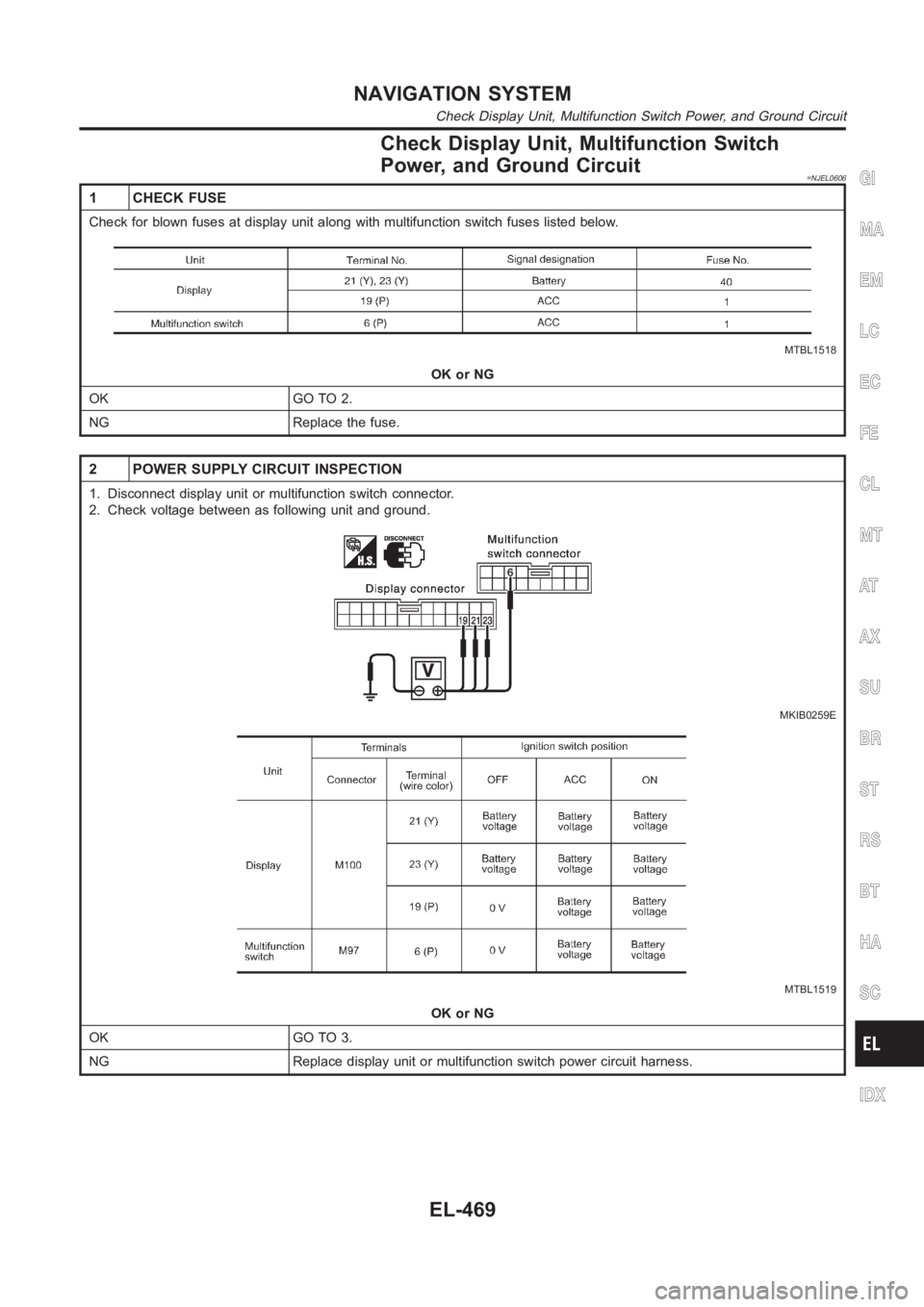
1 CHECK FUSE
Check for blown fuses at display unit along with multifunction switch fuses listed below.
MTBL1518
OK or NG
OK GO TO 2.
NG Replace the fuse.
2 POWER SUPPLY CIRCUIT INSPECTION
1. Disconnect display unit or multifunction switch connector.
2. Check voltage between as following unit and ground.
MKIB0259E
MTBL1519
OK or NG
OK GO TO 3.
NG Replace display unit or multifunction switch power circuit harness.
GI
MA
EM
LC
EC
FE
CL
MT
AT
AX
SU
BR
ST
RS
BT
HA
SC
IDX
NAVIGATION SYSTEM
Check Display Unit, Multifunction Switch Power, and Ground Circuit
EL-469
Page 2806 of 3189
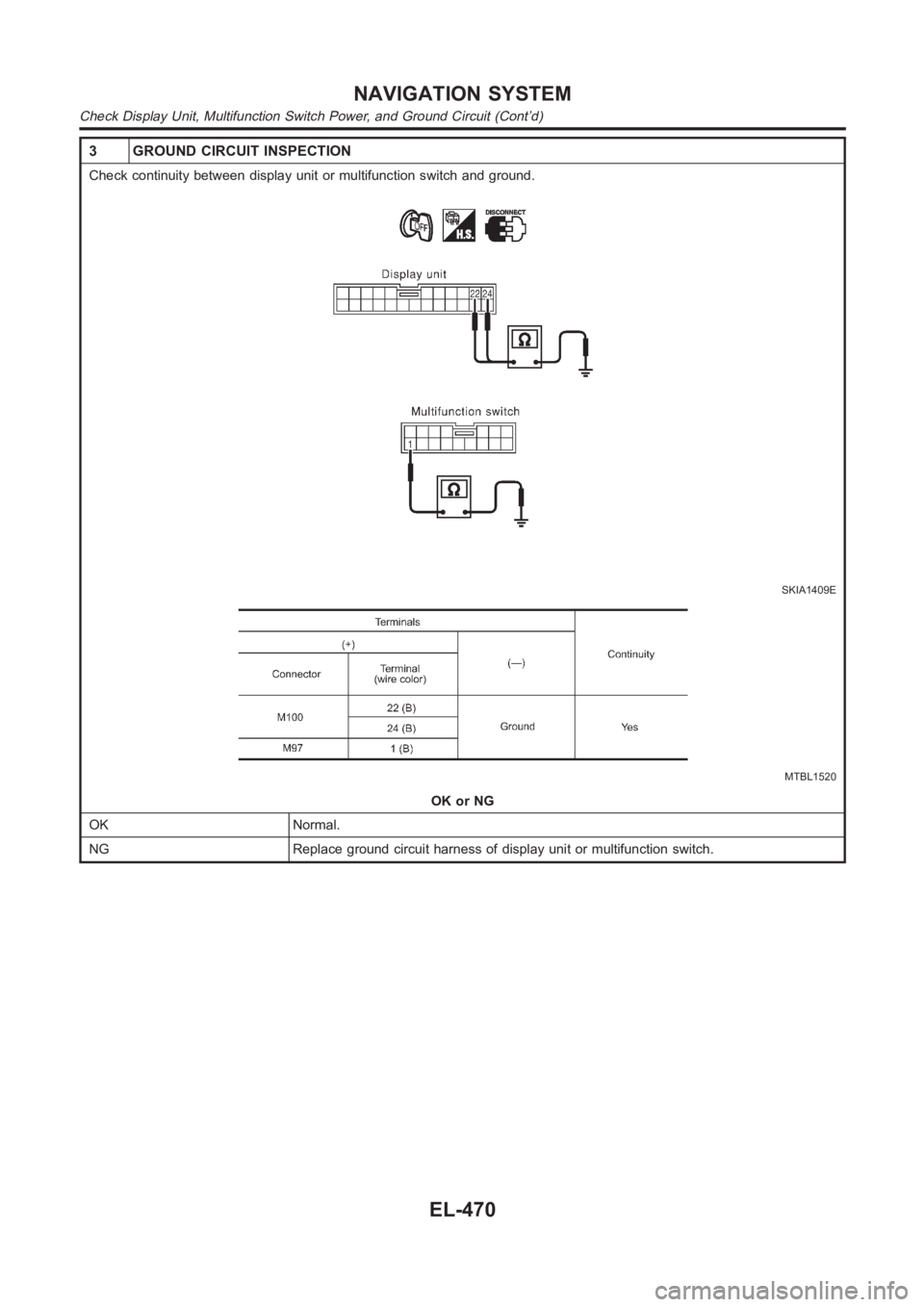
3 GROUND CIRCUIT INSPECTION
Check continuity between display unit or multifunction switch and ground.
SKIA1409E
MTBL1520
OK or NG
OK Normal.
NG Replace ground circuit harness of display unit or multifunction switch.
NAVIGATION SYSTEM
Check Display Unit, Multifunction Switch Power, and Ground Circuit (Cont’d)
EL-470
Page 2813 of 3189
No Screens Appear=NJEL0612
1 CHECK SYMPTOM
Check possibility to operate air conditioning and audio unit by multifunction switch.
OK or NG
OK GO TO 2.
NG EL-497, “System Does Not Start”.
2 DISPLAY UNIT POWER SYSTEM HARNESS CHECK
Check voltage between Display unit and ground. EL-469, “Check Display Unit, Multifunction Switch Power, and Ground
Circuit”.
OK or NG
OK Replace the display unit.
NG Open or short in display unit power system harness.
Color of RGB Image Is Not ProperNJEL0613
1 COLOR BAR DIAGNOSIS CHECK
Check color tone by “SCREEN ADJUSTMENT” of CONFIRMATION/ADJUSTMENT function.
OK or NG
OK INSPECTION END.
NG GO TO 2.
GI
MA
EM
LC
EC
FE
CL
MT
AT
AX
SU
BR
ST
RS
BT
HA
SC
IDX
NAVIGATION SYSTEM
No Screens Appear
EL-477
Page 2821 of 3189
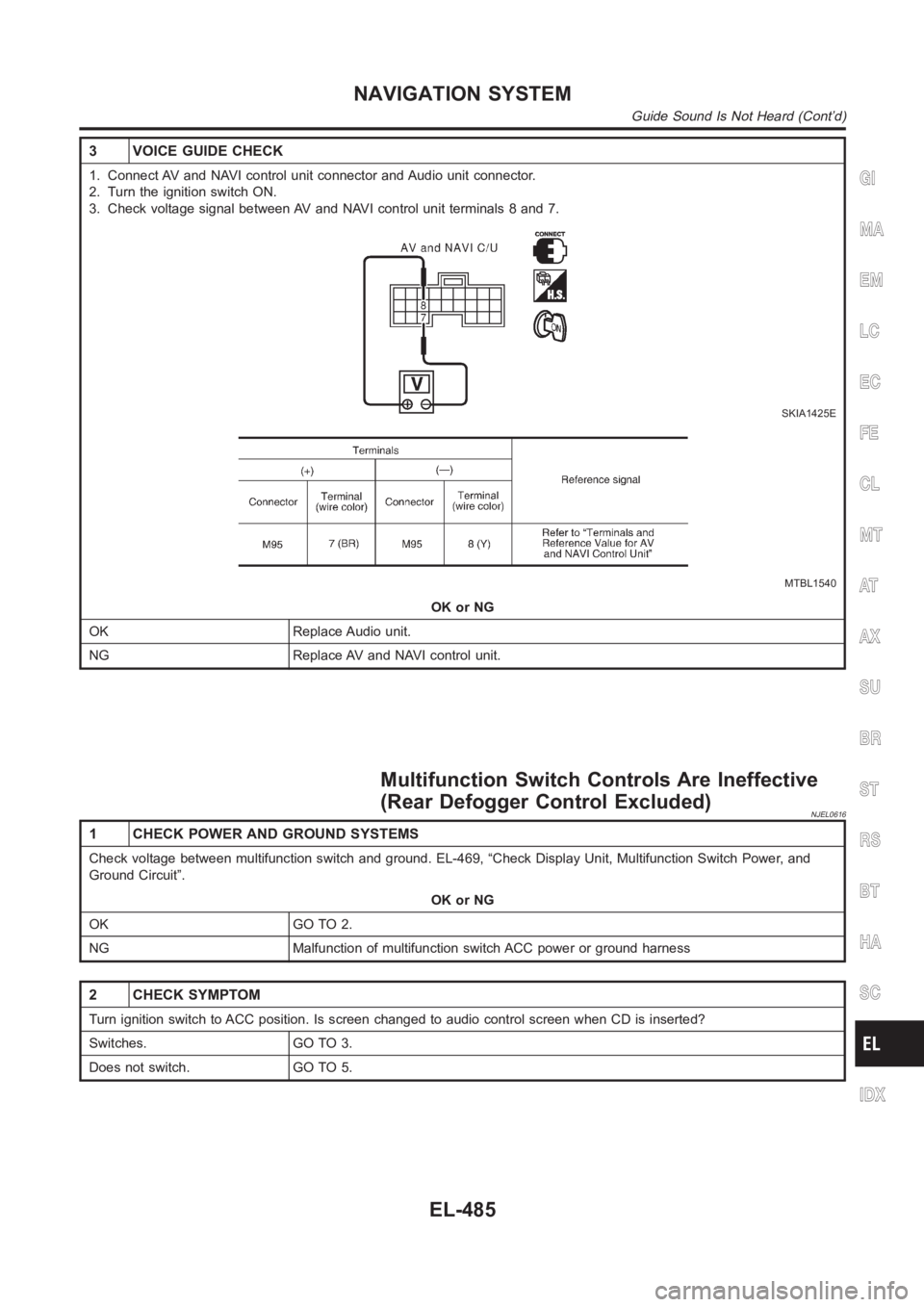
3 VOICE GUIDE CHECK
1. Connect AV and NAVI control unit connector and Audio unit connector.
2. Turn the ignition switch ON.
3. Check voltage signal between AV and NAVI control unit terminals 8 and 7.
SKIA1425E
MTBL1540
OK or NG
OK Replace Audio unit.
NG Replace AV and NAVI control unit.
Multifunction Switch Controls Are Ineffective
(Rear Defogger Control Excluded)
NJEL0616
1 CHECK POWER AND GROUND SYSTEMS
Check voltage between multifunction switch and ground. EL-469, “Check Display Unit, Multifunction Switch Power, and
Ground Circuit”.
OK or NG
OK GO TO 2.
NG Malfunction of multifunction switch ACC power or ground harness
2 CHECK SYMPTOM
Turn ignition switch to ACC position. Is screen changed to audio control screen when CD is inserted?
Switches. GO TO 3.
Does not switch. GO TO 5.
GI
MA
EM
LC
EC
FE
CL
MT
AT
AX
SU
BR
ST
RS
BT
HA
SC
IDX
NAVIGATION SYSTEM
Guide Sound Is Not Heard (Cont’d)
EL-485
Page 2832 of 3189
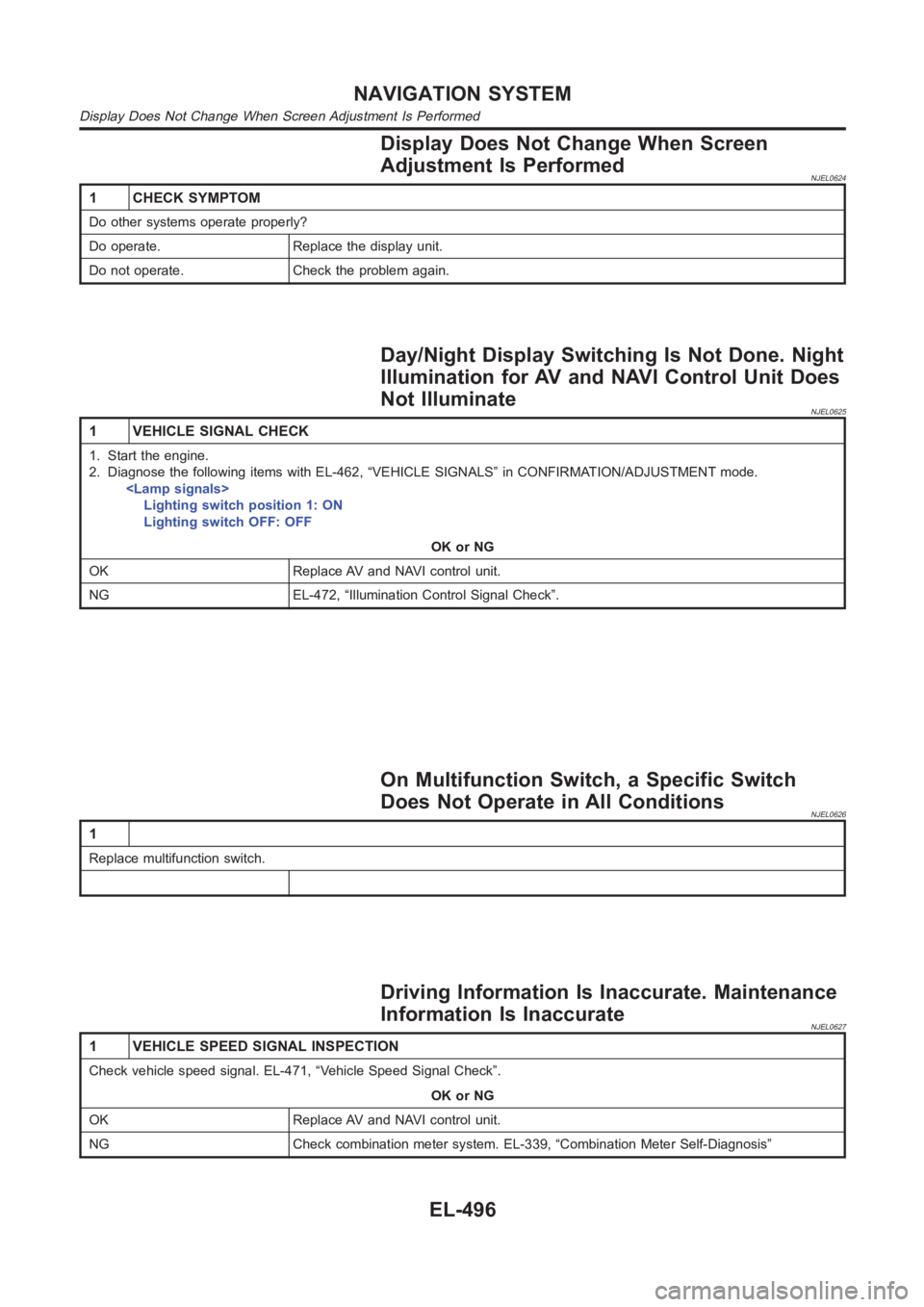
Display Does Not Change When Screen
Adjustment Is Performed
NJEL0624
1 CHECK SYMPTOM
Do other systems operate properly?
Do operate. Replace the display unit.
Do not operate. Check the problem again.
Day/Night Display Switching Is Not Done. Night
Illumination for AV and NAVI Control Unit Does
Not Illuminate
NJEL0625
1 VEHICLE SIGNAL CHECK
1. Start the engine.
2. Diagnose the following items with EL-462, “VEHICLE SIGNALS” in CONFIRMATION/ADJUSTMENT mode.
Lighting switch position 1: ON
Lighting switch OFF: OFF
OK or NG
OK Replace AV and NAVI control unit.
NG EL-472, “Illumination Control Signal Check”.
On Multifunction Switch, a Specific Switch
Does Not Operate in All Conditions
NJEL0626
1
Replace multifunction switch.
Driving Information Is Inaccurate. Maintenance
Information Is Inaccurate
NJEL0627
1 VEHICLE SPEED SIGNAL INSPECTION
Check vehicle speed signal. EL-471, “Vehicle Speed Signal Check”.
OK or NG
OK Replace AV and NAVI control unit.
NG Check combination meter system. EL-339, “Combination Meter Self-Diagnosis”
NAVIGATION SYSTEM
Display Does Not Change When Screen Adjustment Is Performed
EL-496
Page 2843 of 3189
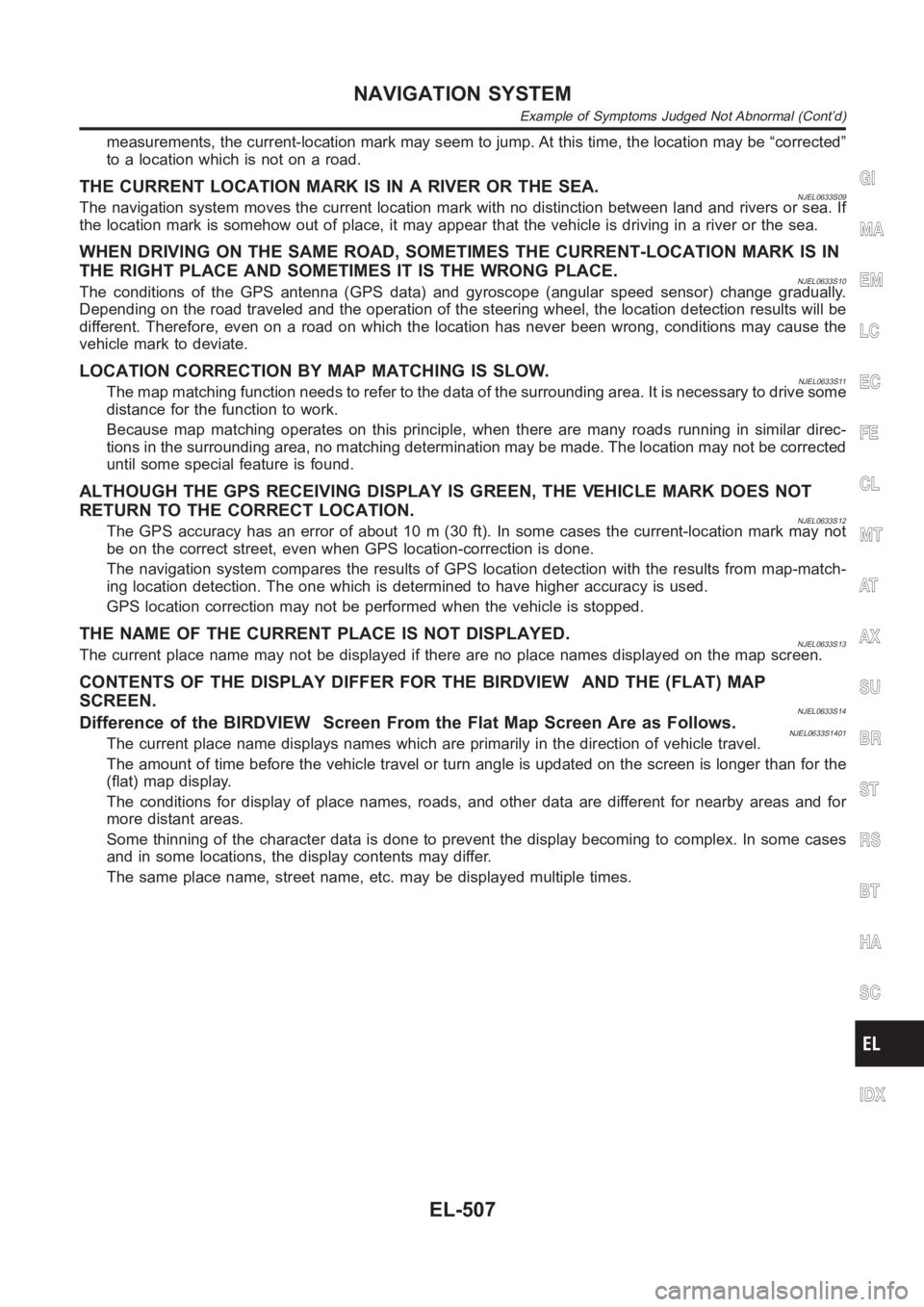
measurements, the current-location mark may seem to jump. At this time, the location may be “corrected”
to a location which is not on a road.
THE CURRENT LOCATION MARK IS IN A RIVER OR THE SEA.NJEL0633S09The navigation system moves the current location mark with no distinctionbetween land and rivers or sea. If
the location mark is somehow out of place, it may appear that the vehicle is driving in a river or the sea.
WHEN DRIVING ON THE SAME ROAD, SOMETIMES THE CURRENT-LOCATION MARK IS IN
THE RIGHT PLACE AND SOMETIMES IT IS THE WRONG PLACE.
NJEL0633S10The conditions of the GPS antenna (GPS data) and gyroscope (angular speed sensor) change gradually.
Depending on the road traveled and the operation of the steering wheel, thelocation detection results will be
different. Therefore, even on a road on which the location has never been wrong, conditions may cause the
vehicle mark to deviate.
LOCATION CORRECTION BY MAP MATCHING IS SLOW.NJEL0633S11The map matching function needs to refer to the data of the surrounding area. It is necessary to drive some
distance for the function to work.
Because map matching operates on this principle, when there are many roadsrunning in similar direc-
tions in the surrounding area, no matching determination may be made. The location may not be corrected
until some special feature is found.
ALTHOUGH THE GPS RECEIVING DISPLAY IS GREEN, THE VEHICLE MARK DOES NOT
RETURN TO THE CORRECT LOCATION.
NJEL0633S12The GPS accuracy has an error of about 10 m (30 ft). In some cases the current-location mark may not
be on the correct street, even when GPS location-correction is done.
The navigation system compares the results of GPS location detection withthe results from map-match-
ing location detection. The one which is determined to have higher accuracyisused.
GPS location correction may not be performed when the vehicle is stopped.
THE NAME OF THE CURRENT PLACE IS NOT DISPLAYED.NJEL0633S13The current place name may not be displayed if there are no place names displayed on the map screen.
CONTENTS OF THE DISPLAY DIFFER FOR THE BIRDVIEW AND THE (FLAT) MAP
SCREEN.
NJEL0633S14Difference of the BIRDVIEW Screen From the Flat Map Screen Are as Follows.NJEL0633S1401The current place name displays names which are primarily in the directionof vehicle travel.
The amount of time before the vehicle travel or turn angle is updated on the screen is longer than for the
(flat) map display.
The conditions for display of place names, roads, and other data are different for nearby areas and for
more distant areas.
Some thinning of the character data is done to prevent the display becomingto complex. In some cases
and in some locations, the display contents may differ.
The same place name, street name, etc. may be displayed multiple times.
GI
MA
EM
LC
EC
FE
CL
MT
AT
AX
SU
BR
ST
RS
BT
HA
SC
IDX
NAVIGATION SYSTEM
Example of Symptoms Judged Not Abnormal (Cont’d)
EL-507