key NISSAN ALTIMA 2000 L30 / 2.G Owner's Manual
[x] Cancel search | Manufacturer: NISSAN, Model Year: 2000, Model line: ALTIMA, Model: NISSAN ALTIMA 2000 L30 / 2.GPages: 242, PDF Size: 1.94 MB
Page 75 of 242
Sun shade
Open and close the sun shade by sliding it
forward or backward.
WARNING
cIn an accident you could be thrown
from the vehicle through an open
sunroof. Always use seat belts and
child restraints.
c
Do not allow anyone to stand up or
extend any portion of their body out of
the opening while the vehicle is in
motion or while the sunroof is closing.
CAUTION
c
Remove water drops, snow, ice or
sand from the sunroof before opening.
cDo not place heavy objects on the
sunroof or surrounding area.
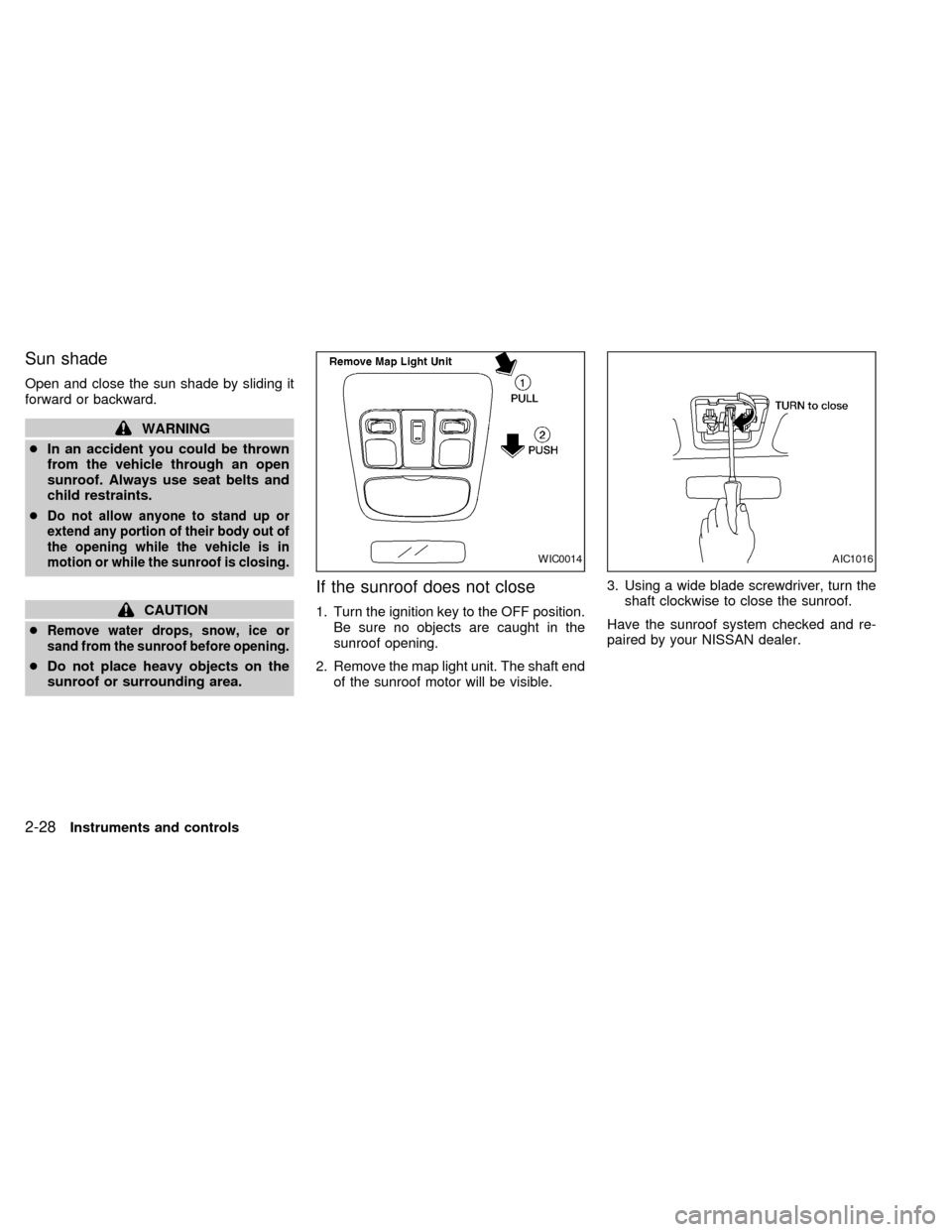
If the sunroof does not close
1. Turn the ignition key to the OFF position.
Be sure no objects are caught in the
sunroof opening.
2. Remove the map light unit. The shaft end
of the sunroof motor will be visible.3. Using a wide blade screwdriver, turn the
shaft clockwise to close the sunroof.
Have the sunroof system checked and re-
paired by your NISSAN dealer.
WIC0014AIC1016
2-28Instruments and controls
ZX
Page 76 of 242
The interior light operates regardless of
ignition key position.
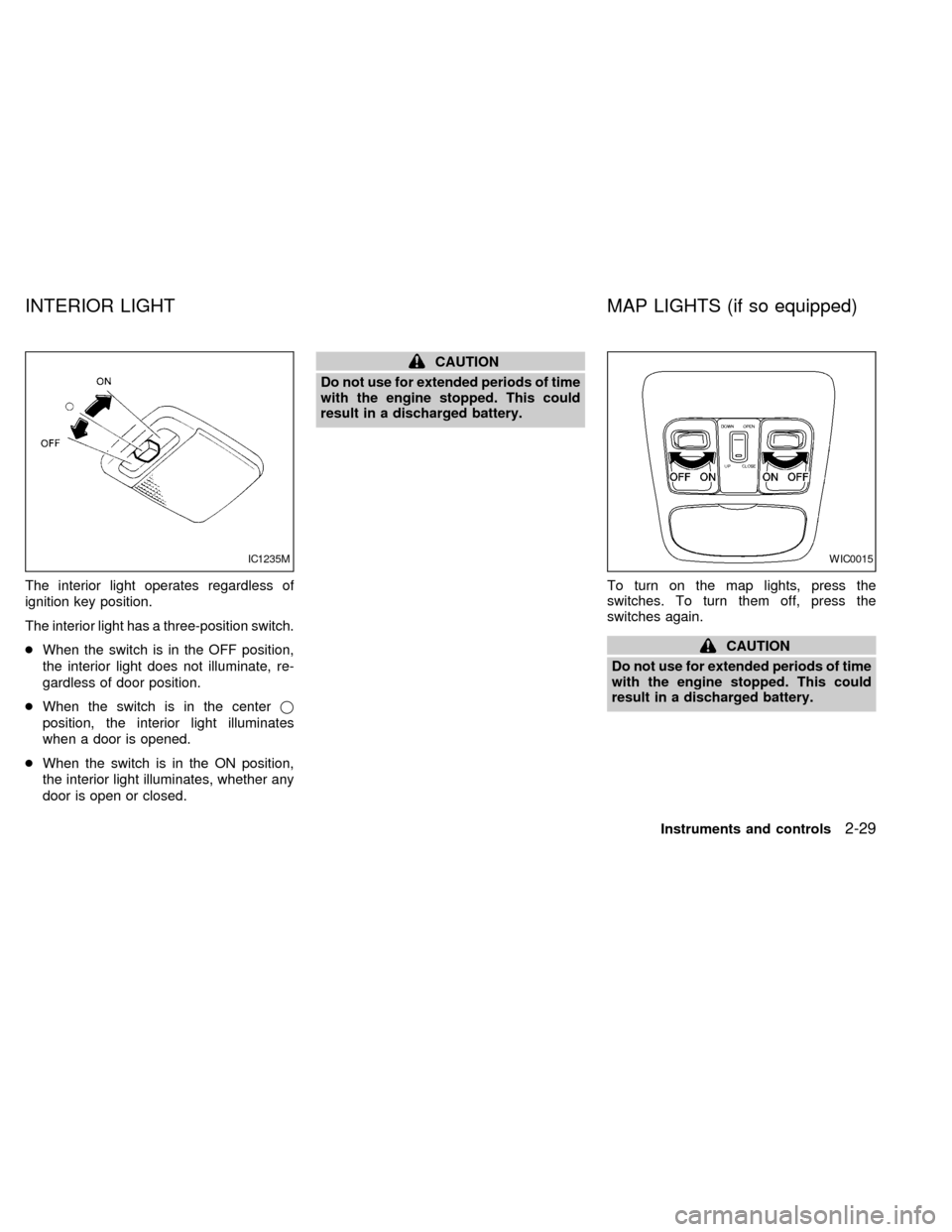
The interior light has a three-position switch.
cWhen the switch is in the OFF position,
the interior light does not illuminate, re-
gardless of door position.
cWhen the switch is in the centerj
position, the interior light illuminates
when a door is opened.
cWhen the switch is in the ON position,
the interior light illuminates, whether any
door is open or closed.
CAUTION
Do not use for extended periods of time
with the engine stopped. This could
result in a discharged battery.
To turn on the map lights, press the
switches. To turn them off, press the
switches again.
CAUTION
Do not use for extended periods of time
with the engine stopped. This could
result in a discharged battery.
IC1235MWIC0015
INTERIOR LIGHT MAP LIGHTS (if so equipped)
Instruments and controls2-29
ZX
Page 78 of 242

PROGRAMMING HomeLinkT
1. With the ignition key in the OFF position,
press and hold the two outside buttons,
and release when the indicator light be-
gins to flash (approximately 20 seconds).
This procedure erases the factory set
default codes and does not have to be
followed when programming additional
hand-held transmitters.
2. Hold the end of the hand-held transmitter
(from the device you wish to train) ap-
proximately 2 to 5 inches (50 to 127 mm)
away from the surface of HomeLinkT
keeping the indicator light in view.3. Using both hands, simultaneously push
the hand-held transmitter button and the
desired HomeLinkTbutton. Do not re-
lease the buttons until step 4 has been
completed.
NOTE:
Some garage door openers may require
the procedures noted under ``Canadian
Programming''.
4. The HomeLinkTindicator light will flash,
first slowly and then rapidly. When the
indicator light flashes rapidly, both but-
tons may be released. The rapid flashing
light indicates the Integrated HomeLinkT
Universal Transceiver has been suc-
cessfully programmed.
To program the remaining two buttons, fol-
low steps 2 through 4.
If, after repeated attempts, you do not suc-
cessfully program the Integrated HomeLinkT
Universal Transceiver to learn the signal of
the hand-held transmitter, refer to ``Rolling
Code Programming'' later in this section.
PROGRAMMING HomeLinkTFOR
CANADIAN CUSTOMERS
Prior to 1992, D.O.C. regulations required
hand-held transmitters to stop transmitting
after 2 seconds. To program your hand-held
transmitter to HomeLinkT, continue to press
and hold the HomeLinkTbutton (note step 2
through 4 under ``Programming HomeLinkT'')
while you press and re-press (``cycle'') your
hand-held transmitters every 2 seconds until
the indicator light flashes rapidly (indicating
successful programming).
NOTE:
If programming a garage door opener,
etc., it is advised to unplug the device
during the ``cycling'' process to prevent
possible damage to the garage door
opener components.
OPERATING THE INTEGRATED
HomeLinkTUNIVERSAL TRANS-
CEIVER
The Integrated HomeLinkTUniversal Trans-
ceiver (once programmed) may now be
used to activate the garage door, etc. To
operate, simply press the appropriate pro-
grammed Integrated HomeLinkTUniversal
SPA0609A
Instruments and controls2-31
ZX
Page 82 of 242

3 Pre-driving checks and adjustments
Keys .......................................................................3-2
Nissan vehicle immobilizer system (NVIS)
keys ........................................................................3-2
Doors ......................................................................3-2
Locking with key .....................................................3-3
Locking with inside lock knob ................................3-3
Locking with power door lock switch .....................3-4
Child safety rear door lock .....................................3-5
Multi-remote control system (if so equipped).........3-5
How to use multi-remote control system ...............3-5
Battery replacement ...............................................3-8
Hood .......................................................................3-9
Trunk lid................................................................3-10Opener operation .................................................3-10
Key operation .......................................................3-10
Fuel filler lid ..........................................................3-11
Opener operation .................................................3-11
Fuel filler cap ........................................................3-11
Steering wheel .....................................................3-13
Tilt operation.........................................................3-13
Sunvisors ..............................................................3-13
Vanity mirrors .......................................................3-13
Mirrors ..................................................................3-14
Inside mirror .........................................................3-14
Outside mirror remote control ..............................3-14
ZX
Page 83 of 242
NISSAN VEHICLE IMMOBILIZER
SYSTEM (NVIS) KEYS
You can only start your vehicle using the
keys which are supplied by your NISSAN
dealer. Each key has a transponder chip in
the key head which is electronically regis-
tered to your vehicle's NVIS. These keys
can be used for all the key locks on your
vehicle.
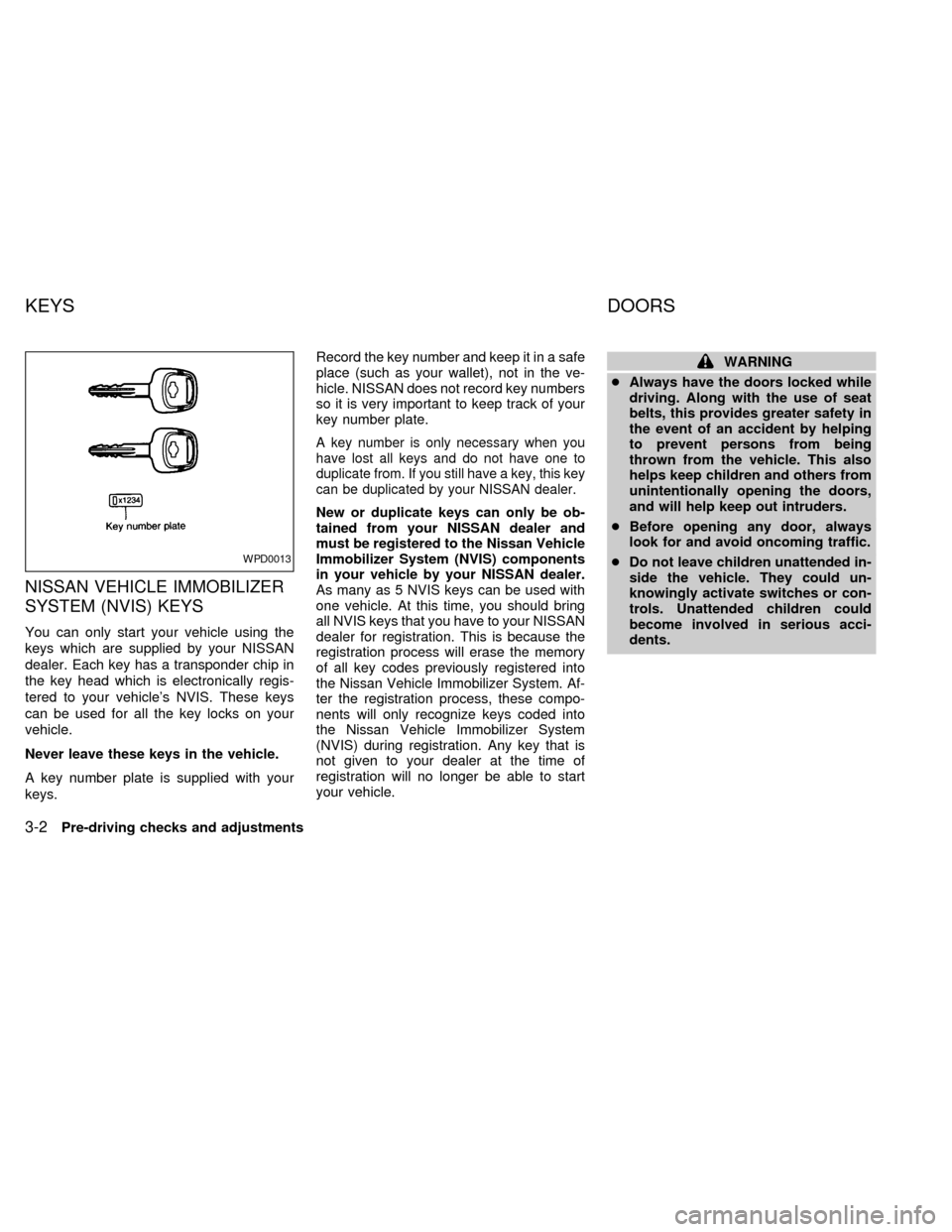
Never leave these keys in the vehicle.
A key number plate is supplied with your
keys.Record the key number and keep it in a safe
place (such as your wallet), not in the ve-
hicle. NISSAN does not record key numbers
so it is very important to keep track of your
key number plate.
A key number is only necessary when you
have lost all keys and do not have one to
duplicate from. If you still have a key, this key
can be duplicated by your NISSAN dealer.
New or duplicate keys can only be ob-
tained from your NISSAN dealer and
must be registered to the Nissan Vehicle
Immobilizer System (NVIS) components
in your vehicle by your NISSAN dealer.
As many as 5 NVIS keys can be used with
one vehicle. At this time, you should bring
all NVIS keys that you have to your NISSAN
dealer for registration. This is because the
registration process will erase the memory
of all key codes previously registered into
the Nissan Vehicle Immobilizer System. Af-
ter the registration process, these compo-
nents will only recognize keys coded into
the Nissan Vehicle Immobilizer System
(NVIS) during registration. Any key that is
not given to your dealer at the time of
registration will no longer be able to start
your vehicle.
WARNING
cAlways have the doors locked while
driving. Along with the use of seat
belts, this provides greater safety in
the event of an accident by helping
to prevent persons from being
thrown from the vehicle. This also
helps keep children and others from
unintentionally opening the doors,
and will help keep out intruders.
cBefore opening any door, always
look for and avoid oncoming traffic.
cDo not leave children unattended in-
side the vehicle. They could un-
knowingly activate switches or con-
trols. Unattended children could
become involved in serious acci-
dents.
WPD0013
KEYS DOORS
3-2Pre-driving checks and adjustments
ZX
Page 84 of 242

LOCKING WITH KEY
Manual
To lock the door, turn the key toward the
front of the vehicle. To unlock, turn it toward
the rear.
Power
For vehicles equipped with the theft warn-
ing system,the power door lock system
allows you to lock or unlock all doors simul-
taneously.
Turning the front door key (driver or passen-
ger side) to the front of the vehicle locks all
doors.
Turning the front door key one time to the
rear of the vehicle unlocks the corresponding
door. From that position, returning the key to
neutral (where the key can only be removed
and inserted) and turning it to the rear again
within 5 seconds unlocks all doors.
LOCKING WITH INSIDE LOCK
KNOB
Manual
To lock a door without the key, move the
inside lock knob to the lock position.
When locking a door this way, be certain not
to leave the key inside the vehicle.
Power
For vehicles equipped with the theft
warning system,moving the inside lock
APD1024APD1011AIC1012
Pre-driving checks and adjustments3-3
ZX
Page 85 of 242

knob (driver side only) to the lock position
locks all doors.
When the inside lock knob (driver side
only) is moved to the lock position with
the key in the ignition and any door
open, all doors will lock and then unlock
automatically.
LOCKING WITH POWER DOOR
LOCK SWITCH
To lock all the doors without a key, push the
door lock switch (driver or front passenger
side), to the lock position. When locking the
door this way, be certain not to leave the
key inside the vehicle.
When the power door lock switch (driver or
passenger side) is moved to the lock posi-
tion with the key in the ignition and any door
open, all doors will lock and then unlock
automatically.
APD1014LPD0003
3-4Pre-driving checks and adjustments
ZX
Page 86 of 242
CHILD SAFETY REAR DOOR
LOCK
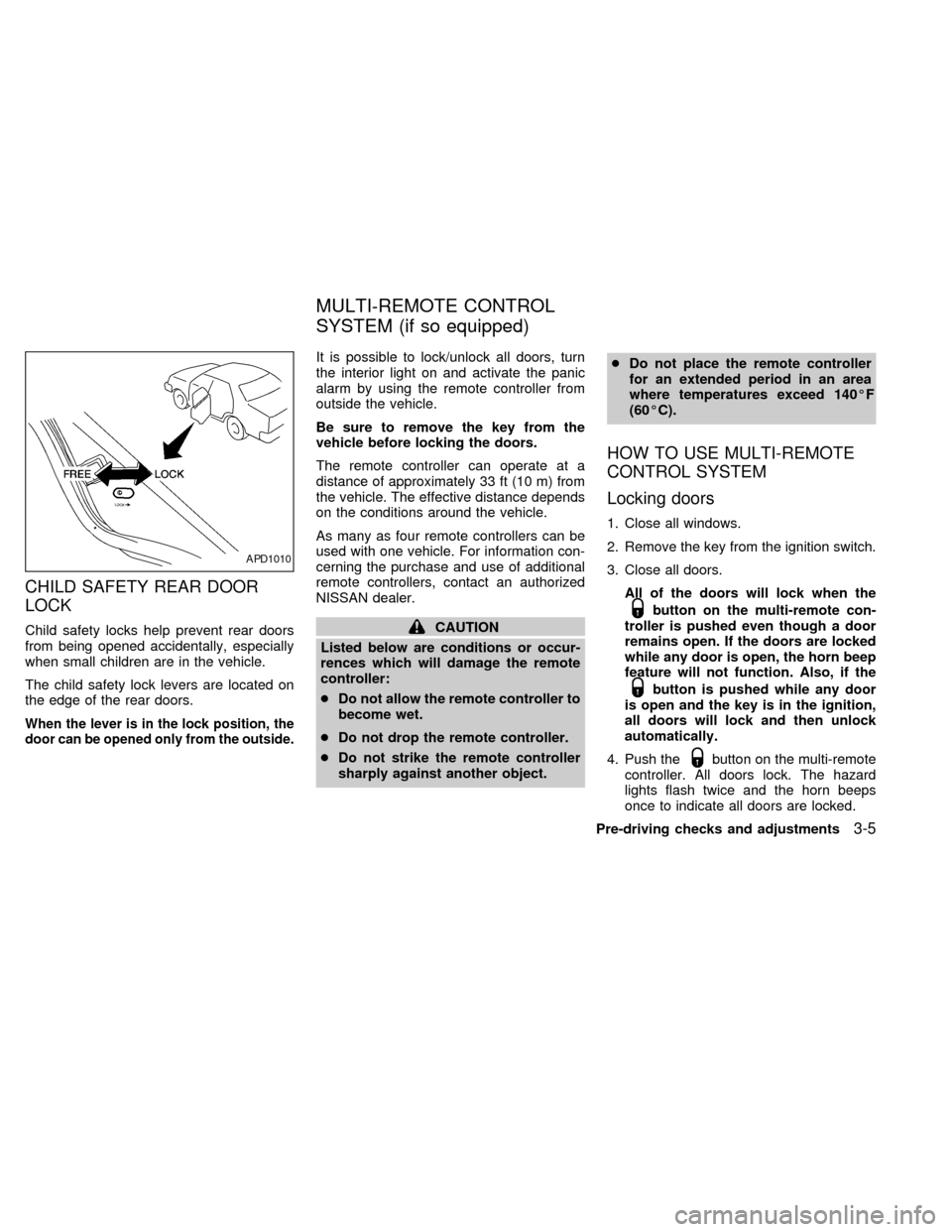
Child safety locks help prevent rear doors
from being opened accidentally, especially
when small children are in the vehicle.
The child safety lock levers are located on
the edge of the rear doors.
When the lever is in the lock position, the
door can be opened only from the outside.
It is possible to lock/unlock all doors, turn
the interior light on and activate the panic
alarm by using the remote controller from
outside the vehicle.
Be sure to remove the key from the
vehicle before locking the doors.
The remote controller can operate at a
distance of approximately 33 ft (10 m) from
the vehicle. The effective distance depends
on the conditions around the vehicle.
As many as four remote controllers can be
used with one vehicle. For information con-
cerning the purchase and use of additional
remote controllers, contact an authorized
NISSAN dealer.
CAUTION
Listed below are conditions or occur-
rences which will damage the remote
controller:
cDo not allow the remote controller to
become wet.
cDo not drop the remote controller.
cDo not strike the remote controller
sharply against another object.cDo not place the remote controller
for an extended period in an area
where temperatures exceed 140ÉF
(60ÉC).
HOW TO USE MULTI-REMOTE
CONTROL SYSTEM
Locking doors
1. Close all windows.
2. Remove the key from the ignition switch.
3. Close all doors.
All of the doors will lock when the
button on the multi-remote con-
troller is pushed even though a door
remains open. If the doors are locked
while any door is open, the horn beep
feature will not function. Also, if the
button is pushed while any door
is open and the key is in the ignition,
all doors will lock and then unlock
automatically.
4. Push the
button on the multi-remote
controller. All doors lock. The hazard
lights flash twice and the horn beeps
once to indicate all doors are locked.
APD1010
MULTI-REMOTE CONTROL
SYSTEM (if so equipped)
Pre-driving checks and adjustments3-5
ZX
Page 88 of 242

remote controller for longer than 0.5 sec-
ond. The trunk release button on the
multi-remote controller will not operate
when the ignition switch is in the ON
position.
2. The trunk lid opens.
Using the panic alarm
If you are near your vehicle and feel threat-
ened, you may activate the alarm to call
attention as follows:
1. Push and hold the
button on the
remote controller forlonger than 1.5
seconds.
2. The theft warning alarm and headlights
will stay on for 30 seconds.
3. The panic alarm stops when:
cit has run for 30 seconds, or
cany button is pressed on the multi-
remote controller.
Silencing the horn beep feature
If desired, the horn beep feature can be
deactivated using the multi-remote control-
ler. The instructions are on the back of the
multi-remote controller.
To deactivate:Press and hold the
andbuttonsfor at least two seconds.
The hazard lights will flash three times to
confirm that the horn beep feature has been
deactivated.
To activate:Press and hold the
andbuttonsfor at least two seconds
once more.The hazard lights will flash three times to
confirm that the horn beep feature has been
reactivated.
Deactivating the horn feature does not si-
lence the horn if the alarm is triggered.
Using the interior light
The interior light can be turned off without
waiting 30 seconds by inserting the key into
the ignition or locking the doors with the
multi-remote controller or pushing the inte-
rior light button to OFF.
WPD0005
Pre-driving checks and adjustments3-7
ZX
Page 91 of 242
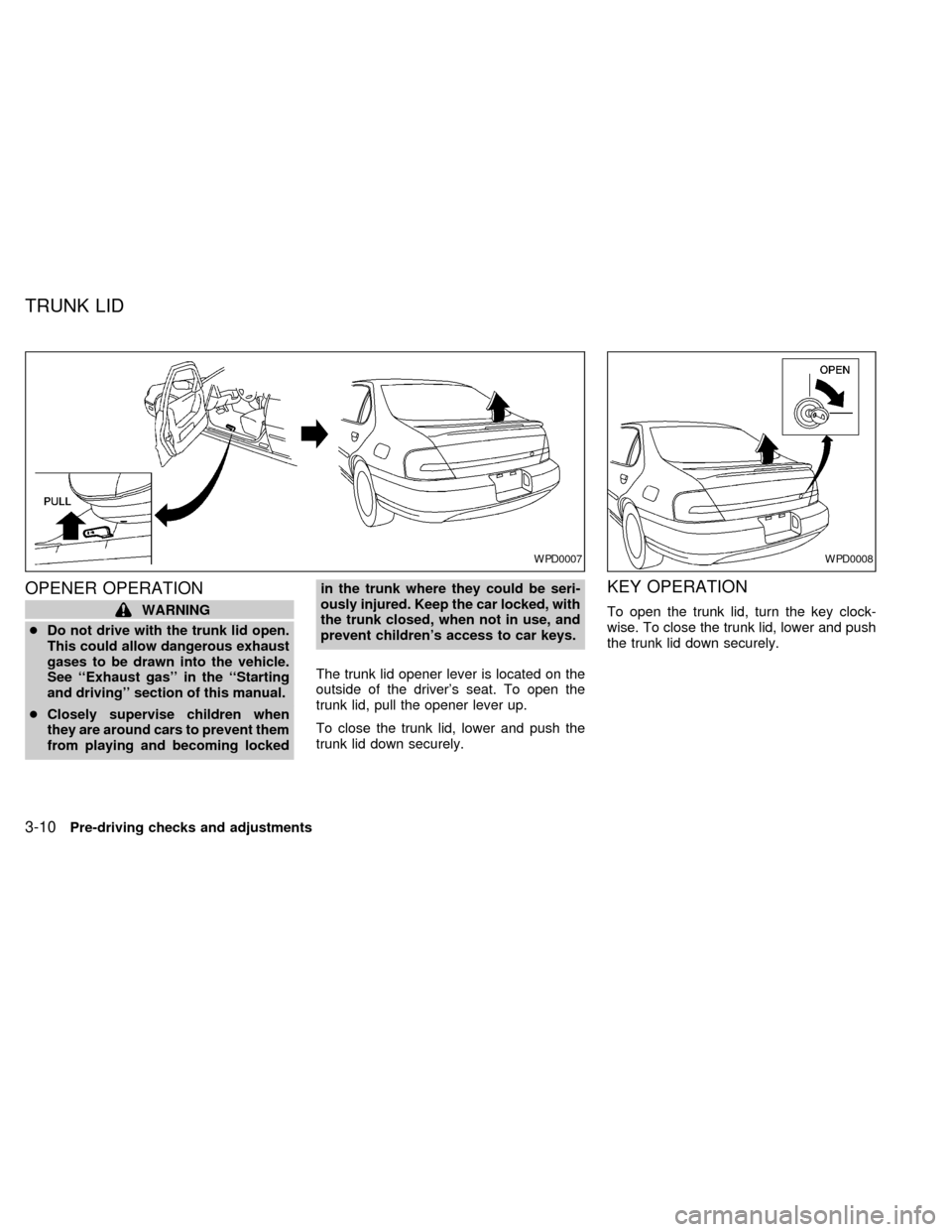
OPENER OPERATION
WARNING
cDo not drive with the trunk lid open.
This could allow dangerous exhaust
gases to be drawn into the vehicle.
See ``Exhaust gas'' in the ``Starting
and driving'' section of this manual.
cClosely supervise children when
they are around cars to prevent them
from playing and becoming lockedin the trunk where they could be seri-
ously injured. Keep the car locked, with
the trunk closed, when not in use, and
prevent children's access to car keys.
The trunk lid opener lever is located on the
outside of the driver's seat. To open the
trunk lid, pull the opener lever up.
To close the trunk lid, lower and push the
trunk lid down securely.
KEY OPERATION
To open the trunk lid, turn the key clock-
wise. To close the trunk lid, lower and push
the trunk lid down securely.
WPD0007WPD0008
TRUNK LID
3-10Pre-driving checks and adjustments
ZX