instrument panel NISSAN ALTIMA 2002 L31 / 3.G User Guide
[x] Cancel search | Manufacturer: NISSAN, Model Year: 2002, Model line: ALTIMA, Model: NISSAN ALTIMA 2002 L31 / 3.GPages: 249, PDF Size: 2.02 MB
Page 96 of 249

cause harmful interference, and (2) this
device must accept any interference re-
ceived including interference that may
cause undesired operation of the device.
1. Pull the hood lock release handle
s1
located below the driver side instrument
panel; the hood springs up slightly.
2. Lift the lever
s2at the front of the hood
with your fingertips and raise the hood.3. Remove the support rod
s3from the
clamp.
4. Insert the support rod
s4into the slot on
the passenger side fender ledge.
5. When closing the hood, return the sup-
LPD0072
HOOD
Pre-driving checks and adjustments3-9
ZX
Page 114 of 249
OPERATING TIPS
cWhen the engine coolant temperature
and outside air temperature are low, the
air flow from the foot outlets may not
operate for a maximum of 150 seconds.
However, this is not a malfunction. After
the coolant temperature warms up, air
flow from the foot outlets will operate
normally.
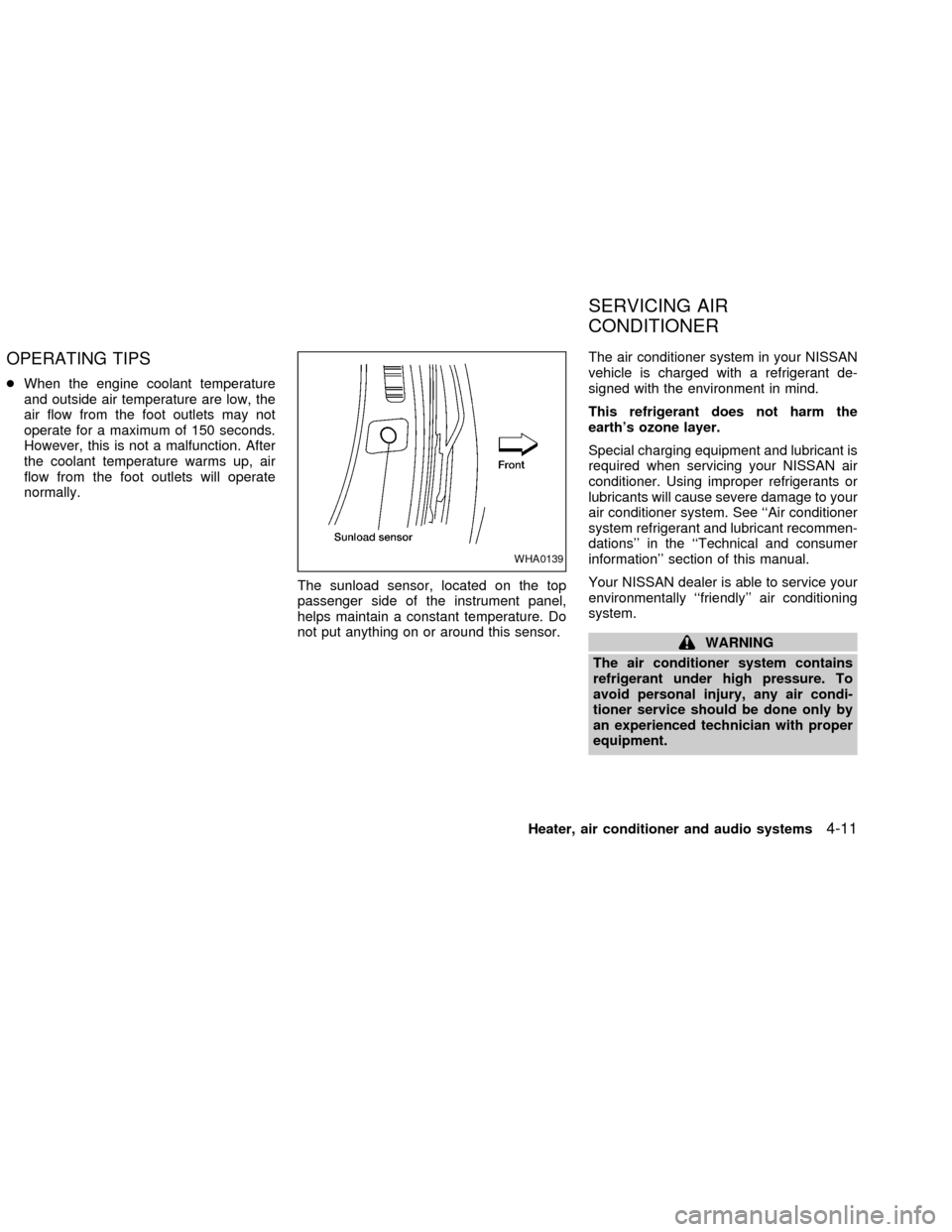
The sunload sensor, located on the top
passenger side of the instrument panel,
helps maintain a constant temperature. Do
not put anything on or around this sensor.The air conditioner system in your NISSAN
vehicle is charged with a refrigerant de-
signed with the environment in mind.
This refrigerant does not harm the
earth's ozone layer.
Special charging equipment and lubricant is
required when servicing your NISSAN air
conditioner. Using improper refrigerants or
lubricants will cause severe damage to your
air conditioner system. See ``Air conditioner
system refrigerant and lubricant recommen-
dations'' in the ``Technical and consumer
information'' section of this manual.
Your NISSAN dealer is able to service your
environmentally ``friendly'' air conditioning
system.
WARNING
The air conditioner system contains
refrigerant under high pressure. To
avoid personal injury, any air condi-
tioner service should be done only by
an experienced technician with proper
equipment.
WHA0139
SERVICING AIR
CONDITIONER
Heater, air conditioner and audio systems4-11
ZX
Page 147 of 249
PRECAUTIONS ON CRUISE
CONTROL
cIf the cruise control system malfunctions,
it cancels automatically. The SET indica-
tor light in the instrument panel then
blinks to warn the driver.
cIf the SET indicator light blinks, turn the
cruise control main switch off and have
the system checked by an authorized
NISSAN dealer.
cThe SET indicator light may blink when
the cruise control main switch is turned
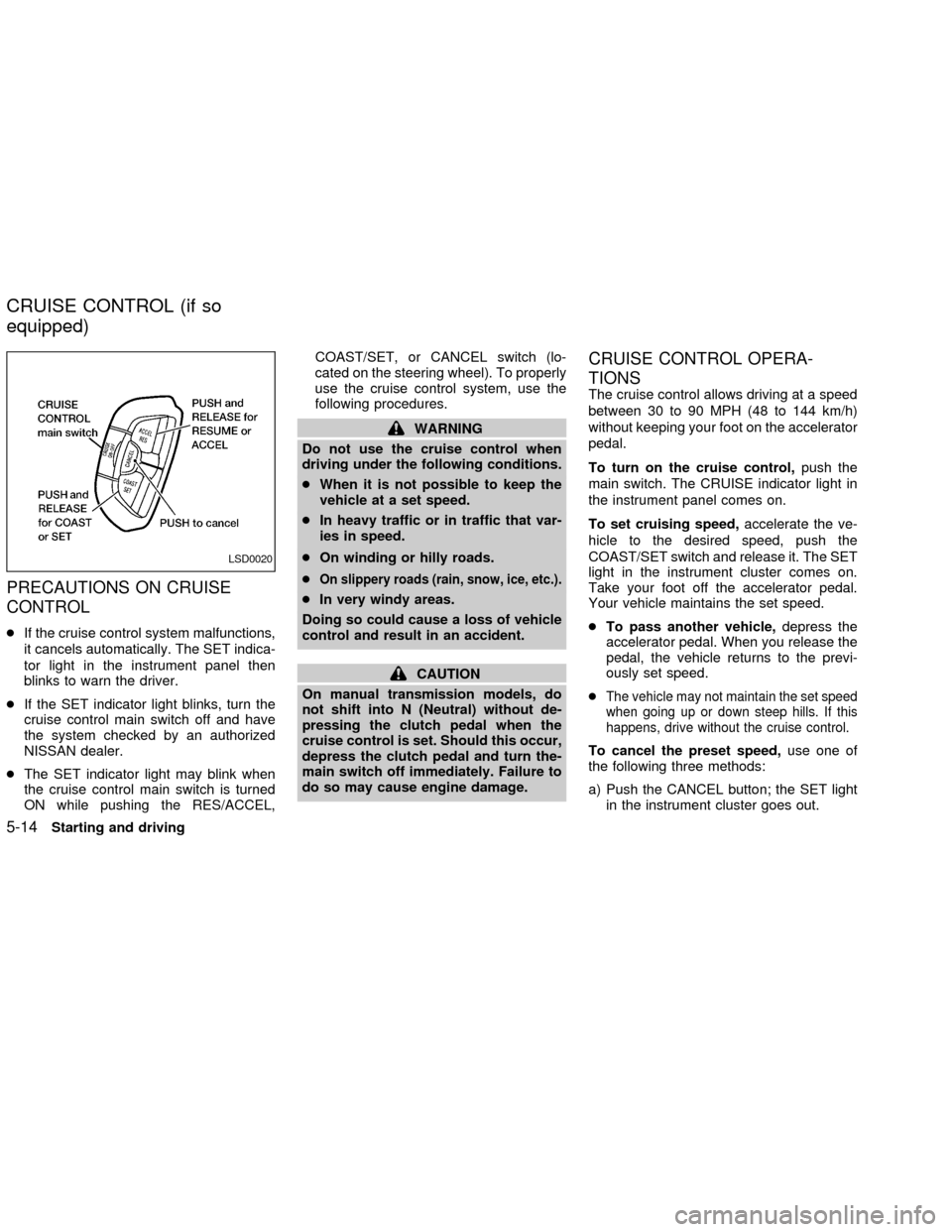
ON while pushing the RES/ACCEL,COAST/SET, or CANCEL switch (lo-
cated on the steering wheel). To properly
use the cruise control system, use the
following procedures.
WARNING
Do not use the cruise control when
driving under the following conditions.
cWhen it is not possible to keep the
vehicle at a set speed.
cIn heavy traffic or in traffic that var-
ies in speed.
cOn winding or hilly roads.
c
On slippery roads (rain, snow, ice, etc.).
cIn very windy areas.
Doing so could cause a loss of vehicle
control and result in an accident.
CAUTION
On manual transmission models, do
not shift into N (Neutral) without de-
pressing the clutch pedal when the
cruise control is set. Should this occur,
depress the clutch pedal and turn the-
main switch off immediately. Failure to
do so may cause engine damage.
CRUISE CONTROL OPERA-
TIONS
The cruise control allows driving at a speed
between 30 to 90 MPH (48 to 144 km/h)
without keeping your foot on the accelerator
pedal.
To turn on the cruise control,push the
main switch. The CRUISE indicator light in
the instrument panel comes on.
To set cruising speed,accelerate the ve-
hicle to the desired speed, push the
COAST/SET switch and release it. The SET
light in the instrument cluster comes on.
Take your foot off the accelerator pedal.
Your vehicle maintains the set speed.
cTo pass another vehicle,depress the
accelerator pedal. When you release the
pedal, the vehicle returns to the previ-
ously set speed.
c
The vehicle may not maintain the set speed
when going up or down steep hills. If this
happens, drive without the cruise control.
To cancel the preset speed,use one of
the following three methods:
a) Push the CANCEL button; the SET light
in the instrument cluster goes out.
LSD0020
CRUISE CONTROL (if so
equipped)
5-14Starting and driving
ZX
Page 148 of 249

b) Tap the brake pedal; the SET light goes
out.
c) Turn the main switch off. Both the
CRUISE indicator on the main switch and
SET light in the instrument cluster go out.
The cruise control is automatically can-
celled and the SET light in the instrument
panel goes out if:
cyou depress the brake or clutch pedal
while pushing the RES/ACCEL or
COAST/SET switch.
cthe vehicle slows down more than 8 MPH
(13 km/h) below the set speed.
cyou depress the clutch pedal (manual
transmission), or move the shift selector
lever to N (Neutral) (automatic transmis-
sion).
To reset at a faster cruising speed,use
one of the following three methods.
a) Depress the accelerator pedal. When the
vehicle attains the desired speed, push
and release the COAST/SET switch.
b) Push and hold the RES/ACCEL switch.
When the vehicle attains the speed you
desire, release the switch.c)Push and release the RES/ACCEL switch.
Each time you do this, the set speed
increases by about 1 MPH (1.6 km/h).
To reset at a slower cruising speed,use
one of the following three methods:
a) Lightly tap the brake pedal. When the
vehicle attains the desired speed, push
the COAST/SET switch and release it.
b) Push and hold the COAST/SET switch.
Release the switch when the vehicle
slows to the desired speed.
c) Push and release the COAST/SET
switch. Each time you do this, the set
speed decreases by about 1 MPH (1.6
km/h).
To resume the preset speed,push and re-
lease the RES/ACCEL switch. The vehicle
returns to the last set cruising speed when the
vehicle speed is over 30 MPH (48 km/h).
During the first 1,000 miles (1,600 km),
follow these recommendations for the future
reliability and economy of your new vehicle.
cAvoid driving for long periods at constant
speed, either fast or slow.
cDo not accelerate at full throttle in any
gear.
cAvoid quick starts.
cAvoid hard braking as much as possible.
cDo not tow a trailer for the first 500 miles
(800 km).
BREAK-IN SCHEDULE
Starting and driving5-15
ZX
Page 153 of 249
tion of any malfunction. If the computer
senses any malfunction, it switches the anti-
lock brake system OFF and turns on the
ABS brake warning light in the dashboard.
The brake system then operates normally,
but without anti-lock assistance.
If the light comes on during the self-test or
while driving, take the vehicle to an autho-
rized NISSAN dealer for repair.
WARNING
The anti-lock brake system is a sophis-
ticated device, but it cannot prevent
accidents resulting from careless or
dangerous driving techniques. It can
help maintain vehicle control during
braking on slippery surfaces, but re-
member that the stopping distance on
slippery surfaces will be longer than on
normal surfaces, even with the anti-
lock brake system. Stopping distances
may also be longer on rough, gravel or
snow covered roads, or if you are using
tire chains. Always maintain a safe dis-
tance from the vehicle in front of you.
Ultimately, the responsibility for safety
of self and others rests in the hands of
the driver.cTire type and condition of tires may
also affect braking effectiveness.
When replacing tires, install the
specified size of tire on all four
wheels.
cWhen installing a spare tire, make
sure it is the proper size and type as
specified on the tire placard. For tire
placard location information, refer to
ªTire placardº in the ``Technical and
consumer information'' section of
this manual.
Refer to ``Wheels and tires'' in the
``Maintenance and do-it-yourself'' sec-
tion of this manual.When driving on slippery surfaces or sud-
denly avoiding obstacles on roads, the ve-
hicle might swerve or slip. With the vehicle
traction control system, sensors detect
these movements and control the braking
and engine output to help improve vehicle
stability while driving.
cWhen the traction control system is op-
erating, the slip indicator in the instru-
ment panel blinks.
cIf the slip indicator blinks, the vehicle is
under slippery conditions. Be sure to
drive carefully. See ªSlip indicator lightº,
and ªtraction control off indicator lightº in
the ªInstruments and controlsº section.
cIf a malfunction occurs in the system,
the
andindicator lights come
on in the meter panel.
As long as these warning lights are on,
the traction control function is canceled.
The vehicle will behave like a vehicle
without the system.
TRACTION CONTROL
SYSTEM (TCS)
5-20Starting and driving
ZX
Page 242 of 249

10 Index
A
Air bag (See supplemental restraint
system) ........................................................ 1-8
Air bag warning light ................. 1-14, 1-19, 2-9
Air cleaner housing filter ............................ 8-21
Air conditioner
Air conditioner operation ........................ 4-5
Air conditioner service .......................... 4-11
Air conditioner specification label ......... 9-12
Air conditioner system refrigerant and
lubrication recommendations.................. 9-7
Heater and air conditioner controls ........ 4-3
Servicing air conditioner ....................... 4-11
Air flow charts .............................................. 4-6
Alarm system (See vehicle security
system) ...................................................... 2-13
Anchor point locations ............................... 1-37
Antenna...................................................... 4-29
Anti-lock brake system (ABS).................... 5-19
Anti-lock brake warning light ..................... 2-10
Armrests....................................................... 1-7
Audio system
FM-AM radio with compact disc (CD)
changer ....................................... 4-16, 4-21
Autolamp switch......................................... 2-20
Automatic
Automatic power window switch .......... 2-32Automatic transmission fluid (ATF) ...... 8-14
Driving with automatic transmission ....... 5-4
B
Battery........................................................ 8-17
Battery
Charge warning light .............................. 2-9
Battery replacement (See remote keyless
entry system) ............................................... 3-8
Before starting the engine ........................... 5-6
Belts (See drive belts) ........................ 8-19, 9-8
Brake
Anti-lock brake system (ABS) .............. 5-19
Brake booster ....................................... 8-26
Brake fluid............................................. 8-16
Brake pedal .......................................... 8-25
Brake system .............................. 2-12, 5-18
Brake warning light ............................... 2-10
Brake wear indicators ................. 2-12, 8-26
Parking brake check ............................. 8-25
Parking brake operation ....................... 5-13
Self-adjusting brakes ............................ 8-26
Break-in schedule ...................................... 5-15
Bulb check/instrument panel ....................... 2-8
Bulb replacement ....................................... 8-32C
Capacities and recommended fuel/
lubricants...................................................... 9-2
Car phone or CB radio .............................. 4-29
Cargo (See vehicle loading information) ... 9-13
Check engine indicator light
(See malfunction indicator light) ................ 2-11
Child restraint with top tether strap ........... 1-37
Child restraints ........................ 1-23, 1-28, 1-35
Child safety rear door lock .......................... 3-4
Cleaning exterior and interior ...................... 7-2
Clutch
Clutch fluid ............................................ 8-16
Clutch pedal.......................................... 8-26
Cold weather driving .................................. 5-21
Controls
Heater and air conditioner controls ........ 4-3
Coolant
Capacities and recommended fuel/
lubricants ................................................ 9-2
Changing engine coolant...................... 8-10
Checking engine coolant level ............... 8-9
Engine coolant temperature gauge ........ 2-6
Corrosion protection .................................... 7-5
Cruise control............................................. 5-14
Cup holders ............................................... 2-27
ZX
Page 244 of 249

Headlight and turn signal switch ............... 2-18
Heated seats.............................................. 2-24
Heater
Heater and air conditioner controls ........ 4-3
Heater operation ..................................... 4-4
Homelink Transceiver
Integrated HomeLinkTUniversal
Transceiver (If so equipped) ................ 2-35
Hood release ............................................... 3-9
Horn ........................................................... 2-23
I
Ignition switch .............................................. 5-4
Immobilizer system ..................... 2-14, 3-2, 5-6
Important vehicle information label............ 9-11
Increasing fuel economy............................ 5-16
Indicator lights and audible reminders
(See warning/indicator lights and audible
reminders) .................................................... 2-8
Inside mirror ............................................... 3-15
Instrument brightness control .................... 2-20
Integrated HomeLinkTUniversal Transceiver
(If so equipped).......................................... 2-35
Interior light ................................................ 2-34
Interior trunk lid release ............................. 3-11
J
Jump starting ...................................... 6-6, 8-18K
Key ............................................................... 3-2
Keyless entry system (See remote keyless
entry system) ............................................... 3-5
L
Labels
Air conditioner specification label ......... 9-12
Emission control information label........ 9-12
Engine serial number ........................... 9-11
F.M.V.S.S. certification label ................ 9-11
Vehicle identification number (VIN)
plate ...................................................... 9-10
Warning labels (for SRS) ..................... 1-19
License plate
Installing the license plate .................... 9-13
Light
Air bag warning light ............ 1-14, 1-19, 2-9
Bulb check/instrument panel .................. 2-8
Bulb replacement.................................. 8-32
Charge warning light .............................. 2-9
Front fog light switch ............................ 2-21
Headlight and turn signal switch .......... 2-18
Interior light ........................................... 2-34
Low washer fluid warning light ............. 2-10
Spotlights (See map light) .................... 2-34
Trunk light ............................................. 2-35
Warning/indicator lights and audible
reminders ................................................ 2-8Lock
Child safety rear door lock ..................... 3-4
Door locks............................................... 3-2
Fuel filler lid lock opener lever ............. 3-12
Glove box lock ...................................... 2-28
Power door locks .................................... 3-3
Trunk lid lock opener lever ................... 3-10
M
Maintenance
General maintenance ............................. 8-3
Maintenance precautions ................ 8-2, 8-5
Outside the vehicle ................................. 8-3
Seat belt maintenance.......................... 1-28
Under the hood and vehicle ................... 8-4
Malfunction indicator lamp (MIL) ............... 2-11
Map lights .................................................. 2-34
Meters and gauges .............................. 2-2, 2-3
Mirror
Inside mirror.......................................... 3-15
Outside mirror control ........................... 3-16
Vanity mirror ......................................... 3-14
Multi-remote control system (See remote
keyless entry system) .................................. 3-5
Multi-remote controller battery
replacement ............................................... 8-29
N
Nissan vehicle immobilizer system
(NVIS) ......................................... 2-13, 3-2, 5-6
10-3
ZX