sensor NISSAN ALTIMA 2005 L31 / 3.G User Guide
[x] Cancel search | Manufacturer: NISSAN, Model Year: 2005, Model line: ALTIMA, Model: NISSAN ALTIMA 2005 L31 / 3.GPages: 304, PDF Size: 4.91 MB
Page 127 of 304
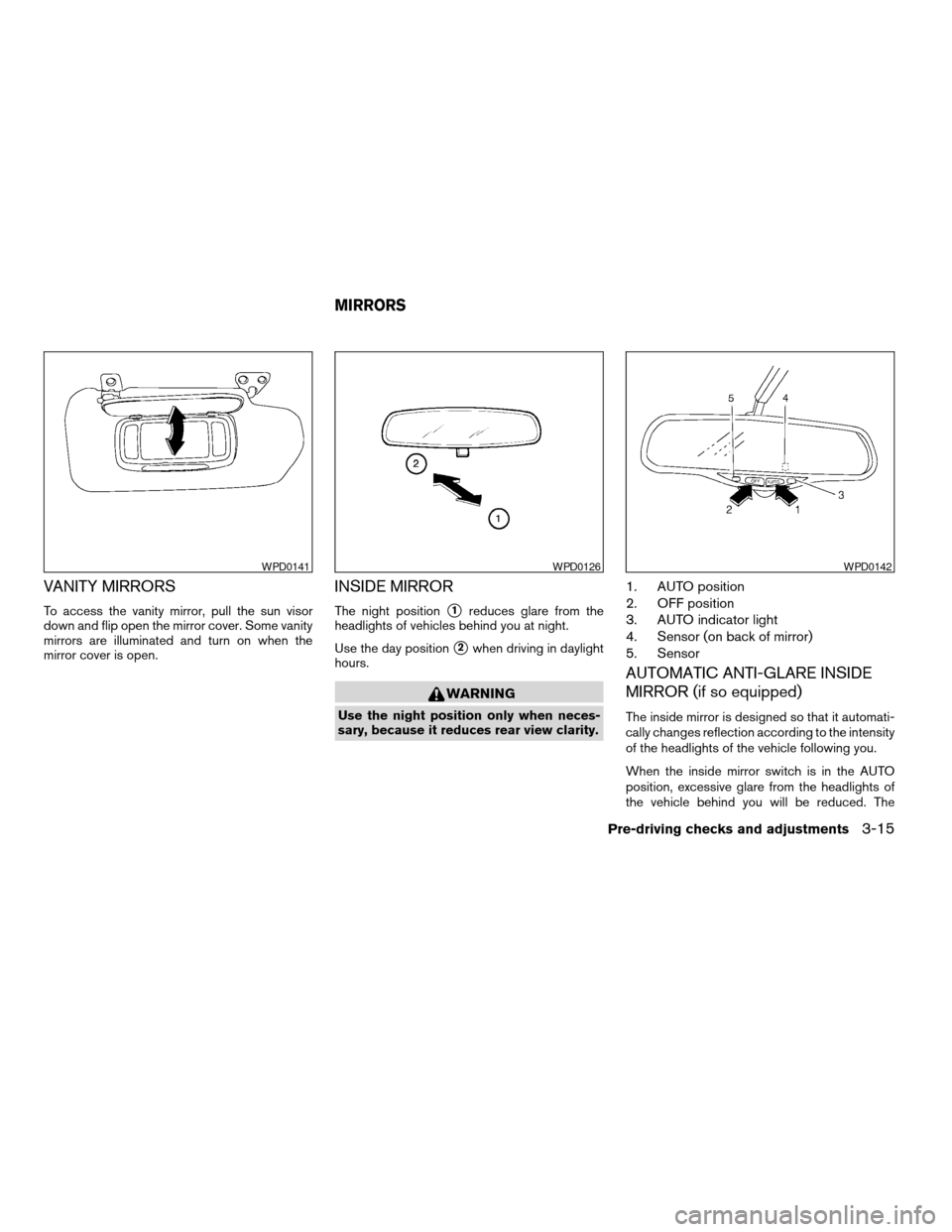
VANITY MIRRORS
To access the vanity mirror, pull the sun visor
down and flip open the mirror cover. Some vanity
mirrors are illuminated and turn on when the
mirror cover is open.
INSIDE MIRROR
The night positions1reduces glare from the
headlights of vehicles behind you at night.
Use the day position
s2when driving in daylight
hours.
WARNING
Use the night position only when neces-
sary, because it reduces rear view clarity.
1. AUTO position
2. OFF position
3. AUTO indicator light
4. Sensor (on back of mirror)
5. Sensor
AUTOMATIC ANTI-GLARE INSIDE
MIRROR (if so equipped)
The inside mirror is designed so that it automati-
cally changes reflection according to the intensity
of the headlights of the vehicle following you.
When the inside mirror switch is in the AUTO
position, excessive glare from the headlights of
the vehicle behind you will be reduced. The
WPD0141WPD0126WPD0142
MIRRORS
Pre-driving checks and adjustments3-15
ZREVIEW COPYÐ2005 Altima (l30)
Owners ManualÐUSA_English (nna)
06/28/04Ðtbrooks
X
Page 128 of 304
AUTO indicator light will be on. When the switch
on the inside mirror is in the OFF position, the
inside mirror will operate normally.
Do not hang any object on the sensor or
apply glass cleaner. Doing so will reduce
the sensitivity of the sensor, resulting in
improper operation.
OUTSIDE MIRRORS
WARNING
cObjects viewed in the outside mirror on
the passenger side are closer than they
appear. Be careful when moving to the
right. Using only this mirror could cause
an accident. Use the inside mirror or
glance over your shoulder to properly
judge distances to other objects.
c Do not adjust the mirrors while driving.
You could lose control of your vehicle
and cause an accident.
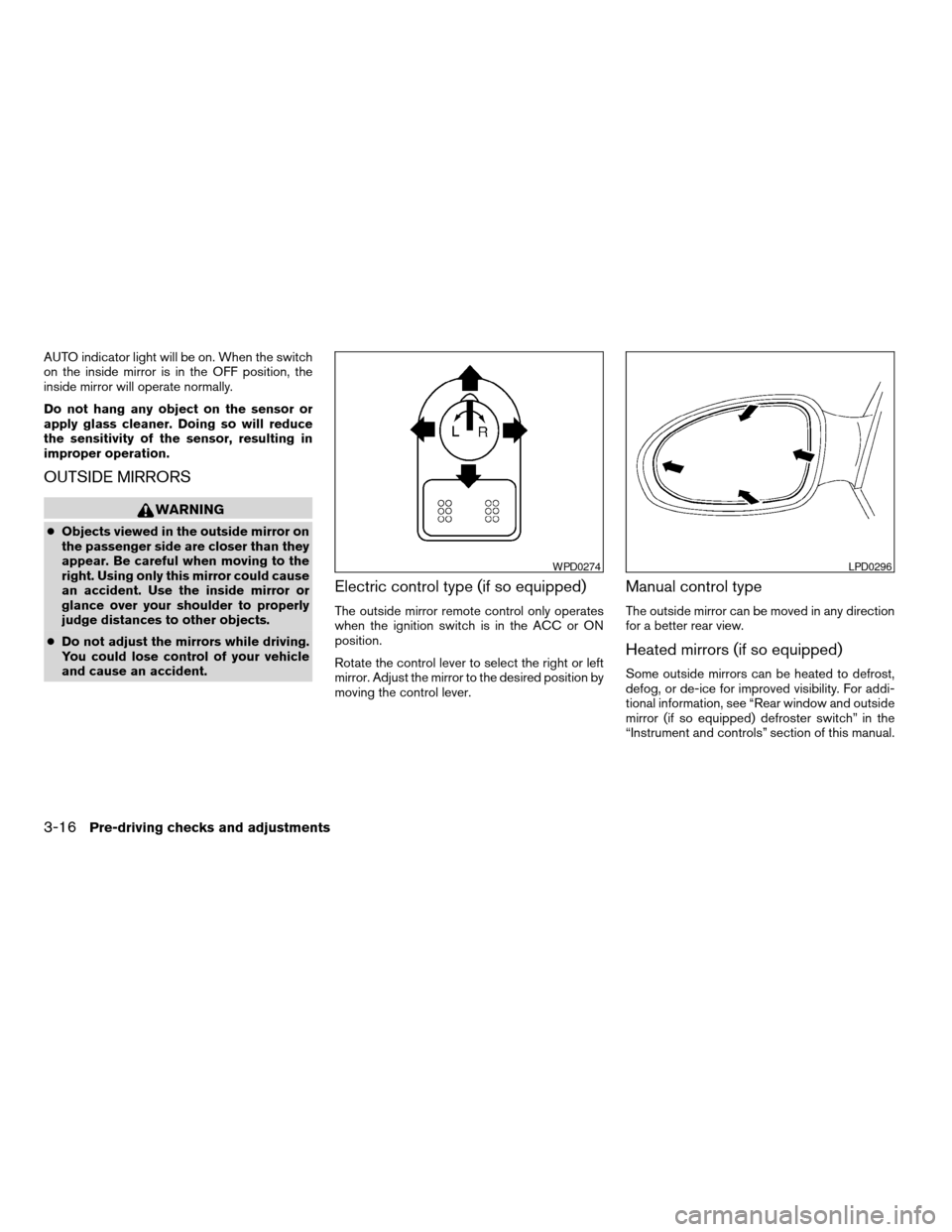
Electric control type (if so equipped)
The outside mirror remote control only operates
when the ignition switch is in the ACC or ON
position.
Rotate the control lever to select the right or left
mirror. Adjust the mirror to the desired position by
moving the control lever.
Manual control type
The outside mirror can be moved in any direction
for a better rear view.
Heated mirrors (if so equipped)
Some outside mirrors can be heated to defrost,
defog, or de-ice for improved visibility. For addi-
tional information, see “Rear window and outside
mirror (if so equipped) defroster switch” in the
“Instrument and controls” section of this manual.
WPD0274LPD0296
3-16Pre-driving checks and adjustments
ZREVIEW COPYÐ2005 Altima (l30)
Owners ManualÐUSA_English (nna)
06/28/04Ðtbrooks
X
Page 136 of 304
Auto re-lock time:
This key allows you to set the length of time
before doors auto re-lock.
Sensitivity of automatic headlights:
This key allows you to set the sensitivity of the
automatic headlights:c Lower- less sensitive, automatic headlights
will take longer to come on when the head-
light sensor senses less ambient light.
c Higher- more sensitive, automatic head-
lights will come on quicker when the head-
light sensor senses less ambient light.
Automatic headlights off delay:
This key allows you to set the length of time
before the automatic headlights turn off after
exiting the vehicle.
Speed dependent wiper:
This key allows you to turn on or turn off the
driving speed dependent intermittent wiper func-
tion.
Return all settings to default:
When this key is selected and turned on using
the “ENTER” button, all settings made by VE-
HICLE ELECTRONICS will return to the default
settings.
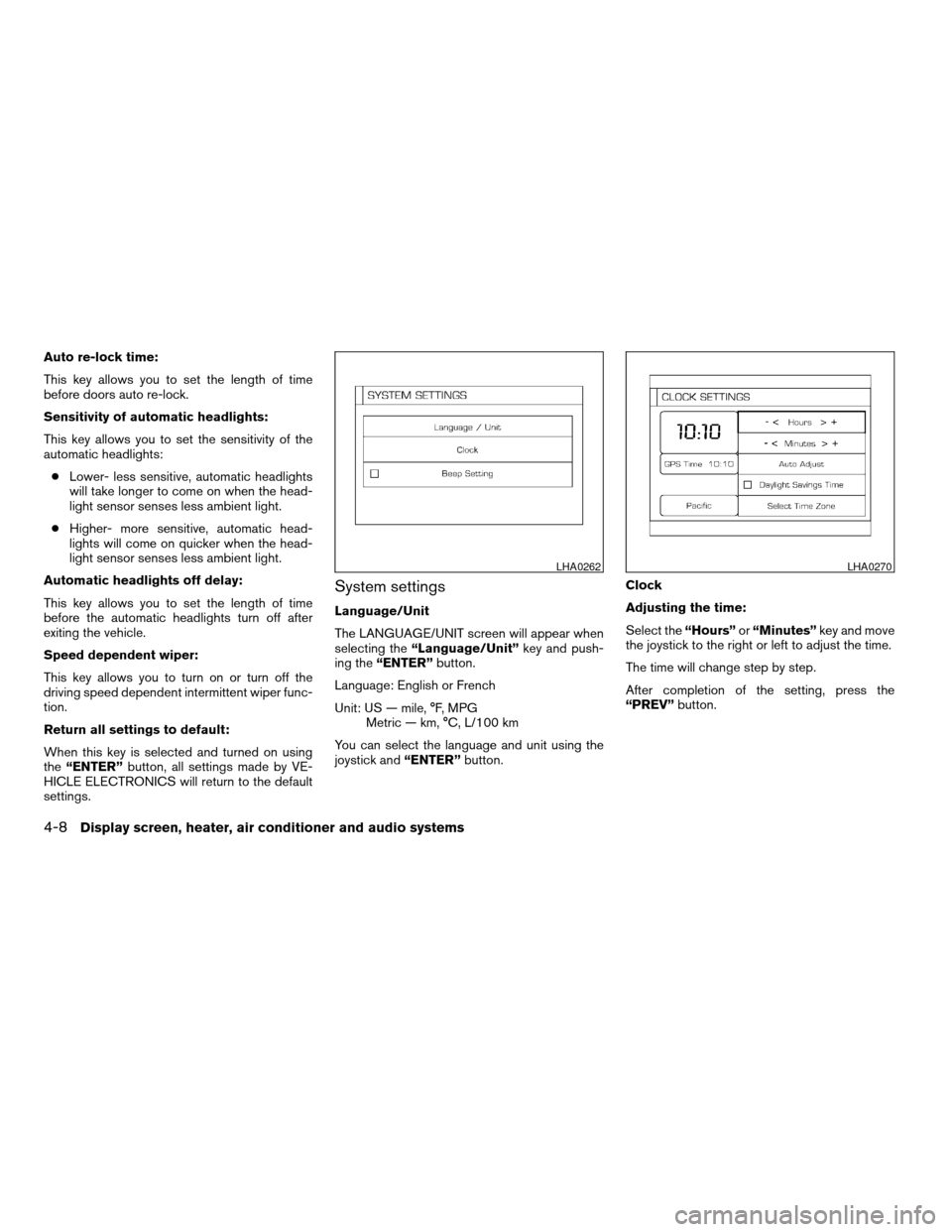
System settings
Language/Unit
The LANGUAGE/UNIT screen will appear when
selecting the “Language/Unit” key and push-
ing the “ENTER” button.
Language: English or French
Unit: US — mile, °F, MPG Metric — km, °C, L/100 km
You can select the language and unit using the
joystick and “ENTER”button. Clock
Adjusting the time:
Select the
“Hours”or“Minutes” key and move
the joystick to the right or left to adjust the time.
The time will change step by step.
After completion of the setting, press the
“PREV” button.
LHA0262LHA0270
4-8Display screen, heater, air conditioner and audio systems
ZREVIEW COPYÐ2005 Altima (l30)
Owners ManualÐUSA_English (nna)
07/09/04Ðdebbie
X
Page 150 of 304
OPERATING TIPS
cWhen the engine coolant temperature and
outside air temperature are low, the air flow
from the foot outlets may not operate for a
maximum of 150 seconds. However, this is
not a malfunction. After the coolant tempera-
ture warms up, air flow from the foot outlets
will operate normally.
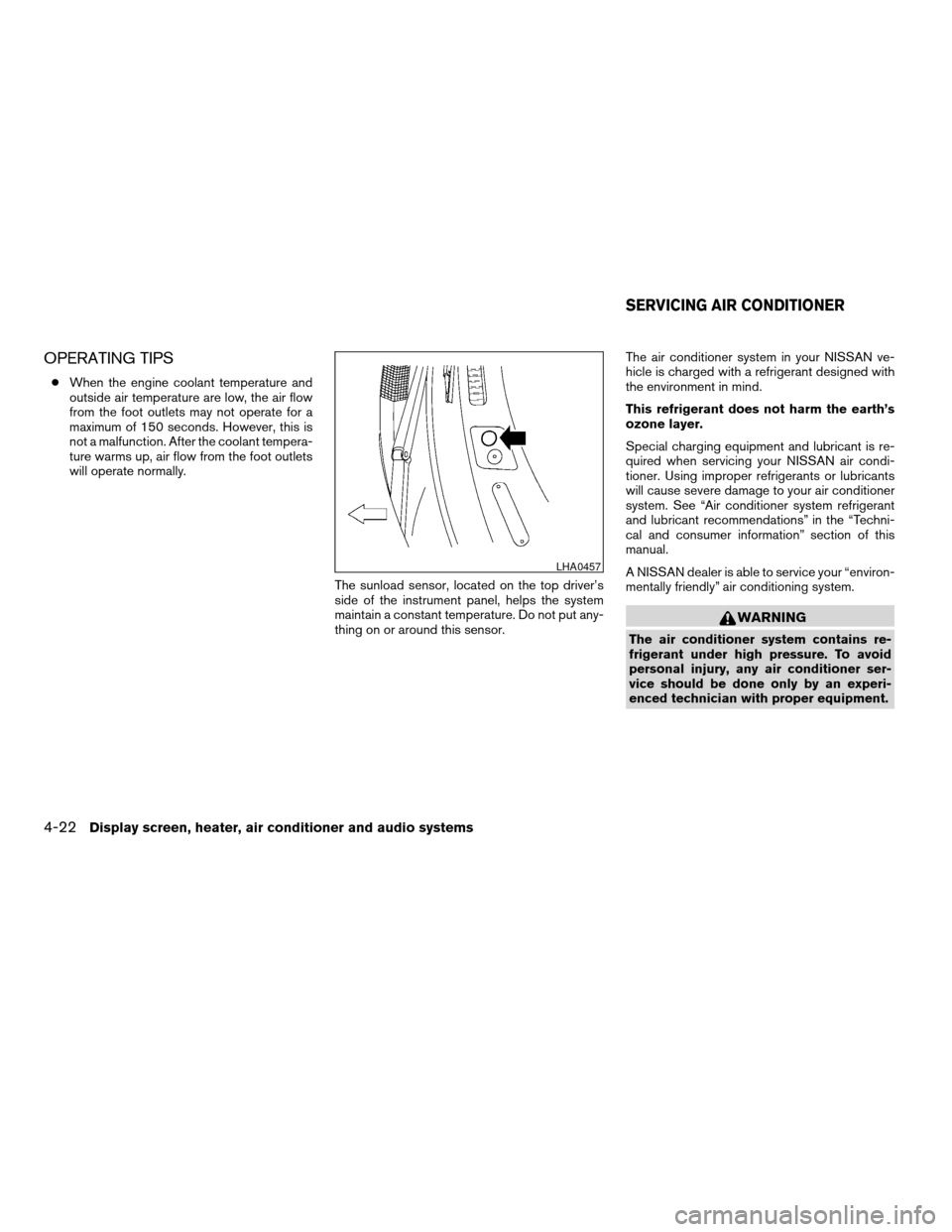
The sunload sensor, located on the top driver’s
side of the instrument panel, helps the system
maintain a constant temperature. Do not put any-
thing on or around this sensor. The air conditioner system in your NISSAN ve-
hicle is charged with a refrigerant designed with
the environment in mind.
This refrigerant does not harm the earth’s
ozone layer.
Special charging equipment and lubricant is re-
quired when servicing your NISSAN air condi-
tioner. Using improper refrigerants or lubricants
will cause severe damage to your air conditioner
system. See “Air conditioner system refrigerant
and lubricant recommendations” in the “Techni-
cal and consumer information” section of this
manual.
A NISSAN dealer is able to service your “environ-
mentally friendly” air conditioning system.
WARNING
The air conditioner system contains re-
frigerant under high pressure. To avoid
personal injury, any air conditioner ser-
vice should be done only by an experi-
enced technician with proper equipment.
LHA0457
SERVICING AIR CONDITIONER
4-22Display screen, heater, air conditioner and audio systems
ZREVIEW COPYÐ2005 Altima
(l30)
Owners ManualÐUSA_English (nna)
06/28/04Ðtbrooks
X
Page 192 of 304
heat up the brakes. Do this until the brakes return
to normal. Avoid driving the vehicle at high
speeds until the brakes function correctly.
ANTI-LOCK BRAKE SYSTEM (ABS)
(if so equipped)
The anti-lock brake system controls the brakes so
the wheels do not lock when braking abruptly or
when braking on slippery surfaces. The system
detects the rotation speed at each wheel and
varies the brake fluid pressure to prevent each
wheel from locking and sliding. By preventing
wheel lockup, the system helps the driver main-
tain steering control and helps to minimize swerv-
ing and spinning on slippery surfaces.
Using the system
Depress the brake pedal and hold it down.
WARNING
Do not pump the brake pedal. Doing so
may result in increased stopping
distances.
Normal operation
The anti-lock brake system does not operate at
speeds below3-6MPH(5-10 km/h) . (The
speeds vary according to road conditions.) When driving, the anti-lock brake system con-
trols the wheels so they will not lock when brak-
ing abruptly or when braking on a slippery road.
Thus, difficult steering and swerving of the ve-
hicle due to locked wheels is minimized. The
system detects the wheel rotation rate and elec-
tronically controls the pressure applied to each
brake. Slight vibration on the brake pedal accom-
panied by noise usually occurs while the ABS
system is operating. Such vibration and noise
encountered during abrupt braking is not a prob-
lem, but indicates that the system is functioning
properly. However, the pulsation may indicate
that road conditions are hazardous and extra care
is required while driving.
Self-test feature
The anti-lock brake system consists of electronic
sensors and hydraulic solenoids controlled by a
computer. The computer has a built-in diagnostic
feature that tests the system each time you start
the engine and move the vehicle at a low speed in
forward or reverse. When the self-test occurs,
you may hear a ‘‘clunk’’ noise and/or feel a pulsa-
tion in the brake pedal. This is normal and is not
an indication of any malfunction. If the computer
senses any malfunction, it switches the anti-lock
brake system off and turns on the ABS brake
warning light on the instrument panel. The brake
system then operates normally, but without anti-
lock assistance.If a malfunction occurs in the system, the anti-
lock function will not operate, but the standard
vehicle brake system will continue to operate
normally. The ABS brake warning light will then
come on.
If the light comes on during the self-test or while
driving, take the vehicle to a NISSAN dealer for
repair.
WARNING
c
The anti-lock brake system is a sophis-
ticated device, but it cannot prevent ac-
cidents resulting from careless or dan-
gerous driving techniques. It can help
maintain vehicle control during braking
on slippery surfaces, but remember that
the stopping distance on slippery sur-
faces will be longer than on normal
surfaces even with the anti-lock brake
system. Stopping distances may also
be longer on rough, gravel or snow cov-
ered roads, or if you are using tire
chains. Tire type and condition may also
affect braking effectiveness. Always
maintain a safe distance from the ve-
hicle in front of you. Ultimately, the re-
sponsibility for safety of self and others
rests in the hands of the driver.
5-20Starting and driving
ZREVIEW COPYÐ2005 Altima (l30)
Owners ManualÐUSA_English (nna)
06/28/04Ðtbrooks
X
Page 193 of 304
cTire type and condition of tires may also
affect braking effectiveness.
c When replacing tires, install the speci-
fied size of tires on all four wheels.
c When installing a spare tire, make sure
it is the proper size and type as speci-
fied on the tire placard. For tire placard
location information, refer to “Tire plac-
ard” in the “Technical and consumer
information” section of this manual.
c Refer to “Wheels and tires” in the
“Maintenance and do-it-yourself” sec-
tion of this manual. When accelerating on slippery surfaces the tire
may spin or slip. With the vehicle traction control
system, sensors detect these movements and
control the braking and engine output to help
improve vehicle stability while accelerating.
c When the traction control system is operat-
ing, the slip indicator in the instrument panel
blinks.
c If the slip indicator blinks, the vehicle is un-
der slippery conditions. Be sure to drive
carefully. See “Slip indicator light” and “Trac-
tion control off indicator light” in the “Instru-
ments and controls” section of this manual.
c If a malfunction occurs in the system,
the
andindicator lights
come on in the meter panel.
As long as these warning lights are on, the trac-
tion control function is canceled. The vehicle will
behave like a vehicle without the system.
WARNING
c The traction control system is designed
to help improve driving stability but
does not prevent accidents due to
abrupt steering operation at high
speeds or by careless or dangerous
driving techniques. Reduce vehicle
speed and be especially careful when
driving and cornering on slippery sur-
faces and always drive carefully.
c If brake related parts such as brake
pads, rotors and calipers are not stan-
dard equipment or are extremely dete-
riorated, the traction control system
may not operate properly and the
indicator light may come on.
c Do not modify the vehicle’s suspension.
If suspension parts such as shock ab-
sorbers, struts, springs and bushings
are not standard equipment or are ex-
tremely deteriorated, the traction con-
trol system may not operate properly
and the
indicator light may come
on.
TRACTION CONTROL SYSTEM (TCS)
(if so equipped)
Starting and driving5-21
ZREVIEW COPYÐ2005 Altima (l30)
Owners ManualÐUSA_English (nna)
06/28/04Ðtbrooks
X