clock reset NISSAN ALTIMA 2005 L31 / 3.G Owners Manual
[x] Cancel search | Manufacturer: NISSAN, Model Year: 2005, Model line: ALTIMA, Model: NISSAN ALTIMA 2005 L31 / 3.GPages: 304, PDF Size: 4.91 MB
Page 134 of 304
The “MAINTENANCE NOTICE” screen displays
each time the key is turned ON until one of the
following conditions are met:c “RESET” is selected.
c “Display Maintenance and Notification” is
set OFF.
c the maintenance interval is set again.
HOW TO USE THE “SETTING”
BUTTON
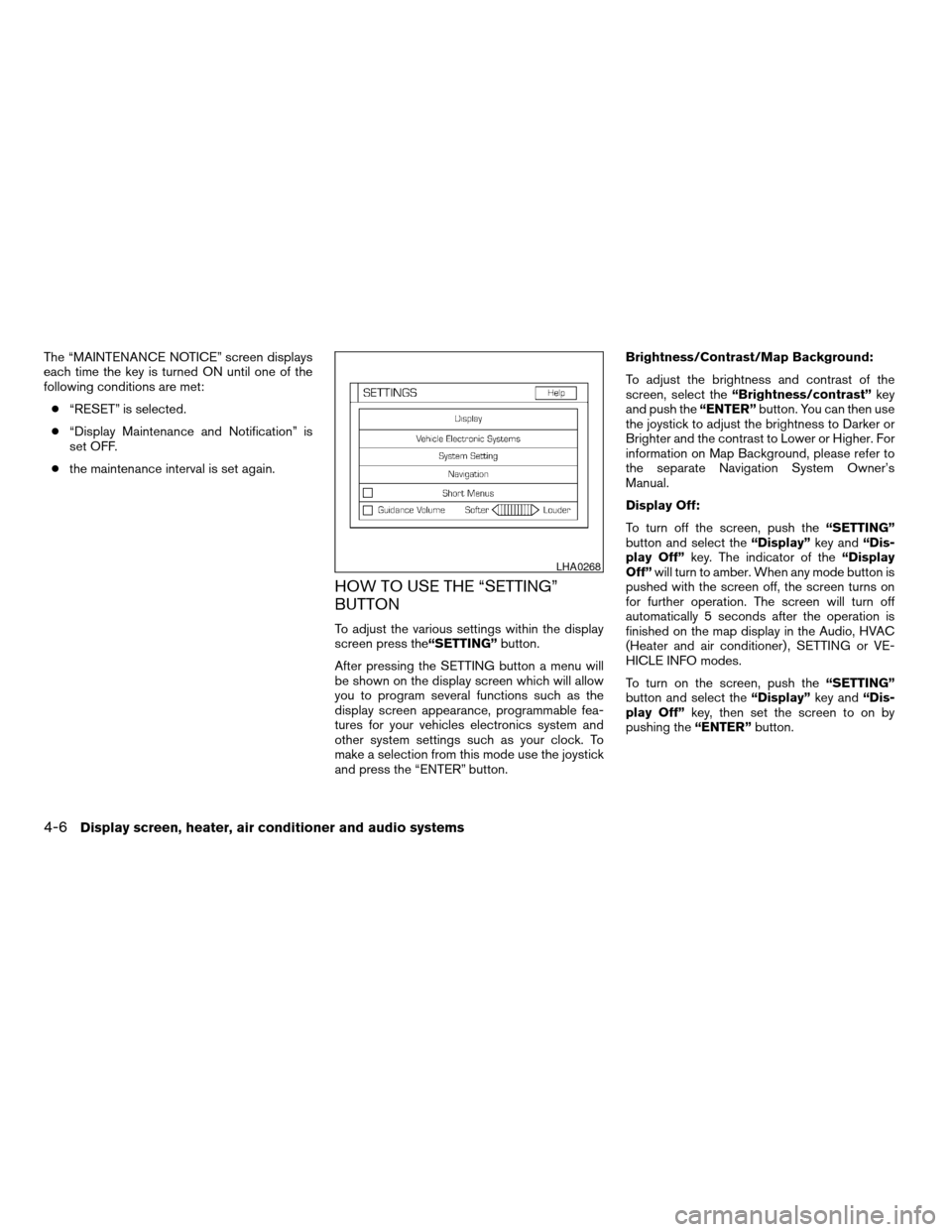
To adjust the various settings within the display
screen press the “SETTING”button.
After pressing the SETTING button a menu will
be shown on the display screen which will allow
you to program several functions such as the
display screen appearance, programmable fea-
tures for your vehicles electronics system and
other system settings such as your clock. To
make a selection from this mode use the joystick
and press the “ENTER” button. Brightness/Contrast/Map Background:
To adjust the brightness and contrast of the
screen, select the
“Brightness/contrast” key
and push the “ENTER”button. You can then use
the joystick to adjust the brightness to Darker or
Brighter and the contrast to Lower or Higher. For
information on Map Background, please refer to
the separate Navigation System Owner’s
Manual.
Display Off:
To turn off the screen, push the “SETTING”
button and select the “Display”key and“Dis-
play Off” key. The indicator of the “Display
Off” will turn to amber. When any mode button is
pushed with the screen off, the screen turns on
for further operation. The screen will turn off
automatically 5 seconds after the operation is
finished on the map display in the Audio, HVAC
(Heater and air conditioner) , SETTING or VE-
HICLE INFO modes.
To turn on the screen, push the “SETTING”
button and select the “Display”key and“Dis-
play Off” key, then set the screen to on by
pushing the “ENTER”button.
LHA0268
4-6Display screen, heater, air conditioner and audio systems
ZREVIEW COPYÐ2005 Altima (l30)
Owners ManualÐUSA_English (nna)
07/09/04Ðbetty
X
Page 137 of 304
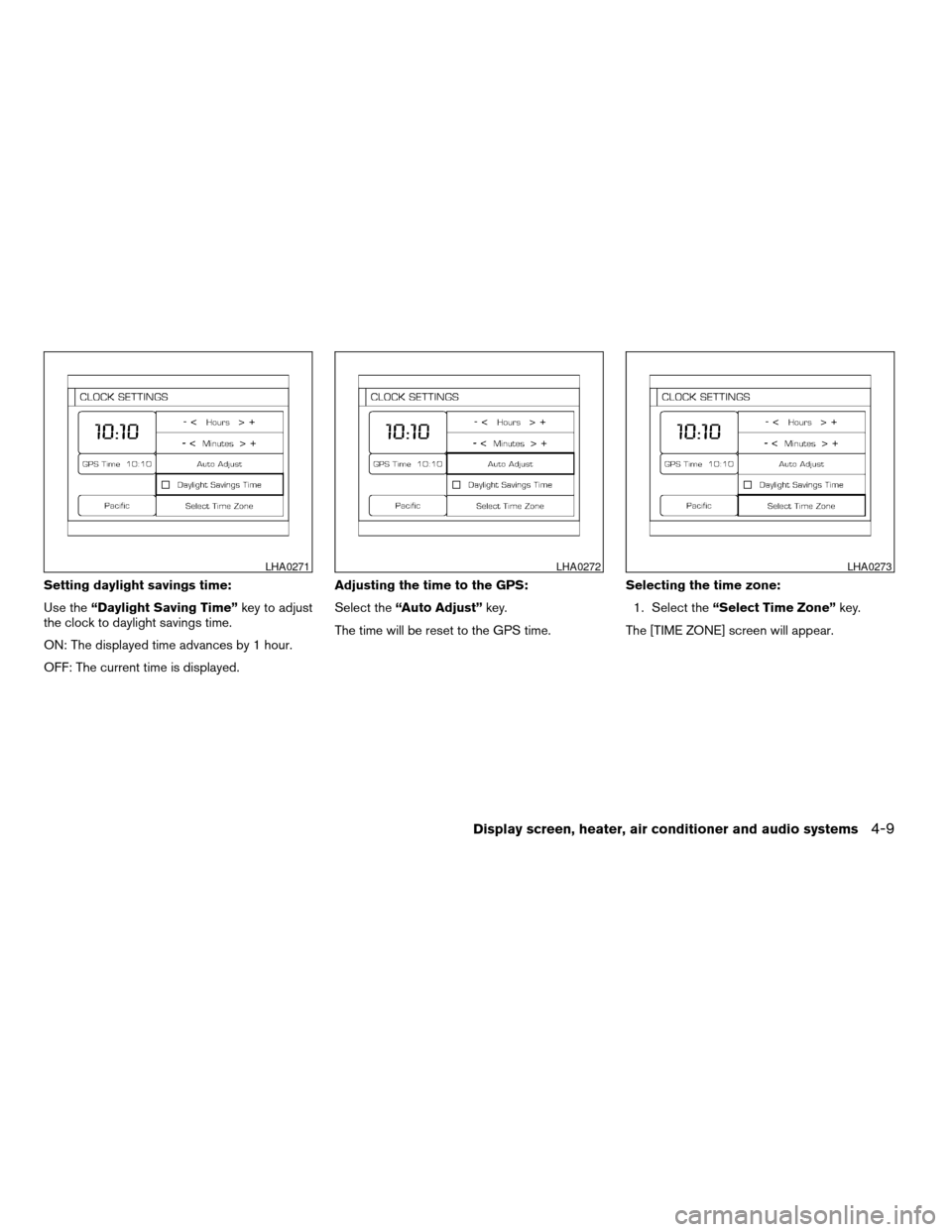
Setting daylight savings time:
Use the“Daylight Saving Time” key to adjust
the clock to daylight savings time.
ON: The displayed time advances by 1 hour.
OFF: The current time is displayed. Adjusting the time to the GPS:
Select the
“Auto Adjust” key.
The time will be reset to the GPS time. Selecting the time zone:
1. Select the “Select Time Zone” key.
The [TIME ZONE] screen will appear.
LHA0271LHA0272LHA0273
Display screen, heater, air conditioner and audio systems4-9
ZREVIEW COPYÐ2005 Altima (l30)
Owners ManualÐUSA_English (nna)
07/09/04Ðdebbie
X
Page 154 of 304
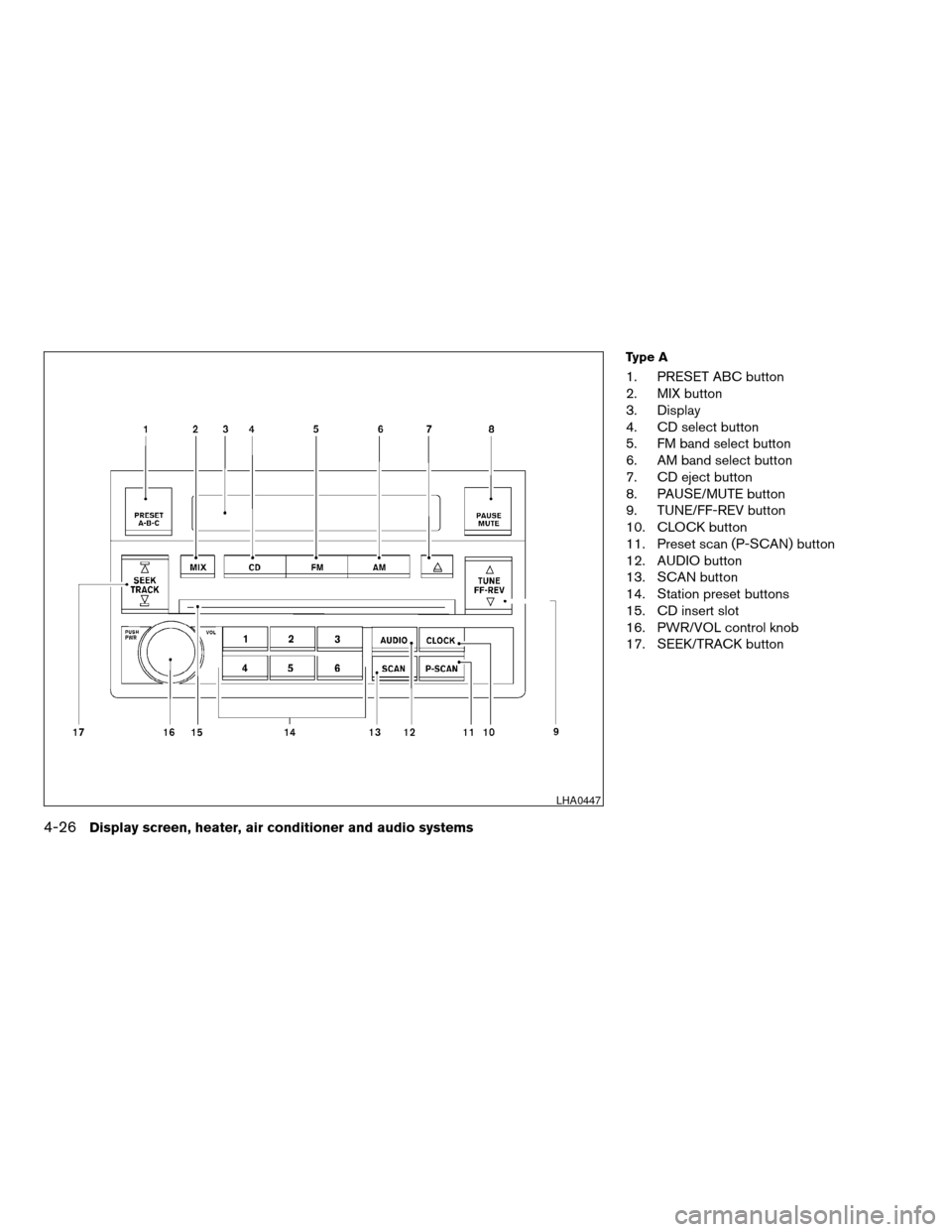
Type A
1. PRESET ABC button
2. MIX button
3. Display
4. CD select button
5. FM band select button
6. AM band select button
7. CD eject button
8. PAUSE/MUTE button
9. TUNE/FF-REV button
10. CLOCK button
11. Preset scan (P-SCAN) button
12. AUDIO button
13. SCAN button
14. Station preset buttons
15. CD insert slot
16. PWR/VOL control knob
17. SEEK/TRACK button
LHA0447
4-26Display screen, heater, air conditioner and audio systems
ZREVIEW COPYÐ2005 Altima(l30)
Owners ManualÐUSA_English (nna)
06/28/04Ðtbrooks
X
Page 155 of 304
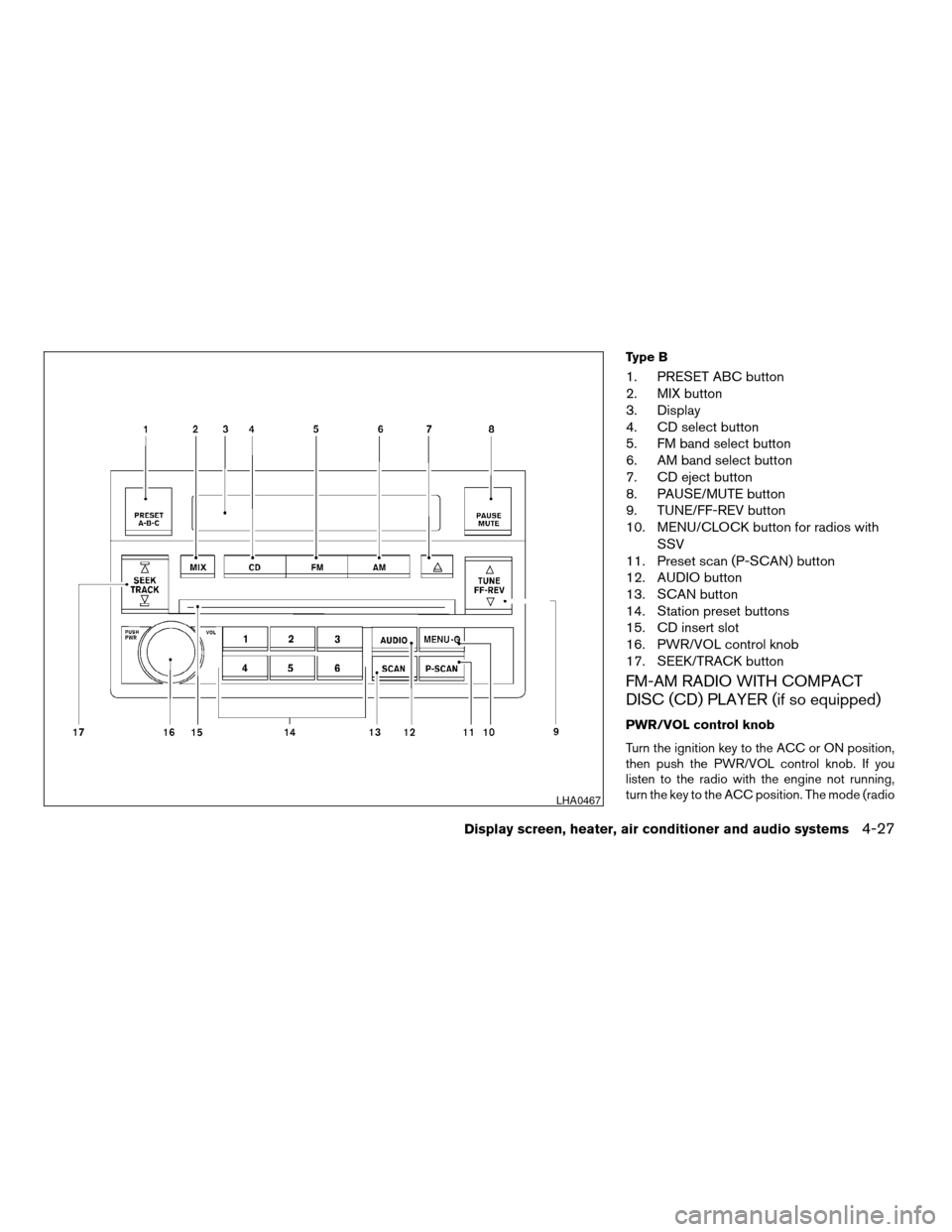
Type B
1. PRESET ABC button
2. MIX button
3. Display
4. CD select button
5. FM band select button
6. AM band select button
7. CD eject button
8. PAUSE/MUTE button
9. TUNE/FF-REV button
10. MENU/CLOCK button for radios withSSV
11. Preset scan (P-SCAN) button
12. AUDIO button
13. SCAN button
14. Station preset buttons
15. CD insert slot
16. PWR/VOL control knob
17. SEEK/TRACK button
FM-AM RADIO WITH COMPACT
DISC (CD) PLAYER (if so equipped)
PWR/VOL control knob
Turn the ignition key to the ACC or ON position,
then push the PWR/VOL control knob. If you
listen to the radio with the engine not running,
turn the key to the ACC position. The mode (radio
LHA0467
Display screen, heater, air conditioner and audio systems4-27
ZREVIEW COPYÐ2005 Altima (l30)
Owners ManualÐUSA_English (nna)
06/28/04Ðtbrooks
X
Page 159 of 304
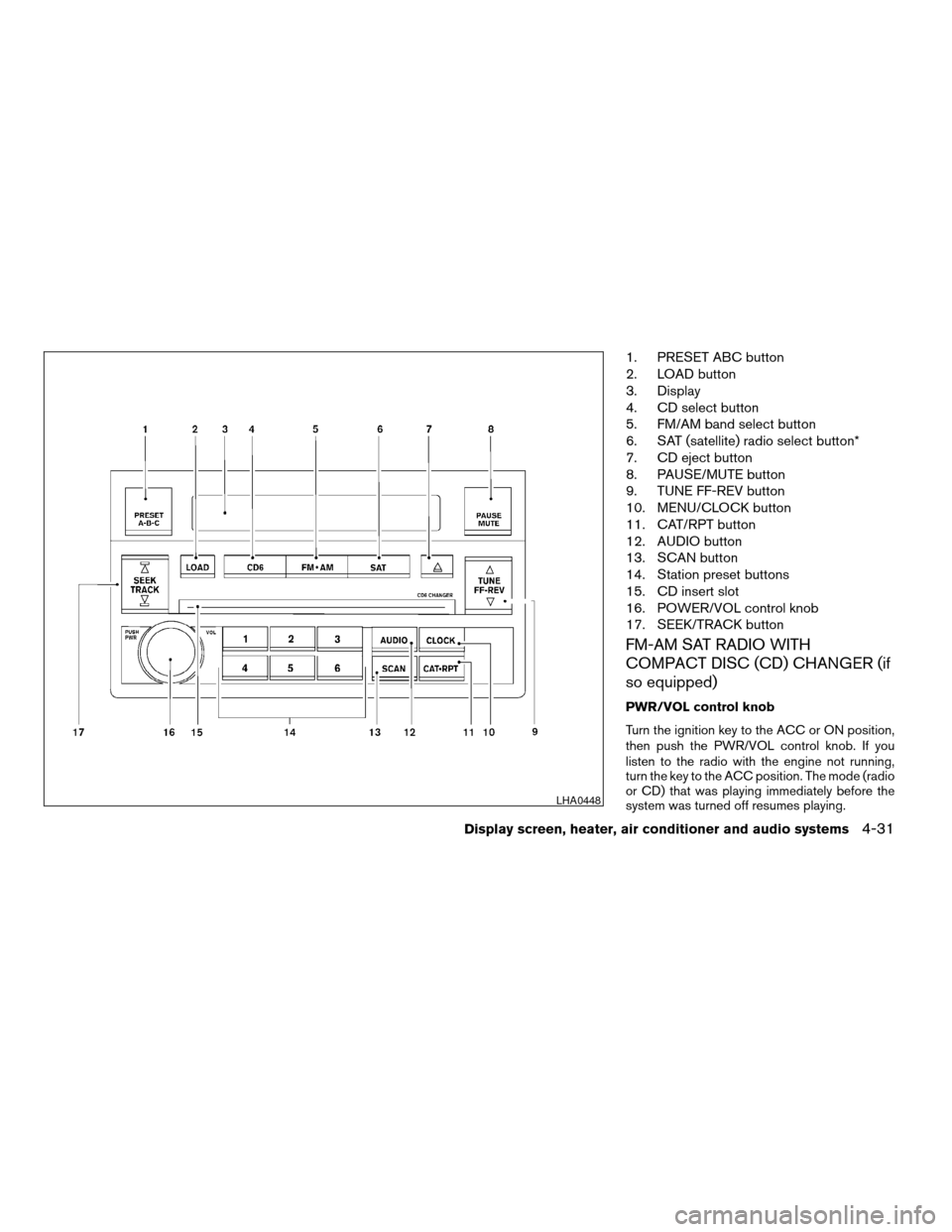
1. PRESET ABC button
2. LOAD button
3. Display
4. CD select button
5. FM/AM band select button
6. SAT (satellite) radio select button*
7. CD eject button
8. PAUSE/MUTE button
9. TUNE FF-REV button
10. MENU/CLOCK button
11. CAT/RPT button
12. AUDIO button
13. SCAN button
14. Station preset buttons
15. CD insert slot
16. POWER/VOL control knob
17. SEEK/TRACK button
FM-AM SAT RADIO WITH
COMPACT DISC (CD) CHANGER (if
so equipped)
PWR/VOL control knob
Turn the ignition key to the ACC or ON position,
then push the PWR/VOL control knob. If you
listen to the radio with the engine not running,
turn the key to the ACC position. The mode (radio
or CD) that was playing immediately before the
system was turned off resumes playing.
LHA0448
Display screen, heater, air conditioner and audio systems4-31
ZREVIEW COPYÐ2005 Altima(l30)
Owners ManualÐUSA_English (nna)
06/28/04Ðtbrooks
X