set NISSAN ALTIMA 2015 L33 / 5.G Quick Reference Guide
[x] Cancel search | Manufacturer: NISSAN, Model Year: 2015, Model line: ALTIMA, Model: NISSAN ALTIMA 2015 L33 / 5.GPages: 28, PDF Size: 2.52 MB
Page 2 of 28
*See your Owner’s Manual for information.
9
17
1
2
4
4
5
192021
22
23
10
18
16
11
6
7
8
Behind
steering wheel
Behind
steering wheel
Behind
steering wheel
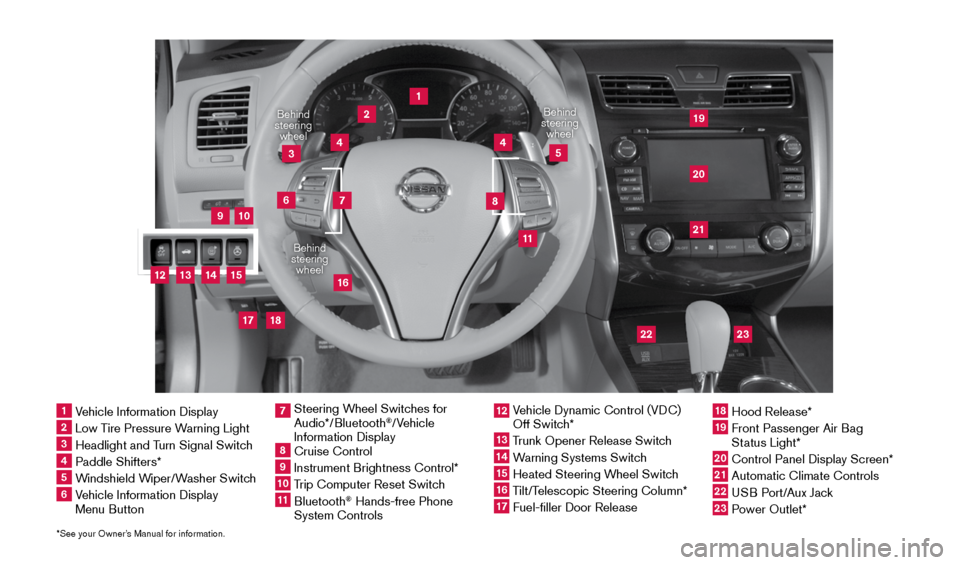
1 Vehicle Information Display2 Low Tire Pressure Warning Light3 Headlight and Turn Signal Switch4 Paddle Shifters*5 Windshield Wiper/Washer Switch6 Vehicle Information Display
Menu Button
Steering Wheel Switches for
7 Audio*/Bluetooth
®/Vehicle
Information Display
8 Cruise Control9 Instrument Brightness Control*10 Trip Computer Reset Switch11 Bluetooth
® Hands-free Phone
System Controls
12 Vehicle Dynamic Control (VDC)
Off Switch*13 Trunk Opener Release Switch14 Warning Systems Switch15 Heated Steering Wheel Switch16 Tilt/Telescopic Steering Column*17 Fuel-filler Door Release
18 Hood Release*19 Front Passenger Air Bag
Status Light*20 Control Panel Display Screen*21 Automatic Climate Controls22 USB Port/Aux Jack23 Power Outlet*
3
12
13
15
14
1911097_15d_AltimaSedan_QRG_011915.indd 31/19/15 4:24 PM
Page 3 of 28
 ........................................................................\
......................................... 2
RearView Monitor with Moving")
NEW SYSTEM FEATURES
Text Messaging (if so equipped) ........................................................................\
......................................... 2
RearView Monitor with Moving Object Detection (MOD) (if so equipped) ...................................... 2
Blind Spot Warning (BSW) System (if so equipped) ........................................................................\
.... 3
Lane Departure Warning (LDW) (if so equipped) ........................................................................\
........... 3
Heated Steering Wheel (if so equipped) ........................................................................\
.......................... 4
SiriusXM Travel Link and SiriusXM Traffic (if so equipped) .................................................................. 4
ESSENTIAL INFORMATION
Tire Pressure Monitoring System (TPMS) with Easy Fill Tire Alert .....................................................5
Loose Fuel Cap ........................................................................\
....................................................................... 6
Fuel-filler Door ........................................................................\
......................................................................... 6
Clock Set/Adjustment ........................................................................\
............................................................ 7
FIRST DRIVE FEATURES
NISSAN Intelligent Key® System ........................................................................\
........................................8
Trunk Lid Release ........................................................................\
................................................................. 10
Power Seat Adjustments (if so equipped) ........................................................................\
..................... 10
Outside Mirror Control Switch ........................................................................\
........................................ 10
Starting/Stopping the Engine ........................................................................\
........................................... 11
Headlight Control Switch ........................................................................\
................................................... 11
Windshield Wiper and Washer Switch ........................................................................\
........................... 12
Automatic Climate Controls (if so equipped) ........................................................................\
................ 13
FM/AM/SiriusXM
® Satellite Radio with CD Player (if so equipped) ............................................... 14
USB (Universal Serial Bus) Connection Port/Aux Jack and iPod® Interface (if so equipped) ... 15
Cruise Control (if so equipped) ........................................................................\
........................................ 16
Tilt and Telescopic Steering Wheel ........................................................................\
................................. 16
SYSTEM GUIDE
Vehicle Information Display ........................................................................\
................................................ 17
Vehicle Information Display Trip Computer Reset ........................................................................\
........ 18
NissanConnect
SM Mobile Apps (if so equipped) ........................................................................\
.......... 18
Bluetooth® Hands-free Phone System ........................................................................\
........................... 18
• System Operating Tips ........................................................................\
............................................... 18
Bluetooth® System without Navigation (if so equipped) .................................................................... 19
Bluetooth® System with Navigation (if so equipped) ........................................................................\
.. 21
Navigation System (if so equipped) ........................................................................\
................................. 23
HomeLink
® Universal Transceiver (if so equipped) ........................................................................\
...... 24
TAB LE OF CONTE NTS
Please see your Owner’s Manual for important safety information and system operation limitations.
• A cellular telephone should not be used for any purpose while driving
so full attention may be given to vehicle operation.
• Always wear your seat belt.
• Supplemental air bags do not replace proper seat belt usage.
• Children 12 and under should always ride in the rear seat properly secured
in child restraints or seat belts according to their age and weight.
• Do not drink and drive.
For more information, refer to the “Safety –– Seats, seat belts and supplemental restraint system (section 1)”\
,
the “Monitor, climate, audio, phone and voice recognition systems (section 4)” and the “Starting and driving
(section 5)” of your Owner’s Manual.
Additional information about your vehicle is also available in your Owne\
r’s Manual, Navigation System
Owner’s Manual and at www.nissanusa.com.
1911097_15d_AltimaSedan_QRG_011915.indd 41/19/15 4:24 PM
Page 5 of 28
3
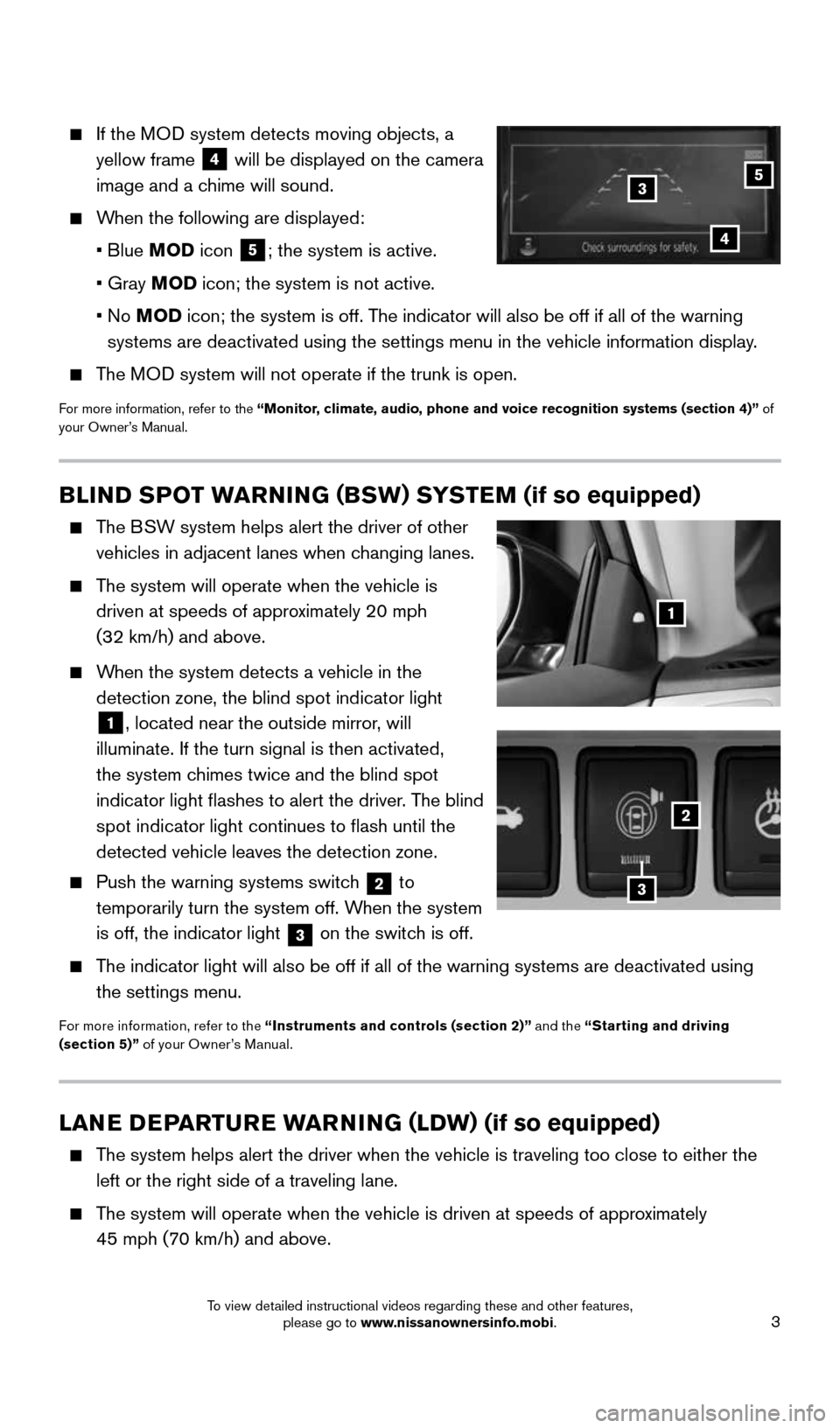
If the MOD system detects moving objects, a
yellow frame
4 will be displayed on the camera
image and a chime will sound.
When the following are displayed:
• Blue MOD icon
5; the system is active.
• Gray MOD icon; the system is not active.
• No MOD icon; the system is off. The indicator will also be off if all of the warning
systems are deactivated using the settings menu in the vehicle informati\
on display.
The MOD system will not operate if the trunk is open.
For more information, refer to the “Monitor, climate, audio, phone and voice recognition systems (section 4)” of
your Owner’s Manual.
35
4
BLIND SPOT WARNING (BSW) SYSTEM (if so equipped)
The BSW system helps alert the driver of other
vehicles in adjacent lanes when changing lanes.
The system will operate when the vehicle is
driven at speeds of approximately 20 mph
(32 km/h) and above.
When the system detects a vehicle in the
detection zone, the blind spot indicator light
1, located near the outside mirror, will
illuminate. If the turn signal is then activated,
the system chimes twice and the blind spot
indicator light flashes to alert the driver. The blind
spot indicator light continues to flash until the
detected vehicle leaves the detection zone.
Push the warning systems switch
2 to
temporarily turn the system off. When the system
is off, the indicator light
3 on the switch is off.
The indicator light will also be off if all of the warning systems are de\
activated using
the settings menu.
For more information, refer to the “Instruments and controls (section 2)” and the “Starting and driving
(section 5)” of your Owner’s Manual.
LANE DEPARTURE WARNING (LDW) (if so equipped)
The system helps alert the driver when the vehicle is traveling too close\
to either the
left or the right side of a traveling lane.
The system will operate when the vehicle is driven at speeds of approximately
45 mph (70 km/h) and above.
1
2
3
1911097_15d_AltimaSedan_QRG_011915.indd 31/19/15 4:24 PM
To view detailed instructional videos regarding these and other features, please go to www.nissanownersinfo.mobi.
Page 6 of 28
4
NEW SYSTEM FEATURES
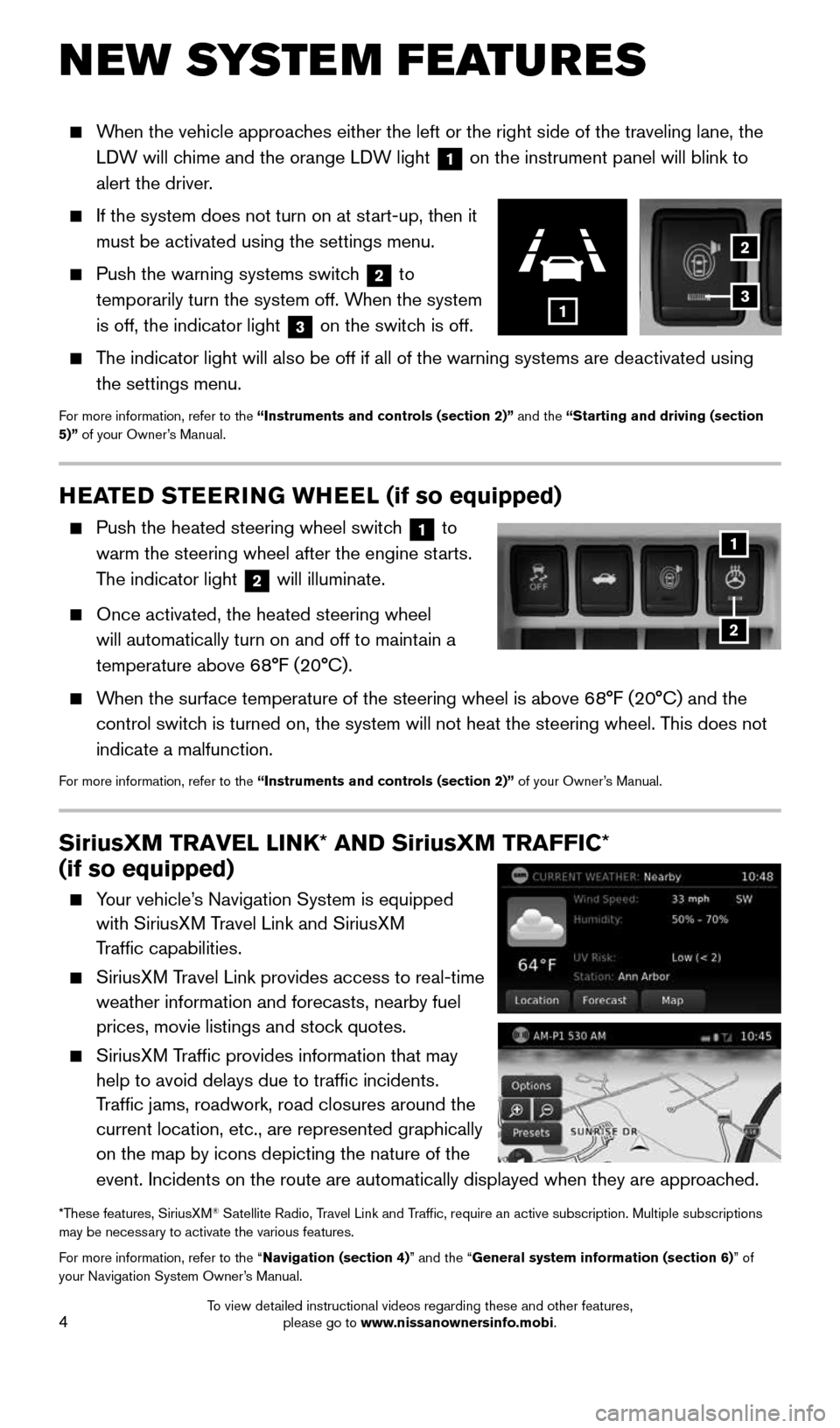
When the vehicle approaches either the left or the right side of the traveling lane, the
LDW will chime and the orange LDW light
1 on the instrument panel will blink to
alert the driver.
If the system does not turn on at start-up, then it
must be activated using the settings menu.
Push the warning systems switch
2 to
temporarily turn the system off. When the system
is off, the indicator light
3 on the switch is off.
The indicator light will also be off if all of the warning systems are de\
activated using
the settings menu.
For more information, refer to the “Instruments and controls (section 2)” and the “Starting and driving (section
5)” of your Owner’s Manual.
2
3
SiriusXM TRAVEL LINK* AND SiriusXM TRAFFIC*
(if so equipped)
Your vehicle’s Navigation System is equipped
with SiriusXM Travel Link and SiriusXM
Traffic capabilities.
SiriusXM Travel Link provides access to real-time
weather information and forecasts, nearby fuel
prices, movie listings and stock quotes.
SiriusXM Traffic provides information that may
help to avoid delays due to traffic incidents.
Traffic jams, roadwork, road closures around the
current location, etc., are represented graphically
on the map by icons depicting the nature of the
event. Incidents on the route are automatically displayed when they are \
approached.
*These features, SiriusXM® Satellite Radio, Travel Link and Traffic, require an active subscription. Multiple subscriptions
may be necessary to activate the various features.
For more information, refer to the “Navigation (section 4)” and the “General system information (section 6)” of
your Navigation System Owner’s Manual.
1
HEATED STEERING WHEEL (if so equipped)
Push the heated steering wheel switch 1 to
warm the steering wheel after the engine starts.
The indicator light
2 will illuminate.
Once activated, the heated steering wheel
will automatically turn on and off to maintain a
temperature above 68°F (20°C).
When the surface temperature of the steering wheel is above 68°F (20°C) and the
control switch is turned on, the system will not heat the steering wheel. This does not
indicate a malfunction.
For more information, refer to the “Instruments and controls (section 2)” of your Owner’s Manual.
1
2
1911097_15d_AltimaSedan_QRG_011915.indd 41/19/15 4:24 PM
To view detailed instructional videos regarding these and other features, please go to www.nissanownersinfo.mobi.
Page 8 of 28
6
LOOSE FUEL CAP
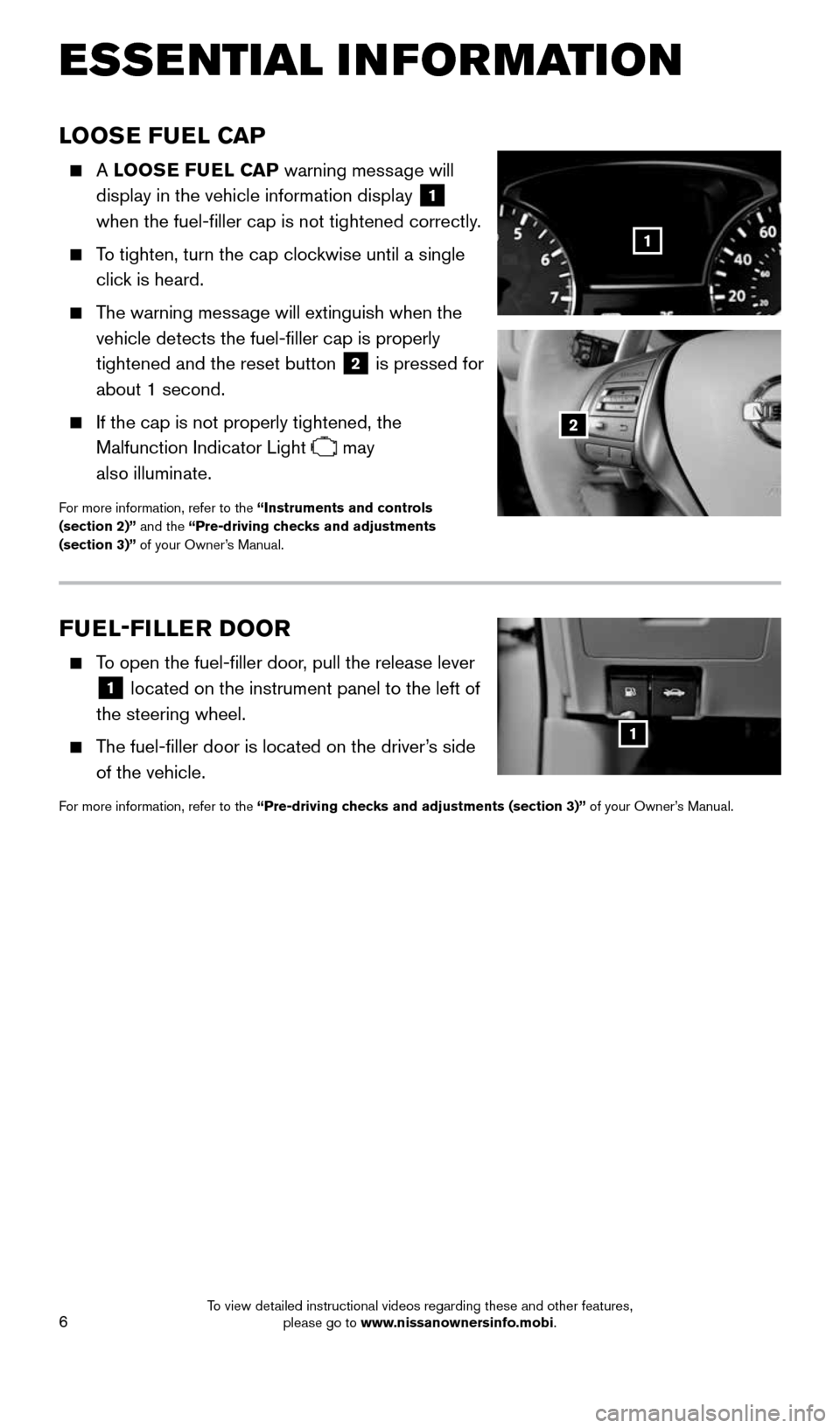
A LOOSE FUEL CAP warning message will
display in the vehicle information display
1
when the fuel-filler cap is not tightened correctly.
To tighten, turn the cap clockwise until a single
click is heard.
The warning message will extinguish when the
vehicle detects the fuel-filler cap is properly
tightened and the reset button
2 is pressed for
about 1 second.
If the cap is not properly tightened, the
Malfunction Indicator Light
may
also illuminate.
For more information, refer to the “Instruments and controls
(section 2)” and the “Pre-driving checks and adjustments
(section 3)” of your Owner’s Manual.
2
1
ESSE NTIAL I N FOR MATION
FUEL-FILLER DOOR
To open the fuel-filler door, pull the release lever
1 located on the instrument panel to the left of
the steering wheel.
The fuel-filler door is located on the driver’s side
of the vehicle.
For more information, refer to the “Pre-driving checks and adjustments (section 3)” of your Owner’s Manual.
1
1911097_15d_AltimaSedan_QRG_011915.indd 61/19/15 4:25 PM
To view detailed instructional videos regarding these and other features, please go to www.nissanownersinfo.mobi.
Page 9 of 28
7
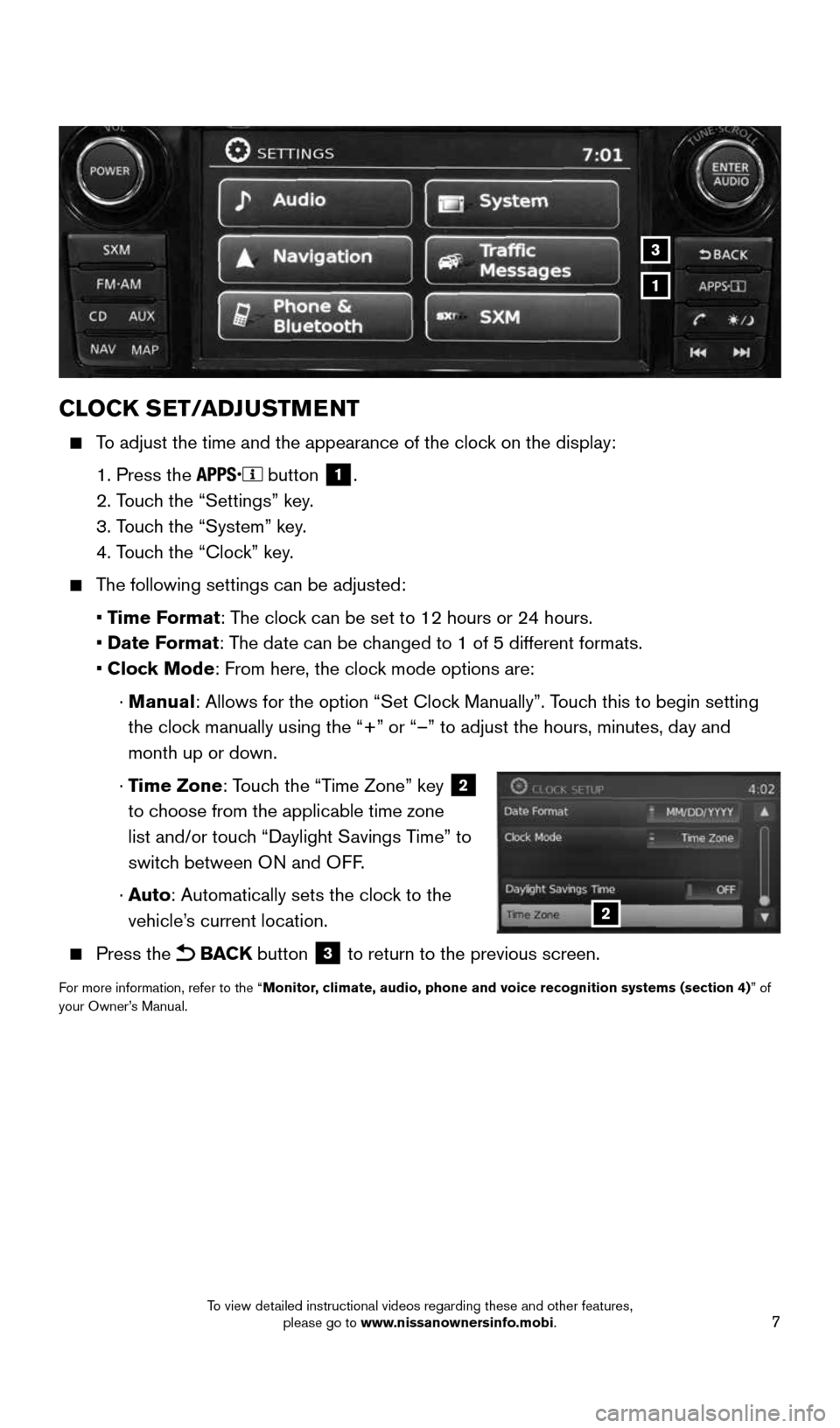
CLOCK SET/ADJUSTMENT
To adjust the time and the appearance of the clock on the display:
1. Press the
button 1.
2. Touch the “Settings” key.
3. Touch the “System” key.
4. Touch the “Clock” key.
The following settings can be adjusted:
• Time Format: The clock can be set to 12 hours or 24 hours.
• Date Format: The date can be changed to 1 of 5 different formats.
• Clock Mode: From here, the clock mode options are:
· Manual: Allows for the option “Set Clock Manually”. Touch this to begin setting
the clock manually using the “+” or “–” to adjust the hours, minu\
tes, day and
month up or down.
· Time Zone: Touch the “Time Zone” key
2
to choose from the applicable time zone
list and/or touch “Daylight Savings Time” to
switch between ON and OFF.
· Auto: Automatically sets the clock to the
vehicle’s current location.
Press the BACK button 3 to return to the previous screen.
For more information, refer to the “Monitor, climate, audio, phone and voice recognition systems (section 4) ” of
your Owner’s Manual.
2
1
3
1911097_15d_AltimaSedan_QRG_011915.indd 71/19/15 4:25 PM
To view detailed instructional videos regarding these and other features, please go to www.nissanownersinfo.mobi.
Page 12 of 28
10
FIRST DRIVE FEATURES
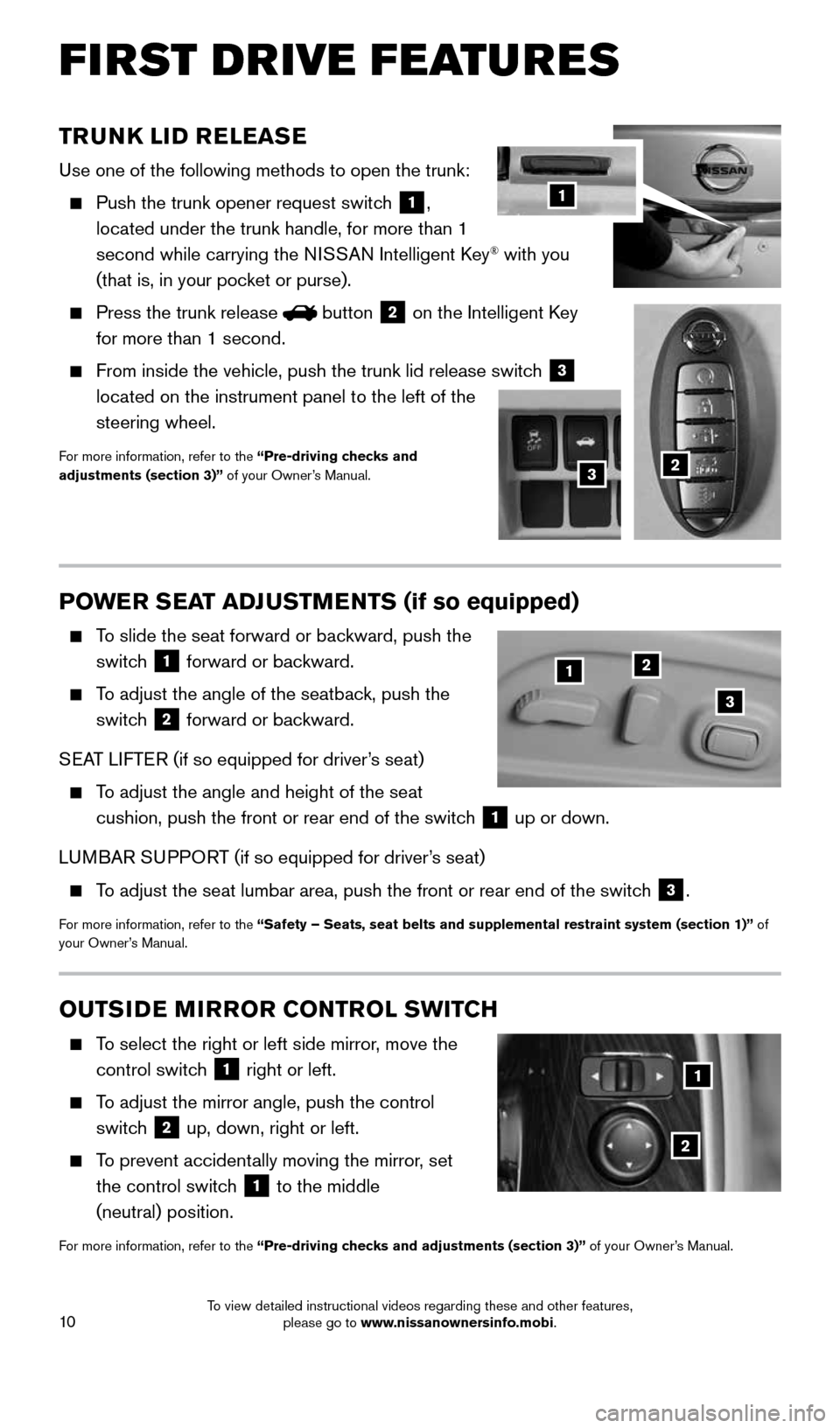
TRUNK LID RELEASE
Use one of the following methods to open the trunk:
Push the trunk opener request switch
1,
located under the trunk handle, for more than 1
second while carrying the NISSAN Intelligent Key
® with you
(that is, in your pocket or purse).
Press the trunk release button
2 on the Intelligent Key
for more than 1 second.
From inside the vehicle, push the trunk lid release switch
3
located on the instrument panel to the left of the
steering wheel.
For more information, refer to the “Pre-driving checks and
adjustments (section 3)” of your Owner’s Manual.
1
23
POWER SEAT ADJUSTMENTS (if so equipped)
To slide the seat forward or backward, push the
switch
1 forward or backward.
To adjust the angle of the seatback, push the
switch
2 forward or backward.
SEAT LIFTER (if so equipped for driver’s seat)
To adjust the angle and height of the seat
cushion, push the front or rear end of the switch
1 up or down.
LUMBAR SUPPORT (if so equipped for driver’s seat)
To adjust the seat lumbar area, push the front or rear end of the switch 3.
For more information, refer to the “Safety – Seats, seat belts and supplemental restraint system (se\
ction 1)” of
your Owner’s Manual.
12
3
OUTSIDE MIRROR CONTROL SWITCH
To select the right or left side mirror, move the
control switch
1 right or left.
To adjust the mirror angle, push the control
switch
2 up, down, right or left.
To prevent accidentally moving the mirror,
set
the control switch
1 to the middle
(neutral) position.
For more information, refer to the “Pre-driving checks and adjustments (section 3)” of your Owner’s Manual.
2
1
1911097_15d_AltimaSedan_QRG_011915.indd 101/19/15 4:25 PM
To view detailed instructional videos regarding these and other features, please go to www.nissanownersinfo.mobi.
Page 15 of 28
13
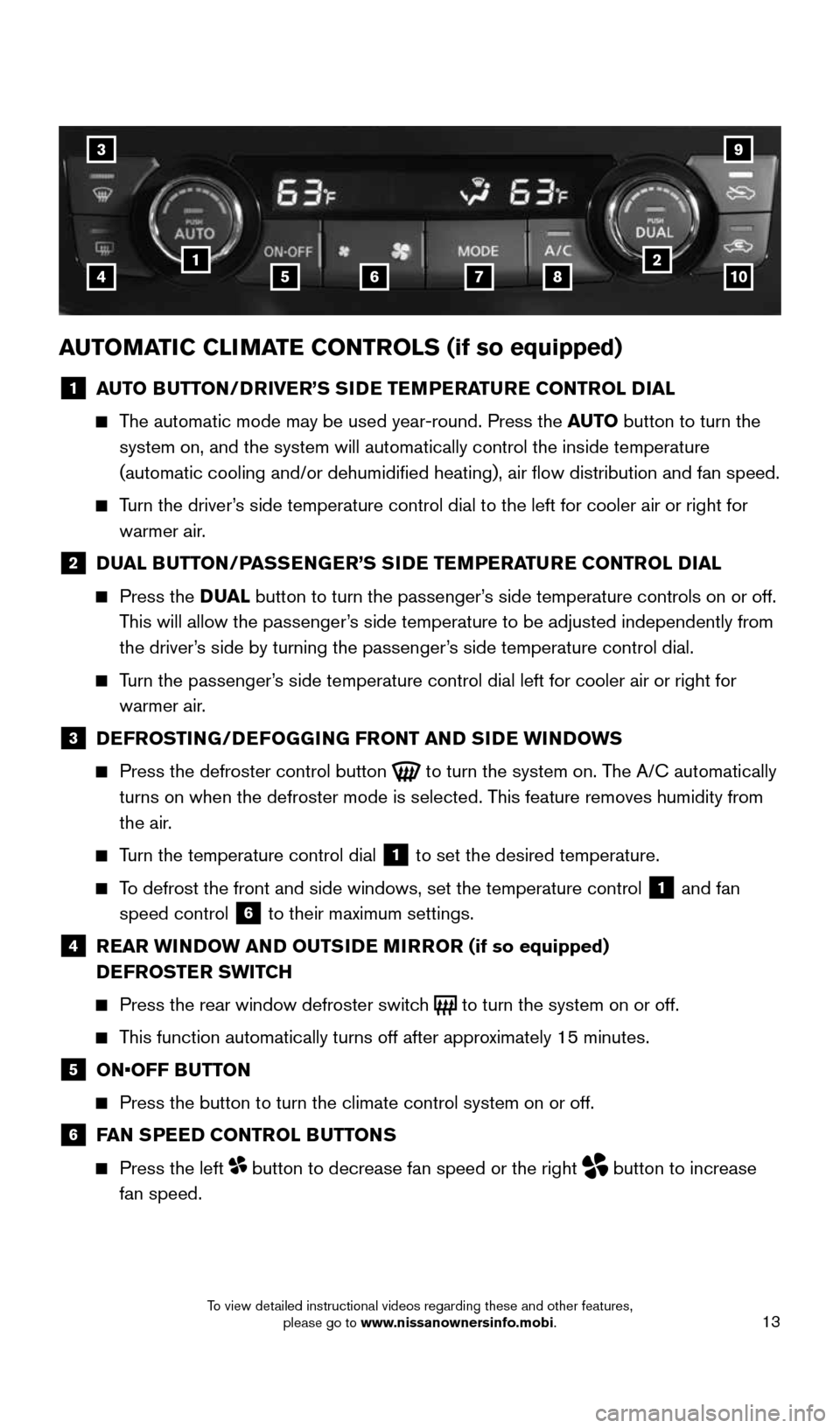
AUTOMATIC CLIMATE CONTROLS (if so equipped)
1 AUTO BUTTON/DRIVER’S SIDE TEMPERATURE CONTROL DIAL
The automatic mode may be used year-round. Press the AUTO button to turn the
system on, and the system will automatically control the inside temperat\
ure
(automatic cooling and/or dehumidified heating), air flow distribu\
tion and fan speed.
Turn the driver’s side temperature control dial to the left for cooler air or right for \
warmer air.
2 DUAL BUTTON/PASSENGER’S SIDE TEMPERATURE CONTROL DIAL
Press the D UAL button to turn the passenger’s side temperature controls on or off.
This will allow the passenger’s side temperature to be adjusted independently from
the driver’s side by turning the passenger’s side temperature control dial.
Turn the passenger’s side temperature control dial left for cooler air or right for
warmer air.
3 DEFROSTING/DEFOGGING FRONT AND SIDE WINDOWS
Press the defroster control button
to turn the system on. The A/C automatically
turns on when the defroster mode is selected. This feature removes humidity from
the air.
Turn the temperature control dial 1 to set the desired temperature.
To defrost the front and side windows, set the temperature control 1 and fan
speed control 6 to their maximum settings.
4
REAR WINDOW AND OUTSIDE MIRROR (if so equipped)
DEFROSTER SWITCH
Press the rear window defroster switch
to turn the system on or off.
This function automatically turns off after approximately 15 minutes.
5 ON•OFF BUTTON
Press the button to turn the climate control system on or off.
6 FAN SPEED CONTROL BUTTONS
Press the left button to decrease fan speed or the right
button to increase
fan speed.
3
415678210
9
1911097_15d_AltimaSedan_QRG_011915.indd 131/19/15 4:25 PM
To view detailed instructional videos regarding these and other features, please go to www.nissanownersinfo.mobi.
Page 17 of 28
15
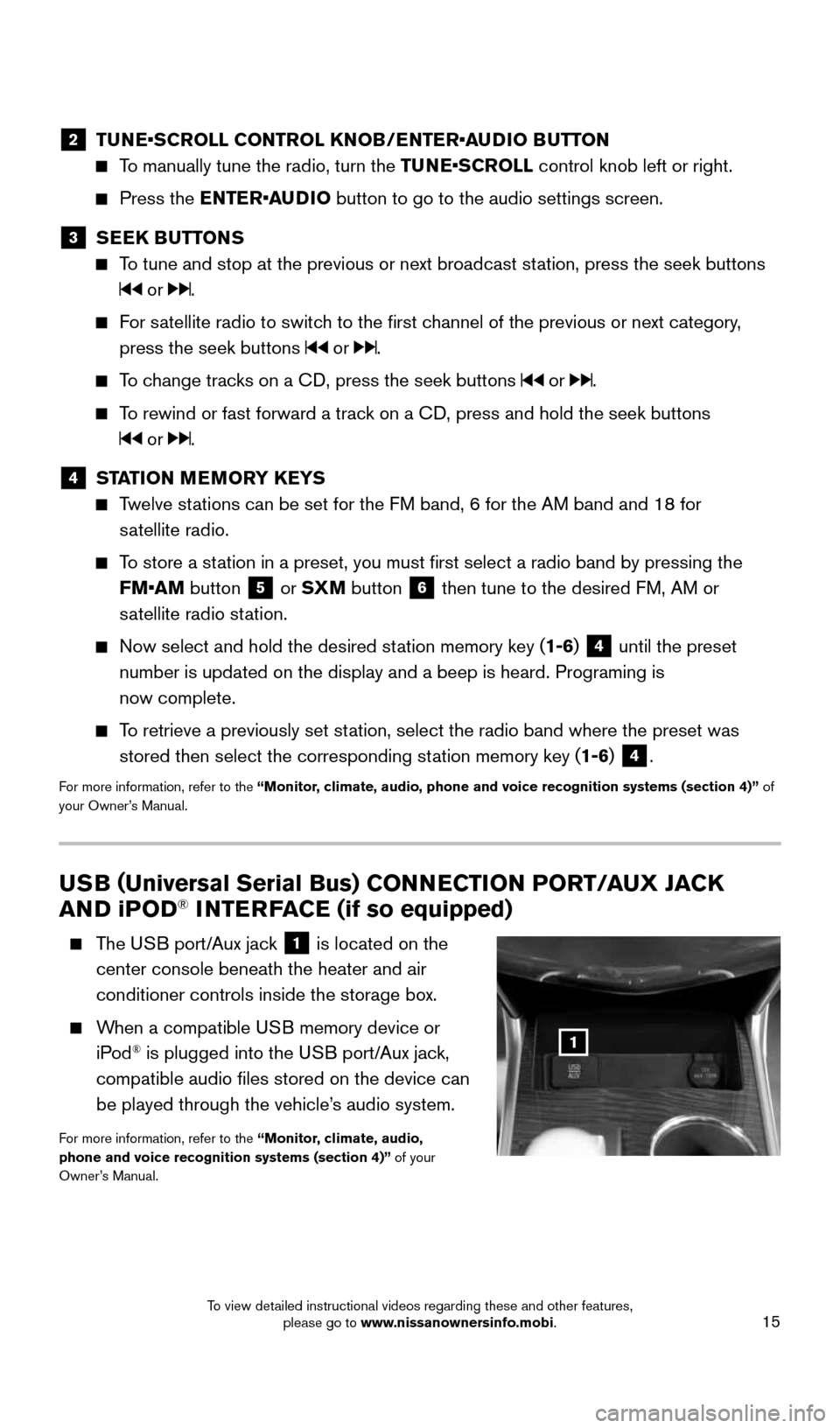
USB (Universal Serial Bus) CONNECTION PORT/AUX JACK
AND i POD® INTERFACE (if so equipped)
The USB port/Aux jack 1 is located on the
center console beneath the heater and air
conditioner controls inside the storage box.
When a compatible USB memory device or
iPod® is plugged into the USB port/Aux jack,
compatible audio files stored on the device can
be played through the vehicle’s audio system.
For more information, refer to the “Monitor, climate, audio,
phone and voice recognition systems (section 4)” of your
Owner’s Manual.
1
2 TUNE•SCROLL CONTROL KNOB/ENTER•AUDIO BUTTON
To manually tune the radio, turn the TUNE•SCROLL control knob left or right.
Press the ENTER•AUDIO button to go to the audio settings screen.
3 SEEK BUTTONS
To tune and stop at the previous or next broadcast station, press the seek buttons
or .
For satellite radio to switch to the first channel of the previous or next category,
press the seek buttons
or .
To change tracks on a CD, press the seek buttons or .
To rewind or fast forward a track on a CD, press and hold the seek buttons
or .
4 STATION MEMORY KEYS
Twelve stations can be set for the FM band, 6 for the AM band and 18 for
satellite radio.
To store a station in a preset, you must first select a radio band by pressing the \
FM•AM button
5 or SXM button 6 then tune to the desired FM, AM or
satellite radio station.
Now select and hold the desired station memory key (1-6) 4 until the preset
number is updated on the display and a beep is heard. Programing is
now complete.
To retrieve a previously set station, select the radio band where the preset was
stored then select the corresponding station memory key (1-6)
4.
For more information, refer to the “Monitor, climate, audio, phone and voice recognition systems (section 4)” \
of
your Owner’s Manual.
1911097_15d_AltimaSedan_QRG_011915.indd 151/19/15 4:25 PM
To view detailed instructional videos regarding these and other features, please go to www.nissanownersinfo.mobi.
Page 18 of 28
16
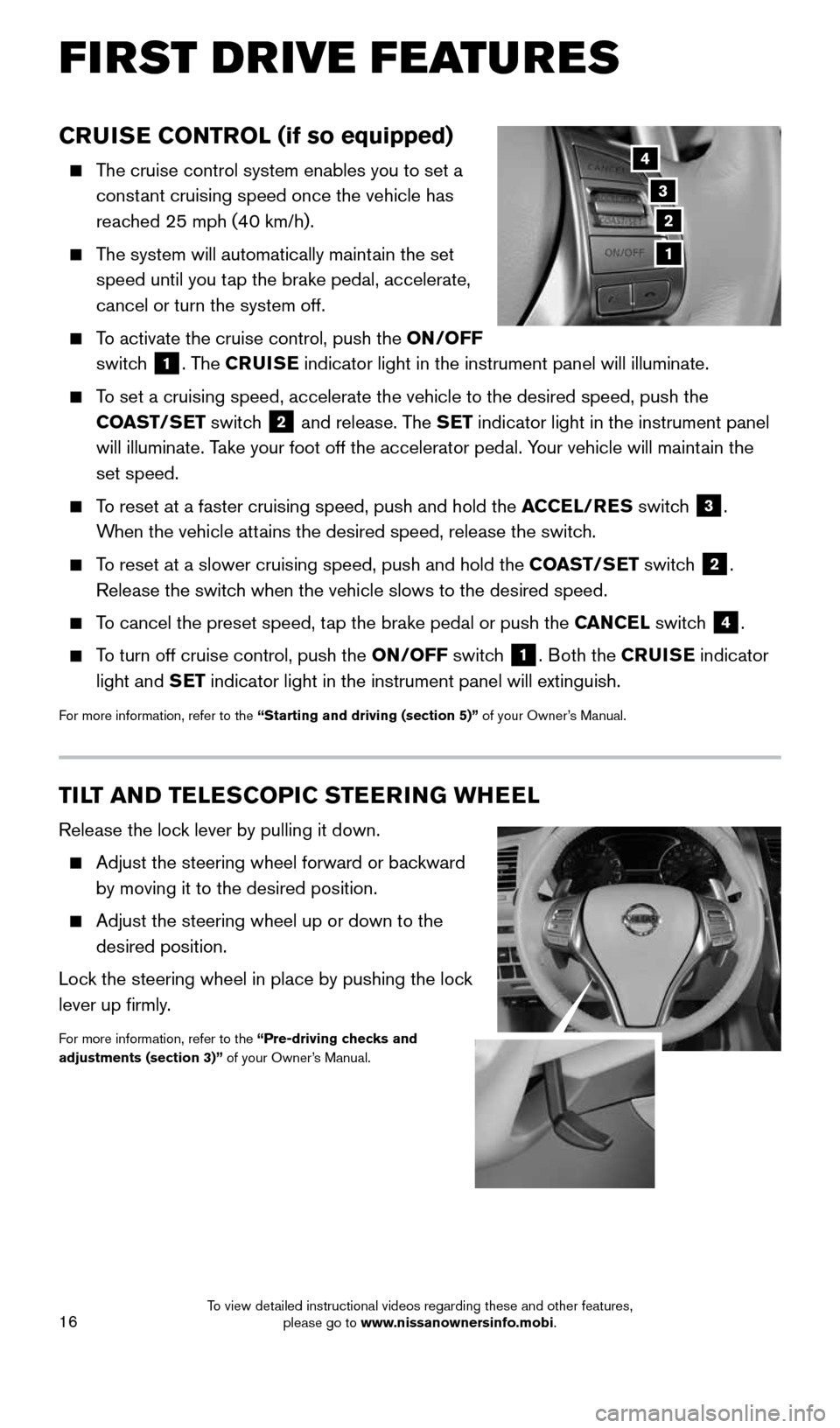
TILT AND TELESCOPIC STEERING WHEEL
Release the lock lever by pulling it down.
Adjust the steering wheel forward or backward
by moving it to the desired position.
Adjust the steering wheel up or down to the
desired position.
Lock the steering wheel in place by pushing the lock
lever up firmly.
For more information, refer to the “Pre-driving checks and
adjustments (section 3)” of your Owner’s Manual.
CRUISE CONTROL (if so equipped)
The cruise control system enables you to set a
constant cruising speed once the vehicle has
reached 25 mph (40 km/h).
The system will automatically maintain the set
speed until you tap the brake pedal, accelerate,
cancel or turn the system off.
To activate the cruise control, push the ON/OFF
switch
1. The CRUISE indicator light in the instrument panel will illuminate.
To set a cruising speed, accelerate the vehicle to the desired speed, pus\
h the
COAST/SET switch
2 and release. The SET indicator light in the instrument panel
will illuminate. Take your foot off the accelerator pedal. Your vehicle will maintain the
set speed.
To reset at a faster cruising speed, push and hold the ACCEL/RES switch
3.
When the vehicle attains the desired speed, release the switch.
To reset at a slower cruising speed, push and hold the COAST/SET switch
2.
Release the switch when the vehicle slows to the desired speed.
To cancel the preset speed, tap the brake pedal or push the CANCEL switch
4.
To turn off cruise control, push the ON/OFF switch
1. Both the CRUISE indicator
light and SET indicator light in the instrument panel will extinguish.
For more information, refer to the “Starting and driving (section 5)” of your Owner’s Manual.
3
2
4
1
FIRST DRIVE FEATURES
1911097_15d_AltimaSedan_QRG_011915.indd 161/19/15 4:25 PM
To view detailed instructional videos regarding these and other features, please go to www.nissanownersinfo.mobi.