light NISSAN ALTIMA 2018 Owner´s Manual
[x] Cancel search | Manufacturer: NISSAN, Model Year: 2018, Model line: ALTIMA, Model: NISSAN ALTIMA 2018Pages: 467, PDF Size: 5.42 MB
Page 274 of 467
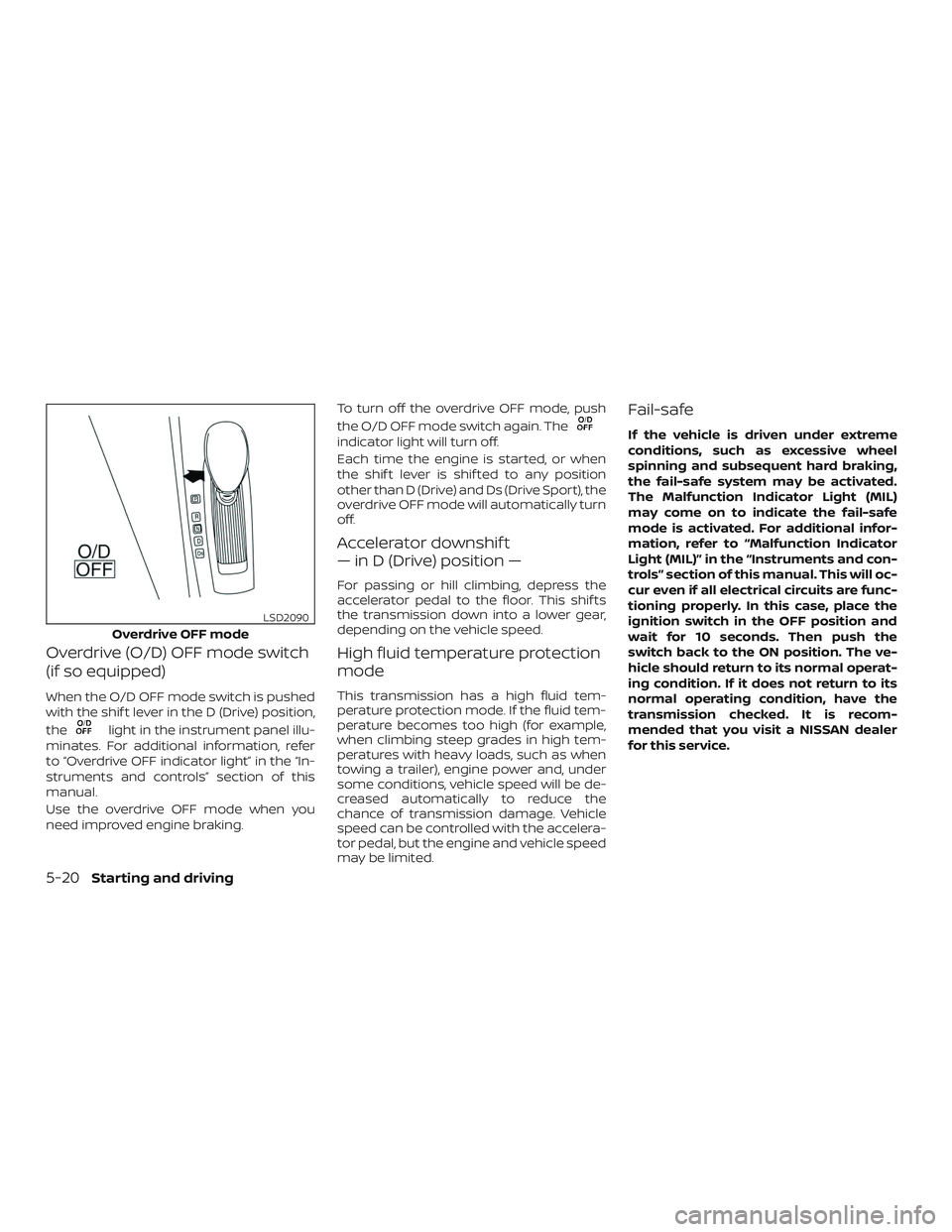
Overdrive (O/D) OFF mode switch
(if so equipped)
When the O/D OFF mode switch is pushed
with the shif t lever in the D (Drive) position,
the
light in the instrument panel illu-
minates. For additional information, refer
to “Overdrive OFF indicator light” in the “In-
struments and controls” section of this
manual.
Use the overdrive OFF mode when you
need improved engine braking. To turn off the overdrive OFF mode, push
the O/D OFF mode switch again. The
indicator light will turn off.
Each time the engine is started, or when
the shif t lever is shif ted to any position
other than D (Drive) and Ds (Drive Sport), the
overdrive OFF mode will automatically turn
off.
Accelerator downshif t
— in D (Drive) position —
For passing or hill climbing, depress the
accelerator pedal to the floor. This shif ts
the transmission down into a lower gear,
depending on the vehicle speed.
High fluid temperature protection
mode
This transmission has a high fluid tem-
perature protection mode. If the fluid tem-
perature becomes too high (for example,
when climbing steep grades in high tem-
peratures with heavy loads, such as when
towing a trailer), engine power and, under
some conditions, vehicle speed will be de-
creased automatically to reduce the
chance of transmission damage. Vehicle
speed can be controlled with the accelera-
tor pedal, but the engine and vehicle speed
may be limited.
Fail-safe
If the vehicle is driven under extreme
conditions, such as excessive wheel
spinning and subsequent hard braking,
the fail-safe system may be activated.
The Malfunction Indicator Light (MIL)
may come on to indicate the fail-safe
mode is activated. For additional infor-
mation, refer to “Malfunction Indicator
Light (MIL)” in the “Instruments and con-
trols” section of this manual. This will oc-
cur even if all electrical circuits are func-
tioning properly. In this case, place the
ignition switch in the OFF position and
wait for 10 seconds. Then push the
switch back to the ON position. The ve-
hicle should return to its normal operat-
ing condition. If it does not return to its
normal operating condition, have the
transmission checked. It is recom-
mended that you visit a NISSAN dealer
for this service.
Overdrive OFF mode
LSD2090
5-20Starting and driving
Page 275 of 467

WARNING
When the high fluid temperature pro-
tection mode or fail-safe operation oc-
curs, vehicle speed may be gradually re-
duced. The reduced speed may be lower
than other traffic, which could increase
the chance of a collision. Be especially
careful when driving. If necessary, pull
to the side of the road at a safe place
and allow the transmission to return to
normal operation, or have it repaired if
necessary.1. To engage, firmly depress the footbrake.
2. To release: ∙ Move the shif t lever to the P (Park)position.
∙ Firmly depress the parking brake pedal and it will release.
∙ Before driving, be sure the brake warning light goes out.
WARNING
∙ Be sure the parking brake is fully re- leased before driving. Failure to do so
can cause brake failure and lead to an
accident.
∙ Do not release the parking brake from outside the vehicle.
∙ Do not use the shif t lever in place of the parking brake. When parking, be
sure the parking brake is fully
engaged.
∙ To help avoid risk of injury or death through unintended operation of the
vehicle and/or its systems, do not
leave children, people who require the
assistance of others or pets unat-
tended in your vehicle. Additionally,
the temperature inside a closed ve-
hicle on a warm day can quickly be-
come high enough to cause a signifi-
cant risk of injury or death to people
and pets.
LSD2177
PARKING BRAKE
Starting and driving5-21
Page 277 of 467
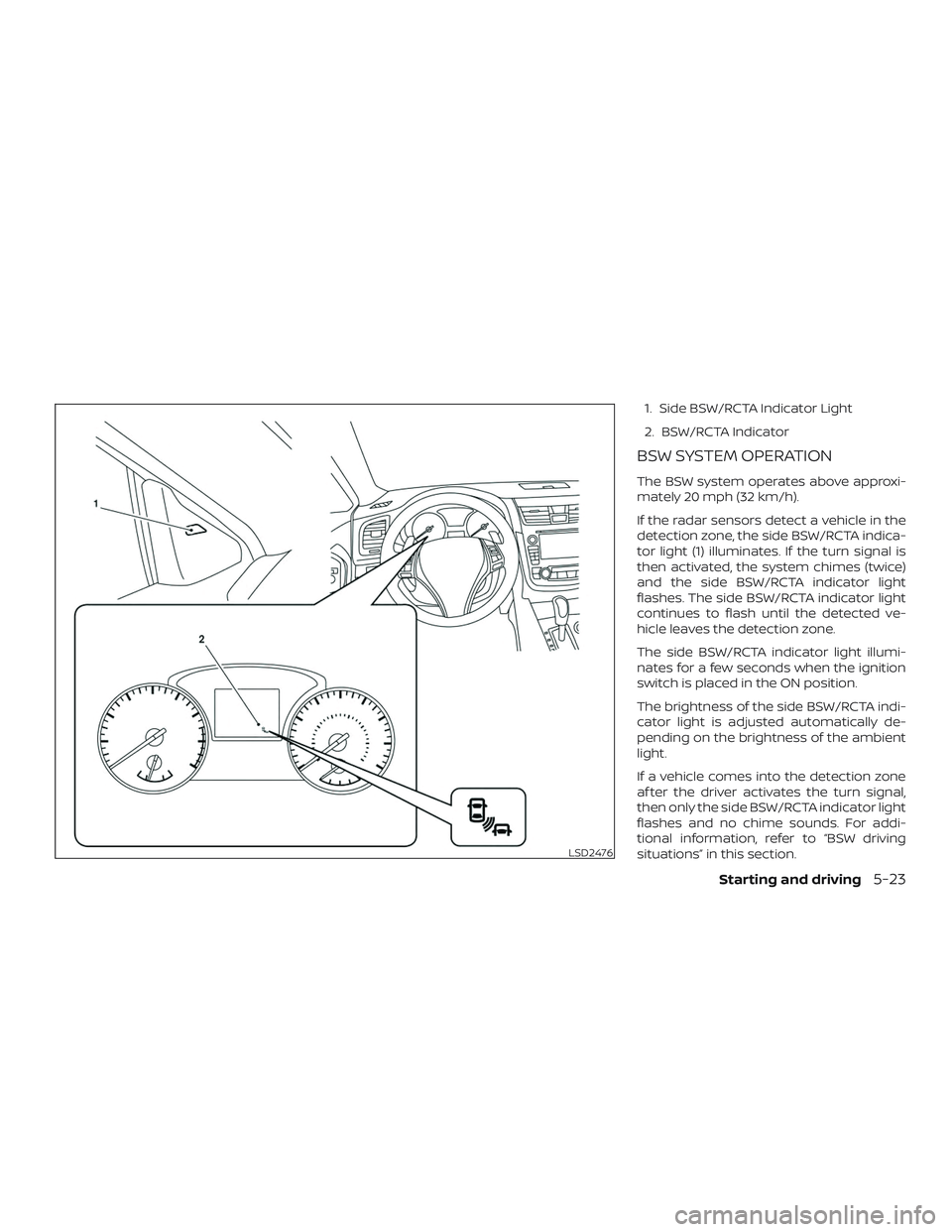
1. Side BSW/RCTA Indicator Light
2. BSW/RCTA Indicator
BSW SYSTEM OPERATION
The BSW system operates above approxi-
mately 20 mph (32 km/h).
If the radar sensors detect a vehicle in the
detection zone, the side BSW/RCTA indica-
tor light (1) illuminates. If the turn signal is
then activated, the system chimes (twice)
and the side BSW/RCTA indicator light
flashes. The side BSW/RCTA indicator light
continues to flash until the detected ve-
hicle leaves the detection zone.
The side BSW/RCTA indicator light illumi-
nates for a few seconds when the ignition
switch is placed in the ON position.
The brightness of the side BSW/RCTA indi-
cator light is adjusted automatically de-
pending on the brightness of the ambient
light.
If a vehicle comes into the detection zone
af ter the driver activates the turn signal,
then only the side BSW/RCTA indicator light
flashes and no chime sounds. For addi-
tional information, refer to “BSW driving
situations” in this section.
LSD2476
Starting and driving5-23
Page 280 of 467
∙ The following conditions may reducethe ability of the radar to detect other
vehicles:
– Severe weather
– Road spray
– Ice/frost/dirt build-up on the vehicle
∙ Do not attach stickers (including transparent material), install accesso-
ries or apply additional paint near the
radar sensors. These conditions may
reduce the ability of the radar to de-
tect other vehicles.
∙ Excessive noise (for example, audio system volume, open vehicle window)
will interfere with the chime sound,
and it may not be heard.
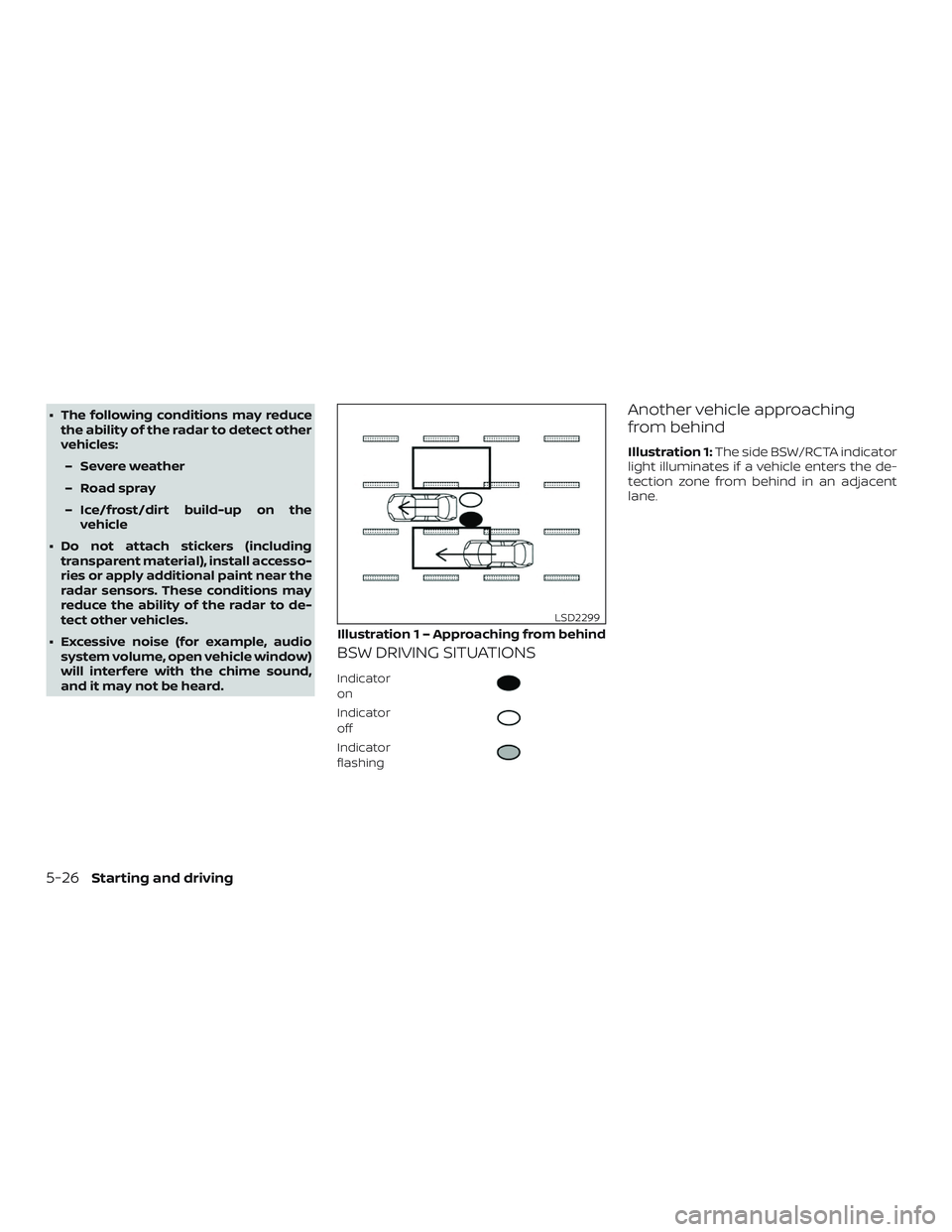
BSW DRIVING SITUATIONS
Indicator
on
Indicator
off
Indicator
flashing
Another vehicle approaching
from behind
Illustration 1: The side BSW/RCTA indicator
light illuminates if a vehicle enters the de-
tection zone from behind in an adjacent
lane.
Illustration 1 – Approaching from behind
LSD2299
5-26Starting and driving
Page 281 of 467
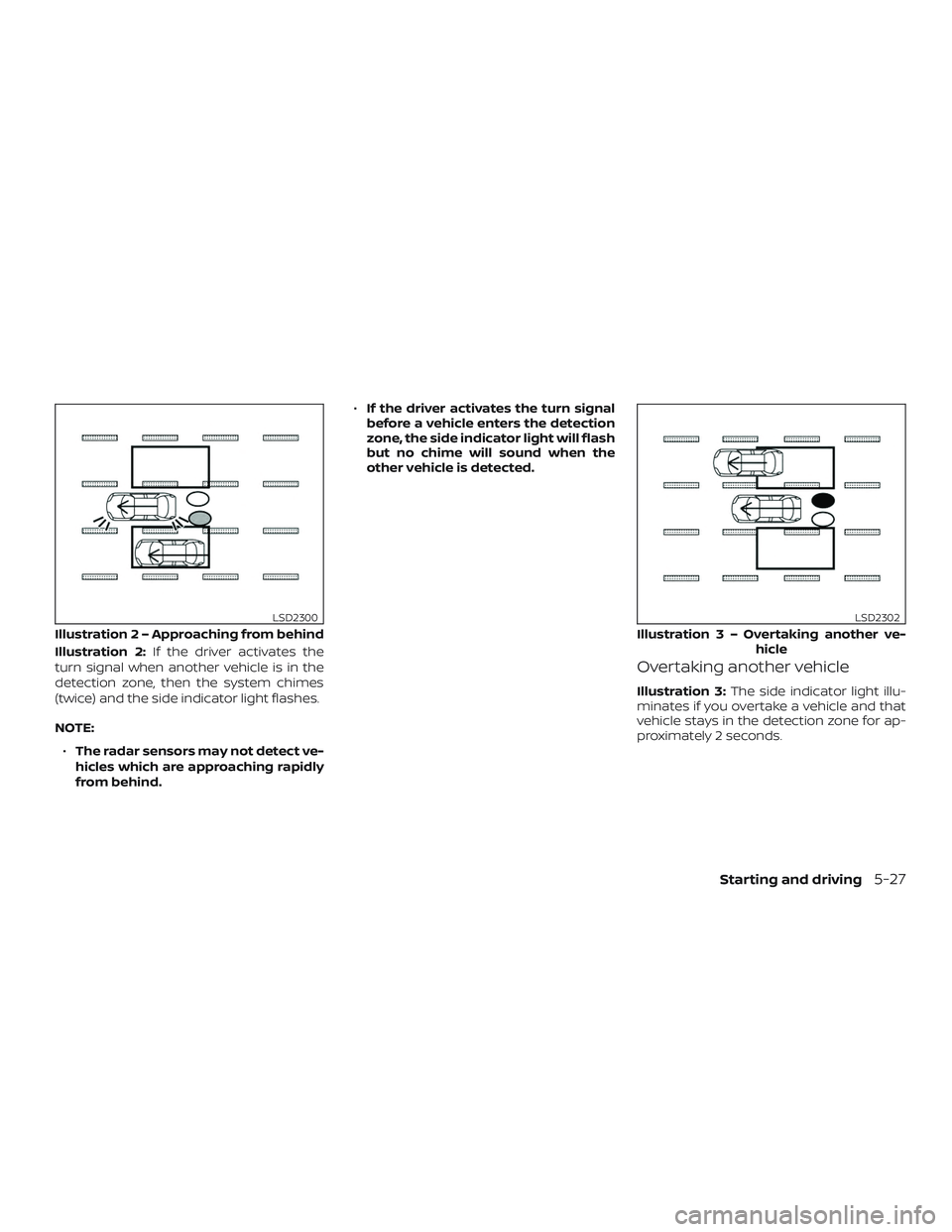
Illustration 2:If the driver activates the
turn signal when another vehicle is in the
detection zone, then the system chimes
(twice) and the side indicator light flashes.
NOTE:
∙ The radar sensors may not detect ve-
hicles which are approaching rapidly
from behind. ∙
If the driver activates the turn signal
before a vehicle enters the detection
zone, the side indicator light will flash
but no chime will sound when the
other vehicle is detected.
Overtaking another vehicle
Illustration 3: The side indicator light illu-
minates if you overtake a vehicle and that
vehicle stays in the detection zone for ap-
proximately 2 seconds.
Illustratio n 2 – Approaching from behind
LSD2300
Illustration3–Over taking another ve-
hicle
LSD2302
Starting and driving5-27
Page 282 of 467
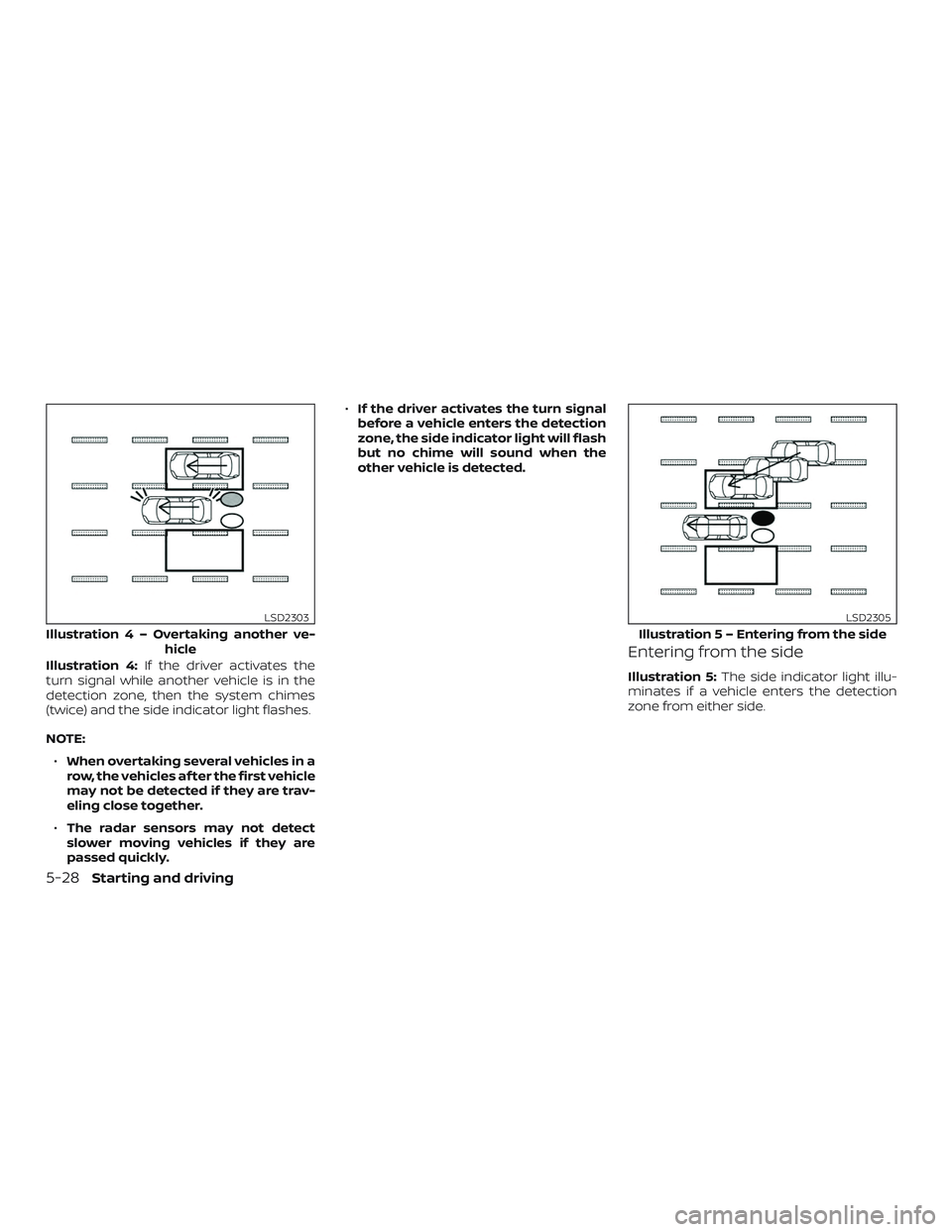
Illustration 4:If the driver activates the
turn signal while another vehicle is in the
detection zone, then the system chimes
(twice) and the side indicator light flashes.
NOTE:
∙ When overtaking several vehicles in a
row, the vehicles af ter the first vehicle
may not be detected if they are trav-
eling close together.
∙ The radar sensors may not detect
slower moving vehicles if they are
passed quickly. ∙
If the driver activates the turn signal
before a vehicle enters the detection
zone, the side indicator light will flash
but no chime will sound when the
other vehicle is detected.Entering from the side
Illustration 5: The side indicator light illu-
minates if a vehicle enters the detection
zone from either side.
Illustratio n4–Over taking another ve-
hicle
LSD2303
Illustratio n 5 – Entering from the side
LSD2305
5-28Starting and driving
Page 283 of 467
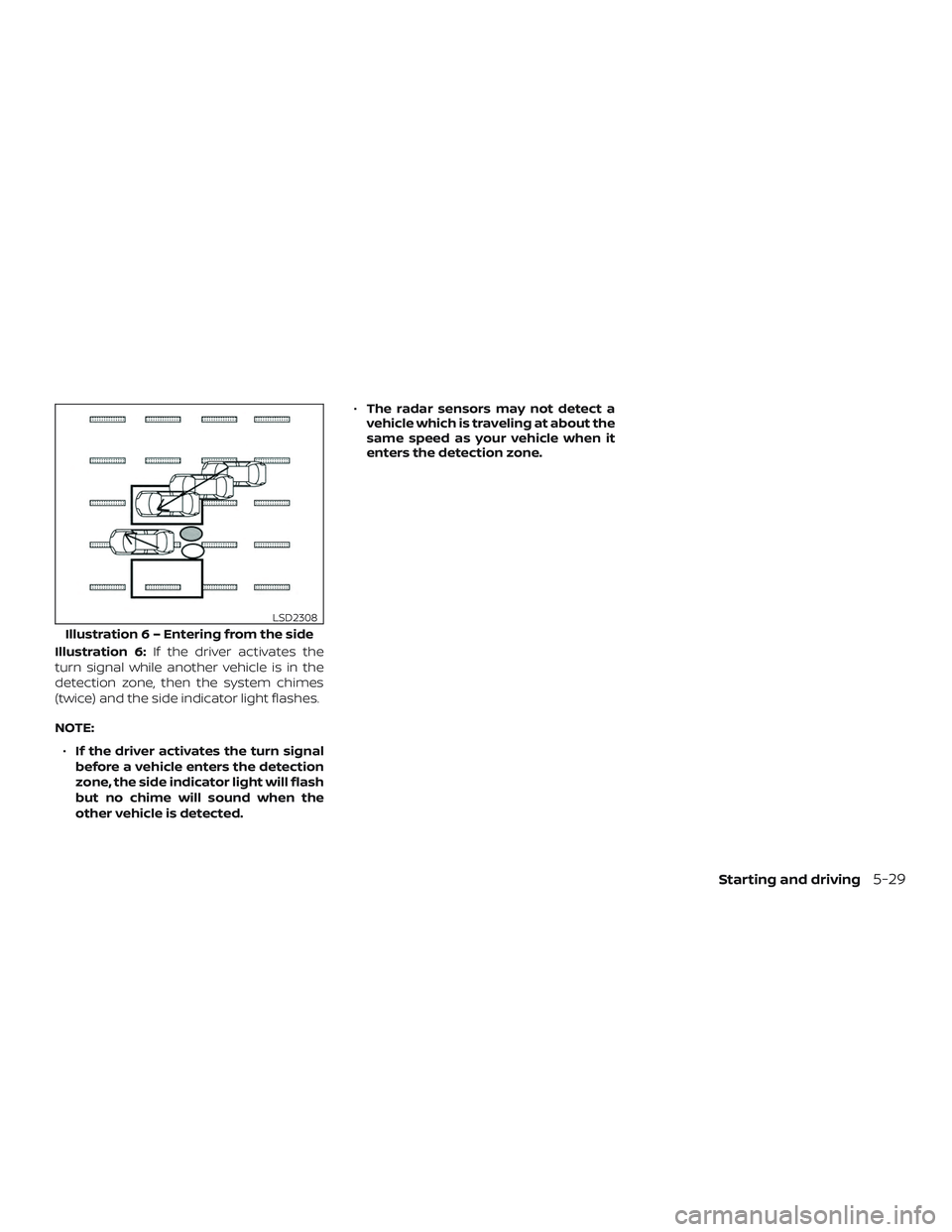
Illustration 6:If the driver activates the
turn signal while another vehicle is in the
detection zone, then the system chimes
(twice) and the side indicator light flashes.
NOTE:
∙ If the driver activates the turn signal
before a vehicle enters the detection
zone, the side indicator light will flash
but no chime will sound when the
other vehicle is detected. ∙
The radar sensors may not detect a
vehicle which is traveling at about the
same speed as your vehicle when it
enters the detection zone.
Illustratio n 6 – Entering from the side
LSD2308
Starting and driving5-29
Page 287 of 467
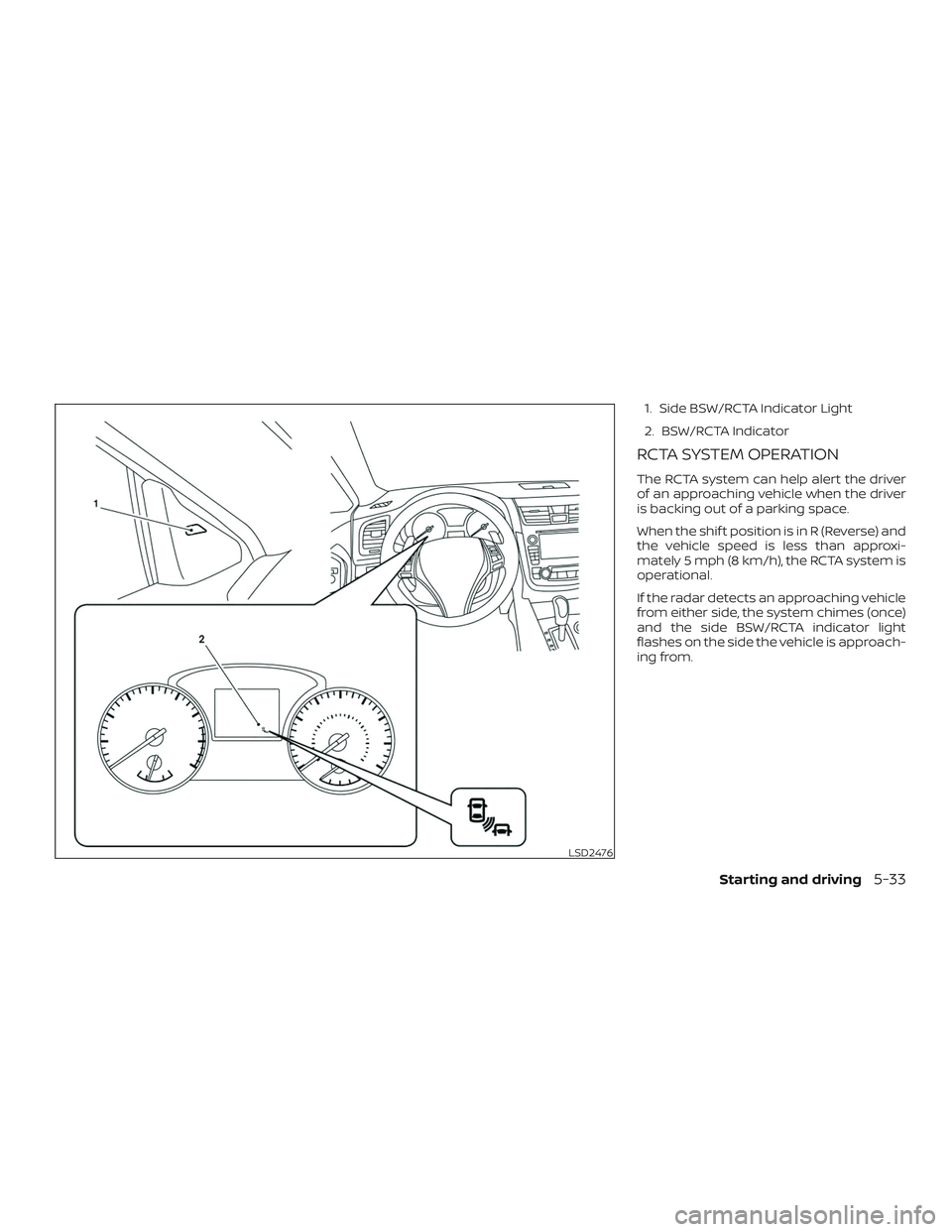
1. Side BSW/RCTA Indicator Light
2. BSW/RCTA Indicator
RCTA SYSTEM OPERATION
The RCTA system can help alert the driver
of an approaching vehicle when the driver
is backing out of a parking space.
When the shif t position is in R (Reverse) and
the vehicle speed is less than approxi-
mately 5 mph (8 km/h), the RCTA system is
operational.
If the radar detects an approaching vehicle
from either side, the system chimes (once)
and the side BSW/RCTA indicator light
flashes on the side the vehicle is approach-
ing from.
LSD2476
Starting and driving5-33
Page 295 of 467
For Canada
Applicable law: Canada 310
This device complies with Industry Canada
licence-exempt RSS standard(s). Operation
is subject to the following two conditions:1. This device may not cause interference, and
2. This device must accept any interfer- ence, including interference that may
cause undesired operation of the de-
vice.
Frequency bands: 24.05 – 24.25GHz
Output power: less than 20 milliwatts
Droit applicable: Canada 310
Le présent appareil est conforme aux CNR
d’Industrie Canada applicables aux appar-
eils radio exempts de licence. L’exploitation
est autorisée aux deux conditions suiv-
antes: 1. L’appareil ne doit pas produire de brouillage, et
2. L’utilisateur de l’appareil doit accepter tout brouillage radioélectrique subi,
même si le brouillage est susceptible
d’en compromettre le fonctionnement. Bandes de fréquences: 24.05 - 24.25GHz
Puissance émise: Moins de 20 milliwatts
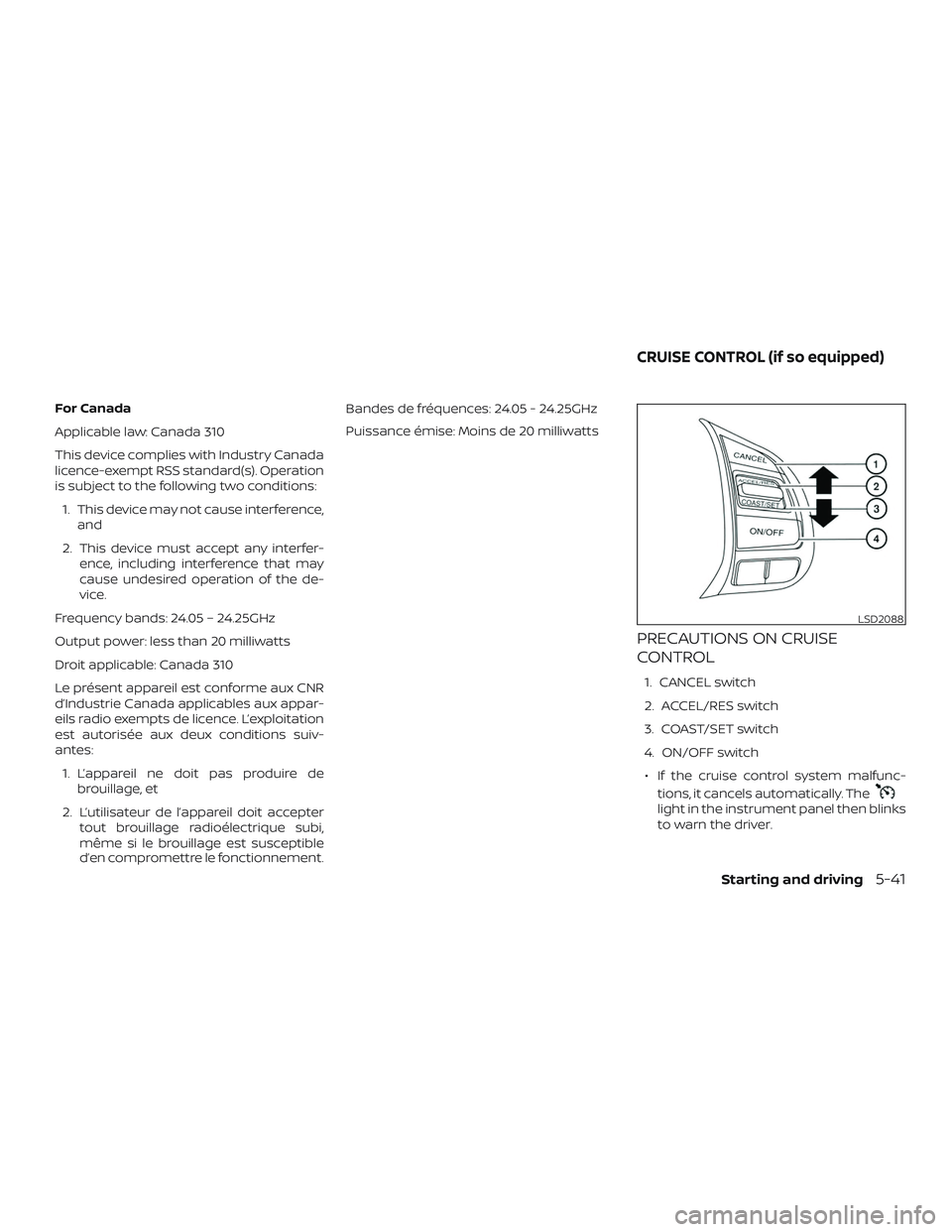
PRECAUTIONS ON CRUISE
CONTROL
1. CANCEL switch
2. ACCEL/RES switch
3. COAST/SET switch
4. ON/OFF switch
∙ If the cruise control system malfunc- tions, it cancels automatically. The
light in the instrument panel then blinks
to warn the driver.
LSD2088
CRUISE CONTROL (if so equipped)
Starting and driving5-41
Page 296 of 467
∙ If thelight blinks, turn the cruise
control switch off and have the system
checked. It is recommended that you
visit a NISSAN dealer for this service.
∙ The
light may blink when the
cruise control switch is turned ON while
pushing the ACCEL/RES, COAST/SET, or
CANCEL switch. To properly set the
cruise control system, use the following
procedures.
WARNING
Do not use the cruise control when driv-
ing under the following conditions:
∙ When it is not possible to keep the vehicle at a set speed.
∙ In heavy traffic or in traffic that varies in speed.
∙ On winding or hilly roads.
∙ On slippery roads (rain, snow, ice, etc.).
∙ In very windy areas.
Doing so could cause a loss of vehicle
control and result in an accident.
CRUISE CONTROL OPERATIONS
The cruise control allows driving at a speed
between 25 - 89 mph (40 - 144 km/h) with-
out keeping your foot on the accelerator
pedal.
To turn on the cruise control, push the
ON/OFF switch on. The
light in the
instrument panel will illuminate.
To set cruising speed, accelerate the ve-
hicle to the desired speed, push the
COAST/SET switch and release it. Take your
foot off the accelerator pedal. Your vehicle
maintains the set speed.
∙ To pass another vehicle, depress the
accelerator pedal. When you release the
pedal, the vehicle returns to the previ-
ously set speed.
∙ The vehicle may not maintain the set speed when going up or down steep
hills. If this happens, drive without the
cruise control.
To cancel the preset speed, use one of the
following three methods:
∙ Push the CANCEL switch.
∙ Tap the brake pedal.
∙ Push the ON/OFF switch off. The
light in the instrument panel goes out. The cruise control is automatically can-
celed if:
∙ You depress the brake pedal while pushing the ACCEL/RES or SET/COAST
switch. The preset speed is deleted
from memory.
∙ The vehicle slows down more than 8 mph (13 km/h) below the set speed.
∙ You move the shif t lever to N (Neutral).
To reset at a faster cruising speed, use
one of the following three methods:
∙ Depress the accelerator pedal. When the vehicle attains the desired speed,
push and release the COAST/SET
switch.
∙ Push and hold the ACCEL/RES switch. When the vehicle attains the speed you
desire, release the switch.
∙ Push and release the ACCEL/RES switch. Each time you do this, the set
speed increases by about 1 mph
(1.6 km/h).
5-42Starting and driving