door lock NISSAN ALTIMA 2018 Owner´s Manual
[x] Cancel search | Manufacturer: NISSAN, Model Year: 2018, Model line: ALTIMA, Model: NISSAN ALTIMA 2018Pages: 467, PDF Size: 5.42 MB
Page 8 of 467
NOTE:
This vehicle’s occupant classification
sensor system generally keeps the clas-
sification locked during driving, so it is
important that you confirm that the
front passenger is properly classified
prior to driving. However, the occupant
classification sensor may recalculate the
weight of the occupant under some con-
ditions (both while driving and when
stopped), so front passenger seat occu-
pants should continue to remain seated
as outlined above.
Troubleshooting
If you think the front passenger air bag
status light is incorrect:
1. If the light is ON with an adult occupying
the front passenger seat:
∙ Occupant is a small adult — the air bag
light is functioning as intended. The
front passenger air bag is suppressed.However, if the occupant is not a small
adult, then this may be due to the following
conditions that may be interfering with the
weight sensors:
∙ Occupant is not sitting upright, leaning
against the seatback, and centered on
the seat cushion with his/her feet com-
fortably extended to the floor.
∙ A child restraint or other object pressing
against the rear of the seatback.
∙ A rear passenger pushing or pulling on
the back of the front passenger seat.
∙ Forcing the front seat or seatback
against an object on the seat or floor
behind it.
∙ An object placed under the front pas-
senger seat.
∙ An object placed between the seat
cushion and center console or between
the seat cushion and the door.
If the vehicle is moving, please come to a
stop when it is safe to do so. Check and
correct any of the above conditions. Re-
start the vehicle and wait 1 minute.NOTE:
A system check will be performed during
which the front passenger air bag status
light will remain lit for about 7 seconds
initially.
If the light is still ON af ter this, the person
should be advised not to ride in the front
passenger seat and the vehicle should be
checked as soon as possible. It is recom-
mended that you visit a NISSAN dealer for
this service.
2. If the light is OFF with a small adult,
child or child restraint occupying the
front passenger seat.
This may be due to the following con-
ditions that may be interfering with the
weight sensors:
∙ Small adult or child is not sitting upright,
leaning against the seatback, and cen-
tered on the seat cushion with his/her
feet comfortably extended to the floor.
∙ The child restraint is not properly in-
stalled, as outlined in the “Child re-
straints” section of this manual.
∙ An object weighing over 9.1 lbs. (4 kg)
hanging on the seat or placed in the
seatback pocket.
Page 21 of 467
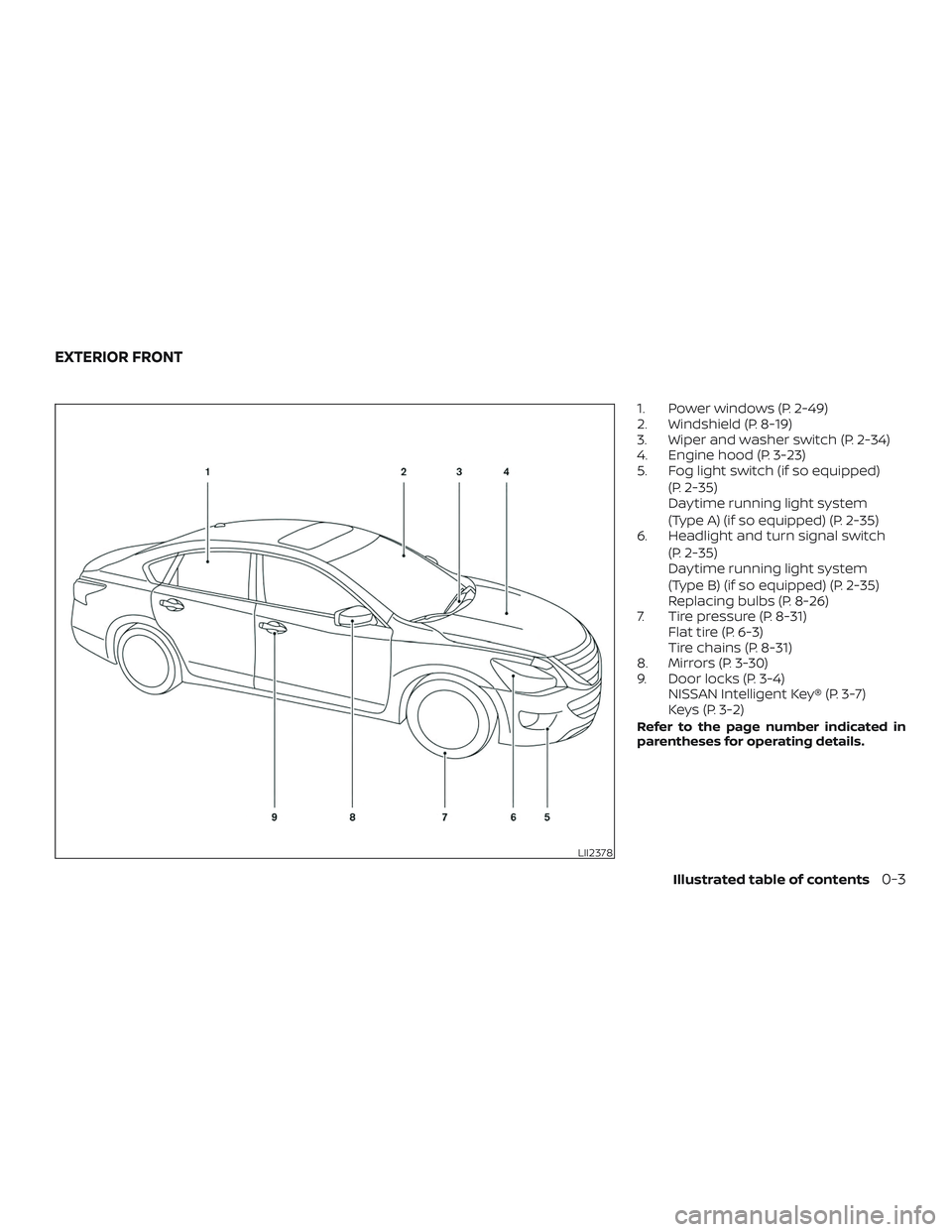
1. Power windows (P. 2-49)
2. Windshield (P. 8-19)
3. Wiper and washer switch (P. 2-34)
4. Engine hood (P. 3-23)
5. Fog light switch (if so equipped)(P. 2-35)
Daytime running light system
(Type A) (if so equipped) (P. 2-35)
6. Headlight and turn signal switch
(P. 2-35)
Daytime running light system
(Type B) (if so equipped) (P. 2-35)
Replacing bulbs (P. 8-26)
7. Tire pressure (P. 8-31) Flat tire (P. 6-3)
Tire chains (P. 8-31)
8. Mirrors (P. 3-30)
9. Door locks (P. 3-4) NISSAN Intelligent Key® (P. 3-7)
Keys (P. 3-2)
Refer to the page number indicated in
parentheses for operating details.
LII2378
EXTERIOR FRONT
Illustrated table of contents0-3
Page 22 of 467
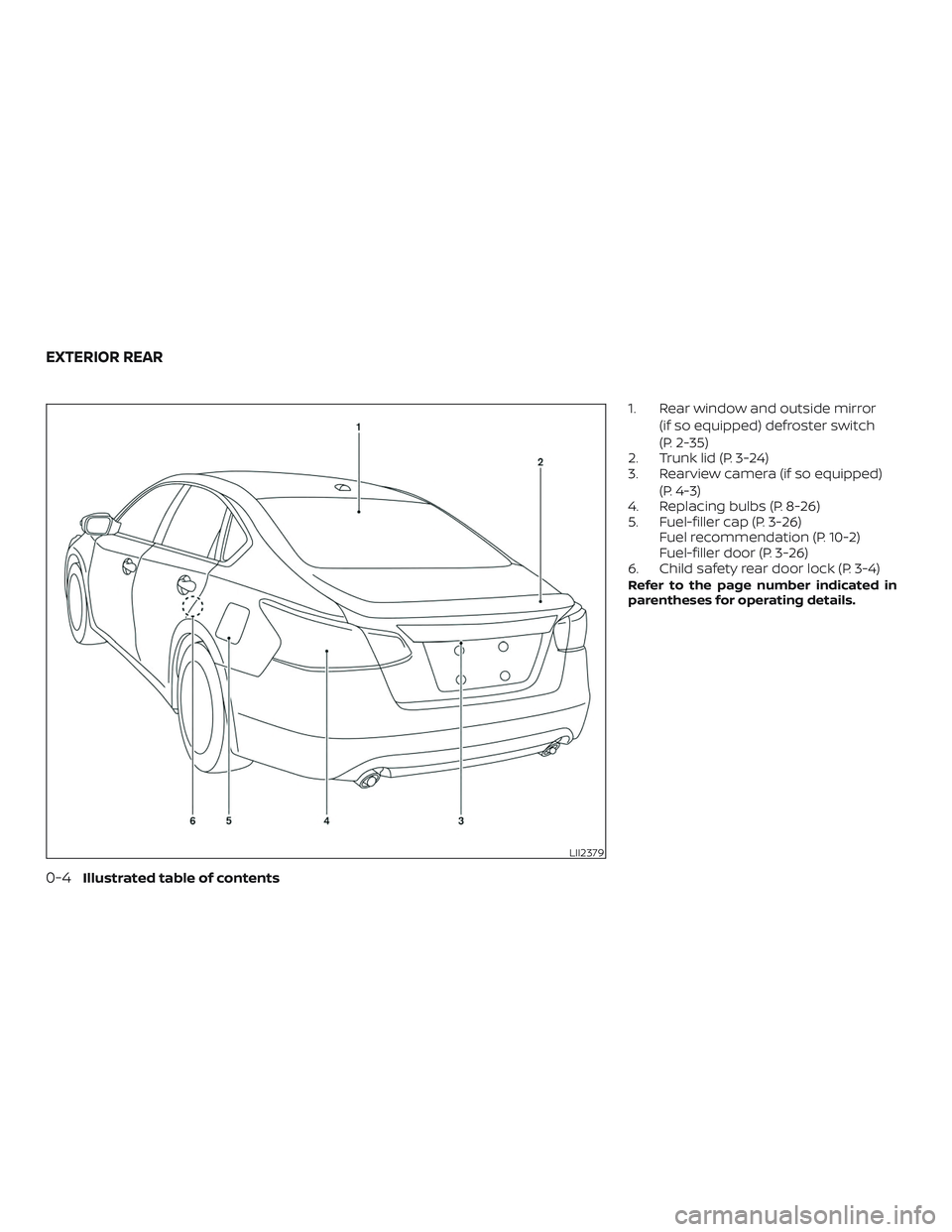
1. Rear window and outside mirror(if so equipped) defroster switch
(P. 2-35)
2. Trunk lid (P. 3-24)
3. Rearview camera (if so equipped)
(P. 4-3)
4. Replacing bulbs (P. 8-26)
5. Fuel-filler cap (P. 3-26) Fuel recommendation (P. 10-2)
Fuel-filler door (P. 3-26)
6. Child safety rear door lock (P. 3-4)
Refer to the page number indicated in
parentheses for operating details.
LII2379
EXTERIOR REAR
0-4Illustrated table of contents
Page 84 of 467
∙ Make sure that a rear passenger is notpushing or pulling on the back of the
front passenger seat.
∙ Make sure that the front passenger seat or seatback is not forced back
against an object on the seat or floor
behind it.
∙ Make sure that there is no object placed under the front passenger seat.
Steps 1. Adjust the seat as outlined in the “Seats” section of this manual. Sit upright, lean-
ing against the seatback, and centered
on the seat cushion with your feet com-
fortably extended to the floor.
2. Make sure there are no objects on your lap.
3. Fasten the seat belt as outlined in the “Seat belts” section of this manual.
Front passenger seat belt buckle sta-
tus is monitored by the occupant clas-
sification system, and is used as an in-
put to determine occupancy status. So,
it is highly recommended that the front
passenger fasten their seat belt. 4. Remain in this position for 30 seconds
allowing the system to classif y the
front passenger before the vehicle is
put into motion.
5. Ensure proper classification by check- ing the front passenger air bag status
light.
NOTE:
This vehicle’s occupant classification
sensor system generally keeps the clas-
sification locked during driving, so it is
important that you confirm that the
front passenger is properly classified
prior to driving. However, the occupant
classification sensor may recalculate the
weight of the occupant under some con-
ditions (both while driving and when
stopped), so front passenger seat occu-
pants should continue to remain seated
as outlined above.
Troubleshooting
If you think the front passenger air bag
status light is incorrect: 1. If the light is ON with an adult occupying the front passenger seat: ∙ Occupant is a small adult — the air bag
light is functioning as intended. The
front passenger air bag is suppressed.
However, if the occupant is not a small
adult, then this may be due to the following
conditions that may be interfering with the
weight sensors: ∙ Occupant is not sitting upright, leaning against the seatback, and centered on
the seat cushion with his/her feet com-
fortably extended to the floor.
∙ A child restraint or other object pressing against the rear of the seatback.
∙ A rear passenger pushing or pulling on the back of the front passenger seat.
∙ Forcing the front seat or seatback against an object on the seat or floor
behind it.
∙ An object placed under the front pas- senger seat.
∙ An object placed between the seat cushion and center console or between
the seat cushion and the door.
If the vehicle is moving, please come to a
stop when it is safe to do so. Check and
correct any of the above conditions. Re-
start the vehicle and wait 1 minute.
1-56Safety—Seats, seat belts and supplemental restraint system
Page 102 of 467
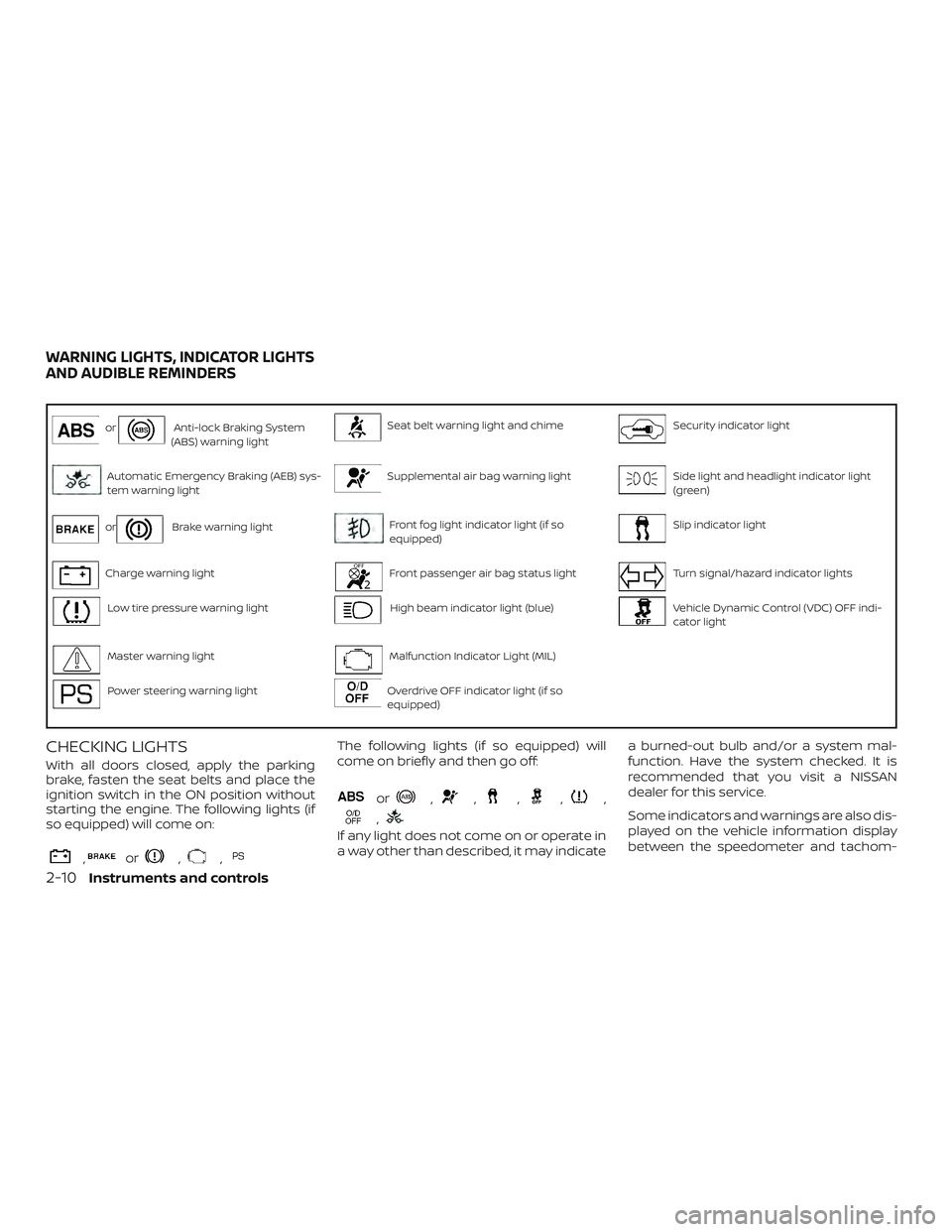
orAnti-lock Braking System
(ABS) warning lightSeat belt warning light and chimeSecurity indicator light
Automatic Emergency Braking (AEB) sys-
tem warning lightSupplemental air bag warning lightSide light and headlight indicator light
(green)
orBrake warning lightFront fog light indicator light (if so
equipped)Slip indicator light
Charge warning lightFront passenger air bag status lightTurn signal/hazard indicator lights
Low tire pressure warning lightHigh beam indicator light (blue)Vehicle Dynamic Control (VDC) OFF indi-
cator light
Master warning lightMalfunction Indicator Light (MIL)
Power steering warning lightOverdrive OFF indicator light (if so
equipped)
CHECKING LIGHTS
With all doors closed, apply the parking
brake, fasten the seat belts and place the
ignition switch in the ON position without
starting the engine. The following lights (if
so equipped) will come on:
,or,,
The following lights (if so equipped) will
come on briefly and then go off:
or,,,,,
,
If any light does not come on or operate in
a way other than described, it may indicate a burned-out bulb and/or a system mal-
function. Have the system checked. It is
recommended that you visit a NISSAN
dealer for this service.
Some indicators and warnings are also dis-
played on the vehicle information display
between the speedometer and tachom-
WARNING LIGHTS, INDICATOR LIGHTS
AND AUDIBLE REMINDERS
2-10Instruments and controls
Page 104 of 467
∙ If the brake fluid level is below theMINIMUM or MIN mark on the brake
fluid reservoir, do not drive until the
brake system has been checked. It is
recommended that you visit a NISSAN
dealer for this service.
Anti-lock Braking System (ABS) warning
indicator
When the parking brake is released and the
brake fluid level is sufficient, if both the
brake warning light and the ABS warning
light illuminate, it may indicate the ABS is
not functioning properly. Have the brake
system checked and, if necessary, repaired.
It is recommended that you visit a NISSAN
dealer for this service. Avoid high-speed
driving and abrupt braking. For additional
information, refer to “Anti-lock Braking Sys-
tem (ABS) warning light” in this section.
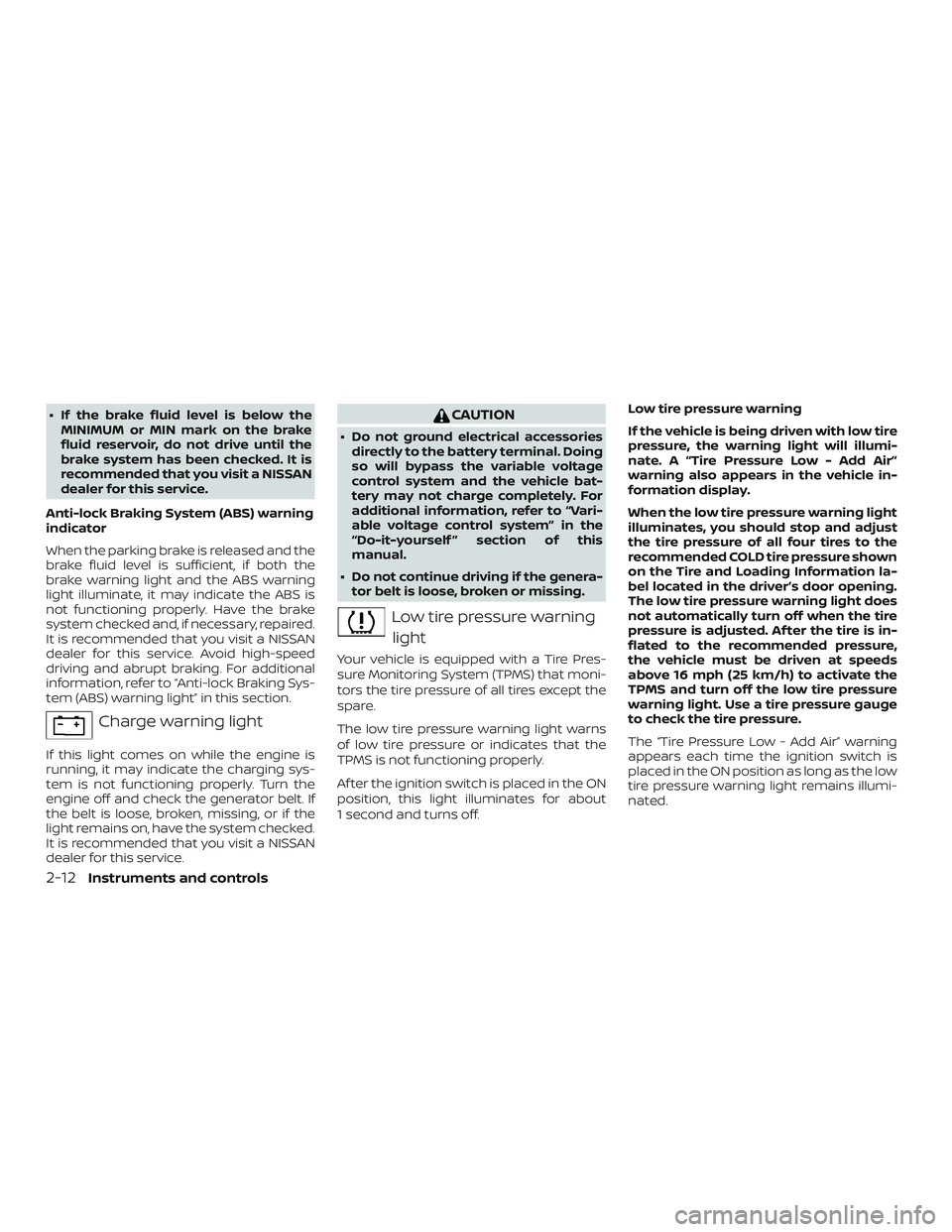
Charge warning light
If this light comes on while the engine is
running, it may indicate the charging sys-
tem is not functioning properly. Turn the
engine off and check the generator belt. If
the belt is loose, broken, missing, or if the
light remains on, have the system checked.
It is recommended that you visit a NISSAN
dealer for this service.
CAUTION
∙ Do not ground electrical accessories directly to the battery terminal. Doing
so will bypass the variable voltage
control system and the vehicle bat-
tery may not charge completely. For
additional information, refer to “Vari-
able voltage control system” in the
“Do-it-yourself ” section of this
manual.
∙ Do not continue driving if the genera- tor belt is loose, broken or missing.
Low tire pressure warning
light
Your vehicle is equipped with a Tire Pres-
sure Monitoring System (TPMS) that moni-
tors the tire pressure of all tires except the
spare.
The low tire pressure warning light warns
of low tire pressure or indicates that the
TPMS is not functioning properly.
Af ter the ignition switch is placed in the ON
position, this light illuminates for about
1 second and turns off. Low tire pressure warning
If the vehicle is being driven with low tire
pressure, the warning light will illumi-
nate. A “Tire Pressure Low - Add Air”
warning also appears in the vehicle in-
formation display.
When the low tire pressure warning light
illuminates, you should stop and adjust
the tire pressure of all four tires to the
recommended COLD tire pressure shown
on the Tire and Loading Information la-
bel located in the driver’s door opening.
The low tire pressure warning light does
not automatically turn off when the tire
pressure is adjusted. Af ter the tire is in-
flated to the recommended pressure,
the vehicle must be driven at speeds
above 16 mph (25 km/h) to activate the
TPMS and turn off the low tire pressure
warning light. Use a tire pressure gauge
to check the tire pressure.
The “Tire Pressure Low - Add Air” warning
appears each time the ignition switch is
placed in the ON position as long as the low
tire pressure warning light remains illumi-
nated.
2-12Instruments and controls
Page 110 of 467
Light reminder chime
With the ignition switch placed in the OFF
position, a chime sounds when the driver’s
door is opened if the headlights or parking
lights are on.
Turn the headlight control switch off before
leaving the vehicle.
NISSAN Intelligent Key® door
buzzer
The Intelligent Key door buzzer sounds if
the Intelligent Key is lef t inside the vehicle
when locking the doors. When the buzzer
sounds, be sure to check both the vehicle
and the Intelligent Key. For additional infor-
mation, refer to “NISSAN Intelligent Key®” in
the “Pre-driving checks and adjustments”
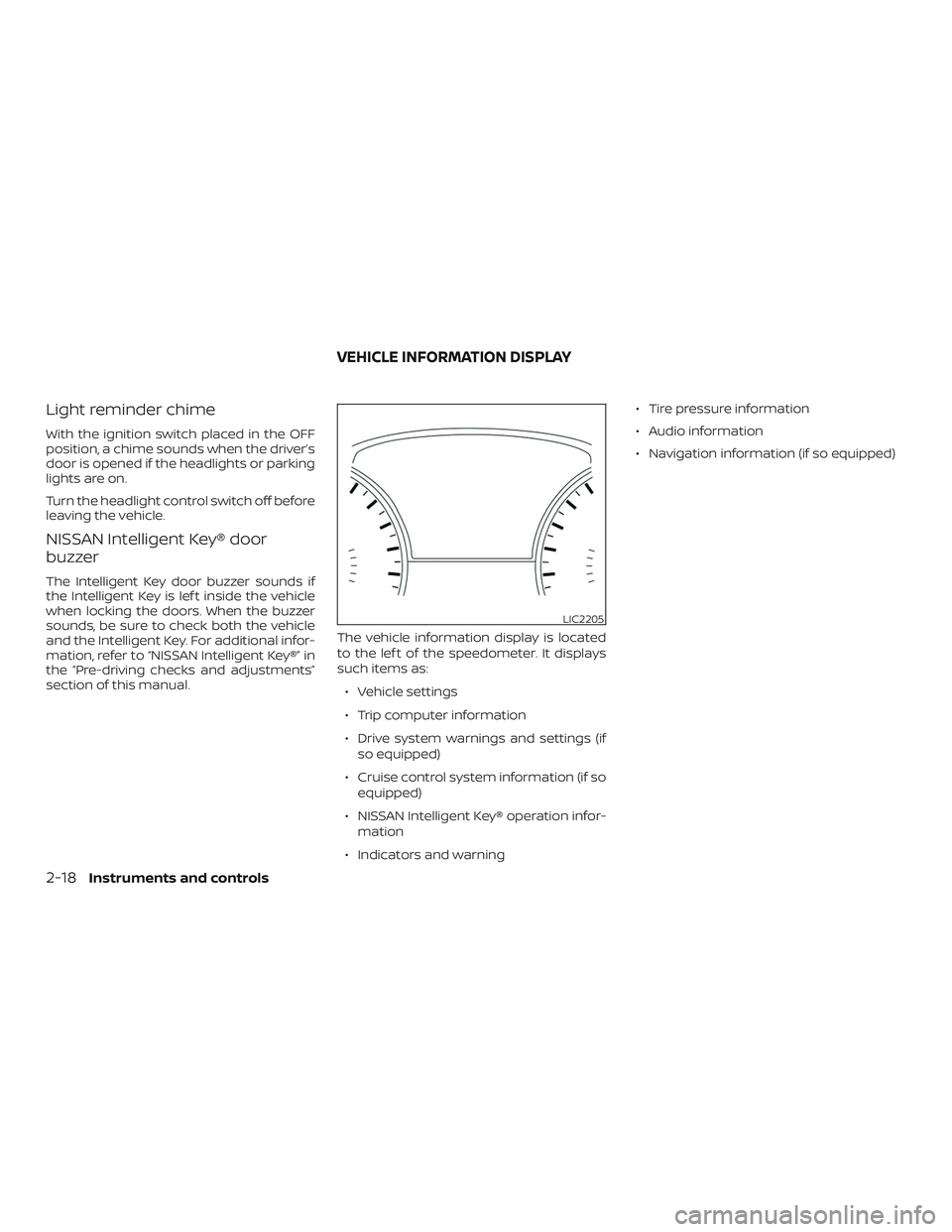
section of this manual.The vehicle information display is located
to the lef t of the speedometer. It displays
such items as:
∙ Vehicle settings
∙ Trip computer information
∙ Drive system warnings and settings (if so equipped)
∙ Cruise control system information (if so equipped)
∙ NISSAN Intelligent Key® operation infor- mation
∙ Indicators and warning ∙ Tire pressure information
∙ Audio information
∙ Navigation information (if so equipped)
LIC2205
VEHICLE INFORMATION DISPLAY
2-18Instruments and controls
Page 113 of 467
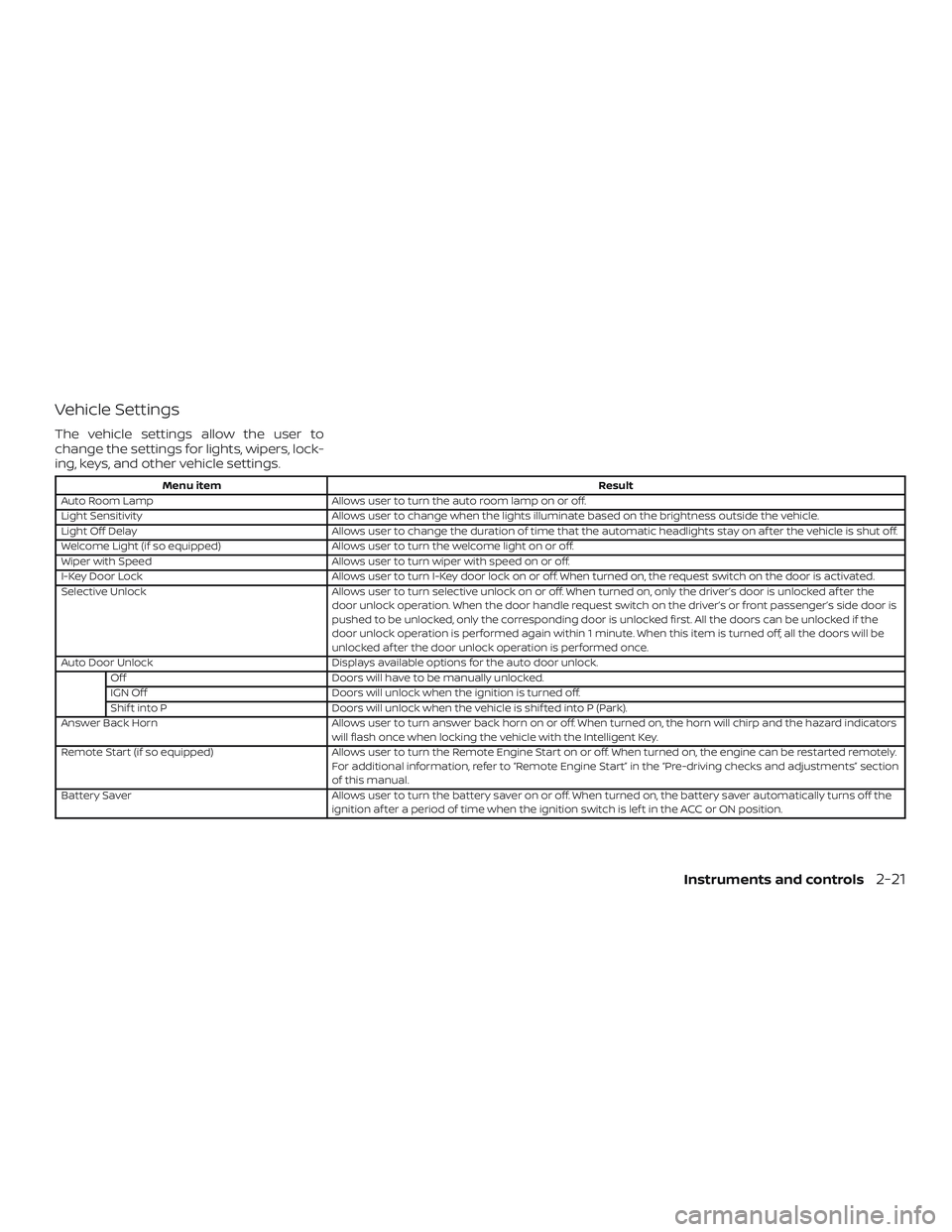
Vehicle Settings
The vehicle settings allow the user to
change the settings for lights, wipers, lock-
ing, keys, and other vehicle settings.
Menu itemResult
Auto Room Lamp Allows user to turn the auto room lamp on or off.
Light Sensitivity Allows user to change when the lights illuminate based on the brightness outside the vehicle.
Light Off Delay Allows user to change the duration of time that the automatic headlights stay on af ter the vehicle is shut off.
Welcome Light (if so equipped) Allows user to turn the welcome light on or off.
Wiper with Speed Allows user to turn wiper with speed on or off.
I-Key Door Lock Allows user to turn I-Key door lock on or off. When turned on, the request switch on the door is activated.
Selective Unlock Allows user to turn selective unlock on or off. When turned on, only the driver’s door is unlocked af ter the
door unlock operation. When the door handle request switch on the driver’s or front passenger’s side door is
pushed to be unlocked, only the corresponding door is unlocked first. All the doors can be unlocked if the
door unlock operation is performed again within 1 minute. When this item is turned off, all the doors will be
unlocked af ter the door unlock operation is performed once.
Auto Door Unlock Displays available options for the auto door unlock.
Off Doors will have to be manually unlocked.
IGN Off Doors will unlock when the ignition is turned off.
Shif t into P Doors will unlock when the vehicle is shif ted into P (Park).
Answer Back Horn Allows user to turn answer back horn on or off. When turned on, the horn will chirp and the hazard indicators
will flash once when locking the vehicle with the Intelligent Key.
Remote Start (if so equipped) Allows user to turn the Remote Engine Start on or off. When turned on, the engine can be restarted remotely.
For additional information, refer to “Remote Engine Start” in the “Pre-driving checks and adjustments” section
of this manual.
Battery Saver Allows user to turn the battery saver on or off. When turned on, the battery saver automatically turns off the
ignition af ter a period of time when the ignition switch is lef t in the ACC or ON position.
Instruments and controls2-21
Page 123 of 467
Shipping Mode On Push Storage Fuse
This warning may appear if the extended
storage switch is not pushed in. When this
warning appears, push in the extended
storage switch to turn off the warning. For
additional information, refer to “Extended
storage switch” in this section.
Transmission Shif t Position indicator
This indicator shows the transmission shif t
position.
CVT Error: See Owner’s Manual
This warning illuminates when there is a
problem with the CVT system. If this warn-
ing comes on, have the system checked. It
is recommended that you visit a NISSAN
dealer for this service.Your vehicle may have two types of security
systems:
∙ Vehicle security system
∙ NISSAN Vehicle Immobilizer System
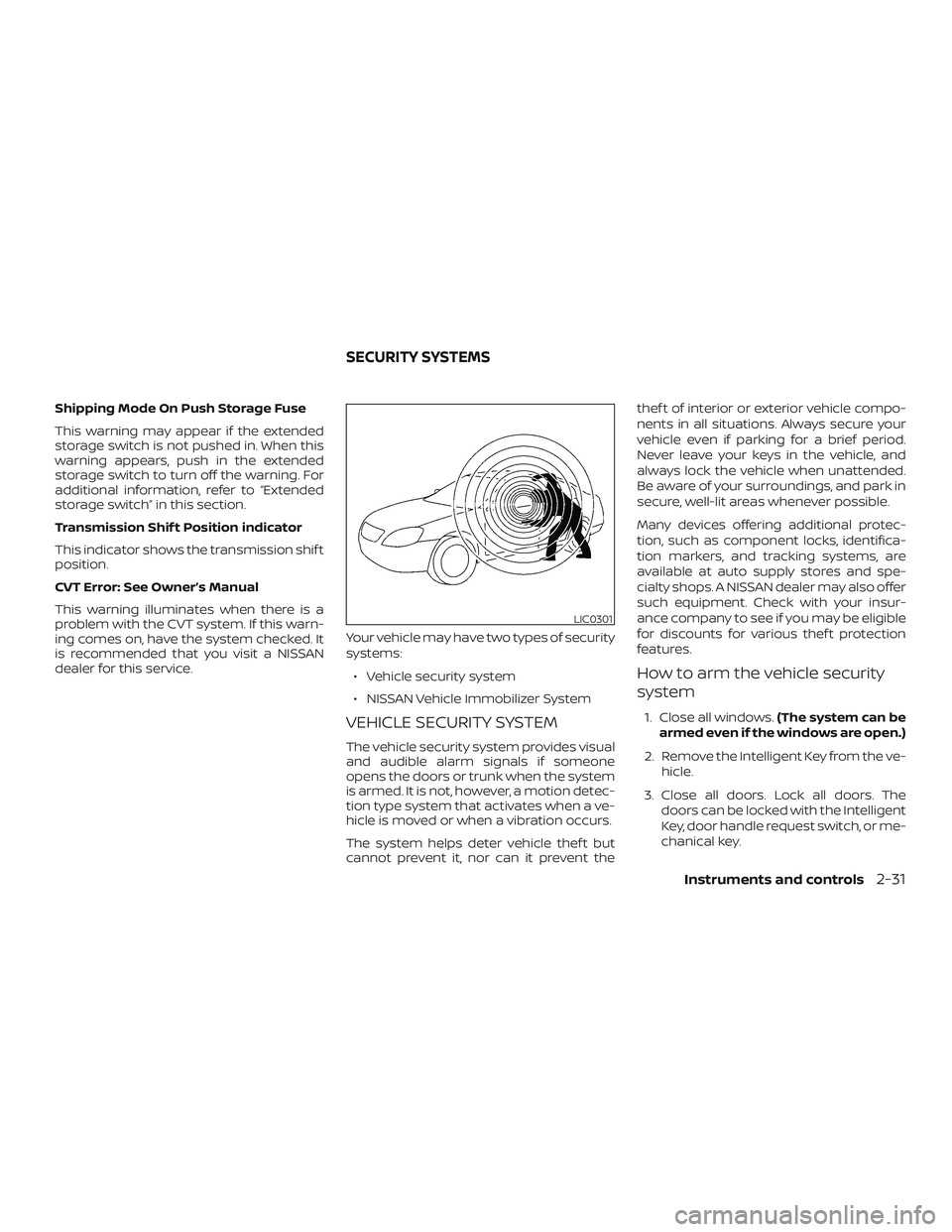
VEHICLE SECURITY SYSTEM
The vehicle security system provides visual
and audible alarm signals if someone
opens the doors or trunk when the system
is armed. It is not, however, a motion detec-
tion type system that activates when a ve-
hicle is moved or when a vibration occurs.
The system helps deter vehicle thef t but
cannot prevent it, nor can it prevent the thef t of interior or exterior vehicle compo-
nents in all situations. Always secure your
vehicle even if parking for a brief period.
Never leave your keys in the vehicle, and
always lock the vehicle when unattended.
Be aware of your surroundings, and park in
secure, well-lit areas whenever possible.
Many devices offering additional protec-
tion, such as component locks, identifica-
tion markers, and tracking systems, are
available at auto supply stores and spe-
cialty shops. A NISSAN dealer may also offer
such equipment. Check with your insur-
ance company to see if you may be eligible
for discounts for various thef t protection
features.
How to arm the vehicle security
system
1. Close all windows.
(The system can be
armed even if the windows are open.)
2. Remove the Intelligent Key from the ve- hicle.
3. Close all doors. Lock all doors. The doors can be locked with the Intelligent
Key, door handle request switch, or me-
chanical key.
LIC0301
SECURITY SYSTEMS
Instruments and controls2-31
Page 124 of 467
4. Confirm that thesecurity indica-
tor light stays on for about 30 seconds.
The vehicle security system is now pre-
armed. The vehicle security system will
automatically shif t into the armed
phase. The
security light begins
to flash once every three seconds. If
during the pre-armed phase one of the
following occurs, the system will not
arm:
∙ Any door is unlocked with the mechani- cal key, the Intelligent Key or door re-
quest switch.
∙ Ignition switch is placed in ACC or ON position.
∙ If the key is turned slowly when lock-
ing the door, the system may not arm.
Furthermore, if the key is turned be-
yond the vertical position toward the
unlock position to remove the key,
the system may be disarmed when
the key is removed. If the indicator
light fails to glow for a period of time,
unlock the door once and lock it
again. ∙
Even when the driver and/or passen-
gers are in the vehicle, the system will
activate with all the doors closed and
locked with the ignition switch placed
in the LOCK position. When placing
the ignition switch in the ACC or ON
position, the system will be released.
Vehicle security system activation
The vehicle security system will give the
following alarm:
∙ The headlights blink and the horn sounds intermittently.
∙ The alarm automatically turns off af ter a period of time. However, the alarm
reactivates if the vehicle is tampered
with again. The alarm can be shut off by
unlocking the driver’s door or trunk lid
with the key, or by pressing the
button on the Intelligent Key.
The alarm is activated by:
∙ opening the door or trunk lid without using the key or Intelligent Key (even if
the door is unlocked by releasing the
door inside lock switch).
How to stop an activated alarm
The alarm stops only by unlocking a door
or the trunk with the mechanical key, push- ing the
button on the Intelligent Key,
or pushing the request switch on the driv-
er’s or passenger’s door with the Intelligent
Key in range of the door handle.
NISSAN VEHICLE IMMOBILIZER
SYSTEM
The NISSAN Vehicle Immobilizer System
will not allow the engine to start without
the use of a registered key.
If the engine fails to start using a registered
key (for example, when interference is
caused by another registered key, an auto-
mated toll road device or automatic pay-
ment device on the key ring), restart the
engine using the following procedures:
1. Leave the ignition switch placed in the ON position for approximately 5 sec-
onds.
2. Place the ignition switch in the OFF or LOCK position, and wait approximately
10 seconds.
3. Repeat Steps 1 and 2.
4. Restart the engine while holding the device (which may have caused the in-
terference) separate from the regis-
tered key.
2-32Instruments and controls